Mobile money payment gateway: what it is, FedaPay vs KkiaPay, and how to add it to your website
G. CHRIST
Published on October 28, 2026
A customer messages you on WhatsApp: "I'll take the blue dress, how do I send the money?" You give her your MTN number. She sends it. You check your phone, take a screenshot, and write the order down in a notebook or a spreadsheet. It works, as long as you get five orders a week. At fifty, you spend your evenings matching transfer text messages with customer names, and one day somebody sends you a fake screenshot.
That is exactly the problem a mobile money payment gateway solves. It lets your customers pay directly on your website with MTN MoMo, Moov Money, Celtiis Cash or a bank card, and it lets your website know automatically, with nobody checking by hand, that the payment has really arrived.
At Guelichweb, we integrate online payments into websites for businesses, shops and organisations in Benin. The same questions come up every time: what exactly is it, FedaPay or KkiaPay, what does it really cost, which documents are needed, and what can go wrong? Here are our answers, with the official figures we checked on 28 October 2026.
What is a mobile money payment gateway?
A payment gateway (also called a payment aggregator) is a service that sits between your website and the payment operators. On one side, it has agreements with MTN, Moov, Celtiis, the Visa and Mastercard networks, and sometimes banks. On the other side, it gives you a single tool to plug into your website: a button, a link or an API.
Without a gateway, you would have to negotiate with each operator separately, build one integration per operator and handle security yourself. Nobody does that for a shop or an NGO. With a gateway, you open a merchant account, integrate a single module, and your customers see the list of available payment methods when they check out.
The gateway does three essential things:
- It collects the money: the customer approves the payment on their phone and the money lands in your merchant account.
- It tells your website: your website receives an automatic notification (a webhook) saying "transaction approved" or "transaction declined".
- It pays the funds out to you: you withdraw the money to your mobile money account or your bank account, under the gateway's conditions.
The difference with simply showing a mobile money number on your website is huge. With a number, you do the checking. With a gateway, the system does the checking, and your website can confirm the order, send the receipt and update the stock on its own.
Why it has become essential in West Africa
Mobile money is no longer one option among many. According to the GSMA's 2025 State of the Industry report, there were more than 2.1 billion registered mobile money accounts worldwide in 2024, over 1.1 billion of them in Sub-Saharan Africa, and 514 million accounts active every month globally (official GSMA press release).
In Benin, most of your customers do not have a bank card that works online, but almost all of them have a MoMo or Moov Money account. A website that only accepts cards, or sends people to a bank transfer, loses a large share of buyers at the very moment they wanted to pay. Our position is simple: if you sell online in Benin or the WAEMU zone, mobile money should be the default payment method, with cards as a complement.
That applies to shops, but also to an NGO collecting donations, a school collecting enrolment fees, an event organiser selling tickets or a firm charging for consultations. We already touched on this in our guide to creating an online store in Benin and in our article on what an NGO website should include.
How a mobile money payment works on a website, step by step
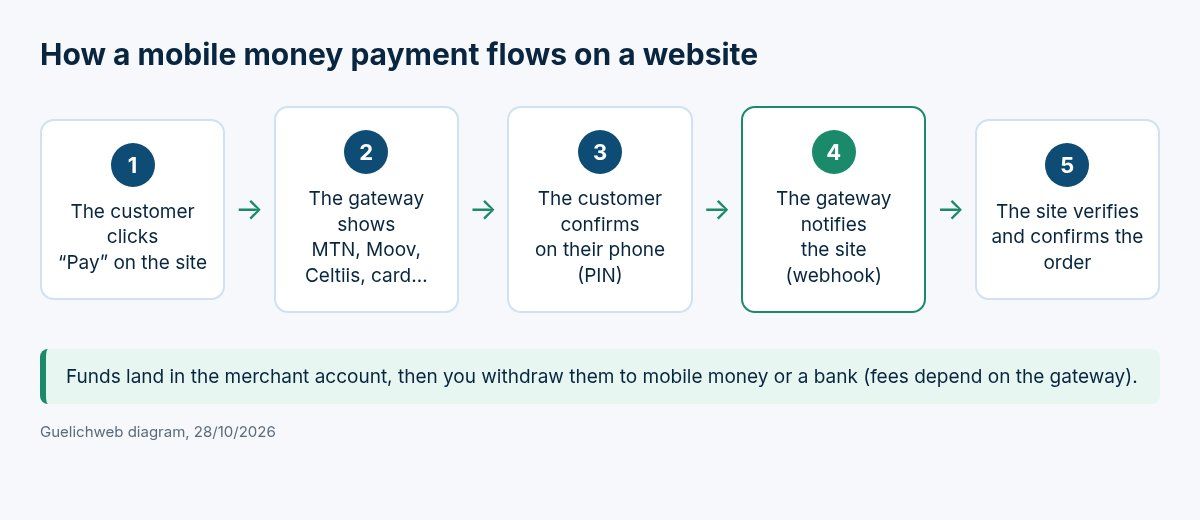
Guelichweb diagram: the typical path of a mobile money payment through a gateway.
- The customer fills in their cart or a donation form, then clicks "Pay".
- The gateway's payment window opens. The customer picks their operator (MTN, Moov, Celtiis…) or a card, and enters their number.
- They receive a confirmation request on their phone and approve it with their PIN. They authorise the payment, never you.
- The gateway sends your website a server-to-server notification (the webhook): approved, declined or cancelled.
- Your website verifies that notification, marks the order as paid, sends the receipt to the customer and alerts your team.
Step 4 is the one that many rushed integrations skip. If your website treats an order as paid just because the customer landed back on the "thank you" page, you are exposed to orders being confirmed with no money received. FedaPay's webhook documentation lists the events to listen for (transaction created, approved, declined, cancelled, transferred…), and KkiaPay's provides a secret key so you can check that the notification really comes from the gateway. If the word webhook is new to you, our article on what an API is covers the basics.
FedaPay or KkiaPay: the two names you hear in Benin
Official logos of FedaPay and KkiaPay, as shown on their websites on 28/10/2026.
When a business in Benin wants to take payments online, the question "FedaPay or KkiaPay?" almost always comes first. Both are well established in Benin, operate in several WAEMU countries, and both display on their homepage a payment institution approval from the BCEAO, the regional central bank. They do the same job, but their pricing is built differently, and that is where the choice is made.
One caution before the numbers: the prices below are the ones shown on the official pages on 28 October 2026, for Benin. They change. Always check the pricing page before signing up, and ask for written confirmation if your volume justifies negotiating.
FedaPay: no subscription, a fee per transaction
FedaPay's pricing page sums up its approach in one line: no fees until you receive payment. There is no monthly subscription. For Benin, the fee on collected payments is:
- 1.80% for MTN, Moov and Celtiis;
- 4.00% for BMO and Coris Money;
- 3.60% for Visa and Mastercard cards.
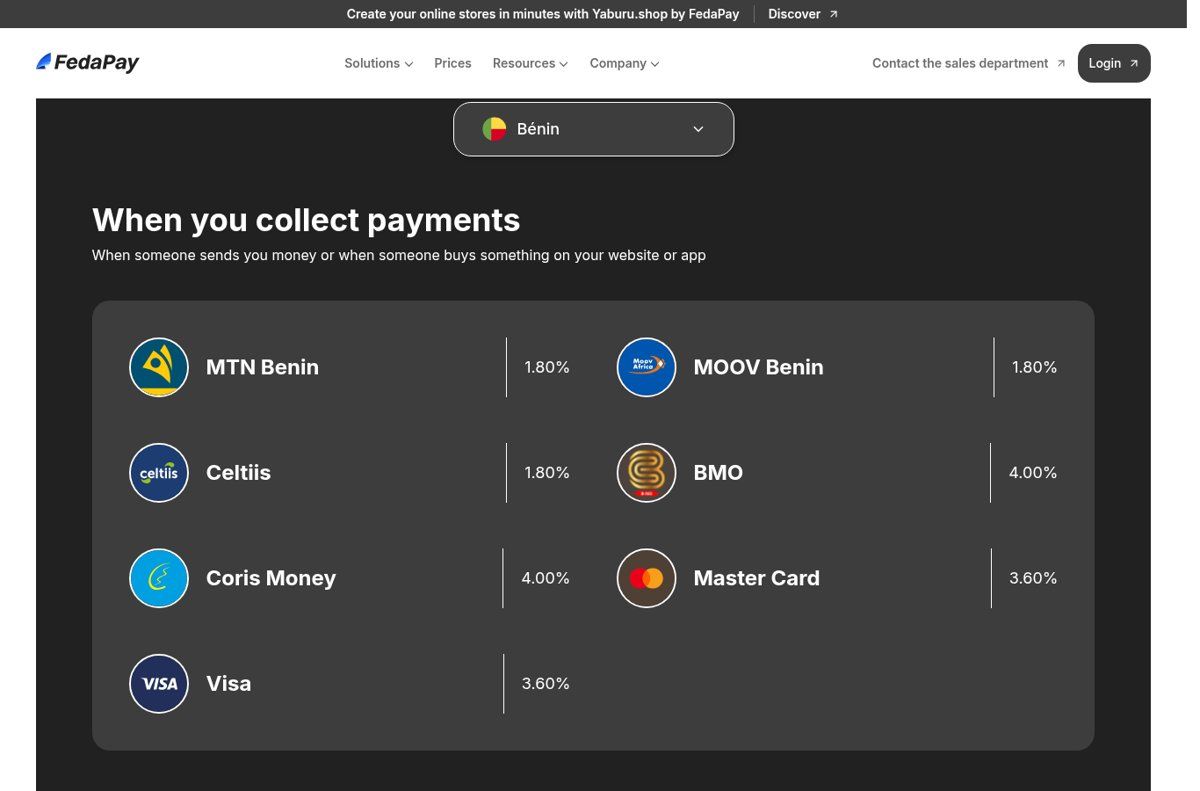
Source: FedaPay pricing page (fedapay.com/pricing), Benin tab, captured 28/10/2026.
For withdrawals, the same page lists free withdrawals to mobile money (cross-network fees may apply) and 3,500 XOF for a withdrawal to a bank account. Sending money to third parties (outgoing payouts, on request) is charged by bracket, from 150 XOF for up to 10,000 XOF sent to 2,500 XOF above 500,000 XOF. The plugins page also states that funds can be transferred to mobile money or a bank account after 3 days.
KkiaPay: monthly plans, fees often paid by the customer
KkiaPay works with plans. For Benin, its pricing page shows four plans with no entry fee: TPE (payment terminal), Mobile app, Integration and Push Up. The one that matters for a website is the Integration plan:
- a subscription of 9,900 FCFA excl. tax per month, first month free;
- mobile money: 1.5%, paid by the customer;
- bank cards: 2.1% for WAEMU cards and 3% for non-WAEMU cards, paid by the customer;
- kkiapay Direct payment links at 100 FCFA per link, USSD menu integration and a dedicated expert, according to the same page.
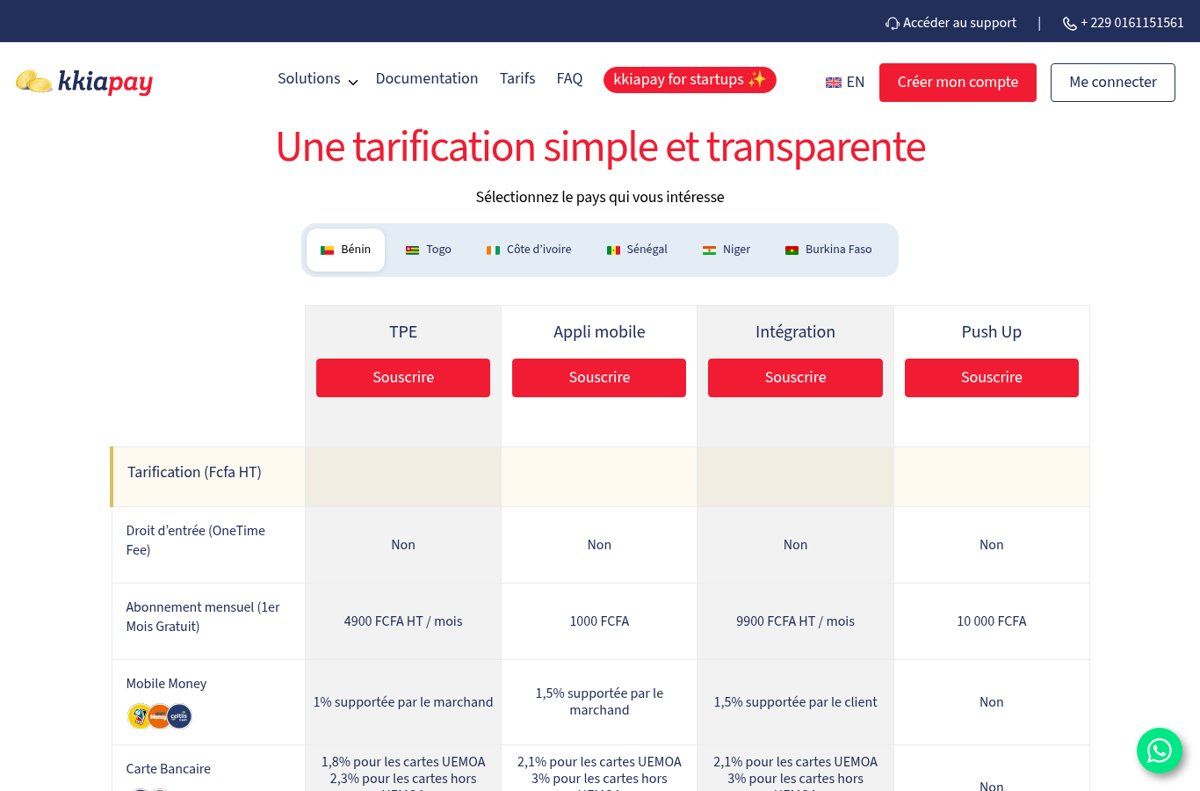
Source: KkiaPay pricing page (kkiapay.me/tarifs), Benin tab, captured 28/10/2026.
KkiaPay's fees documentation confirms that, by default, fees are paid by the customer, but the merchant can choose to absorb them. It also lists a payout to a bank account at 7,000 FCFA, whatever the amount. Another strength KkiaPay highlights: you can collect payments "with or without a website", thanks to kkiapay Direct payment links that can be shared on WhatsApp or Facebook.
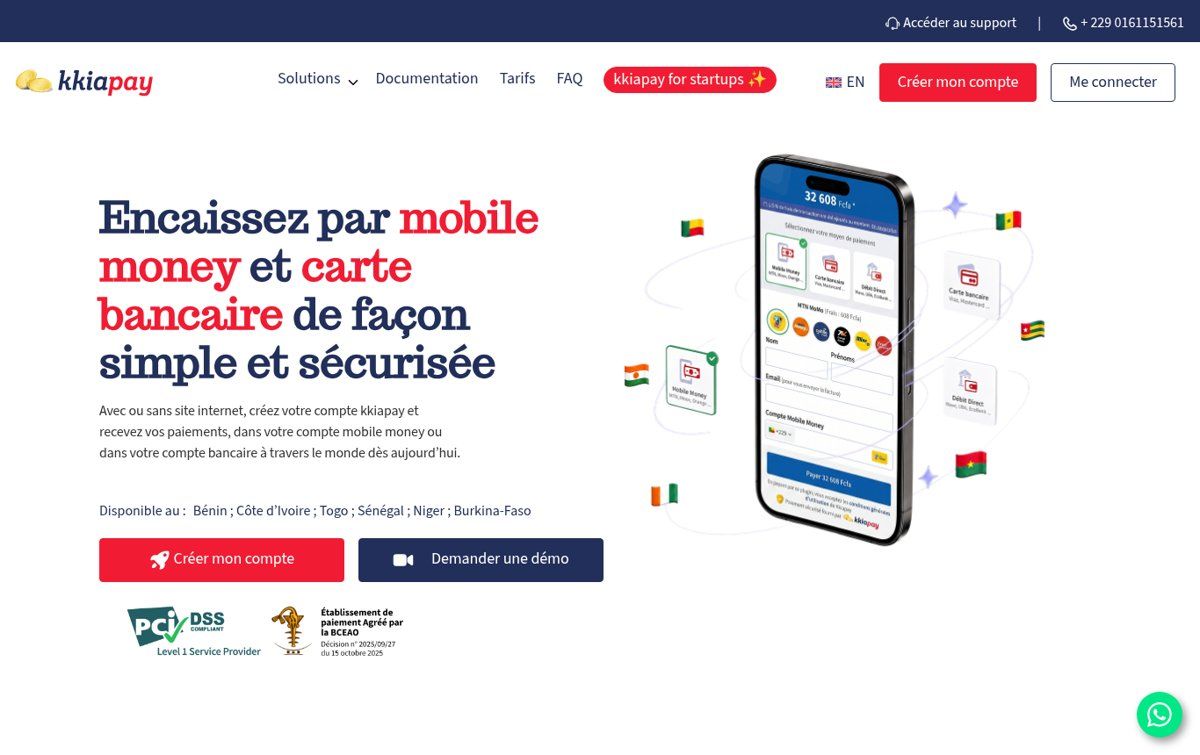
Source: KkiaPay homepage (kkiapay.me), captured 28/10/2026.
The differences that really matter
- The pricing model. FedaPay charges nothing without a sale, which suits a new or irregular business. KkiaPay's Integration plan has a monthly fee, offset by a lower mobile money rate.
- Who pays the fees. At KkiaPay, the customer pays the fees by default. That protects your margin, but a customer who sees the amount go up at the last moment may hesitate. At FedaPay, the fee is deducted from what you receive.
- Bank withdrawals. 3,500 XOF at FedaPay, 7,000 FCFA at KkiaPay according to their pages. If you often move small amounts to the bank, it adds up; if you withdraw to mobile money, much less so.
- Operators. FedaPay also lists BMO and Coris Money in Benin, at 4%. If some of your customers use those services, that counts.
- Countries. KkiaPay lists Benin, Côte d'Ivoire, Togo, Senegal, Niger and Burkina Faso. FedaPay refers to the WAEMU zone. If you sell in several countries, check operators and prices country by country.
What about other gateways?
FedaPay and KkiaPay are not alone. CinetPay, very present in Côte d'Ivoire, and PayDunya, founded in Senegal, also cover several West African countries. For a business based in Senegal or Côte d'Ivoire, they deserve a serious comparison. For an organisation that sells mainly in Benin, we usually start by comparing FedaPay and KkiaPay, because they cover Beninese operators most directly. That is not a ranking: it is a starting point.
What it really costs: run the numbers on your own sales
A percentage means nothing until you apply it to your own case. Here is a purely illustrative example using the prices shown on 28/10/2026: a shop making 100 sales a month at 25,000 FCFA each, all paid with MTN or Moov, so 2,500,000 FCFA collected.
- With FedaPay: 1.80% of 2,500,000 FCFA, which is 45,000 FCFA in fees per month, with no subscription. Withdrawals to mobile money are listed as free (apart from possible cross-network fees).
- With KkiaPay, Integration plan: 9,900 FCFA excl. tax in subscription for you. The 1.5% mobile money fee, 375 FCFA on a 25,000 FCFA sale, is paid by your customers by default. If you decide to absorb it, that comes to 37,500 FCFA, plus the subscription.
With 10 sales a month instead of 100, the logic flips: 4,500 FCFA in fees at FedaPay, against a fixed 9,900 FCFA excl. tax subscription at KkiaPay. The right choice depends on your volume, your average order value and your policy on fees, not on reputation.
Add to this calculation what your current set-up costs you: the time spent checking transfers, the data-entry mistakes, the orders lost because a customer did not want to send money to a personal number. That cost never appears on a price list, but it is very real.
Three ways to add payments to your website
1. The payment link: fast, no development
You create a link in your dashboard and send it to the customer by WhatsApp, email or text message. It is ideal for testing, for selling services on a quote basis, or for a simple donation page. The limit: nothing is automated on the website side, so payments have to be matched by hand. FedaPay's older documentation also notes that a payment link is valid for 24 hours and can only be used once.
2. The plugin: for WordPress, WooCommerce, PrestaShop
If your website runs on a CMS, an official plugin does most of the work. FedaPay offers plugins for WooCommerce, PrestaShop, Odoo, OpenCart, Bubble and GiveWP (for donations); KkiaPay offers them for WooCommerce, PrestaShop, WordPress and Give, among others. It is often the best option for a WordPress shop: see our article what is WordPress and when to choose it.
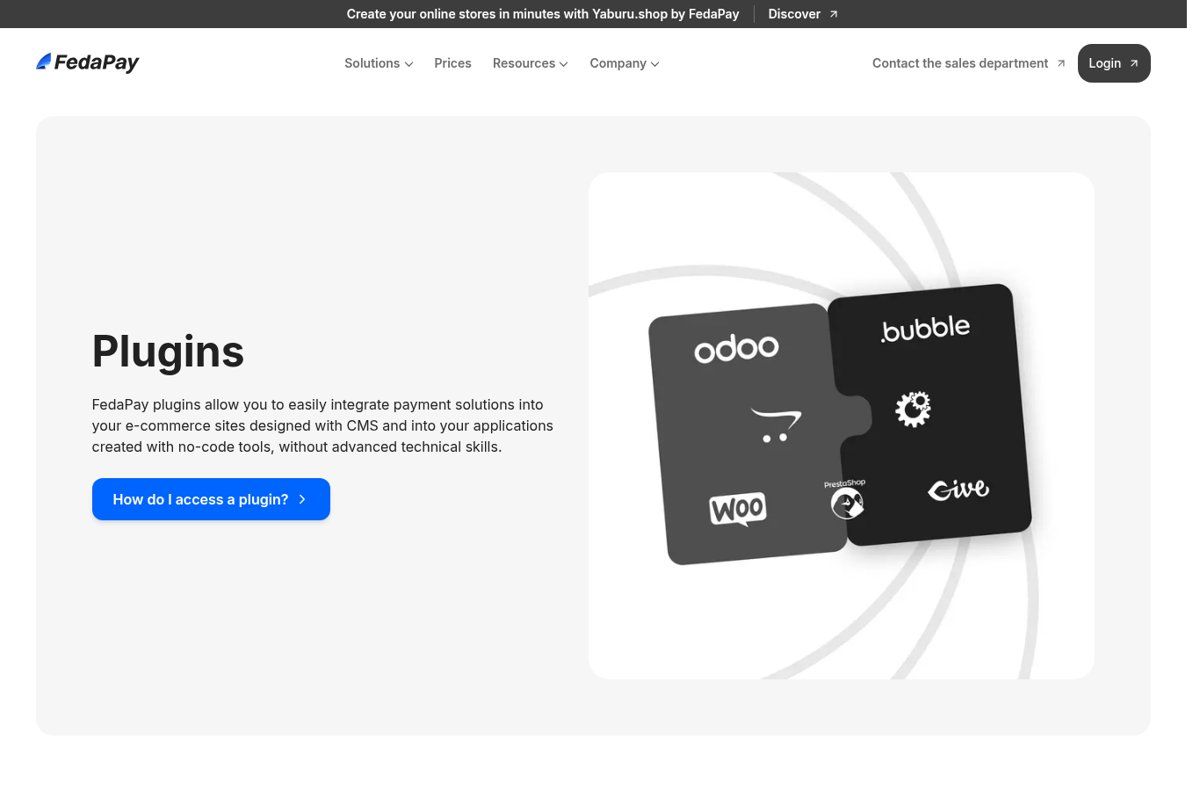
Source: FedaPay Plugins page (fedapay.com/plugins), captured 28/10/2026.
3. The widget or the API: for a custom website or an app
For a custom-built website (Next.js, Laravel, a mobile app…), you add the gateway's payment button with a few lines of JavaScript (Checkout.js at FedaPay, a widget and SDKs at KkiaPay), then write the server-side code that receives the webhook and verifies the transaction. It is more work, but it is the only way to fully control the journey: invoice generated automatically, member area unlocked, ticket sent on WhatsApp, record added to your CRM.
Both gateways offer a test mode (sandbox) with separate keys. Use it. No integration should go live without simulating a successful payment, a declined payment and an abandoned payment.
The documents to prepare to open a merchant account
This is the step businesses underestimate most. A payment gateway is a regulated company: it has to know who you are before letting you collect money. According to FedaPay's documentation on account types, the main options are:
- Business account: RCCM (trade register), IFU (tax ID) and ID of the legal representative, with no transaction limits.
- NGO account: registration receipt, registration number and ID, also with no limits.
- Freelancer account: IFU and ID, with limits (10 transactions per week, between 100 and 300,000 XOF per transaction).
- Public institution: a government account validated directly by FedaPay.
At KkiaPay, accounts run in test mode by default; to activate yours, you fill in your personal and company details, then upload scanned administrative documents.
FedaPay even publishes the most common reasons for rejection, and the list is instructive: an address that is too vague, an imprecise description of the activity, a non-compliant signature, share capital inconsistent with the RCCM, an invalid ID, a wrong IFU, or a website address that is not a full URL. Get these right before you start the technical integration: an unvalidated account blocks the whole project, even when the code is ready.
The mistakes we see most often
- Confirming the order on the return page instead of waiting for the webhook. That opens the door to unpaid orders marked as paid.
- Leaving test keys in production, or worse, exposing the secret key in JavaScript that anyone can read. Only the public key belongs in the browser.
- A website without HTTPS. No customer should type a payment number on an unsecured page. See our explanation of SSL certificates.
- Not announcing fees. If the customer pays the fees, say so before they click. An amount that changes without explanation drives people away.
- Forgetting what happens after payment: no receipt, no confirmation message, no alert for the team. The customer pays, then starts to worry.
- Ignoring refunds and disputes. Decide in advance who refunds, how and how quickly.
- Opening the account in a person's name rather than the organisation's. When that person leaves, the business loses access to its payments.
Our view: how to choose without getting it wrong
We do not have a favourite gateway on principle, and we are wary of anyone who recommends the same one to everybody. Here is the rule we apply when we advise an organisation:
- You are starting out, or your sales are irregular: a plan with no subscription limits the risk. You only pay when you sell.
- You have steady, high mobile money volume: run the numbers on subscription plus lower rate, using your real figures from the last three months.
- You collect donations: look at donation plugins (GiveWP, Give) and the NGO account type. Donors should not feel they are paying fees on top of their gift, unless that is a deliberate choice.
- You sell without a website, mostly through WhatsApp: start with payment links, then move to a full integration when volume justifies it. Our article on the WhatsApp Business API shows how to go further.
- You want to automate after-sales: pick the gateway whose webhooks and documentation suit your tools, and connect it to your processes. Our guide to task automation gives concrete examples.
One last conviction: nothing forces you to stay with one gateway forever. A clean integration, kept separate from the rest of the website, lets you switch provider if prices or service change. That is also why we advise against quick fixes that scatter payment code all over a website.
Frequently asked questions
What is the difference between a payment gateway and a mobile money account?
A personal or merchant mobile money account receives transfers, but it does not talk to your website. A gateway collects the payment and automatically tells your website that the transaction is approved, so the order can be confirmed without manual checks.
FedaPay or KkiaPay: which one is cheaper?
It depends on your volume. As of 28/10/2026, FedaPay shows 1.80% on MTN, Moov and Celtiis with no subscription; KkiaPay's Integration plan shows 9,900 FCFA excl. tax per month and 1.5% on mobile money, paid by the customer by default. With few sales, no subscription is often the better deal; with many sales, run the numbers.
Do I need a website to take payments through a gateway?
No. Payment links let you collect money through WhatsApp, Facebook or email. But without a website, you lose the automation: order confirmation, receipt, stock update. Beyond a few sales a week, a website with built-in payments saves a lot of time.
Can I take payments as an individual or a freelancer?
FedaPay has a freelancer account, with an IFU and an ID, but it is limited in the number and amount of transactions. For a regular activity, a business account with an RCCM is a better fit.
How long does it take to integrate a gateway?
A payment link takes minutes once the account is validated. A WooCommerce plugin can be installed and tested in a few hours. A custom integration with webhooks, receipts and automations takes longer, depending on the project. In every case, merchant account validation is often the longest step: prepare your documents first.
Is it safe for my customers?
Yes, if the integration is done properly: the customer approves the payment with their PIN on their own phone, and neither you nor your website ever sees that code. The risks come mostly from mistakes on the website side: no HTTPS, an exposed secret key, orders confirmed without checking the webhook.
Are the prices in this article up to date?
They were taken from FedaPay's and KkiaPay's official pages on 28 October 2026, for Benin. Gateways change their pricing: always check their pricing page before deciding.
Want to take mobile money payments on your website?
We can help you choose the gateway that fits your volume and your activity, prepare the account opening file, and integrate payments properly: tests, webhooks, receipts, team notifications. Whether you already have a website or are starting from scratch with our website design service in Cotonou, the price depends on your website and your needs: we prepare a quote after an initial diagnosis, as explained on our offers page.
Tell us about your online payment project: we will tell you clearly what is needed, how long it takes and what you can do yourself.