Task automation: what it is, real examples and where to start in a small business or NGO
G. CHRIST
Published on October 27, 2026
Take an ordinary day in your organisation and count the copy-pastes. A customer's number copied from WhatsApp into a notebook, then into an Excel file. The same invoice rebuilt by hand because the template changed. The weekly report someone pieces together every Friday from five different files. The payment reminder that gets forgotten one time out of three. Each of these takes two minutes on its own. Added up, they eat hours every week, and they create mistakes.
That is exactly where task automation comes in. At Guelichweb, we build automations for businesses, NGOs and public institutions, and we see the same pattern everywhere: the problem is almost never the tool. The problem is that people try to automate before looking at how the work actually gets done. This article explains what automation is, what you can hand over to software and what you should keep, with concrete examples and a method to get started without wasting money.
Task automation: a simple definition
Automating a task means having software carry out an action that someone currently does by hand, following rules set in advance. France Num, the French government portal for the digital transformation of small businesses, sums up the principle in a phrase we like to borrow: "if this happens, then do that" (France Num, in French).
Three ideas follow from that definition, and they matter more than any tool name:
- An automatable task is repetitive. If it happens once a year, automating it costs more than doing it.
- It follows clear rules. If you cannot explain in three sentences how to do it, software will not know either.
- It starts from an event or a date. A form submitted, a payment confirmed, an incoming message, the first Monday of the month. Without a trigger, nothing starts.
Automation is nothing new. Banks and manufacturers have automated for decades. What has changed is the cost of getting started. Tools such as n8n, Make and Zapier now let a ten-person organisation connect its apps without building a full piece of software. And artificial intelligence adds a new ability: handling content that a simple rule could not read, such as a free-form message or a scanned document.
Task, process, workflow: three words not to mix up
In meetings, these words are often used interchangeably. They are not the same thing, and the confusion gets expensive when you write a project brief.
- A task is a single action: sending a receipt, creating a customer record, saving an attachment in the right folder.
- A process is the whole body of work that produces a result: from a quote request all the way to payment, for example. It involves several people, several tools and some decisions.
- A workflow is the precise sequence of steps in a process, in a defined order. IBM describes it as a system for managing repetitive processes and tasks that occur in a particular order, usually visualised as a diagram or checklist (IBM).
An automated workflow is always built from the same blocks: a trigger (what starts the flow), conditions (rules such as "if the amount is above a certain threshold"), actions (what the tool does) and, in well-designed projects, a human check at the sensitive points. In n8n, for example, each step is a "node" connected to the next one, and the official documentation describes a workflow in exactly those terms: a collection of connected nodes (n8n documentation).
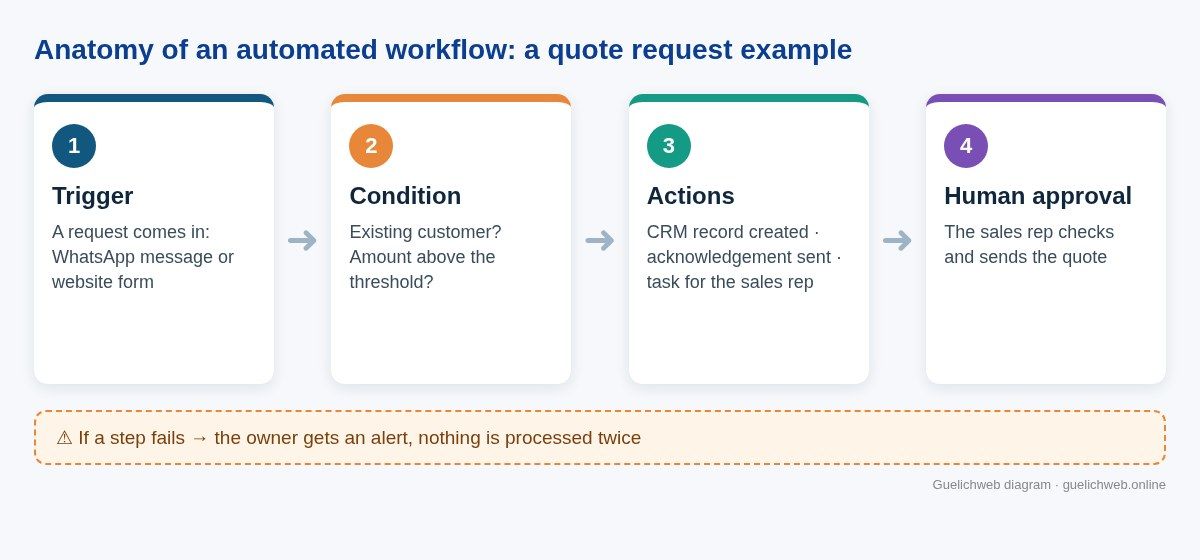
Guelichweb diagram: the four building blocks of an automated workflow, using a quote request as the example.
Keep this in mind above all: you automate tasks, but the real gains come when you rethink the process. Automating a useless step just means doing something useless faster.
Six levels of automation, from the simplest to the most ambitious
Many managers think automation starts with a big software purchase. In practice there is a ladder, and you often need to start at the bottom.
1. Features already built into your tools
WhatsApp Business offers away messages and quick replies. Gmail can sort and auto-reply. Your invoicing software may already send reminders. Before buying anything, go through the settings. We regularly see organisations paying for a feature they already had.
2. Spreadsheets, forms and macros
A Google Form linked to a Google Sheets file already removes a lot of manual data entry. Formulas, conditional formatting and Excel macros do the rest. It is limited, but it is free or close to it, and it is an excellent training ground. We cover this approach in What is Google Sheets? A small business guide.
3. No-code automation platforms
n8n, Make and Zapier connect applications to one another: a form, a CRM, a messaging app, file storage. You draw the scenario, the tool runs it. Today this offers the best effort-to-result ratio for a small business or an NGO. To choose between them, read n8n or Make: which automation tool to choose and What is Zapier, and how it compares with Make and n8n.
4. Custom connections through APIs
When a tool has no ready-made connector, or when an in-house system needs to be connected, you go through its API, the entry point designed so that other programs can talk to it. It is more technical and more robust. If the term is new to you, our article What is an API? explains it without jargon.
5. RPA, or "software robots"
RPA (robotic process automation) imitates a person's clicks on a screen, for older software that offers no modern connection (IBM). Our view is clear: for an African small business, it is rarely the right choice. It is fragile (one button moves and everything breaks) and often expensive. We only use it as a last resort.
6. Automation with artificial intelligence
AI does not replace the previous levels; it adds to them. It can read a freely written message, pull the details out of a photographed invoice, classify a request or suggest a draft reply. When it makes multi-step decisions, we call it an AI agent, a topic we cover in What is an AI agent? Examples for small businesses. The basic rule: use AI to understand and to draft, and use classic rules to decide and execute anything involving money.
Concrete automation examples, department by department
Here are automations we consider realistic for an organisation of 5 to 100 people. None of them requires an in-house IT department.
Sales and customer relations
- Every request received through the website form or on WhatsApp automatically creates a CRM record, with its source and date. No more leads lost in someone's phone. See What is a CRM?.
- A quote still unsigned after five days creates a follow-up task for the sales rep, rather than an impersonal automatic message.
- Repetitive questions (opening hours, location, public prices, documents to bring) get an instant answer, with a handover to a person as soon as the question goes beyond the script. That is the job of a good chatbot, explained in WhatsApp chatbot: what it actually does.
Administration and accounting
- Invoices received by email are saved in the right folder, renamed according to a single rule and listed in a tracking sheet.
- A payment confirmed by the payment platform generates the receipt, sends it to the customer and updates the cash-in sheet.
- Every Monday morning, management receives a summary: the week's revenue, unpaid invoices, pending quotes. Nobody spends Friday evening stitching files together.
Human resources
- Job applications are gathered in a single table, and every candidate receives an acknowledgement. The shortlisting itself stays human.
- A leave request goes through a form, reaches the manager, and the decision updates the shared schedule.
- A new employee's arrival triggers the creation of their accounts and the sending of onboarding documents.
NGOs and funded projects
- Data collected in the field with a mobile form flows into a single database, instead of ten files sent over WhatsApp.
- Logframe indicators are calculated automatically, which cuts the scramble for figures before every donor report.
- Donation receipts are generated and sent right away, which builds donor trust.
Institutions and public services
- Every letter or request received gets a tracking number, and the applicant can check the status of their file without travelling.
- Appointments are booked online with an automatic reminder the day before, which reduces no-shows.
What you should not automate (or not yet)
This is the part software vendors tend to leave out. Some tasks are better kept human, at least at first.
- A process nobody can describe. If every employee does the task their own way, automation will freeze the mess in place. Start by agreeing on the right way to do it.
- Decisions that commit money or reputation. A refund, an exceptional discount, a reply to a sensitive complaint. The tool can prepare; a person approves.
- Relationships built on trust. The first contact with a key partner, a condolence message, a negotiation. A badly timed automatic message does more damage than a late reply.
- Rare tasks. Something that happens twice a year does not justify a project.
- Data you do not control. If the customer file is full of duplicates and wrong numbers, automating simply means messaging the wrong people faster.
Our rule: automate what is frequent, clear and low-risk. For everything else, the tool prepares and a person decides.
How to spot which tasks to automate first
You do not need a three-month audit. Take one week and ask each person to note the tasks they repeat. Then run each task through these five questions:
- How many times a week? The more frequent, the faster the payback.
- How long each time? Multiply by the frequency and you get the time actually lost.
- Are the rules clear? Could you write the procedure on half a page?
- Is the information already digital? A form, an email, a file: yes. A paper notebook: it will need digitising first.
- What happens if it goes wrong? A typo in an internal report does not weigh the same as a wrong amount sent to a customer.
Then place each task on a simple grid: frequency on the vertical axis, clarity of the rules on the horizontal axis. The "frequent and clear" corner holds your first projects. The "rare and fuzzy" corner holds what you leave alone.
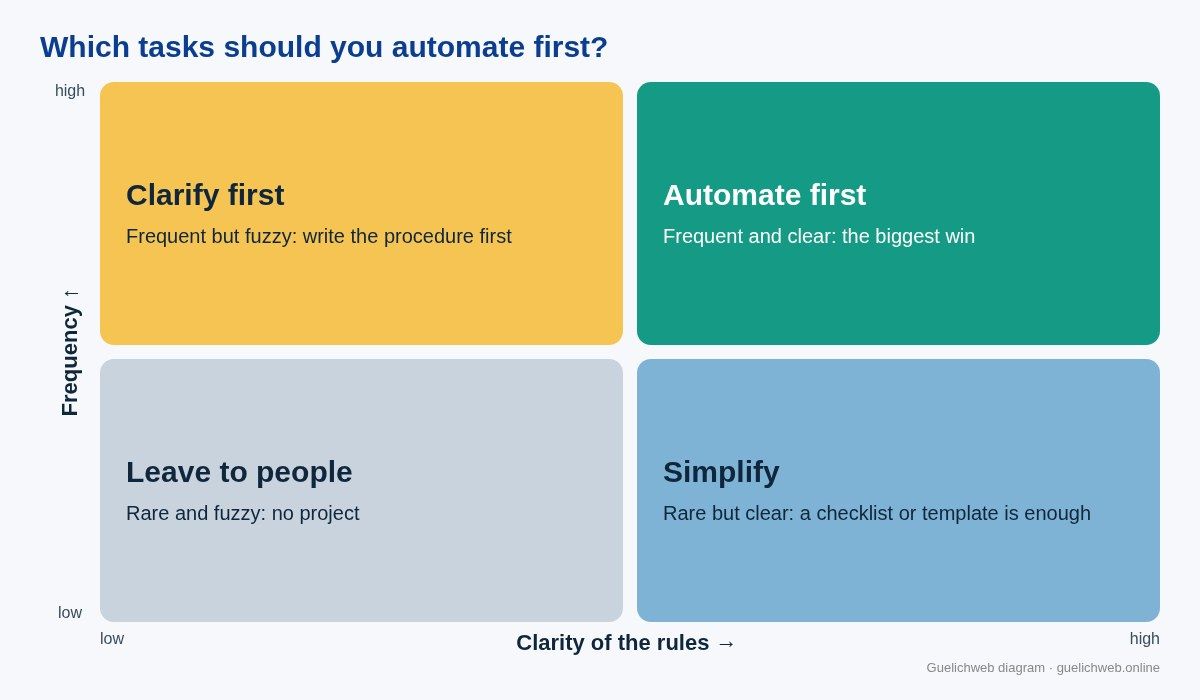
Guelichweb diagram: the grid we use in workshops to choose the first tasks to automate.
Our six-step method for a first project
- Draw the current process on paper. Who does what, with which tool, in what order. You almost always discover steps management did not know about.
- Simplify before automating. Remove double entry, pointless approvals and duplicate files. Sometimes this step alone solves half the problem.
- Pick a single flow to start with. The most frequent and least risky one. A visible first success convinces the team far better than a grand plan.
- Choose the tool to fit the flow, not the other way round. The apps you already use, the budget, where the data must be hosted and who will maintain the system decide the choice.
- Test with real cases, including awkward ones. A name with an apostrophe, a foreign phone number, a payment in two instalments, a connection cut in the middle of processing.
- Document it and name an owner. An automation without an owner eventually breaks down silently. Someone needs to receive the alerts and know what to do.
A good first project takes a few weeks, not a few months. If it drags on, the scope is usually too broad or the process was not clear to begin with.
Automating in French-speaking Africa: realities to plan for
Most guides on this subject are written for European companies equipped with full management software. The reality of our clients in Benin and across the region is different, and an automation that ignores it fails quickly.
- WhatsApp is the real workplace channel. Orders, complaints and even internal approvals go through it. A useful automation therefore often starts from WhatsApp. To do this properly at scale, you need Meta's official API, which we explain in What is the WhatsApp Business API and how much does it cost?.
- Mobile money dominates payments. A payment confirmation must come from the official notification sent by the operator or the payment aggregator, never from a screenshot sent by the customer. This is a non-negotiable security point.
- Internet access and electricity are not guaranteed. A good workflow can resume where it stopped, never processes the same payment twice and alerts someone when a step fails. Tools such as n8n let you plan for these error scenarios, but someone still has to set them up.
- Subscriptions are often paid in foreign currency. A tool billed per operation can cost far more than expected if volume spikes. We always calculate the monthly cost at real volume before recommending a solution. Some tools can also be self-hosted, which changes the equation.
- Personal data is protected by law. In Benin, Book V of the Digital Code (Law No. 2017-20) governs the processing of personal data, overseen by the Personal Data Protection Authority (APDP). Sending customer files to online tools is not a trivial act: you need to know where the data goes and why.
- Excel is everywhere, and that is not a flaw. Rather than imposing new software overnight, it is often smarter to connect the existing spreadsheet and migrate later, when the team is ready.
Will automation replace your staff?
This is the question that worries teams, and it deserves a straight answer. A widely quoted McKinsey Global Institute analysis of the US labour market estimated that fewer than 5% of occupations could be fully automated with existing technology, but that about 60% of occupations had at least 30% of activities that could be automated (McKinsey). In other words, automation changes jobs far more often than it removes them.
What we see on the ground points the same way. In a small business, automation takes chores away from people who are already overloaded. The assistant who no longer retypes orders can call customers back. The monitoring and evaluation officer who no longer merges files can analyse results. To make this work, involve the people concerned from day one: they know the exceptions, and they are the ones who will keep the system alive.
How much does automation cost, and how long does it take?
It depends on how many tools need connecting, the volume processed, the quality of the data and the level of human control required. A simple automation between a form and a spreadsheet has nothing in common with a flow connecting WhatsApp, a CRM, a payment platform and accounting software.
We have written a full article on the cost items: How much does AI automation cost in Benin?. At Guelichweb, we do not quote blind: we provide a quote after a diagnosis of your processes, as explained on our offers page. It is the only way to avoid selling an overbuilt system to someone who needed two well-defined rules.
Also budget for running costs: tool subscriptions, possible hosting, AI usage if any, and a few hours of maintenance per quarter. An automation is not a one-off purchase; it is a small system that needs looking after.
The mistakes we see most often
- Starting with the tool. "We want n8n" is not a goal. "We want to answer every quote request within an hour" is.
- Automating everything at once. The big project touching every department ties the team up for months and often fails at the first exception.
- Forgetting error cases. What happens if the customer gives an invalid number, if the API does not respond, if the same message arrives twice? Without answers to these questions, the system ends up producing duplicates or gaps.
- Not measuring. Record the time spent before the project. Without a starting point, you cannot tell whether the automation pays off.
- Depending on one person. If the only person who understands the workflow leaves, someone else must be able to take over. Hence the documentation, even a short one.
- Automating pushy messages. Three automatic reminders in two days drive customers away and can get a WhatsApp number suspended.
Automation, digitisation, digital transformation: where does it fit?
Automation is one building block of digital transformation, not a synonym for it. Digitising means moving from paper to files. Going digital means those files flow through online tools. Automating means some steps happen without anyone stepping in. Transforming means rethinking how the organisation works and serves its customers thanks to all of the above. We explore these distinctions in Digital transformation: definition and examples for SMEs and NGOs.
In practice, an organisation that still handles orders on paper cannot automate them directly. It first needs a digital entry point: a form, a website, a CRM. That is why our projects often combine a website, WhatsApp and a CRM, as described in Website, WhatsApp and CRM for a small business in Cotonou.
Frequently asked questions about task automation
What is the difference between automation and artificial intelligence?
Automation executes rules defined in advance. Artificial intelligence can handle less structured content, such as free text or an image, and produce a likely answer. The two are often combined: AI understands the request, classic automation carries out the actions. IBM gives a good overview of the range, from basic automation to intelligent automation (IBM).
Can you automate tasks for free?
Yes, to get started. The built-in features of your tools, Google Forms and Google Sheets, or the free plans and self-hosted versions of some platforms are enough for small volumes. The real cost shows up with volume, the reliability you need and the setup time.
Do you need to know how to code to automate?
Not for simple automations: no-code platforms work by drag and drop. As soon as you need to handle errors, APIs without connectors or large volumes, technical skills become necessary. That is often where an outside provider saves time.
Which tasks should a small business automate first?
Frequent, simple and low-risk ones: logging incoming requests, acknowledgements, appointment reminders, weekly reports, filing documents. Leave anything involving refunds or commercial decisions for later.
How long does it take to set up a first automation?
A simple automation can be running within a few days if access to the tools is available. A flow connecting several systems, with proper testing, usually takes a few weeks. Clarifying the process often takes longer than the technical work.
Is my data safe in an automation tool?
It depends on the tool, where it is hosted and how it is configured. Send only the data that is strictly necessary, protect access, and check your obligations with your country's data protection authority. A self-hosted tool gives you more control, but also requires more maintenance.
Want to know what you could automate?
If your team spends its days retyping, chasing and merging files, there are almost certainly hours to win back. At Guelichweb, we always start with a diagnosis: we look at how work really flows, identify the two or three flows that will pay off most, then propose a solution suited to your tools and budget.
Tell us about your repetitive tasks: we will tell you honestly what is worth automating, and what is not.