What is Zapier? 2026 pricing, the free plan, and Zapier vs Make vs n8n: which one to choose
G. CHRIST
Published on October 21, 2026
A quote request comes in through the website form. Someone copies it into a spreadsheet, emails the customer to say "received", then pings the sales rep on WhatsApp. Three minutes each time. No big deal, until the week there are forty requests and the person in charge is on leave.
That's exactly the kind of work Zapier promises to do for you. The name comes up in every video about automation, usually as the obvious answer. At Guelichweb, we automate processes for SMEs, NGOs and institutions in Benin, and our view is more nuanced: Zapier is excellent for getting started, but it isn't always the right tool for the long run. Here's what it does, what it really costs in 2026, what the free plan allows, and how it compares with Make and n8n.
What is Zapier? The short answer
Zapier is an online service that connects your apps and runs actions automatically, without writing code. When something happens in one tool (a form is filled in, a payment arrives, an email lands), Zapier triggers one or more actions in other tools (add a spreadsheet row, send a message, create a customer record).
Source: official Zapier logo, taken from zapier.com on 21/10/2026.
The company is American. According to Wikipedia, it was started in 2011 in Columbia, Missouri, by Wade Foster, Bryan Helmig and Mike Knoop, and has been fully remote from the start. Zapier now lists more than 9,000 apps you can connect (Zapier help centre): Gmail, Google Sheets, Facebook Lead Ads, HubSpot, Shopify, Calendly, Typeform, Slack and thousands more.
In one sentence: Zapier is the glue between pieces of software that don't talk to each other.
How Zapier works: trigger, action, Zap
Three words are enough to understand the tool. Zapier defines them on its key concepts page.
- The trigger: the event that starts everything. "New Google Forms response", "New Facebook lead", "New order in the shop".
- The action: what Zapier does next. "Add a row to Google Sheets", "Send an email", "Create a contact in the CRM".
- The Zap: the whole thing, one trigger followed by one or more actions. Once switched on, it runs on its own, day and night.
Each successful action counts as a task. That's the unit Zapier bills you on, and it's the point most people discover too late. The trigger itself uses nothing, and neither do built-in tools such as filters or data formatting (pricing page).
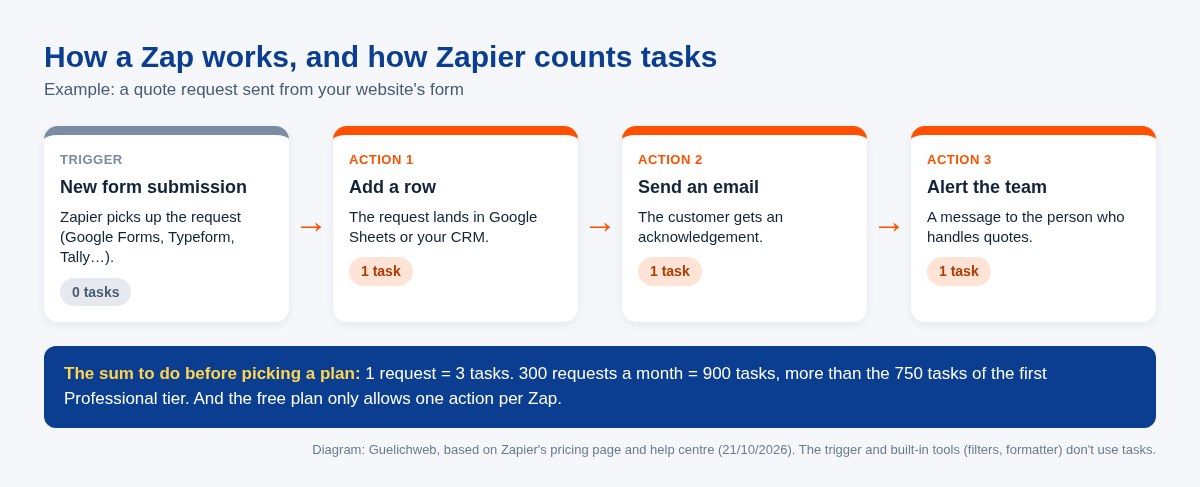
Diagram: a Zap with three actions uses three tasks per request (Guelichweb, based on Zapier's documentation).
This diagram sums up the question we ask every client before we talk about tools: how many times a month does the event happen, and how many actions follow it? Everything else comes from that multiplication.
What Zapier does beyond Zaps
Zapier is no longer just Zaps. Its getting started guide also covers Tables (a small database), Interfaces and Forms (simple forms and pages), AI agents, chatbots, and Copilot, an assistant that builds a Zap from a plain-language description. More recently, Zapier MCP lets assistants such as ChatGPT or Claude take action in your apps.
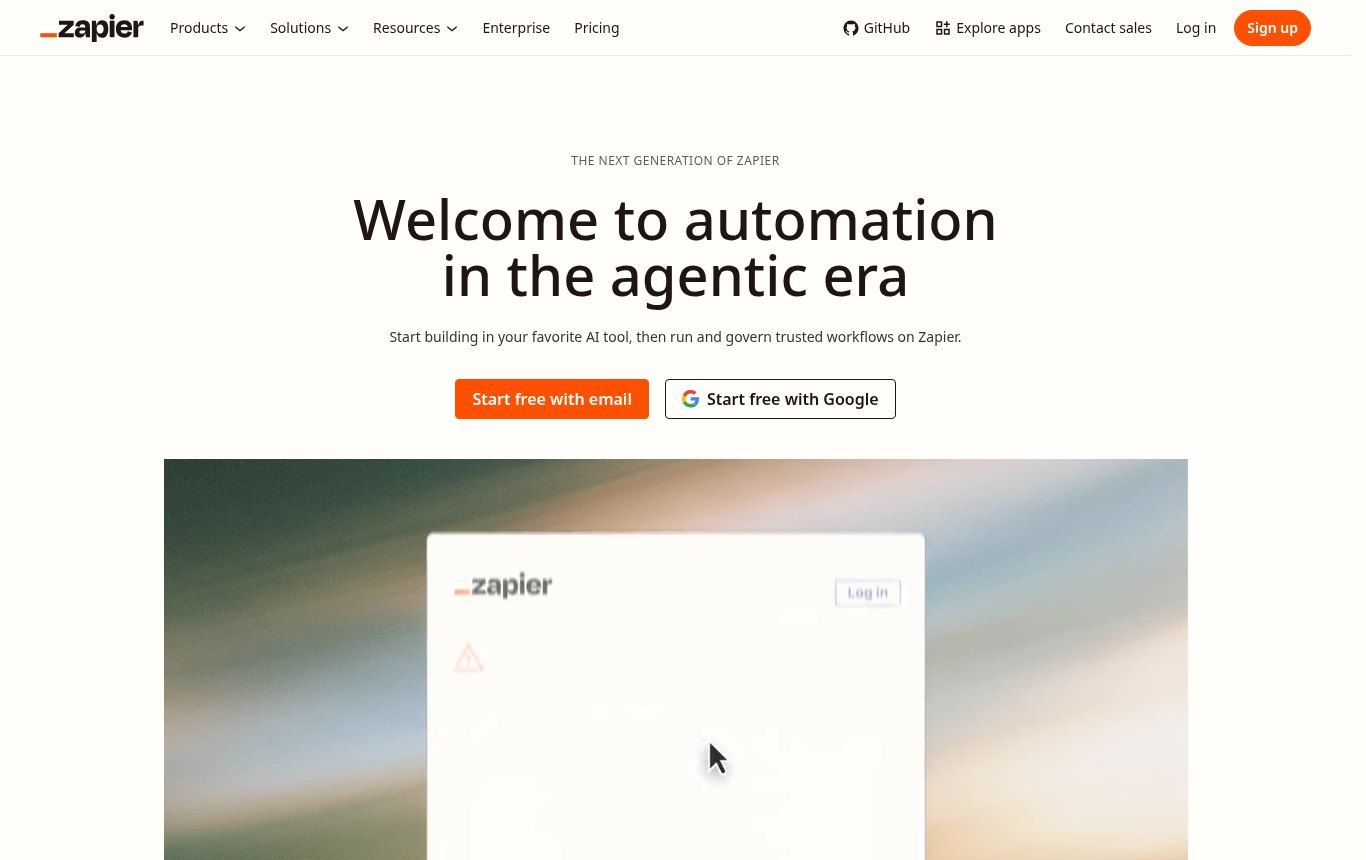
Source: zapier.com home page, screenshot taken on 21/10/2026.
Our view: for an SME or an NGO, the classic Zap is still the core. Zapier's agents and chatbots are billed separately from tasks, and they need serious set-up if you don't want them telling your customers nonsense. If that interests you, read our article What is an AI agent? before switching anything on.
Concrete examples for an SME, an NGO or an institution
Tutorial examples tend to feature Californian start-ups. Here are cases that look more like what we see in Cotonou, Abomey-Calavi, Abidjan or Dakar.
1. Centralise website enquiries
The contact form feeds a Google Sheets spreadsheet automatically, the customer gets an acknowledgement and the right person is notified. No more requests sleeping in an inbox nobody checks. If your team already lives in a spreadsheet, our guide What is Google Sheets? shows how to organise it for this kind of use.
2. Stop losing leads from Facebook ads
A Facebook Lead Ads campaign collects phone numbers. Without automation, someone downloads them by hand, often days late. With a Zap, each lead lands in the CRM within a minute. A lead called back the same day is worth more than one called back the following week. If you don't have a CRM yet, start with our article What is a CRM?.
3. Handle registrations for a workshop or training
An NGO runs a training session. Registrations come through a form, each participant receives a confirmation and the venue, the list updates for the field team, and a reminder goes out the day before. It's simple, and it's precisely the kind of flow where Zapier is most comfortable.
4. Track online payments
Zapier has connectors for some payment providers active in Africa, such as Paystack or Flutterwave. However, on 21/10/2026 we found no Zapier integration page for FedaPay, KKiaPay, CinetPay or MTN MoMo, which are widely used in Benin and Côte d'Ivoire. You'd then need webhooks, which are only on paid plans. Always check that your local tools are in the catalogue before you commit.
5. Prepare a weekly report
Every Monday, a scheduled Zap gathers the week's figures and emails them to management or to the donor. It isn't spectacular. It's often the automation that saves the most time.
Zapier pricing in 2026: what the plans really cost
The prices below come from Zapier's official pricing page, checked on 21/10/2026. They're in US dollars, excluding tax, and they change regularly: always check before you pay.
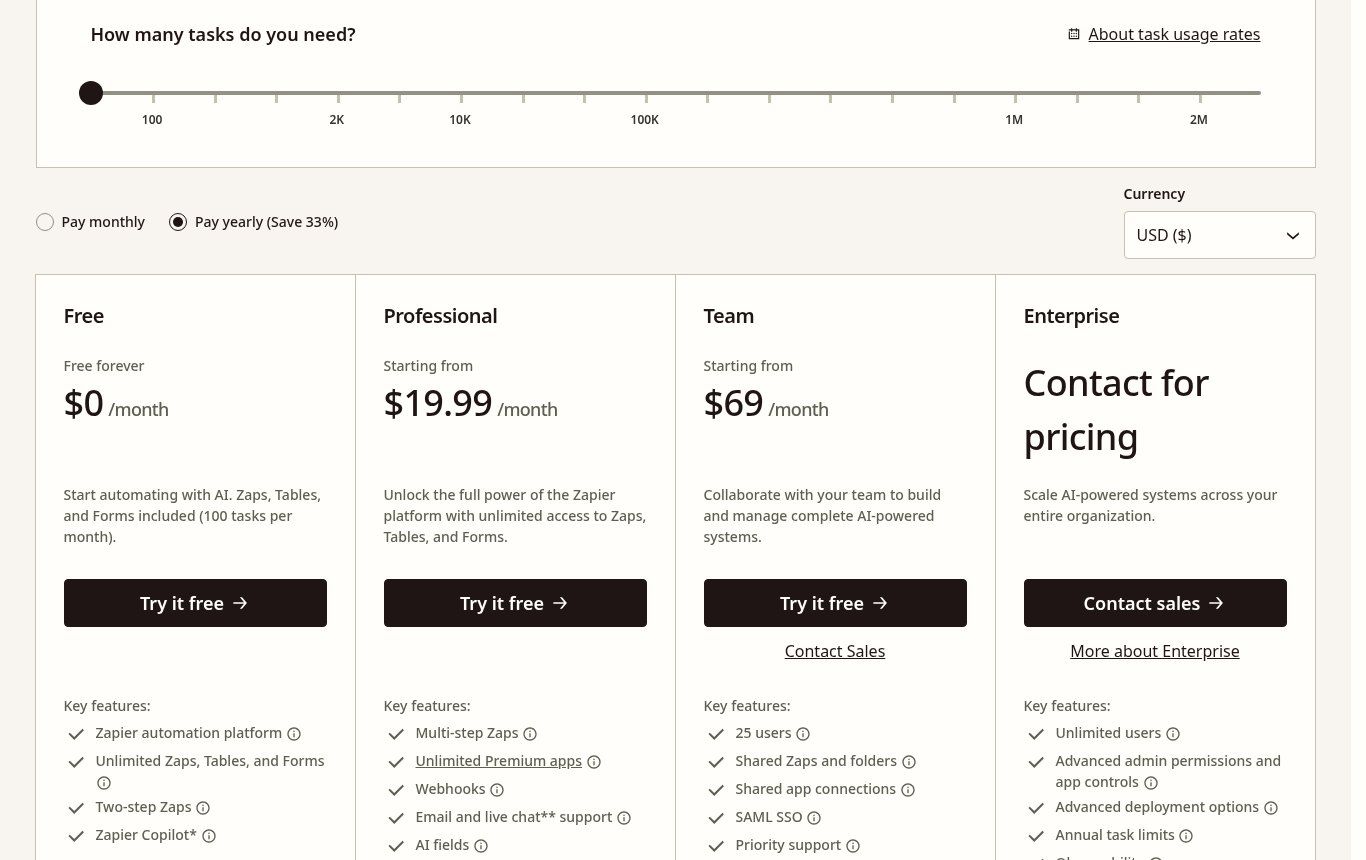
Source: zapier.com/pricing, screenshot taken on 21/10/2026 (annual billing selected).
- Free: $0, 100 tasks a month, two-step Zaps only (one trigger, one action), checks for new data every 15 minutes.
- Professional: from $19.99 a month billed annually, or $29.99 monthly, for 750 tasks. Multi-step Zaps, "premium" apps, webhooks, filters and conditional paths.
- Team: from $69 a month billed annually for 2,000 tasks, up to 25 users, shared Zaps and connections.
- Enterprise: custom pricing for large organisations.
The price rises with the number of tasks. Still on annual billing, Professional goes to $39 a month for 1,500 tasks, $49 for 2,000, $89 for 5,000 and $129 for 10,000. Annual billing works out about 33% cheaper than monthly. Zapier also offers a 14-day free trial of Professional, with no card required, and an extra 15% discount for non-profits. NGOs should ask for it.
The trap: going over your task limit
On paid plans, if you exceed your allowance, Zapier can keep your Zaps running and bill each extra task at a higher rate: 1.25 times the base rate on annual plans, 2.5 times on monthly plans. Zaps stop anyway once you reach three times your subscription volume. In practice, a badly configured Zap looping over a weekend can cost more than the whole month. Turn on flood protection and check your task history every week at the start.
And in CFA francs?
Zapier bills in dollars or in one of the 19 currencies it supports, including the euro. The CFA franc isn't one of them. The amount in FCFA therefore depends on the dollar rate on the day you're charged, plus your bank's fees on international payments. For an annual budget, leave a margin. And remember it's a recurring foreign-currency expense, which matters for an institution with formal procurement rules.
Zapier free plan: what it really allows
Yes, Zapier is free, but within narrow limits. With 100 tasks a month and one action per Zap, you could, for example, send each form response to a spreadsheet, for about a hundred responses a month. As soon as you want to add a confirmation email, that's a multi-step Zap, so it's paid. Filters, webhooks and premium apps are also paid-only.
Another limit people forget: the 15-minute interval. Triggers labelled "Instant" fire straight away on any plan, but many apps are checked at regular intervals. For an internal reminder, 15 minutes makes no difference. For replying to a customer who's waiting, it does.
Our verdict: the free plan is for understanding the tool and testing an idea on a small volume. It isn't for running a process your revenue depends on.
Zapier's limits seen from French-speaking Africa
Most comparisons are written for European or North American companies. For an organisation in Benin, Senegal, Côte d'Ivoire or Cameroon, five points weigh more heavily.
- The app is in English only. The marketing site exists in French, but Zapier itself states that the app and its help centre are only available in English (Zapier help). Browser translation helps, but not much. If the person managing the Zaps isn't comfortable in English, that's a real obstacle.
- Payment is in foreign currency. You need a card that accepts international payments, and the cost moves with the dollar.
- WhatsApp isn't as simple as people think. Zapier's "WhatsApp Notifications" app is marked premium, so paid plans only, and messages are sent through templates (integration page). Behind it sits the official WhatsApp Business API, with its own rules and its own billing, which we explain in What is the WhatsApp Business API?.
- Local tools are often missing from the catalogue. Nine thousand apps, but few African payment or management tools, as noted above.
- Costs climb with volume. Per-task billing, in dollars, becomes heavy when your flows have many steps and run hundreds of times a day.
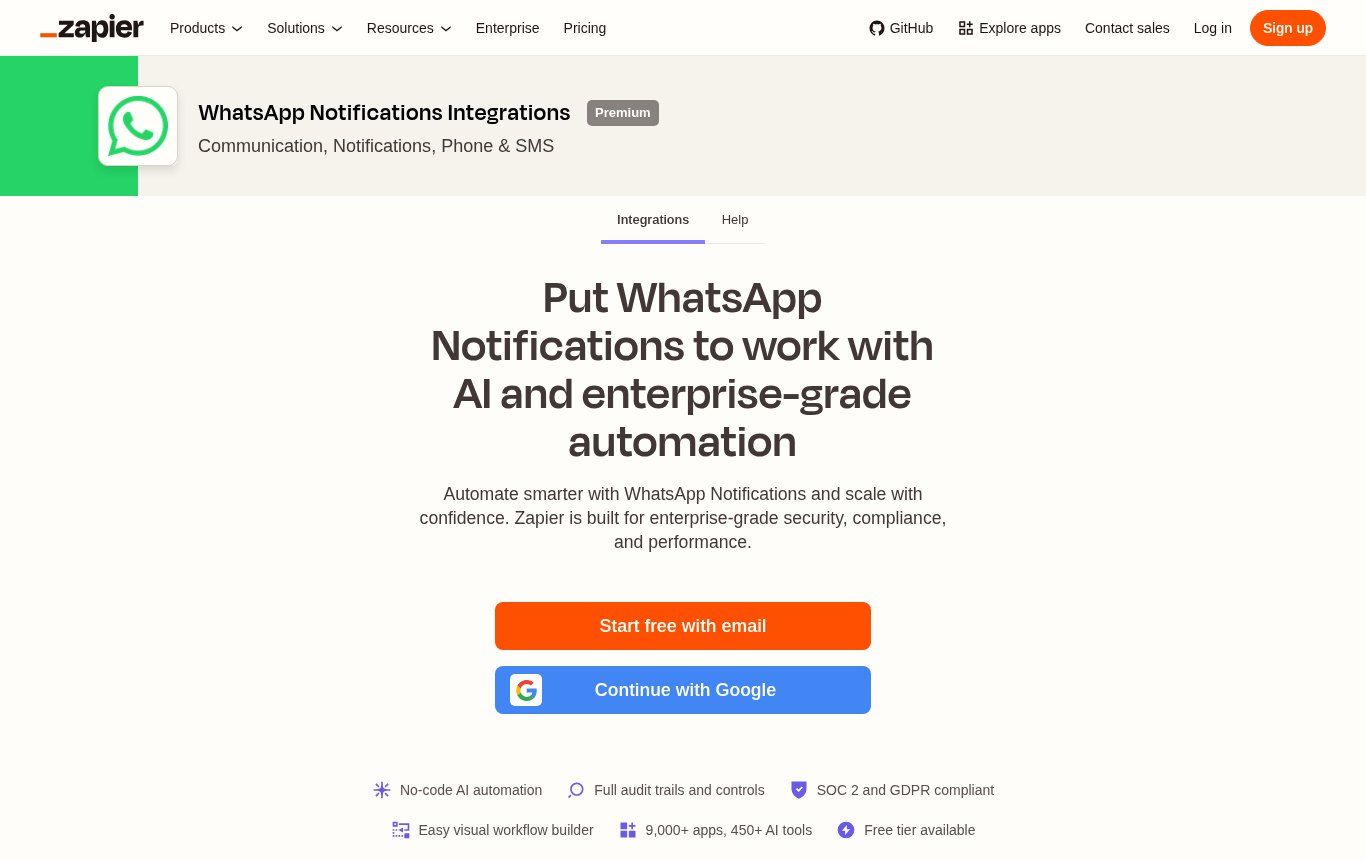
Source: zapier.com/apps/whatsapp-notifications/integrations, screenshot taken on 21/10/2026. The "Premium" badge means the app is only available on paid plans.
Zapier vs Make vs n8n: which one should you choose?
All three tools do the same basic job: an event triggers a series of actions. What separates them is what they bill you for, where they run and who can pick them up. We've already compared n8n and Make in detail; here, the question is where Zapier fits.
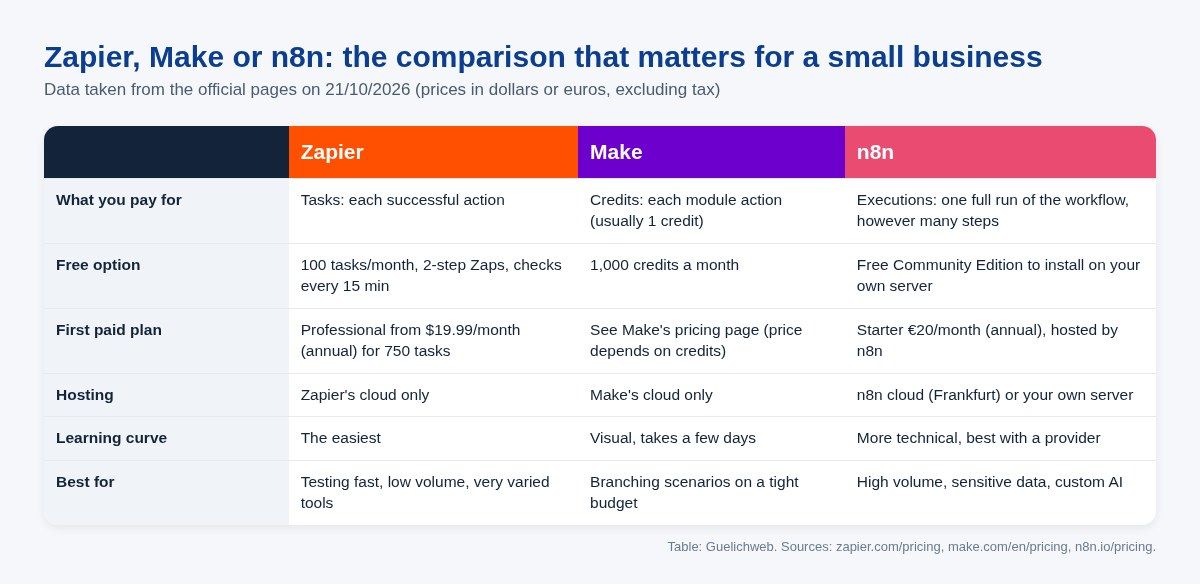
Diagram: Zapier, Make and n8n compared using their official pricing pages as of 21/10/2026 (Guelichweb).
Choose Zapier if…
You want a result today, without a provider. Your flows are short (two or three steps), your volume is modest, and you use mainstream tools that the catalogue covers well. Zapier is the easiest of the three to learn, and that's a real advantage when nobody on the team is technical.
Choose Make if…
Your scenarios involve conditions, loops and data transformations, and you want to keep the budget under control. Make (formerly Integromat) bills in credits, usually one credit per module action, and its free plan gives you 1,000 credits a month (Make pricing page). For slightly longer flows, the cost gap with Zapier widens quickly. Its visual editor takes a few days to learn.
Choose n8n if…
Your volume is high, your data is sensitive, or you want to build custom AI agents. n8n bills per full workflow execution, however many steps it has: €20 a month billed annually for the hosted Starter plan, about 13,100 FCFA at the euro's fixed rate (n8n pricing page). Above all, the Community Edition can be installed free on your own server. In return, someone has to install it, secure it and keep it updated.
Where we stand at Guelichweb
We don't sell a tool, we automate processes. But we do have an opinion, and here it is.
Zapier is the best tool for testing an automation when you're on your own, with no technical budget and mainstream apps. For an SME that wants to run processes day to day, we rarely recommend staying on it: per-task billing in dollars and an English-only interface weigh too much. Most of the time we start with Make for simple to medium flows, and move to n8n as soon as volume rises, data has to stay under your control, or a WhatsApp chatbot comes into play. That's the thinking behind our WhatsApp chatbot and n8n automation in Benin offer.
One case where we firmly recommend Zapier: when the tool you depend on only exists in its catalogue, and your volume will stay low. The catalogue is its strongest argument, and it would make no sense to build a custom integration for twenty operations a month.
The mistakes we see most often
- Choosing the tool before describing the process. If nobody can say who does what when a request comes in, Zapier will simply automate the mess.
- Not counting tasks. Multiply the number of events by the number of actions before choosing a plan. Do it for your busiest month, not your average one.
- Creating accounts in the provider's name. Your Zapier, Make or n8n account must be in your name, with a company email. Otherwise, the day you change provider, your automations leave with them.
- Nobody watching. A failing Zap sends an alert email. If that email lands in an inbox nobody reads, the outage can last for weeks.
- Automating everything at once. One well-chosen flow, observed for a month, teaches you more than ten fragile Zaps launched on the same day.
- Forgetting about personal data. Your customer data passes through the tool's servers. For health records, banking details or beneficiary data, ask where it's hosted before you connect anything.
Before you start: 5 questions to ask yourself
- Which specific process do you want to automate, and how much time does it take each week today?
- How many times a month does the trigger event happen, and how many actions follow it?
- Are your tools (form, CRM, payment, messaging) in Zapier's or Make's catalogue, or will you need webhooks?
- Who on your team will monitor the automations and fix errors, and which language are they comfortable in?
- Is the data sensitive enough that it must stay on a server you control?
If you have clear answers to all five, the choice of tool becomes almost obvious. If you're stuck on the first one, that's where to start, and it's often where an outside view helps most. To prepare your overall budget, our article How much does AI automation cost in Benin? sets out the costs to plan for.
Related reading: What is Canva, WhatsApp chatbot and Website, WhatsApp and CRM.
Frequently asked questions about Zapier
What is Zapier in simple terms?
It's a no-code automation tool: it connects your apps and runs actions automatically when an event happens. People also call it a "connector" or a no-code platform.
Is Zapier free?
There's a permanent free plan: 100 tasks a month, two-step Zaps and checks every 15 minutes. Multi-step Zaps, webhooks and premium apps require a paid plan.
Is Zapier available in French?
The marketing site, yes. The app and help centre, no: Zapier says they're only available in English and suggests using browser translation.
Zapier or Make: which is cheaper?
For short, infrequent flows, the gap is small. Once your scenarios have several steps and run often, Make usually works out cheaper. Do the sums with your own volumes on both pricing pages.
Can you connect WhatsApp to Zapier?
Yes, through apps such as WhatsApp Notifications (marked premium, so paid plans only) or WhatsApp Business. Sending relies on the official WhatsApp API and its message templates, with Meta's own charges.
Can you pay for Zapier from Benin?
Yes, with a bank card that accepts international payments. Billing is in dollars or one of the supported currencies, not in FCFA. Allow for bank fees and exchange-rate swings.
Does Zapier offer a discount for NGOs?
Yes, Zapier advertises an extra 15% discount for non-profits, excluding pay-per-task overage charges. Make also says it supports NGOs, on request.
What is a Zapier task?
A successful action in a Zap. A Zap that adds a row and sends an email uses two tasks every time it runs. The trigger and built-in tools (filters, formatter, delays) don't count.
Want to know which tool suits your organisation?
We start from your real process, your volumes and your constraints (language, payment, data), then recommend Zapier, Make or n8n, with no built-in preference. The cost of setting it up depends on that diagnosis, as explained on our offers page, and all our services are described on the Services page.
Tell us which task wastes the most of your time: [contact us](https://guelichweb.online/en/contact) for a first conversation.