What is Canva? 2026 pricing, the free plan and the real limits for your business brand
G. CHRIST
Published on October 18, 2026
In many of the small businesses, associations and even public offices we work with in Benin, the posters, Facebook visuals and business cards all come from the same place: Canva. Usually an intern or a relative "who's good with this stuff" opened an account one day and everyone followed. It works, it's fast, it's free. Until the day you want to register your logo as a trademark, the account gets locked, or you notice that the competitor across the street is using exactly the same poster template.
In this guide I explain, without jargon, what Canva is, what you can really do with it, what its plans cost in 2026 (figures taken from the official page), the free offer most NGOs don't know about, and above all the limits you should know before making it the foundation of your organisation's visual identity. Our position is simple: Canva is an excellent production tool. It is not a brand identity.
What is Canva? A simple definition
Canva is an online graphic design tool. It lets you make visuals (social media posts, posters, flyers, presentations, documents, short videos, business cards) from ready-made templates, by dragging and dropping text, photos and shapes. You don't need to know how to draw or install heavy software: everything runs in the browser, or in the app on your phone and computer.
Canva launched in 2013. On its official page it claims more than 220 million monthly active users, a presence in 190 countries and over 100 languages (Canva, About). French is one of them, which partly explains its success in French-speaking Africa.
Official Canva logo, cropped from canva.com. The trademark belongs to Canva Pty Ltd.
If you were wondering what kind of software Canva is, the short answer is: online design software (also called a web app or SaaS, meaning software you rent over the Internet rather than install). It belongs in the same family as Adobe Express or Microsoft Designer, not next to Photoshop or Illustrator, which are tools for professional designers.
What an SME, NGO or institution can actually do with Canva
In practice, these are the uses where Canva saves a small organisation time every week:
- Posts for Facebook, Instagram, WhatsApp Status and LinkedIn: promotions, opening announcements, opening hours, job offers, short press releases.
- Posters and flyers for an event, an awareness campaign, a training session or an open day, exported as PDF for the printer.
- Presentations for a donor meeting, a board meeting or a tender.
- Simple documents: formatted activity reports, product sheets, short catalogues, restaurant menus.
- Short videos for social media, using animated templates.
- Variations: the same visual adapted to square, story and banner formats, which takes hours by hand.
Canva also lets you publish a very simple website. For an event page, that's handy. For a company's main website that needs to be found on Google, it's another story: we explain why in our article on what you really get with a free website.
How it works, in five steps
- Create an account with an email address, a Google account or a Facebook account. Business tip: use an address in the organisation's name (for example communication@your-domain), not an employee's personal inbox.
- Pick a format or a template: "Instagram post", "A3 poster", "16:9 presentation"… Canva offers thousands of templates sorted by use.
- Customise: replace the text, add your photos, your colours and your logo.
- Download the result as PNG or JPG for the web, PDF for print, or MP4 for a video.
- Share or publish: send an edit link to a colleague, or schedule a social media post (a paid-plan feature).
If you want a guided introduction, Canva's own design school and help centre are free, and French readers will find a clear public walkthrough from France's national agency for territorial cohesion (Les Bases du numérique, Canva sheet, in French).
Canva pricing: what do the plans cost in 2026?
Canva works on a "freemium" model: a very complete free version, then paid plans. Here is what the official pricing page showed on 18 October 2026, with yearly billing selected (Canva, Plans and pricing):
- Canva Free: 0. More than 1.6 million templates, more than 4.7 million photos, videos and graphics, 1 Brand Kit limited to 3 colours, 5 GB of storage, and up to 20 uses of the AI tools per month.
- Canva Pro: US$120 per year, for one person. More than 3.6 million templates (including premium), more than 141 million premium assets, 5 Brand Kits, AI tools (resize, translate, background remover), post scheduling, 100 GB of storage.
- Canva Business (called "Pro+" on the French-language page): US$210 per year, per person. Everything in Pro, plus team collaboration and admin tools, 100 Brand Kits with approvals, 500 GB of storage and more AI.
- Canva Enterprise: on quote, for large organisations (single sign-on, security controls, 1 TB of storage).
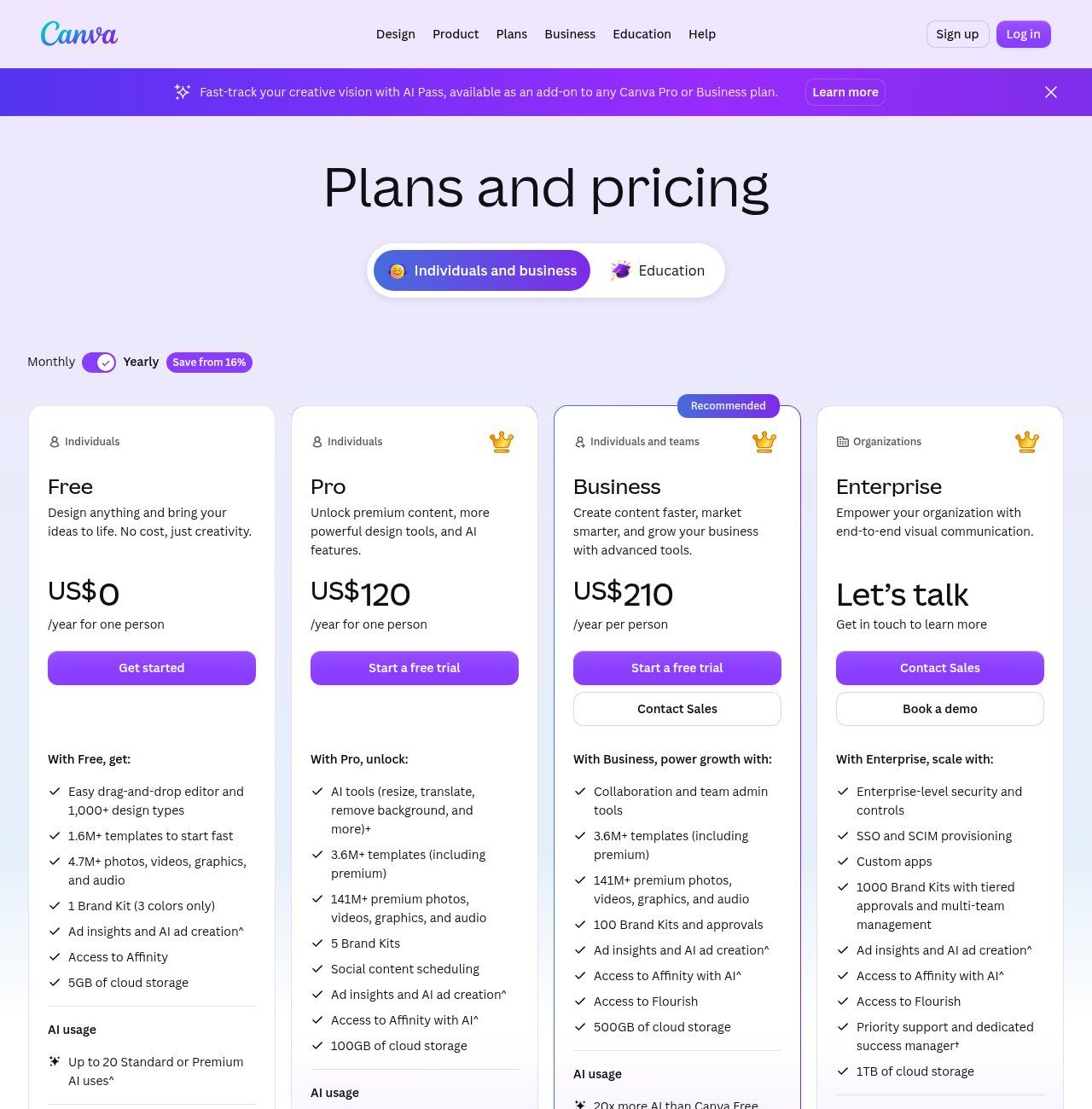
Source: Canva's official "Plans and pricing" page (canva.com/pricing), screenshot taken on 18/10/2026 with yearly billing selected.
Three important clarifications, because this is where online comparisons often go wrong:
- The price depends on your country and currency. Canva adjusts its prices to the region you browse from: the same page can show euros in France and dollars elsewhere. The amount that matters is the one you see in your own account at checkout, tax included.
- Monthly billing costs more. The French page shows a saving of "16% or more" with yearly billing.
- Pro is for one person. Canva says it plainly: a Pro account can only be used by one person. Sharing a Pro password among five colleagues breaks the terms and often ends with a locked account. For a team, the intended plan is Business (Pro+).
For payment, Canva accepts PayPal and Visa, Mastercard and American Express cards, plus other methods in some countries (same page, FAQ section). For an organisation in Benin, that means in practice a bank card that works internationally, or a PayPal account. Mobile Money is not on the list.
Free Canva for NGOs, nonprofits and schools: the offer many miss
This is what surprises me most in the field: NGOs pay for a subscription, or make do with the free version, when they could get the equivalent of Pro at no cost. The Canva Nonprofits programme gives registered nonprofit organisations free access to all Canva Pro features, plus collaboration tools for one team of up to 50 users. Additional seats are 50% off (Canva Nonprofits).
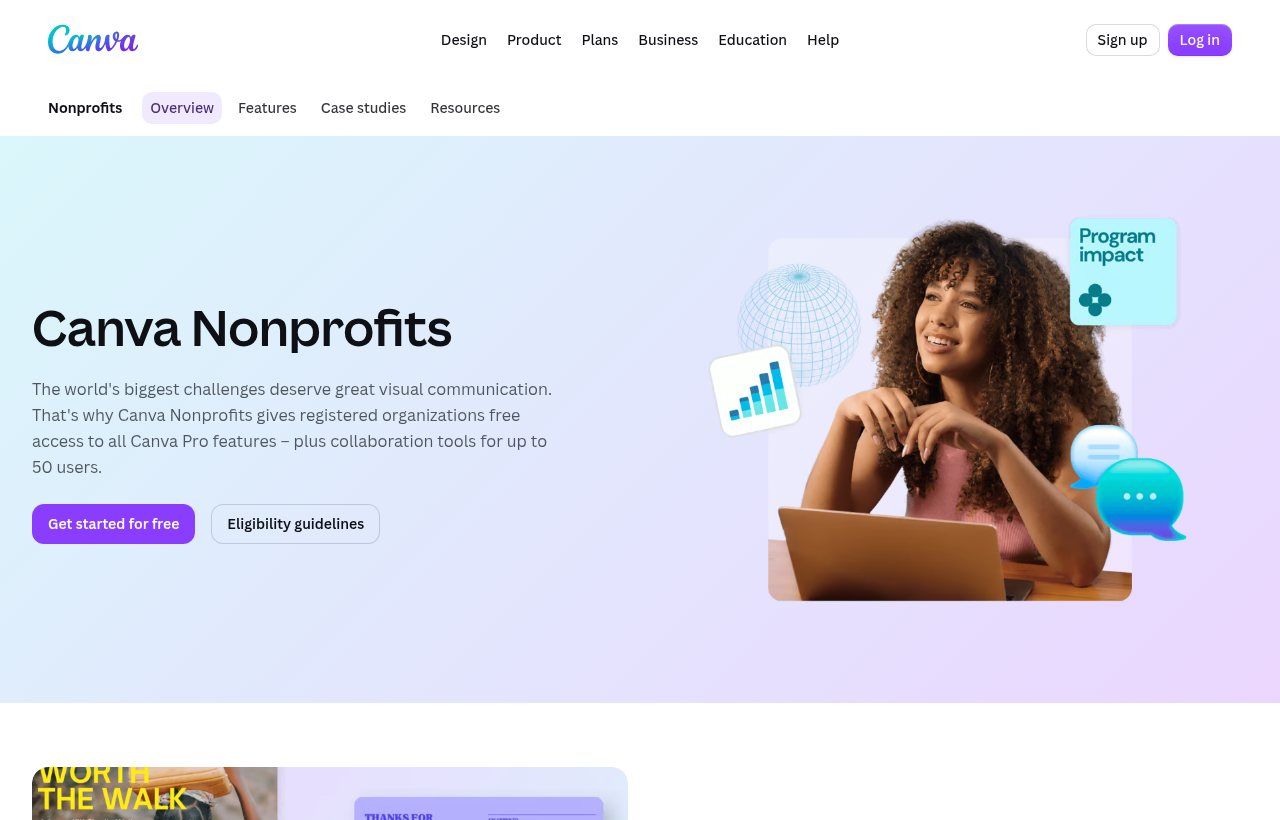
Source: official Canva Nonprofits page (canva.com/nonprofits), screenshot taken on 18/10/2026.
The conditions, as Canva publishes them: be officially registered as a charitable nonprofit, be independent from government and not operate for commercial profit. Government agencies, political organisations, educational institutions, for-profit companies and grant-making foundations are excluded. An NGO or association registered in Benin, with its statutes and registration receipt, should therefore apply. The decision is Canva's, which checks the documents.
For education, there is Canva for Education, reserved for primary and secondary teachers, their students and eligible schools, and Canva for Campus for higher education (Canva for Education). Private schools and training centres should check eligibility case by case.
One last word on Affinity, which shows up in search suggestions. Affinity is a suite of professional design software acquired by Canva. Its official website says it is now free for individuals (Affinity). That's good news for a freelance designer who wants to work in vector without paying for a licence.
"Canva Pro free APK": why it's a bad idea
Among the most frequent searches in Benin, Côte d'Ivoire and Senegal are "canva pro gratuit apk" (free Canva Pro APK), "canva pro free for life" and "canva pro team invite link". These are modified versions of the app, or invitations into teams shared by strangers. Our view leaves no room for nuance: for a business, avoid them.
- Security risk: a modified app downloaded outside the Play Store can contain anything, and it runs on the phone that receives your business WhatsApp messages.
- Legal risk: Canva's content licence states that Canva can terminate the licences without notice if you fail to comply with its terms. You must then stop using the designs concerned (Canva, Content License Agreement). Imagine having to take down every poster you have.
- Risk of loss: in a "team" joined through a link, your designs live in someone else's workspace. The day they close the team, you lose everything.
If money is tight, the official free version is more than enough to start, and NGOs have the Nonprofits offer.
The real limits of Canva for a business's visual identity
This is where the difference between "having nice visuals" and "having a brand" plays out. Canva is very good at production. It has clear limits as soon as we talk about exclusivity, ownership and consistency.
1. A logo made from a Canva template cannot be registered as a trademark
This is not our interpretation: it's in Canva's help centre. Logo templates can be used by anyone, so your rights to a logo made from a template are non-exclusive, and you cannot register it as a trademark. The same goes for a logo built with photos or graphics from the library: Canva only grants a non-exclusive licence, and the elements of a registrable logo must be unique (Canva, Trademarked logos created on Canva).
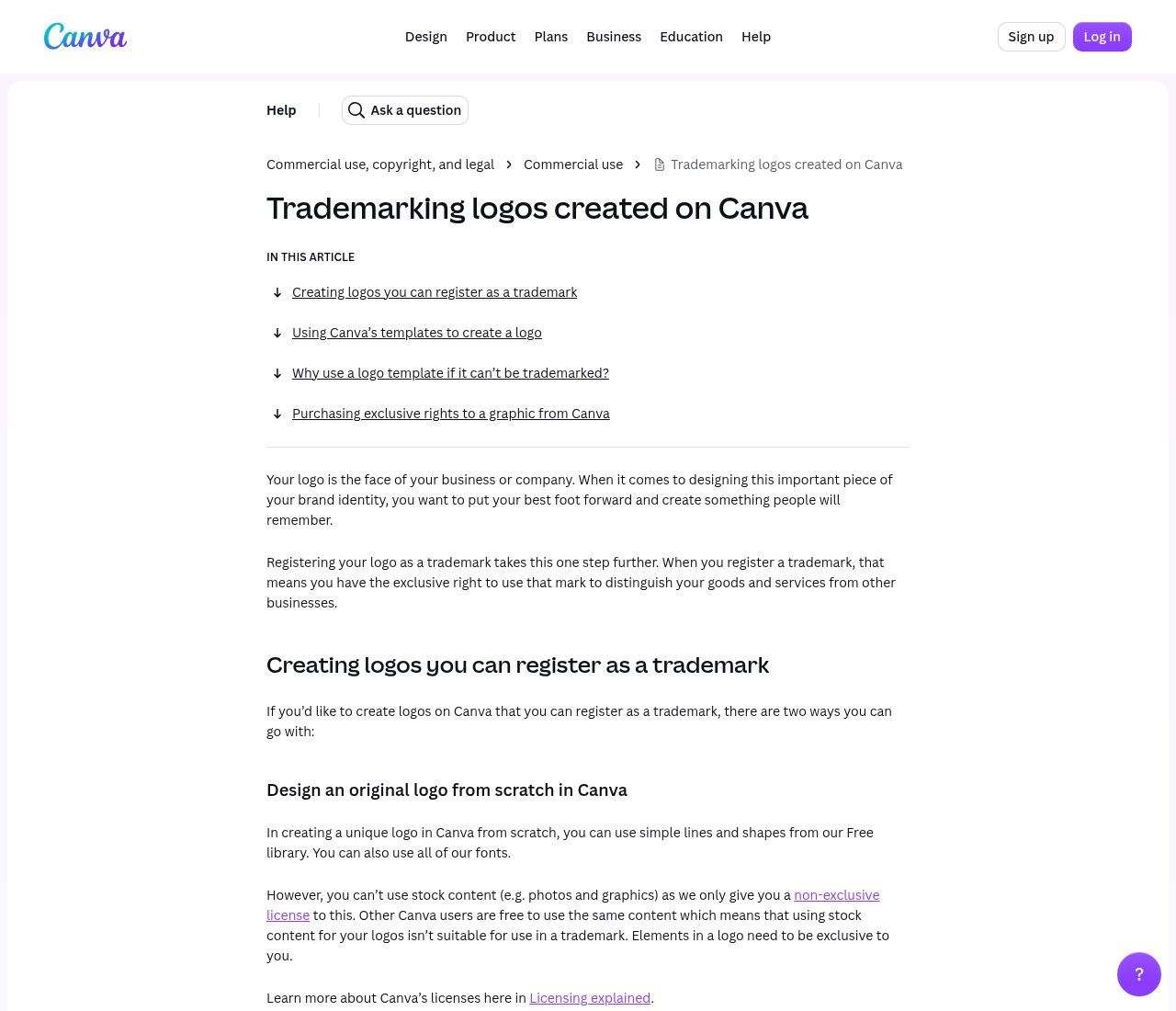
Source: Canva help centre, article on trademarked logos (canva.com/help/trademarks-logo), screenshot taken on 18/10/2026.
For a business in Benin, trademarks are registered with OAPI, the African Intellectual Property Organization, which covers 17 member states including Benin (OAPI). If you plan to protect your name and logo one day, start from an original design, made by you or by a designer, with simple shapes and fonts whose licence allows it. We detail the method in how to create a logo for your business.
2. Your competitors can use exactly the same templates
The best-looking templates are also the most used. In Cotonou we sometimes recognise the same poster layout at three different organisations in the same week. For customers, it blurs the message: your promotion looks like the one next door. The answer isn't to drop Canva, it's to create your own templates once and for all, then stop starting from public ones.
3. The free version limits your brand guidelines
With Canva Free you get a single Brand Kit limited to 3 colours. That's often enough for a small shop, but not for proper brand guidelines with primary and secondary colours and set fonts. Pro moves up to 5 Brand Kits, Business to 100 with an approval workflow, according to the pricing page.
4. Premium assets don't belong to you
Premium photos, graphics and music are licensed for use inside a design. The licence forbids copying, downloading or distributing them as a standalone item (Canva content licence). So you can't pull a premium illustration out to print it on its own on T-shirts or resell it.
5. The working file stays at Canva
A Canva design isn't a file you keep on your hard drive: it's a document inside an online account. If that account belongs to a former employee, a contractor or a nephew, your communication is in their hands. Make sure designs sit in an account or team in the organisation's name, and keep a copy of your logos as source (vector) files outside Canva.
6. The tool doesn't replace strategy
Canva helps you lay out a message well. It doesn't tell you which message to carry, to whom, or with what proof. The best visuals we see aren't the most decorated ones: they're the ones that clearly state the offer, the price or the date, and how to act (a WhatsApp number, a link). It's the same logic as for a website: a pretty design that doesn't convert doesn't serve the business, as we explain in why your website is not bringing you customers.
Our view: when Canva is enough, and when to call a professional
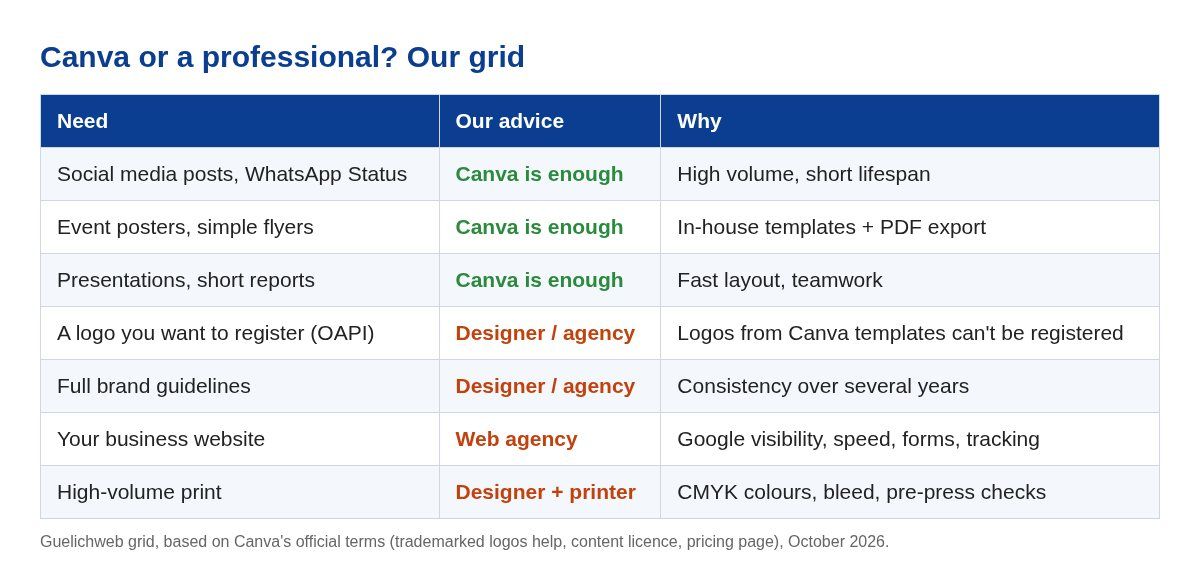
Table made by Guelichweb from Canva's official terms (help on trademarked logos, content licence, pricing page).
Canva is enough when you produce everyday materials: posts, event posters, internal presentations, small brochures. It's also enough to test an idea before investing.
A professional pays off as soon as the stakes are longevity and ownership: the logo you want to register, the brand guidelines that need to last five years, the website that needs to be found on Google, or high-volume print where a colour mistake is expensive. The best setup, in our view, combines both: a designer or agency creates the logo, the guidelines and a dozen in-house templates, then your team adapts them in Canva day to day.
Using Canva well in a business: 8 simple rules
- One account in the organisation's name, with a business email address, never an employee's personal account.
- An original logo uploaded, ideally supplied as SVG or high-resolution PNG by whoever designed it, rather than a logo taken from a template.
- A complete Brand Kit: exact colours (hex codes), fonts, logo in light and dark versions.
- Your own templates for recurring formats (promotion, announcement, job offer, quote), saved as team templates.
- A naming rule: date, subject, format. Six months from now you'll find the campaign poster in two seconds.
- The right export: PNG or JPG for the web and WhatsApp, PDF for the printer. Ask your printer whether they want a CMYK file, an option Canva offers for print.
- Light images for your website: a 3 MB image slows a page down on mobile. Compress it before uploading.
- One person in charge who approves before anything goes out. Consistency comes from a human decision, not from a tool.
Going further: Canva, data and automation
Things get interesting for an SME when you stop remaking the same visuals by hand. Canva offers bulk design creation: from a table (names, prices, dates), it generates one version of the design per row. A 40-product catalogue, 30 training certificates or badges for a seminar take a few minutes.
The source table can live in Google Sheets, which we introduce in what is Google Sheets?. And when the need grows (emailing each certificate automatically, publishing the product sheet, alerting the team on WhatsApp), you move to an automation tool such as Make or n8n, which we compare in n8n or Make: which automation tool to choose. That's exactly the kind of workflow we build at Guelichweb.
Our view in one sentence
Use Canva to produce fast and well every day, but build your logo and brand guidelines outside the templates, otherwise your brand doesn't really belong to you.
Related reading: What is an AI agent, What is a CRM and What is the WhatsApp Business API.
Frequently asked questions about Canva
Is Canva really free?
Yes. The free version has no time limit and gives access to more than 1.6 million templates. Items marked with a crown are reserved for paid plans, and AI is limited to about 20 uses per month.
How much does Canva Pro cost per month?
On 18/10/2026 the official page showed US$120 per year for Pro with yearly billing. Monthly billing costs more, and the exact amount depends on your country and currency: check it in your account before paying.
Can I pay for Canva from Benin?
Yes, with a Visa, Mastercard or American Express card that works online, or with PayPal. Canva says it accepts other payment methods in some countries, to be checked at checkout.
Can I register a logo created on Canva as a trademark?
Only if it's original: simple shapes and fonts, with no logo template and no library elements. A logo made from a Canva template cannot be registered as a trademark, according to Canva's official help.
Can my NGO get Canva Pro for free?
If it is officially registered as a nonprofit, independent from government and without commercial activity, yes: it can apply for Canva Nonprofits, which offers Pro features for one team of up to 50 people.
Does Canva work without the Internet?
Canva remains an online service. Its pricing page announces a "Canva offline" feature to access your files without a connection, but syncing, templates and AI need a connection.
Canva or Photoshop: which one should I choose?
Canva to produce materials quickly from templates, with no training. Photoshop, Illustrator or Affinity for a designer creating a logo, an illustration or advanced photo retouching. Many teams use both.
Need a visual identity that truly belongs to you?
At Guelichweb, we help SMEs, NGOs and institutions build solid foundations: a professional website, a presence on Google, and automations that save the team time. The price depends on your project: we quote after a diagnosis, as explained on our offers page. Discover our services and our website creation in Cotonou, or contact us to talk about your communication.