What is an API? A simple definition, real examples and practical business uses
G. CHRIST
Published on October 26, 2026
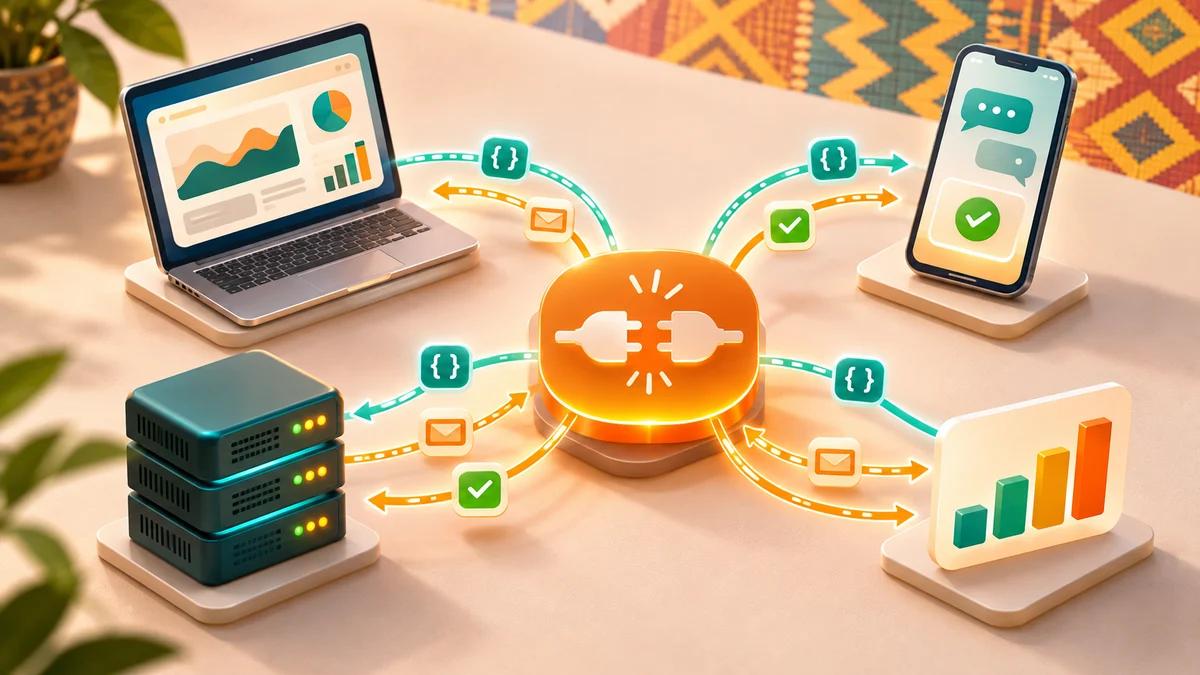
A customer pays by mobile money on your website. Three seconds later the order switches to "paid", a receipt goes out by email and your team gets an alert on WhatsApp. Nobody copied anything by hand. There is no magic behind this everyday little miracle. There are APIs.
The word shows up everywhere: in agency quotes, in online payment offers, in automation tutorials. And it is almost always explained by developers, for developers. At Guelichweb we spend a good part of our time connecting tools together for small businesses, NGOs and public institutions. So here is our version: what an API is, how it works, what it actually does for an organisation in French-speaking Africa and beyond, and the questions to ask before you rely on one.
What is an API? The simple definition
API stands for Application Programming Interface. France's data protection authority, the CNIL, describes it as a software interface that "connects" one piece of software or service to another so they can exchange data and features.
Put differently: an API is an official front door that a piece of software opens to other software. Instead of a person logging in, clicking around and copying information, a program sends a standardised request and receives a standardised answer. Neither system needs to know how the other works inside. They simply follow the same contract.
The most common analogy, used among others by the French government's Simplifions guide on data.gouv.fr, is the waiter in a restaurant. You do not walk into the kitchen. You order from the waiter, who passes the order on and comes back with your dish. The API is that waiter between two computers. The menu is the API documentation: the list of what you are allowed to ask for, and in what form.
An API is a service counter. You are not allowed into the back office, but you get a fast, consistent answer, as long as you fill in the form properly.
How an API works, without the jargon
Most of the APIs a business deals with are web APIs, often called "REST" APIs. They travel over the internet using HTTP, the same protocol your browser uses. Every exchange follows the same pattern.
- The client sends a request. The "client" here is not a person: it is the software doing the asking (your website, your mobile app, an automation tool such as n8n).
- The request targets a specific address, called an endpoint. It is a URL, just like the ones you type into a browser. If URLs still feel fuzzy, our article What is a URL? walks through each part of a web address.
- It states an action using a method: GET to read, POST to create, PUT or PATCH to update, DELETE to remove.
- It proves who is asking, usually with an API key or a token placed in the request header.
- The server replies with a status code (200 = all good, 401 = unauthorised, 404 = not found, 500 = server-side error; the full list is on MDN) and, usually, data in JSON format.
JSON looks intimidating at first, but it is just text organised into "name: value" pairs. A person can read it, and a program reads it even better. That is what lets two pieces of software, written by different teams, in different languages, on different continents, understand each other.
What does a real API response look like?
Nothing beats a real example. Open-Meteo offers a free weather API for non-commercial use. We asked it for the current weather in Cotonou, Benin, simply by typing this address into a browser. Here is what came back:
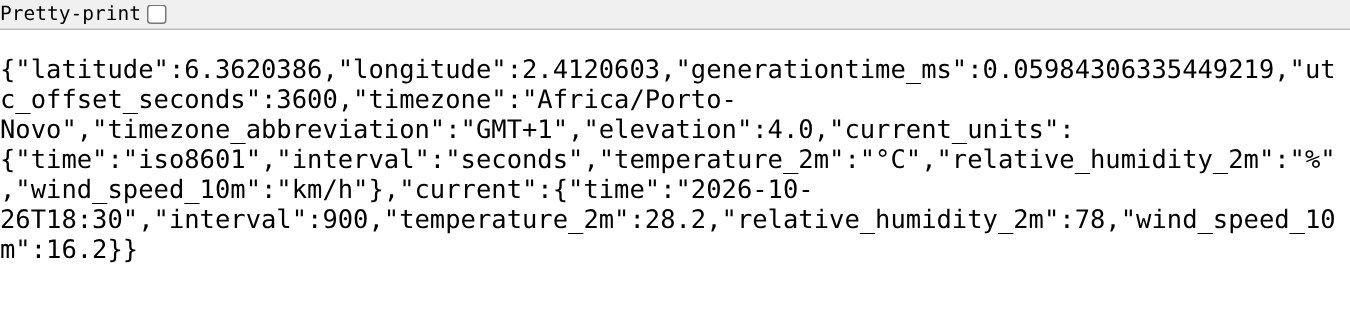
Source: response from the public Open-Meteo API, api.open-meteo.com, captured on 26/10/2026 at 6:30 pm (Benin time).
Look at the last line: "temperature_2m": 28.2, "relative_humidity_2m": 78, "wind_speed_10m": 16.2. No layout, no pictures, no buttons. Just the data. That is the whole difference between a web page, built for human eyes, and an API, built for programs. A weather app takes exactly this text and displays it with nice icons.
Swap "weather" for "till balance", "payment status", "product stock" or "list of people registered for a training session", and you have grasped 80% of what APIs change inside an organisation.
API examples you already use
You use APIs every day without noticing. A few telling examples:
- "Sign in with Google" on a website: the site asks Google's API to confirm who you are, without ever seeing your password.
- Mobile money or card payment in an online shop: the site sends the amount to a payment provider's API, which then sends back the result.
- The Google Maps map on a "Contact" page: it is displayed through the Google Maps API.
- Parcel tracking with a courier: the seller's website queries the courier's API.
- A WhatsApp chatbot answering your customers: it receives and sends messages through Meta's WhatsApp Business API.
- An AI assistant built into a tool: the tool sends your question to a language model's API and shows you the answer.
That last point matters more and more. When a company says "we added AI to our software", it has very often plugged in an AI API. It is also how an AI agent works: a program that calls several APIs to complete a task on your behalf.
API vs webhook: the difference that makes or breaks automation
Standard definitions explain this poorly, yet it is what decides whether an automation runs smoothly or keeps limping.
- With an API, you ask. Your tool queries the service: "has order 42 been paid?". If you want to know the moment it gets paid, you have to keep asking at regular intervals. This is called polling.
- With a webhook, the service tells you. You give it an address, and as soon as an event happens (payment approved, form submitted, message received), it automatically sends the details to that address.
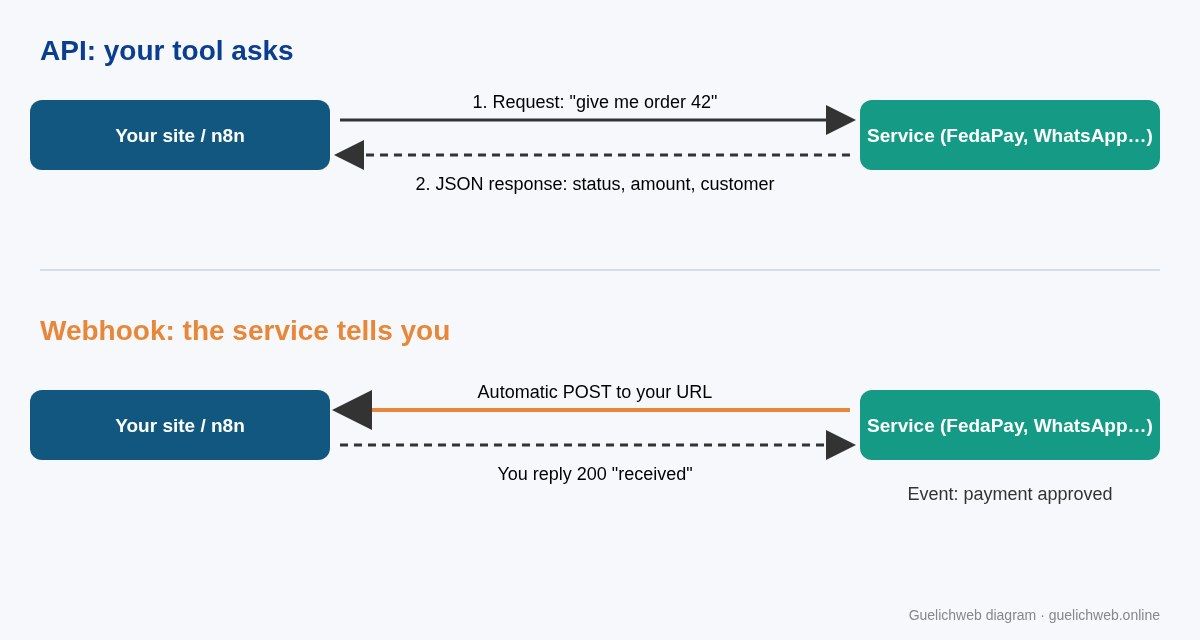
Diagram by Guelichweb: your tool on the left, the external service on the right.
In practice, good integrations use both. The webhook flags the event immediately; the API is then used to fetch the full, up-to-date details. The documentation of FedaPay, a payment aggregator operating in Benin and the wider West African region, shows this well: each time a transaction changes status (created, approved, declined, cancelled), an event is generated and can be sent to the URL of your choice.
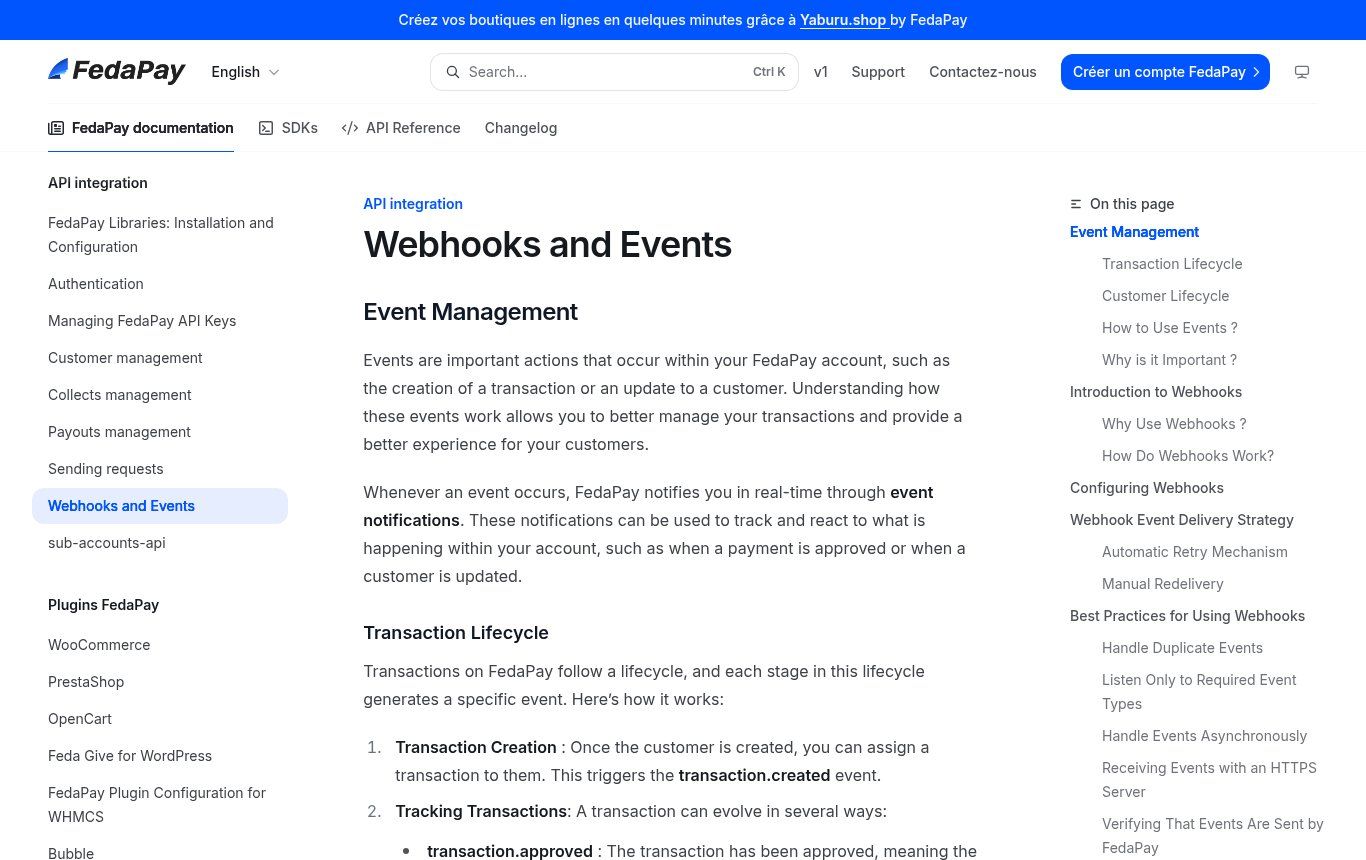
Source: FedaPay developer documentation, "Webhooks and Events" page, docs.fedapay.com, captured on 26/10/2026.
That same page sets out rules we apply on every project, whatever the provider: answer very quickly with a 2xx code and do the heavy processing afterwards; check the message signature to make sure it really comes from the service; handle duplicates, because the same event can arrive twice; and only listen to the events you need. FedaPay also states that when delivery fails it retries up to 9 times, then disables the webhook after 10 failures. That detail matters: if your server goes down over a weekend, your payments stop being reported until someone notices.
What an API actually changes for a business, an NGO or an institution
You can talk architecture for hours. What a manager cares about is what it saves. Here are the cases we see most often.
1. No more double data entry
A quote request comes in through the website form. Someone copies it into a spreadsheet, then into the CRM, then into a WhatsApp message to the salesperson. Three entries, three chances to make a mistake. With APIs, the form feeds the CRM or a Google Sheets file directly, and the alert goes out on its own.
2. Collect and confirm payments with no manual step
For an online shop, a school collecting registration fees or an NGO receiving donations, the payment webhook is the core component. It updates the order, generates the receipt and notifies the customer. Our guide on creating an online shop in Benin shows where this piece fits into a full project.
3. Talk to customers where they already are
In West Africa, many customers prefer WhatsApp to web forms. Meta's WhatsApp Business Platform (Cloud API) lets you send confirmations and appointment reminders, or reply automatically. We cover how it works and how it is billed in WhatsApp Business API: what it is and what it costs, and what a bot can reasonably do in WhatsApp chatbots: what they really do.
4. Reports that update themselves
An NGO has to report to its donors. An institution tracks indicators. Instead of exporting files by hand every month, data from several tools (field forms, accounting, CRM) can flow through APIs into a single dashboard. The report stops being a monthly chore and becomes a page you simply open.
5. Add AI without changing your tools
Summarising incoming messages, sorting requests, drafting a first reply: all of this goes through an AI model's API connected to the tools you already have. It is often the most sensible way to start with AI, because nobody is forced to change their habits.
Do you need to code to use an API?
Not really, not any more. That is exactly why automation tools such as n8n, Make and Zapier have taken off. They offer ready-made connectors for hundreds of services and, when no connector exists, a generic block that can call any API.
In n8n, that block is called HTTP Request. Its documentation explains that it can query any service with a REST API: you pick the method, paste the URL, set up authentication, and you can even import a "curl" command copied straight from the service's documentation.
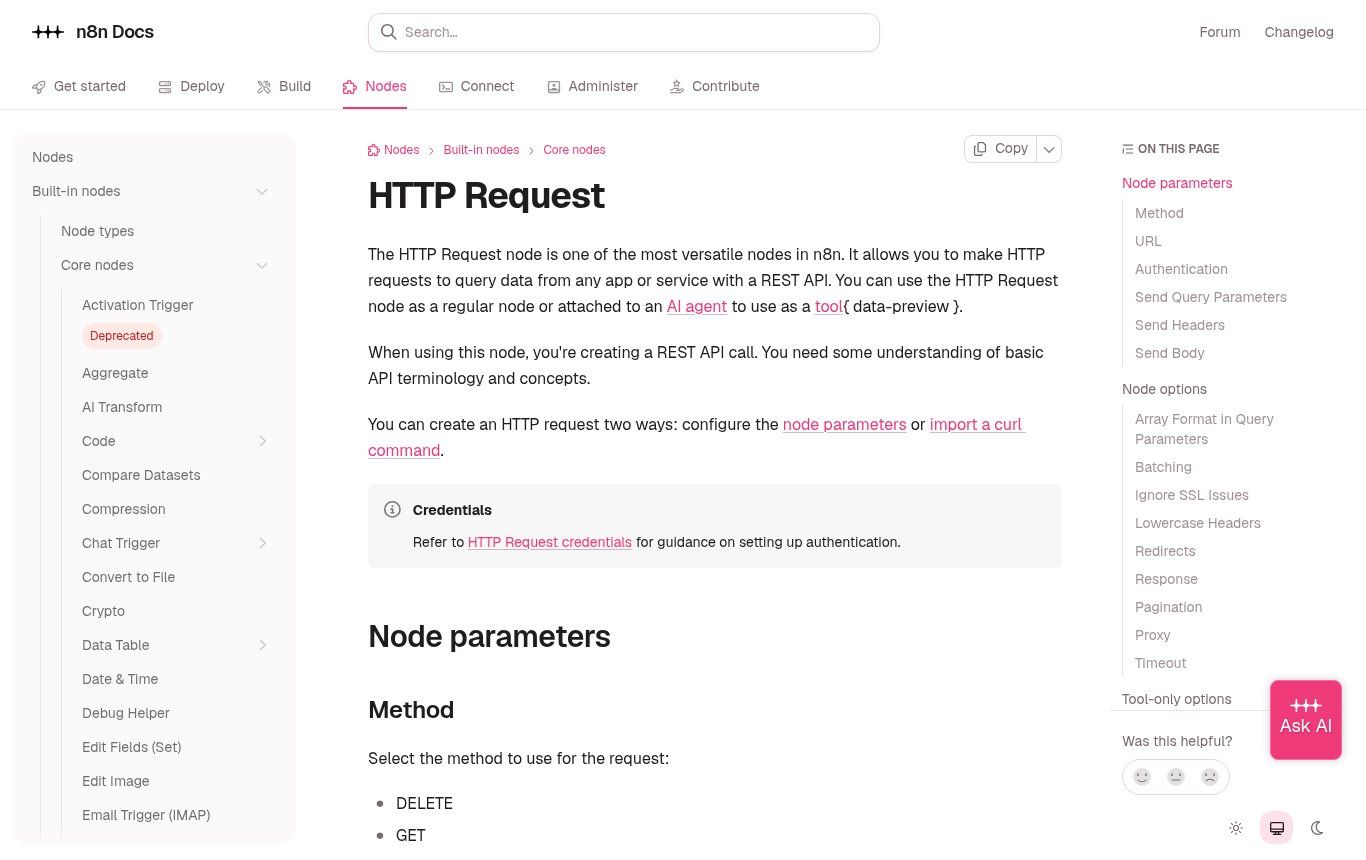
Source: official n8n documentation, "HTTP Request" page, docs.n8n.io, captured on 26/10/2026.
Its counterpart on the receiving side is the Webhook node: it creates a URL that you give to the external service, and every notification it receives triggers your workflow. To choose between these tools, read n8n or Make: which automation tool to choose and our comparison of Zapier, Make and n8n.
Our view, after many projects: knowing how to code is not essential, but knowing how to read API documentation is. Someone who understands what an endpoint, a key, a 401 code and a JSON response are will move ten times faster, even in a no-code tool. That is the skill we recommend for whoever looks after digital tools in-house.
API keys: what to know (and what never to do)
An API key is an access badge. Whoever holds it talks to the service in your name: they can read your customer list, create transactions, send messages billed to your account. Treat it like the code to your safe.
- Never paste it into a WhatsApp message, an email or a shared document. Share it through a password manager, or enter it directly into the tool.
- Never put it in a website's visible code (browser-side JavaScript). Some services provide a public key meant for that; the secret key stays on the server.
- Keep test and production apart. FedaPay, like most payment services, provides test keys and live keys. Build with the former.
- One key per use, so you can revoke one without breaking everything.
- Revoke it when a contractor or employee who had access leaves, just as you would change the locks.
- Grant the minimum rights. If an integration only needs to read, do not let it delete.
This is not paranoia. The reference OWASP API Security Top 10 project lists the most common API weaknesses, and authorisation and authentication problems sit at the top. Attackers know APIs are often watched less closely than a website's visible pages. And of course, any serious API runs over HTTPS: our article on SSL certificates explains why.
Free or paid APIs: what does it cost?
There is no single price, and be wary of anyone who quotes one without looking at your case. Three things need to be separated.
- The cost of using the API itself. Some are free (many public and open-data APIs), some are free up to a certain volume, others are billed per call, per message or as a percentage of each transaction. Online payments are generally charged per transaction; the WhatsApp API per message, depending on its category. Always check the provider's official price list.
- The cost of the tool that links things together, if there is one: an automation tool subscription, or hosting for an n8n instance.
- The cost of setting it up and looking after it: understanding the need, configuring, testing failure cases, documenting, monitoring. It is often the most underestimated item, yet it is what separates a reliable integration from a constant source of breakdowns.
We wrote a whole article on this: how much an AI automation costs in Benin. For Guelichweb projects we do not publish fixed prices: we start with a diagnosis, then provide a tailored quote, as explained on our offers page.
Before you rely on an API: our checklist
Plugging in an API means handing part of your operations to an outside service. Before you commit, ask these questions.
- Is the documentation clear and up to date? A poorly documented API is expensive in development time, every time something changes.
- Is there a test environment? Without a sandbox, every trial runs on real data or real payments.
- What happens when the service is down? A good integration plans for retries, alerts and a fallback mode.
- What are the usage limits? Many APIs cap the number of calls per minute or per day. Make sure your busiest periods (back to school, a fundraising campaign, a sale) will get through.
- Where does the data go? If you send personal data about customers, beneficiaries or patients, check the provider's terms and your own obligations. In Benin, the Digital Code (Code du numérique) governs personal data protection.
- Does the provider keep a change log? APIs evolve. A version history and deprecation notices give you time to adapt.
- Can you get your data back and leave? An API that lets you export your data easily is a good sign. The opposite is a trap.
If a tool you are considering has no API at all, that tells you something too. Sooner or later it will force you to copy data by hand. For a core tool, such as a CRM, a till or a donation platform, we see the lack of an API as a serious reason to look elsewhere.
The mistakes we see most often
- Automating a process that is not clear. An API speeds up what already exists. If nobody knows who approves a quote, automation will just speed up the confusion.
- Planning nothing for failures. An integration that works on demo day and silently breaks a month later is worse than no integration at all.
- Running everything on one person's personal account. Keys and service accounts should belong to the organisation.
- Ignoring duplicates. A payment received twice by webhook must not create two orders or two receipts.
- Confusing "connected" with "reliable". Test with real-life cases: a declined payment, a customer with no email, a name with accents, a network outage.
FAQ: your questions about APIs
What does API mean in computing?
API stands for Application Programming Interface. It is a set of rules that lets one piece of software request data or actions from another, automatically and securely.
What is a simple example of an API?
A weather app showing the temperature: it measures nothing itself, it queries a weather service's API and displays the answer. The "Sign in with Google" button and mobile money payments on a website are other everyday examples.
What is the difference between an API and a website?
A website returns pages formatted for people. An API returns raw data, often in JSON, for programs. Many services have both: a website for you, an API for your tools.
What is a REST API?
It is the most widespread style of web API. It uses HTTP, an address (endpoint) for each resource and standard methods such as GET, POST, PUT and DELETE. AWS gives a detailed explanation.
What is the difference between an API and a webhook?
With an API, your tool asks the question when it needs to. With a webhook, the service sends the information on its own as soon as an event happens. Solid automations often use both.
Are APIs free?
Some are, some are not. Many offer a limited free tier, then usage-based billing. Online payments and WhatsApp messages, for example, are charged according to each provider's price list.
Can my current website be connected to other tools?
Often, yes. It depends on the technology behind the site, the tools you want to connect and whether APIs exist on both sides. That is exactly what we check during a diagnosis.
Want your tools to talk to each other?
If your teams still spend time copying information between a form, a spreadsheet, WhatsApp and the accounts, there is probably an API that can do that job. Contact Guelichweb: we look at your tools and processes, tell you what can be connected and what is not worth it, then send you a quote after diagnosis. You can also explore our WhatsApp chatbot with n8n in Benin offer and all our services.