NGO website: what it should include (donations, reports, transparency)
G. CHRIST
Published on October 24, 2026

Before signing a grant agreement, a funder types your NGO's name into Google. A donor in the diaspora does the same before sending money, and so does a journalist before quoting you. What they find in a few seconds matters more than most organisations think: a Facebook page that has been silent for eight months and a personal WhatsApp number tell a very different story from a clear, up-to-date website with downloadable reports.
At Guelichweb, a web and automation agency based in Benin, we work with SMEs, NGOs and institutions across French-speaking Africa. This article answers one specific question: what should an NGO website include to build trust, raise donations and make life easier for partners? You will find the essential pages, how to set up online giving with mobile money, what to publish in terms of reports and transparency, the technical traps specific to our region, and a checklist at the end.
Why an NGO needs a real website (not just a Facebook page)
Many associations start with a Facebook page and a WhatsApp group. That makes sense: it is free and it is where members already are. But a social network cannot do a website's job. You do not own it, the algorithm decides who sees your posts, documents get lost in the feed, and a funder cannot find your 2024 report in two clicks.
Our position is simple: social media keeps the day-to-day relationship alive, while the website is your official reference. It is where people check that you legally exist, what you do, with whose money and with what results. French guides for associations say the same thing: apart from the legal notice, no page is strictly mandatory, yet visitors consistently look for the same information, such as your presentation, team, projects, partners and activity reports (Animafac practical guide, in French).
One point people often forget: a website on your own domain name also gives you professional email addresses (contact@your-ngo.org rather than a Gmail account). For an NGO dealing with development agencies, that detail counts. If this applies to you, our article on buying and managing a .bj domain name explains how to buy one and keep it under your control.
Who is an NGO website for? Four audiences, four expectations
The first mistake we see on NGO websites is trying to talk to everyone at once, which means talking to no one. Before drawing a single menu, list your audiences and what each one is looking for.
- Funders and technical partners: they want to check your legal status, governance, areas of work, geographic coverage and results. They download documents and they compare.
- Individual donors, including the diaspora: they want to understand the cause in thirty seconds, feel reassured about how the money is used, then give easily from their phone, often from abroad.
- Beneficiaries and communities: they want to know how to reach you, where you work and how to join a programme. They browse on entry-level phones with little data.
- Job seekers, volunteers, journalists and authorities: vacancies, calls for volunteers, press contacts, statements.
Every page on the site should have one main audience and one expected action. If a page has neither, it does not need to exist.
The essential pages of an NGO website
Here is the site structure we recommend as a baseline. It works for a small local association as well as for an NGO running several funded projects. You add pages over time; you rarely remove them.
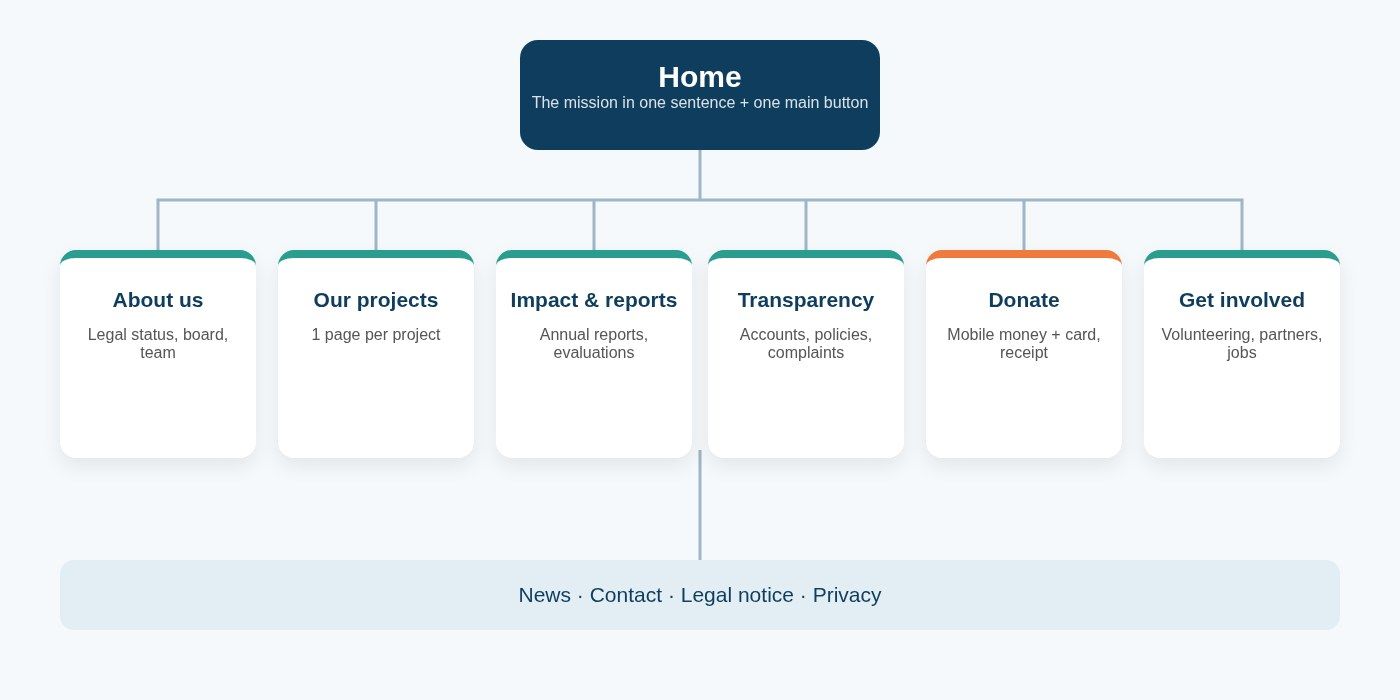
Guelichweb diagram: the basic structure of an NGO website, from the home page to the trust pages.
1. Home page: the mission in one sentence
Visitors should understand within seconds who you help, where and how. One sentence, not a paragraph. Then two or three figures you can prove, a real photo from the field (not a stock image), and a single primary button, usually "Donate" or "Support us". Too many competing buttons and nobody clicks.
2. About us: legal identity and people
This is the trust page. It should tell your story and mission, but above all show what funders check: your legal form, the registration or receipt number issued by your country's authorities, your founding date, head office, board members and their roles, and the operational team with real photos. An NGO that hides who runs it sends a bad signal, even unintentionally.
3. Our projects: one page per project
Do not lump everything into an "Our work" page listing fifteen activities. Create one page per project or programme, always with the same structure: the problem, the objective, the area, the period, partners and funders (with their consent), activities, results to date, and one or two stories from the field. That repeated structure reassures funders and helps Google understand each page.
4. Impact and reports
This is where your annual reports, activity reports, evaluations and studies live. We come back to it in detail below, because it is the part NGOs neglect the most.
5. Transparency and governance
A separate page, even a short one: financial statements, spending breakdown, internal policies, complaints mechanism. The mere fact that it appears in the menu already says something about how seriously you take accountability.
6. Donate
A dedicated page, reachable from every page of the site, that explains what the money pays for and offers several payment methods. It should be the fastest and simplest page on the whole site.
7. Get involved: volunteering, partnerships, jobs
Not everyone will give money. Some can give time, skills, equipment or a corporate partnership. Provide a short form for each type of involvement, and publish your vacancies and tenders here rather than in images shared on WhatsApp.
8. News, contact, legal notice and privacy
News proves the organisation is alive: a site whose latest post is two years old suggests a dormant organisation. The contact page should give a physical address, a monitored email, a phone number that actually gets answered and a realistic response time. Finally, the legal notice and privacy policy are not decorative, especially once you collect donor or beneficiary data.
Online giving that works in West Africa: mobile money first
NGO websites designed in Europe show a credit card donation button and stop there. In our countries, that approach leaves out a large share of local donors, who pay with MTN MoMo, Moov Money, Orange Money or Wave. Conversely, a site that only accepts mobile money loses part of the diaspora and international donors, who use cards. You need both.
In practice, this means using a payment aggregator that combines mobile money and cards in a single form. In Benin, options such as FedaPay or KKiaPay exist, and there are others across the region. Compare transaction fees, the countries and operators covered, payout times, and check the conditions for opening an account as an association. We do not recommend one single provider: the right choice depends on your donors and your bank.
Our firm view: never display a personal mobile money number as a way to donate. It is the quickest way to raise doubts, even when everything is above board. Donations should land in an account held in the organisation's name, with a receipt.
A few rules that make a real difference on the donation page:
- Suggested amounts tied to something concrete, only if you can back it up ("this amount covers one pupil's school supplies for a term"). A figure invented to tug at heartstrings always ends up backfiring.
- A short form: amount, name, email or phone, payment method. Every extra field loses donors.
- An automatic receipt sent by email or WhatsApp, in the organisation's legal name, with the date and amount.
- Recurring giving offered next to one-off gifts, if your payment tool supports it.
- Other ways to give explained clearly: bank transfer with the NGO's account details, in-kind donations, corporate sponsorship, with a named contact person.
This flow can then be automated: each donation logged in a spreadsheet or CRM, a thank-you message sent, a monthly summary for the treasurer. We explain how in our article on CRMs and free tools for small organisations.
Reports and transparency: what funders actually check
This is the heart of the matter, and it is where most NGO websites we review are weakest. The report exists, but it sits on someone's laptop, or it was uploaded once as a 40 MB PDF that nobody can open on a phone.
Documents to publish
- Your annual or activity reports for recent years, at least the two most recent.
- Financial statements, audited if you have them, or at least a clear summary of income and expenditure.
- The list of governing body members and the date of the last general assembly.
- Your internal policies: anti-fraud and anti-corruption, child and vulnerable adult safeguarding, protection from sexual exploitation and abuse, conflicts of interest. If you have them, publish them; if you do not, that is a priority project even before the website.
- A complaints and whistleblowing mechanism, with a dedicated contact.
- A one-page organisation profile, downloadable and current for the year: it is often the first document a partner asks for.
The right way to publish a report
Publish the core of the report as a web page (key figures, a map of your areas, two or three stories, a spending chart), then offer the full PDF as a download. People read a page on their phone; few open a PDF. Compress your PDFs (a few megabytes at most), show the file size next to the link, and name them clearly: "annual-report-2025.pdf" rather than "final doc v3.pdf".
Lead with outcomes, not activities. "312 women started an income-generating activity" says more than "we held 24 training sessions". And only publish figures you can prove: a funder who checks one number and finds it inflated will stop believing the rest.
For NGOs funded by international donors
Some funders ask you to publish your project data using the IATI standard (International Aid Transparency Initiative). Your website does not replace that publication, but a page linking to your IATI data, where it exists, shows you take transparency all the way.
Beneficiary photos and personal data: the red line
NGO websites are full of photos of children, patients and struggling families. They are often the most moving content, and also the most problematic, both ethically and legally. Our rule: no identifiable photo without informed, documented consent, and for minors, consent from parents or guardians. Avoid images that portray people only as victims, and never publish a precise location that could put someone at risk.
On the data side, every form (donation, volunteering, programme registration) collects personal information. Ask only for what you need, explain what it is used for in your privacy policy, and store it securely. In Benin, the personal data protection authority (APDP) is the reference body for these obligations; other countries in the region have equivalent authorities. If your site uses analytics tools, our article on cookies and consent banners explains what you need to display.
Technical requirements specific to our region
A beautiful site that takes twelve seconds to load on 3G in Parakou or Bouaké is useless. According to the GSMA, nearly a billion people in Africa still do not use mobile internet despite network coverage (GSMA, Mobile Economy Africa), and those who do pay for every megabyte. Here are our minimum requirements for an NGO website.
- Mobile first: most of your local visitors will come from a phone. Test every page on an entry-level device, not just on the project manager's laptop.
- Lightweight: compressed images (WebP format), no autoplay video, no heavy animations. Measure with PageSpeed Insights, Google's free tool.
- Secure: HTTPS is mandatory, especially with a donation form. See our article on SSL certificates.
- Properly hosted and backed up: an NGO site going offline on the very day a funder visits happens more often than you would think. Read our comparison of web hosting in West Africa.
- Bilingual if your partners are: an English version of key pages (home, about, projects, reports) is often enough for English-speaking funders. There is no need to translate everything from day one.
- Accessible: sufficient contrast, alternative text on images, properly nested headings. The W3C's WCAG guidelines are the international reference.
- Manageable by your team: your communications officer should be able to publish news or a report without calling a developer.
Google for Nonprofits: an often overlooked lever
Google runs a free programme for non-profit organisations. Its eligibility page lists Benin, Côte d'Ivoire, Senegal, Togo, Cameroon and Burkina Faso among the covered countries, with the organisation validated by a third-party partner (Google for Nonprofits eligibility). Google notes that not every product is available in every country, so check in your account what applies to your NGO, for example collaboration tools or advertising credits.
Why mention this in an article about websites? Because these programmes generally expect a good-quality, secure site with enough content and a clearly explained mission. A well-built website is therefore also the gateway to these free tools. Also remember to set up your Google Business Profile so your NGO shows up on Google Maps.
Template, WordPress or custom website?
Google's suggestions show plenty of searches like "NGO website template" or "free charity website". Templates have their place: for a small association with no budget, a clean theme filled in properly beats having no site at all. Our article on what you really get with a free website covers the limits.
Once the NGO runs several projects, takes donations online and publishes reports regularly, a generic template quickly shows its limits: no structured project pages, no mobile money integration, and slowness that builds up with every plugin. WordPress remains a good option when it is properly configured and maintained; a custom site makes sense when you need a partner area, project tracking or automations. The choice should not come from your provider's favourite tool, but from your needs written down in black and white. Our website requirements document template is a good place to start.
The mistakes we see most often
- A site launched for one project, then abandoned when the funding ends. The website should belong to the NGO, not to a project. Budget for maintenance and updates in your core operating costs.
- The domain name and hosting registered to the provider or a former employee. The day that relationship ends, you lose your site and your emails.
- Reports nobody can find, buried in a "Documents" page without titles or dates.
- Stock photos instead of real field photos: donors notice, and it breaks trust.
- A contact form nobody reads. An unanswered message is worse than no form at all.
- Statistics without a date or source. "10,000 beneficiaries": since when, and counted how?
Checklist: is your NGO website ready?
- The mission can be understood in one sentence on the home page.
- Legal form, registration number, head office and board are visible.
- Each project has its own page with objective, area, period, partners and results.
- The last two annual reports and a financial summary can be downloaded as lightweight PDFs.
- Internal policies and a whistleblowing contact are published.
- The donate button appears on every page and accepts both mobile money and cards.
- An automatic receipt is sent after each donation.
- Beneficiary photos are real and covered by consent.
- The site runs on HTTPS, loads fast on an entry-level phone and is backed up.
- The domain name, hosting and admin access are in the NGO's name.
- The latest news item is less than three months old.
How much does an NGO website cost?
It depends on the number of pages, languages, the donation module, any partner area and the volume of documents. We do not quote prices off the cuff: after assessing your needs, we prepare a detailed quote, as explained on our offers page. To know what a serious quote should contain, read our guide to website costs in Benin. One piece of advice: be as wary of quotes inflated because "NGOs have funding" as of low offers that leave out hosting, security or training.
FAQ: NGO websites
Which pages are mandatory on an NGO website?
Legally, mainly the legal notice and, once you collect data, a privacy policy. In practice, a credible NGO site also has an About page, one page per project, a Reports page, a Transparency page, a Donate page and a Contact page.
Can a small association make do with a free website?
To get started, yes, provided you get your own domain name as soon as possible and fill in the core pages properly. Once you collect donations or apply for funding, a professional site becomes a worthwhile investment.
How do you accept mobile money donations on a website?
Through a payment aggregator that connects your site to mobile money operators and bank cards, with an account in the organisation's name. Donors pay from the donation page and receive an automatic receipt.
Should an NGO publish its accounts on its website?
The law does not always require it, but it is strongly recommended. A clear summary of income and spending, plus audited statements where they exist, reassures funders and individual donors alike.
Should an NGO website be in both French and English?
If you work with English-speaking partners, translate at least the key pages. Otherwise, a well-made site in one language is better than a sloppy machine translation.
How can my NGO show up on Google?
A well-structured website, a Google Business Profile, regular news and links from your partners. Our guide on how to appear on Google walks through the steps.
A website that works for your mission
A good NGO website is not a decorative shop window. It is a trust tool that saves your team time, reassures funders before the first meeting, and lets someone in Cotonou or Paris support your cause in two minutes from their phone. Content matters more than design: a clear mission, documented projects, accessible reports and simple giving.
Are you building your NGO's website or looking to improve the one you have? Tell us about your situation on our contact page: we start with an assessment, then propose a site structure and a tailored quote. You can also browse our services in website development, automation and management tools.