What is WordPress? A simple definition, and when to choose it (or not) for a business website
G. CHRIST
Published on October 22, 2026
Out of three website quotes a business receives in Cotonou, Abidjan or Dakar, there's a good chance at least one says "WordPress website" and nothing more. The client nods, compares the totals and often signs without knowing what that word commits them to for the next five years: who will be able to edit the site, what they'll pay every year, and what happens the day the developer stops picking up the phone.
We are a web and automation agency in Benin. We build sites with WordPress when it fits, and without it when it doesn't. Our own website, the one you're reading, doesn't even run on WordPress: it runs on Next.js with a separate CMS. So this is neither a sales pitch nor a takedown. It's what we explain to clients before they choose: what WordPress is, how it works, what it really costs, and when you'd be better off with something else.
What is WordPress? The one-sentence definition
WordPress is free, open-source software for building and running a website from an ordinary web browser, without writing code: you write pages and posts in a dashboard, and the software takes care of publishing them online.
It's what's called a CMS, a content management system. It started in 2003 as a blogging tool and has become a general-purpose platform: showcase sites, institutional sites, media, online stores, intranets. It's released under the GPL licence, version 2 or later, which means you can install it, modify it and use it with no licence fee, on as many sites as you like.
Source: official WordPress logo, wordpress.org/about/logos.
What is the WordPress CMS in practice? A picture that helps
Think of a building. Without a CMS, every page on your site is a room built by hand: to change a phone number that appears on ten pages, you have to go back into ten rooms with a builder's toolkit. With a CMS, the structural work is done once and for all. You just move the furniture: change some text, add a photo, publish a press release. The phone number is stored in one place and updates everywhere.
That's the promise of WordPress, and it's why organisations that publish often like it so much: an NGO posting its activity reports, a town hall sharing notices, a firm running a blog, a school updating its calendar. Whoever publishes doesn't need to be a developer. They need an account, a bit of training, and a site that was built properly in the first place.
If you're still unsure what form your online presence should take, our article what is a website: the 6 types and how to choose will help you pin down the need before talking about tools.
How a WordPress website works: the four layers
When a developer hands you "a WordPress site", they're really handing you four things stacked on top of each other. Knowing them will spare you plenty of misunderstandings.
- WordPress core. The software itself, the same for every site in the world. It handles pages, posts, media, user accounts and menus. It's written in PHP and stores your content in a MySQL or MariaDB database. It's updated several times a year: as we write, the latest version on the WordPress.org releases page is 7.1.3, released on 6 October 2026.
- The theme. The look: layout, colours, fonts, the style of the menu. Changing the theme changes how the site looks without touching the text. The official directory lists more than 15,000 free themes, not counting premium themes sold elsewhere.
- Plugins. Modules that add features: contact form, store, SEO, translation, backups, bookings. The plugin directory offers more than 76,000 free ones. They are WordPress's great strength and, as we'll see, its main weakness.
- Hosting. The server, rented from a hosting company, where all of this runs. WordPress has specific requirements: the official requirements page currently recommends PHP 8.3 or later, MySQL 8.0 or MariaDB 10.11 or later, and HTTPS support.
On top of these four layers sits the dashboard, the admin area (often at yoursite.com/wp-admin) where you log in to work. It's the only part most users ever see.
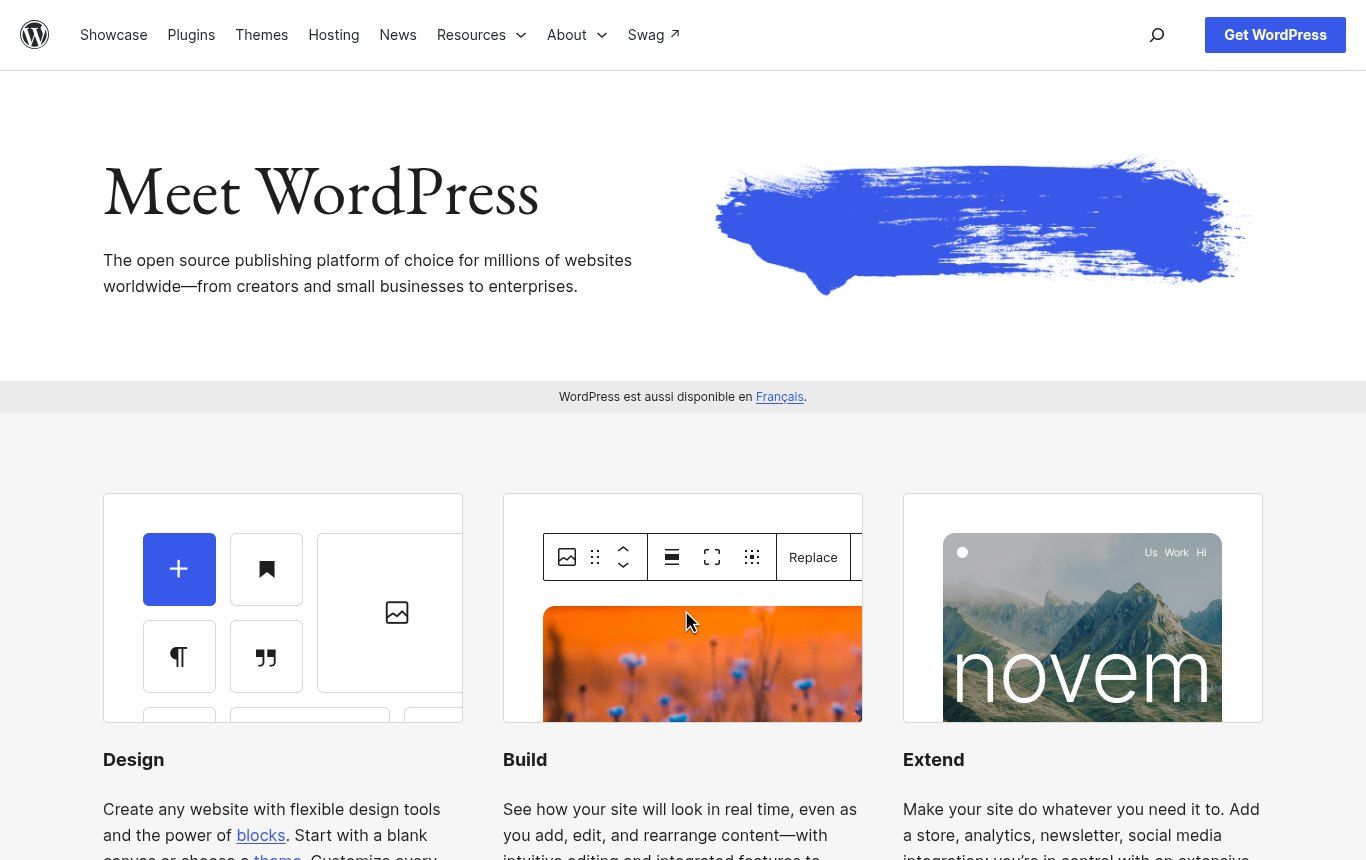
Source: wordpress.org home page, screenshot taken on 22 October 2026.
The WordPress jargon you're going to hear
Type "what is WordPress" into Google and the suggestions quickly turn to the jargon: plugins, hosting, Elementor. In French-speaking searches from Benin, Côte d'Ivoire, Senegal and France, the same words come up again and again: Elementor, slug, ACF, Jetpack, Gutenberg, Divi, taxonomy. In other words, plenty of people already have a WordPress site, or a quote for one, and get stuck on the vocabulary. Here's what matters.
- Gutenberg (the block editor): the editor built into WordPress since 2018. Each paragraph, image or button is a "block" you can move around. It's the default tool, with no subscription.
- Elementor, Divi: page builders sold by third-party companies that let you lay out a page by drag and drop. Handy, but they often make the site heavier and lock you in: the day you remove them, the layout falls apart. Some features are reserved for their paid versions.
- Slug: the part of the address that identifies a page. In /en/blog/what-is-wordpress-when-to-choose-it, the slug is what-is-wordpress-when-to-choose-it. A short, clear slug helps visitors and Google.
- Taxonomy: a way of classifying content. Categories and tags are taxonomies. An NGO might create one to sort its projects by country or theme.
- ACF (Advanced Custom Fields): a plugin that adds custom fields (price, event date, case number) to content. Widely used by developers to turn WordPress into a tool tailored to a specific trade.
- Jetpack: a plugin from Automattic that bundles statistics, security, backups and social sharing. Part of it is free, the rest is paid.
- WooCommerce: the plugin that turns WordPress into an online store. Its official page shows more than 7 million active installations.
WordPress.org vs WordPress.com: the confusion that costs money
It's the question we get asked most, and fairly so, since both carry the same name.
WordPress.org is the home of the free software. You download it at no cost, install it with the host of your choice (in Africa, in Europe, wherever you like), and you control everything: code, plugins, backups. In return, security and updates are your responsibility, or your developer's. This is called "self-hosted" WordPress, and it's almost always what an agency quote means.
WordPress.com is a commercial service, run by the company Automattic, that hosts WordPress for you. There's a free plan, which shows WordPress.com ads to your visitors, and then paid plans. On the pricing page we checked on 22 October 2026, paying yearly, the Personal plan costs US$4 a month, Premium US$8, Business US$25 and Commerce US$45, excluding taxes. The same page states that plugins can be installed on every paid plan.
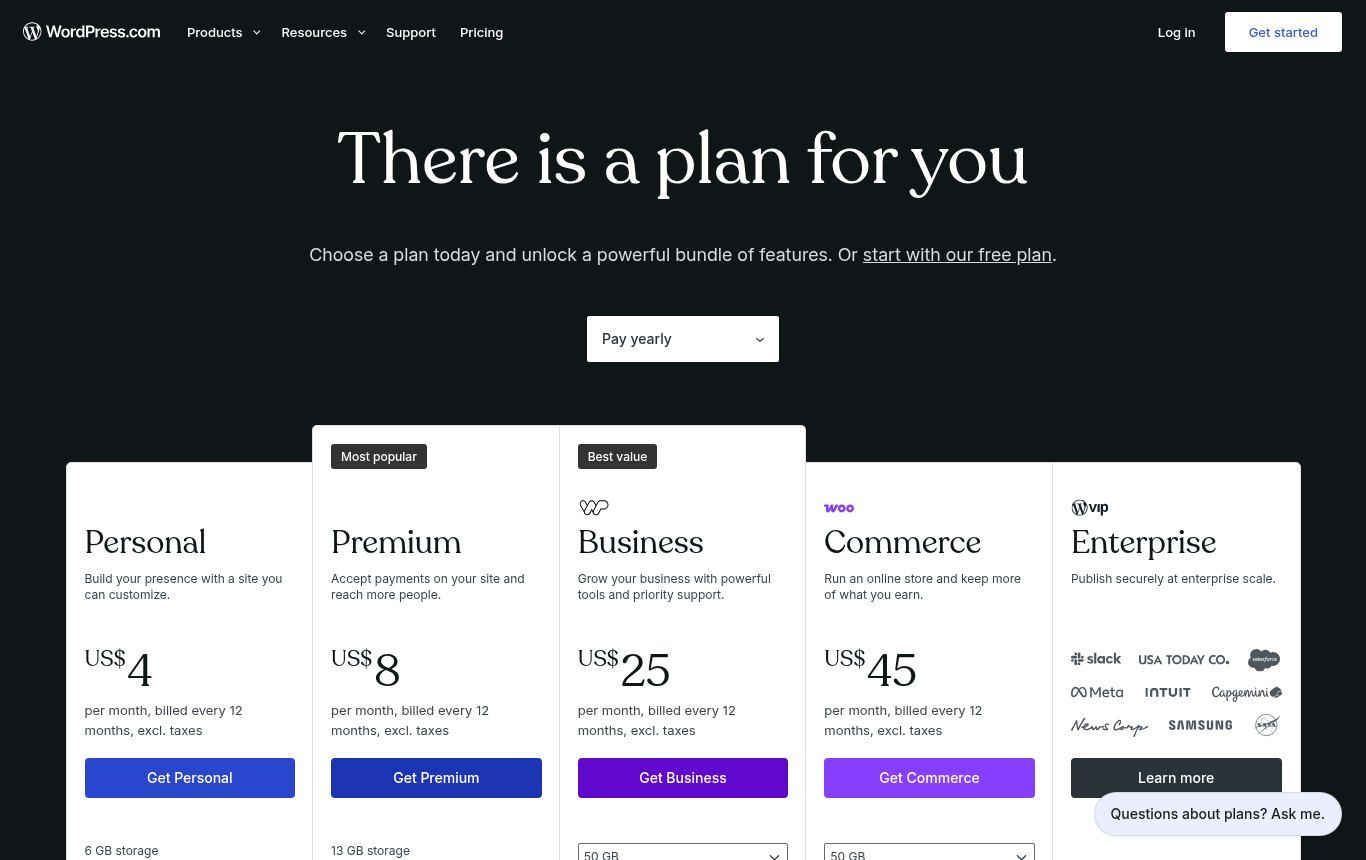
Source: wordpress.com/pricing, screenshot taken on 22 October 2026 (prices in US dollars, excluding taxes, billed for 12 months).
Our advice is simple. For a personal blog or an association starting out with no budget, WordPress.com can be enough. For a business website you want to grow, hand over to a developer, or host close to your visitors, go with WordPress.org and professional hosting. Either way, pay in dollars with a card that won't quietly expire without anyone noticing: it's one of the most common reasons we see sites go offline.
Is WordPress free? What a WordPress site really costs
The software is free. The website isn't. That distinction causes most of the nasty surprises, so here's what you actually pay for:
- The domain name, renewed every year (.bj, .ci, .sn, .com and so on).
- Hosting, monthly or yearly, priced according to power, included backups and support.
- Premium themes and plugins, often sold as yearly subscriptions: the licence for a premium theme, a page builder or a security plugin has to be renewed, or it stops receiving updates.
- Building the site: design, writing, adding content, configuration, testing. This is the most variable item.
- Upkeep: updates, backups, monitoring, small fixes. With WordPress, this one isn't optional.
We don't publish a price list, because a five-page site for a firm and a multilingual portal for an NGO have nothing in common. We start with a diagnosis, then draw up a detailed quote, as explained on our Offers page. To see what a serious quote should include, read how much does a website cost in Benin: what your quote should really include. And if someone promises you a "free" website, our article how to make a website for free: what you really get sets the record straight.
Why WordPress is the world's most used CMS
According to W3Techs, checked on 22 October 2026, WordPress is used by 58.3% of websites whose CMS can be identified, which is 39.6% of all websites. For comparison, Shopify, second in that ranking, sits at 5.3% of all websites. This success isn't magic. It comes down to four very practical reasons.
- You're not locked in. The software is free and open. If your developer disappears, someone else can take over the site, as long as you have the access. With a closed platform, leaving often means starting over.
- Everyone knows it. Developers, designers, trainers, hosts: finding someone who can work on WordPress is easy, in Cotonou as anywhere else.
- It covers a lot of needs. Between the core, themes and plugins, you can build a showcase site, a blog, a store or a multilingual site without heavy development.
- It's good for publishing. For an organisation that produces lots of content, editing comfort and user roles (author, editor, administrator) make a real difference.
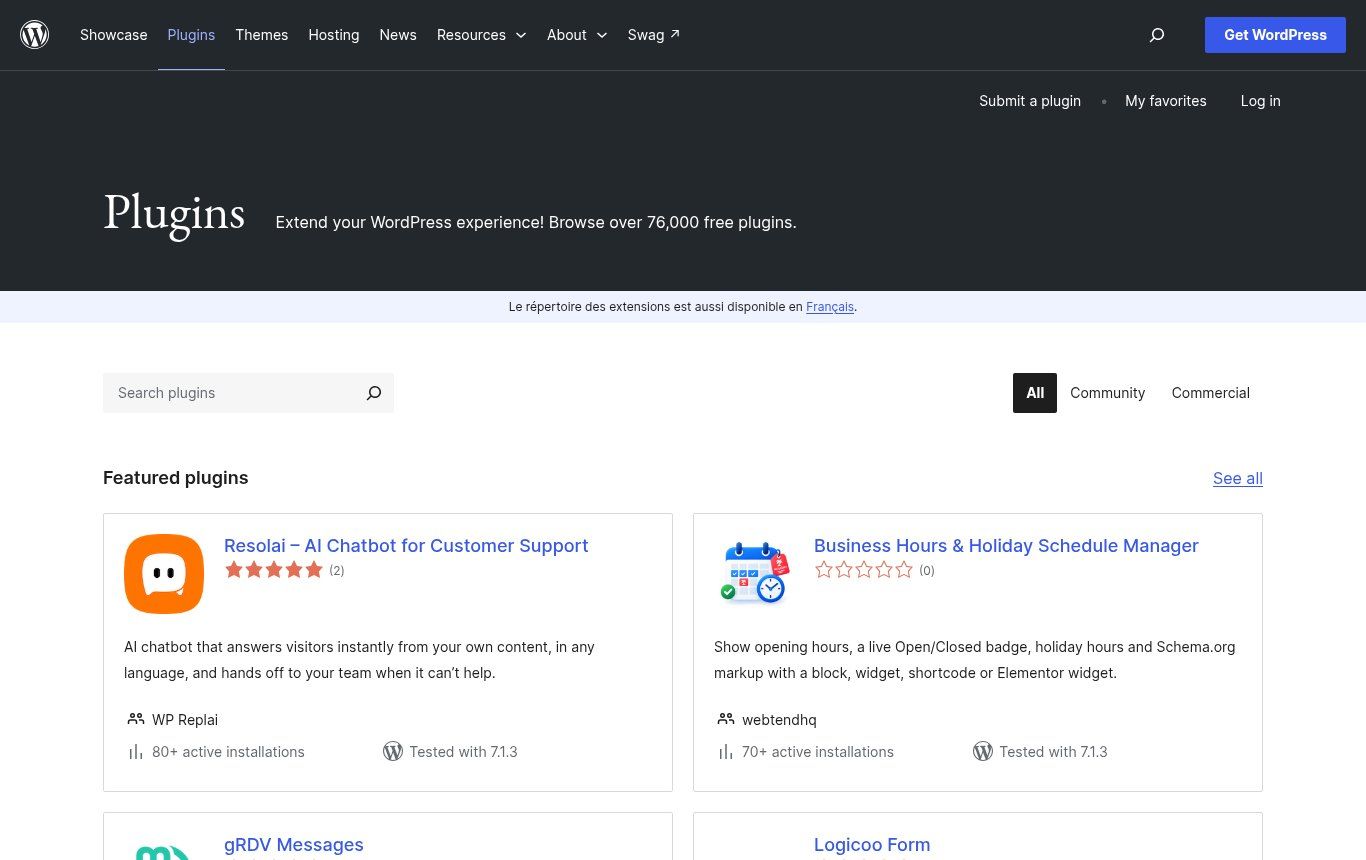
Source: wordpress.org/plugins, screenshot taken on 22 October 2026.
WordPress's real limits (the ones brochures leave out)
A tool that runs close to 40% of all websites is also hackers' favourite target. That's not a flaw in WordPress core, which is seriously maintained. The risk almost always comes from what gets added around it.
Plugins are the way in
Each plugin is a piece of code written by someone else and maintained more or less well. On 21 October 2026, bjCSIRT, Benin's computer incident response team, published an alert (2026/ALERTE/127) about WordPress sites taken over remotely using stolen keys for the UpdraftCentral service, linked to the UpdraftPlus backup plugin, which runs on more than 4 million sites. A well-known plugin, installed precisely to protect sites. That's no reason to run from WordPress. It's a reason to install few plugins, choose maintained ones, and follow security alerts.
Updates are not optional
WordPress, themes and plugins ship fixes all the time. A site left without updates for a year isn't "stable"; it's exposed. The WordPress.org releases page says it plainly: only the most recent version in a series is safe and actively maintained. So someone, in-house or at a provider, has to back up, update and check that nothing broke.
Slowness creeps in unnoticed
An all-in-one theme, a page builder, fifteen plugins, 4 MB images uploaded straight from a phone: the site gets heavy. On an average mobile connection, every lost second drives visitors away. WordPress can be very fast, but only if it's built lean.
Pirated "free" themes
Dubious websites offer paid themes and plugins for free ("nulled"). It's the most expensive saving there is: those files often contain hidden code that opens a door to attackers or injects spam links. If your developer delivers a premium theme without a licence in your name, ask where it came from.
What changes when you're in Benin or French-speaking Africa
Most WordPress guides are written for Europe or North America. They're right on the fundamentals, but they miss several realities we deal with every week.
Mobile Money payments
For an online store in West Africa, accepting MTN MoMo, Moov Money or Wave often matters more than bank cards. Local payment gateways exist and offer WooCommerce plugins. But check their state before you build your store on them: on 22 October 2026, in the official directory, the FedaPay Gateway for WooCommerce plugin showed more than 600 active installations and a last update two years old, tested up to WordPress 6.4; the KKiapay WooCommerce plugin was in the same position (more than 400 installations, last updated two years ago, tested up to WordPress 6.4). On listings like these, WordPress.org displays a warning: the plugin hasn't been tested with the latest three major releases.
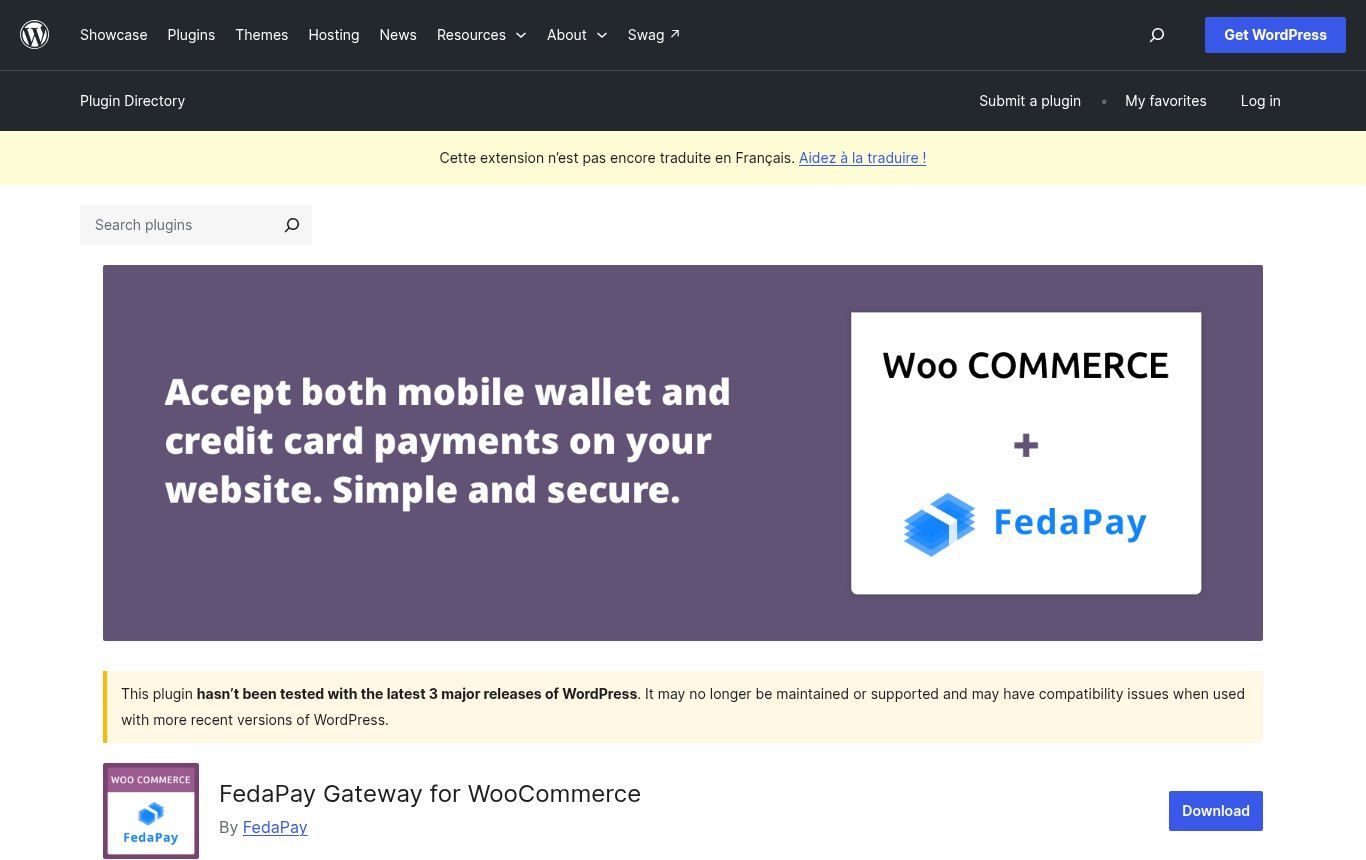
Source: wordpress.org/plugins/woo-gateway-fedapay, screenshot taken on 22 October 2026.
That doesn't mean these plugins don't work: the payment provider may distribute a newer version through its own channels, or recommend another integration method. It means you should ask the provider, test a real payment before launch, and agree on who will fix things if a WooCommerce update breaks checkout. We go through these choices in how to create an online store in Benin: steps, real costs and pitfalls.
Hosting and the PHP version
Some very cheap hosting plans still run old versions of PHP. WordPress still works on PHP 7.4, but the official requirements page points out that those versions are no longer maintained and may expose your site. Before paying, ask the host which PHP version it offers, whether backups are included and where they're stored, and whether an HTTPS certificate is provided. On that last point, our article what HTTPS and an SSL certificate are explains why it's no longer negotiable.
For WordPress.org, shared hosting with cPanel, HTTPS and a maintained PHP version is enough in most cases. On the international side, Shinjiru offers that kind of plan (LiteSpeed, SSL, email) from about $3.95/month with 24/7 support — still compare it with a local FCFA-billed host if most of your audience is in West Africa. Shinjiru plans (affiliate link: if you sign up through this link, we may earn a commission at no extra cost to you).
Domain and access in the developer's name
This is trap number one. The developer buys the domain, hosting and licences on their own account "to keep things simple". Three years later the relationship sours or they change careers, and the business discovers it owns neither its web address nor its site. Insist that the domain is registered in your organisation's name, that you have your own WordPress administrator account, and that the hosting login is handed over to you. Because WordPress is open, that's the only thing that guarantees you can change provider.
NGO and donor-funded project websites
Many NGO websites are born inside a two- or three-year project budget. The site is delivered, the project ends, and nobody pays for upkeep any more. With WordPress, that's risky: an abandoned site often ends up hacked, and it's the organisation's reputation that suffers. If you build a site within a funded project, put hosting and maintenance in the budget, beyond the end date if you can, and name someone in-house who keeps the access.
French-English bilingual sites
Many organisations in the region work with English-speaking partners, in Nigeria, in Ghana or among donors. WordPress doesn't handle multiple languages on its own: you need a specialised plugin, often paid, and a clear organisation (who translates, which version is authoritative). It's doable, but it belongs in the requirements document, not as an afterthought.
So when should you choose WordPress for a business website?
Here's the grid we use in meetings. There's nothing scientific about it, but it avoids most casting mistakes.
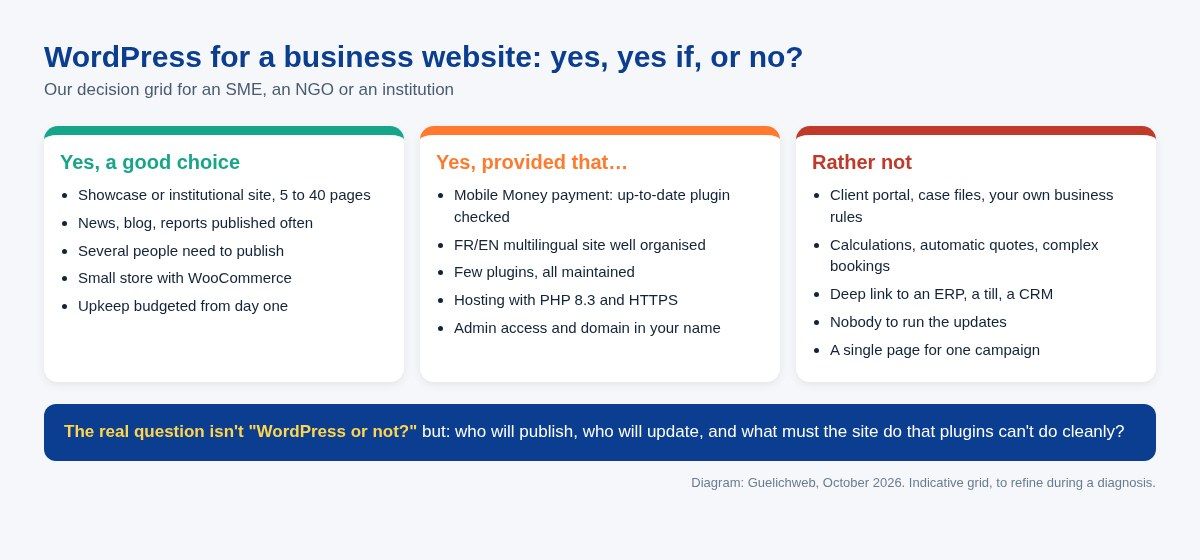
Diagram: Guelichweb, October 2026.
WordPress is a good choice for a showcase or institutional site that has to stay alive: an SME presenting its services and posting news, an NGO sharing its reports, a local authority informing residents, a school, a firm. It's also a good fit for a small store with WooCommerce, once local payment is checked. The common condition: someone will look after upkeep, and it's budgeted.
WordPress is a poor choice when your website is really an application: a client portal where each person sees their own files, quotes calculated from several criteria, bookings with rules specific to your business, a deep connection to your till, stock or CRM. You can do anything with plugins, but stack enough of them and you get a fragile assembly nobody dares to update. In those cases custom development often costs less over time. Our article how to create an app, web or mobile covers that route.
WordPress is overkill for a single campaign or sign-up page: a well-made landing page is enough. And if you want to run everything yourself, with no technical skills and no developer, a platform like Wix or Squarespace may be simpler, with other trade-offs that we priced out in Wix, Squarespace or a custom website: the real cost in CFA francs.
Finally, there's a third route, the one we chose for our own site: a custom-built, fast website connected to a separate CMS (a so-called "headless" CMS) where content is written. You keep the editing comfort without plugins to babysit. It's more demanding to set up, and it isn't the right answer for everyone, but it's worth knowing about before saying "WordPress by default".
Getting a WordPress site off to a good start: our checklist
If WordPress is the right choice for you, here's what we check before delivery, and what you can demand from any developer.
- The domain is registered in your organisation's name, with an email address you actually read.
- The hosting offers a maintained PHP version, HTTPS and automatic backups stored off the server.
- You have your own administrator account, and every author has a personal account with the right role (not one shared password passed around on WhatsApp).
- The theme is lightweight and up to date, and its licence is in your name if it's a paid one.
- The plugin list is short, each one has a reason to be there, and none has been abandoned for years.
- The contact form and, where relevant, payments have been tested for real, with a real transaction.
- The site is connected to Google Search Console and a first check has been done (see how to appear on Google).
- A handover document says where the access details are, who runs updates and how often.
To put all this in writing before you even ask for quotes, our website requirements document template is a good starting point. And if your goal is to publish regularly, read how to create a business blog that attracts customers too: the tool won't do the editorial work for you.
Our honest view
WordPress is an excellent tool for most business and organisation websites whose main job is to present, inform and publish. It's often the most sensible choice: open, widely known, transferable. What we refuse is WordPress by default: sold without a single question about the need, loaded with plugins, delivered without client access and left without upkeep. That kind of WordPress isn't cheap. It just costs you later.
The right approach runs in the opposite order to what we often see. First, what the site must do, who will keep it alive and on what yearly budget. Then the tool. If the answer is WordPress, great. If it isn't, better to find out before you pay.
Related reading: Website maintenance, AI website builders and How to create a logo for your business.
Frequently asked questions about WordPress
What is WordPress in one sentence?
Free, open-source software, known as a CMS, for building and managing a website from a browser without coding, using a dashboard, themes for the look and plugins for features.
What exactly is a WordPress website?
A site built with the WordPress software and installed on hosting. It includes WordPress core, a theme, plugins and a database holding your text, images and user accounts.
Is WordPress really free?
The software is, with no licence fee. But a live website needs a domain name, hosting, often theme or plugin licences, the build itself and ongoing upkeep. Those items make up the real cost.
What's the difference between WordPress.org and WordPress.com?
WordPress.org provides the free software you install with the host of your choice, with full control. WordPress.com is a commercial service that hosts WordPress for you, with a free plan (with ads) and paid plans.
Do you need to code to use WordPress?
Not to publish pages, posts and images. Yes, or you need a professional, to build a solid, fast and secure site, choose the right plugins and step in when an update goes wrong.
Is WordPress good for Google SEO?
It gives you good foundations: readable URLs, titles, page structure. But rankings depend mostly on content, speed and site structure. A slow, badly organised WordPress site won't rank better than any other.
Is WordPress secure?
The core is seriously maintained. The risks come mainly from poorly maintained plugins and themes, weak passwords and forgotten updates. A WordPress site kept up to date, with few plugins and regular backups, is reasonably safe.
Can a WordPress site accept Mobile Money?
Yes, through WooCommerce and a local payment gateway. Check with the payment provider that its plugin is up to date and compatible with your WordPress version, then test a real transaction before opening the store.
Can you switch providers with a WordPress site?
Yes, it's one of its big advantages, provided you have the access: domain, hosting, WordPress administrator account and licences. Without that access, even open software won't protect you.
Torn between WordPress and something else?
We look at your needs before talking tools: what the site must do, who will keep it alive, what upkeep budget is realistic. Then we tell you frankly whether WordPress is the right choice, and build it properly if it is. Our services are listed on the Services page, and our Website creation in Cotonou page describes how we work.
Got a "WordPress website" quote on the table, or an existing site you know little about? [Contact us](https://guelichweb.online/en/contact) for a first diagnosis.