Website maintenance: what it involves, what it should cover and what it costs
G. CHRIST
Published on October 22, 2026

On 21 October 2026, bjCSIRT, Benin's national computer security incident response team, published an alert about WordPress sites being taken over remotely. The way in wasn't a weak password. It was a backup and remote-management service, installed precisely to look after those sites better. The attackers created hidden administrator accounts that stay active even after the malicious plugin has been cleaned up.
That story sums up the subject. A website isn't a product you deliver and then forget. It's software that runs around the clock, exposed to the Internet, built from components that change every month. At Guelichweb, we build and take over websites for SMEs, NGOs and institutions in Benin, and we keep seeing the same pattern: the site cost a lot, it was well made, and then nobody looked after it for two years. Here's what maintenance really covers, what it should include, and how to think about its price without getting caught out.
What is website maintenance?
Website maintenance covers everything that keeps a site online, secure, fast and up to date after launch: updating the software and plugins, backups, monitoring, fixing breakdowns, small improvements and renewing the services it depends on (domain, hosting, HTTPS certificate).
It's often confused with hosting. They're not the same thing. Your host rents you the computer your site runs on and makes sure that computer stays on. Maintenance takes care of what runs on it. A good host won't update your WordPress plugins, won't test your contact form and won't notice that the link to your pricing page has been returning an error for three weeks.
Hosting stays a separate line from maintenance. For international shared hosting with cPanel and 24/7 support, providers such as Shinjiru list entry plans around $3.95/month (Budget) or $8.95/month (Strongbolt with DDoS protection). Always compare renewal and backups, keep a copy off the host, and prefer a local FCFA-billed host if most of your audience is in West Africa. Shinjiru (affiliate link: if you sign up through this link, we may earn a commission at no extra cost to you).
Another common mix-up: maintenance isn't a redesign. It keeps the site healthy. When the design no longer reflects your organisation, or the structure no longer fits what you sell, that's a new project with its own quote.
The four types of maintenance (and why the distinction matters)
The vocabulary comes from software maintenance. It's useful because it tells you exactly what a contract covers and what will be billed on top.
- Corrective maintenance: fixing what's broken. A blank page after an update, a form that no longer sends anything, a failing payment, a hacked site to clean.
- Preventive maintenance: stopping things from breaking. Security updates, backups, uptime monitoring, removing unused plugins. It's the core of a good contract, and the part most often neglected because nobody sees it.
- Evolutive (or perfective) maintenance: improving the site. Adding a page, a new service, a language, a booking module. These are small improvements; beyond a certain size, it becomes a project.
- Adaptive maintenance: keeping up with the environment. Your host moves to a new PHP version, a browser changes its behaviour, a payment provider changes its API. The site has to adapt without you asking for anything.
In large organisations you'll also hear about application maintenance outsourcing: an outside provider takes on some or all of these four areas for a business application. For a company website, the principle is the same on a smaller scale.
Our advice: always ask your provider to sort what they offer into these four boxes. A contract that just says "maintenance" leaves the door open to misunderstandings, especially about improvements.
What maintenance should actually cover
1. Updates, tested before they're applied
A WordPress site is a core (WordPress itself), a theme and plugins, each updated by different developers. The pace is fast: on the WordPress releases page you can see, for example, version 7.1.2 released on 22 September 2026, then 7.1.3 on 6 October, two weeks later. The same page states that only the most recent release in the 7.1 series is safe to use and actively maintained.
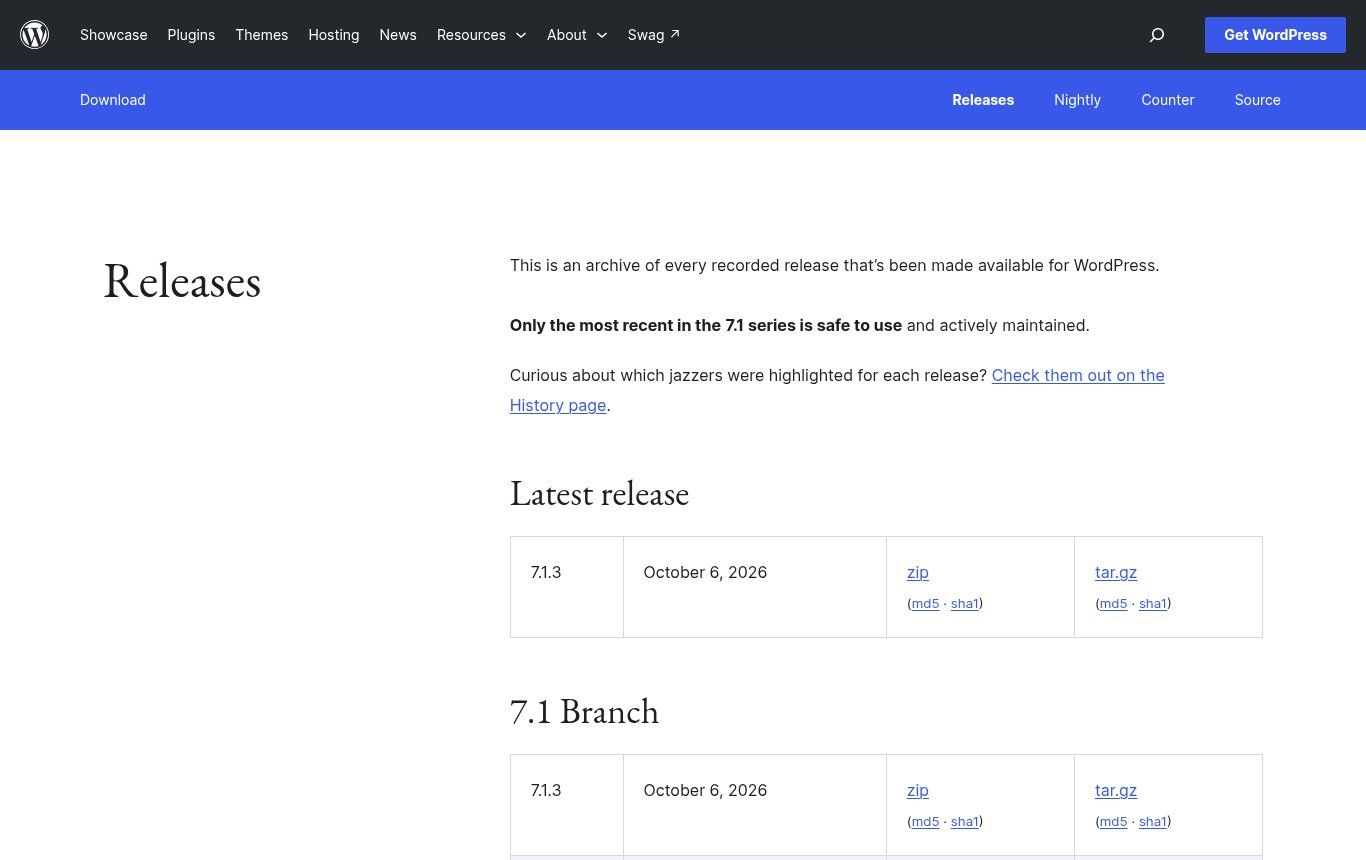
Source: wordpress.org/download/releases, screenshot taken 22/10/2026.
Updating isn't enough; it has to be done properly. The official documentation opens with a warning and an instruction: back up before any update. On a site that brings in money, we go further: major updates are applied to a test copy of the site first, then to the live site once checked.
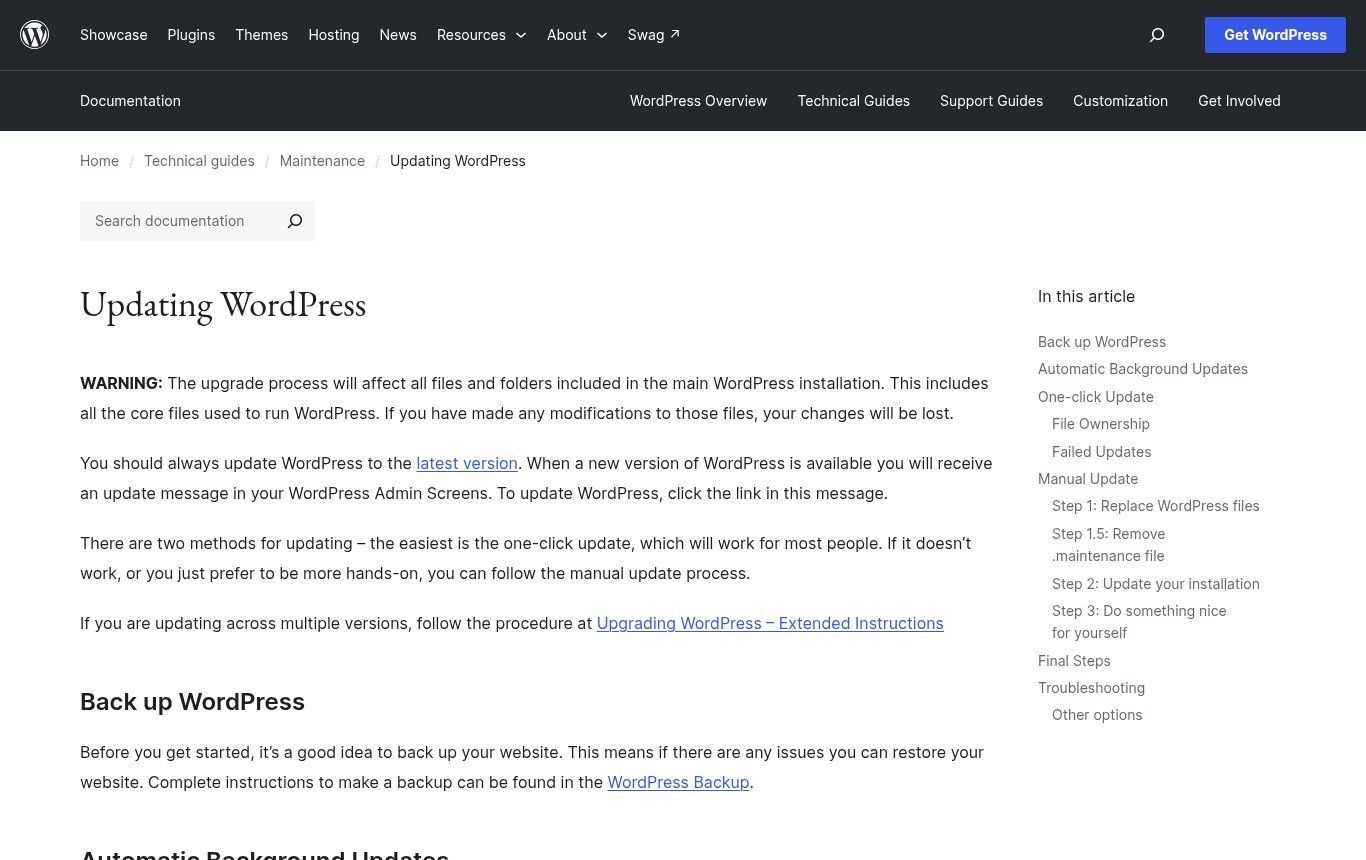
Source: wordpress.org/documentation/article/updating-wordpress, screenshot taken 22/10/2026.
2. Backups stored elsewhere, and tested
A backup must include both the files and the database, as the WordPress backup guide points out. It must also be stored somewhere other than the site's server: if the server fails or is compromised, a backup kept in the same place goes down with it. And a backup you've never tried to restore is only a promise. Ask for at least one restore test per quarter.
3. Day-to-day security
Named administrator accounts protected by two-factor authentication, unused plugins removed, limited permissions, monitoring of changed files: the WordPress hardening guide covers these good practices. Then there's keeping watch. For organisations in Benin, the bjCSIRT website publishes free alerts in French about vulnerabilities affecting WordPress, PHP and other common software. Any maintenance provider working in Benin should be reading it.
4. Monitoring and performance
A monitoring tool checks every few minutes that the site is responding and alerts someone when it isn't. For speed, PageSpeed Insights measures mobile loading for free, based on the Core Web Vitals defined by Google. That isn't a detail in West Africa: many of your visitors arrive on a smartphone, on mobile data paid by the megabyte. Heavy images added over the months are enough to slow down a site that was fast on launch day.
5. Technical SEO and content
Maintenance also includes a regular look at Google Search Console: pages not indexed, 404 errors, mobile usability problems. If you're new to the tool, our guide How to appear on Google explains the setup. And an up-to-date site means up-to-date content: prices, opening hours, phone numbers, team. A WhatsApp number that no longer answers loses more customers than an outdated plugin.
6. Domain, hosting, HTTPS and email
These are subscriptions, and a subscription that isn't renewed takes the site offline overnight. Maintenance should track the renewal dates of the domain name, the hosting, paid plugin licences and the HTTPS certificate (our article on HTTPS and SSL certificates explains its role).
Why an unmaintained website ends up costing more
WordPress powers 39.6% of all websites and 58.3% of sites whose CMS is known, according to W3Techs (figures read on 22/10/2026). That popularity makes it the favourite target of bots that scan the Internet looking for vulnerable versions. They don't pick their victims: they test everything, including a small NGO's website in Parakou.
The bjCSIRT alert mentioned at the start is a good example. According to alert 2026/ALERTE/127, UpdraftPlus, a backup plugin installed on more than 4 million sites, had keys to its remote-management service stolen on 17 and 18 October 2026. The developer released fixed versions (1.26.13 and 2.26.13) on 19 October, but the update removes neither the malicious plugins nor the fraudulent accounts already created. bjCSIRT is clear that affected sites must be checked manually.
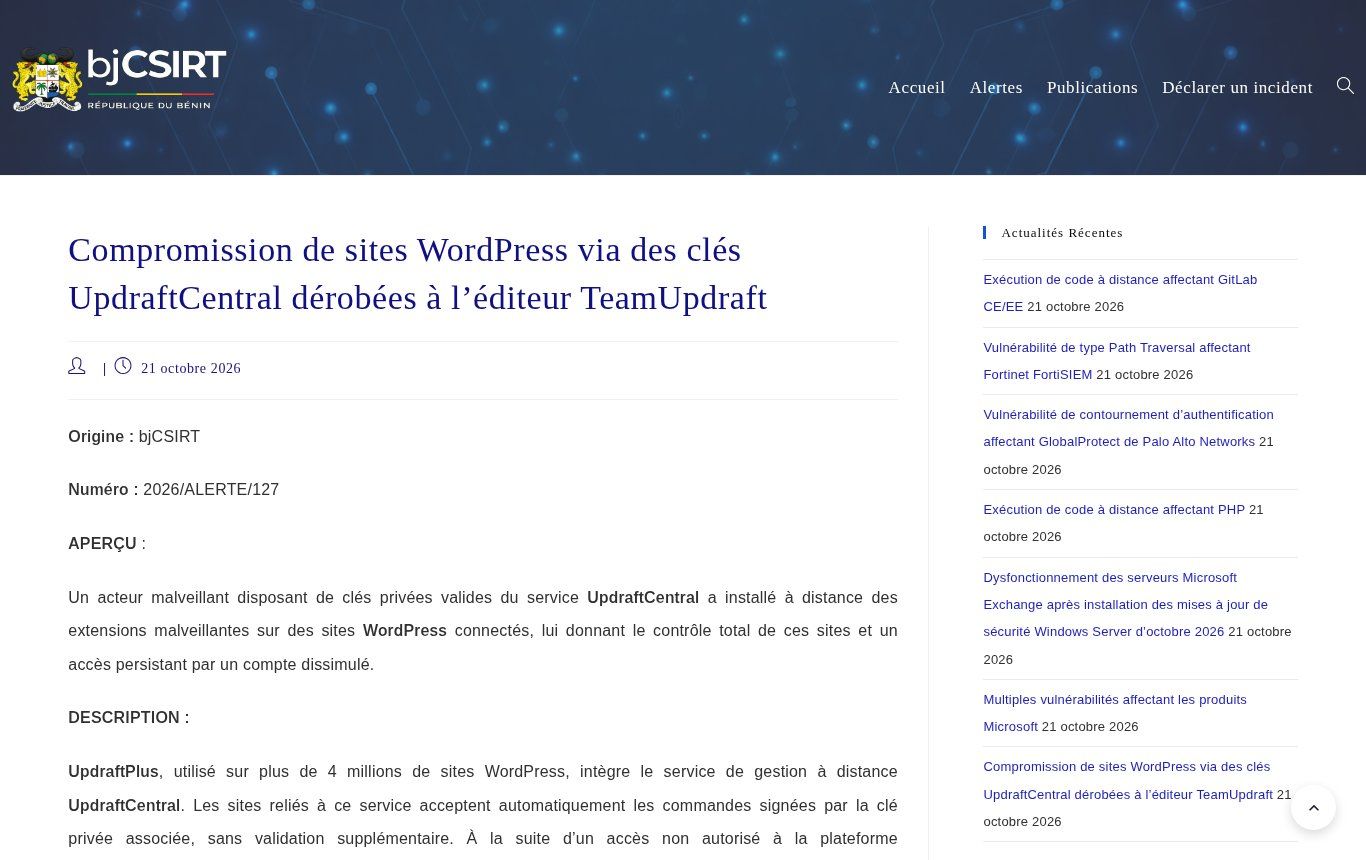
Source: csirt.bj, alert 2026/ALERTE/127, screenshot taken 22/10/2026.
The lesson matters: automatic updates don't replace a human who reads the alerts and goes to check. That's exactly the difference between a tool and maintenance.
A second example, less dramatic but more widespread: the PHP version, the language WordPress runs on. According to the official supported versions page, PHP 8.2 will stop receiving security fixes after 31 December 2026, a little over two months from now. Hosts eventually force recent versions. An old theme that was never updated can then break the site on the day of the switch, often without warning.
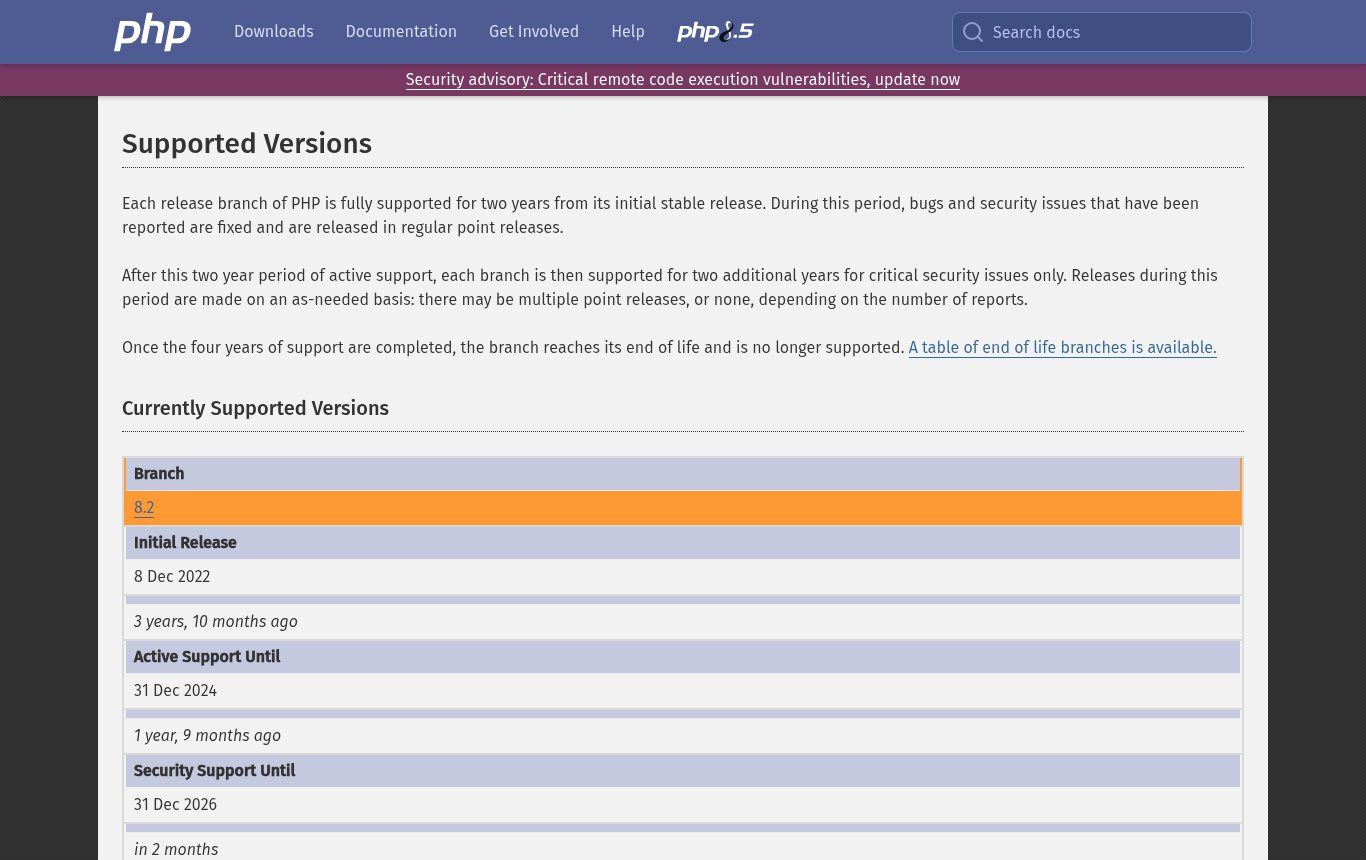
Source: php.net/supported-versions.php, screenshot taken 22/10/2026.
The maths is simple. Cleaning a hacked site, getting it off Google's blocklists and reassuring your customers almost always costs more than a year of upkeep. And that's before the things you can't put a number on, like a donor who lands on a casino page instead of your annual report.
The maintenance schedule we recommend
The pace depends on the size of the site and what it does. An online store that takes payments needs more attention than a five-page showcase site. Here's the baseline we use for a business website.
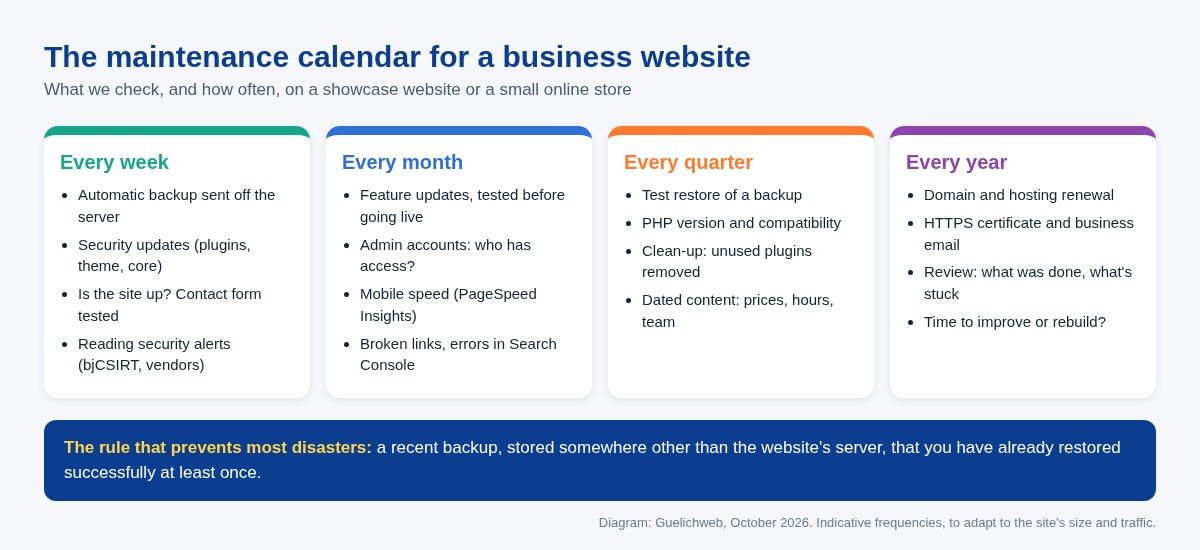
Diagram: Guelichweb, October 2026.
WordPress, custom code or Wix: maintenance isn't the same
Source: official logo, wordpress.org/about/logos, retrieved 22/10/2026.
WordPress
It's the most common case, and the one that needs the most follow-up, precisely because it relies on dozens of plugins written by different developers. The good news: since WordPress 5.6, new installations apply automatic updates for both minor and major core releases by default, as the documentation on automatic updates explains. But plugins and themes still need watching, and that's where most vulnerabilities are found.
One thing we don't compromise on: "nulled" themes and plugins, meaning pirated copies of paid products downloaded for free. They're common on websites delivered at rock-bottom prices. They get no official updates and sometimes contain malicious code from day one. If your site uses them, no amount of maintenance will make it safe. They have to be replaced.
Custom-coded sites
Fewer automated attacks, but technical dependencies that also age: libraries, framework, Node or PHP version, third-party services. Maintenance is less frequent, but it needs someone who knows the code. Hence the importance of getting the source code and documentation on delivery, which we recommend writing into the requirements document from the start.
Wix, Squarespace, Shopify
The platform handles technical updates and server security: a real advantage. You're still responsible for content, SEO, added apps, the domain name and paying the subscription. We've broken those costs down in our comparison Wix, Squarespace or a custom website.
Website maintenance: what drives the price
There's no official rate, and be wary of anyone who quotes a price without looking at your site. On the first page of Google, published offers in France range from a few tens to several hundred euros a month; in West Africa, a few agencies advertise monthly packages in CFA francs starting at around 20,000 FCFA. Those gaps mean nothing until you compare what's included, line by line.
What really moves the price:
- The technology and the state of the site: a WordPress site with 35 plugins, half of them abandoned, takes far more work than a recent, clean site. The first month often costs more because the site has to be brought up to standard.
- What the site does: a showcase site, a store with mobile-money payments, a members' area or a donation portal don't carry the same level of risk.
- The guaranteed response time: a fix within 4 hours, weekends included, isn't priced like a reply within 48 working hours.
- The amount of changes included: one or two hours of edits a month, or none.
- Outside costs: hosting, domain, paid plugin licences, off-site backup tool. They're often billed in dollars or euros, separately or included depending on the offer.
The most common billing models are a monthly or annual package (best suited to preventive maintenance), one-off work billed by the hour, and a block of prepaid hours. Some West African agencies also price it as an annual percentage of what the site cost to build.
At Guelichweb we don't publish a price list: we start with a diagnosis of the site (technology, plugins, hosting, access, existing backups), then propose a quote that fits, as explained on our Offers page. If you're also planning a new site, our article on website costs in Benin shows how to build maintenance into the budget from day one.
Maintenance contract: the clauses to get in writing
A maintenance contract doesn't need to be long. It needs to be precise. Before signing, check that these points are spelled out:
- Scope: which site, which technology, which plugins, which services (hosting, domain, email) are included, and what's excluded.
- Updates: how often, and how they're tested before being applied.
- Backups: frequency, retention period, storage off the server, restore tests.
- Response times: how fast a site-down problem is handled, separate from the time for an ordinary request, with the days and hours covered.
- Included hours and the rate beyond them.
- Reporting: a regular summary of what was done, incidents and the state of backups.
- Ownership and exit: the domain, hosting and accounts are in your name; at the end of the contract, the provider hands over access, the latest full backup and the documentation.
- Personal data: if the site collects data (forms, customer accounts, donations), the provider has access to it. In Benin this falls under the Digital Code and the personal data protection authority (APDP); include a confidentiality clause.
Point 7 causes the most trouble. We regularly take over sites whose domain was bought in the name of the previous provider, who can no longer be reached. Without access to the domain, you don't control your web address.
The traps we run into most often
- The domain that expires silently. Registrars of generic domains (.com, .org…) must send at least two reminders before expiry, roughly a month and then a week beforehand, under ICANN's policy. But if those reminders go to an email address hosted on the domain itself, or to a former employee's inbox, nobody reads them. The best practices attached to that policy recommend a secondary contact address that doesn't depend on the domain.
- The expired bank card. Hosting and licence renewals are often paid with an international card. The card expires, and the site goes dark a few days later.
- The admin password shared on WhatsApp among five people, two of whom have left. Everyone should have their own account, with the permissions they need and no more.
- The site delivered and then abandoned. The project was funded, the maintenance wasn't. It's common in NGO projects funded by donors: put maintenance in the budget line from the funding application onwards.
- Updates done live, on a Friday evening, with no backup. Everyone has done it once. Once is enough.
What you can do yourself
If your budget is tight and your site is simple, some of the upkeep can be done in-house, as long as it's done regularly. Here's the minimum we recommend for a small organisation:
- Record the renewal dates for the domain, hosting and licences in a shared spreadsheet, with a reminder one month ahead.
- Set up an automatic backup sent to external storage (Google Drive, Dropbox or similar), and try restoring it once on a copy.
- Once a week, open your site on a phone, fill in the contact form and check the message arrives.
- Once a month, run the updates after a backup, then check the main pages, in several browsers if you can (our article on web browsers explains why).
- Subscribe to bjCSIRT alerts and read the ones that concern your CMS.
Let's be honest: this works for a showcase site with no online payments. As soon as the site takes money, collects sensitive data or carries an institution's reputation, hand it to someone who does this for a living.
Our view: do you really need a maintenance contract?
If your site brings you quote requests, sales, donations or credibility with partners, yes. Without hesitation. The cost of regular maintenance is predictable; the cost of an outage or a hack never is.
If your site is a simple presentation page that never changes, hosted on a platform like Wix, light in-house follow-up may be enough. And if your site brings you nothing today, maintenance won't fix that: start by reading why your website is not bringing you customers.
What we frankly advise against is the halfway house: a cheap contract that amounts to ticking "automatic updates", with no testing, no off-site backup and nobody reading the alerts. You're paying for a feeling of security, not for security.
Related reading: What is WordPress, AI website builders and Landing page.
Frequently asked questions about website maintenance
What does website maintenance involve?
Updates, backups, security and uptime monitoring, fixing breakdowns, small improvements and keeping track of subscriptions (domain, hosting, HTTPS certificate).
What's the difference between maintenance and hosting?
The host provides and monitors the server. Maintenance looks after the site running on it: its software, plugins, content and backups. The two complement each other; one doesn't replace the other.
How much does website maintenance cost?
It depends on the technology, the state of the site, what it does, the guaranteed response time and the changes included. Published offers range from a few tens of thousands of CFA francs to several hundred euros a month. Ask for a diagnosis before any quote.
How often should a WordPress site be updated?
Security fixes as soon as possible, ideally within the week, and urgently when a critical vulnerability is reported. Feature updates can be grouped once a month, after a backup and a test.
Does a Wix site need maintenance?
Less technical maintenance, since the platform handles it. But you still need to look after content, SEO, the domain name, any added apps and the subscription renewal.
Can a different provider maintain a site they didn't build?
Yes, as long as you have all the access: domain, hosting, site admin and the source code for a custom site. The new provider usually starts with an audit to see what state the site is in.
What should I do if my WordPress site is hacked?
Don't delete things in a rush. Change the passwords, tell your host, bring in a professional to clean the site and look for hidden accounts, then restore a clean backup if needed. For institutions in Benin, bjCSIRT also has an incident reporting form.
How is website maintenance treated in the accounts?
As a rule, routine maintenance is treated as an expense for the year, while a major redesign may be capitalised. The exact rule depends on the accounting framework that applies to you (SYSCOHADA in the OHADA zone, for example), so have your accountant confirm the treatment.
Your website deserves proper care
We maintain the sites we build, and we also take over existing sites after an audit. We start by looking at the technology, the plugins, the backups and, above all, who owns the access, then we propose a level of care that matches what your site actually does. All our services are on the Services page, and our Website creation in Cotonou page describes how we work.
Not sure what state your site is in, or who holds your domain name? [Contact us](https://guelichweb.online/en/contact) for a first diagnosis.