What is a web browser? A simple definition, which one to choose in 2026 (and why your website must pass the multi-browser test)
G. CHRIST
Published on October 18, 2026
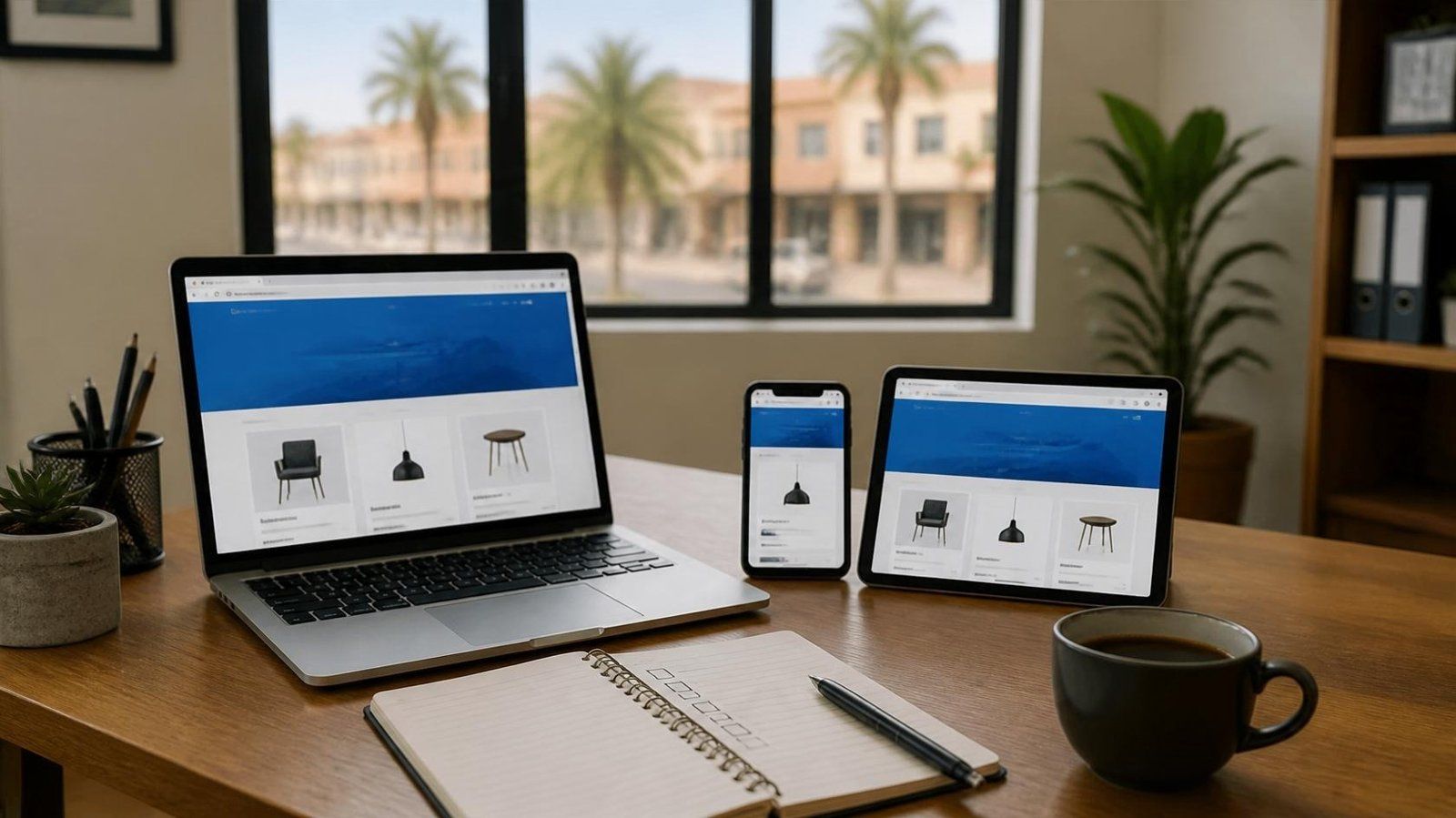
Ask the people around you which browser they use. Many will say "Google". Others say "the Internet", or point at the round icon on their phone without knowing its name. For an individual, that's fine. For a business, an NGO or a public body with a website, it's a real blind spot: your customers never see your site the way you see it. They see it through their own browser.
In this guide, I give a clean definition, finally separate the browser, the search engine and the website, show which browsers people actually use in Benin and across Africa, give our honest view on which one to choose for each use, and explain why a professional website must be tested on several browsers before it goes live.
What is a web browser? The simple definition
A web browser is a piece of software that fetches pages from the Web and displays them on screen, letting you move from one page to another through links. That's the definition given by MDN, the reference documentation for web developers, which adds that a browser uses a rendering engine to display pages (MDN, Browser).
The vocabulary changes from one place to another. In French, people say navigateur, navigateur Internet or, in Quebec, fureteur. In English, you'll hear browser, web browser or internet browser. They all mean the same thing.
Official logos: Google Chrome (gstatic.com, Google), Mozilla Firefox (mozilla.org), Microsoft Edge and Opera (official files published on Wikimedia Commons). The trademarks belong to their owners.
The best-known examples are Google Chrome, Safari (Apple), Microsoft Edge, Mozilla Firefox and Opera. On a Samsung phone, you'll often find Samsung Internet too. And there's one case many people forget: when you tap a link inside Facebook, Instagram or TikTok, the page often opens in a browser built into the app, not in Chrome or Safari. For the user, it's invisible. For a website owner, it matters, and I'll come back to it below.
Browser, search engine, website: stop mixing them up
This is the number one confusion, and it has very practical consequences when you talk to a web provider. Here is the difference, in one line each:
- The browser is software installed on your phone or computer: Chrome, Safari, Firefox, Edge, Opera.
- The search engine is a website that finds other websites: Google, Bing, DuckDuckGo. You open it in your browser, like any other site.
- The website is an organisation's set of pages at a specific address (for example guelichweb.online). We go into detail in our definition of a website.
- The Internet is the global network that carries all of this. The Web is just one use of it, as we explain in the difference between the Internet and the Web.
The trap comes from the name Google: Google makes both a browser (Chrome) and the most used search engine. When someone says "I went on Google", they may have opened Chrome, or they may have typed a search. Those aren't the same thing. Being visible in the search engine is SEO work, which we describe in how to appear on Google. Displaying correctly in the browser is development work. A good website needs both.
How a web browser works, step by step
Between the moment you type an address and the moment the page appears, usually no more than a second or two goes by. But a lot happens in that time.
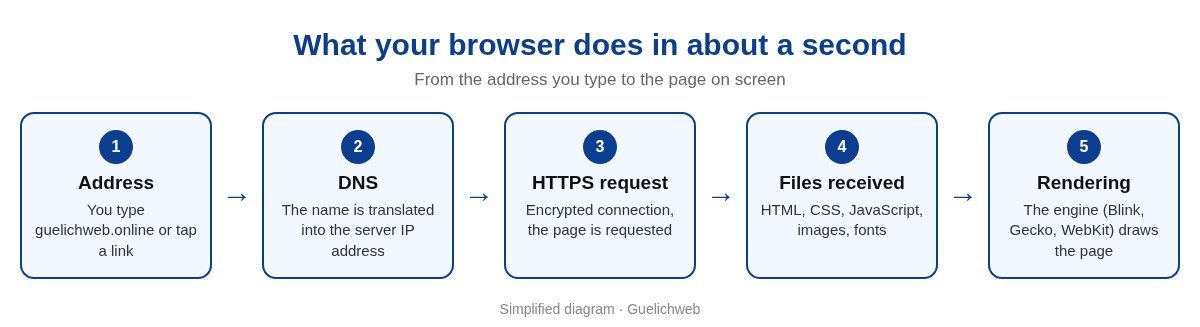
Simplified diagram by Guelichweb.
- The address. You type a URL or tap a link. Every part of that address has a meaning, which we break down in our article on URLs.
- Translating the name. The browser asks the DNS system which IP address matches the domain name. It's the Internet's directory.
- The secure connection. The browser contacts the server, checks its certificate and opens an encrypted HTTPS connection. That's what makes the "Not secure" warning appear, or not. It's all explained in HTTPS and SSL certificates.
- The files. The server sends back the HTML code (the content and its structure), the CSS (the styling), the JavaScript (the interactions), then images and fonts. The browser also stores cookies, the small files that remember your basket, for example; see our guide to cookies and trackers.
- Rendering. The rendering engine turns all that code into a visible page: it works out where each block goes, draws the text, colours and images, then runs the scripts.
That last step is the key to everything else. Today there are only three major rendering engines: Blink, Gecko and WebKit (MDN, Rendering engine). Blink powers Chrome, Edge, Opera, Samsung Internet and Brave. Gecko powers Firefox. WebKit powers Safari. And on the iPhone, in most countries including Benin, other browsers such as Chrome or Firefox also use WebKit, because Apple requires it on iOS.
The practical consequence: a site that looks perfect in Chrome on the developer's computer can behave differently on a customer's iPhone, even if that customer uses "Chrome". That isn't theory. It's daily life for anyone who builds websites.
The most used browsers in Benin and across Africa
To know which browsers to test a site on, you have to look at what people really use. The most widely followed figures come from StatCounter Global Stats, which measures visits across millions of websites that run its analytics tool.
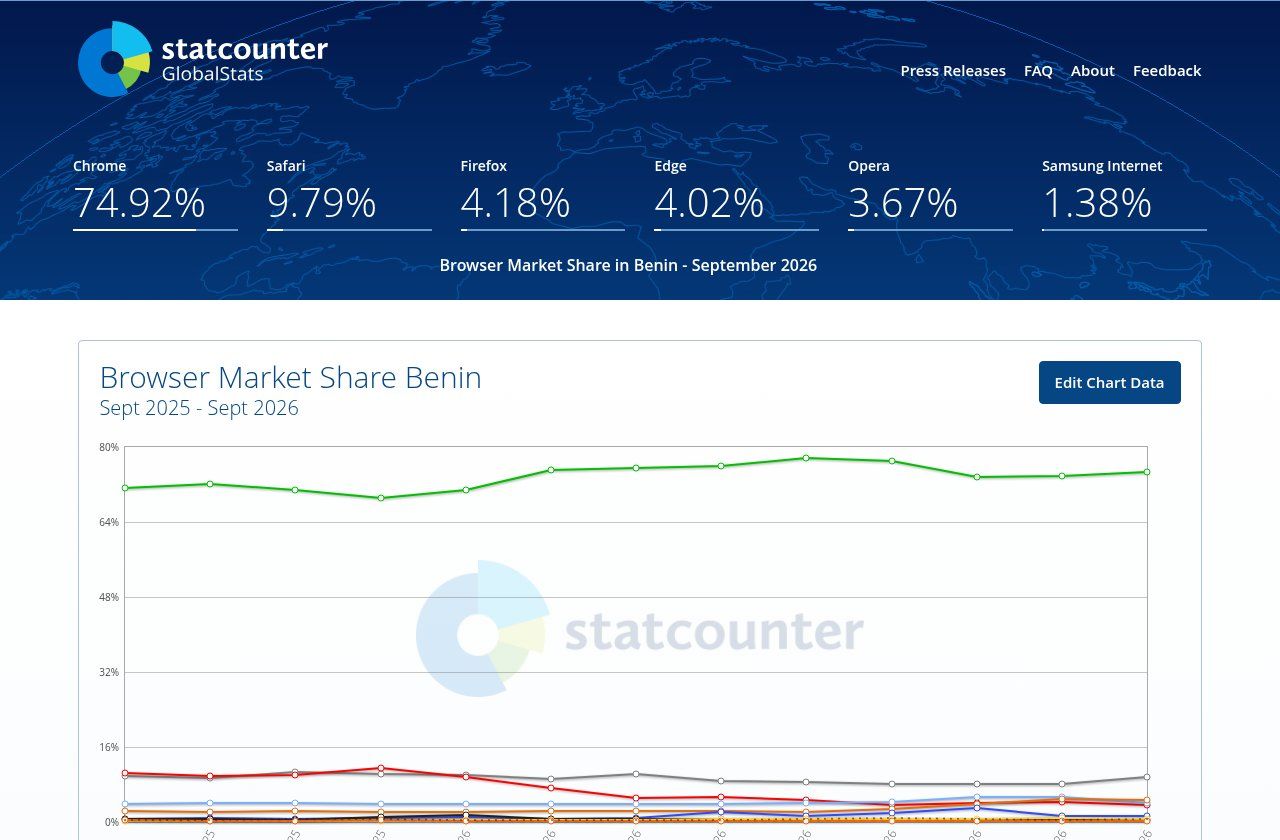
Source: StatCounter Global Stats, "Browser Market Share Benin", all devices, September 2026 (gs.statcounter.com), screenshot taken on 18/10/2026.
In September 2026, in Benin, across all devices, Chrome accounted for about 75% of visits, Safari for nearly 10%, then Firefox, Edge and Opera for around 4% each (StatCounter, Benin). Across Africa as a whole, Chrome stood at 74.54% in September 2026, ahead of Safari (9.1%) and Opera (5%) (StatCounter, Africa).
Three details in these statistics interest us more than the ranking itself:
- Mobile dominates. Again according to StatCounter, about 60% of visits in Benin in September 2026 came from a phone, against 39% from a computer. A site designed for big screens first misses most of its audience.
- Safari carries real weight on mobile. On phones, Safari accounts for more than 14% of visits in Benin (StatCounter, mobile Benin). These are your iPhone visitors: customers, partners, members of the diaspora. Ignoring them by testing only on Android would be a mistake.
- At the office, diversity comes back. On computers, Firefox and Edge each go above 10% in Benin. Edge comes preinstalled with Windows, which partly explains its place on the office computers of public bodies, NGOs and businesses.
A word of caution: these figures describe a sample of websites, not the whole population. They show a reliable trend, not a truth to the decimal point. For your own site, the only source that counts is your analytics tool, which will tell you which browsers your own visitors use.
Which browser should you choose in 2026? Our view by use
There's no "best browser" in absolute terms. Today's major browsers are all fast, free and up to date with web standards. The right choice depends on your device, your work tools and what matters to you: privacy, data usage, compatibility. Here's how we see it.
Google Chrome: the default choice, especially if you live in Google
Source: official Google Chrome page (google.com/chrome), screenshot taken on 18/10/2026.
If your team uses Gmail, Google Drive or Google Sheets, Chrome is the simplest choice: bookmarks and passwords sync, and above all there are profiles, which cleanly separate the work account from the personal one on the same computer (Chrome Help, multiple profiles). It's also the browser of the vast majority of your customers, so it's the one where your site has to be flawless. Its weak points: it's memory hungry on modest computers, and it sits at the heart of Google's advertising ecosystem.
Mozilla Firefox: the right choice for privacy, and for a second opinion
Source: official Mozilla Firefox page (mozilla.org/firefox), screenshot taken on 18/10/2026.
Firefox is the only major browser that uses neither Blink nor WebKit. It's made by Mozilla, an organisation owned by a non-profit foundation, and it puts protection against tracking first. We happily recommend it as a second browser on every computer: for privacy, but also because it lets you check in two minutes that a site doesn't work "only in Chrome".
Microsoft Edge: the logical pick on Windows and Microsoft 365
Edge is already installed on every recent Windows computer. It runs on the same engine as Chrome, so compatibility is excellent, and it fits well with the Microsoft 365 accounts many NGOs and institutions use. If your organisation works in Word, Outlook and Teams, there's no point forcing another browser on people. Just resist the many suggestions it shows by default, which you can switch off in the settings.
Safari: on iPhone and Mac, keep it
Safari is Apple's browser. On a Mac, Apple highlights its battery life and its protection against tracking. On the iPhone, since other browsers use the same WebKit engine in most countries, switching browser changes the interface and syncing, but not really how websites display. For a business, the real question isn't whether to choose Safari. It's whether your site works in Safari.
Opera and Opera Mini: for saving mobile data
Opera keeps a place in Benin, close to 4% of visits according to StatCounter, and its lightweight mobile version, Opera Mini, remains well known in Africa. Opera says this browser cuts data use by up to 90% and stays fast on slow networks (Opera Mini, official page). When mobile data is expensive, that argument carries weight. As a website owner, keep in mind that data-saving modes can lighten or simplify some pages: your contact form must keep working under those conditions.
Brave, Samsung Internet and the rest
Brave blocks ads and trackers by default. Samsung Internet comes preinstalled on Samsung phones and is built on Blink. Both are good browsers, with smaller shares in Benin. Be wary, however, of unknown "browsers" downloaded outside the official app stores that promise free data or ad-free videos: they're a classic way to get unwanted software onto a phone.
Our recommendation for a team: the same main browser for everyone (Chrome if you're on Google Workspace, Edge if you're on Microsoft 365), a work profile separate from the personal one, and Firefox installed alongside as a second browser. It's simple, free, and it solves most problems before they happen.
The settings that really matter for an SME or an NGO
Which browser you pick matters less than how you use it. Here's what we advise checking on every work computer:
- Updates. An up-to-date browser means security holes are fixed. Chrome updates itself, but sometimes it needs a restart (Chrome Help, update). Watch out for old computers: Chrome now requires Windows 10 or later, and the last version that supports Windows 7 and 8.1 is Chrome 109, released in January 2023 (Chrome system requirements). A computer still on Windows 7 is therefore browsing with a browser that no longer gets fixes.
- Separate profiles. A "work" profile and a "personal" profile stop accounts, passwords and history from getting mixed up, especially on a shared computer.
- Passwords. The browser's built-in password manager beats a notebook or a text file, as long as the linked account is protected with two-step verification.
- Extensions. Every extension can read what you do in the browser. Keep as few as possible, installed from the official store, and remove the ones nobody recognises.
- Private browsing. It doesn't save history on the device, but it doesn't make you invisible: the sites you visit, your employer or your Internet provider can still see your activity, as Google itself points out (Chrome Help, Incognito mode).
- The padlock. Before typing a password or a payment number, look at the address bar. No secure connection, no typing.
Why your website must be tested on several browsers
Back to where we started: your customers see your site through their browser, on their phone, with their connection. If you only test in Chrome on your own computer, you're testing the most favourable case, the one that looks least like your visitors' reality.
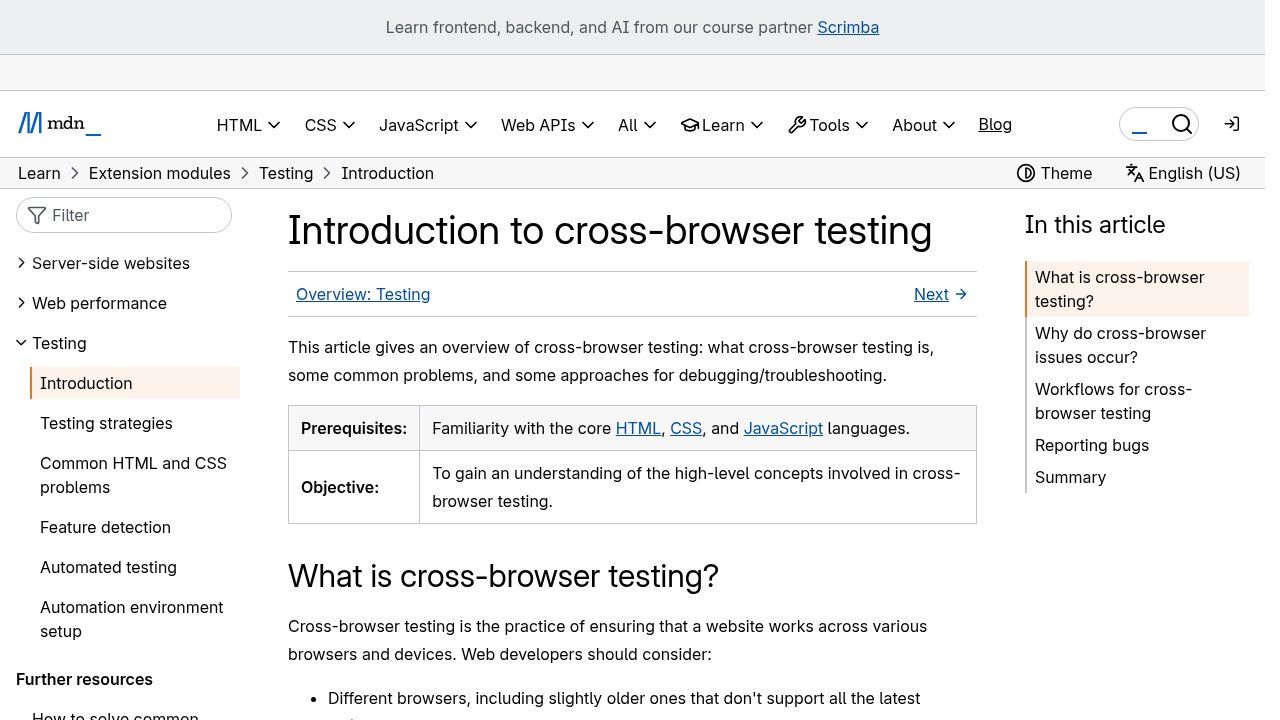
Source: MDN Web Docs, "Introduction to cross-browser testing" (developer.mozilla.org), screenshot taken on 18/10/2026.
MDN defines this work as making sure a website works across different browsers, including slightly older versions, on different devices, and for people who use assistive technologies (MDN, cross-browser testing). The most common problems aren't spectacular. They're sneaky:
- a "Send" button that doesn't respond on iPhone, so quote requests get lost without anyone knowing;
- a menu that spills off the screen on a small entry-level Android phone;
- a date or phone field that displays differently from one browser to the next;
- a payment or login page that gets stuck inside the Facebook or Instagram in-app browser;
- fonts or images so heavy that the page takes forever on a 3G connection.
The good news is that browsers have never been so close to each other. The Baseline project, run by the WebDX community group, shows which web features are supported by all the core browsers: Chrome (desktop and Android), Edge, Firefox (desktop and Android) and Safari (macOS and iOS). A feature is called "widely available" 30 months after it became compatible everywhere (web.dev, Baseline). A serious developer checks it, or looks it up on Can I use, before relying on a recent technique.
Our minimum test list before going live
- Chrome on a real entry-level Android phone, not only on a high-end model.
- Safari on a real iPhone, especially forms, login and payment.
- Chrome, Edge and Firefox on a computer, with a standard laptop screen.
- A link to the site opened from Facebook, Instagram and WhatsApp, to see how it behaves in in-app browsers.
- A slowed-down connection, simulated with Chrome's developer tools (Chrome DevTools, network throttling).
- The most important journey from start to finish: quote request, order or donation, right up to the confirmation being received.
Free tools to check it yourself
The device mode in Chrome's developer tools simulates different screen sizes (Chrome DevTools, device mode). PageSpeed Insights measures loading speed on mobile and flags files that are too heavy. But no simulation replaces a real phone in your hand. Ask three colleagues with different devices to fill in your contact form: within ten minutes, you'll know whether your site is losing customers.
What you should require from your web provider
When you order a website, browser compatibility mustn't be a hidden option. Ask, in writing in the quote, which browsers and devices the site will be tested on, whether forms will be checked on iPhone and Android, and who fixes things if a display problem shows up after delivery. A provider who answers "it works on all browsers" without saying which ones probably hasn't tested. To go further on what a quote should contain, see what your website quote should really include.
And if your current site doesn't seem to bring in any business, compatibility is one of the first things to check, along with speed and a clear message. We go through those causes in why your website is not bringing you customers.
Our view in one sentence
The browser you use is a personal choice; the ones your customers use are a business constraint, and your website has to work in every one of them.
Related reading: What is the Internet, What does www mean and Intranet.
Frequently asked questions about web browsers
What's the difference between a browser and a search engine?
The browser is the software that displays pages (Chrome, Safari, Firefox). The search engine is a website that finds other websites (Google, Bing). You use the second inside the first.
Is Google a browser?
No. Google is first of all a search engine. Google's browser is called Chrome. The "Google" app on Android or iPhone is mainly for searching.
What is the most used browser in Benin?
Chrome, with about three visits out of four in September 2026 according to StatCounter, ahead of Safari. On computers, Firefox and Edge are more present than on mobile.
How do I know which browser I'm using?
Look at the icon of the app you open to go online, or open that app's menu and then the "About" section. It shows the browser's name and version.
Should I install several browsers?
For personal use, one is enough. For a business that runs a website or online tools, having two, for example Chrome and Firefox, helps you check whether a problem comes from the site or from the browser.
Is a free browser safe?
The major browsers (Chrome, Safari, Edge, Firefox, Opera) are free and safe as long as you download them from the publisher's website or the official app store, and keep them up to date.
Does your website display properly for all your customers?
At Guelichweb, we build websites designed for mobile first and checked on the browsers your visitors actually use, in Benin and elsewhere. The price depends on your project: we quote after a diagnosis, as explained on our offers page. Discover our services and our website creation in Cotonou, or contact us to review your current site.