What is the Internet? A simple definition, how it works and what it means for your business
G. CHRIST
Published on October 19, 2026
Type "qu'est-ce qu'Internet" ("what is the Internet") into Google in French and look at the suggestions: "pix", the name of a French digital skills testing platform, "a search engine", "a browser". So plenty of people wonder whether the Internet is a network, a browser or a search engine, and it's no accident. People say they are "going on the Internet" to open Facebook, that "the Internet is down" when the Wi-Fi drops, and that they "searched the Internet" when they typed a question into Google. One word ends up covering three different things.
At Guelichweb, we build websites and automations for SMEs, NGOs and public institutions in Benin. And we keep seeing the same pattern: the most expensive mistakes (poorly chosen hosting, a site too heavy for mobile connections, a domain name the organisation doesn't actually own) often come from a blurry picture of what the Internet is. This article clears that up: a precise definition, the real journey of a web page between Cotonou and a server, the story of how the Internet was invented, the figures for Benin, and then what all of this means for your organisation.
If your question is mainly about the difference between the Internet and the Web, we covered it separately in The difference between the Internet and the Web. Here, the focus is on how the Internet works.
What is the Internet? The simple definition
The Internet is a global network that links together millions of computer networks (those of telecom operators, businesses, universities and governments) using shared communication rules, the TCP/IP protocols. Its job is to carry data from one device to another, anywhere on the planet.
Mozilla's developer documentation puts it simply: "At its most basic, the Internet is a large network of computers which communicate all together" (MDN Web Docs). France's national statistics office, Insee, describes it as a "set of interconnected global networks that allows computers and servers to communicate efficiently by means of a common communication protocol (IP)" (Insee, our translation).
Keep three ideas in mind:
- The Internet is a network of networks. Nobody owns "the Internet" as a whole. Your mobile operator runs its network, your web host runs its own, and interconnection agreements tie them together.
- The Internet carries data; it doesn't decide what the data is. A web page, an email, a WhatsApp call, an app update: to the network, they are all packets to deliver.
- The Internet has no centre. If a cable or a router fails, data can often take another route. That property was built in from the start.
Is the Internet a network, a browser or a search engine?
The correct answer is a network. A browser (Chrome, Safari, Firefox, Edge) is software installed on your phone or computer that displays web pages. We explain it in What is a web browser and which one to choose. A search engine (Google, Bing) is a service: a website that has already gone through and organised billions of pages and helps you find them again. Both need the Internet to work. The Internet itself existed long before either of them.
How the Internet works: a page's journey from Cotonou to the server
The best way to understand the Internet is to follow what happens when a customer in Cotonou opens a business website on their phone. The diagram below sums up the five steps. I go through each of them afterwards.
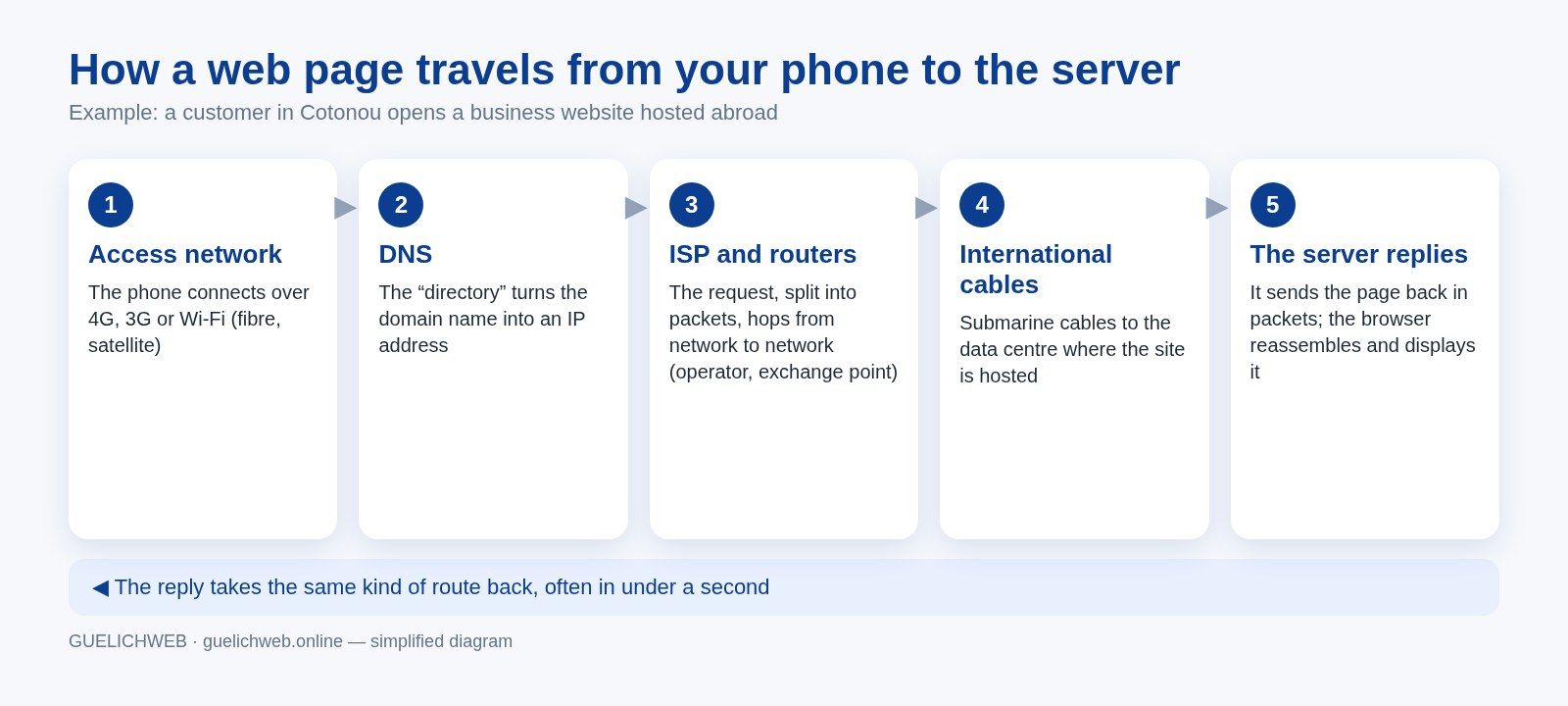
Guelichweb diagram, simplified from the explanation in MDN Web Docs.
1. The access network: the front door
Your phone doesn't talk to the server directly. It first connects to one of your operator's antennas (over 4G, 3G or 2G), or to a Wi-Fi router that is itself connected to fibre, a fixed line or a satellite dish. In Benin, that front door is overwhelmingly mobile. According to ARCEP Benin, the telecom regulator, 58% of mobile Internet subscriptions were on 4G at the end of 2025, 17% on 3G and still 25% on 2G (ARCEP 2025 annual report, in French). Remember that last figure; it matters when you design a website.
2. DNS: the directory that turns a name into an address
Machines on the Internet don't recognise each other by name but by number: IP addresses. When you type a website's domain name, your device first asks a DNS server (Domain Name System), which replies with the IP address of the server to contact. It's the Internet's directory. If your domain name expires, or its DNS settings are wrong, your site becomes unreachable even if the server itself is working perfectly. To understand the different parts of a web address, see our article What is a URL.
3. Packets, routers and operators
Your request is then cut into small pieces called packets. Each one carries the sending IP address and the destination address, a bit like an envelope. Routers, which are specialised computers, read those addresses and send each packet on to the most suitable next network. Packets from the same page don't necessarily take the same route. When they arrive, the TCP protocol puts them back in order and asks again for any that got lost.
Your Internet service provider (ISP) handles the first leg. After that, networks pass packets to one another under interconnection agreements. Benin has an Internet exchange point, BENIN-IX, based in Cotonou and launched in 2013: a place where networks swap local traffic directly instead of routing it through another country. According to the PeeringDB database, five networks are listed there, including SBIN, MTN Benin and Isocel (PeeringDB). The more local traffic stays local, the faster and cheaper it is.
4. International cables
If your website's server is in Europe or the United States, as is the case for many Beninese sites, the packets leave the country through submarine fibre-optic cables. ARCEP puts Benin's international bandwidth at 350 Gbps as of 31 December 2025 (2025 annual report). Contrary to a common belief, most intercontinental traffic runs through these cables, not via satellites. The story of the cables that land in Cotonou is told in our article on the Internet and the Web.
5. The server replies, and everything travels back
The server hosting the site receives the request, prepares the page (text, images, scripts) and sends it back, also split into packets. Your browser reassembles them and displays the page. With a lightweight page and a well-connected server, the whole round trip often takes under a second. With an 8 MB page sent from a distant server to a phone on 3G, the wait can be far longer, and that's where you lose visitors.
One last point: the exchange is encrypted when the address starts with https. The packets still travel over the same networks, but their content is unreadable to anyone who sees them pass. We go into this in What is HTTPS and an SSL certificate.
Protocols: the shared rules that hold it all together
Millions of networks built by different players can talk to one another because they follow the same rules, called protocols. You don't need to know them in detail, but knowing what each one does helps you understand a quote or a technical diagnosis:
- IP (Internet Protocol): gives every machine an address and routes packets from one network to the next.
- TCP (Transmission Control Protocol): checks that all packets arrive, in the right order, and asks again for missing ones.
- UDP: faster but without checks, used for live voice and video, where a lost packet is better than a late one.
- DNS: translates domain names into IP addresses.
- HTTP and HTTPS: the rules of the Web, between a browser and a web server.
- SMTP, IMAP, POP: the rules of email, which is a different Internet service from the Web.
France's CEA research agency puts it neatly in its infographic: the IP address is "the identity card of each machine" and TCP "corresponds to the transport layer" (CEA, Internet et le Web, in French).
Who invented the Internet?
There is no single inventor, so be wary of answers that give just one name. The Internet is the result of several stages, led by different teams:
- 1969: ARPANET. A network funded by the US Department of Defense research agency (ARPA, later DARPA). The first node was installed at UCLA in September 1969 (Internet Society). The main goal was to share scarce computing resources between universities.
- 1972: email. Ray Tomlinson wrote the first software to send and read messages on ARPANET, which quickly became the network's most popular use (Internet Society).
- Early 1970s: Cyclades, in France. The experimental network led by Louis Pouzin championed the datagram: independent packets, with the machines at each end of the line taking care of reliability (Louis Pouzin, Inria, in French). That idea influenced the design of TCP/IP.
- 1974: TCP. Vint Cerf and Robert Kahn published "A Protocol for Packet Network Intercommunication", the protocol that lets different networks connect to each other. It was later split in two, TCP and IP (Vint Cerf's account).
- 1 January 1983: the switchover. All ARPANET hosts had to move to TCP/IP by that date. It is often remembered as the birth of the modern Internet (Vint Cerf, Google).
- 1989: the Web. Tim Berners-Lee invented the World Wide Web at CERN, a service that runs on the Internet. He made the Internet accessible to the general public; he didn't create it.
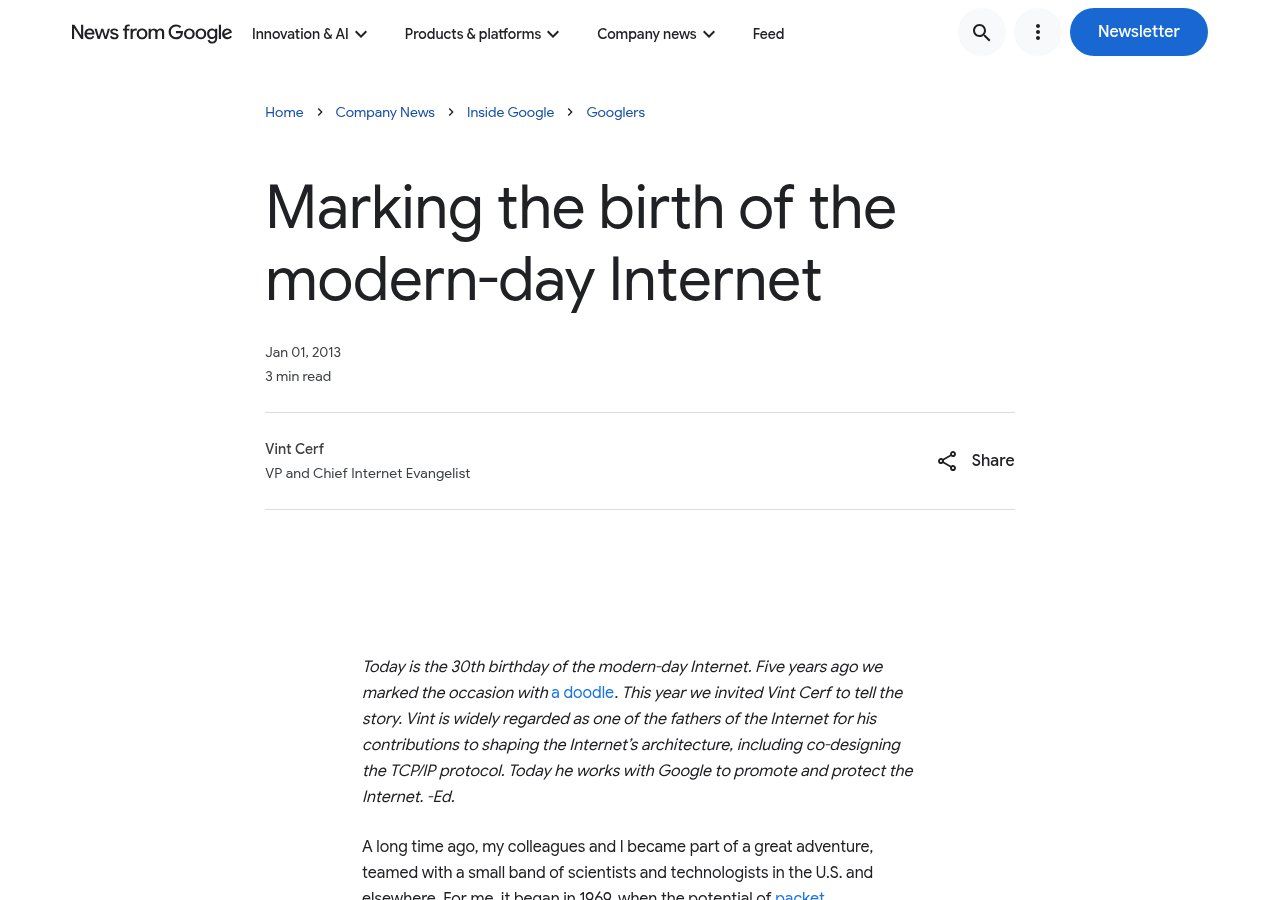
Source: Google blog, "Marking the birth of the modern-day Internet", Vint Cerf, screenshot taken on 19/10/2026.
If someone asks you for a short answer: Vint Cerf and Robert Kahn are regarded as the "fathers of the Internet" for TCP/IP, built on ARPANET, with significant contributions from Europe, including Cyclades.
The Internet in Benin in figures: what the statistics really say
This is where many articles go wrong, because they mix two kinds of figures that don't measure the same thing.
Subscriptions, from the regulator. ARCEP Benin's Internet Observatory counts 11,560,567 active mobile Internet subscriptions as of 31 March 2026, split between Spacetel (MTN), Moov Africa and Celtiis (dashboard at 31 March 2026, in French). ARCEP's 2025 annual report records 8,594,822 mobile Internet subscribers at 31 December 2025, which it calls a "mobile Internet penetration of 64.9%" (2025 annual report).
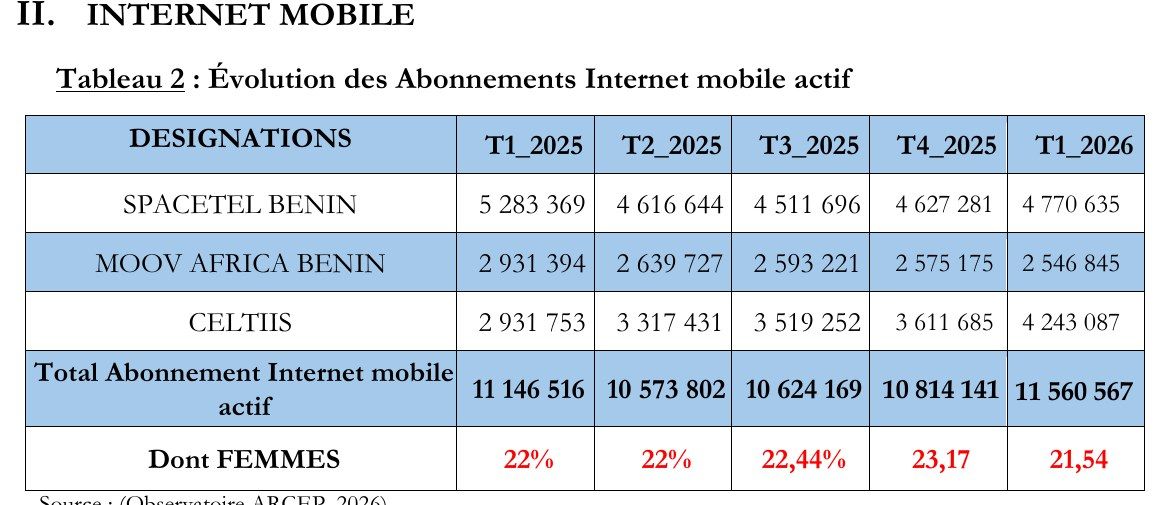
Source: ARCEP Benin, Internet Observatory, dashboard at 31 March 2026 (PDF, in French), extract captured on 19/10/2026.
Fixed Internet remains marginal. The same dashboard counts 128,222 fixed Internet subscriptions at 31 March 2026, a penetration of 0.95%, of which 82.68% are fibre (FTTH). Satellite subscriptions exist but are a tiny minority: 2,550 Starlink subscriptions on the same date (ARCEP).
Users, from international studies. DataReportal, drawing on data from Kepios, the ITU and the GSMA, estimates that Benin had 4.80 million Internet users at the end of 2025, or 32.2% of the population (Digital 2026: Benin). Across Africa, the International Telecommunication Union (ITU) estimates that 36% of the population used the Internet in 2025 (ITU, Facts and Figures 2025).
Why such a gap between 64.9% and 32.2%? Because a subscription isn't a person. Many people in Benin have two or three SIM cards with different operators, and an "active" card in the regulator's sense doesn't mean someone who goes online every week. Both figures are honest; they simply answer different questions. For a business, the useful takeaway is this: the customers who are online are almost all on mobile, and a large share of the population isn't online regularly yet.
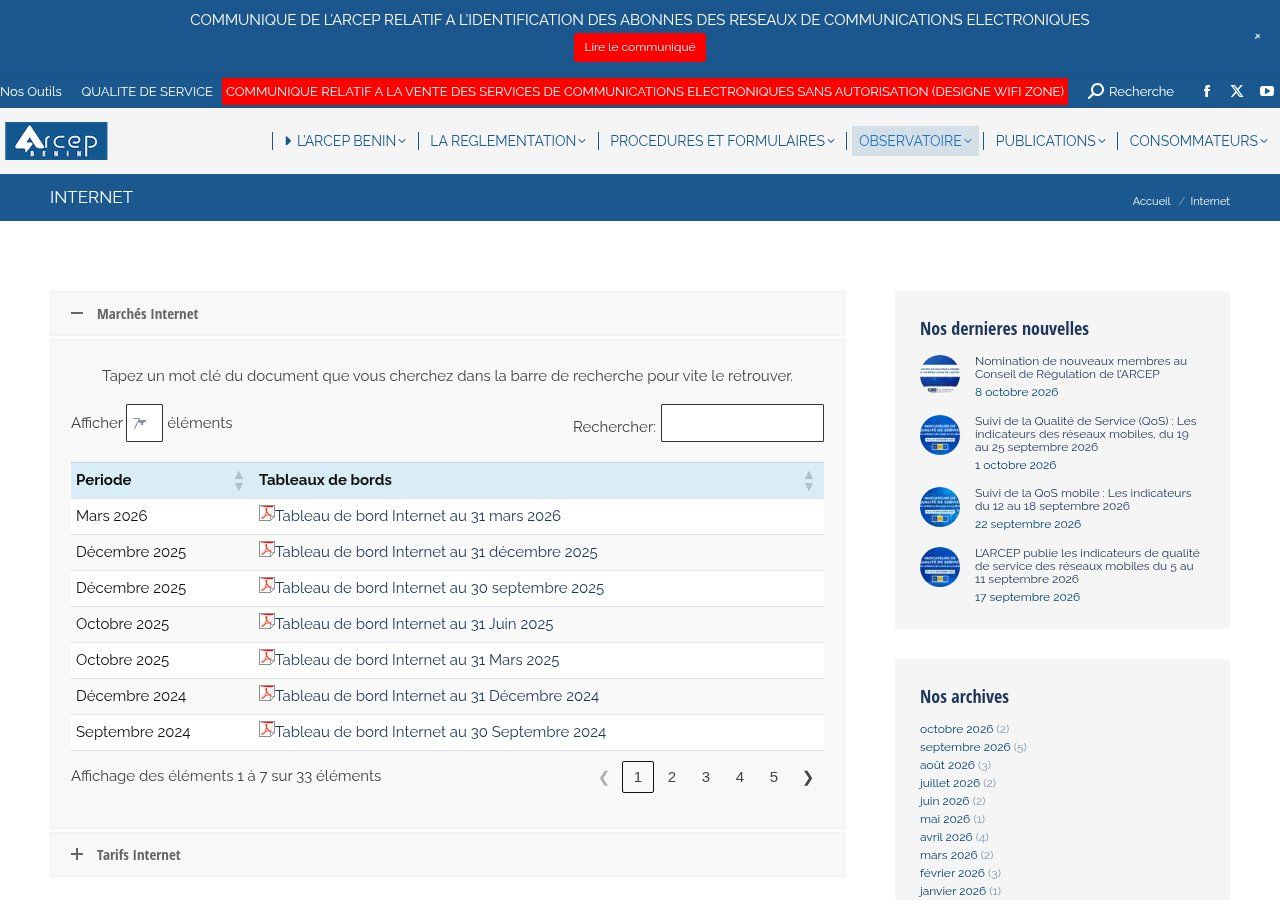
Source: ARCEP Benin, Observatory "Internet" page, screenshot taken on 19/10/2026. Dashboards are published there every quarter.
Internet, Web, Wi-Fi, cloud: keep them apart
Four words come up in almost every conversation with our clients. Telling them apart helps you describe a problem correctly:
- The Internet: the global network that carries data.
- The Web: a service that runs on the Internet, made of pages connected by links and read in a browser. Your website is on the Web; WhatsApp uses the Internet without being a web page.
- Wi-Fi: a short-range radio link between your device and a router, over a few metres. Having "Wi-Fi" with no subscription behind it is like having a tap with no water.
- The cloud: servers located elsewhere, in data centres, that you use remotely over the Internet (Google Drive, your website hosting, your online CRM).
So when a client calls us because "the site isn't working", the first question is always the same: is it the site, or the connection? If other websites open normally on the same phone, the problem lies with the site, its hosting or its DNS. If not, it's the connection, and there's little either of us can do except wait or switch networks.
What this means in practice for an SME, an NGO or an institution
Understanding a page's journey isn't a school exercise. Each step matches a decision you make, or that your provider makes for you.
1. Design for mobile, and for modest connections
With a quarter of mobile Internet subscriptions still on 2G according to ARCEP, a website weighing several megabytes per page is a website some of your visitors will never manage to open. Our position is clear: a business homepage has no reason to exceed 1 to 2 MB. Compressed images, no autoplay video, a limited number of fonts. It takes more work at the design stage, and it's what separates a site that brings in business from a pretty site that stays empty. If your site already exists and generates no enquiries, read Why your website is not bringing customers.
2. Choose where your site is hosted
Distance matters. A poorly connected server, or one very far from your visitors, adds delay to every round trip. For an institutional or commercial site aimed at Benin and the wider region, we look at the quality of the host, its connectivity to West Africa and the use of a content delivery network (CDN), which keeps copies of your files closer to visitors. It's a case-by-case decision; there is no magic host.
3. Actually own your domain name
DNS is the first link in the chain. If your organisation's domain name was bought in the name of a former provider or an employee who has since left, you don't control the front door to your own website. Check whose name it is registered in, who receives the renewal reminders, and write down the expiry date. It's one of the first things we check during a diagnosis.
4. Plan for outages
The Internet is resilient, not invincible. On 14 March 2024, failures on several submarine cables off West Africa disrupted connectivity in a number of countries, including Benin (Cloudflare). For an organisation, the lesson is simple: keep a channel that doesn't depend on your website (a visible phone number, an email address), and don't keep your only copies of documents in a service you can't reach offline.
5. Get your tools working together
The Internet doesn't just connect people to websites; it also connects software to software. That's what makes automation possible: a form on your site that creates a record in your CRM, sends a WhatsApp message and fills in a tracking sheet, with no copy-pasting. We cover this in n8n or Make: which automation tool to choose and in Website, WhatsApp and CRM for an SME in Cotonou.
Common myths about the Internet
- "The Internet is Google." No. Google is a company that provides services over the Internet (a search engine, YouTube, Gmail). It owns cables and data centres, but it is just one network among tens of thousands.
- "The Internet runs on satellites." A small part of it does, mostly for remote areas. Most traffic between continents travels through submarine cables.
- "The Internet was built to survive a nuclear war." It's a stubborn legend. The EHNE encyclopedia (in French) points out that ARPANET was mainly meant to share expensive, scarce computing resources between universities.
- "If I have Wi-Fi, I have the Internet." Wi-Fi connects you to a router. If the subscription behind it is cut off or used up, you have Wi-Fi but no Internet.
- "My site is on the Internet, so people will find it." Being online and being found are two different things. For the second, read How to appear on Google.
Related reading: What does www mean, Buying a .bj domain name and Cookies and trackers.
Frequently asked questions about the Internet
What is the Internet, in one sentence?
The Internet is a global network that links millions of computer networks through the TCP/IP protocols, so that data can travel between any connected devices.
Who owns the Internet?
No one in particular. Each piece has an owner (an operator, a host, a company, a university), but the whole belongs to nobody. Some bodies coordinate the shared rules: the IETF writes the technical standards, and ICANN coordinates domain names and IP addresses globally.
What is the difference between the Internet and the Web?
The Internet is the network; the Web is one of the services that use it, alongside email, messaging and video calls. We wrote a full article on the question: The difference between the Internet and the Web.
Who invented the Internet, and when?
There's no single date. ARPANET, the Internet's ancestor, was born in 1969. Vint Cerf and Robert Kahn published the TCP protocol in 1974, and ARPANET switched to TCP/IP on 1 January 1983, a date often treated as the birth of the modern Internet.
How does the Internet reach Benin?
Through submarine cables that land in Cotonou, then through operators' networks (fibre, mobile antennas) to users. ARCEP puts the country's international bandwidth at 350 Gbps at the end of 2025. A small share of connections also goes via satellite.
How many people use the Internet in Benin?
According to DataReportal, about 4.80 million people at the end of 2025, or 32.2% of the population. ARCEP, which counts subscriptions rather than people, records 8.59 million mobile Internet subscribers on the same date. The two figures don't measure the same thing.
Can you have a website without the Internet?
You can build a site on your computer without a connection. But for others to see it, it has to be hosted on a server connected to the Internet, with a domain name. To see the different kinds of websites, read What is a website.
Is your online presence built for your real visitors?
A site that loads quickly on a 3G phone, hosted in the right place, with a domain name you own and tools that talk to each other: that's not a luxury, it's what the Internet requires as it is actually used in Benin and West Africa. At Guelichweb, we always start with a diagnosis of what you already have, then we send you a quote tailored to your situation, with no off-the-shelf package. You can browse our offers and services, or see how we approach website creation in Cotonou.
Let's talk about your project: [contact us](https://guelichweb.online/en/contact) for a first conversation and a diagnosis.