What does www mean? A simple definition, and should your website address use it
G. CHRIST
Published on October 21, 2026

Look at the business cards, posters and radio ads around you: almost every website address still starts with "www". Now type one of those addresses without the three letters. Sometimes the site opens normally. Sometimes it shows an error. And sometimes it opens… but as a copy of itself that Google treats as a different address.
Those three letters have a simple history and a very real technical role. At Guelichweb, we build websites for small businesses, NGOs and public institutions in Benin, and the question comes up in two forms: "what does www mean?" and "do I need it?". Here are our answers, without unnecessary jargon, plus a method to check your own site in two minutes.
What does www mean? The short answer
www stands for World Wide Web. It is the full name of the Web, the system of pages joined by links that you open in a browser. In an address like www.mybusiness.bj, "www" is a subdomain: an optional label placed in front of the domain name.
It is read out as "double-u double-u double-u", which is famously longer to say than the words it abbreviates. It is sometimes shortened to W3, as in the name of the W3C, the body that publishes Web standards. Wikipedia notes that the awkward pronunciation probably helped the plain word "Web" take over in everyday speech (Wikipedia, World Wide Web).
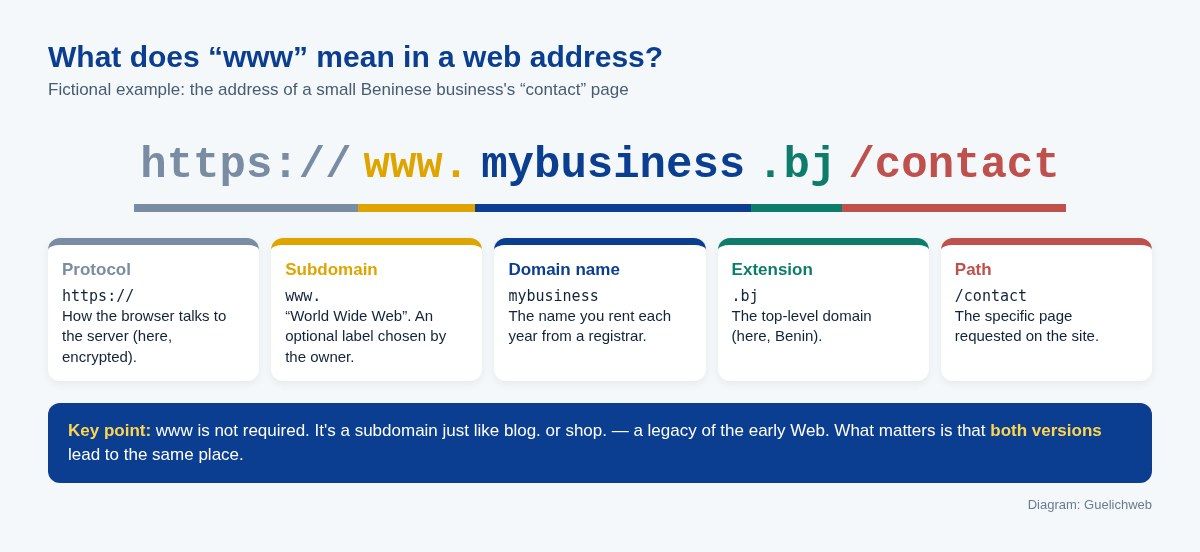
Diagram: the five parts of a web address, including the www subdomain (Guelichweb).
If you want the details of every part of an address (protocol, domain, path, parameters), we explain them step by step in What is a URL? A simple definition of each part. Here, we focus on those three letters.
Where "www" comes from (and why the first website didn't have it)
The Web was invented at CERN, near Geneva, by Tim Berners-Lee in the late 1980s. A fun detail: the very first website in history had no www. According to CERN, its address was info.cern.ch, and the first page lived at http://info.cern.ch/hypertext/WWW/TheProject.html (CERN, a short history of the Web). The WWW letters appear in the path, not in front of the domain.
The "www." prefix comes from a habit of network administrators: giving each machine a name that says what it does. An organisation often had one machine for files (ftp.), one for mail (mail.) and, from the 1990s, one for the Web (www.). The name stuck, even when a single server started doing everything, and later when websites moved to hosting companies and content delivery networks (CDNs).
A late-1990s joke said that WWW really stood for "World Wide Wait", because connections were so slow. Anyone who used an internet café in West Africa back then will understand.
www, Internet, Web: three words people mix up
The Internet is the network: the cables, antennas and routers that carry data. The Web (the World Wide Web) is one service running on that network, just like email or WhatsApp. When you open a page in your web browser, you are using the Web; when you send a voice note, you are using the Internet, but not the Web.
And "www" in an address? It is only the subdomain label. It does not make a site "more Web" or more official. The full distinction is in our article on the difference between the Internet and the Web.
"www" in a text message: a completely different meaning
Google's suggestions show that many people search for "what does www mean in text" or "in slang". If someone writes "that was so funny www" on social media or in an online game, they are not talking about the Web. In Japanese internet slang, the letter w comes from "warau" (to laugh): "www" is the equivalent of "lol" or "hahaha", and the more w's, the harder the laugh. The usage spread worldwide with manga, anime and video games.
A second common confusion: "www" in an email address. There is never one. An email address is written contact@mybusiness.bj, not contact@www.mybusiness.bj. If you see "www" after the @ on a form, poster or email signature, it is a mistake, and messages sent to that address may never arrive.
Should you use www in your website address?
Straight answer: for Google, it makes no difference. Neither the www nor the non-www version gets a ranking advantage. What matters is choosing one, making sure the other leads to it, and sticking with it. MDN, Mozilla's reference documentation, puts it this way: choose a "canonical" domain and stay consistent in all your links (MDN, Choosing between www and non-www URLs).
So the choice comes down to practical criteria. These are the ones that really count.
Good reasons to keep www
- Your host recommends it. Vercel, for example, advises using www as the primary domain and redirecting the non-www version to it, because this gives its delivery network more control over traffic (Vercel documentation). When the infrastructure serving your site makes a recommendation, follow it.
- A DNS constraint. A CNAME record, widely used to connect a domain to a CDN, cannot coexist with any other data on the same name (RFC 1912, section 2.4). The root of a domain always carries other records. Using www sidesteps the issue. Many providers have since found workarounds for the root, but the constraint is real.
- Cookies and subdomains. On a non-www site, cookies set for the whole domain (as many analytics tools do) are also sent to your other subdomains (shop., app., intranet.). With www, keeping them separate is easier. Useful if you plan several applications.
- Instant recognition. On the radio or a poster, "www" immediately says "this is a website". This matters most with extensions the public knows less well, such as .bj, .online or .africa.
Good reasons to drop it
- It's shorter. Four fewer characters to spell out on the phone, paint on a delivery van, or type on a smartphone keyboard.
- Browsers often hide it anyway. Some browsers, such as Google Chrome, already hide www in the address bar (Vercel mentions this in its documentation). Your visitors don't always see it.
- Cleaner in a WhatsApp message. mybusiness.bj reads better, and WhatsApp still turns it into a clickable link.
Our view
If your site already exists and ranks well, don't change anything: there is nothing to gain and a real risk of breaking links. For a new site, we start without www, unless the host recommends the opposite or you plan a whole set of subdomains. Our own site runs without www: type www.guelichweb.online and you are redirected to guelichweb.online. But we wouldn't turn that preference into a rule.
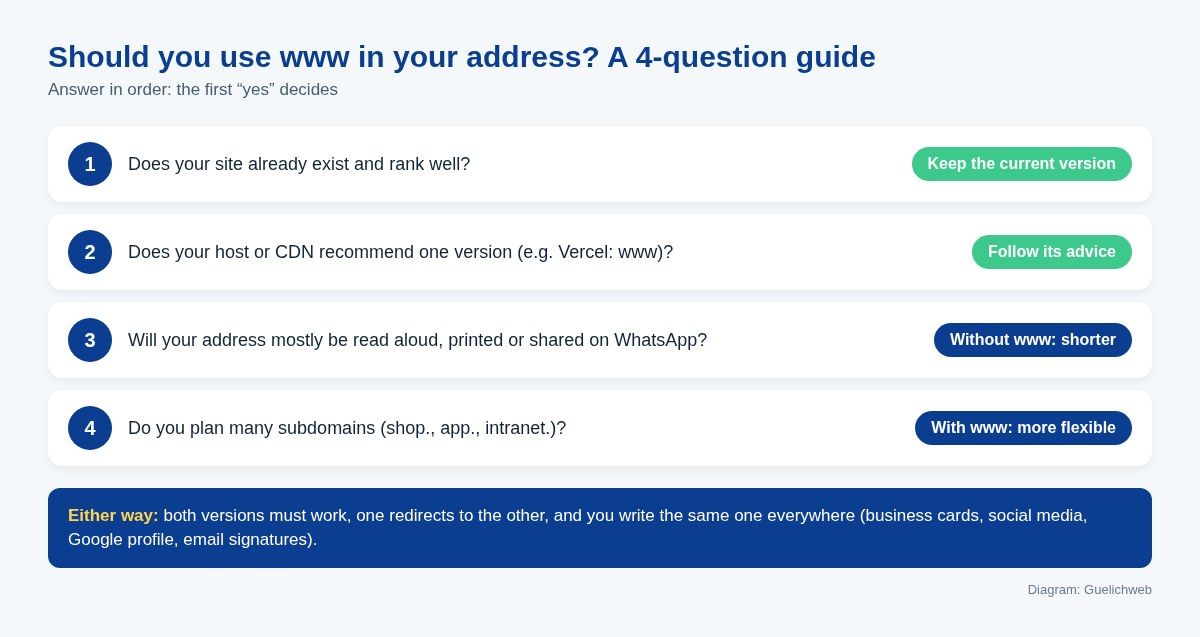
Diagram: the four-question decision guide (Guelichweb).
The real problem: when both versions don't lead to the same place
The "with or without" debate is secondary. The real problem is a site where www.mybusiness.bj and mybusiness.bj behave differently. There are three situations.
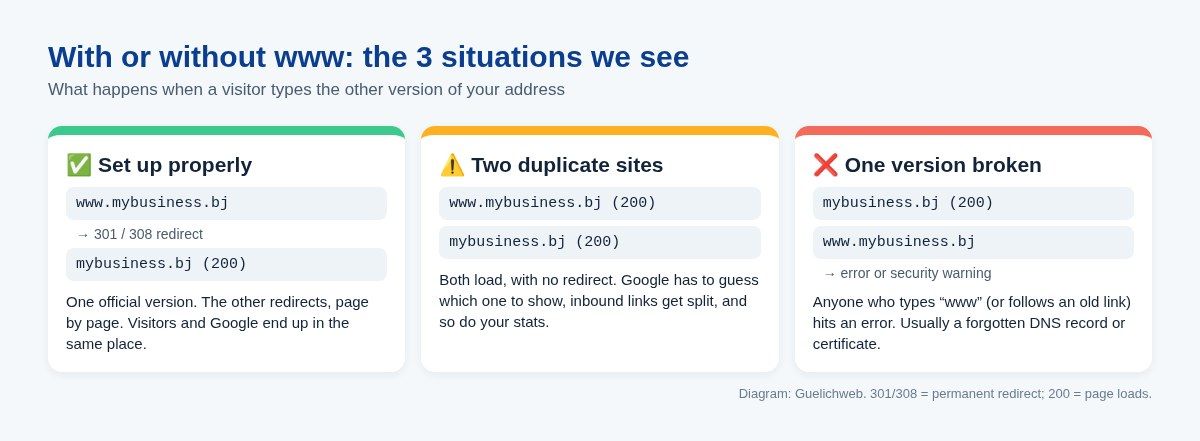
Diagram: set up properly, duplicated, or broken (Guelichweb).
1. Set up properly
Only one version loads. The other returns a permanent redirect (status 301 or 308) to the right one, keeping the requested page: www.mybusiness.bj/contact leads to mybusiness.bj/contact, not to the home page. Google explains that a permanent server-side redirect is a strong signal for choosing the "canonical" URL, the one it shows in its results (Google Search Central, redirects).
2. Two duplicate sites
Both versions show the same pages, with no redirect. For visitors, everything seems fine. For Google, these are two separate addresses with the same content. It will eventually pick one, but you don't control which. Links from other sites get split between the two, and so do your visitor statistics. Google lists the ways to tell it which version you prefer: redirects, the rel="canonical" tag and the sitemap (Google Search Central, consolidate duplicate URLs).
3. One version broken
This is the most expensive case. Someone types "www" because it's printed on your flyer, or clicks an old link, and lands on an error, a hosting company's default page or a security warning. They won't look any further. The usual causes: the DNS record for www was forgotten, or the SSL certificate only covers one of the two versions.
What we observed on Beninese websites
Out of curiosity, on 21 October 2026 we tested both versions (with and without www, over HTTPS) of 13 Beninese public or semi-public websites from our test server. Result: 5 cleanly redirected one version to the other (or to another official address), 4 answered on both versions with no redirect at all, 2 returned a secure-connection error on one of the two versions, and 2 could not be reached either way from our server (inconclusive). It's a small sample, at one moment, from a single connection: it is not a study. But it shows that getting this right is not automatic, even for heavily visited sites. We are not naming anyone: the point is for you to check yours.
How to check your site in two minutes
You don't need to be a developer. Open a private browsing window (so the browser doesn't auto-complete the address from memory), then:
- Type mybusiness.bj (with your domain) and note the final address displayed.
- Type www.mybusiness.bj and note the final address. It should be identical to the previous one.
- Repeat with an inner page: www.mybusiness.bj/contact. You should land on the contact page, not the home page.
- Type the http:// version (no s). It should switch automatically to https://.
- Click the address bar to show the full address: some browsers hide www and https.
If one of the versions shows an error or a warning, that's situation 3: fix it first. If both show the site without the address changing, that's situation 2: less urgent, but worth fixing.
For the more technical, the command curl -I https://www.mybusiness.bj shows the response code: 301 or 308 with a "location" line pointing to the right version is perfect; 200 means that version answers directly.
Finally, if you track your site in Google Search Console, prefer a "Domain property". Google states that it includes all subdomains (www included) and all protocols, while a "URL-prefix property" only sees one version (Search Console help). It's the simplest way to see which version Google has chosen.
How to fix it properly (the checklist we follow)
Depending on your hosting, you'll do this in a control panel (cPanel, Plesk), at your domain registrar, in a CDN such as Cloudflare, or in the settings of a platform like Vercel. The tool changes; the logic stays the same:
- Choose the official version (with or without www) using the guide above, and write it down. If your site already exists, it's the one Google shows today.
- Check DNS: you need a record for the root domain and one for www. Without a www record, the redirect can't even happen.
- Check the SSL certificate: it must cover both names. Otherwise visitors see a security warning before they are redirected.
- Set up a permanent redirect (301 or 308) from the secondary version to the official one, page by page, keeping the path and parameters.
- Align the signals: canonical tags, sitemap, internal links, language versions. Everything should point to the official version.
- Update everything outside the site: Google Business Profile, Facebook and LinkedIn pages, Instagram bio, email signatures, document templates.
- Check again after a few days in Search Console that only the right version is indexed.
One important point: don't use a temporary redirect (302 or 307) for this kind of choice. It tells Google the change isn't final, which weakens the signal.
What we often see in French-speaking Africa
www problems are not specific to Benin, but some local habits make them worse. Here is what keeps coming up in public materials and the sites we look at.
- Printed materials with www, a site set up without it. The flyer says www.myassociation.org, the site was built without www, and nobody created the redirect. Every poster sends visitors to an error.
- A provider who left with the access. The domain was bought by a former provider, in their own name, and nobody knows where to change the DNS. Fixing three letters becomes a project. That's why we insist the domain should always be registered in the organisation's name (see our URL article).
- Several addresses floating around. The Google profile shows the www version, the Facebook page the non-www version, the email signature an old http address. Even if everything redirects, each extra hop slows loading slightly, which matters on an unstable mobile connection.
- Email addresses with www. We still see contact@www… on business cards. Messages don't arrive, and nobody notices.
Our position is simple: pick one address, write it exactly the same way everywhere, and make every other variant lead to it. If you're reprinting your materials, now is the time. If you're planning a new website, put this in your requirements document: "the www and non-www versions, over http and https, all redirect to the official address".
www and SEO: what really matters
You still read that www "helps SEO" or, on the contrary, that it "hurts" it. Both are wrong. Google treats the www and non-www versions as two different URLs: the problem is letting it choose on its own between two copies. Once the redirect is in place, your choice has no influence on your ranking.
If you want to grow on Google, your time is better spent elsewhere: a complete Google Business Profile, pages that answer your customers' questions, a site that's fast on mobile. We've gathered the essentials in how to appear on Google, and how crawling and indexing work in our article on search engines.
Mistakes to avoid
- Switching from www to non-www (or the reverse) on a site that ranks well "to look modern". No gain, real risk.
- Redirecting every www page to the home page instead of the matching page.
- Forgetting the www DNS record when changing hosts.
- Renewing a certificate that only covers one of the two versions.
- Mixing both versions in the site's internal links.
- Putting www in an email address.
- Assuming the site "works" because it opens on your phone: your browser may have remembered the right version. Test in private browsing.
Related reading: Buying a .bj domain name, What is the Internet and Web hosting.
Frequently asked questions
What does www stand for?
www stands for World Wide Web. It refers to the Web, the collection of pages joined by links and viewed in a browser.
What does www mean in a web address?
It's a subdomain, a label placed in front of the domain name. Historically, it named the machine that served an organisation's web pages. Today it is optional.
Is a site without www less trustworthy?
No. Trust depends on the exact domain name and the HTTPS padlock, not on whether www is there. A fraudulent site can perfectly well have a www.
With or without www: which is better for SEO?
Google favours neither. What matters is that only one version is official and the other redirects to it permanently (301 or 308).
Why doesn't my site open without www (or with it)?
Most often, a DNS record is missing for one of the two versions, or the SSL certificate doesn't cover it. Your host or provider can fix this quickly if they have access to the domain.
What does www mean in a text message?
In a message, especially among fans of Japanese culture, "www" means someone is laughing, like "lol" or "hahaha". Nothing to do with the Web.
Do I need to reprint my materials if I switch versions?
No, as long as the redirect is in place: old materials will keep working. Just harmonise them at your next print run.
Want us to take a look at your address?
If your private-browsing test reveals an error or a duplicate, or if you no longer know who manages your domain, that's exactly what we look at during a diagnosis: domain, DNS, certificate, redirects and link consistency. Any work is then quoted after that diagnosis, as explained on our offers page. And if you're planning a new site, see our page on website design in Cotonou.
Send us your website address: [contact us](https://guelichweb.online/en/contact) for a first conversation.