Website requirements document: free template and filled-in example (Word or PDF)
G. CHRIST
Published on October 21, 2026

"How much does a website cost?" We get that question almost every week, usually with no other detail. And we can't answer it honestly. A five-page showcase site and a portal with a members' area and Mobile Money payments have nothing in common, in time or in budget. The document that turns a vague request into a project someone can price is called a website requirements document. In French-speaking Africa you'll hear it called a cahier des charges.
At Guelichweb, we build websites and automations for SMEs, NGOs and institutions in Benin. The projects that go well nearly always share one thing: someone on the client side took an hour or two to write down what they wanted. Below is the template we recommend, section by section, with the questions to fill in, a complete example, and the "terms of reference" version for organisations that go through a tender. It's free: copy it into Word or Google Docs, then export it as a PDF.
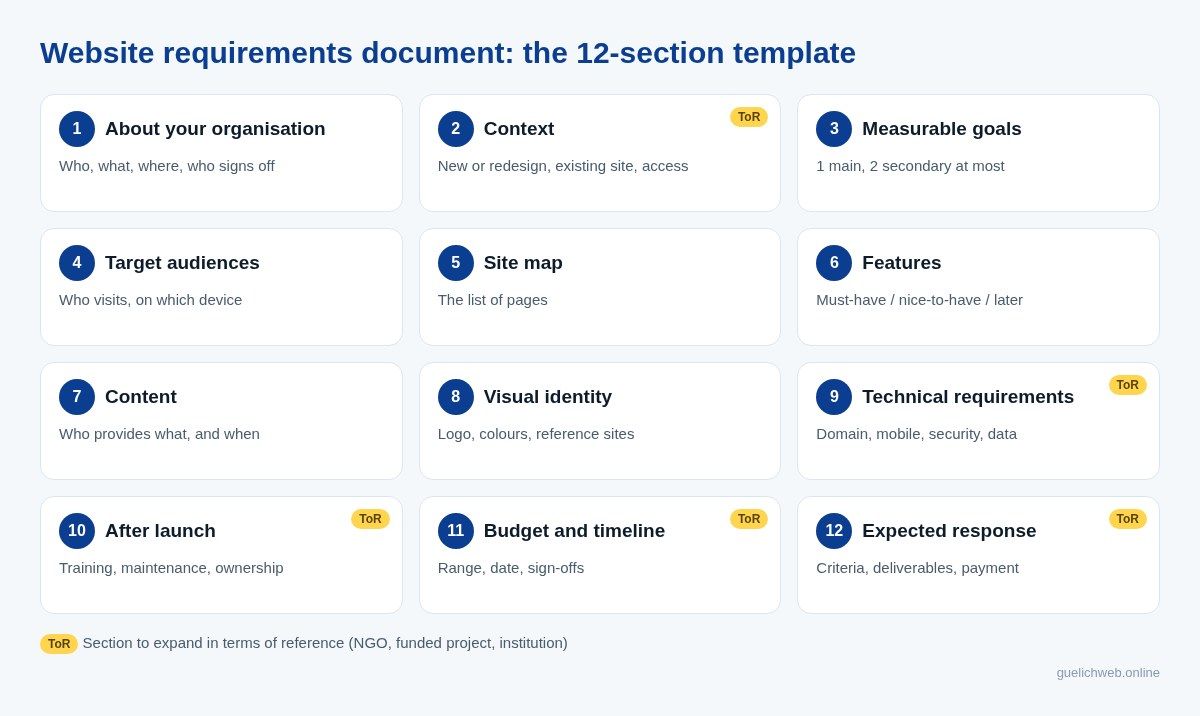
Diagram: the 12-section template (Guelichweb). Yellow badges mark the sections to expand in terms of reference.
What is a website requirements document?
A website requirements document describes what the site must do, for whom, with what content, under which constraints, by when and on what budget. It lets you request comparable quotes, then serves as the shared reference until delivery.
It doesn't describe the technology for you. You don't need to know what a CMS or a server is to write a good one. You describe needs ("a parent must be able to pre-register their child from a phone"); the provider proposes the solutions. If you're just starting, our article on the types of websites will help you put a name on what you're looking for.
Requirements document, brief, terms of reference: what's the difference?
They're cousins. A brief is the short version, often one or two pages. A requirements document (or specification) is the full version for a private project. Terms of reference (ToR) and formal tender specifications are the versions used by NGOs, donor-funded projects and public bodies: they add the rules for selecting the provider, the required deliverables and the payment terms. The core structure stays the same.
Who should write it?
You. A provider can help you structure it, ask the right questions and rephrase. But if the agency writes your needs on its own, it is really writing its own offer. Our view is firm: the first version must come from the person who knows the customers, the users and the internal constraints. Even if it's imperfect. Even with typos.
Why it's the most profitable document in your project
- Comparable quotes. Send the same document to three providers and you finally compare prices for the same work, not three different interpretations. To read the proposals afterwards, see what a website quote in Benin should include.
- Fewer surprises. What's written is planned, and what's planned is priced. What isn't written gets discussed later, usually at the worst possible moment.
- A faster project. The provider asks fewer questions and starts sooner.
- A basis if you disagree. The day someone says "that wasn't included", the document settles it.
A requirements document doesn't guarantee a good website. What it mostly does is stop you paying for a bad one while believing you're buying something else.
Short version or terms of reference: which one do you need?
It depends on who is buying and how the purchase is controlled. A shop, a firm or a private school consulting two or three providers doesn't need thirty pages. An NGO accountable to a donor, a town hall or a public project does.
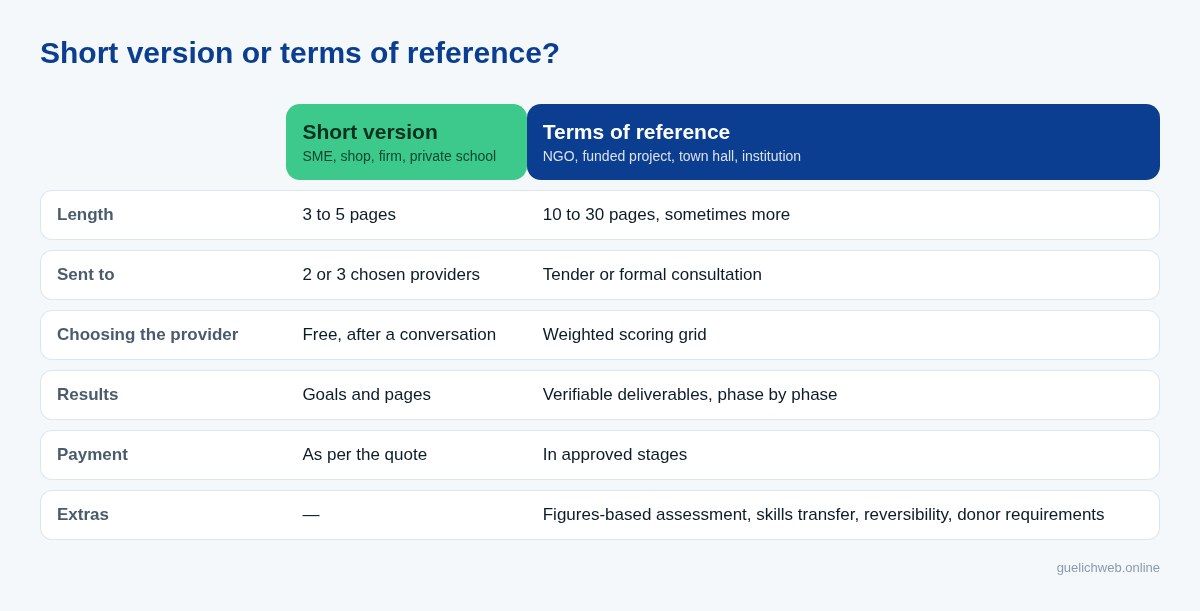
Diagram: two levels of the same template (Guelichweb).
Our advice: always start with the short version. If you need terms of reference, add the sections flagged below afterwards. The reverse works badly: ToR copied from another project and filled in in a hurry often contain requirements nobody actually chose.
The requirements template to copy (12 sections)
Copy the headings and questions into a blank document. Answer in your own words. If you don't know, write "to be defined": a good provider will ask you, and that is already useful information.
1. About your organisation
- Who are you, what do you do, since when, and where?
- Who do you serve (customers, beneficiaries, members, partners)?
- Who owns the project and who signs off decisions?
2. Context: new site or redesign?
- Why this project now (opening, new school year, new funding, outdated site)?
- If a site exists: its address, what works, what doesn't, and who holds the domain name and hosting accounts.
- What tools do you already use (WhatsApp Business, spreadsheet, CRM, invoicing software)?
3. Measurable goals
- One main goal, two secondary ones at most: receive quote requests, sell online, take pre-registrations, reassure donors, recruit.
- How will you know the site works? Number of requests, sales, WhatsApp messages, applications submitted.
4. Target audiences
- Who will visit the site, and what will each type of visitor look for?
- On what device (almost always a phone) and in which language?
- What action do you expect from each (call, message on WhatsApp, fill in a form, download a report)?
5. Site map: the list of pages
- List the pages you want. A common base for a showcase site: Home, About, Services or Products, Work, Contact.
- Add as needed: Pricing, Blog or News, FAQ, Careers, Members' area, Reports and publications.
- A single campaign page is sometimes enough; see the difference between a landing page and a showcase site.
6. Features: must-have, nice-to-have, later
- Contact form, WhatsApp button, appointment booking.
- Catalogue, cart, online payment (Mobile Money, card), order tracking.
- Customer, student or member area with login; online donations; document search.
- Connections to your tools: CRM, spreadsheet, automatic emails, notifications.
- Sort every line into three columns. This sorting is gold: it lets the provider propose a realistic first version and a next step.
7. Content: who provides what, and when
- Text, photos, videos, logo, product list and prices, reports to publish.
- Who writes or produces them, and by what date?
- Should copywriting, translation or a photo shoot be included in the quote?
8. Visual identity and references
- Logo, colours, fonts, existing brand guidelines (or the need to create them).
- Two or three sites you like, and exactly why.
- One site you don't like, and why. That's often more telling.
9. Technical requirements (without jargon)
- Domain name: does it exist, whose name is it registered in, do you need a .bj, a .com or both? See how to choose a good web address.
- Hosting, security (HTTPS), automatic and tested backups.
- Mobile display and speed on a 3G/4G connection; Google's free PageSpeed Insights tool lets you check.
- Languages (French, English, other), accessibility (the W3C's WCAG standard), basic SEO.
- Personal data collected by forms, cookie banner, legal notice.
- Who will be able to edit the site, with which permissions?
10. After launch
- Team training and a user guide.
- Maintenance: updates, backups, response time if something breaks.
- Ownership: the domain, hosting, code and every account must be in your name or handed over to you.
11. Budget and timeline
- A budget range, even a wide one. Without it, you'll get proposals you can't afford or cut-price ones.
- Your target launch date, and the reason for that date.
- The sign-off dates on your side (mock-up, content, acceptance testing).
12. What you expect from the provider
- What you want to receive: proposal, schedule, itemised price, references, maintenance terms.
- The response deadline and the contact person.
- For ToR: selection criteria and their weighting, deliverables, staged payment terms.
Free example: a filled-in requirements document (fictional case)
Here is what the short version looks like once completed. The business is made up; the needs are typical of what we see in Cotonou.
- Organisation: fictional professional kitchen equipment shop in Cotonou, serving restaurants, street-food stalls and caterers, delivering to Cotonou, Abomey-Calavi and Porto-Novo.
- Context: new site. No website, a Facebook page, and a WhatsApp Business account flooded with price requests.
- Main goal: receive qualified quote requests. Indicator: number of requests per month via the form and WhatsApp.
- Audiences: restaurant managers (on a phone, in a hurry); hotel buyers (on a computer, want a PDF data sheet).
- Pages: Home, Catalogue (6 categories), Product page, Work, About, Contact.
- Must-have: catalogue without payment, a "Request a quote on WhatsApp" button with the product name pre-filled, a quote form. Nice-to-have: downloadable data sheets. Later: Mobile Money payment for small items.
- Content: photos and product list supplied by the shop before the 15th of the month; copy written by the provider from an interview.
- Technical: a .bj domain to register in the company's name; fast on mobile; form connected to a shared spreadsheet.
- After launch: half-day training to add products; monthly maintenance priced separately.
- Budget and timing: range stated; launch before the festive season.
Three pages are enough for this project. Notice what is deliberately missing: no imposed technology. The shop says what it wants to achieve and lets the providers propose.
NGO, school, institution: what to add for terms of reference
When the project is donor-funded or goes through a procurement procedure, you need a document any evaluator can read without you in the room. Add:
- An assessment of what exists, with figures where possible: pages, tools, problems observed.
- Expected results, written as verifiable deliverables (approved mock-ups, live site, guide, training delivered).
- Selection criteria and their weight: methodology, references, team, price.
- A phased timeline with payment tied to each approved phase.
- Skills transfer: who will be trained, how many people, which documents are handed over.
- Ownership and reversibility: source code, access, accounts, data export.
- Donor requirements: partner visibility, report publishing, languages.
A real, public example says more than a long explanation. In September 2026, Enabel, the Belgian development agency, published the tender specifications for redesigning the websites of INMeS and IFSIO, two health training institutes in Benin. The document runs to 63 pages. It includes an assessment of the existing sites, Mobile Money payments (MTN, Moov, Celtiis), required compliance with Benin's Digital Code, twelve months of maintenance and staff training. Above all, it reports that one institute lost five months of data at its former host, hence a "non-negotiable" requirement for automatic, off-site and tested backups.
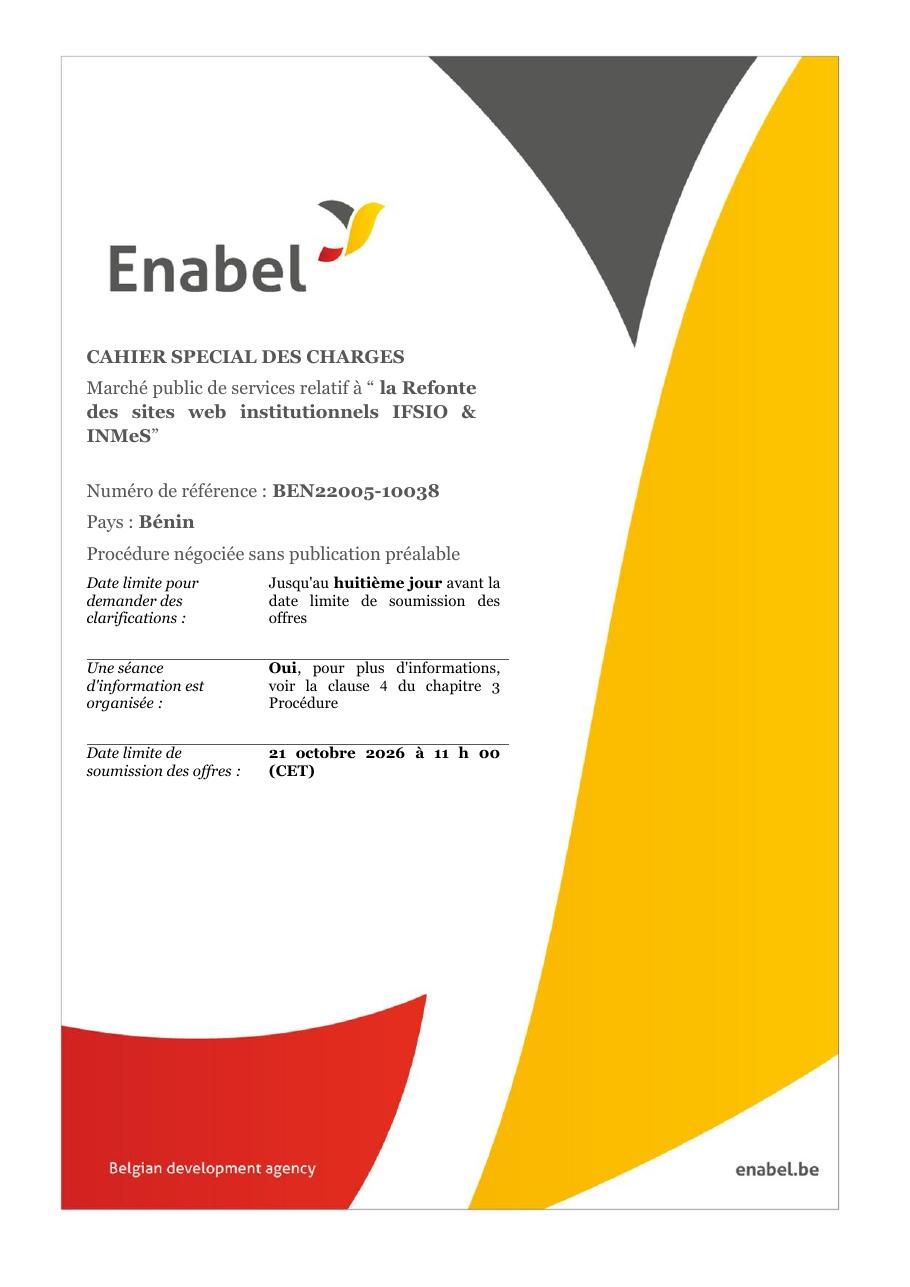
Source: cover of tender specifications BEN22005-10038, Enabel (enabel.be), public document in French.
The lesson for a small NGO? You don't need 63 pages. But backups, ownership of access and training aren't big-institution details. They're what saves a project three years later.
What standard templates forget (Benin and French-speaking Africa)
The templates you can download online are often well made, but written for Europe or North America. For a project in Benin, Côte d'Ivoire, Senegal or Cameroon, add these questions:
- Payments: Mobile Money (MTN MoMo, Moov Money, Celtiis Cash in Benin; Orange Money, Wave elsewhere), through an aggregator or directly? Is card payment needed at all?
- WhatsApp: that's often where the sale closes. Should the site send visitors there with a pre-filled message? Should it connect to a CRM? See website, WhatsApp and CRM.
- Connectivity: your visitors pay for their mobile data. Require light pages tested on a mid-range phone.
- Personal data: in Benin, Law No. 2017-20 on the Digital Code governs data collection; the data protection authority, the APDP, offers compliance tools on its portal, including a legal notice template.
- Local visibility: Google profile, address and neighbourhood, the same phone number everywhere; see local SEO.
- Languages: French only, or English too for partners and donors?
How to turn it into a PDF or Word file for free
No paid software needed. Copy the template above into Google Docs, Microsoft Word or LibreOffice Writer. Replace the questions with your answers, delete the sections you don't need, then export: in Google Docs, "File", "Download", "PDF document"; in Word or LibreOffice, "Save as" or "Export as PDF".
Three details that look professional: a cover page with the project name, the date and a version number (v1, v2); numbered sections like the ones here, so anyone can say "point 6" on the phone; your attachments listed in an appendix (logo, photos, examples). Send the PDF to all providers at the same time, with the same deadline.
7 mistakes that ruin a requirements document
- Describing solutions instead of needs. "I want WordPress" closes the door on a better option. "My team must publish news without help" lets the provider propose.
- Making everything a must-have. If everything is a priority, nothing is, and the quote explodes.
- Forgetting content. It's the first cause of delay we see: the site is ready, the text and photos aren't.
- Hiding the budget. It doesn't protect you; it gets you proposals you can't compare.
- Copying a template without reading it. Useless requirements are expensive, and requirements copied from another country may not apply to you.
- Leaving the domain and hosting in the provider's name. The day the relationship ends, you lose your address.
- Planning nothing after delivery. A site with no updates or backups ages fast, and sometimes disappears.
What next? Using the document to choose
When proposals come in, go through your sections one by one. Did each provider answer everything? Who asked smart questions? Who suggested postponing a nice-to-have feature to stay within budget? A lower quote that ignores half of your document isn't cheaper; it's incomplete. Then keep the requirements document as an appendix to the contract. You'll use it again for acceptance testing, when you check page by page that the delivered site matches what was planned.
Related reading: What is WordPress, Website maintenance and AI website builders.
Frequently asked questions
What is a website requirements document?
It's the document that describes a website's goals, audiences, pages, features, content, technical constraints, budget and timeline, so you can get comparable quotes and steer the project.
How long should a website requirements document be?
Three to five pages are enough for a showcase site or a small shop. Terms of reference for an NGO or an institution are longer, because they add selection rules, deliverables and staged payments.
Where can I find a free website requirements template in PDF?
The 12-section template in this article is free: copy it into Word or Google Docs, fill it in, then export it as a PDF. Several agencies and organisations also offer downloadable templates, mostly written for Europe or North America.
Who writes it: the client or the agency?
The client, at least for the first version, because they know their customers and constraints. The agency can help structure and complete it during a diagnosis.
What's the difference between a requirements document and terms of reference?
Terms of reference are the formal version used by NGOs, donors and public bodies. They take the requirements document and add selection criteria, deliverables, a payment schedule and skills transfer.
Should I state my budget?
Yes, at least a range. It lets providers propose a suitable solution and saves you from quotes you can't compare.
Need help scoping your project?
Started the template and stuck on the technical part? That's normal, and it's exactly what we cover in a diagnosis: we review your answers, ask the missing questions and tell you frankly what is essential now and what can wait. Every project then gets a quote after that diagnosis, as explained on our offers page. See also our services and our page on website creation in Cotonou.
Send us your draft requirements, even unfinished: [contact us](https://guelichweb.online/en/contact) for a first conversation.