AI in business: concrete use cases and a one-page AI usage policy template (SMEs, NGOs, institutions)
G. CHRIST
Published on October 29, 2026

In many organisations, AI is already in use. Nobody decided it, no meeting approved it, yet the communications officer drafts her posts with ChatGPT, the accountant asks an assistant for Excel formulas, and an intern pasted a project's beneficiary list into a free tool last night "to get a summary". This is not a made-up scenario: it is a very common situation as soon as you start talking about AI in business with SMEs, NGOs and public institutions.
The problem is not that teams use AI. The problem is that they use it with no framework: without knowing what they are allowed to put into it, without review, and without management knowing what is going on. The result is all of the risks of AI and very few of its benefits.
At Guelichweb, automation and AI assistants are part of what we do, in Benin and for French-speaking Africa. In this article we give you our take: concrete use cases, team by team, what you should not hand over to AI, and a one-page AI usage policy template you can adapt this week.
What does AI in business actually mean?
When people talk about AI in business today, they mostly mean generative AI: tools such as ChatGPT, Gemini, Copilot or Claude that can write, summarise, translate, classify or analyse a document from an instruction written in everyday language. This family of tools changed the game because it requires no technical skill to get started.
It helps to separate three levels of use, because they carry neither the same benefits nor the same risks:
- The personal assistant. One person uses a chat tool to help with their work: drafting a letter, rewording a paragraph, preparing a meeting. This is the most widespread and the simplest level.
- AI built into existing tools. AI works inside your email, your CRM, your office suite or your website: automatic email summaries, suggested replies in a support tool, sorting the requests that arrive through your contact form.
- Automation with AI. A full process runs with an AI step in the middle: a WhatsApp request comes in, AI classifies it, a record is created in the CRM and the right person is notified. This is where the biggest time savings are, and it is what we sometimes call an AI agent.
Our view: most organisations want to jump straight to level 3. They are wrong. A team that has never learned to write a clear instruction, review an AI output and protect its data will make costly mistakes with an automation. Level 1, properly framed, is the best training ground.
Concrete examples of AI in business, team by team
Generic lists along the lines of "AI boosts productivity" are useless. Here are specific uses that work for a team of a few people just as well as for an institution with several hundred staff. None of them requires any development to begin with.
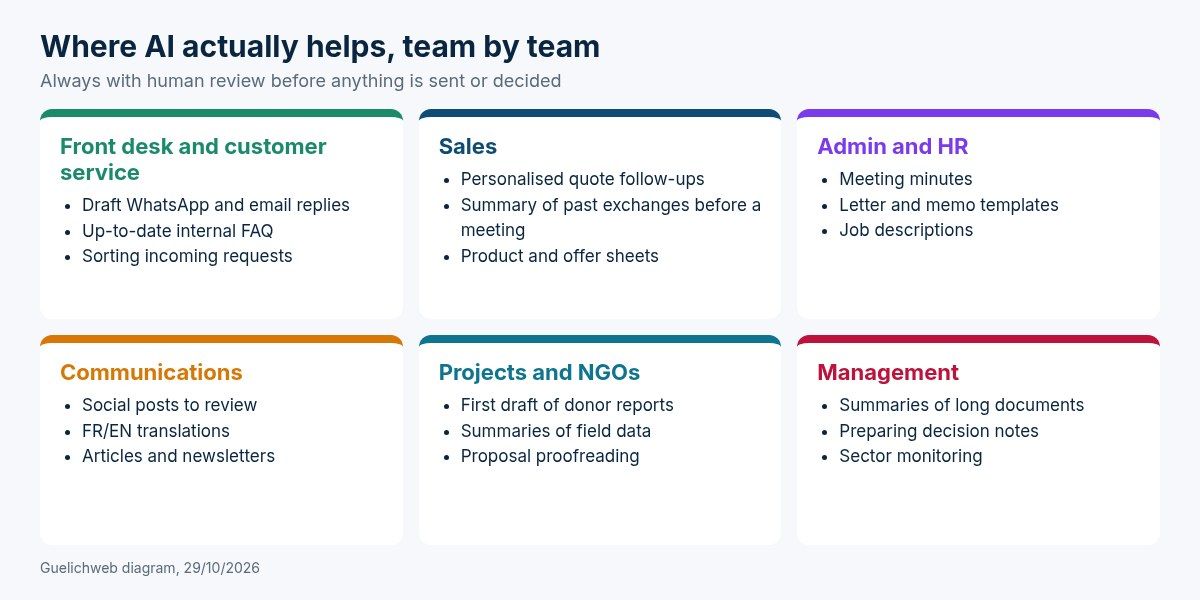
Guelichweb diagram: examples of generative AI use cases by team, always with human review.
Front desk and customer service
This is often the most overloaded team, especially when customers write on WhatsApp at all hours. AI can suggest a draft reply to frequent questions (opening hours, documents required, lead times), soften a message that sounds too abrupt, or summarise a long conversation before handing it to a colleague. The person at the front desk reviews, corrects and sends. They stay in control of the reply, but save several minutes per message.
If the volume grows, the next step is an assistant that answers simple questions on its own and hands over to a human for everything else. We cover what it can and cannot really do in our article on the AI chatbot.
Sales
A salesperson who follows up on quotes with the same copy-pasted message gets few replies. With AI, they can prepare a personalised follow-up from their notes, summarise a client's history before a meeting, or turn a technical document into a clear offer sheet. The gain is real as long as client information is stored properly somewhere, ideally in a CRM, rather than scattered across ten WhatsApp chats.
Administration and human resources
Meeting minutes from rough notes, templates for administrative letters, job descriptions, internal memos and procedures: useful documents that nobody wants to write. AI produces a first version in seconds. Be careful, though, with anything involving staff: appraisals, salaries, disciplinary files. That data has no place in a consumer tool.
Communications and marketing
Social media posts, newsletters, blog articles, French-English translations: this is the most visible use. It is also where the temptation to publish without reviewing is strongest. Unedited AI text is easy to spot: smooth sentences, artificial enthusiasm, no information specific to your organisation. Use AI to get started and to structure, then rewrite with your own examples, your verified figures and your own voice.
Projects, programmes and NGOs
For an NGO, AI can help produce the first outline of a narrative report for a donor, summarise field reports, check that a proposal meets every criterion of a call for proposals, or translate an executive summary. These are heavy, repetitive tasks, and the gains can be significant.
But this is also the sector with the highest risk, because it handles beneficiary data: names, family situations, health data, sometimes vulnerable people. That information must never be pasted as-is into an AI tool. Anonymise first, or don't do it at all.
Management
A director receives forty-page reports, regulatory texts and market studies. Asking AI for a structured summary, the list of decision points or the questions to put to the team saves precious time. Golden rule: when an important decision rests on a figure or a quote, check it in the original document. AI tools can invent numbers with great confidence.
What you should not hand over to AI
Generative AI tools are very good at producing plausible text. That is not the same as accurate text. Here are the situations where we clearly advise against relying on them without strong human control:
- Decisions that affect people: hiring, disciplinary action, granting aid or credit, selecting beneficiaries. AI can help organise information, never make the call.
- Legal, tax or medical information presented as certain. A tool may quote a law that does not exist or an outdated rate.
- Published figures in a report, a quote or a tender response, unless they have been checked at the source.
- Sensitive messages: bad news for a client, a reply to a complaint, crisis communication. A draft can help, but the tone has to come from you.
- Anything that commits the organisation's signature without review: contracts, agreements, official letters.
This does not mean AI is useless on these topics. It means it remains an assistant, and responsibility stays human. A sentence we like to put in AI policies: "Whoever sends the document is accountable for it, whatever tool helped."
The real risks of AI for an SME or an NGO
There is plenty of talk about spectacular risks. In practice, the ones that hurt small and medium-sized organisations are much more down to earth.
1. Data leaks through copy and paste
This is risk number one. Depending on the tool and its settings, content typed into a free version of an AI assistant may be stored and, in some cases, used to improve the models. Business plans generally offer better guarantees, but you have to check tool by tool, in the terms of use and privacy settings (for ChatGPT, for example, in the data controls section). The safest rule is still never to put in anything you would not want to see leave the organisation.
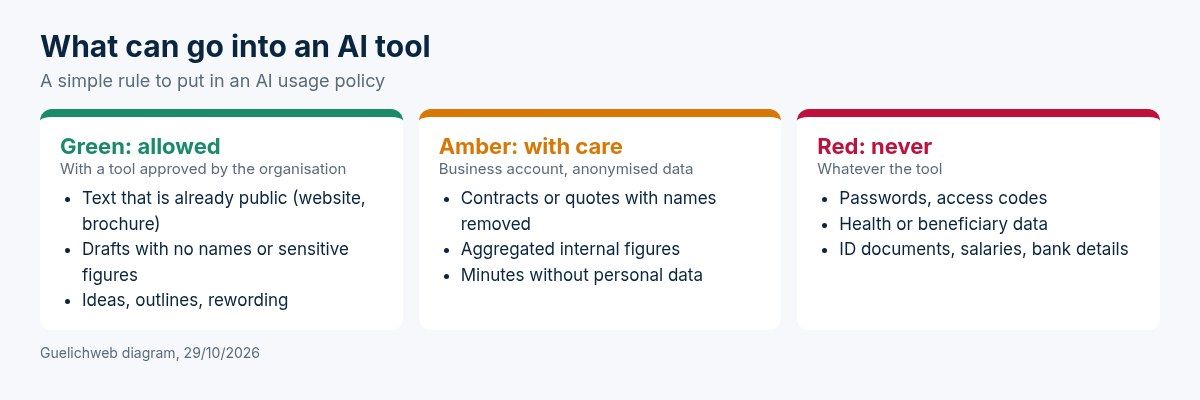
Guelichweb diagram: a three-colour rule that is easy to remember and to display.
2. Errors published with confidence
Generative AI does not "know" anything: it predicts a likely sequence of words. So it can invent a source, a date or a figure in the same assured tone as the rest. The risk is not the error itself, it is the error that slips through because nobody reviewed it. A report sent to a donor with an invented statistic can cost a great deal of credibility.
3. Personal accounts and lost access
When every employee uses AI with a personal account, the organisation has no idea what is stored where. The day that person leaves, their conversations, their prompt templates and sometimes working documents leave with them. It is exactly the same problem as websites registered in a former contractor's name, or professional email addresses created on personal Gmail accounts.
4. The legal framework people ignore
In Benin, personal data protection is governed by the Digital Code and supervised by the Personal Data Protection Authority (APDP). Côte d'Ivoire has ARTCI and Senegal the Personal Data Protection Commission (CDP). These rules still apply when the data goes through an AI tool hosted abroad. If you work with European partners, the EU AI Act also requires organisations that deploy AI systems to ensure a sufficient level of AI literacy among their staff. We are not lawyers: for sensitive processing, have it checked by a legal professional or your data protection officer.
5. "Gadget" AI that achieves nothing
The last risk is less dramatic but very common: paying for subscriptions, launching a chatbot on the website, announcing an "AI transformation"... and changing nothing in the team's daily work. Without a measurable goal (time saved, response time, number of requests handled), AI stays a communications expense.
AI usage policy for business: a one-page template
An AI usage policy (also called an AI charter) is a short document that tells everyone what is allowed, what is forbidden, and who to ask when in doubt. The templates you find online often run to ten or twelve pages, written for large European companies. For a fifteen-person SME or a field NGO, that is too much: nobody will read it.
Our conviction: a one-page policy that is actually read and explained in a meeting protects better than a twelve-page document sitting in a shared folder. Here is the outline we suggest. Replace the brackets with your own details.
AI usage policy of [Organisation name] — version 1, [date]
- Scope. This policy applies to everyone who works for [Name]: employees, interns, volunteers and consultants, whenever they use an AI tool for their work.
- Approved tools. The approved tools are: [list, for example two tools at most], used with an account provided or approved by [Name]. Any other tool must be approved beforehand by [AI lead].
- Data. Green: public text and drafts with no personal information. Amber: anonymised internal documents, only in an approved tool. Red, never: passwords, health data, beneficiary data, ID documents, salaries, bank details, partners' confidential documents.
- Review. Any content produced with the help of AI is reviewed by a person before it is sent, published or used for a decision. Figures, names, dates and references are checked at the source.
- Accountability. The person who sends or publishes a document is accountable for it, whatever tool was used.
- Transparency. When a recipient could believe content is entirely human-made when it is not (a generated image, an automatic reply), we say so.
- Decisions about people. No decision about a person (hiring, disciplinary action, selection, aid) is made by an AI tool. AI can help prepare, never decide.
- Incidents. If there is an error, or data is sent to a tool by mistake, inform [AI lead] the same day. Reporting is never punished; hiding is.
- Review cycle. The policy is reviewed every six months, or whenever a new tool is added.
Have every team member sign and date it: it sounds bureaucratic, but it is what turns a document into a shared rule.
To go further on the principles, three serious references: the UNESCO Recommendation on the Ethics of AI, the OECD AI Principles, and the French data protection authority CNIL's resources on AI, written for French law but very clear on the logic of data protection.
How to start using AI in your organisation in 30 days
Here is the approach we recommend. It is deliberately modest. The aim is a first measurable result, not to transform everything.
Week 1: take stock
Simply ask the team, without judgement: who already uses an AI tool, which one, for what, and with which account? You will be surprised. Also note the three tasks that waste the most time every week. They are your first candidates.
Week 2: choose the tools and write the policy
Choose one or two tools at most, ideally with business accounts managed by the organisation. If you already use Google Workspace or Microsoft 365, start by looking at what your subscription offers: integration with your documents and email matters more than the raw performance of the model. Write the one-page policy above and present it in a meeting.
Week 3: train on real cases
One hour of training on your own documents is worth more than a day of theory. Show how to write a good instruction (context, role, expected format, examples), how to check the result, and how to anonymise a document before using it. Appoint an AI lead, even on a very part-time basis.
Week 4: measure and decide
Go back to the three tasks from week 1. How long do they take now? Is the quality at least as good? If so, you can consider the next step: connecting AI to your tools to automate the most repetitive tasks, with tools such as n8n or Make.
ChatGPT for business: free or paid?
This question comes up a lot. Our answer is nuanced. The free version of an AI assistant is enough to discover, test, and work on public or non-sensitive content. It becomes a problem when the tool is used every day, with internal documents, by several people, each on a personal account.
The business plans (team or enterprise) of the main vendors generally bring centralised account management, clearer commitments that your data will not be used for training, and higher usage limits. Prices change often and depend on the number of users: always check the vendor's official page when you decide, and compare with what is already included in your office suite. For an organisation that pays in CFA francs, also think about the payment method: an international bank card is often required.
Our advice: do not buy a subscription for the whole team at once. Start with two or three motivated people, measure for a month, then expand.
AI for SMEs and NGOs in French-speaking Africa: what really changes
Most guides to AI in business are written for European organisations. Several realities are different here, and they change the way you roll out AI:
- WhatsApp is the main customer channel. The most concrete gains often come from there: faster replies, better-sorted requests, information copied automatically into a spreadsheet or CRM. To go as far as automation, you need the WhatsApp Business API.
- Connectivity and mobile first. Many staff work from their smartphone, on limited data plans. A heavy tool designed for a desktop computer will see little adoption.
- Languages. AI tools are very good in French and English. They are much less reliable in national languages such as Fon, Yoruba, Wolof or Dioula. If your users speak those languages, plan for systematic human validation.
- Donors ask questions. More and more technical and financial partners ask how organisations protect data and use AI. Having a written policy is becoming a sign of seriousness.
- A national context on the move. Benin adopted a National Artificial Intelligence and Big Data Strategy 2023-2027 (in French), approved by the Council of Ministers on 18 January 2023. The signal is clear: the topic is no longer reserved for large companies.
To place AI within a broader modernisation project, our article on digital transformation for SMEs and NGOs gives the overall picture.
How much does AI cost a business?
There are three cost items. First, tool subscriptions, paid per user per month. Second, set-up time: policy, training and tool selection, which can be done in-house. Finally, if you go further, building automations or assistants connected to your tools, which depends entirely on your processes.
We do not quote random prices for that last item: an assistant answering a shop's frequent questions and a system that sorts an institution's requests across three channels have nothing in common. We explain the factors that drive the budget in our article how much does AI automation cost in Benin. As with our offers, the principle stays the same: diagnosis first, detailed quote second.
Frequently asked questions about AI in business
Does a small business really need an AI policy?
Yes, as soon as one person on the team uses AI for work, which is almost always the case. One page is enough. The goal is not administrative compliance; it is to stop sensitive data ending up in a tool simply because people did not know better.
Can you ban AI at work?
You can, but it rarely works. Teams often keep using it on the quiet, on their phones, with personal accounts. It is better to allow a few tools with clear rules than to push usage into the shadows.
What data should never go into ChatGPT or another assistant?
Passwords and access codes, health data, identifiable beneficiary or client data, ID documents, salaries, bank details and partners' confidential documents. When in doubt, anonymise or leave it out.
Will AI replace our employees?
In an SME or an NGO, AI mainly replaces tasks, not people: writing first drafts, sorting, copying information from one place to another. The time freed up goes into better follow-up of clients, beneficiaries and projects. The real risk is for organisations that do not train their teams.
What is the first AI use case to set up?
Pick a task that is repetitive, frequent, low-risk and easy to measure: meeting minutes, answers to frequent questions, or quote follow-ups. Avoid starting with a sensitive topic or a public-facing chatbot.
Should you disclose that content was produced with AI?
When the recipient could be misled, yes: a generated image presented as a real photo, an automatic assistant posing as a human. For a letter reviewed and owned by a staff member, what matters most is that someone is accountable for it.
Want to put a framework around AI in your organisation?
If your teams already use AI without any framework, or if you want to go further with assistants and automations connected to your website, WhatsApp or CRM, we can start from your real tasks and tell you honestly what is worth automating and what is not.
Get in touch: we reply within 24 business hours and, if a project takes shape, you receive a detailed quote after diagnosis, with no commitment.