Audio to text transcription: free tools, WhatsApp voice notes, meetings and African languages (2026 guide for SMEs and NGOs)
G. CHRIST
Published on November 11, 2026
In Benin, and across much of French-speaking Africa, a lot of work happens by voice. A customer sends a two-minute WhatsApp voice note to place an order. An NGO field officer records interviews on a phone. A board meeting ends with no minutes because nobody had time to take notes. The result: hours of audio that nobody listens to again, and information that quietly disappears.
The good news is that audio to text transcription has become free, or close to it, and far more accurate than it was three years ago. The less good news is that the pages ranking on Google are almost all tool landing pages selling their own service. None of them talk about accents, African languages, customer voice notes, or what you are actually allowed to do with a recording of someone’s voice.
At Guelichweb, we build WhatsApp chatbots, n8n automations and AI tools for small businesses, NGOs and public institutions. Here is the method we recommend, with our honest opinion on the tools. Every price and limit quoted below was checked on the official pages on 11 November 2026.
In short: for a short WhatsApp voice note, start with WhatsApp’s built-in transcripts. For a meeting or interview of up to 30 minutes, a free online tool is enough, as long as the content is not sensitive. For confidential recordings or large volumes, run a model on your own machine (Whisper) or use a pay-per-minute API, then automate with n8n. Whatever you choose, always proofread the text before you rely on it.
Audio to text transcription: what are we actually talking about?
Transcription means turning the speech in a recording into written text. Today’s tools use automatic speech recognition, also called speech to text or ASR. An AI model listens to the file and proposes the most likely text, punctuation included.
In practice, we separate three levels. Mixing them up is the number one cause of disappointment:
- Verbatim transcript: everything that was said, word for word, hesitations included. This is what the tool produces. Useful for research interviews or as evidence.
- Clean transcript: the same content without the “ums”, repetitions and false starts, with speaker names. This is what most teams really want.
- Minutes or summary: a structured digest (decisions, actions, owners, deadlines). This is no longer a transcript but a summary, often produced by a second AI tool from the text.
Our advice: decide which of the three you need before you hit record. Meeting minutes don’t need a perfect transcript. An interview that will be quoted in a donor report does.
The three families of tools (and what each one does well)
There are hundreds of transcription websites. Rather than comparing them one by one, it is more useful to understand where your file goes, because that decides the cost, the quality and the privacy.
1. Features built into the apps you already use
WhatsApp, Word, Google Docs and most phones can already turn speech into text. They are free or included in a subscription you already pay for. The catch: they are designed for short tasks, with few export options and few settings.
2. Online transcription websites
You upload a file and get text back. Many of them run on Whisper, OpenAI’s open model. Some process the file on their servers, others directly in your browser, without uploading anything. Free plans usually limit file length or the number of files per day.
3. Open models and APIs
Whisper (OpenAI) and Omnilingual ASR (Meta) are open source: you can run them on your own computer or server without sending audio to anyone. Transcription APIs, on the other hand, are billed per minute and are mainly used for automation: every new file gets transcribed with no manual step.
How to transcribe a WhatsApp voice note to text
This is often the first question people ask, and the answer depends on your phone.
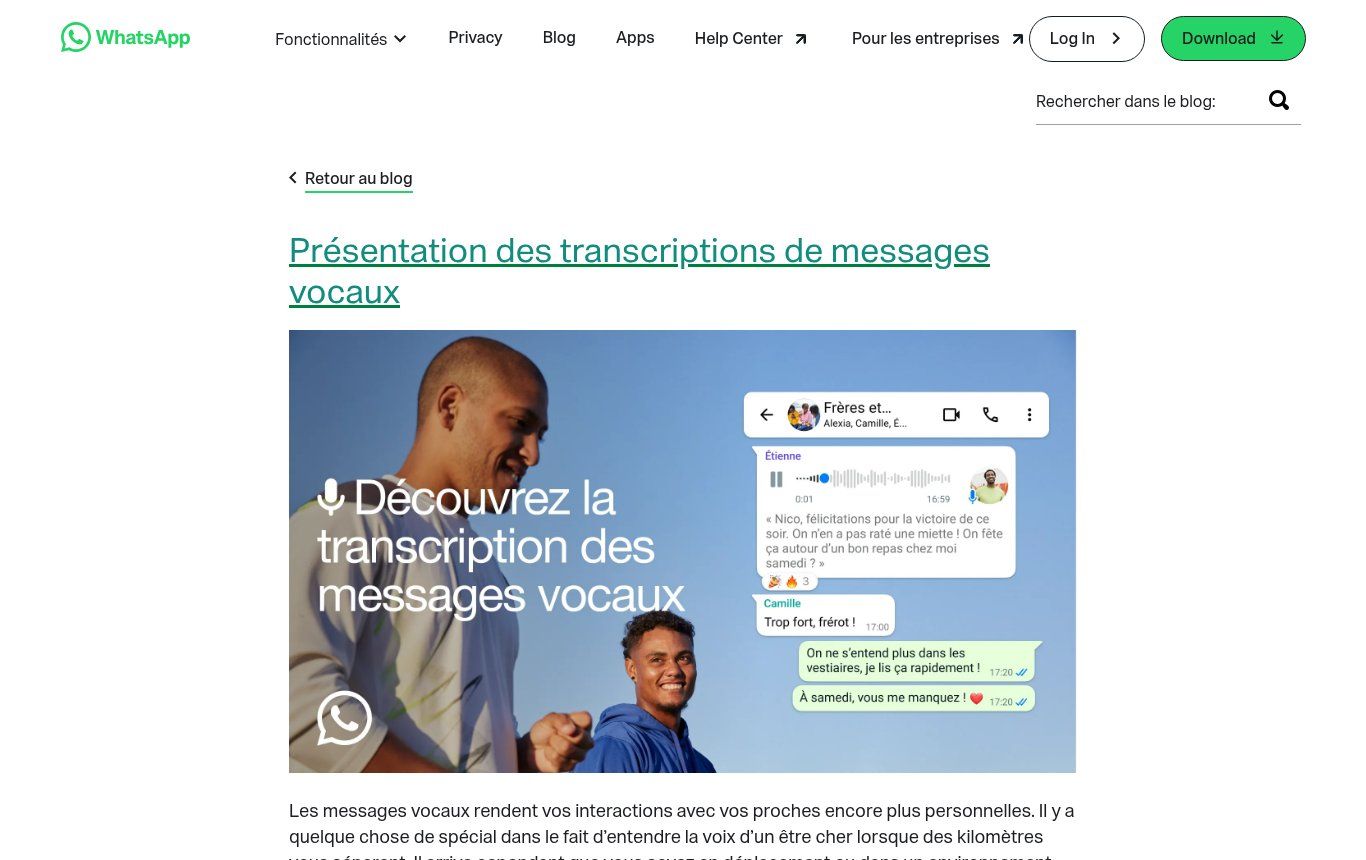
Source: blog.whatsapp.com, “Introducing voice message transcripts” post (French version), screenshot taken 11/11/2026.
WhatsApp offers voice message transcripts. According to WhatsApp, transcripts are generated on your device, so nobody else, not even WhatsApp, can read them. To turn it on: Settings > Chats > Voice message transcripts, then pick the language. After that, long-press a received voice note and tap “Transcribe”.
Two limits to keep in mind. First, the feature is not available everywhere yet: the official help page says it depends on the device. On iPhone, French and English work. On Android, the language list is shorter and, according to several specialist sites that track beta releases, French was still not offered to every user in late 2026. Just check your settings. Second, transcription runs in one language chosen in advance. A voice note that mixes French and Fon, or French and English, will come out rough.
If the feature is missing on your phone, the fallback is simple: long-press the voice note, tap Share, save the file (often an .opus file) and drop it into a transcription tool. On WhatsApp Web, right-click the voice note to download it.
Our take: to read a friend’s or a colleague’s voice notes, the built-in feature is plenty. For customer voice notes arriving by the dozen on WhatsApp Business, it is the wrong scale. That is when automation makes sense, as described further down.
How to transcribe a meeting, an interview or a training session
Word (Microsoft 365): the easiest option if you already have a licence
Word’s Transcribe feature turns a recording into text, separates speakers and adds timestamps so you can replay any passage. Microsoft states a limit of 300 minutes of uploaded audio per month with a Microsoft 365 subscription. It is available in Word for the web and in Word for Microsoft 365 on Windows for business accounts. If your organisation already uses Microsoft 365, it is often the best place to start.
Google Docs: live dictation, not file transcription
Voice typing in Google Docs (Tools > Voice typing) writes what you say into the microphone in real time. It works in English, French and many other languages in Chrome, Edge and Safari. But it does not transcribe a recorded audio file. Some tutorials suggest playing the audio out loud next to the microphone: it works poorly, and we advise against it for anything that matters.
Free websites: handy, but read the limits
Take TurboScribe, one of the names that comes up most in search suggestions. Its pricing page, viewed from Benin, shows a free plan limited to 3 files per day, each up to 30 minutes, with lower processing priority. The unlimited plan is shown at $10 per month billed annually, i.e. $120 a year (the page displays roughly 70,478 CFA francs a year).
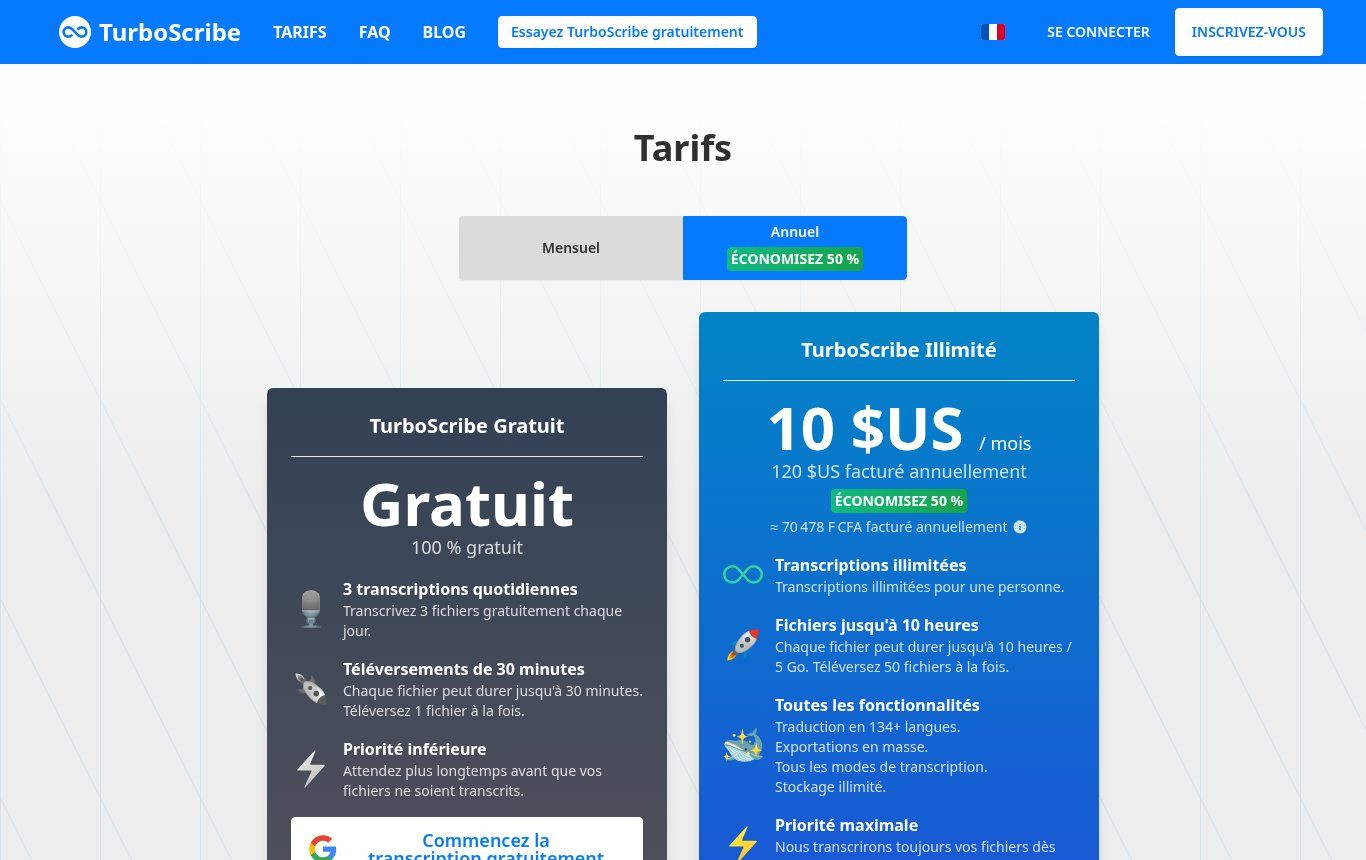
Source: turboscribe.ai pricing page (French version), screenshot taken 11/11/2026 from Benin, “Annual” view. We mention this tool as an example and have no commercial relationship with it.
Other sites run Whisper directly in your browser, so the audio never leaves your computer. That is excellent for privacy, but they often use a small model, which is less accurate on noisy recordings or strong accents, and slow on a phone.
Whisper on your own computer: free, private, slightly technical
Whisper is released under the MIT licence: the code and model weights are free to use, commercial use included. It comes in several sizes, from “tiny” (about 1 GB of video memory according to the documentation) to “turbo” (about 6 GB). Depending on the machine and model size, one hour of audio takes anywhere from a few minutes (with a good graphics card) to over an hour (on a plain processor), with no internet connection needed once the model is downloaded. You do need to run a command or use an app that bundles it.
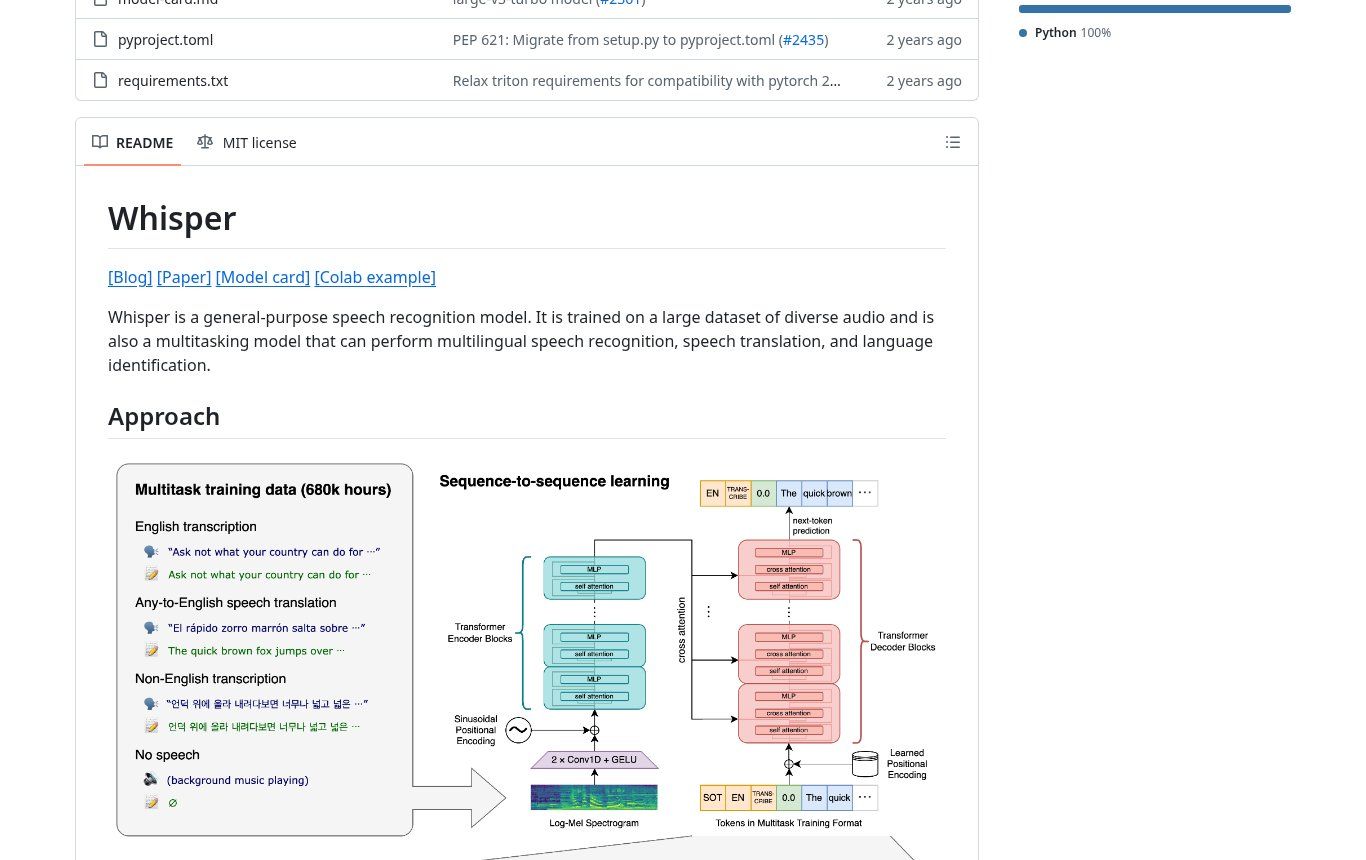
Source: github.com/openai/whisper, screenshot taken 11/11/2026.
Our one-minute decision grid
- WhatsApp voice note received, personal use: WhatsApp’s built-in transcripts, or share the file to a tool if the feature is missing.
- Internal meeting, nothing sensitive, under 30 minutes: a free website, or Word if you have Microsoft 365.
- Interview with a beneficiary, patient, employee or customer: process it locally (Whisper on your machine, or a browser-based tool that uploads nothing). Never a free website whose retention policy you don’t know.
- Dozens of files per week: a pay-per-minute API connected to n8n or Make, with human review.
- Recordings in Fon, Yoruba, Dendi, Wolof or Bambara: test on three real minutes before deciding anything (see next section).
Accents, noise and African languages: the real question in West Africa
This is the topic tool pages avoid. A model trained mostly on European or North American speech copes well with clearly spoken West African French or English. It does, however, make predictable mistakes on people’s names, neighbourhoods and villages, institutional acronyms and amounts of money.
For African languages, things have changed recently. Whisper’s official language list includes Yoruba, Hausa, Lingala, Swahili, Shona and Somali. It does not include Fon, Wolof, Bambara or Ewe. In November 2025, Meta released Omnilingual ASR under the Apache 2.0 licence, claiming more than 1,600 languages. We checked the language list in the source code: Fon, Wolof, Bambara, Ewe, Mooré and Dioula are all there.
Don’t confuse “the language is on the list” with “the transcript is usable”. Meta itself publishes error rates that vary widely from one language to another. For a language with little training data, expect text that needs heavy editing, especially when spelling is not standardised among your speakers. Our position is clear: for any serious project in a national language, test on real excerpts, measure how long correction takes, and keep a reviewer who speaks the language. A model is not a sworn translator.
Code-switching, mixing two languages in the same sentence, is very common in Cotonou, Abidjan, Dakar or Lagos, and remains the weak spot of these tools, the best ones included. If your recordings consistently mix languages, budget more time for review.
Privacy and the law: what most guides leave out
A voice is personal data. A recording often contains much more: a name, a phone number, a health condition, a family situation, a debt amount. In Benin, the Digital Code regulates the collection and processing of personal data, overseen by the data protection authority, the APDP. Similar rules exist in Senegal, Côte d’Ivoire, Cameroon, Nigeria and, in Europe, under the GDPR.
For a small business or an NGO, this comes down to five simple rules:
- Inform people and get their consent before recording an interview or a meeting, and explain what the recording will be used for.
- Know where the file goes. An online transcription site may store audio on servers outside Africa. That is a data transfer, and Benin’s Digital Code regulates transfers outside the country. Read the tool’s privacy policy before using it for work.
- Process locally whenever the content is sensitive: health, minors, victims, aid beneficiaries, HR matters, disputes.
- Anonymise the transcript before sharing it (replace names with codes), especially in a report for a donor.
- Set a retention period and delete the audio once the transcript has been approved, unless there is a good reason to keep it.
If your team already uses ChatGPT or other AI tools, add these rules to your AI usage policy. And if your website collects voice notes or recordings, your privacy policy must say so.
A 6-step method for reliable transcripts
- Record properly. Put the phone less than a metre from the speaker, away from fans and air conditioners, with notifications off. A cheap clip-on microphone often makes more difference than the transcription tool itself.
- Name the file usefully: date, place, type, the person’s code (for example 2026-11-11_Abomey_interview_B07). You will thank yourself three months later.
- Pick the tool by sensitivity, not by habit (see the grid above).
- Proofread against the audio, checking names, figures, dates and negations first. A missing “not” flips the meaning of a sentence.
- Clean up and structure: speakers, paragraphs, timestamps at key moments. If you want minutes, this is the stage where you can ask an AI assistant for a summary, based on the reviewed text.
- Archive or delete according to your retention rule, and store the approved transcript where the team will find it (shared folder, CRM, document base).
A useful benchmark: on a clean recording, proofreading usually takes between a quarter and half of the audio’s length. On a noisy or multilingual recording, it can take longer than the audio itself. If reviewing takes longer than typing it by hand, change tools or improve the recording.
What does transcription really cost?
For occasional use, nothing. Between WhatsApp’s feature, a website’s free plan and Whisper running locally, a small organisation can transcribe several hours a month without paying.
For regular or automated use, APIs are surprisingly cheap. On OpenAI’s pricing page, checked on 11/11/2026, transcription costs $0.006 per minute with Whisper or gpt-4o-transcribe, and $0.003 per minute with gpt-4o-mini-transcribe. At the day’s exchange rate (about 586 CFA francs to the dollar), one hour of audio comes to about $0.36, a little over 210 CFA francs, or about 105 CFA francs with the “mini” model. You need a card that can pay in US dollars, which is still a hurdle for some organisations.
The real cost lies elsewhere: in review time, in setting up the automation, and in the time lost fixing a bad recording. That is why we refuse to promise “zero human involvement”.
Automate it: from WhatsApp voice notes to your CRM
This is where transcription becomes genuinely useful for a business. Two typical scenarios:
Scenario 1: customer voice notes on WhatsApp Business
With the WhatsApp Business API (not the free app), every voice note received triggers a technical notification. An n8n workflow fetches the audio file and transcribes it (n8n’s OpenAI node includes a “Transcribe a recording” operation), then:
- saves the text to the customer’s record in your CRM or a Google Sheet;
- tags the request (order, complaint, price question);
- alerts the right person on the team, with the text and a link to the audio;
- and, if you run a WhatsApp chatbot, lets it understand requests sent as voice notes.
The rule we always apply: the transcript is used to sort and prepare, not to reply automatically to a complaint or confirm an order without a human looking at it.
Scenario 2: meetings and field interviews
The team drops the recording into a shared folder. n8n detects the new file, runs the transcription, drafts a first summary (decisions, actions, deadlines) and emails everything to the person in charge, who reviews and approves it. For an NGO running dozens of interviews per mission, the time saved is real. For sensitive interviews, the API is replaced by Whisper installed on the organisation’s own server.
This kind of workflow is part of what we build in our automation and WhatsApp chatbot with n8n projects. The price depends on volume, the tools already in place and the level of confidentiality required: we quote after a diagnostic, as explained on our offers page.
The 7 mistakes we see most often
- Uploading confidential interviews to the first free website Google shows.
- Publishing or forwarding a transcript without checking it against the audio.
- Choosing the wrong language in the tool (a French voice note transcribed “as English” is useless).
- Recording a meeting with the phone at the far end of the table, next to the fan.
- Confusing transcripts with minutes, then being surprised the text is too long to be useful.
- Letting an AI summarise an interview without checking that it added nothing. Automatic summaries can invent details.
- Keeping every recording forever “just in case”, with no retention rule and no access control.
Frequently asked questions
What is the best free audio to text transcription tool?
There is no single winner. For a WhatsApp voice note, the built-in feature. For a non-sensitive file under 30 minutes, a free website such as TurboScribe. For confidential content, Whisper on your computer or a browser-based tool that does not upload the file.
Can I transcribe a WhatsApp voice note on Android?
Yes, if voice message transcripts are available on your device and in your language (Settings > Chats). Otherwise, share the voice note, save the file and drop it into a transcription tool.
Does transcription work in Fon, Yoruba or Wolof?
Whisper supports Yoruba and Hausa, but not Fon or Wolof. Meta’s open-source Omnilingual ASR includes Fon, Wolof, Bambara and Ewe. Quality varies a lot: test on your own recordings and plan for review by a native speaker.
Is it legal to transcribe a recording of someone?
For professional use, inform the person and get their consent before recording, limit use to the stated purpose and protect the files. In Benin, these rules come under the Digital Code and the APDP; elsewhere, check your local data protection law. For a specific case, get legal advice.
How long does it take to transcribe one hour of audio?
A few minutes for the tool, online or locally on a good machine. Add review time: usually 15 to 30 minutes for one hour of clean audio, much more if the recording is noisy or mixes languages.
Can AI produce meeting minutes directly?
Yes, in two steps: transcription, then a summary by an assistant such as ChatGPT. Review the summary with the transcript next to it, and check the tool’s privacy terms before pasting the content of an internal meeting.
Our conclusion
Audio to text transcription is no longer a technical problem: free tools are good, APIs cost cents per hour, and African languages are finally starting to be covered. The real challenge is now organisational: knowing where your recordings go, who reviews them, and how the text reaches the right place, whether that is your CRM, your report or the right inbox.
Do you receive lots of WhatsApp voice notes, run field interviews, or want meeting minutes without giving up your evenings? We can look at your situation and tell you honestly whether a free tool is enough or whether automation is worth the investment. Contact Guelichweb for a first conversation.