What is n8n? Free or paid, and how to install it (local, Docker, VPS) without exposing your data — 2026 guide
G. CHRIST
Published on November 10, 2026

You have probably seen the name in a YouTube video or a WhatsApp group: “with n8n, I automated my whole business in a weekend.” It is an appealing promise. The reality is more interesting and a little less magical: n8n is an excellent tool, free in its self-hosted edition, but installing it is the easy part. Keeping it alive, up to date and secure for three years is where most projects break.
At Guelichweb, n8n is our main automation tool for the small businesses, NGOs and public institutions we work with in Benin and across French-speaking Africa. This guide answers the questions we hear most: what exactly is n8n, is it really free, and how do you install it (on your computer, with Docker or on a VPS) without exposing your data. We checked pricing, licensing and installation steps on n8n’s official pages on 10 November 2026.
In one sentence: n8n is software that connects your applications and runs tasks for you. Try it for free locally or on n8n Cloud; move to a server only when someone, in-house or at a provider, is named as responsible for maintaining it.
What is n8n? The short answer

Official n8n logo. Source: n8n brand guidelines (guidelines.n8n.design).
n8n (pronounced “n-eight-n”, short for “nodemation”) is a workflow automation platform. You build automations on a canvas by connecting blocks called nodes: a trigger (a form submitted, an email received, a set time, a confirmed payment), then actions (write to a spreadsheet, send a message, create a customer record, call an AI model). Each complete run of a workflow is called an execution.
Three things set it apart from Zapier or Make, which we compare in detail in our n8n vs Make article:
- It can run on your own infrastructure. You can install it on your own server, which changes both the cost model and where your data lives.
- Its source code is public, but it is not open source in the strict sense: n8n is distributed under a “fair-code” licence, the Sustainable Use License. We come back to this below, because it matters for agencies and NGOs.
- It is technically very open. More than 400 ready-made integrations according to the official GitHub repository, an HTTP node to call any API, JavaScript or Python code when needed, and AI nodes to build AI agents.
n8n’s GitHub repository had more than 200,000 stars on 10 November 2026. That figure does not prove the tool is right for you, but it tells you something useful: the community is huge, tutorials and workflow templates are everywhere, and the project is not about to disappear.
What do small businesses, NGOs and institutions use n8n for?
Forget the flashy demos. The automations that really pay off are often mundane. These are the ones we see most often in French-speaking Africa:
- Never losing an enquiry again. Every message from your contact form is saved to a spreadsheet or CRM, and the team gets a WhatsApp or email alert within a minute.
- Answering on WhatsApp without spending the whole day on it. n8n has nodes for the WhatsApp Business API: acknowledgements, appointment booking, hand-over to a human. It is the engine behind our WhatsApp chatbots.
- Tracking payments. When your payment gateway confirms a Mobile Money payment, the order switches to “paid”, the customer gets a confirmation and accounting gets its line.
- Producing Monday’s report on its own. Weekly figures pulled from Google Sheets or a database, formatted and sent to management or to a donor.
- Managing registrations for a workshop or training. Sign-up, confirmation, a reminder the day before, attendance list, certificate afterwards.
If automation is new to you, start by listing the repetitive tasks that cost your team hours every week, and the ones where a mistake is expensive. Those two lists usually overlap, and that overlap is where n8n earns its keep.
Is n8n free or paid?
Both, and that is where the confusion starts. On one side there is the software you install yourself; on the other, the service hosted by the vendor, n8n Cloud. Here is what the official pages said on 10 November 2026.
Self-hosted n8n: free, with no execution limit
- Community edition: free, no licence key. According to the documentation, it includes “almost the complete feature set”: unlimited workflows and executions, every integration, AI.
- Registered Community edition: still free. You register your email address and receive a key that unlocks folders, debugging in the editor and custom execution data. Do it; it costs nothing.
- What the free edition lacks: sharing workflows and credentials between users, projects, SSO, environments, Git version control and external secrets. For a small team, that gap shows up as soon as two people need to work on the same workflows.
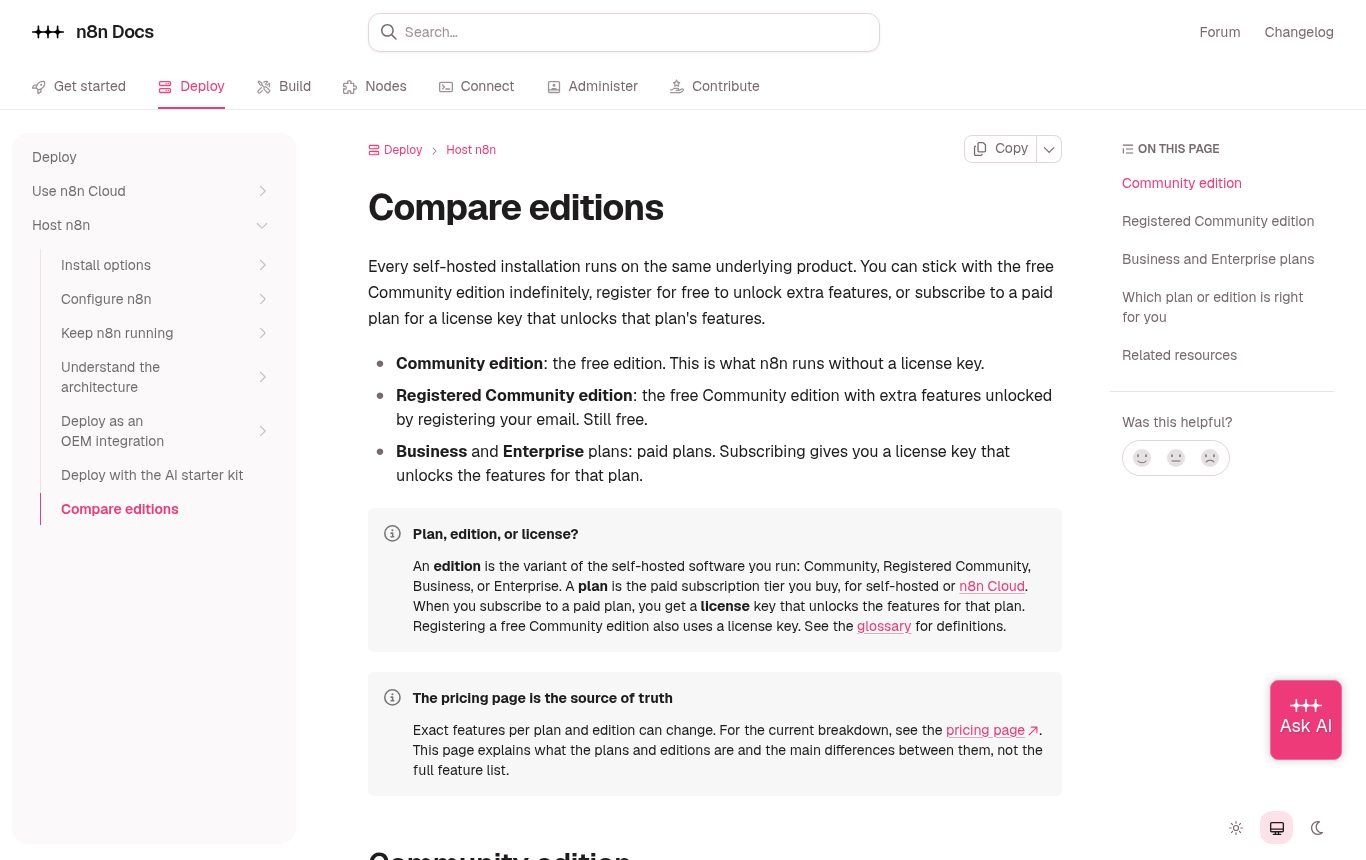
Source: official n8n documentation, “Compare editions” page (docs.n8n.io), captured 10/11/2026.
n8n Cloud: a subscription billed per execution
On the pricing page, billed annually: Starter at €20 per month (2,500 executions), Pro at €50 per month (10,000 executions), then Business and Enterprise for larger organisations. Depending on your location, the page may show prices in US dollars. At the fixed euro peg, €20 is about 13,100 CFA francs and €50 about 32,800 CFA francs per month. A free trial is available with no credit card. n8n Cloud data is hosted in the European Union, in Frankfurt.
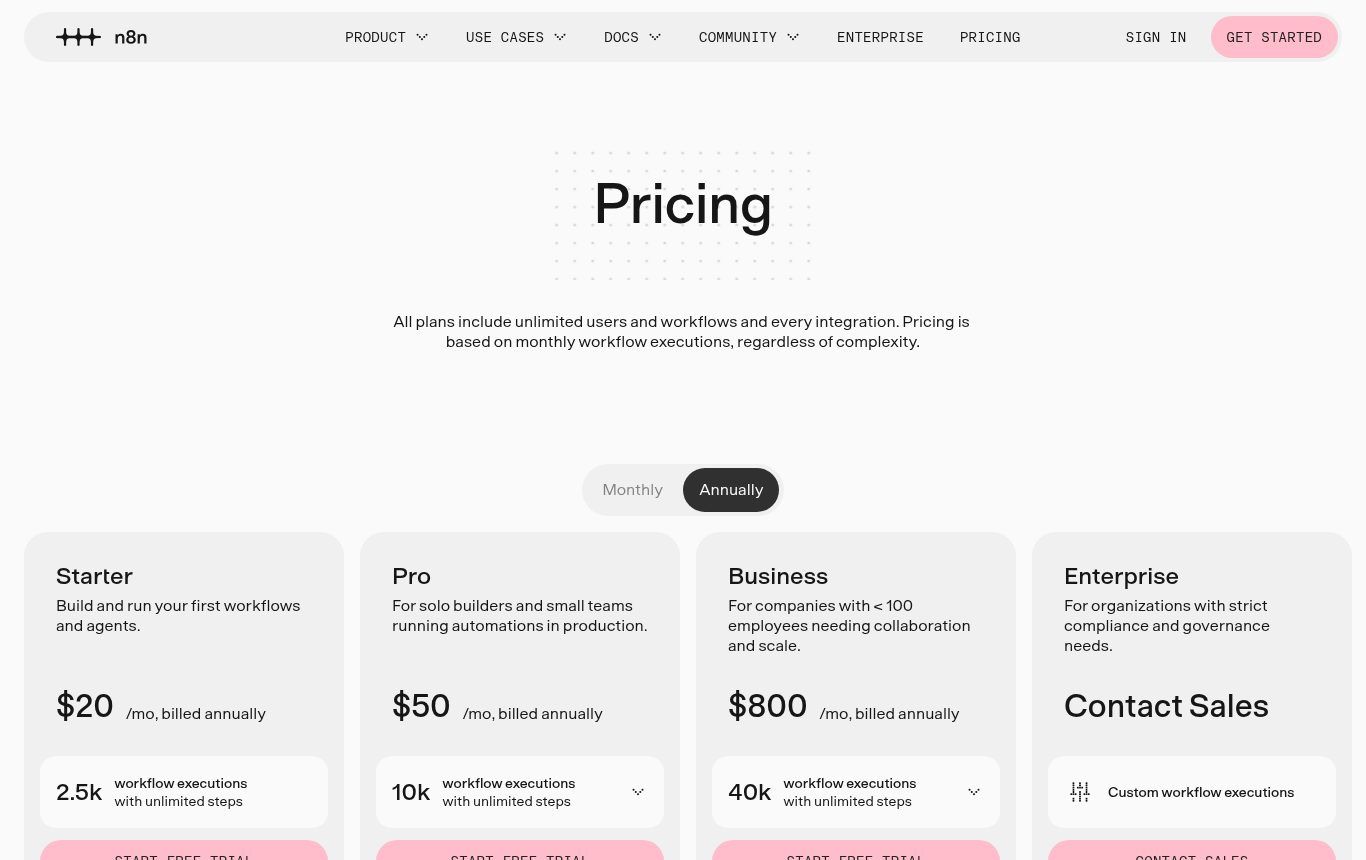
Source: n8n.io/pricing, captured 10/11/2026 (shown in US dollars from our server).
Worth knowing: one execution is one complete run of a workflow, however many steps it has. That is far more predictable than Make’s “operations” or Zapier’s “tasks”. Still, a workflow scheduled every 5 minutes uses roughly 8,600 executions a month on its own; check your triggers before picking the Starter plan.
Free does not mean zero cost
The self-hosted edition is free the way a car someone gives you is free: you still need the garage, the fuel and the mechanic. In practice you pay for a server, a domain (or a subdomain of the one you already have), and above all for human time spent on updates, backups and monitoring. We explain this total-cost logic in how much does AI automation cost in Benin.
The n8n licence: what you are allowed to do
This is the point almost no installation tutorial covers, even though it directly affects agencies, consultants, incubators and NGOs that support other organisations. The official licence FAQ is clear:
- Allowed: using n8n to run your own organisation; building automations for your clients as long as they cannot create or edit them; charging for workflow creation, setup, maintenance, training and consulting; running several instances.
- Not allowed without a commercial licence: hosting n8n as a service where your clients build their own workflows; letting external users configure workflows through your product, even behind a custom interface; white-labelling and reselling n8n.
A concrete example: an NGO that installs an n8n instance for its own processes is fine. A platform that invites dozens of associations to “build their automations” on a shared n8n is not. If in doubt, n8n asks you to write to license@n8n.io before launching the project, not after.
The 4 ways to run n8n (and which one to choose)
- n8n Cloud. Nothing to install; updates and security handled by the vendor. The right choice to get started quickly or if nobody on your team can manage a server. Limits: a monthly cost in euros, an international bank card, an execution cap.
- On your own computer (local). Ideal for learning and prototyping. Useless in production: as soon as the PC sleeps or loses its connection, your automations stop, and external services cannot reach your webhooks.
- On a VPS you manage, with Docker. The “serious” self-hosting route: unlimited executions, data on a server you choose. It requires Linux skills and maintenance discipline.
- Through a hosting company’s “one-click n8n” offer. Several hosts sell VPS plans with n8n pre-installed. Handy for installation, but updates, security and backups often remain your job: read carefully what is included.
An important change many articles have not caught up with: according to the official documentation, the old “npm install n8n” or “npx n8n” method no longer works from n8n 3.0, which is distributed only through Docker. Existing npm installs keep working for now, but any new installation should start with Docker. If a tutorial has you install Node.js and then n8n with npm, it is ageing fast.
Installing n8n locally to test it (Windows, Mac or Linux)
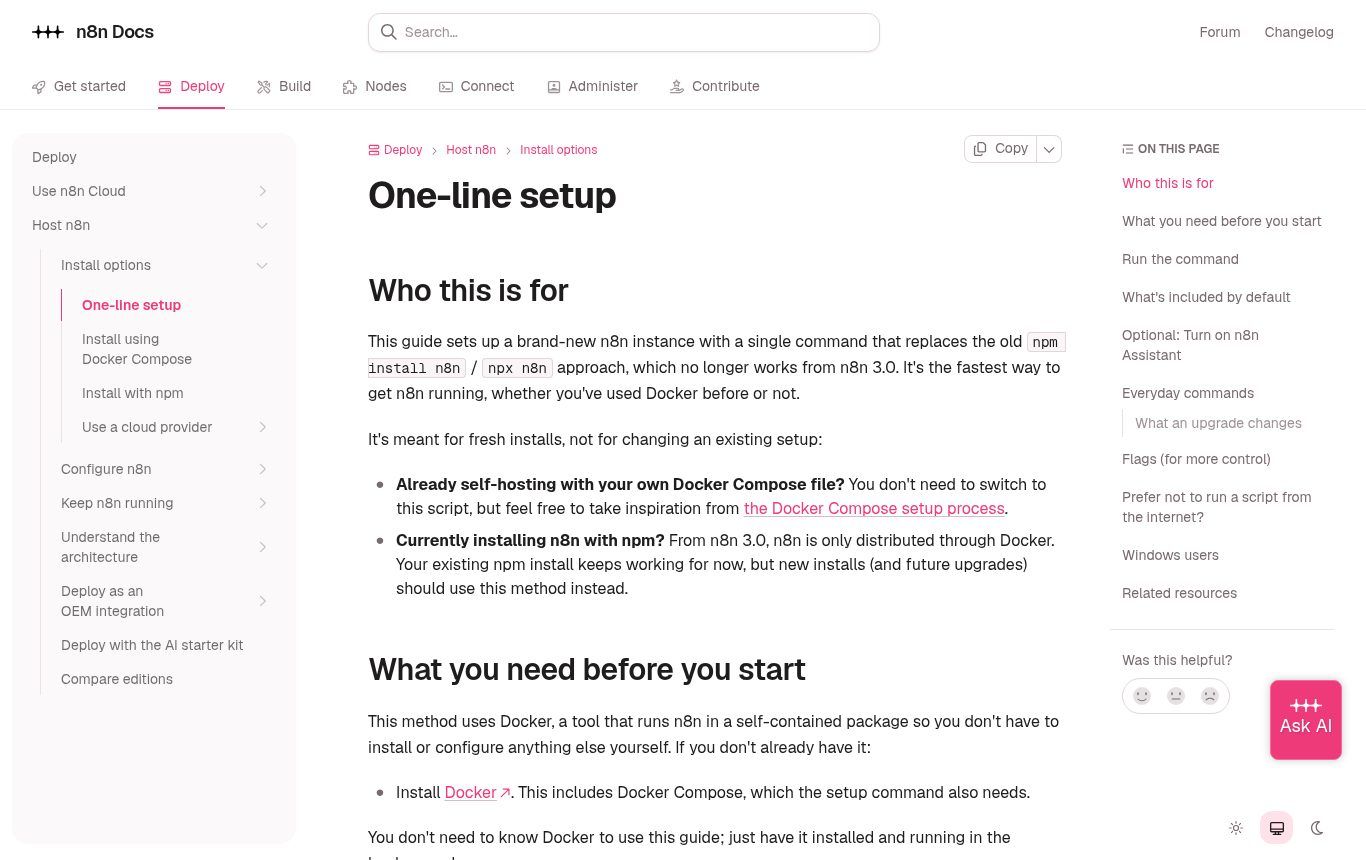
Source: official n8n documentation, “One-line setup” page (docs.n8n.io), captured 10/11/2026.
To test on your own machine, the method n8n recommends takes three steps:
- Install Docker Desktop (Windows, Mac) or Docker Engine with the Compose plugin (Linux). On Windows, the documentation points to WSL; make sure the computer has enough free memory.
- Open a terminal and run the official install command: “curl -fsSL https://get.n8n.io | sh”. It checks Docker, creates an n8n folder, generates the configuration and unique secrets, then starts n8n.
- Open http://localhost:5678 in your browser and create the owner account. That account is stored on your machine, not with the vendor.
Our advice: before running any command found online that downloads and executes a script, at least read the official page that describes it, and never copy it from an unknown source. It is a basic habit we also stress in our guide to hacked websites.
Installing n8n on a VPS: the production version
The day your automations become important (customer reminders, a WhatsApp chatbot, payment sync), they need to run on a server that is always on and reachable over HTTPS. Here is the approach, aligned with the official Docker Compose procedure.
1. Choose the server
n8n is not CPU-hungry; memory is what matters. The documentation says an idle instance uses around 100 MB, but usage climbs with the size of the data you process, files and the Code node. A small Linux VPS (Ubuntu or Debian) is enough to start; then size it on your real workflows rather than a number read on a forum.
Where should you host from Benin or West Africa? The criteria are the same as for a website, and we cover them in web hosting: free or paid in West Africa: payment method, reachable support, backups, data location. A local or regional host billed in CFA francs is often still the simplest choice for a Beninese organisation. If you want an international option instead (card or Bitcoin payment, several hosting countries), Shinjiru, an offshore host since 2000, offers VPS plans from about $11.90/month and a Strongbolt range with DDoS protection (prices checked on 10/11/2026), with no Mobile Money or CFA-franc billing. See Shinjiru’s plans (affiliate link: we may earn a commission if you sign up, at no extra cost to you).
2. Prepare the domain name
Create a dedicated subdomain, for example n8n.your-organisation.bj, with a DNS A record pointing to the server’s IP address. Avoid installing n8n on the same server as your brochure website if you can: a flaw in one should not open the other.
3. Install Docker, then n8n with Docker Compose
The documentation provides a complete Docker Compose file that runs n8n behind Traefik, a proxy that automatically obtains and renews the HTTPS certificate. You fill in a .env file with your domain, subdomain, email address for the certificate and time zone, then start it with “docker compose up -d”.
Two details separate a clean installation from a fragile one:
- The time zone. The official examples and most tutorials use Europe/Berlin or Europe/Paris. In Benin, set Africa/Porto-Novo (Africa/Abidjan for Côte d’Ivoire, Africa/Dakar for Senegal, Africa/Lagos for Nigeria) in GENERIC_TIMEZONE and TZ. Otherwise, your “every day at 8 am” reminder will go out at the wrong time.
- The port. The official file publishes n8n only on 127.0.0.1:5678. Keep it that way: the public goes through the proxy over HTTPS. Several tutorials expose port 5678 directly to the internet over HTTP with an insecure cookie. Avoid that in production.
If these steps feel abstract, that is a useful signal: self-hosting is not for you yet, and there is nothing wrong with that. n8n’s own documentation says self-hosting is recommended for experienced users, and that mistakes can lead to data loss, security issues and downtime.
After installation: the 7 settings tutorials forget
Installation takes an hour. Here is what decides whether your instance will still be healthy in two years.
- Back up the encryption key. n8n encrypts your credentials (passwords, API keys) with a key stored in the .n8n folder. According to the Back up and restore page, without that key a restored database can no longer decrypt your credentials. Keep a copy off the server, in a password manager owned by the organisation.
- Back up for real. A complete backup is the n8n_data volume (plus the PostgreSQL database if you use one), copied off the server. Apply the 3-2-1 rule from our backup guide and test a restore at least once.
- Update every month. n8n recommends updating at least once a month, with a backup right before. With Docker Compose: “docker compose pull”, “docker compose down”, then “docker compose up -d”.
- Follow security advisories. In February 2026, n8n fixed a series of critical flaws allowing code execution on the server (25 February 2026 bulletin); on 28 October 2026, another batch of high-severity issues was fixed (bulletin). On n8n Cloud, patches are applied automatically. Self-hosted, it is your job.
- Limit who can create workflows. Several of those flaws required an account able to create or edit workflows. Only give that right to trusted people, with strong passwords and two-factor authentication on their accounts.
- Clean up executions. By default, n8n deletes executions older than 14 days or beyond 10,000 (documentation). If you process personal data, keep only what you need: saving only failed executions is often enough.
- Name an owner. A name, an email address, a last-update date written down somewhere. An n8n instance set up by an intern who left a year ago is a risk, not a saving.
On personal data, remember that customer records, WhatsApp numbers and beneficiary lists flow through n8n. In Benin, the Digital Code and the data protection authority (APDP) regulate this processing; elsewhere, similar laws apply. Knowing where the server is and who can access it is part of your obligations, not a technical luxury.
n8n Cloud or self-hosted: our view
We often get the question as “can we do it for free?”. Our answer is deliberately clear-cut:
- Choose n8n Cloud if you run fewer than a few thousand executions a month, have no server skills in-house and can pay in euros. You are buying peace of mind.
- Choose self-hosting if your volumes would make Cloud expensive, if you must control where data lives (donor-funded projects, health, beneficiary data), or if you need custom nodes. On one condition: someone is paid or mandated to maintain it.
- Choose neither if you have not yet identified a specific process to automate. Describe the problem first; the tool comes after. Sometimes Zapier or Make does the job perfectly well.
The setup we advise against most: a “free” self-hosted n8n running the company’s WhatsApp chatbot, never updated, with no backup and a single admin account shared by four people. It works perfectly… until the day it stops working altogether.
Your first useful workflow in 30 minutes
Nothing beats a real use case to understand n8n. This one helps from day one:
- Trigger: an “n8n Form Trigger” node, or a webhook connected to your website form.
- Clean-up: an “Edit Fields” node that formats the name, the phone number (Benin’s 10-digit format, for example) and the message.
- Record: a Google Sheets node that adds a row with the date, the source and the status “new”.
- Alert: an email to the sales team, or a WhatsApp message through the official API if you already have it.
- Acknowledgement: an email to the prospect confirming receipt and giving a realistic response time.
Test with three fake enquiries, check that the recorded time is correct (that time zone again), then activate the workflow. You have just fixed a problem we see in most small businesses: enquiries received, never handled. To go further, our article WhatsApp chatbot: what it actually does shows how to plug in the next step.
The mistakes we see most often
- Installing n8n on the office PC and being surprised that “the automation stops at weekends”.
- Following a 2024 npm tutorial while n8n 3.0 drops that installation method.
- Leaving the default time zone and sending customer reminders at 3 am.
- Losing the encryption key when moving servers, then having to re-enter every credential.
- Opening port 5678 to the internet without HTTPS “just to test”… and forgetting about it.
- Offering clients a shared n8n where they build their own workflows, without reading the licence.
- Automating a poorly defined process: you get faster chaos, not a better process.
Frequently asked questions about n8n
Is n8n free forever?
The self-hosted Community edition is free with no time limit and no execution cap, according to the official documentation. You only pay for infrastructure and maintenance time. n8n Cloud is a subscription after the trial period.
Is n8n available in French or other languages?
The official interface and documentation are in English. As far as we know, there is no official French version of the editor. Node names are simple and you get used to them quickly; your workflows, meanwhile, can send messages in whatever language you choose.
Do I need to code to use n8n?
Not for simple workflows: everything is drag and drop. A grasp of basic logic (conditions, loops, JSON data format) helps a lot. Code becomes useful for advanced cases, and managing a server is a separate skill altogether.
Can I still install n8n with npm or npx?
Existing npm installs still work, but the documentation states that from n8n 3.0 the software is distributed only through Docker. For a new installation, go straight to Docker.
Can n8n connect to WhatsApp?
Yes, through Meta’s WhatsApp Business API (send nodes and a receiving trigger). You need a Meta Business account, a dedicated number, and you must follow Meta’s rules on message templates. Unofficial tools that “drive” WhatsApp Web put your number at risk of being banned.
Where is my data stored with n8n?
On n8n Cloud, in the European Union (Frankfurt, according to the pricing page). Self-hosted, wherever your server is. That is one of the main arguments for self-hosting for institutions and NGOs.
Can an agency install n8n for its clients?
Yes, and charge for installation, workflow building and maintenance, as long as clients do not build their own workflows on an instance you host for them. That is what n8n’s licence FAQ provides.
How much does an n8n setup by Guelichweb cost?
It depends on the number of workflows, the tools to connect, the choice between Cloud and a server, and the level of maintenance you expect. We provide a quote after a free assessment of your processes: see our offers to understand how we work.
Want n8n without the sleepless nights?
We install, configure and maintain n8n instances for small businesses, NGOs and institutions, and we build the workflows that go with them: forms, CRM, reminders, WhatsApp chatbots, reports. Tell us which process wastes the most of your time; we will tell you honestly whether n8n is the right answer, and in what form. Let’s talk about your project, or explore our services.