Website hacked: what to do? The 7 first reflexes, the clean-up, and how to secure (and back up) your site
G. CHRIST
Published on November 1, 2026

One morning, a customer messages you on WhatsApp: "Your website sends me to an online betting page." Or Chrome shows a big red screen when someone types your address. Or, searching for your company name on Google, you find hundreds of pages in Japanese that you never wrote. In all three cases, the diagnosis is the same: your website has been hacked.
The first reaction is almost always the wrong one: delete everything, reinstall in a hurry, put the site back online the same evening. The result is that the hole stays open and the attacker comes back the following week, often with better-hidden access.
At Guelichweb, we build and maintain websites for SMEs, NGOs and institutions in Benin and across French-speaking Africa. This guide brings together what to do, in the right order, when a site is compromised: the signs that don't lie, the reflexes for the first hours, who to notify (in Benin and elsewhere), how to clean up without destroying evidence, how to regain Google's trust, and then how to secure and back up your website so it doesn't happen again.
If your site is being hacked right now, read the section "The 7 reflexes for the first hours" first. The rest can wait until tomorrow.
How to tell if your website has been hacked
A hack is not always spectacular. Defacement, where the home page is replaced by the attacker's message, is the most visible form (French government guidance from Cybermalveillance.gouv.fr). But most attacks try to stay hidden for as long as possible, because your site is then being used to relay spam, phishing or malware. Signs to watch for:
- Strange redirects, often only on mobile or only when people arrive from Google: the visitor lands on a casino, a counterfeit shop or a fake lottery. You, typing the address directly, see nothing.
- Unknown pages in Google. Search for "site:yourdomain.bj" on Google. If pages in Japanese, pharmacy pages or "crypto" pages show up, you are dealing with a content injection hack.
- A browser warning ("Deceptive site ahead", "This site may harm your computer") or the note "This site may be hacked" under your Google result.
- A message in Google Search Console in the "Security issues" report, or an email from your hosting provider about a suspended account, outgoing spam or abnormal resource usage.
- Admin accounts nobody recognises, files with random names (like "az78e4jFn.php"), forms that suddenly send hundreds of emails.
- Your emails land in spam or get rejected: your domain may have been used to send fraudulent messages.
A free tool to keep at hand: Google's Safe Browsing site status page. Type in your domain and Google tells you whether it has detected dangerous content.
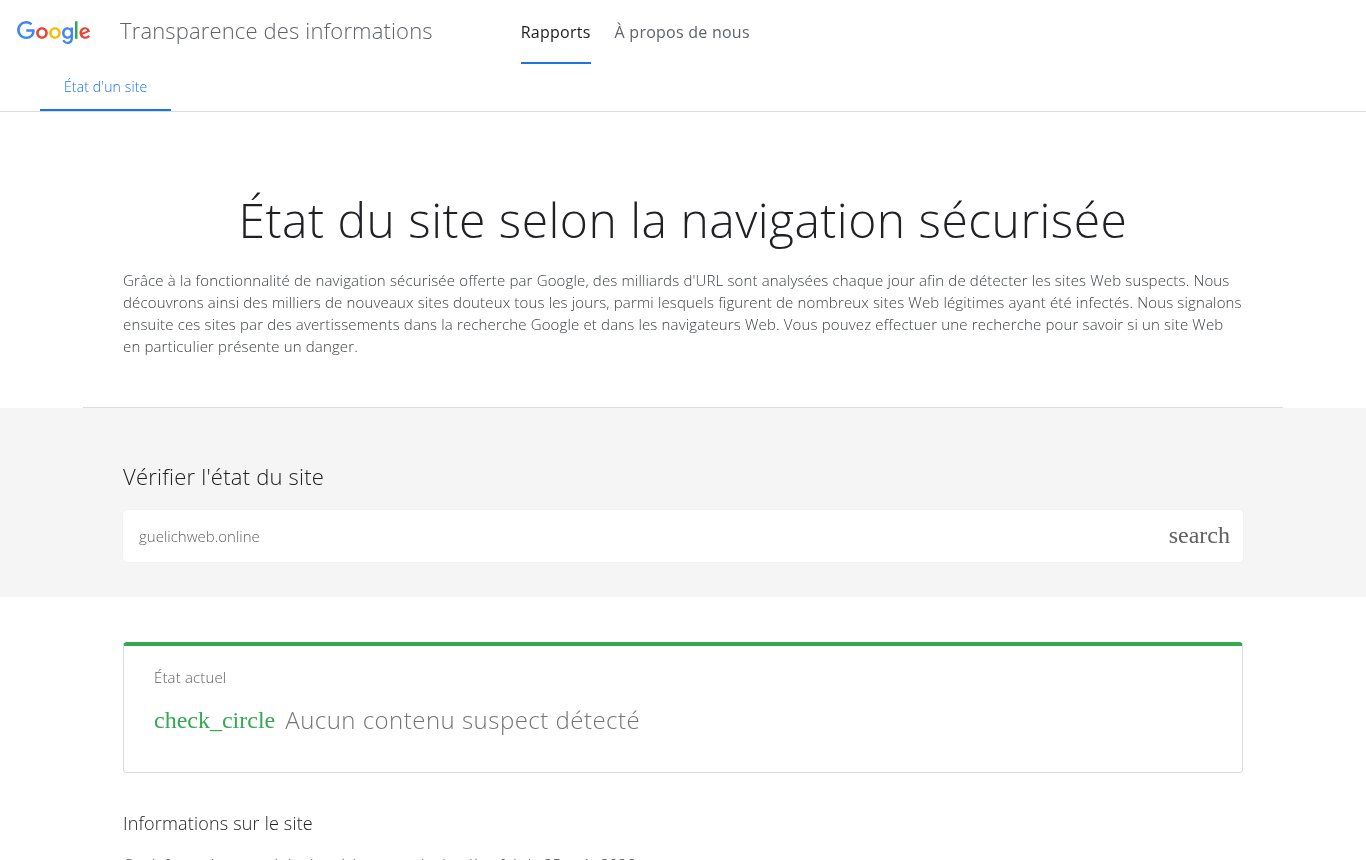
Source: Google Transparency Report, "Safe Browsing site status" page (transparencyreport.google.com), French interface, screenshot taken on 01/11/2026.
Be careful: a green result does not prove that everything is fine. It only means Google has not spotted anything. If you have seen a redirect with your own eyes, trust yourself. And if your site is already connected to Google Search Console, open the "Security issues" report: that is where Google lists the affected pages.
The 7 reflexes for the first hours
French, Swiss and Ivorian authorities, as well as OVHcloud's and Google's guides, all follow the same logic: freeze the situation, keep the evidence, cut off the attacker's access, and only then clean up. Here is the order we recommend.
- Don't delete anything yet. No files, no database, no accounts. Deleting blindly wipes the traces that show how the attacker got in.
- Keep the evidence. Dated screenshots, a list of suspicious URLs, alert emails from your host or from Google, and above all a full copy of the site and its database, labelled "INFECTED". Ask your host for the access logs of the last few days: they are sometimes deleted after a short time.
- Put the site in quarantine. A simple maintenance page, or a temporary suspension at the host. Every hour online is one more visitor exposed to malware or to a fake payment page in your name.
- Tell your hosting provider and your web developer. The host can confirm the attack, provide logs and sometimes restore a backup. If an agency or freelancer built the site, they know how it is put together: call them before improvising.
- Change every password, from a clean device. Hosting account, FTP/SFTP, database, site administrators, domain registrar, email. Do it from a computer you know is clean: if the administrator's machine has spyware, the new passwords will be stolen immediately. Turn on two-factor authentication everywhere it exists.
- Assess which data was exposed. Contact forms, customer accounts, orders, an NGO's beneficiary records: if personal data may have been viewed or copied, you have legal obligations (see below).
- Report the incident. In Benin, to the national CERT (bjCSIRT); elsewhere, to the relevant authority. And file a police complaint if you suffer harm: it is what allows you to assert your rights later, especially with an insurer or a partner.
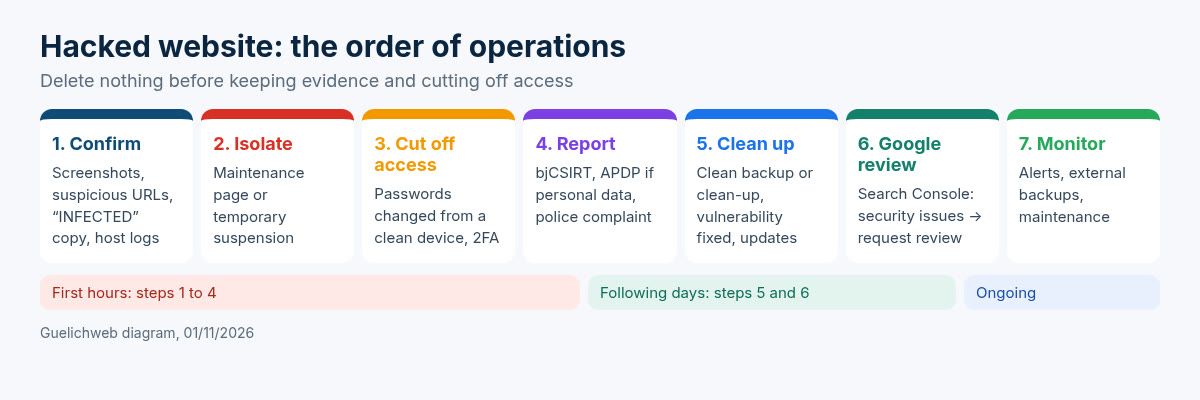
Guelichweb diagram, 01/11/2026: the order of operations after a hack, from discovery to getting back to normal.
Who to notify in Benin and French-speaking Africa
This is the angle most guides miss: they point to France's CNIL or to European police, which is no help to an NGO in Parakou or an SME in Abidjan. Here are the real contacts.
Benin: bjCSIRT and the APDP
bjCSIRT is Benin's national computer security incident response team. It describes itself as the first point of contact for government institutions, works with the Republican Police, and its website has a "Déclarer un incident" (report an incident) section. It also publishes regular alerts about vulnerabilities that directly affect websites, for example, at the end of October 2026, on a very widely used WordPress form plugin and on WordPress itself. The contact details shown on its website on 01/11/2026 are bjcsirt@asin.bj and an emergency phone number; check them on the official page before calling.
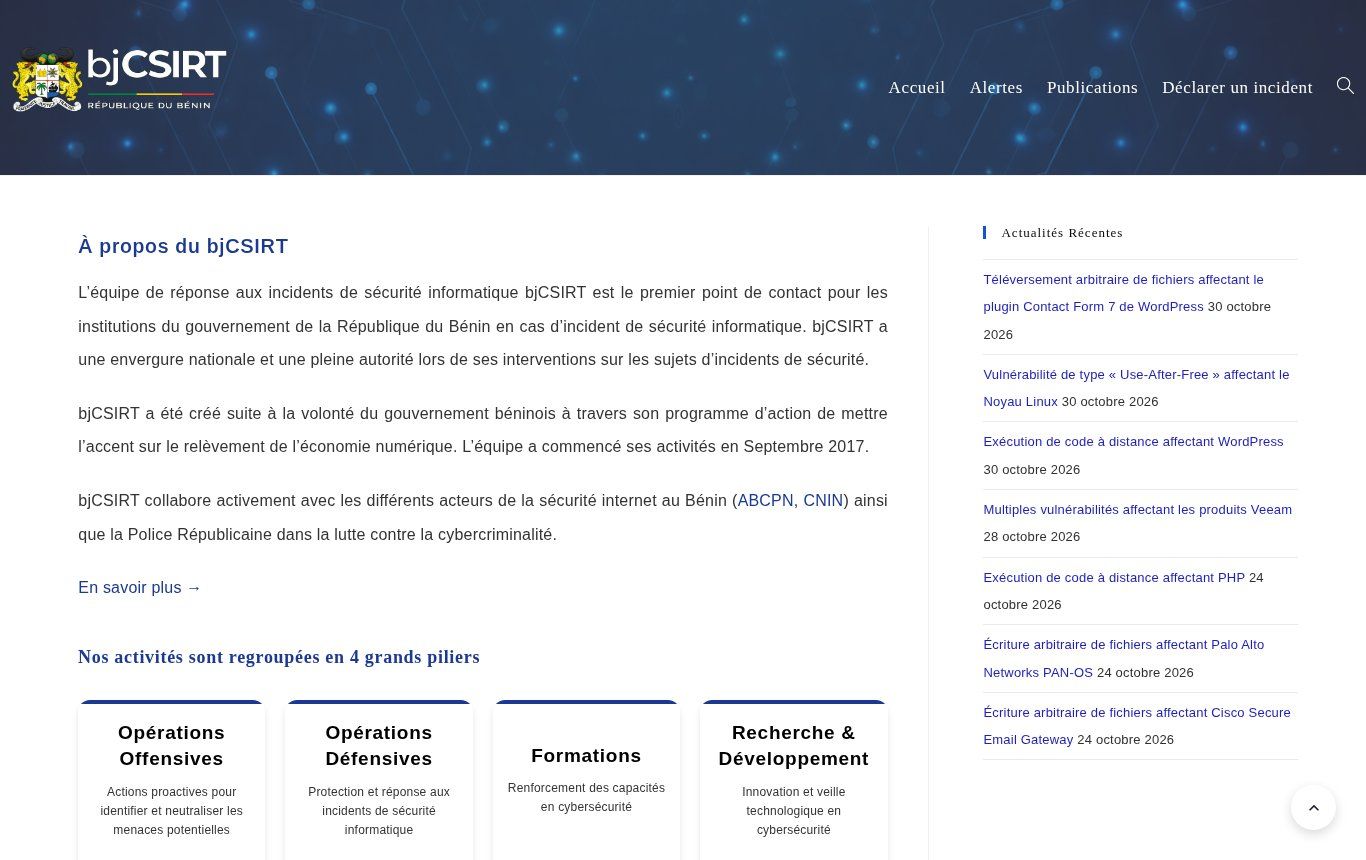
Source: bjCSIRT home page (csirt.bj), in French, screenshot taken on 01/11/2026, showing the "report an incident" menu and the latest security alerts.
If personal data is affected, the APDP, Benin's data protection authority, comes in. Article 427 of the Digital Code (Law No. 2017-20, amended in 2021) requires the data controller to notify the APDP without delay of any security breach that has affected personal data, and to inform the people concerned, subject to exceptions. In its reference documents, the APDP recommends notifying as early as possible and within 72 hours at most when the breach poses a risk to individuals. Even without risk, the breach must be recorded in an internal register.
Côte d'Ivoire, Senegal, France
- Côte d'Ivoire: the national cybersecurity agency (ANSSI) and its CI-CERT publish an incident procedure and a reporting form open to companies, NGOs, public bodies and schools. For personal data, the authority is ARTCI.
- Senegal: the National Police runs a reporting platform managed by its special cybercrime division; it states that a report is not a formal complaint, which must be filed with that division. For personal data, the authority is the CDP.
- France or a European audience: Cybermalveillance.gouv.fr for assistance, and the CNIL for data breaches (72 hours under the GDPR).
Our firm view: report it, even if the incident seems minor. It is not an admission of weakness; it is an official, dated record, and these teams see dozens of similar cases. They sometimes know before you do which vulnerability was exploited.
Cleaning up: restore a backup or repair?
In its guide "Clean and maintain your site", Google distinguishes three situations. It is the right way to look at it:
- You have a clean, recent backup from before the hack: restore it, then immediately apply every available update. Otherwise you are putting exactly the same open door back online.
- You have a clean but old backup: restore it, update everything, then re-add recent content (posts, products, pages) by hand, checking each item. Never copy a technical file across from the infected version.
- You have no usable backup: the site has to be cleaned file by file and table by table. It is slow and technical, and it is the moment when hiring a professional costs less than getting the clean-up wrong.
In every case, three rules:
- Find the vulnerability before going back online. OVHcloud says it plainly in its guide on what to do after a hack (in French): removing malicious code without fixing the hole lets the attacker come back, sometimes with a new backdoor. The most common causes listed in that guide: missing updates, spyware on a computer used to manage the site, unofficial plugins or themes, weak passwords that are never changed, and overly permissive file permissions.
- Remove what you no longer use: deactivated plugins, old themes, forgotten test copies in a sub-folder ("/old", "/test", "/v2"), accounts of former interns.
- Change the passwords again once the clean-up is done, and check the user lists of the site, the hosting account and Search Console. Attackers often add their own "owner" account to keep control.
The WordPress case
WordPress is not less secure than other tools. It is simply very widespread, so every vulnerability found in a popular plugin is exploited massively and automatically, on thousands of sites within days. Your business is not the target; your plugin version is.
The usual causes are well known: "premium" themes or plugins downloaded for free from dubious sites (so-called "nulled" files, shipped with a backdoor), plugins abandoned by their developers, an administrator account called "admin" with a weak password, and a site never updated since it was delivered. WordPress's official documentation on hardening is a good starting point. If you are still deciding on the tool, our article What is WordPress and when to choose it will help.
Regaining Google's trust
Once the site is clean, the red warning does not go away on its own. In Search Console, the "Security issues" report lists the problems detected and sample affected URLs. Google is clear in its documentation: you must fix the problem across the whole site, not just on the sample pages, then click "Request review" and explain precisely what you did.
A good review request has three parts: the exact problem, the actions taken (for example: "spam content removed, vulnerability fixed by updating plugin X, passwords changed, unknown accounts deleted"), and the verified outcome. According to Google's guide, a review takes about a day for phishing, a few days for malware, and up to several weeks for injected spam. Once the site is cleared, warnings are removed within 72 hours. Don't send another request until the first one has been answered.
For injected spam (the Japanese pages, for example), also make sure those URLs drop out of the index: return a 404 or 410 error on those addresses and let Google remove them. Allow a few weeks for the parasite results to disappear completely.
Telling your customers and partners
Staying quiet is tempting. It rarely pays off. If your customers received fraudulent emails in your name, or if their data may have leaked, they will find out anyway. It is better that they hear it from you, with clear instructions.
An effective message is short: what happened (without jargon), what is affected and what is not, what you have done, what the person should do (ignore a given email, not pay on a given page, change a reused password), and a contact for questions. For an NGO, also tell your donors before they find out on their own: they care more about transparency than about the incident itself.
Securing your website: the checklist that prevents most trouble
We don't believe in the "unhackable website". We believe in websites that make attacks hard, detect them fast and can be restored within an hour. Here are the measures that really matter, in order of impact.
1. Access
- One named account per person, never a shared "admin@" account whose password is passed around on WhatsApp.
- Long, unique passwords stored in a password manager. Check on Have I Been Pwned whether your team's email addresses appear in known breaches.
- Two-factor authentication on hosting, the registrar, email and the site's admin area.
- Access removed immediately when an employee, intern or contractor leaves.
2. Account ownership
This is a very common issue in our region, and badly underestimated: the domain name and hosting are often registered in the personal name of a former contractor or a nephew who "knows computers". On the day of a hack, nobody has the logins, and recovery takes weeks. The domain, hosting and email must be in your organisation's name, with an email address you control. We cover this for .bj domains in our guide to the .bj domain name.
3. Updates
CMS core, plugins, themes, PHP version: anything out of date is an invitation. Minor security updates can be applied automatically; major updates should be tested on a copy of the site first. This is the core of a website maintenance contract, and it is exactly what most hacked sites were missing.
4. Hosting and HTTPS
Serious hosting isolates sites from one another, keeps logs, offers backups and responsive support. "Free" or very cheap hosting shared with thousands of abandoned sites does not always do that; we compare the options in free or paid web hosting. An SSL certificate (HTTPS) is essential, but it only protects the connection: a site on HTTPS can perfectly well be hacked.
Once the site is clean, review the host as well: off-server backups, automatic HTTPS, maintained PHP, and reachable support. If you are moving hosts, plans such as Shinjiru Strongbolt (DDoS protection, assisted migration, 24/7 support) can be among the international options to compare — a local FCFA-billed host is often better when most visitors are in West Africa. Shinjiru Strongbolt (affiliate link: if you sign up through this link, we may earn a commission at no extra cost to you). No host replaces WordPress updates or strong passwords.
5. Forms and monitoring
Forms are a classic entry point for spam and injections. Bot protection, server-side validation, sending limits: we cover these in our contact form guide. Add uptime monitoring (a service that checks your site every few minutes and alerts you by email or WhatsApp) and an alert whenever a new administrator is created. With an automation tool such as n8n, this kind of alert can be set up in a day.
Website backups: the only insurance that really works
If you remember only one measure, make it this one. A good backup turns a catastrophic hack into a bad morning. But it has to exist, be complete and actually work.
- What to back up? The site files (theme, plugins, images, documents) and the database. The WordPress documentation on backups stresses both parts; one without the other is not enough. Also keep a separate copy of your domain's DNS settings.
- How often? As often as things change. A showcase site updated once a month: a weekly backup is enough. A shop or a site with sign-ups: daily, or more.
- Where? Never only with the same host as the site. If the account is compromised or suspended, the backups go with it. The classic "3-2-1" rule, also recommended by Cybermalveillance.gouv.fr: three copies, on two different media, one of them off-site.
- For how long? Keep several weeks of history. A quiet hack may be a month old: if you only keep the last 7 backups, they are all infected.
- Tested? A backup that has never been restored is a hypothesis. Run a test restore on a copy at least twice a year.
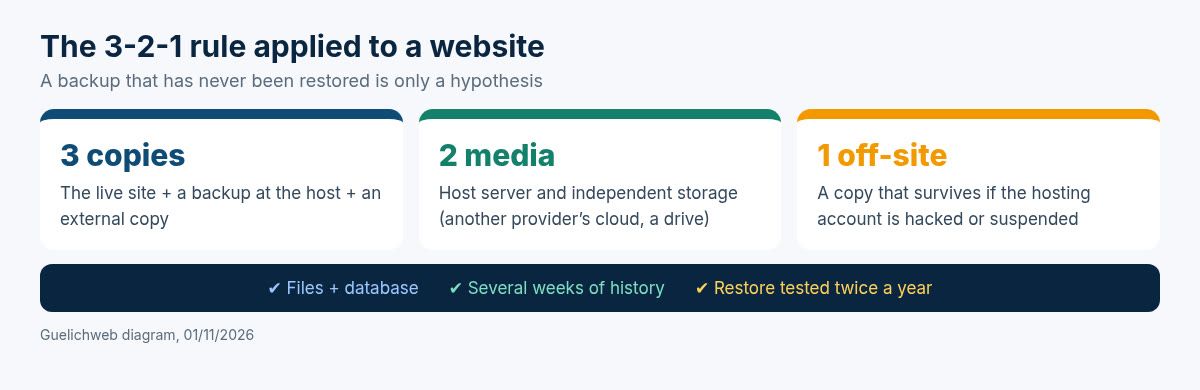
Guelichweb diagram, 01/11/2026: the 3-2-1 rule applied to a website.
Mistakes that turn an incident into a crisis
- Going back online the same day without finding the vulnerability. Reinfection is almost guaranteed.
- Changing passwords from the administrator's infected PC.
- Restoring a backup without checking its date: it already contained the backdoor.
- Forgetting the "side" accounts: Search Console, registrar, email, mailing tools, payment accounts linked to the site.
- Ignoring personal data and notifying neither the authority nor the people concerned.
- Paying a ransom or an unknown "ethical hacker" who contacts you after the attack offering to fix everything. It is often the same actor, or another scammer.
- Changing nothing afterwards: same low-end hosting, same abandoned plugins, no external backup.
Do it yourself or get help?
Our position is simple. The first-hour reflexes are things you can and should do yourself: keep the evidence, isolate the site, change passwords, report. The clean-up, on the other hand, means reading server logs, comparing files and understanding how the attacker got in. If nobody on your team has done it before, get help: a failed clean-up costs you twice, in time and in reputation.
After the incident is often the right time for a website audit, and sometimes for a redesign if the site relies on outdated components that can no longer be updated. As for budget, we don't quote prices off the cuff: every situation is different (type of site, extent of the infection, available backups). We provide a quote after a diagnosis, as explained on our offers page.
FAQ: hacked website, security and backups
My website was hacked. Should I delete it and build a new one?
Rarely. In most cases, a clean backup or a thorough clean-up is enough, provided the vulnerability is fixed. A rebuild makes sense when the site relies on technology that is no longer maintained.
How can I tell if a website is hacked without being technical?
Search for "site:yourdomain" on Google, check your domain on Google's "Site status" page, open your site on a phone by clicking a Google result, and read the messages from Search Console and your host. A redirect or unknown pages are enough to confirm the suspicion.
Does HTTPS prevent hacking?
No. HTTPS encrypts the connection between the visitor and the site. It does not protect against a weak password or a vulnerable plugin.
Do I have to report the hack to the APDP in Benin?
If personal data may have been viewed, altered, copied or lost, yes: Article 427 of the Digital Code requires notification without delay, and the APDP recommends doing it within 72 hours at most when there is a risk to individuals. In every case, document the incident.
How long until Google removes the warning?
After an accepted review request, Google says warnings are removed within 72 hours. The review itself ranges from about a day (phishing) to several weeks (injected spam).
Is a security plugin enough?
It helps, but it is not enough. A plugin does not replace updates, strong passwords or a tested external backup.
Need help with a hacked website or with securing it?
If your site has just been compromised, or if you simply want to know where you stand before it is, get in touch through our contact page. We run an initial diagnosis, tell you honestly what is urgent and what can wait, then send a clear quote: clean-up, hardening, automatic backups or ongoing maintenance. You can also browse all our services.