Website redesign: when to do it, the steps, and how not to lose your search rankings
G. CHRIST
Published on October 28, 2026

Your website is four or five years old. It looks broken on a phone, the "Team" page still shows people who left long ago, and the day you wanted to change a phone number, you had to call the developer who built it. If they still pick up. You are thinking it is time to start over.
Maybe it is. But a poorly prepared website redesign can do more damage than the old site ever did: pages vanishing from Google, company email down for two days, contact forms that no longer reach anyone. We see these accidents regularly, and almost all of them could have been avoided with a week of preparation.
At Guelichweb, we take over websites for businesses, NGOs and institutions in Benin, often built by someone else. This article pulls together what we check before touching anything: when a redesign is really justified, the steps in the right order, and how to keep the search rankings your site took years to earn.
Website redesign: a definition
A redesign is the partial or complete rebuild of an existing website: its look, its structure, its content, its technology, or all of them at once. The key word is existing. Unlike a brand-new build, a redesign inherits a past: pages already indexed by Google, links from other websites, customers used to certain addresses, a domain name, email inboxes. The whole challenge is to change what no longer works without breaking what does.
It also helps to separate it from two things people often confuse it with:
- Maintenance: updates, backups, security, small fixes. This is routine upkeep, and it is precisely what lets you postpone a redesign. We covered it in detail in our article on website maintenance.
- Content updates: changing text, adding photos, posting news. If that is all you need, you do not need a redesign. You need a website you can edit yourself.
The three levels of redesign
"Redesign" covers very different projects. Before asking for a quote, place your need in one of these three categories. It avoids misunderstandings with the agency and quotes you cannot compare.
1. Visual redesign
You change the look: colours, fonts, layout, photos, sometimes the logo. Page structure, addresses and the platform stay the same. It is the lightest project, suited to a site that works well but looks dated. One warning: if the site was never responsive in the first place, a fresh coat of paint will not be enough.
2. Technical redesign
You change what is under the hood: moving to a recent version of WordPress or to another platform, new hosting, faster loading, switching to HTTPS, fixing the mobile layout. Visitors sometimes see almost nothing, but the site becomes faster, safer and easier to evolve.
3. Full redesign
You rethink everything: who the site is for, what it must do, the page structure, the content, the design and the technology. It is the typical case for an organisation whose activity has changed since the site was built: an NGO with new donors, an SME that now sells online, a firm now targeting international clients.
Our advice: the higher the level, the higher the risk for your search rankings. A visual redesign that keeps the same addresses is almost risk-free. A full redesign with a new platform, a new structure and sometimes a new domain needs a real plan.
8 signs it is time to rebuild your website
You do not rebuild a site because it has "aged" or because a competitor just launched theirs. You rebuild it when it is costing you customers, money or time. Here are the signs we take seriously:
- It looks wrong on a phone. In Benin, as in most of French-speaking Africa, most of your visitors arrive on mobile. Google also looks at the mobile version of your site first when indexing it (Google's documentation on mobile-first indexing). You can check quickly with our method to test how a site displays on mobile.
- It is slow, especially on a patchy 3G or 4G connection. A page that takes eight seconds to appear loses visitors before they read anything. See our guide on website speed.
- Nobody on your team can edit it. If changing opening hours requires a developer, the site will always end up wrong.
- The platform is no longer updated: an old WordPress version, abandoned plugins, a theme that cannot be updated without breaking everything. That is a security problem first.
- It is not on HTTPS, or the browser shows "Not secure". We explain why that is a deal-breaker in our article on HTTPS and SSL certificates.
- It no longer matches your activity: new services missing, old services still listed, a different target audience.
- It generates no enquiries: no WhatsApp button, a form that goes nowhere, no page that clearly says what to do next.
- You control neither the domain name nor the hosting, because everything is in the previous developer's name. That point alone often justifies a takeover project.
If you tick one or two of these, a targeted fix may be enough. From three or four upwards, and especially if points 3, 4 and 8 are among them, a redesign is usually the most sensible option.
Rebuild or fix: our view
We often say this to clients who arrive wanting to "redo everything": a redesign is not always the answer. If your site is recent, on a healthy platform, and the real problem is that it brings no enquiries, start with the usual causes we describe in why your website is not bringing customers: visibility, message, call to action, responsiveness behind the site. A new design does not fix an unclear message.
On the other hand, endlessly patching a site built on outdated technology often costs more over two or three years than a well-run redesign. Every fix takes longer, every update is scary, and the site stays fragile. Our rule: fix it when the foundation is sound, rebuild it when the foundation is the problem.
Before the design: take back control of your website
This is the step nobody puts in quotes, yet it is the one that stalls the most projects we see. Before talking about colours and mock-ups, make sure you have in hand:
- The domain name: which registrar it is with, whose name it is in, which contact email is attached, and when it expires. If it is in the previous developer's name, have it transferred to your organisation before anything else. We explain how in our article on buying and managing a domain name.
- The hosting: account credentials, access to the control panel, renewal date. See also our web hosting guide.
- Administrator access to the site: an account in your name, not just the developer's.
- Business email: where it is hosted (with the website host, with Google, with Microsoft…). This is crucial for what comes next.
- Analytics tools: Google Search Console and Google Analytics, if they exist, with owner access for you. Our article on Google Analytics 4 explains how to check.
The trap we see most often: the organisation changes hosting during the redesign, the domain's DNS settings are changed, and nobody copies over the MX records. Result: email stops arriving for the whole organisation, sometimes for days, and nobody understands why.
If your email addresses use your domain, write down every current DNS record (MX, SPF, DKIM and so on) before touching anything, and have them copied over exactly. We also cover this in our guide to creating a professional email address.
The steps of a website redesign, in the right order
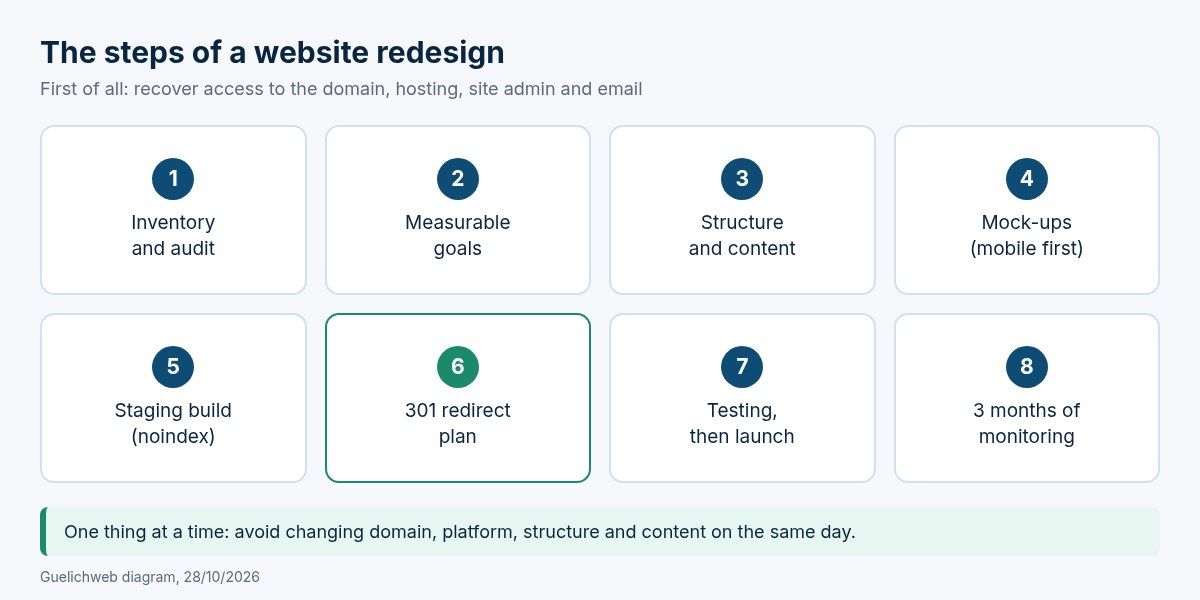
Guelichweb diagram: the steps of a redesign, from inventory to post-launch monitoring.
Step 1: inventory and audit of the existing site
List every page on the current site with its exact address, and work out which ones matter: those that get visits from Google, those that receive links from other websites, those that generate enquiries. Search Console is the most reliable source for this, if it was set up. Also note important PDF files and images: Google points out that they can receive traffic too (Google's guide to site moves).
Sort the content as well: what to keep as is, rewrite, merge or delete. An NGO website with forty news posts from 2019 does not need to keep all of them, but the ones that still get visits deserve attention.
Step 2: goals
"A more modern website" is not a goal. "Receive quote requests on WhatsApp from the services page", "let donors download our annual reports", "let our team publish news without help" are. Two or three measurable goals are enough. They will guide every decision afterwards.
Step 3: structure and content
Draw the new structure: which pages, in what order, linked how. This is also the moment to choose clear, durable page addresses (we explain how in our article on URLs) and to start writing. Our experience never changes: content is what delays redesigns, not development. Start preparing it early.
Step 4: mock-ups
Approve the look on the key page types (home, service page, contact page, article) before building everything. Ask to see the mobile version first, not as an afterthought.
Step 5: building on a staging site
The new site is built on a test address while the old one stays online. That test version must be blocked from indexing so it does not create duplicates in Google, for example with a noindex tag or password protection (Google's documentation on blocking indexing). And you must remember to lift that block on launch day: it is a classic mistake, one Google names explicitly in its site move guide.
Step 6: the redirect plan
This is the heart of the matter for search rankings. We cover it in detail just below.
Step 7: testing, then launch
Forms (does the message really arrive?), WhatsApp button, payments if any, display on several phones, speed, internal links, redirects. Launch at a quiet time for your business if possible, and never on a Friday evening before a long weekend.
Step 8: three months of monitoring
After launch, keep an eye on errors in Search Console, pages not found, the number of indexed pages and the enquiries you receive. Google warns that rankings can fluctuate for a few weeks after a migration while its crawlers revisit every page. That is normal. A drop that lasts is not: it nearly always points to a redirect or indexing problem.
Redesign and SEO: how not to lose your rankings
Your current site, however dated, may have pages that rank well on Google. Some receive links from directories, partners or press articles. If those addresses disappear overnight, Google finds error pages instead, and all that value evaporates. Here are the rules to follow, all taken from Google's official documentation on redirects and on site moves:
- Every important old address must redirect to the equivalent new page, using a permanent server-side redirect (301 or 308). Google states that these redirects do not cause a loss of PageRank.
- Do not redirect everything to the home page. Google may treat mass redirects like that as "soft 404" errors. If a page genuinely has no equivalent, a real 404 or 410 page is better.
- Avoid chains (old page to intermediate page to final page). Redirect straight to the final destination.
- Keep redirects for at least a year, and ideally forever from the visitor's point of view: that is Google's recommendation.
- Update your internal links, sitemap and canonical tags so they point to the new addresses, not to redirects.
- If you change domain name, use the Search Console Change of Address tool once the redirects are in place. It is not needed for a simple switch from HTTP to HTTPS or from www to non-www.
- Change one thing at a time whenever possible. Google recommends, for example, moving to the new domain first and changing the layout afterwards. Changing domain, platform, structure and content on the same day makes any problem very hard to diagnose.
What a redirect plan looks like
It is simply a table, often a Google Sheets file, with the old address, the new one and the redirect type. Here is a fictional example for an NGO website:
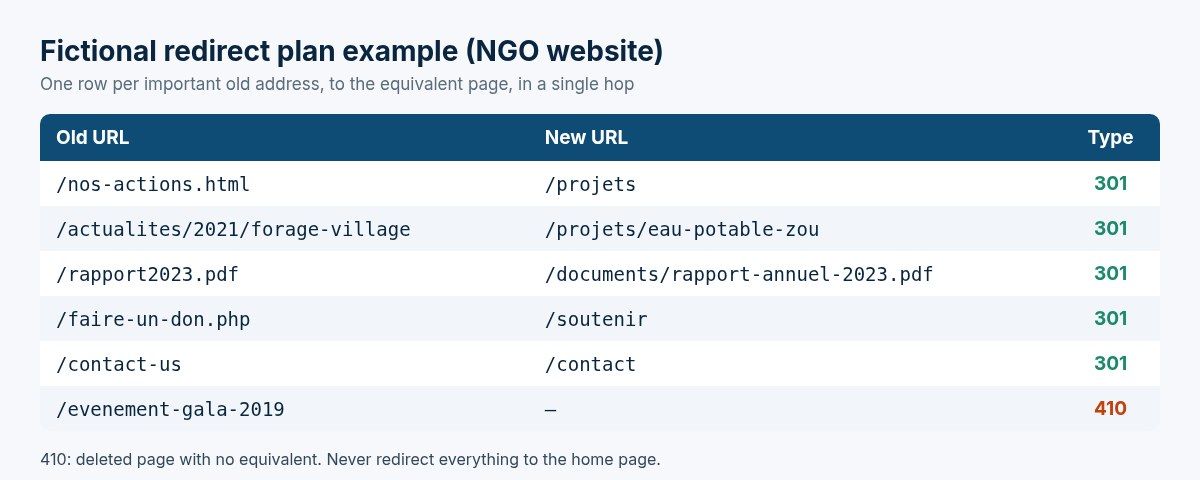
Guelichweb diagram: fictional example of a redirect plan (old URL, new URL, type).
On a twenty-page site, this table takes an hour. On a site with hundreds of articles, it needs crawling tools and automatic rules. Either way, it must be ready before launch and tested line by line right after.
One last point that guides written for European markets almost never mention: many African organisations' websites receive inbound links from donor websites, ministries, tender platforms or NGO directories. Those links are valuable and you cannot edit them yourself. Find them in Search Console (the links report) and make sure every one of those addresses redirects to the right page.
What a redesign should deliver in Benin and French-speaking Africa
A redesign is also the chance to fix what many sites copied from European templates leave out. Here is what we add almost every time:
- Lightweight pages: compressed images, few scripts, a limited number of fonts. Some of your visitors pay for mobile data by the megabyte. Google's Core Web Vitals benchmarks (main content displayed within 2.5 seconds, among others) are described on web.dev.
- WhatsApp as the main contact channel, with a pre-filled message depending on the page. And behind it, an organisation that replies fast: that is where a WhatsApp chatbot or a simple CRM can help.
- Mobile money payments if you sell, collect fees or raise donations, instead of a phone number at the bottom of the page.
- A Google Business Profile linked to the site, for local searches such as "agency in Cotonou". See our guide to creating a Google Business Profile.
- French-English bilingual content when your audience calls for it: international donors, clients in Nigeria or Ghana. We explain how to do it properly in building a multilingual website.
- A simple admin area, so your team can publish news, reports and job offers themselves.
- Accessibility: sufficient contrast, alt text on images, keyboard navigation. The reference rules are the W3C's WCAG. For a public institution, it is not a luxury.
How much does a website redesign cost?
You will find plenty of price grids online, almost all in euros or dollars and built for European or North American markets. They do not transfer as they are to Benin or Côte d'Ivoire, and they often compare projects that have nothing in common. What really drives the price of a redesign:
- The level of redesign: visual, technical or full.
- The volume of content to carry over, rewrite or translate. This is the most underestimated item.
- The number of different page templates, more than the number of pages.
- Features: online payments, member area, appointment booking, connection to a CRM or to automations.
- The state of the existing site: a site whose credentials are lost, or one on a closed platform whose content cannot be exported, takes more work.
- The redirect plan: twenty addresses or two thousand.
To compare quotes, our advice is the same as for a new site: ask for itemised lines, and know what is included (content, training, maintenance, hosting) and what is not. We gathered it all in what a website quote should include. At Guelichweb, we do not price a redesign blind: we prepare a quote after diagnosing your current site, as explained on our offers page. A redesign quote given without looking at the existing site ignores precisely what drives the cost.
How long does a redesign take?
For a visual redesign of a small brochure site, a few weeks can be enough. A full redesign with rewritten content, new features and a platform change is more a matter of months. In the projects we see, the timeline depends mostly on three factors on the client side: having the content ready (text, photos, documents), how quickly things get approved, and recovering access to the domain and hosting. Also plan the three months of post-launch monitoring into your schedule.
The most common redesign mistakes
- Launching the new site without redirects. The most expensive mistake, and the most common.
- Forgetting to remove the noindex from the test version. The site is beautiful, online, and invisible on Google.
- Cutting off email by changing DNS without copying the MX records.
- Deleting content that was working because it did not "fit" the new design.
- Leaving the domain in the new agency's name, recreating exactly the dependency you wanted to escape.
- Losing your measurement history: not reinstalling Google Analytics or losing access to Search Console.
- Approving the site on a large screen only, when visitors are on phones.
- Changing everything at once: domain, platform, structure and content on the same day.
Preparing your redesign brief
A redesign brief looks like a brief for a new site, with an extra section about what already exists. Our website requirements document template is a good starting point. Add:
- the current site's address, platform, host, domain registrar and who holds the credentials;
- what works and must be kept (pages, features, content that attracts visits);
- what is causing problems, with concrete examples;
- the list of connected services: email, forms, payments, WhatsApp, CRM, analytics;
- your two or three measurable goals;
- who supplies and approves content on your side, and by when.
Website redesign FAQ
What is a website redesign?
It is the partial or complete rebuild of an existing website: design, structure, content or technology. It differs from a new build because it must preserve what the site has already gained: rankings, inbound links, familiar addresses, email.
How often should you redesign your website?
There is no fixed interval. You often hear "every three to five years", but a well-built, well-maintained site can last longer with regular improvements. Rebuild it when the signs listed above pile up, not on a fixed date.
Will a redesign hurt my SEO?
Not if it is well prepared. With page-by-page permanent redirects, updated internal links and a new sitemap, rankings may fluctuate for a few weeks and then settle. Lasting losses almost always come from addresses deleted without redirects or a forgotten indexing block.
What is the difference between a redesign and maintenance?
Maintenance looks after the existing site (updates, backups, security). A redesign rebuilds it. Good maintenance lets you postpone a redesign; the lack of it often makes one unavoidable.
Can a different agency redesign the site than the one that built it?
Yes, as long as you have recovered access to the domain, the hosting and the site's admin. If the previous developer no longer responds, the priority is to recover the domain name through the registrar by proving your organisation is the registrant.
Should I change my domain name during a redesign?
Only if you have a real reason: a name change, or a poorly chosen domain in the first place. It is the riskiest change for SEO. If you do it, redirect every old address, declare the move in Search Console, and keep the old domain active and renewed for years.
Can I keep the same content and only change the design?
Yes, that is a visual redesign. Still, take the opportunity to reread your text: outdated information (team, opening hours, services) hurts your image more than a dated design.
WordPress or a custom site for a redesign?
It depends on who will manage the site day to day and on the features you need. We compare the cases where WordPress is the right choice in what WordPress is and when to choose it. For a redesign, staying on the same platform simplifies the migration; switching makes sense when the current platform is the source of the problems.
Thinking about rebuilding your website?
We can start with a diagnosis of your current site: access to the domain and hosting, technical health, the pages that matter to Google, mobile display, speed. You will know whether it is better to fix or rebuild, and what that involves. If a redesign is justified, we run it from inventory to post-launch monitoring, redirects included. Explore our services and our website creation offer in Cotonou.
Tell us about your website: we will tell you honestly whether a redesign is needed, and where to start.