Website audit: a free checklist to review your site yourself (and know what to fix first)
G. CHRIST
Published on October 29, 2026

"Our website exists, it is online, so it works." That is probably the most expensive sentence we hear in our line of work. A site can be online and, at the same time, have stopped delivering contact-form messages months ago, show a WhatsApp number that no longer exists, or be invisible on Google because one box was ticked at the wrong moment.
A website audit gets you out of that illusion. It is not a fifty-page report full of coloured scores. It is an honest inventory: what works, what is broken, what is costing you enquiries, and in which order you should deal with it.
At Guelichweb, the audit is the first thing we do before proposing anything to a business, an NGO or a public institution. Here is the method we follow, adapted so that you can do most of it yourself, for free, in an hour or two. Afterwards you will know whether your site needs a few small fixes, a real project, or nothing at all.
Website audit: what exactly are we talking about?
A website audit is a methodical review of an existing site to check whether it does its job: being found, loading properly, inspiring trust and turning visitors into contacts. It covers the technical side, search visibility, security, content and the visitor journey.
Three things are often confused:
- An SEO audit only looks at visibility on Google: indexing, keywords, titles, links. It is one part of the audit, not the whole audit. If the topic is new to you, our article What is SEO? covers the basics.
- A free online audit tool, which gives you a score out of 100 in thirty seconds. Useful for spotting technical problems, but it has no idea whether your phone number is right or whether your prices date from 2021.
- A full audit, which combines tools with a human review around one central question: does this site help the organisation reach its goals?
Our view is simple: automated tools are essential, but an audit that stops at their scores misses the point. A site can score 95/100 and bring in no enquiries at all, while another one scoring 60 does its job very well.
When should you audit your website?
There is no need to wait for a disaster. These are the moments when an audit really pays off:
- You hardly get any enquiries through the site, even though business is running. This is often the sign of a broken form or WhatsApp link, far more than of a design problem. We cover the usual causes in why your website is not bringing customers.
- You are planning a redesign. The audit tells you what to keep, what to drop and which pages carry value on Google. Without it, a website redesign is done blindfolded.
- Your web provider has disappeared, or your internal team is changing. Before anything else, you need to know who owns the domain, the hosting and the logins.
- A donor, a partner or a major client is about to look at your site closely: a funding application, a tender, the launch of a programme.
- Once a year, quite simply, the way you would have a vehicle serviced. An unmaintained site degrades even if nobody touches it.
Before you start: what you need
For a first audit you do not need any paid software. Get ready:
- a computer and an entry-level or mid-range smartphone on mobile data (not just the office Wi-Fi);
- a list of the 5 to 10 most important pages: home, services, contact, donation or order page, two or three articles;
- a spreadsheet with four columns: item checked, finding, severity, action;
- if possible, access to the site's Google Search Console and to its analytics (Google Analytics or another tool).
Write down everything you notice, even things that look trivial. A useful audit is a written audit: six months from now, you will want to compare.
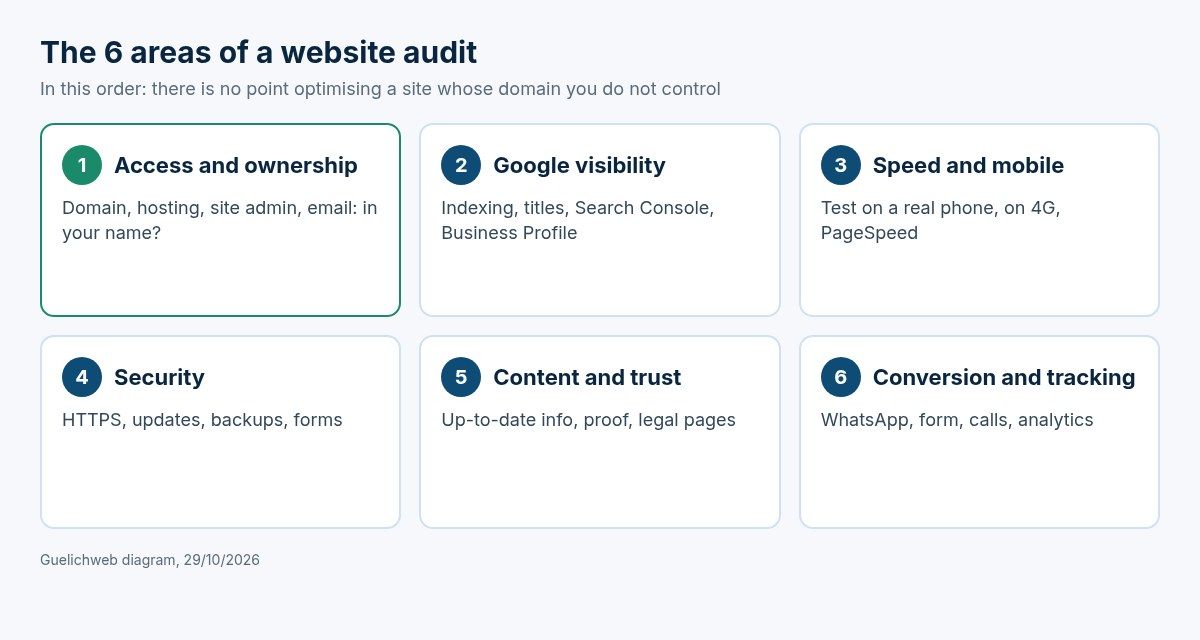
Guelichweb diagram: the six areas of the checklist, in the order we check them.
The free checklist in 6 areas
Order matters. We start with whatever can block everything, and finish with what wins you enquiries. There is no point tuning the speed of a site whose domain name you do not control.
Area 1: access and ownership (the most overlooked)
No online tool checks this part, and yet it causes the worst situations. In West Africa it is common for the domain to have been bought by a former provider, in their own name, with their own bank card. The day they forget to renew it, the website and the email go down together.
- Is the domain name registered to your organisation? When does it expire? Who receives the renewal notice? See our guide to buying and managing a domain name.
- Do you have the logins for the hosting and for the site's admin area? Are they stored somewhere other than in a single person's head?
- Do your professional email addresses depend on the same provider? If so, mark it in red: it is your most fragile point. More in our article on professional email addresses.
- Is there a recent backup of the site, and does anyone know how to restore it?
If you cannot answer any of these questions, stop the audit here. Your priority is not SEO; it is getting back the keys to your own house.
Area 2: visibility on Google
Start with the simplest test: type site:yourdomain.com into Google. You get an estimate of the indexed pages. Zero results? There is a serious problem. Test pages, drafts or "Hello world" pages? There is some cleaning up to do.
- Is the site registered in Google Search Console? It is free, and it is the only tool that shows you what Google really sees: indexed pages, errors, the searches that bring visitors. If this has not been done, our guide how to appear on Google walks you through it.
- Does every important page have a unique, clear title (the blue line shown in Google) and a meta description that makes people want to click?
- Is there a single main heading (H1) per page, with logical subheadings?
- Is the robots.txt file accidentally blocking the whole site? Open yourdomain.com/robots.txt: if you see "Disallow: /" on its own, call someone.
- Does your Google Business Profile exist, with the right opening hours, the right number and a link to the site? For a local business, it often matters more than the website itself. See creating your Google Business Profile and local SEO.
- Do your pages answer the searches your clients actually type? Nobody searches for "Our innovative solutions". Our method to find the right keywords costs nothing.
Google publishes its own SEO starter guide. It is short, free of needless jargon, and it contradicts quite a few myths that are sold as secrets.
Area 3: speed and mobile display
This is where audits run from Paris or Montreal get it most wrong. A site that opens in one second on fibre can take ten seconds on a phone with patchy 4G in Parakou or Bouaké. And that phone is exactly where your clients look at it.
- Open the site on your smartphone, on mobile data, in a private window. Time it. If it takes more than three or four seconds before anything useful appears, you are losing people.
- Run your main pages through PageSpeed Insights, Google's free tool. Focus on the mobile results and the three Core Web Vitals: LCP (main content display, target 2.5 seconds or less), INP (responsiveness, 200 milliseconds or less) and CLS (visual stability, 0.1 or less). The thresholds are explained on web.dev.
- Can the text be read without zooming? Are the buttons big enough for a thumb? Does the menu open? Does anything spill over the side of the screen?
- Do the images weigh several megabytes? That is one of the most frequent causes of slowness, often ahead of the hosting.
If this area is red, our articles on page speed and on responsive websites go through the fixes, from the simplest to the most technical.
Area 4: security and upkeep
- Does the site open over https with a padlock, on every page, without warnings? The free SSL Labs test grades the certificate in detail. The basics are in what is HTTPS and an SSL certificate.
- If the site runs on WordPress or another CMS: are the core and the plugins up to date? How many plugins are no longer used?
- Are the forms protected against spam (captcha, honeypot field)? An inbox flooded with fake messages eventually stops being read, and the real messages get lost with them.
- Are there admin accounts belonging to former staff or providers? Delete them.
- Do the cookie banner and the privacy policy match what the site really does? See cookies and trackers.
A site without upkeep is not stable: it ages. If nobody is in charge of these checks, read what proper website maintenance covers.
Area 5: content and trust
Put yourself in the shoes of a client discovering your organisation, or of a programme officer at a donor agency with twenty applications to review. Within thirty seconds, do they understand what you do, for whom, and where?
- Does the home page clearly say what you do, without an empty slogan?
- Is the information current: address, phone numbers, team, offers, latest news? A news item from 2022 on the front page says the organisation has gone dormant.
- Is there concrete proof: completed projects, partners, activity reports, verifiable testimonials? For an NGO, transparency is a decisive argument, as we explain in what an NGO website should include.
- Are the legal notice and the organisation's contact details easy to find?
- Do the images have alternative text? It helps Google and is essential for visually impaired people. The free WAVE extension flags the most common accessibility problems; the full reference remains the W3C's WCAG guidelines.
- Do the links work? 404 errors on downloadable documents (reports, tenders) are very common after a change of structure.
Area 6: conversion and tracking
This is the area that brings in business, and the one we test most insistently. A site that loads quickly and ranks well is useless if visitors cannot reach you.
- Send yourself a message through the contact form. Does it arrive? In which inbox? How fast? In spam? If emails are not being delivered properly, ask your provider to check the domain's SPF and DKIM records; Google explains how to set up SPF.
- Tap the WhatsApp button on your phone. Does it open the right chat, with the number in international format (+229 for Benin, +225 for Côte d'Ivoire, +221 for Senegal)? A badly formatted number does not work on every phone.
- Is the phone number tappable on mobile?
- How many clicks does it take to go from the home page to a quote request, a donation or a registration? More than three is too many.
- If you sell online: run a real test purchase all the way to the mobile money or card payment.
- Are you measuring anything? Without analytics, you cannot know whether a fix made any difference. Google Analytics 4 is more than enough to start.
The test that reveals the most problems in five minutes: fill in your own contact form from a phone, on 4G, and wait for the reply.
The free tools we actually use
There are dozens of audit tools. For a small business or an NGO, these cover the essentials without paying a cent:
- [Google Search Console](https://support.google.com/webmasters/answer/9128668?hl=en): indexing, errors, search queries, Core Web Vitals from real visitors. If you could keep only one, it would be this one.
- [PageSpeed Insights](https://pagespeed.web.dev/): speed and Core Web Vitals page by page, on mobile and desktop.
- Screaming Frog SEO Spider (desktop software, free version limited to 500 URLs): crawls the whole site and lists broken links, missing or duplicate titles, redirects.
- Google's [Rich Results Test](https://search.google.com/test/rich-results): checks structured data (reviews, FAQ, local organisation).
- [SSL Labs](https://www.ssllabs.com/ssltest/) for the certificate and [WAVE](https://wave.webaim.org/) for accessibility.
- Your own phone, on mobile data. The most underrated tool on the list.
Be wary of tools that display dozens of "critical errors" to sell you a subscription. Many of those alerts have no real effect on your visitors. A perfect score is not the goal; a site that does its job is.
Prioritising: what to fix first
At the end of the checklist you will probably have twenty or thirty rows in your spreadsheet. That is normal, and it is where most audits fail: everything looks urgent, so nothing gets done. Rank each item on two criteria: its impact on your enquiries (or donations, sales, registrations) and the effort needed to fix it.
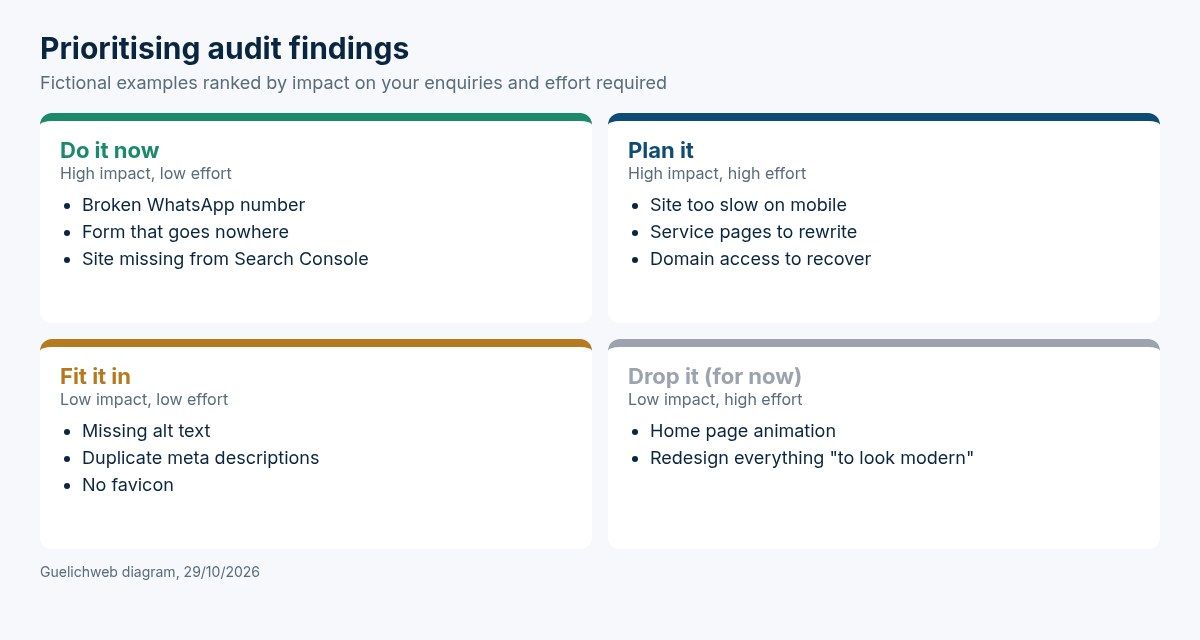
Guelichweb diagram: fictional examples ranked by impact and effort.
- High impact, low effort: right away. A form that sends nothing, a broken WhatsApp link, a wrong number, a site not registered in Search Console, a robots.txt blocking everything. These fixes often take less than an hour and change everything.
- High impact, high effort: plan it. Recovering ownership of the domain, rewriting the service pages, making the site fast on mobile. Set a date and an owner.
- Low impact, low effort: fit it in. Alt text, duplicate meta descriptions, a favicon. Handle them during the next update.
- Low impact, high effort: drop it for now. Animations, a font change, the "more modern design" nobody asked for.
If more than half of your items land in the "high effort" boxes, and especially if the site runs on technology that nobody knows how to maintain any more, a redesign becomes a serious question. In that case the audit becomes the starting point of your website requirements document.
The most common audit mistakes
- Relying only on a score out of 100. An automated tool does not know your address has changed or that your flagship offer is not even presented.
- Auditing only the home page. Visitors often land from Google on an inner page, an article or a specific offer.
- Testing only on a desktop, at the office, on Wi-Fi. That is the opposite of what most of your visitors experience.
- Forgetting email. A badly configured domain can send your replies to clients straight into their spam folder, without anyone noticing.
- Running the audit and fixing nothing. A report filed away in a folder is worthless. Three fixes done beat thirty recommendations read.
- Rebuilding everything when a repair would do. Many sites do not need a redesign, just ten targeted fixes.
Free DIY audit or professional audit?
The checklist above covers a good share of what a professional checks. Do it yourself if your site is simple (around ten pages), if you have the logins, and if someone in-house can make the fixes.
Bring in an outside eye in these cases:
- you do not know who holds the domain or the hosting, or you cannot get the logins back;
- the site has several hundred pages, a catalogue, a members' area or online payment;
- the problems involve the server, email configuration or security;
- you are preparing a redesign or migration and do not want to lose your rankings;
- you want to connect the site to WhatsApp, a CRM or automations so that every enquiry is followed up, which is at the heart of our services.
A good professional audit does not stop at a list of problems: it estimates the effort, says what can be done in-house and what needs a provider, and does not push you towards a redesign by default. If the auditor always concludes that everything must be rebuilt, be careful.
As for pricing, we do not publish a fixed price for an audit: a ten-page brochure site and an institutional portal with a user area have nothing in common. As with our offers, the diagnosis comes first, followed by a detailed quote.
After the audit: keeping the site healthy
An audit is a snapshot. To keep the site in shape, a few simple habits are enough:
- Every month: test the form and the WhatsApp button, glance at the Search Console alerts.
- Every quarter: update the content (team, offers, news), check the backups, apply CMS updates.
- Every year: run the full checklist again and compare with the previous year. Check the domain's expiry date.
Appoint one person in charge, even part-time. The sites that decay are almost always the ones "everybody" looks after, which means nobody.
Frequently asked questions about website audits
How long does a website audit take?
For a brochure site of about ten pages, the checklist in this article takes one to two hours. A professional audit of a larger site, with data analysis and written recommendations, usually takes several days.
Is a free online website audit enough?
It is enough to spot technical problems: slowness, missing tags, certificate issues. It is not enough to judge content, trust, the contact journey or who owns the logins, which are often the real problems.
What is the difference between an SEO audit and a website audit?
An SEO audit focuses on visibility in search engines. A website audit is broader: it includes SEO, but also security, speed, the mobile experience, content and the site's ability to generate enquiries.
How often should I audit my website?
A full checklist once a year, plus a quick check of the form and the Search Console alerts every month. Run a full audit again before any redesign or change of hosting.
Do I need to rebuild my site after an audit?
Not necessarily; in fact, rarely. Most audits lead to a list of targeted fixes. A rebuild is justified when the site relies on obsolete technology, cannot be edited, or when the fixes would cost more than starting over.
Can I audit a competitor's website?
Yes, for everything public: speed, mobile display, content, structure, presence on Google. It is even a good way to benchmark your own site. Obviously, you will not have access to their analytics or their Search Console.
Want an outside view of your website?
If you have gone through the checklist and the list looks long, or if you are stuck at area 1 because nobody knows where the logins are, we can run this diagnosis with you. We look at the site, but also at what happens after the click: where enquiries land, who answers them, and what gets lost along the way.
Tell us about your website: we reply within 24 working hours and, if work is needed, you receive a detailed quote after the diagnosis, with no commitment.