What is Airtable? Free vs paid, 2026 pricing, and how to turn it into an automated mini-CRM
G. CHRIST
Published on November 23, 2026

In almost every SME and NGO we work with, there is one file that keeps the place running. An Excel sheet called "CLIENTS_FINAL_v3", a Google Sheet shared with twelve people, sometimes a paper notebook. Everyone edits it, nobody dares restructure it, and one day a row vanishes and no one knows who deleted it. That is usually the moment someone says the word Airtable.
This guide answers the questions people actually ask us: what is Airtable? Is it free? What does it cost when you pay in dollars from Cotonou, Abidjan or Dakar? Where does your data live? And above all, how do you turn it into a small CRM that fills itself from your web forms and WhatsApp messages, using n8n or Make? Prices and limits were checked on Airtable's official pages on 23 November 2026.
What is Airtable? The short answer
Airtable is an online tool that looks like a spreadsheet but works like a database. You see rows and columns, just like Excel, but every column has a specific type (date, drop-down list, attachment, phone number, checkbox and so on) and, crucially, your tables can be linked to each other. A customer is linked to their orders, an order to its products, a beneficiary to their field visits. It runs in the browser, on desktop and on mobile.

Official Airtable logo (source: airtable.com site header, captured 23/11/2026).
Our position is simple: Airtable is one of the best tools to get a team out of the "Excel file that does everything" without jumping straight into heavy software. It is not an ERP, not accounting software and not a replacement for your website. It is a very good data backbone for a team of 2 to 30 people, provided you design it properly from day one.
Airtable's vocabulary in 4 words
Four ideas are enough to read any Airtable base. Once they are clear, everything else falls into place.
- Base: your whole project, the equivalent of a workbook. For example, a "Sales pipeline" base or a "2027 training programme" base.
- Table: one kind of object inside the base, the equivalent of a tab. Contacts, Quotes, Products, Beneficiaries, Partners.
- Field: a typed column. This is where Airtable beats a spreadsheet: a "Status" field only accepts the values you defined, a "Phone" field stays a phone number, an "Attachment" field holds the PDF of the quote.
- View: a way of displaying the same data. Grid, Kanban, calendar, gallery, form. Sales sees the pipeline as a Kanban board, management sees a filtered grid, field staff fill in a form. The data stays the same.
Add to that linked records (one customer connected to all their quotes without retyping their name ten times), built-in automations ("when status changes to Won, send an email") and interfaces, small clickable dashboards you build for people who should not touch the underlying structure.
Airtable vs Excel or Google Sheets: what is the real difference?
This question comes up every time, and the answer is not "Airtable is better". A spreadsheet is still unbeatable for calculations, budget models or one-off analysis. We have a full guide to Google Sheets and another on building a customer database in Excel. Airtable becomes worthwhile when your file is used to track things that move: leads, cases, orders, requests, beneficiaries.
- Reliable data: in a spreadsheet, anyone can type "Cotonou", "cotonou" or "Ctn". In Airtable, the City field offers a list, and your filters finally work.
- Relationships: linking a customer to their invoices in Excel takes fragile VLOOKUPs. In Airtable it is one click.
- Permissions: you can grant read-only, comment or edit access, and share a form without giving access to the base.
- History: every record keeps a trail of changes (2 weeks on the free plan, 1 year on Team).
- Automation: Airtable talks cleanly to n8n, Make or Zapier, whereas a shared spreadsheet tends to break an automation the moment someone inserts a column.
Our rule of thumb: if your file has more than three tabs that depend on each other, if more than three people edit it every week, or if you copy the same information into several places, you have outgrown the spreadsheet.
Is Airtable free? What the Free plan really includes
Yes, Airtable has a free plan with no time limit. When you sign up, your first workspace also gets a 14-day trial of the Team plan; when it ends, you stay on Free unless you pay. Here is what the Free plan includes according to the pricing page and the help centre, both checked on 23/11/2026:
- unlimited bases, but 1,000 records (rows) per base;
- up to 5 editors or creators per workspace, 50 commenters and unlimited read-only users;
- 1 GB of attachments per base;
- 100 automation runs per month and 1,000 API calls per month, per workspace;
- 2 weeks of revision history;
- 500 AI credits per editor per month;
- the Interface Designer is included, but not extensions, Gantt view or form customisation (the Airtable branding stays visible).
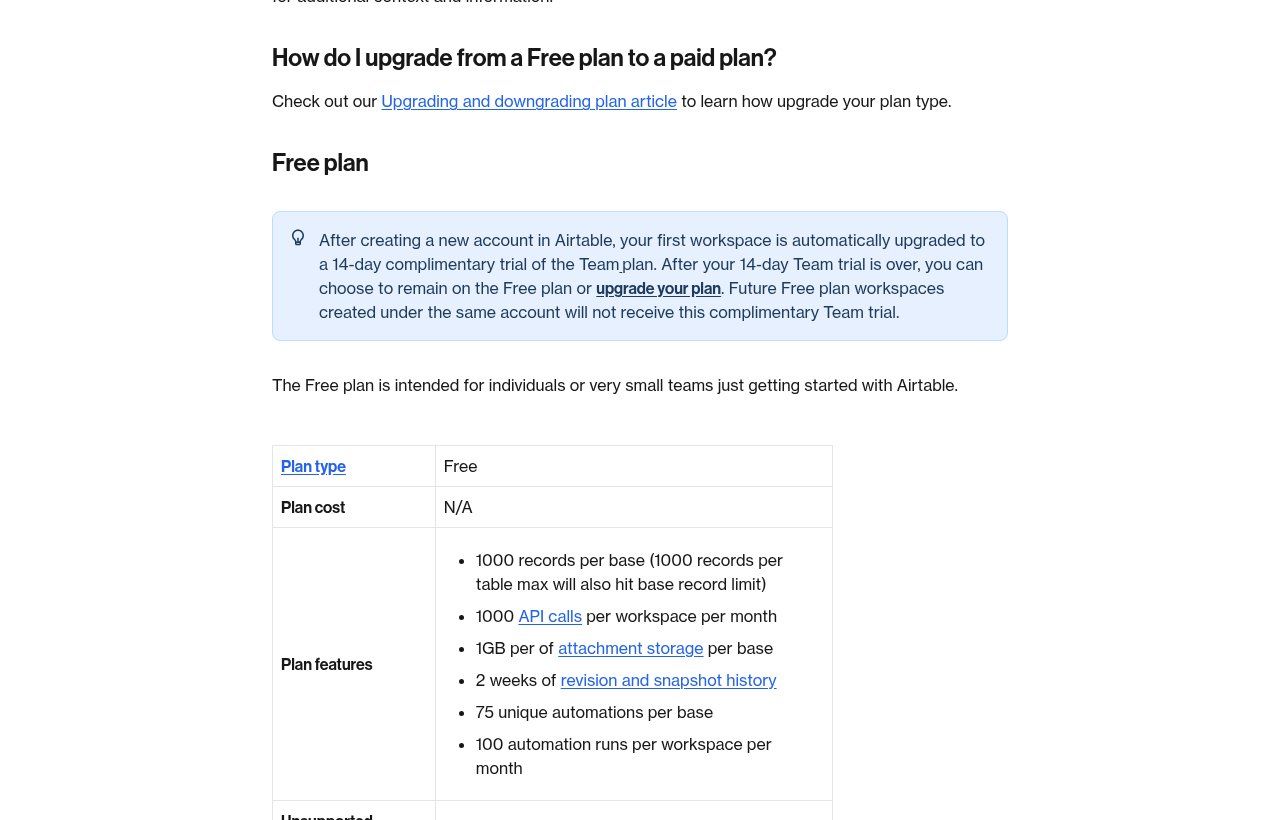
Source: Airtable help centre, "Airtable plans overview" (support.airtable.com), captured 23/11/2026.
The takeaway: the Free plan is perfect for testing a process and for very light use. But 100 automation runs a month is roughly three a day. As soon as you connect a website form or a WhatsApp chatbot that creates a record for every contact, you will hit the cap within days. And 1,000 rows fill up quickly if you keep your customers and their order history in the same base.
The good news: if you go over the record or attachment limit, Airtable says it never deletes your data; you simply cannot add more until you change plan. For automations and API calls, usage is capped until the next month.
How much does Airtable cost in 2026?
Prices are in US dollars, per seat (billed user) per month, as shown on airtable.com/pricing on 23 November 2026:
- Free: $0.
- Team: $20 per seat per month billed annually, $24 billed monthly. 50,000 records per base, 25,000 automation runs per month, 20 GB of attachments per base, extensions, Gantt and timeline views, 1 year of history, 15,000 AI credits per paid user.
- Business: $45 per seat per month billed annually, $54 monthly. 125,000 records per base, 100,000 runs, 100 GB, two-way sync, admin panel, SAML single sign-on.
- Enterprise Scale: custom pricing for large organisations (governance, audit logs, choice of data region).
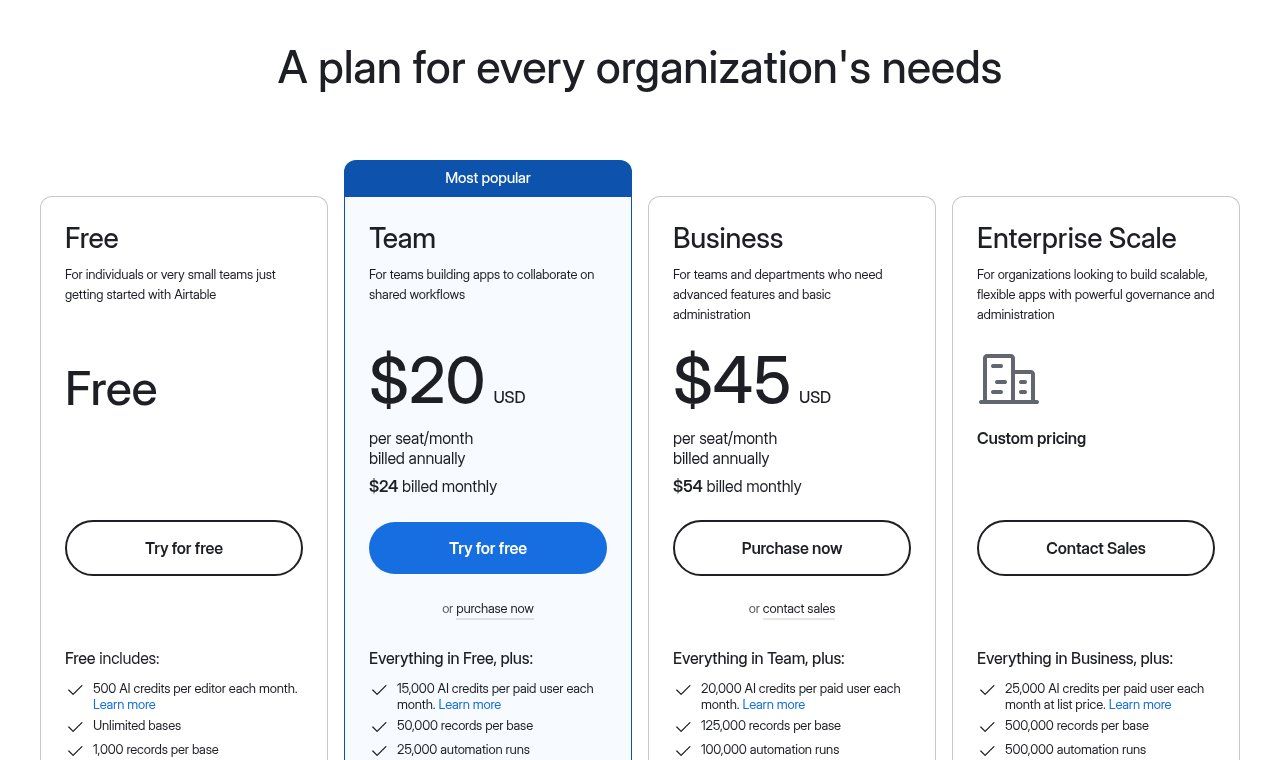
Source: Airtable official pricing page (airtable.com/pricing), captured 23/11/2026.
Who gets billed?
This is what surprises people most. Billing is per workspace, and you pay for every person with edit rights on at least one base in that workspace (on Team, the help centre says commenters are billable too). Read-only users, people submitting a form and share links are free. In practice, a team of 5 editors on Team pays $100 a month on annual billing, or $1,200 a year. But your 40 field agents who only fill in a form cost nothing.
Paying from Benin, Côte d'Ivoire or Senegal
Airtable is paid by bank card, in dollars. There is no Mobile Money option and no pricing in CFA francs. A Visa or Mastercard enabled for international online payments usually works, but check your bank's online spending cap and exchange fees: the real amount debited in CFA francs depends on the day's rate and those fees. For an organisation that struggles to get an international card, this is a genuine obstacle, and one reason we sometimes recommend a self-hosted alternative (see below).
NGOs: the 50% discount and its conditions
Airtable offers qualifying nonprofits 50% off the monthly price of the Team plan, i.e. $12 per user per month, paid by card. The conditions published in the help centre are strict: you need legal registration documents, an existing Airtable account under the email used to apply, and the organisation must not be a government body, a religious or political organisation, a hospital or a health insurance player, among other exclusions. The discount cannot be combined with annual billing. Airtable says it usually replies within 2 business days.
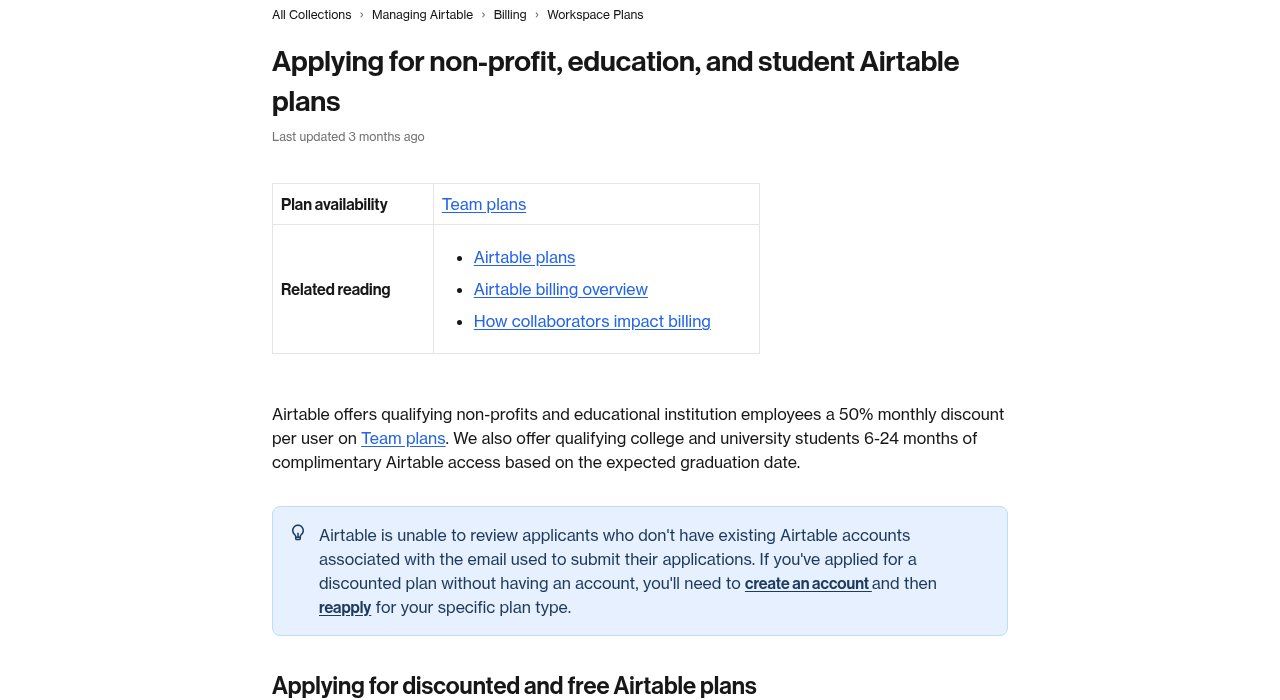
Source: Airtable help centre, "Applying for non-profit, education, and student Airtable plans", captured 23/11/2026.
Our advice to West African NGOs: have a clear PDF of your registration certificate ready, ideally with an English translation, before you apply. A public institution is not eligible and will need to look at standard pricing or an open-source option.
Is Airtable available in French?
Yes. According to the help centre, the Airtable interface is available in English, French, German and Spanish: click your account icon, then "Language preferences". Your own table and field names obviously stay as you wrote them. The help centre, the API documentation and much of the community remain mostly in English, which is not a blocker but takes a little effort during setup for French-speaking teams.
Where is your data stored? The question few articles cover
By default, Airtable hosts customer data in the United States on Amazon Web Services. Choosing another region (Europe or Australia) is only offered on Enterprise Scale, and even then some metadata and account data stay in the US, according to the Data residency page.
For a shop tracking orders, that is not a problem. For an NGO handling beneficiary data (health, family situation, vulnerabilities) or for a public institution, it is a real question. In Benin, the Digital Code governs personal data and its transfer abroad, overseen by the data protection authority (APDP), and most countries in the region have similar rules. This is not legal advice, but our practice is clear: we do not put sensitive data about vulnerable people into Airtable without checking the framework with your lawyer, minimising the fields collected and often pseudonymising records. In those cases a self-hosted database, or KoboToolbox for data collection, may be a better fit.
What SMEs, NGOs and institutions actually do with Airtable
These are the use cases we most often see working, from the simplest to the most ambitious:
- Mini-CRM: leads, customers, follow-ups and quotes, with a Kanban pipeline. This is use case number one. If you are weighing it against a classic CRM, start with our guide What is a CRM?.
- Request tracking: every request received via the website, WhatsApp, phone or email, with an owner and a due date.
- Catalogue and small inventory: product records with photos, prices and quantities. For simple stock, our article on inventory management in Excel or Google Sheets may be enough; Airtable takes over when several people enter data at the same time.
- Project and beneficiary tracking for an NGO: activities, sites, partners, indicators, supporting documents.
- Recruitment: applications received through a form, interview stages, decisions.
- Content calendar: Facebook, WhatsApp and blog posts with status and attached visuals.
- Mail or equipment register for an institution: who has what, since when, in what condition.
Building an Airtable mini-CRM in 7 steps
This is the method we use. A first usable version takes about half a day, as long as you do not skip step 1.
- Sketch your process on paper before opening Airtable: where contacts come from, which stages, who does what, which information is missing today. Without this, you will rebuild your Excel mess in a prettier tool.
- Create 3 tables, not 12: Contacts, Opportunities (or Requests), Interactions. Products or Invoices can come later.
- Type your fields: phone numbers in international format (+229…), status as a fixed list (New, Contacted, Quote sent, Won, Lost), source as a list (Website, WhatsApp, Referral, Trade fair), owner as a collaborator field, amount as currency.
- Link the tables: each opportunity links to a contact, each interaction to an opportunity. Add a "Last interaction" field calculated automatically.
- Create one view per use: a "Pipeline" Kanban for sales, a "Follow up this week" grid filtered by date, a "My cases" view for each person.
- Open a form for simple data entry (field prospecting, trade fairs, front desk) instead of giving access to the whole base.
- Import your existing data only after removing duplicates and standardising cities and phone numbers. Importing a dirty file means keeping its problems.
One tip that will save you weeks: write down, in each field's description, what it is for and who fills it in. Six months later, that is what stops a new colleague from breaking your structure.
Automating Airtable with n8n or Make: 4 practical scenarios
Airtable's built-in automations are great for internal actions (notify someone when a status changes). But to connect Airtable to WhatsApp, your website, your inbox or an AI model, you need an automation tool. We mostly work with n8n and Make; if you are unsure, read n8n or Make: which one to choose. Both have an Airtable connector: the n8n Airtable node can create, read, list, update and delete records, and a trigger node watches for new records; Make offers an equivalent Airtable app.
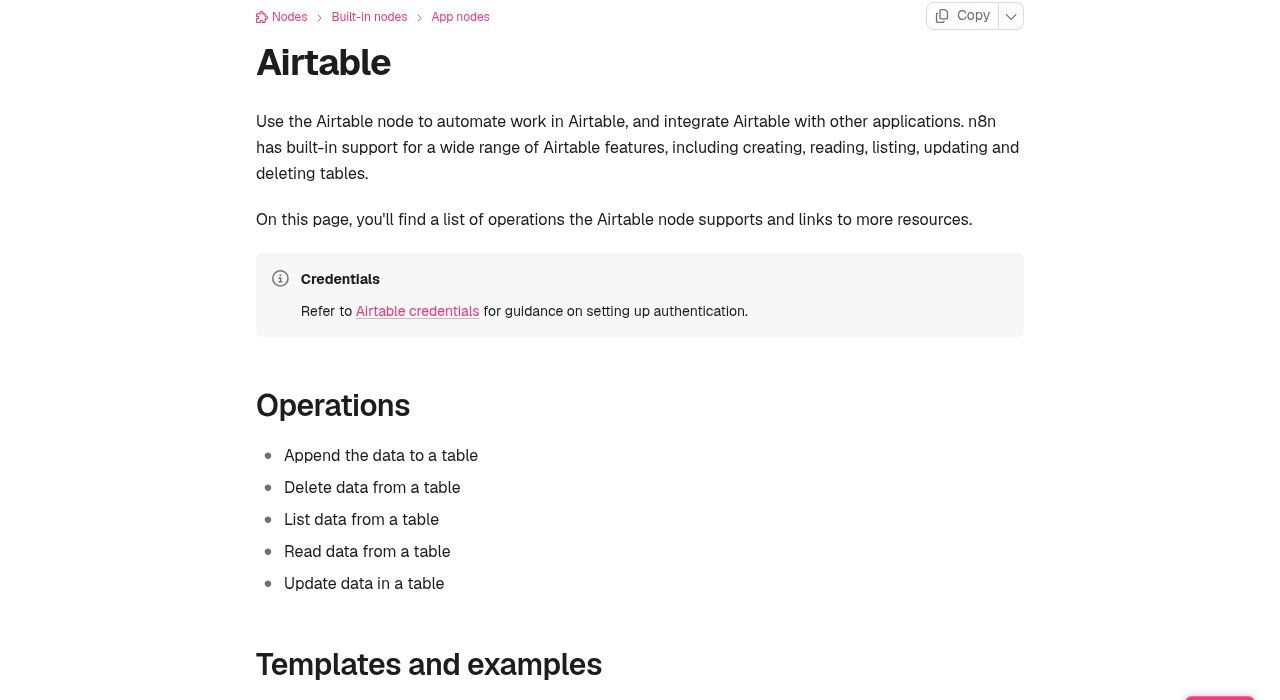
Source: official n8n documentation, Airtable node (docs.n8n.io), captured 23/11/2026.
1. Website form → CRM record + WhatsApp alert
A visitor fills in your website contact form. A webhook sends the data to n8n, which checks whether the contact already exists (same phone or email), creates or updates the record in Airtable, then alerts the right salesperson. No more messages lost in an inbox nobody reads.
2. WhatsApp chatbot → qualification → Airtable
Your WhatsApp chatbot asks three questions (need, city, rough budget), then n8n saves a summary of the conversation in the Opportunities table with the source "WhatsApp". This is exactly what we build in our WhatsApp chatbot with n8n projects.
3. Automatic follow-ups
Every morning, n8n reads Airtable's "Follow up" view and prepares each salesperson's list for the day, or sends a follow-up message approved in advance. People keep control of the tone; the machine forgets no one.
4. Weekly AI report
On Friday, n8n pulls the week's opportunities, asks an AI model for a five-line summary (new contacts, deals won, blockers) and sends it to management. Ten minutes of reading instead of an hour-long meeting.
Two technical limits to know so you are not caught out: Airtable's API accepts at most 5 requests per second per base (and 50 per second in total for a single access token), according to the developer documentation; beyond that it returns an error and you have to wait. And on the free plan, the 1,000 API calls a month run out fast with an automation polling every five minutes. A good scenario batches operations and uses triggers rather than constant polling.
For access, Airtable uses personal access tokens or OAuth. Create a token restricted to the bases and permissions you actually need, and store it in n8n's or Make's credentials, never in a shared file.
Airtable alternatives, and when to prefer them
Airtable is not always the right answer. Here is how we decide:
- Google Sheets: free, familiar to everyone, perfect while the data stays simple and few people write to it. Combined with n8n, it already does a lot.
- A dedicated CRM (HubSpot free, Zoho and others): better if your need is purely sales and fairly standard. You gain ready-made features and lose flexibility. See our CRM guide.
- Odoo: if you also want invoicing, inventory and accounting in one place. Heavier, more complete. Read What is Odoo?.
- Baserow or NocoDB: open-source alternatives that look like Airtable and can be self-hosted on your own server. Worth considering when data privacy or the lack of an international card is the blocker, provided someone maintains the server and backups.
- KoboToolbox: for offline field data collection, especially in NGOs. It can feed Airtable or another database afterwards.
The 7 mistakes we see most often
- Importing your Excel file as is and wondering why nothing improves.
- Putting everything in a single 60-column table. One table per kind of object, linked together.
- Giving everyone edit rights: it costs more (every editor is billed) and it is riskier. Read-only access and forms are often enough.
- Leaving free-text fields for statuses, cities or sources. Your statistics become wrong.
- Building 15 automations before the process is stable. Automate what already works by hand, not what is still fuzzy.
- Forgetting backups: free revision history only lasts 2 weeks. Export your tables to CSV regularly, or automate the export.
- Naming no owner for the base. Without an owner, an Airtable base decays as fast as an Excel file.
Our verdict: who is Airtable right for?
Airtable is an excellent choice for an SME, NGO or department that wants to structure one specific process (sales, requests, projects) in a few days, with a handful of editors, non-sensitive data and an international bank card. It becomes even more valuable once it is connected to WhatsApp, the website and AI through n8n or Make.
It is less suitable if you have dozens of editors (the bill climbs fast), sensitive personal data that must stay on a server you control, or a need for full business management (invoicing, accounting, inventory) that belongs in an ERP. When in doubt, start free with one process and one team, and review after a month.
How Guelichweb can help
We do not resell Airtable subscriptions. Our job is to design the base structure with you, import and clean your data, then automate what should be automated: website forms, WhatsApp chatbot, follow-ups and reports, with n8n or Make. If Airtable is not the right tool for your case, we will say so and suggest the right alternative. To get a sense of budgets, our article how much does AI automation cost in Benin explains what drives the cost.
Every project is different, so you receive a quote after a diagnosis of your needs. See our offers or browse all our services.
FAQ: Airtable
What is Airtable in simple terms?
It is an online tool that combines the simplicity of a spreadsheet with the power of a relational database: linked tables, typed columns, several views (grid, Kanban, calendar, form) and automations, with no code. The interface is available in English, French, German and Spanish.
Is Airtable free?
Yes, the Free plan has no time limit, with 1,000 records per base, 5 editors, 1 GB of attachments per base and 100 automation runs a month. Paid plans start at $20 per seat per month (Team, billed annually).
How much does Airtable cost per month?
Team: $20 per seat billed annually or $24 monthly. Business: $45 or $54. Enterprise Scale: custom pricing. Only users who edit are billed; read-only users and people filling in a form are free.
Can I pay for Airtable with Mobile Money or in CFA francs?
No. Payment is by bank card, in US dollars. The amount debited in local currency depends on the exchange rate and your bank's fees.
What happens when I hit the 1,000-record limit?
Your data is not deleted and the base stays readable, but you cannot add records until you reduce the volume or change plan.
What is a free alternative to Airtable?
Google Sheets for simple needs, Baserow or NocoDB if you want a similar open-source tool you can self-host on your own server. Each comes with trade-offs in maintenance and features.
Can Airtable replace a CRM?
For a small team, very often yes: a well-designed Airtable mini-CRM connected to your forms and WhatsApp covers the essentials. For a large sales team with standard needs (telephony, email sequences, forecasting), a dedicated CRM remains a better fit.
In short
Airtable is the bridge between the overflowing Excel file and business software that is too heavy. Free to try and reasonable for a small team, it shows its full value when the base is well designed and connected to your channels: website, WhatsApp, email and AI. Check the free plan limits, the bank card question and data hosting before you move your whole operation into it.
Want to turn your customer file into a mini-CRM that fills itself? Contact Guelichweb: we always start with a diagnosis.