What is a webhook? A simple definition, real examples (Mobile Money payments, WhatsApp, forms) and how to use it with n8n or Make
G. CHRIST
Published on November 18, 2026
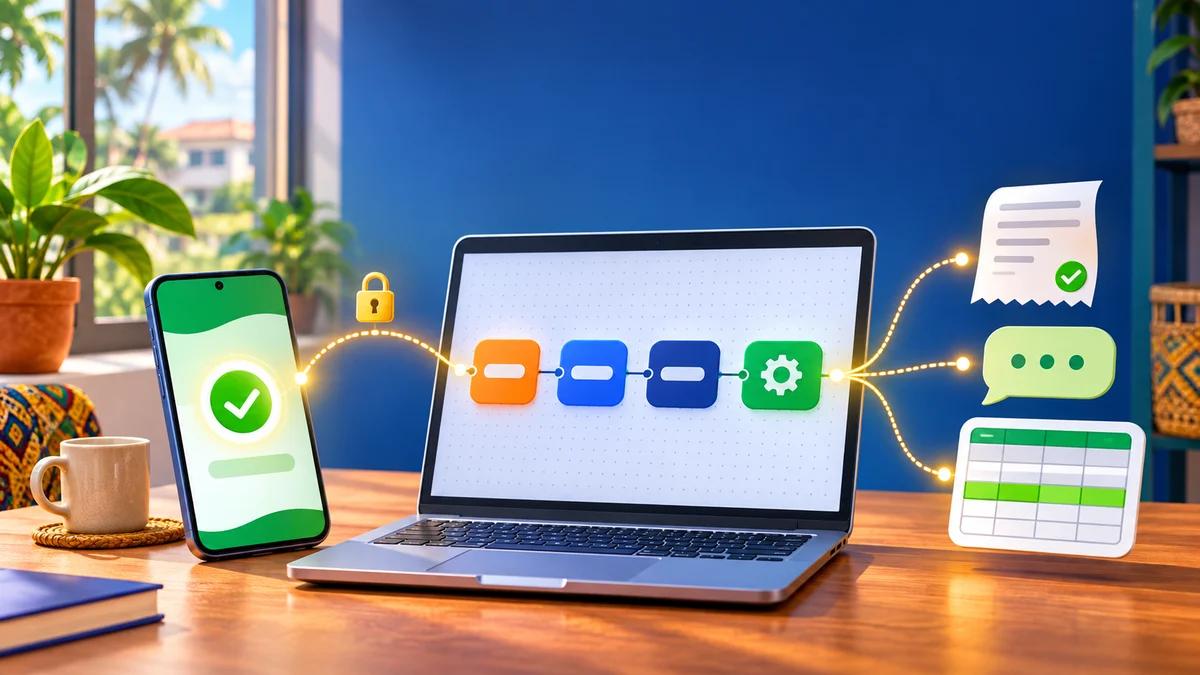
A customer pays by Mobile Money on your website. Three seconds later, the order switches to “paid”, the receipt goes out by email, the delivery team gets a message and a new line appears in your tracking sheet. Nobody touched anything. Behind this small miracle there is almost never any artificial intelligence. There is a webhook.
The word sounds technical, so people shy away from it. The idea, though, is very simple: instead of constantly asking a service “anything new?”, you give it an address, and it tells you the moment something happens. At Guelichweb, it is a building block you will find in most of the automations we design with n8n or Make. It is also, in our view, the most neglected one: it takes ten minutes to plug in, people forget to secure and monitor it, and the day it breaks, nobody notices.
So this guide answers “what is a webhook?” without unnecessary jargon, then goes further than the usual definitions: examples that make sense for an SME, an NGO or a public body in French-speaking Africa (FedaPay or KkiaPay payments, WhatsApp, forms, online stores), what the official documentation actually says, and the rules that make a webhook reliable. Technical details were checked on 18 November 2026 in the documentation of FedaPay, KkiaPay, Meta, n8n, Make, WooCommerce and Stripe.
In short
- A webhook is an automatic notification: when an event happens in a service (payment approved, message received, form submitted), that service immediately sends an HTTP request, usually a POST in JSON format, to an address you chose.
- With an API, you go and fetch the information. With a webhook, the information comes to you. Good integrations use both.
- You don’t need to be a developer to receive one: n8n and Make create the receiving address for you.
- A webhook that touches money or personal data must be verified (signature or secret), de-duplicated and monitored. Otherwise it eventually creates duplicate receipts or stops silently.
What is a webhook? The simple definition
A webhook is an automatic message sent from one application to another at the exact moment an event happens. The word combines web, for the protocol used, and hook, the point where you “hook into” a piece of software. It is sometimes called an “HTTP callback”, but interfaces almost always say “webhook”. According to Wikipedia, the term was coined in 2007 by developer Jeff Lindsay.
In practice, a webhook involves three things:
- The sender: the service where something happens. A payment gateway, WhatsApp, a WooCommerce store, a form.
- The event: the precise fact that triggers the message. “Transaction approved”, “new message received”, “order created”.
- The receiving URL (also called the endpoint): a public web address waiting for these messages. It can be a page on your website, a server, or a node in n8n or Make.
When the event happens, the sender sends a request to the receiving URL with the event details. The receiver replies with a success code (in the 200 range), and the exchange is over. It often takes less than a second, and nobody watches it. That is exactly why it needs to be designed carefully.
What a webhook contains
The content (the “payload”) depends on the service. To give you an idea, here is a simplified version of what KkiaPay sends when a payment succeeds, according to its documentation:
{ "transactionId": "3iH6wjHJ3", "isPaymentSucces": true, "method": "MOBILE_MONEY", "amount": 1000, "fees": 19, "performedAt": "2024-03-20T08:55:22.883Z", "event": "transaction.success" }
Nothing magical: a transaction ID, a status, a payment method, an amount, a date and the event name. Your automation reads these fields and decides what to do: confirm the order, generate a receipt, notify the customer. Field names vary from one service to another, but the logic stays the same.
Webhook or API: who calls whom?
The two are often confused because they speak the same language (HTTP and JSON). The difference fits in one sentence: with an API, you ask; with a webhook, you are told.
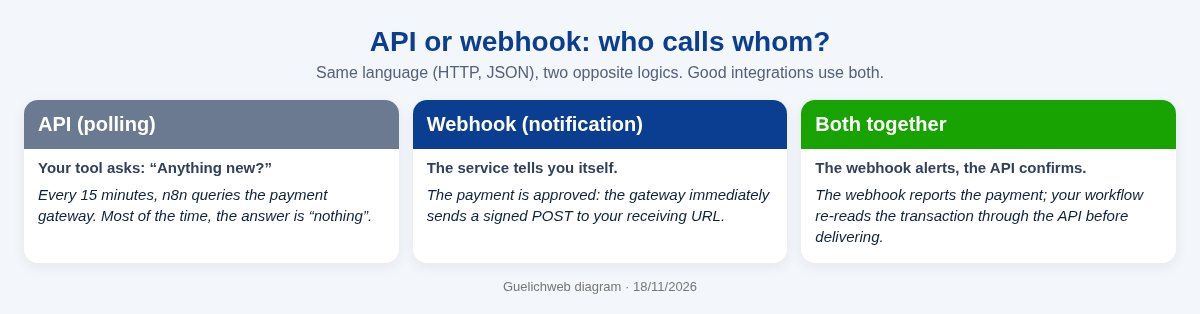
Without a webhook, your tool would have to query the payment gateway every five or fifteen minutes. That is slow (the customer waits), wasteful (most answers are “nothing new”) and, on Make or Zapier, every check uses credits. With a webhook, the information arrives once, at the right moment.
But a webhook does not replace an API. It signals; the API is then used to re-read up-to-date details, correct a record or catch up on a missed event. For payments, our rule is simple: the webhook triggers, the API confirms, and only after that confirmation do you deliver. If APIs are still a bit fuzzy, our article What is an API? covers the basics with examples; we won’t repeat it here.
6 practical examples for an SME, an NGO or a public body
1. The confirmed Mobile Money payment (FedaPay, KkiaPay)
This is the flagship example in West Africa. FedaPay, for instance, sends a “transaction.approved” event when a payment is validated, “transaction.declined” when it fails and “transaction.canceled” when it is cancelled (FedaPay documentation). KkiaPay sends “transaction.success” or “transaction.failed”. A school collecting enrolment fees, an NGO receiving donations or a shop selling online can automatically validate the file, send the receipt and alert the team. To choose and integrate a gateway, see our guide to the mobile money payment gateway.
2. The incoming WhatsApp message (WhatsApp Business Platform)
When a customer writes to your number connected to the WhatsApp API, Meta sends a webhook to your server with the message text, the sender and the time. That webhook is what allows a chatbot to reply, a human agent to be alerted or a conversation to be saved in your CRM. Meta also uses webhooks to tell you whether your messages were delivered and read, or whether a message template’s quality is dropping (Meta documentation). No webhook, no real WhatsApp chatbot. We explain what the API allows in What is the WhatsApp Business API? and what a bot can really do in WhatsApp chatbot: what it actually does.
3. The submitted form
A contact or registration form can send its answers to a webhook instead of (or as well as) a plain email. The request then lands directly in Google Sheets, a CRM or a team channel, with an automatic acknowledgement. Many WordPress form plugins offer this option. Google Forms has no native webhook, but a small Apps Script triggered on each response can send one. For the form itself, see website contact form and how to make a Google Form.
4. The online order (WooCommerce)
WooCommerce can fire a webhook every time an order, product, customer or coupon is created or updated (WooCommerce documentation). A new order can then update a stock file, alert the delivery rider on WhatsApp and create the invoice. If you are planning a store, our guide to creating an online store in Benin shows where this piece fits.
5. Internal alerts (Discord, Slack, Teams)
Some tools work the other way round: they give you an “incoming” webhook URL to which you send a message so that it appears in a channel. That is what people are looking for when they search “what is a Discord webhook”: an address that lets a program post in a channel without building a full bot. Handy to be alerted when a large payment arrives, when an urgent form is submitted or when an automation fails.
6. Activity tracking for an NGO or a public body
A training registration can trigger sending the programme, adding the person to a participant list and, after the event, generating a certificate. A citizen request submitted online can create a file, assign a reference number and send an acknowledgement. Nothing spectacular, but these are exactly the repetitive tasks that eat up hours of admin time. Our article on task automation helps you spot which ones are worth automating.
What the documentation actually says (and why it matters)
General definitions usually stop at “the service sends a request”. Official documentation contains the details that make the difference between a reliable automation and one that breaks on a Saturday night. Here is what we noted on 18 November 2026:
- FedaPay expects a 2xx response; anything else is a failure. On failure, it retries up to 9 times at increasing intervals, then automatically disables the webhook after 10 unsuccessful attempts (unless you untick the corresponding option). Webhooks are signed in the X-FEDAPAY-SIGNATURE header, with a timestamp to prevent an intercepted message from being replayed, and only TLS 1.2 and 1.3 are supported. A “Redeliver” button in the logs lets you resend an event (source).
- KkiaPay retries 5 times if delivery fails and treats any code outside the 2xx range, including 3xx redirects, as a failure. Each request carries an x-kkiapay-secret header based on the “secret hash” you set in the dashboard (source).
- Meta (WhatsApp) retries for up to 7 days if your server does not reply 200, which can produce duplicate notifications. Payloads can be up to 3 MB (source). During setup, Meta sends a verification request with a hub.challenge parameter your server must echo back, and then signs every notification in the X-Hub-Signature-256 header (source).
- WooCommerce sends a “ping” to the URL the first time you activate the webhook, and disables it after more than five consecutive failures. A secret is used to sign each delivery (source).
- Stripe, which you will come across if you sell internationally, retries for up to 3 days in live mode, warns that the same event may arrive more than once and recommends returning a 2xx quickly before any heavy processing (source).
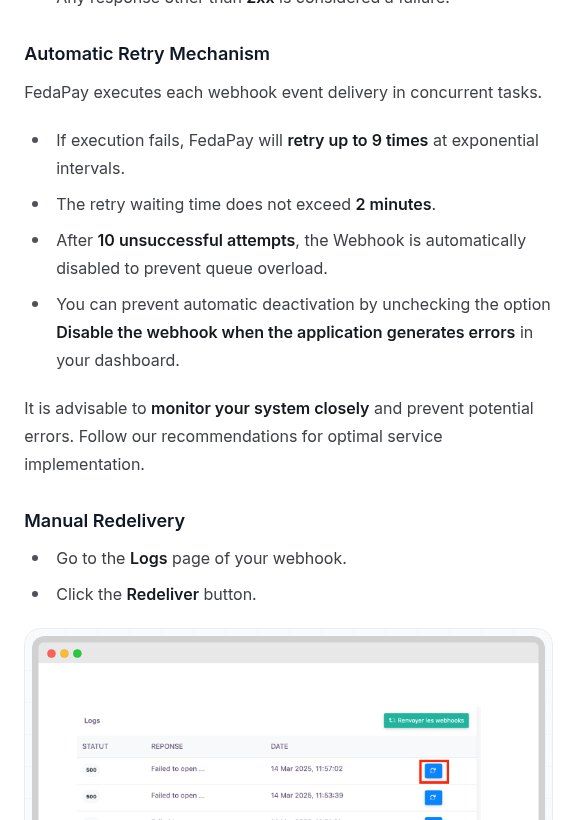
Source: FedaPay documentation, “Webhooks and Events” (docs.fedapay.com), screenshot taken on 18/11/2026.
The lesson is clear: a webhook can arrive twice, arrive late, or stop arriving altogether if your server was down for too long. Any serious automation has to be built around those three assumptions.
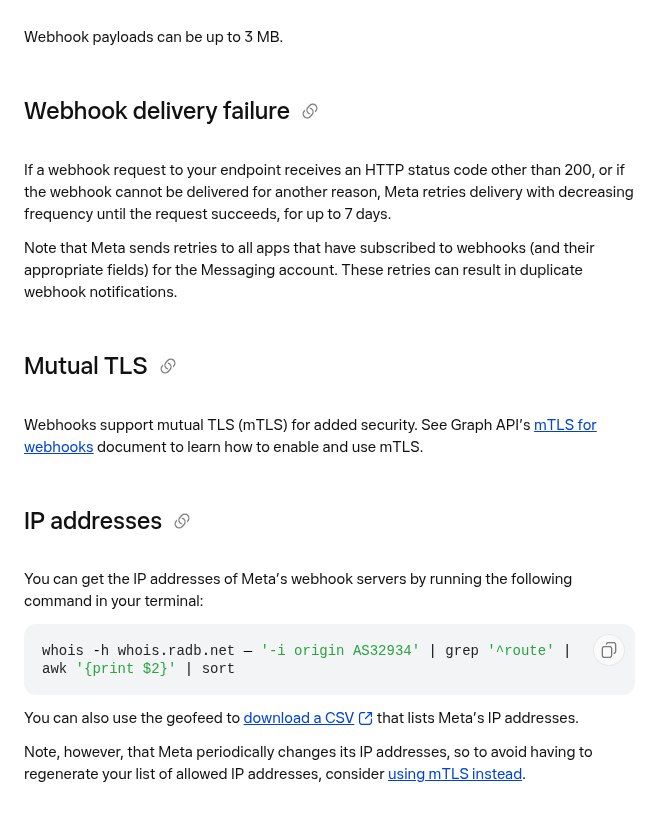
Source: Meta for Developers, “WhatsApp webhooks” (developers.facebook.com), screenshot taken on 18/11/2026.
Receiving your first webhook with n8n
n8n is the tool our WhatsApp chatbot offer is built on, largely because it can be installed on your own server (see What is n8n?). Its Webhook node creates the receiving URL for you. The steps:
- Create a workflow and add the Webhook node as the trigger.
- Choose the HTTP method (POST in the vast majority of cases) and, if you want a readable address, a custom path.
- Copy the test URL, click “Listen for test event”, then trigger an event from the sending service (many offer a “Test” button or a sandbox mode). The data appears in n8n: you see exactly what the service sends.
- Build the rest: verification, filter, writing to Google Sheets or your CRM, WhatsApp message, email.
- Replace the test URL with the production URL in the sending service, then publish (activate) the workflow.
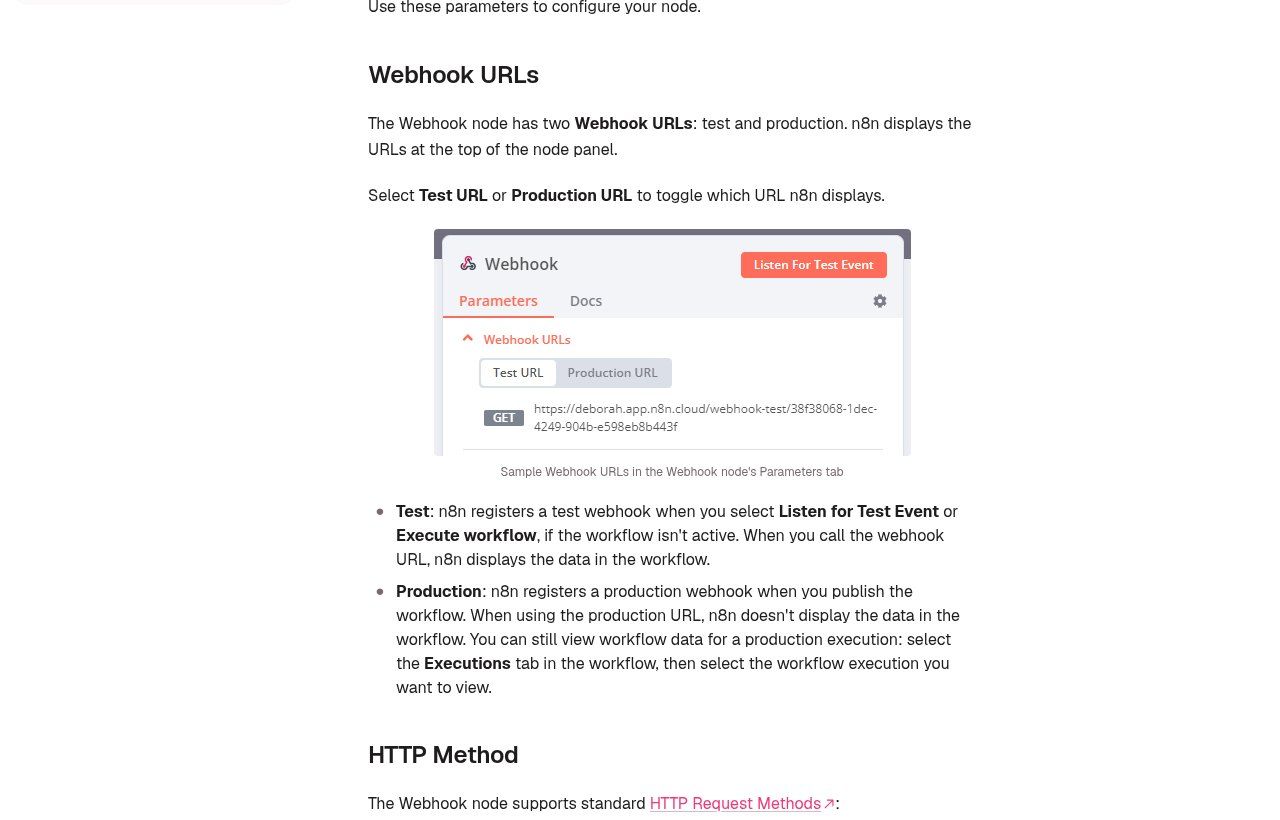
Source: n8n documentation, “Webhook” node (docs.n8n.io), screenshot taken on 18/11/2026.
The most classic trap? Leaving the test URL in the sending service. According to the n8n documentation, the test URL only works while you are listening in the editor, and the production URL is only registered once the workflow is published. Everything works during the demo, then nothing works the next day.
The node also offers useful protection: authentication (Basic, Header or JWT), an allowlist of IP addresses, an “Only Run If” option to ignore requests that don’t match a condition, and a choice of when n8n replies (immediately, or at the end of the workflow). The maximum payload size is 16 MB by default. For a payment webhook, we reply immediately and process afterwards.
What about Make (or Zapier)?
Make works on the same principle with its Custom webhook module, which generates a URL any service can send data to. Many apps also have “instant” triggers, which are pre-configured webhooks.
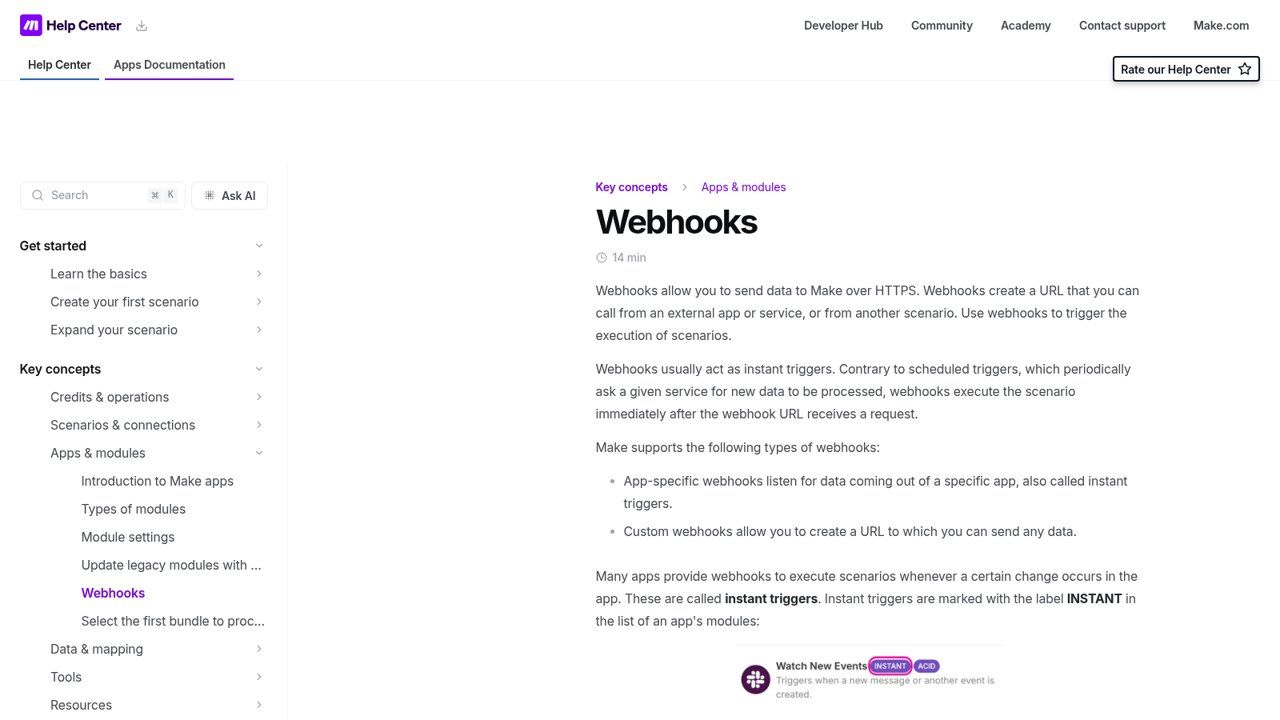
Source: Make Help Center, “Webhooks” (help.make.com), screenshot taken on 18/11/2026.
A few points from the Make documentation worth knowing before you start:
- Each webhook has its own queue. Its size depends on your plan; when it is full, Make rejects new data.
- Make processes up to 300 incoming requests per 10-second interval; beyond that, it returns a 429 error.
- A webhook not connected to any scenario for more than 5 days is deactivated and returns a 410 error.
- Webhook logs are kept for 3 days (30 days on the Enterprise plan). If something goes wrong, you need to see it quickly.
- By default, webhook-triggered runs are processed in parallel. If order matters (stock, receipt numbering), turn on processing data in order.
Zapier also has a webhooks module. To compare the three tools on price, data hosting and ease of use, read n8n or Make and What is Zapier?.
The golden rules of a reliable, secure webhook
A webhook URL is an open door on the internet. If someone finds it and you check nothing, they can send you a fake “payment approved”. Here is the flow we put in place whenever money or personal data is involved:
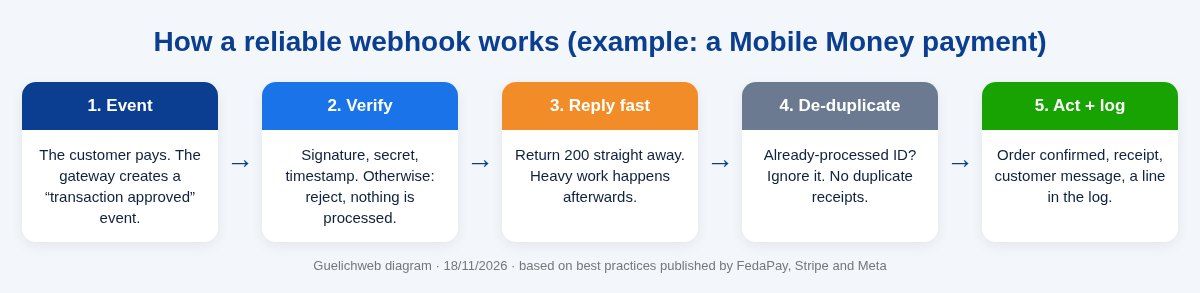
- Always HTTPS, with a valid certificate. FedaPay and Meta require it anyway.
- Verify the origin: signature (FedaPay, Meta, WooCommerce, Stripe) or shared secret (KkiaPay). A request that fails verification is rejected, full stop.
- Keep secrets out of visible code: never in a web page, never in a WhatsApp message, never in a shared file. In n8n or Make, use credentials or protected variables.
- Reject messages that are too old when the service provides a timestamp. That is what stops an intercepted webhook from being replayed.
- Reply fast, process later. The sender expects a quick response; if your processing takes too long, it assumes failure and resends the message.
- De-duplicate: store the ID of every processed event and ignore the ones you have already seen. A payment received twice must never produce two receipts.
- Confirm through the API before any irreversible action (delivering goods, unlocking access, validating a paid registration).
- Only listen to the events you need. Receiving everything “just in case” overloads your system and your logs.
These rules are not paranoia. They follow, almost word for word, the best practices published by FedaPay, Stripe and Meta. If a provider delivers a payment webhook with no signature check and no duplicate handling, ask them why.
Classic failures (and how to avoid them)
- The receiver is an office computer. One power or internet cut and webhooks fail. After enough failures, FedaPay or WooCommerce disable the webhook. The receiver must run on an online server, not a desktop PC. To choose where to host it, see our guide to web hosting in West Africa.
- The webhook was disabled silently. Nobody looks at the gateway dashboard. Set up an alert: if no payment has arrived for a period that is abnormal for your business, someone is notified.
- A redirect breaks everything. Your site moved from http to https, or from “www” to no “www”, and the old URL redirects. For KkiaPay, a 3xx response counts as a failure. Always use the exact final address.
- Processing takes too long. Generating a PDF, calling an AI, sending several messages: if all of that happens before you reply, the service thinks you didn’t answer and resends the event. Result: duplicates.
- The SSL certificate expired. Webhooks stop overnight. Automatic renewal and monitoring prevent this.
- The test URL stayed in production (see above for n8n). Check it every time you go live.
- Events arrive out of order. An update can arrive before the creation. Don’t trust arrival order: re-read the real state through the API when it matters.
Monitoring without spending your days on it
Three habits are enough in most cases. First, a log: every webhook received leaves a line (time, event, ID, result). Second, a failure alert: if the workflow crashes, a WhatsApp message or email goes to the person in charge. Third, a daily reconciliation for payments: a small job compares the gateway’s transactions (read through the API) with the orders confirmed on your side every evening. The day a webhook gets lost, you see it that same evening, not at the end of the month.
Testing a webhook without breaking anything
Before connecting a real service, it helps to see what it actually sends:
- The service’s test (sandbox) mode: FedaPay and KkiaPay have test environments with keys separate from live keys. Do all your trials there.
- The service’s test button: KkiaPay offers a test once the webhook is created, Meta lets you send a test notification from the app dashboard, WooCommerce sends a ping on activation.
- n8n’s test URL or a listening Make module, both of which display the data received.
- A public inspection service such as webhook.site, handy to see a raw request. Never send real customer data there: it is a third party.
For local development, Stripe and others mention tunnelling tools such as ngrok, which give your machine a temporary public address. Fine for testing; never for production.
Webhooks and personal data: the point people forget
A webhook often carries phone numbers, names, amounts, sometimes the content of WhatsApp messages. That data passes through your automation tool and may stay there: Make, for example, keeps queued data until it is processed, and keeps logs for several days. Ask yourself three questions: where does this data travel, how long is it kept, and who can access it? In Benin, personal data protection is overseen by the APDP; an NGO funded by European donors will often have GDPR-related requirements as well. A self-hosted n8n gives you more control, provided it is properly maintained.
Do you need a developer? How much does it cost?
To receive a webhook in n8n or Make and write a line into Google Sheets, no: someone comfortable with digital tools can get there by following the documentation. Our guide What is Google Sheets? is a good starting point for the spreadsheet side.
As soon as money, sensitive data or several systems to synchronise are involved (website, gateway, WhatsApp, CRM, accounting), our view is firm: get support, at least for the design and the go-live. The cost of a badly designed webhook doesn’t show right away; it shows the day fifty customers have paid and received nothing.
At Guelichweb, we don’t sell a fixed-price “webhook” package: every project depends on the tools already in place and the level of security required. We provide a quote after an assessment, as explained on our offers page. To understand what drives a budget, read how much does AI automation cost in Benin, and for the most requested example, see our page on the WhatsApp chatbot with n8n in Benin.
Frequently asked questions about webhooks
Is a webhook free?
The mechanism itself is free: it is just a web request. What can cost money is the tool that receives it (a Make or Zapier subscription, a server for n8n) and the design time. Some services reserve webhooks for paid plans; check case by case.
What is the difference between an API and a webhook?
With an API, your tool requests information when it needs it. With a webhook, the service sends the information as soon as an event happens. The webhook is faster and more efficient; the API lets you check, correct and catch up. They complement each other.
What is a webhook URL?
It is the web address the service sends its notifications to. You create it in your tool (n8n, Make, your website) and paste it into the sending service’s settings. It must be public, use HTTPS and should not be shared around.
What is a Discord webhook?
It is a URL provided by Discord that lets a program post messages in a channel without building a full bot. The principle is the same for Slack or Teams: these are “incoming” webhooks.
How do I test a webhook?
Use the sending service’s test mode, its test button if it has one, and n8n’s test URL or a listening Make module to see the data received. A public inspector such as webhook.site helps for a first look, with no real data.
What happens if my server is down?
Most services retry: 9 times for FedaPay, 5 times for KkiaPay, for up to 7 days for Meta, for up to 3 days for Stripe. But some disable the webhook after too many failures (FedaPay, WooCommerce). Hence the importance of a reliable server, an alert and reconciliation through the API.
Can I use webhooks without a website?
Yes. A tool like n8n or Make provides the receiving URL itself. You can, for example, receive payments from a payment link or WhatsApp messages without having a website.
Final word
A webhook is a doorbell: the service presses it, your system opens the door. Installed properly, it makes your automations instant and efficient. Installed badly, it rings twice, rings for a stranger, or stops ringing without anyone noticing. The difference doesn’t come from the tool you choose but from a handful of rules: verify, reply fast, de-duplicate, confirm, monitor.
Want to connect your Mobile Money payments, your WhatsApp or your forms to your tools without fearing the silent failure? Contact Guelichweb: we first look at what you already use, then tell you honestly what is worth automating and how to do it properly. You can also browse our services.