What is Odoo? Free or paid, real 2026 prices from West Africa (CFA francs) and which SMEs it suits
G. CHRIST
Published on November 11, 2026

If you have searched for “Odoo pricing” recently, you have probably read articles quoting around 20 euros per user per month, or even more in US dollars. We opened Odoo’s pricing page from Cotonou, Benin, on 11 November 2026. The number on screen was different: €7.25 per user per month for the Standard plan, a little under 4,800 CFA francs. Odoo adjusts its prices by country. Almost nobody mentions it, and it completely changes the maths for a small business or an NGO in West Africa.
At Guelichweb we build websites, WhatsApp chatbots and automations for SMEs, NGOs and public institutions in Benin and across French-speaking Africa. More and more often, people ask us: “What is Odoo, exactly? Is it free? Is it worth it for us?” Here is our straight answer. Every price and rule quoted below was checked on Odoo’s official pages on 11 November 2026.
In short: Odoo is business management software (an ERP) that brings sales, inventory, invoicing, CRM, purchasing, website and much more into a single database. It is free for one app, or in the Community edition if you host it yourself. As soon as you want several apps hosted by Odoo, you pay per user. The real cost of an Odoo project is rarely the licence: it is the implementation.
What is Odoo? The simple definition
Official Odoo logo. Source: odoo.com, “Brand assets” page.
Odoo is an ERP (enterprise resource planning) system. The idea is simple: instead of one tool for invoices, a spreadsheet for stock, a notebook for leads and yet another program for the till, you get one database and a set of apps that share it. You type a quotation once. When the customer accepts it, the quotation becomes a sales order, the order reserves stock, the delivery updates the inventory, and the invoice reuses the same lines without retyping.
The publisher is a Belgian company, Odoo S.A. The software has been around for a long time (it used to be called OpenERP) and ships one major version per year. According to the official release notes, Odoo 20 was released in September 2026, and Odoo 19 in September 2025. Each major version gets three years of standard support, according to the supported versions page. Keep that in mind: if you install Odoo yourself, you will have to upgrade to a newer version at least every three years.
Odoo is organised into apps (also called modules): CRM, Sales, Invoicing, Accounting, Inventory, Purchase, Point of Sale, Website, eCommerce, Project, Employees, Time Off, Manufacturing, Email Marketing and dozens more. You switch on only what you need today and add the rest later.
What does Odoo do for an SME, an NGO or an institution?
Odoo demos often feature a factory or a large online store. In our context, the most telling use cases are more modest:
- A distributor or a retailer with several outlets: real-time stock per shop, a till (Point of Sale), purchase orders, customer invoices, and no more gaps between the notebook and the shelf. If you still run on spreadsheets, read our guide to inventory management with Excel or Google Sheets first: it will tell you whether you really need an ERP.
- A service business (consultancy, agency, engineering firm): leads in the CRM, quotations, projects, timesheets, invoicing and reminders. Our article on unpaid invoice reminders shows how much good follow-up is worth.
- An NGO: purchasing and approvals, project tracking, equipment inventory, staff and leave management, and clean reports for donors.
- A training institution: registrations, payments, events, e-learning and communication with learners.
What these cases share: several people handle the same information (customers, products, money) and waste time copying it from one tool to another. That is exactly the problem an ERP solves. If your team is two people with twenty invoices a month, Odoo is probably too big for you today. More on that below.
Is Odoo free or paid? Odoo’s three kinds of “free”
The honest answer is: both. There are three ways to use Odoo without paying for a licence, and each has a catch.
1. The “One App Free” plan (Odoo Online)
On its pricing page, Odoo offers a €0 plan: one app, unlimited users, hosted by Odoo. If the app you pick depends on other apps (eCommerce, for instance, needs Website and Invoicing), Odoo gives you those too. It is an excellent way in, and we already recommended it as a free CRM in our article What is a CRM and which one to choose.
The catch is in the FAQ: to move from One App Free to Standard, “simply install the additional apps you need”. In other words, the day a curious colleague clicks “Install” next to the Inventory app, you switch to a paid per-user subscription. The FAQ also says that installing Studio or adding a company moves you to the Custom plan, while stating elsewhere that the free plan allows several companies. The page contradicts itself; for budgeting purposes, assume it will be paid. Our advice: one administrator, and a written rule about who may install apps.
2. The Community edition (self-hosted)
Odoo Community is Odoo’s open-source core, published under the LGPLv3 licence. You download it, install it on your own server and use it with as many users and apps as you like, without paying Odoo anything. On paper, it is the perfect option for a tight budget.
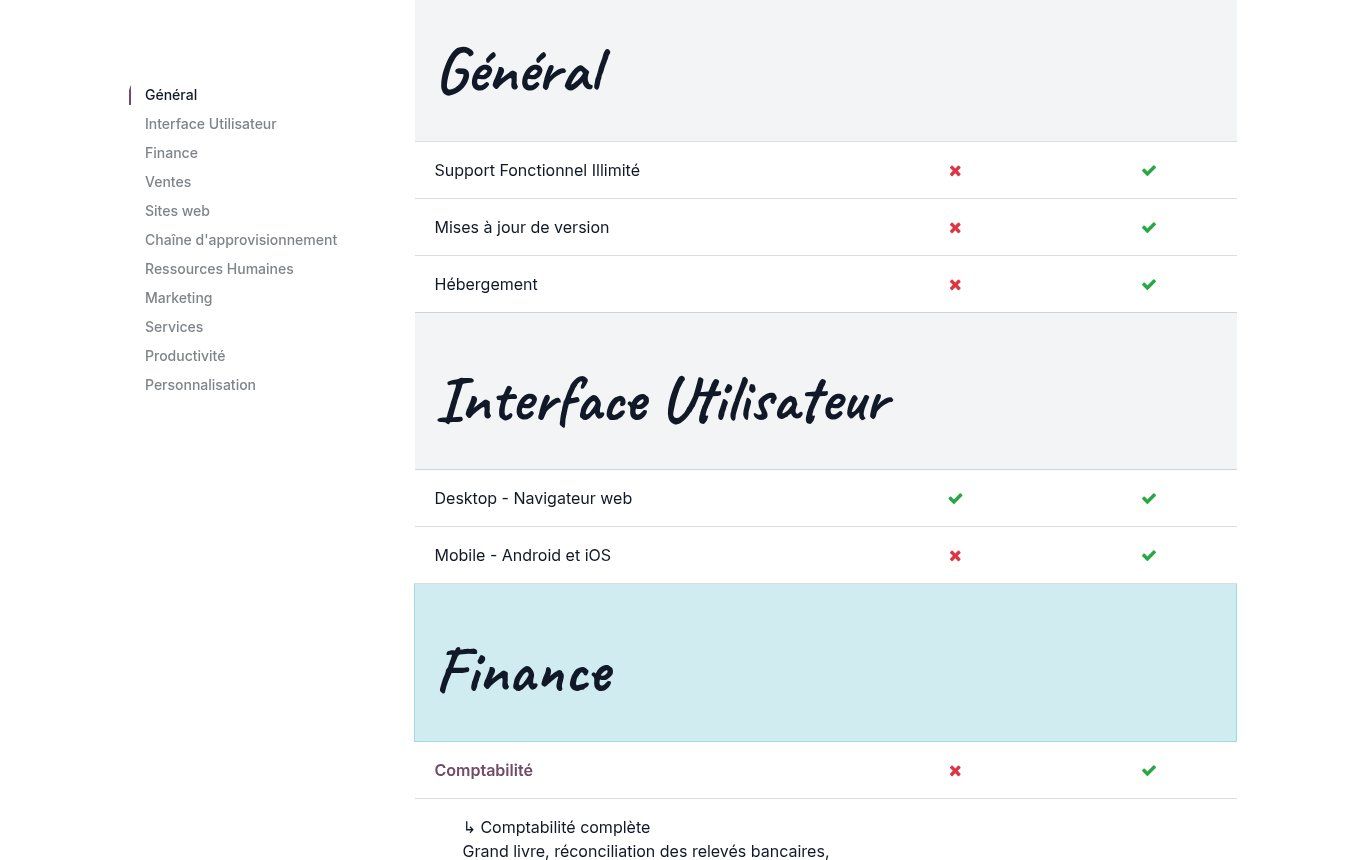
Source: odoo.com, “Compare editions” page (French version), screenshot taken on 11/11/2026. The left column is Community, the right column is Enterprise.
In practice, the editions comparison page shows what Community lacks. The most important gaps for our clients:
- No full accounting. Community handles invoicing and payments, but not the general ledger, bank reconciliation or advanced accounting reports. For an accountant working under the OHADA standard (SYSCOHADA), that is often a deal-breaker.
- No Android or iOS mobile app (the phone browser works, but it is less comfortable).
- No Studio to adapt screens without code, no OCR for supplier bills, no Sign, no Documents, no WhatsApp app.
- No support, no version upgrades and no hosting: all of that becomes your responsibility, or your provider’s.
Our blunt view: Community is a good choice for an organisation that has, in-house or at a provider, a named person responsible for the server, backups and upgrades. Without that person, “free” gets very expensive the day the server goes down or the version stops being maintained.
3. The free trial
Odoo offers a free trial of Odoo Online to test every app. Use it for one specific thing: run a real case from your business (a quotation, a delivery, an invoice) end to end, with the person who will do it every day. Not for clicking around.
Odoo pricing in 2026: what actually shows up from Benin
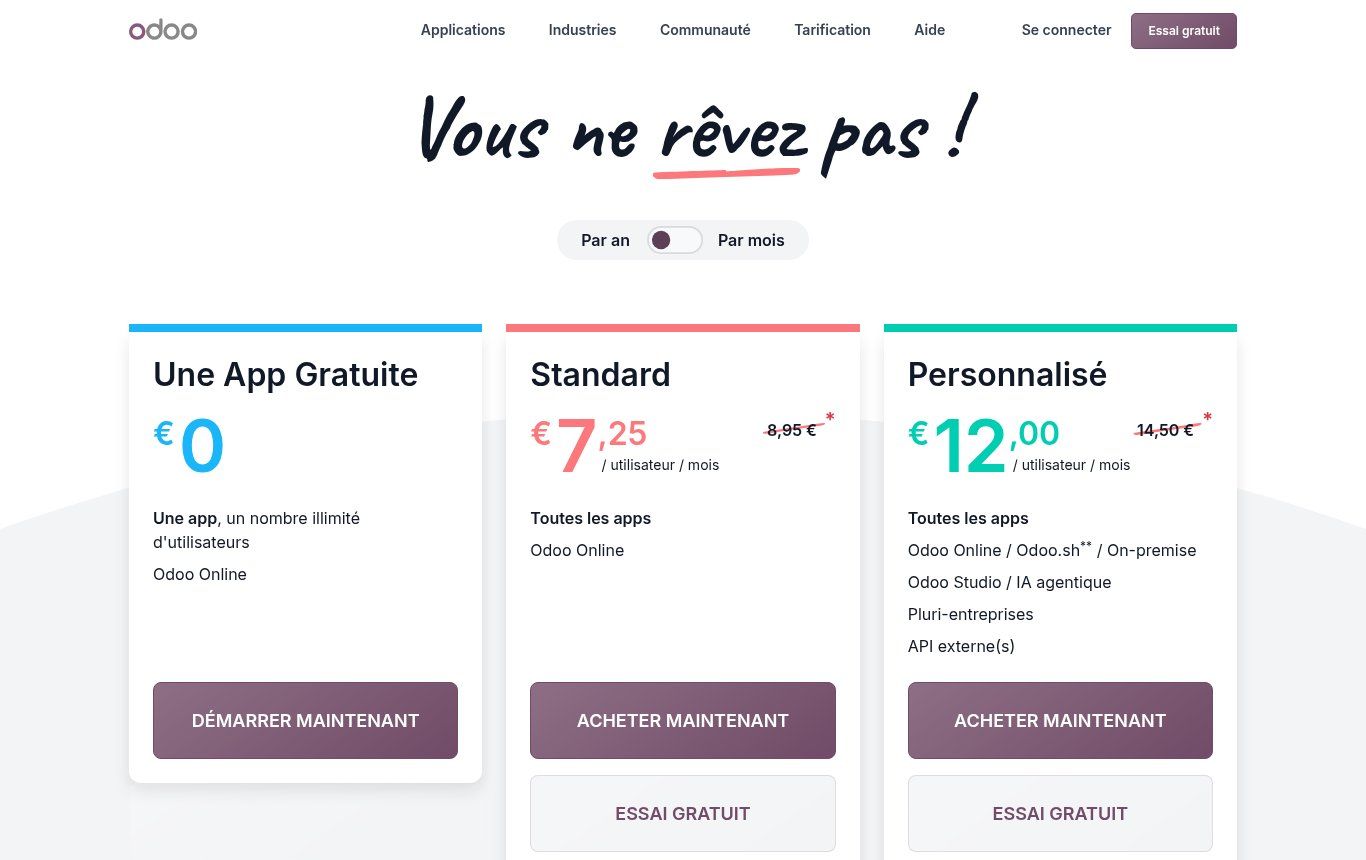
Source: odoo.com/fr_FR/pricing, screenshot taken on 11/11/2026 from a connection located in Benin, annual billing.
These are the prices we recorded on 11 November 2026 from a Beninese connection. Amounts are shown in euros; CFA conversions use the fixed rate €1 = 655.957 CFA francs, rounded to the nearest franc. If you read this from another country, the page may show you different figures.
- One App Free: €0, one app, unlimited users, on Odoo Online.
- Standard: €7.25 per user per month billed annually (about 4,756 CFA), instead of €8.95 (about 5,871 CFA). Billed monthly: €9.10 instead of €11.20. All apps, Odoo Online only.
- Custom: €12.00 per user per month billed annually (about 7,871 CFA), instead of €14.50 (about 9,511 CFA). Billed monthly: €14.50 instead of €17.90. All apps, plus Studio, multi-company, external API, and a choice of hosting (Odoo Online, Odoo.sh or your own server).
- Light User: €2.50 per month, for employees who only need limited features (time off, expenses, attendance, point of sale). Odoo grants it after a call with an advisor.
Mind the asterisk: according to Odoo, the discount “applies for 12 months to the users specified in the initial order”. In year two, the struck-through price is what you pay. Always budget on that price.
Licence budget examples (implementation not included)
- 5 users on Standard, billed annually: €435 in year one (about 285,341 CFA), then €537 per year (about 352,249 CFA).
- 5 users on Custom, billed annually: €720 in year one (about 472,289 CFA), then €870 per year (about 570,683 CFA).
- 10 users on Standard, billed annually: €870 in year one (about 570,683 CFA), then €1,074 per year (about 704,498 CFA).
These amounts exclude any applicable taxes. They also say nothing about implementation, which is almost always the biggest line. And they can change: redo the calculation on the official page on the day you sign.
Who counts as a paying user?
Odoo’s FAQ is clear: anyone who accesses the Odoo back end to create, view or edit documents is a paying user, including an employee who only records expenses and an external accountant. Customers and suppliers who view their invoices through the portal, and visitors who order from your online shop, do not count. For an NGO with many field staff, the Light User licence can make a real difference: ask for it.
What is not included
Again according to the pricing page: implementation (analysis, configuration, data import, training), Odoo.sh hosting, maintenance of custom code and “in-app purchase credits” (SMS, AI scanning of supplier bills, lead generation) are billed separately. Odoo Online does include hosting, backups, upgrades and email support, available in French and English among other languages.
Standard or Custom? The API question nobody asks
This is the point that matters most to us, because we connect tools to each other every day. Odoo’s FAQ defines “external API” as an outside piece of software calling Odoo’s API to read or change your data. And the external API is reserved for the Custom plan.
In practice, if you want an n8n or Make workflow to create a contact in Odoo for every enquiry from your website, a WhatsApp chatbot to check stock before answering, or an external dashboard to read your sales, you are in “external API” territory. Standard is not enough. Conversely, when Odoo is the one calling an outside service (a payment provider, a carrier, bank synchronisation), that stays within the Standard plan.
Our rule: if your project includes even one incoming connection from your website, WhatsApp or an automation tool, budget for Custom from day one. Better to know before you sign than to find out when you try to plug in your API.
Odoo in West Africa: SYSCOHADA, CFA francs, Mobile Money and WhatsApp
European and American articles skip these questions. Yet they are the ones that decide whether Odoo will hold up in your organisation.
SYSCOHADA accounting
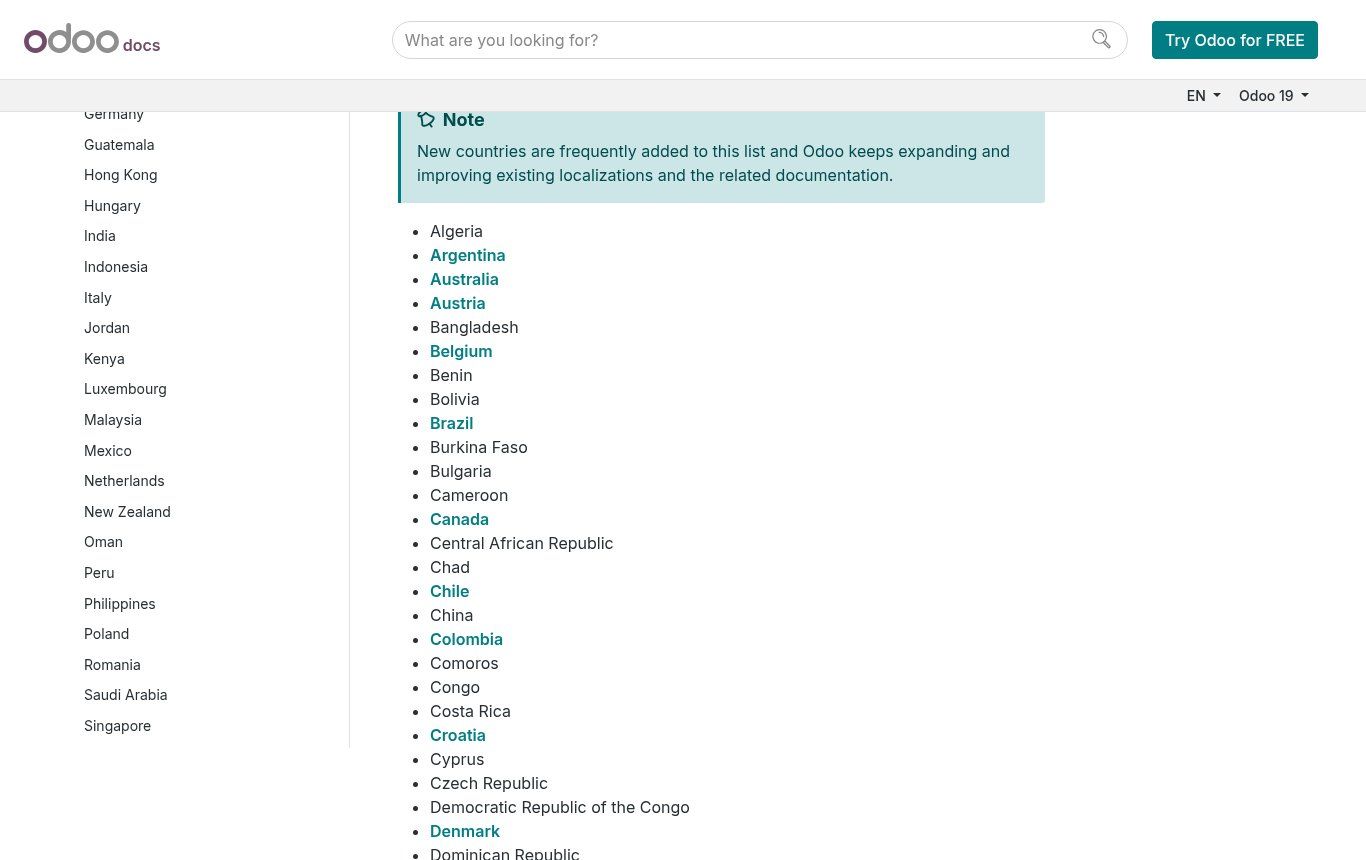
Source: official Odoo 19 documentation, “Fiscal localizations” page, screenshot taken on 11/11/2026.
Odoo 19’s fiscal localisation documentation lists Benin, Burkina Faso, Cameroon, Ivory Coast, Mali, Niger, Senegal, Guinea, Congo and other OHADA countries. The Benin module (l10n_bj) installs the SYSCOHADA chart of accounts when you create the company with Benin as its country. Togo did not appear in that list on the day we checked.
A localisation is not ready-made accounting. Odoo itself says you need to fine-tune the chart of accounts, activate the right taxes and configure country-specific reports. Have your chartered accountant validate the setup before the first entry: the documentation states that you cannot switch localisation package once an entry has been posted. And keep an eye on electronic invoicing rules in your country.
Mobile Money
Odoo does not connect directly to MTN MoMo, Moov Money or Wave. In the official list of payment providers, two players cover Africa: Flutterwave, which Odoo describes as a provider established in Nigeria covering several African countries, and DPO Pay. Check with them that your country, currency and the mobile wallets you need are actually supported.
For FedaPay and KKiaPay, which we compare in our article on Mobile Money payment gateways, third-party modules exist on the Odoo Apps store for version 19. They are not published by Odoo: have them audited. And a third-party module cannot be installed on the Standard plan (Odoo Online without custom modules): you need Custom on Odoo.sh or your own server, or Community. The other option, often simpler: let the gateway confirm the payment and use n8n to mark the invoice as paid in Odoo, which again requires the external API.
Odoo’s WhatsApp app exists, but the documentation is explicit: it is Enterprise-only, does not work in Community, and requires a WhatsApp Business Platform account (Meta’s official API), not the WhatsApp Business app on your phone. Before you start, read our article on the WhatsApp Business API and its pricing: business-initiated messages are billed by Meta on top of your Odoo licence.
Local support
Odoo’s partner directory showed around ten partners for Benin on 11 November 2026, and also covers Senegal, Ivory Coast, Cameroon and Togo. That helps, but a partner badge does not guarantee that an integrator understands your business. Ask to see a comparable project, live.
How much does an Odoo project really cost?
The licence is the visible part. The real budget usually breaks down like this:
- Analysis: understanding how your quotations, orders, stock and payments flow, and deciding what changes. This phase makes or breaks the project.
- Configuration: companies, taxes, chart of accounts, products, warehouses, access rights, document templates.
- Data migration: customers, suppliers, products, opening stock and balances. If your spreadsheets are messy, this line explodes.
- Training users, app by app, on your own data.
- Integrations with your website, WhatsApp, payment gateway or automation tools.
- Operations: backups, updates and upgrading to the next version, especially on Community or your own server.
We will not publish an “average Odoo project price”: there is no such thing. A shop with two apps and a clean catalogue has nothing in common with a multi-project NGO that wants analytic accounting per donor. At Guelichweb we quote after a diagnosis of your processes, as for all the services listed on our offers page. If you want to frame your needs before talking to anyone, our requirements document template adapts easily to a business software project.
When Odoo is the right choice, and when it is not
Odoo is very good software. That is not a reason to install it everywhere. Here is our checklist, based on what we see on the ground.
Odoo makes sense if…
- at least three or four people handle the same customers, products or payments;
- you manage stock, several outlets or regular purchasing;
- you lose time (and money) copying the same information between tools;
- someone in the organisation is ready to own the project and make the new tool stick;
- you accept adapting your habits a little to Odoo’s standard flows rather than having everything custom-built.
Odoo is not for you (yet) if…
- you work alone or in a pair with few invoices: a good spreadsheet, a simple invoicing tool or a free CRM will do;
- your real problem is visibility or incoming enquiries: start with your website, WhatsApp and lead tracking, as in our article on the website, WhatsApp and CRM trio;
- you want Odoo “exactly like our old software”: every custom development has to be paid for again at each upgrade;
- nobody has time to enter data properly: a poorly fed ERP produces wrong numbers faster than a notebook.
Odoo versus the alternatives
Odoo is not alone. Without going into a full comparison, here is how we see the options people most often search for alongside “Odoo alternative”:
- Excel or [Google Sheets](/en/blog/what-is-google-sheets-small-business-guide): perfect to get started and to prove you have a process. It hits its limits when several people edit the same files and mistakes become expensive.
- A stand-alone CRM (HubSpot, Zoho, free Odoo CRM): the right answer if your priority is sales and your invoicing is simple.
- Dolibarr: an open-source ERP/CRM with a reputation for being lighter, often liked by small organisations. Compare on a real case rather than on feature lists.
- ERPNext: another complete open-source ERP with its own community. Same questions as with Odoo Community: who hosts it, who updates it, who upgrades it?
Whatever the tool, method matters more than brand. Our article on digital transformation for SMEs and NGOs explains how to avoid the tool that gets abandoned after three months.
Getting started with Odoo without mistakes: our 6-step plan
- Write your main process on one page: from customer request to cash received. Who does what, with which tool today.
- Pick a single starting app, the one that hurts most (often Sales + Invoicing, or Inventory). Test it on the free plan or the trial.
- Run three real cases end to end with the people who will handle them every day.
- Decide on hosting and plan: Standard if everything stays inside Odoo, Custom if you must connect your website, WhatsApp or n8n, Community only with a named technical owner.
- Clean your data before importing: a duplicate customer in Excel becomes a duplicate customer in Odoo.
- Set three metrics to track from month one (time to invoice, stock-outs, overdue payments): our KPI dashboard article helps you choose them.
The mistakes we see most often
- Budgeting the first-year promotional price and discovering the struck-through price at renewal.
- Choosing Community to save money with nobody in charge of backups and upgrades.
- Signing up for Standard and then learning that Custom is required to connect the website or the automation tool.
- Installing everything at once: twelve apps, zero adoption. One app used well beats ten left open.
- Leaving the accountant out of the project when the SYSCOHADA localisation must be validated before the first entry.
- Commissioning custom modules to reproduce old habits, then blocking every upgrade.
FAQ: your questions about Odoo
What is Odoo in one sentence?
Business management software (an ERP) made of apps (CRM, sales, inventory, invoicing, accounting, website…) that share one database, so you stop retyping the same information.
Is Odoo really free?
Yes, in two cases: the One App Free plan on Odoo Online (one app, unlimited users) and the Community edition you host yourself. As soon as you want several apps hosted by Odoo, you pay per user per month.
How much does Odoo cost in Benin?
On 11 November 2026, from Benin, the Standard plan showed €7.25 per user per month billed annually for 12 months (about 4,756 CFA), then €8.95 (about 5,871 CFA). The Custom plan: €12.00, then €14.50. Add implementation, which depends on your project.
What is the difference between Odoo Community and Odoo Enterprise?
Community is open source (LGPLv3) and free, but has no full accounting, no mobile app, no Studio, and no support or upgrades from Odoo. Enterprise adds these and many more apps, for a per-user subscription.
Does Odoo support SYSCOHADA accounting?
Odoo provides fiscal localisations for several OHADA countries, including Benin, Senegal and Ivory Coast, with the SYSCOHADA chart of accounts. The setup should be validated by a chartered accountant, and full accounting is part of Enterprise.
Can I collect Mobile Money payments with Odoo?
Not natively with MTN MoMo or Moov Money. Flutterwave and DPO Pay are among the official providers; FedaPay and KKiaPay go through third-party modules or an automation (n8n) between the gateway and Odoo.
Can I connect Odoo to WhatsApp and n8n?
Yes. Odoo’s WhatsApp app is Enterprise-only and requires the WhatsApp Business API. To connect n8n, Make or your website to Odoo, you need the external API, which is reserved for the Custom plan on Odoo’s paid offers.
Our conclusion
Odoo is probably the most complete business management software an SME or NGO in French-speaking Africa can afford in 2026, especially with prices displayed well below those quoted in European articles. But “affordable” does not mean “simple”. Success depends on three decisions made before the first installation: the right starting scope, the right plan (especially if you need to connect other tools), and one person who owns the tool over time.
Torn between Odoo, a simple CRM, or a website + WhatsApp + automation combination? We can look at your situation with you and tell you honestly what is worth doing, even if the answer is “not yet”. Contact Guelichweb for a first conversation.