Customer database in Excel: how to build a client file that actually works (template, WhatsApp, Google Sheets) and when to move to a CRM
G. CHRIST
Published on November 14, 2026

In most of the small businesses we work with, the "customer file" already exists. It just comes in five pieces: the manager's phone contacts, two hundred WhatsApp chats, a notebook by the till, a spreadsheet left behind by a former salesperson and a pile of business cards in a drawer. The day someone wants to follow up last year's customers, announce a new product or simply find out who buys the most, nobody can find anything.
A well-built customer database in Excel fixes this for next to nothing. You don't need software costing hundreds of thousands of CFA francs to get started: a spreadsheet, fifteen well-chosen columns and three habits are enough. But the templates that rank at the top of Google are designed for Europe or North America: postcode, VAT number, email address first. In West Africa, the main channel is WhatsApp, phone numbers have changed format, many customers have no email address, and the law on direct marketing is not the same.
So here is our method, the one we apply before connecting a CRM or an automation for a client. It works for a shop, a clinic, a consultancy, a school, an NGO or a public service that manages its users.
In short
- A customer file is a structured list: one row per customer (or contact), one piece of information per column, nothing else.
- Google Sheets if several people work on it or if you mostly use a phone; Excel if one person maintains it, especially offline.
- In Benin, store numbers as +229 01 XX XX XX XX (10 digits since 30 November 2024), in a column formatted as text.
- Drop-down lists for type, source and status; a dated "consent" column; a duplicate hunt every month.
- A spreadsheet is enough while few people edit it. Once follow-ups start slipping, it's time to automate or move to a CRM.
Customer file, customer database, CRM: the difference in two sentences
A customer file is the list of your customers and prospects with their contact details and a few useful facts (source, status, last contact). A customer database is the same thing, more structured: often several linked tables (customers, contacts, orders) with strict data-entry rules.
A CRM adds memory and action: the history of every exchange, reminders, assigned tasks, statistics. We wrote a whole article on what a CRM is and which free CRM to choose; here we deal with the step before, the one many people skip: clean data. A CRM full of duplicates and wrong numbers is no better than a notebook.
Excel or Google Sheets for your customer file?
Official Google Sheets logo and official Microsoft Excel logo (trademarks of Google LLC and Microsoft Corporation).
Our view is simple. Google Sheets wins as soon as two or more people touch the file: everyone works on the same version, the edit history is kept, the phone app is decent and a Google Forms form can fill it automatically. For a sales team on the move, an NGO with field staff or a shop with two sales assistants, it is the right choice. We explain it in detail in what is Google Sheets?.
Excel remains excellent if a single person keeps the file on one computer, if the connection is unreliable or if your organisation already runs on Microsoft 365. It is also more comfortable for large files and pivot tables. The trap: the copy sent by email and then edited separately by everyone. After a month you have "customers_final_v3_new.xlsx" and no reliable version left.
As for capacity, no small business will hit the limits: an Excel worksheet has 1,048,576 rows (Microsoft), and Google raised the Sheets limit to 20 million cells per file in September 2026 (Google Workspace Updates). The real ceiling is human: beyond a few thousand rows edited by several people, discipline breaks before the software does.
The essential columns (the template we use)
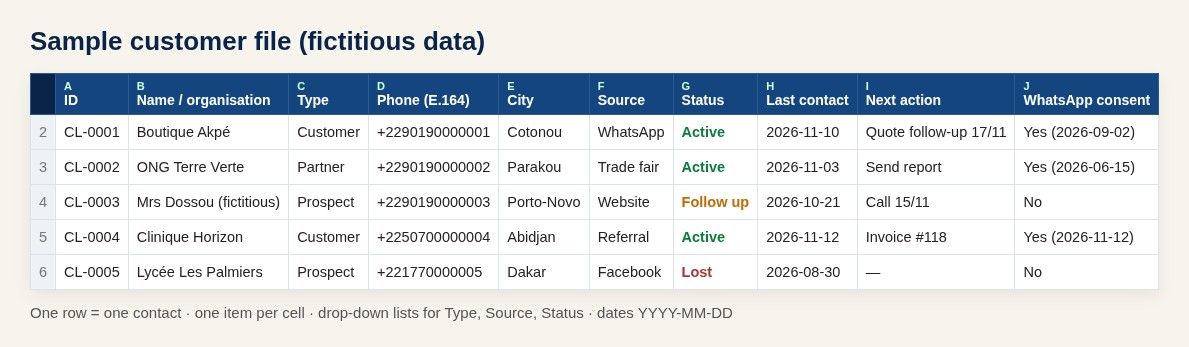
Guelichweb diagram: sample customer file with fictitious data.
These are the columns we set up almost everywhere. Each one has a rule; the rule is what makes the file reliable, not the column itself.
- Customer ID (CL-0001, CL-0002…): unique and never reused, even if the customer leaves. It is what later lets you link the file to orders, invoices or a CRM.
- Name / organisation: the name as the customer writes it. For a company, the legal name; the contact person goes in a separate column.
- Contact (first and last name of the person to reach): useful as soon as you sell to companies, schools or NGOs.
- Type: Customer, Prospect, Partner, Donor, Supplier… in a drop-down list.
- Phone in international format (+229…, +225…, +221…), one number per cell. A second number? A second column.
- WhatsApp: yes/no, or the number if it differs from the main one.
- Email: optional for many of our clients, but valuable for invoices and newsletters.
- City and district / area: two columns, not one. They are used for rounds, deliveries and local campaigns.
- Source: how the contact found you (WhatsApp, Facebook, website, trade fair, referral, walk-in). This is the column that tells you where to invest.
- Status: Active, Follow up, Inactive, Lost. Always in a drop-down list.
- Date of first contact and date of last contact, as real dates.
- Next action and next action date: the columns that turn a directory into a sales tool.
- Consent: the accepted channel (WhatsApp, SMS, email), the date and how it was given. More on this below; it is not a detail.
- Notes: short and factual. No judgement about the person, no sensitive information.
Selling products? Add a second "Sales" tab (date, customer ID, product, amount, payment method: cash, mobile money, bank transfer) rather than cramming purchases into one cell. With the customer ID, a simple pivot table will then give you revenue per customer. For an NGO, the same principle applies to donations or attendance at activities.
What not to put in your file
Many templates ask for a date of birth "to send birthday wishes". If you are not actually going to do it, don't collect it: every piece of data you collect is data you must protect. And some data has no place in a sales file at all: health, religion, ethnicity, political opinions, detailed family situation. A clinic or a health NGO managing patient records needs a suitable, secure tool, not a spreadsheet shared by link.
The trap European templates ignore: phone numbers
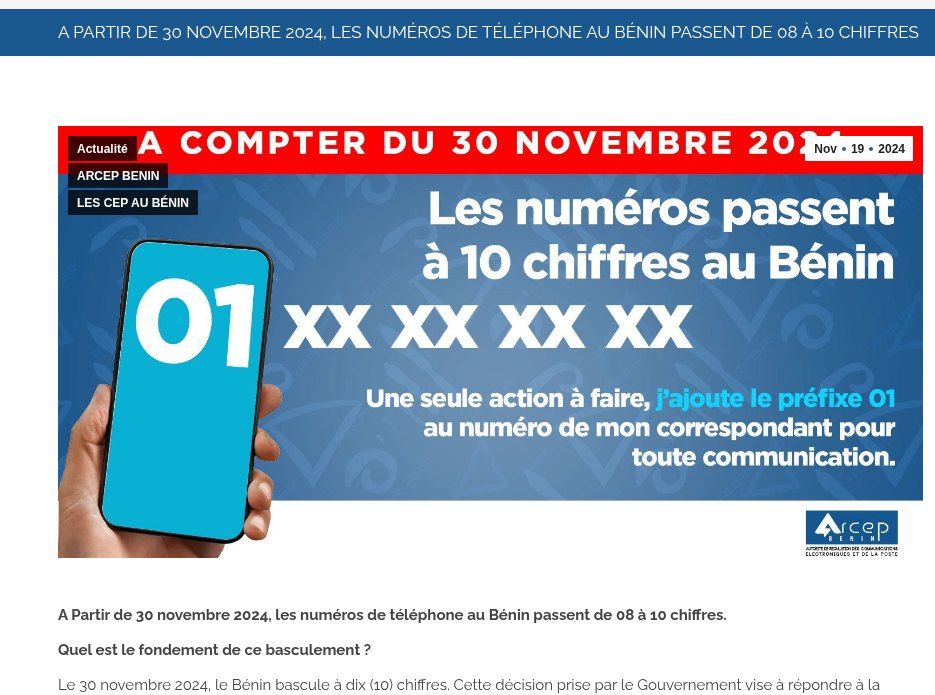
Source: screenshot of the public ARCEP Benin page (arcep.bj, in French), 14/11/2026.
In Benin, since 30 November 2024, every number has moved from 8 to 10 digits: you add 01 in front of the old number, whatever the operator. The regulator ARCEP explicitly asks people to update "directories, personal address books, business directories" (ARCEP Benin). If your file predates that, some of your numbers are probably still 8 digits long. Côte d'Ivoire made the same switch on 31 January 2021 (07 for Orange, 05 for MTN, 01 for Moov, according to Orange Côte d'Ivoire). In Senegal, mobile numbers have 9 digits.
Our three rules for phone numbers:
- International format everywhere: +2290197000000, with no spaces in the working cell. You can add a display column with spaces if you like, but the reference column stays raw.
- Format the column as Text before typing anything (right-click, Format Cells, Text). Otherwise Excel drops the "+" or leading zeros and sometimes turns the number into scientific notation.
- Don't drop the 0 in 01. Benin notified the ITU that the leading zero is part of the number and must be dialled from abroad: +229 01… (ITU). This is a classic mistake, because WhatsApp's help page says to "omit any zeroes"; that advice targets the national trunk 0 used in other countries, not Benin's 01.
To convert a column of old Beninese numbers in one go (column D, with or without spaces), this formula works in Excel and Google Sheets with English settings:
=IF(LEN(SUBSTITUTE(D2," ",""))=8,"+22901"&SUBSTITUTE(D2," ",""),D2)
It only changes 8-digit numbers and leaves the others as they are. Then check foreign and landline numbers by hand, and replace the original column with the values (Copy, Paste Special, Values). With French regional settings, the function names and separators change (SI, NBCAR, SUBSTITUE and semicolons).
A useful bonus: a clickable WhatsApp link for each customer. The official format is wa.me followed by the international number without the "+" (WhatsApp Help). With the number in column E:
=HYPERLINK("https://wa.me/"&SUBSTITUTE(E2,"+",""),"Message on WhatsApp")
One click from the computer opens the chat in WhatsApp Web, without saving the contact. For a team that follows up twenty customers a day, the time saving is immediate.
Building the file step by step (30 minutes)
- Write the headers in row 1, a single header row, with no merged cells. Merged cells break sorting, filters and imports.
- Turn the range into a table (Excel: Ctrl+T; Sheets: Format, Convert to table). Filters appear, formatting follows new rows and formulas copy down automatically.
- Create a "Lists" tab with your allowed values: types, sources, statuses, cities. Then apply drop-down lists to the relevant columns (Data, Data validation).
- Format the columns: Phone as Text, dates as Date (we recommend YYYY-MM-DD, which sorts without surprises), amounts as Number.
- Freeze the first row (View, Freeze Panes) so the headers stay visible as you scroll.
- Add duplicate detection (see below) and conditional formatting on the next action date: red when it is overdue.
- Keep the file in one place: a company Drive or OneDrive, not a USB stick, not the mailbox. Appoint one owner who decides on columns and does the clean-up.
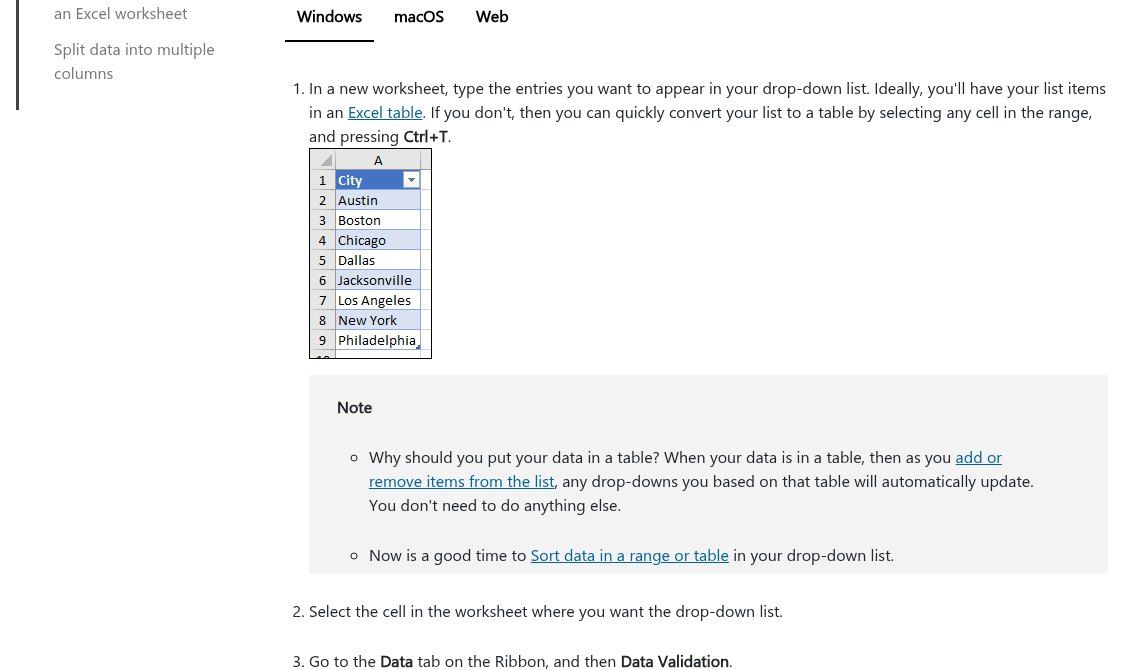
Source: screenshot of "Create a drop-down list", Microsoft Support (support.microsoft.com), 14/11/2026.
Why insist on drop-down lists? Because without them the same city is written "Cotonou", "cotonou", "Ctn" and "COTONOU", and your filter only finds a quarter of them. Microsoft itself recommends keeping the list values in an Excel table so the list updates automatically when you add an item (Microsoft).
Hunting duplicates without losing information
A customer listed twice means two follow-ups on the same day, a history split in two and wrong statistics. Duplicates always come from the same places: a number typed with and without the country code, a name spelt two ways, two files merged together.
To spot them, use the normalised phone number as the key, not the name. Conditional formatting with the formula =COUNTIF($E:$E,E2)>1 highlights numbers that appear more than once. You see the problem before deleting anything.
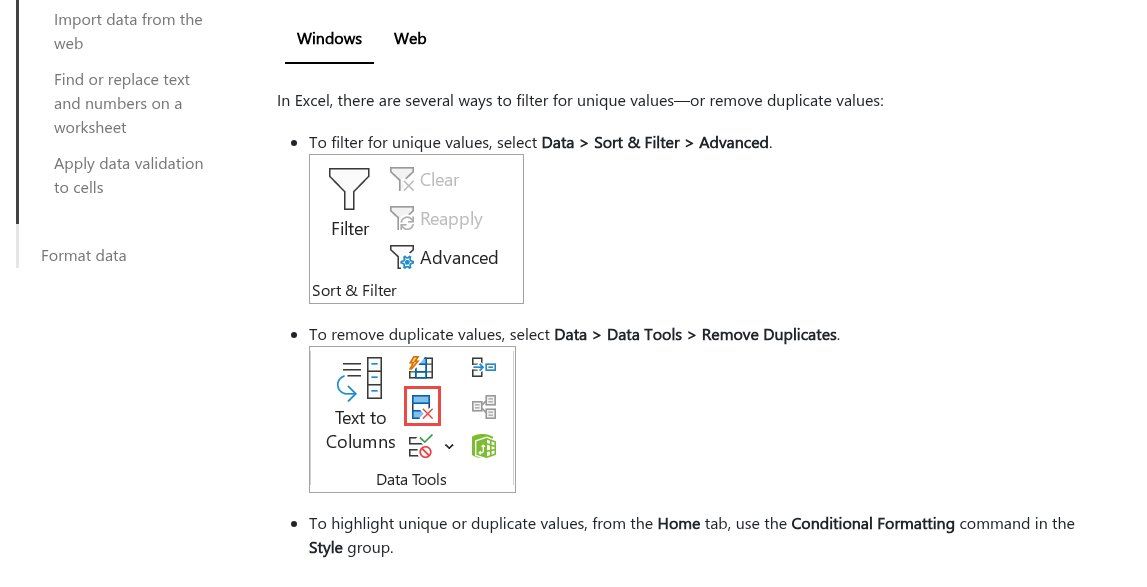
Source: screenshot of "Filter for unique values or remove duplicate values", Microsoft Support (support.microsoft.com), 14/11/2026.
To remove them, Excel offers Data, Remove Duplicates (Microsoft) and Google Sheets offers Data, Data clean-up, Remove duplicates (Google Help). Be careful: these commands keep the first row and permanently delete the others. If the second row held the email address or the latest order, that information is gone. Our method: sort by phone number, merge the few highlighted rows by hand, and only then run the removal. Always on a copy of the file.
Filling the file without retyping
A customer file lives or dies by how it is fed. If someone has to copy everything in on Friday evening, it will be up to date for two weeks, no more. A few sources that plug straight into a spreadsheet:
- Your website form: every enquiry creates a row. We explain how to build one without losing messages in website contact form: examples and how to create one for free.
- A Google Forms form in the shop or at a stand, shown as a QR code: customers enter their own name and number and tick their consent. Responses land in Sheets.
- Offline field data collection for NGOs and surveys, with a tool such as KoboToolbox whose exports then feed the file: see our KoboToolbox guide.
- WhatsApp Business: the app's labels (New customer, Order in progress, To be paid…) help sort chats, but they never leave the phone. Get into the habit of adding each new customer you identify to the file, or have an automation do it.
A word of caution about a common search: "export WhatsApp contacts to Excel". WhatsApp offers no way to export your contacts to a spreadsheet. Browser extensions that promise it read your conversations through WhatsApp Web; we advise against them for a business number. The other way round is easy: export the file as CSV and import it into Google Contacts (Google Help, which recommends splitting files above 3,000 contacts); once the contacts sync to the phone, WhatsApp recognises them.
Consent and the law: what your file must be able to prove
This is the part free templates forget, and the one that can cost you dearly. In Benin, the Digital Code (Law No. 2017-20) prohibits direct marketing by email, SMS or automated systems to anyone who has not given prior consent; silence is not consent, and the burden of proof is on you (Article 332, text on the APDP website, in French).
Article 333 provides an exception for existing customers: if their details were collected during a sale or a service, if you offer them similar products or services, and if they can object simply and free of charge with every message. Article 334 requires you to keep an up-to-date list of people who asked not to receive anything more. Our cautious reading: a bulk WhatsApp blast to contacts who don't know you falls within the same spirit, and it is also the quickest way to get your number blocked.
In practice, your file should therefore include:
- a Consent column (channel accepted, date, source: form, ticked box, written message from the customer);
- an Opt-out column or tab: when someone replies "STOP", record it the same day and never contact them again for promotions;
- a retention period decided in advance. For readers in France, the CNIL recommends three years from the last contact initiated by a prospect, and three years after the end of the relationship for a customer (CNIL guidance, in French). It is a sensible benchmark elsewhere too.
And buying customer lists, which shows up so often in search suggestions? We strongly advise against it: you will almost never be able to prove the people's consent, the numbers are often out of date, and you risk having your WhatsApp number flagged as spam. For the information your website must display, see legal notice and privacy policy; for formalities specific to Benin, the competent authority is the APDP.
Securing a file that is worth its weight in gold
Your customer file is often your most valuable asset after your stock. It deserves five simple precautions:
- Named sharing, never "anyone with the link". Everyone uses their own account, with view-only rights for those who don't need to edit.
- Remove access on the day an employee or intern leaves.
- Version history (built into Sheets and into Excel on OneDrive) to roll back after a mistake.
- A copy outside the main account every week or month.
- Beware of fake "A document has been shared with you" links: they are one of scammers' favourite entry points. Our article on phishing at work lists the habits to pass on to your team.
Automating your customer file with n8n (or Make)
Once the file is clean, automation becomes simple and reliable. That is where the spreadsheet starts to pay off. n8n's Google Sheets node can read, append and update rows (n8n documentation), and a trigger can react to every new row. A few scenarios we set up regularly:
- New contact from the website or a form: duplicate check on the phone number, new row with the source, welcome message and an alert to the right salesperson.
- Daily reminder: every morning at 8 a.m., the list of the day's "next actions" sent by WhatsApp or email to each salesperson.
- Follow-ups: a customer marked "Follow up" for more than 7 days is flagged automatically. For unpaid invoices, see our invoice reminder method.
- Weekly report: new contacts by source, prospect-to-customer conversion rate, customers inactive for 90 days. Enough to feed a KPI dashboard.
- Newsletter: syncing only consenting contacts to your email tool, as described in our email marketing guide.
One rule we don't compromise on: automated sales messages go through human approval at first, and only to contacts who accepted that channel. For WhatsApp at scale, the app is no longer enough; you need the WhatsApp Business API. If you want to know what n8n is and how to install it, start with what is n8n?, then look at our WhatsApp chatbot + n8n offer.
When an Excel file is no longer enough
A spreadsheet is not an end in itself. It becomes a brake when you tick at least two of these boxes:
- more than three people edit the file every day;
- you want the full history of exchanges per customer (calls, messages, quotes);
- follow-ups get forgotten despite the "next action" column;
- you need different access rights for different teams or branches;
- sales, stock and invoicing need to talk to each other (that is more of an ERP job, such as Odoo).
The good news: if you followed this method, migrating takes a day instead of a month. A file with a unique ID, consistent lists and normalised numbers imports as-is into most CRMs. The comparison of free options is in what is a CRM?, and the full website + WhatsApp + CRM setup in the trio that changes an SME's sales.
The 7 mistakes we see most often
- Several pieces of information in one cell ("97000000 / 66000000", "Cotonou, Akpakpa"). Impossible to sort or filter.
- Merged cells and decorative titles above the table. Pretty when printed, disastrous for importing.
- 8-digit numbers left over since the 2024 switch, or numbers turned into 9.7E+07 by Excel.
- No "source" column, so no idea what actually brings in customers.
- One file per salesperson, each with their own, and nobody to merge them.
- No record of consent, followed by a campaign sent to everyone.
- Deleting instead of archiving: a customer who leaves moves to "Inactive"; they don't disappear. Their history is still useful.
How much does setting it up cost?
If you do it yourself with this article, the cost is your time: half a day to create the file, a few days to clean up what you already have, depending on its state. Excel or Google Sheets are often already among your tools; if not, see Google Workspace: pricing and plans.
If you would rather have support, we always start with a diagnosis: where your contacts come from, who uses them, what you want to automate. The price depends on how much data needs cleaning and which automations need connecting, which is why we quote after that diagnosis, as explained on our offers page. You can also browse all our services.
Frequently asked questions
How do I create a customer file in Excel for free?
Open a blank workbook (Excel, or its free web version with a Microsoft account), type the headers from the "essential columns" section, turn the range into a table with Ctrl+T, add drop-down lists for type, source and status, and format the phone column as text. You don't need to download a template: a template that doesn't fit your business costs more time than it saves.
What is the difference between a customer record and a customer file?
A customer record describes a single customer, often on one page (contact details, preferences, history). The customer file is the list of all records, one row per customer. In a spreadsheet you work on the file; a record is simply a row, or a filtered view of one customer.
Do I need to register my customer file with an authority?
It depends on the country and the type of data. In Benin, personal data processing falls under Book V of the Digital Code and the APDP, whose website sets out the applicable formalities; for an ordinary sales file, check with the APDP or a lawyer. In France, prior declaration to the CNIL was abolished with the GDPR and replaced by a record of processing activities.
How do I add 01 to Beninese numbers in Excel?
Use the formula given above: =IF(LEN(SUBSTITUTE(D2," ",""))=8,"+22901"&SUBSTITUTE(D2," ",""),D2), copy it down the whole column, check the results, then paste the values over the original numbers. Format the column as text so the "+" stays visible.
Excel or Google Sheets for a customer file?
Google Sheets if several people work on it or if you want to feed it with forms and automate it easily. Excel if one person maintains it, often offline, or if your organisation already uses Microsoft 365.
How many customers before I need a CRM?
The number of rows matters less than the number of people working on the file and the number of follow-ups to track. A shop with 2,000 customers and a single manager can stay on Sheets; a team of five salespeople with 300 active prospects will quickly benefit from a CRM.
Going further
A clean customer file is the foundation for everything else: follow-ups, newsletters, a WhatsApp chatbot, dashboards. If you would like us to look at the state of your contacts together and see what can be safely automated, get in touch through our contact page. We always start with a diagnosis, and we will tell you frankly if a well-kept spreadsheet is all you need.