Google Workspace: what it is, 2026 pricing, and which plan to choose for an SME
G. CHRIST
Published on November 3, 2026

"Send it to my personal Gmail." "The shared Drive? That's the intern's account." "We lost access to contact@ when the salesperson left." If any of that sounds familiar, you probably do not have Google Workspace yet — or it was set up badly.
Google Workspace is Google's professional suite: Gmail on your own domain, Drive, Meet, Calendar, Docs, Sheets, Forms, Chat, and Gemini. It is not "free Gmail with a bit more storage". It is a paid, per-user toolkit so an organisation actually owns its mailboxes, files and accounts.
At Guelichweb we help SMEs, NGOs and institutions in Benin and French-speaking Africa digitise how they work: websites, professional email, automations, CRM. This guide explains what Google Workspace is, what it costs on Google's official price list, which plan to pick, how to roll it out, and which mistakes get expensive.
In short: Google Workspace = email @your-domain + collaboration tools + central admin. List prices (ex-tax, per user per month, annual plan): Business Starter $7, Standard $14, Plus $22. Most small organisations start on Starter or Standard. No Guelichweb fee schedule here — for hands-on help (domain, DNS, migration, automations) we quote after a short diagnosis.
What is Google Workspace, exactly?
Google Workspace (formerly G Suite) is Google's paid offer for organisations. It bundles professional versions of Gmail, Drive, Docs, Sheets, Slides, Meet, Calendar, Chat, Forms, Sites and more, managed from an Admin console.
The key differences from a personal Gmail account (@gmail.com):
- You own the domain. Addresses look like contact@yourcompany.bj or director@yourngo.org, not firstname.lastname123@gmail.com.
- You administer accounts. When someone leaves, you disable access and keep the files. You do not beg for a password on WhatsApp.
- You get security controls. Mandatory 2-step verification, app allow-lists, retention options depending on the plan.
- Storage and meetings are sized for teams. Meet recording, shared team Drives, common calendars.

Official Google Workspace logo, shown for illustration.
Source: Google Workspace homepage, captured on 3 Nov 2026.
Workspace is not a full website, not a complete CRM, and not a local e-invoicing tool. It is the foundation: communication, documents, meetings. Around it you connect a site, a CRM, WhatsApp Business, and automations with n8n or Make. For the wider picture, see our article on digital transformation for SMEs and NGOs.
What is included (and what is not)
The building blocks you use every day
- Business Gmail: mailboxes on your domain, ad-free, with Google's reinforced phishing protections.
- Drive: cloud files, shared team Drives, fine-grained permissions.
- Docs, Sheets, Slides, Vids: real-time collaboration. Sheets remain an excellent starting point for a small organisation — our Google Sheets guide goes deeper.
- Meet: video calls; recording and advanced options depend on the plan.
- Calendar: shared calendars, rooms, and appointment booking pages on higher plans.
- Forms: surveys and intake forms that land in a Sheet — ideal fuel for automation.
- Chat and spaces: internal messaging (a complement, not a replacement, for WhatsApp with clients in Benin).
- Gemini: AI assistant by plan; Google states your organisation's data is not used to train its public models.
What Workspace does not replace
- Your website. Google Sites can host a tiny page, not a serious brochure or e-commerce site. For a real site in Cotonou or Abomey-Calavi, see website creation and Abomey-Calavi web agency.
- WhatsApp. Clients still message you on WhatsApp. Workspace structures the inside; WhatsApp remains the client channel. They complement each other (see WhatsApp chatbot).
- A proper CRM. You can prototype tracking in Sheets; a real CRM becomes necessary as the team grows.
- Local electronic invoicing. Workspace can store and send PDFs; it does not replace a tax-compliant invoicing tool.
Google Workspace pricing: official rates (2026)
The prices below come from Google Workspace Help on flexible vs annual plans, checked on 3 Nov 2026. They are per user per month, exclusive of tax, in USD (EUR equivalents on the same Help page). Prices change: always confirm on the pricing page before you buy.
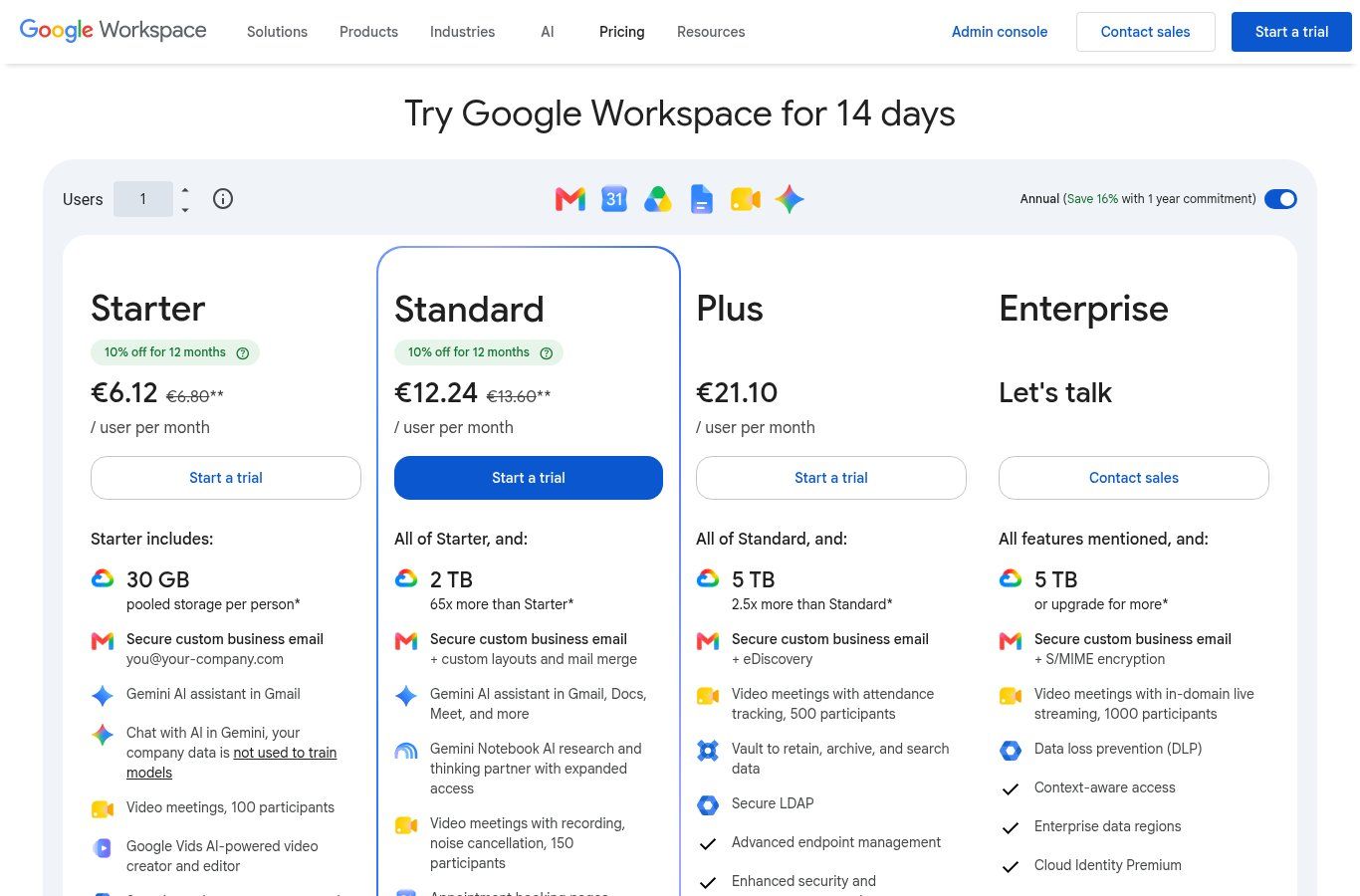
Source: Google Workspace pricing, captured on 3 Nov 2026. Temporary introductory discounts may appear for new customers — those are not the permanent list price.
Business Starter
- Annual plan: $7.00 USD or €6.80 / user / month.
- Flexible plan (no commitment): $8.40 USD or €8.10 / user / month.
- Storage: 30 GB pooled storage per user across the organisation.
- Meet: up to 100 participants (per Google's product grid).
- Best for: very small teams that mainly need clean professional email and basic Drive.
Business Standard
- Annual: $14.00 USD or €13.60 / user / month.
- Flexible: $16.80 USD or €16.20 / user / month.
- Storage: 2 TB pooled per user.
- Extras: Meet recording, broader Gemini in apps, appointment booking pages, eSignature in Docs/PDF per Google's grid.
- Best for: most SMEs and NGOs we meet — a sensible balance of price, storage and meetings.
Business Plus
- Annual: $22.00 USD or €21.10 / user / month.
- Flexible: $26.40 USD or €25.30 / user / month.
- Storage: 5 TB pooled per user.
- Extras: Vault (retention / eDiscovery), stronger security controls, Meet up to 500 with attendance tracking.
- Best for: teams with compliance needs, audits, or a real Vault requirement.
Enterprise
Priced via Google sales or a reseller. No 300-user cap (Business editions are limited to 300 users according to Business editions Help). Advanced features include DLP, data regions, deeper endpoint management, and more.
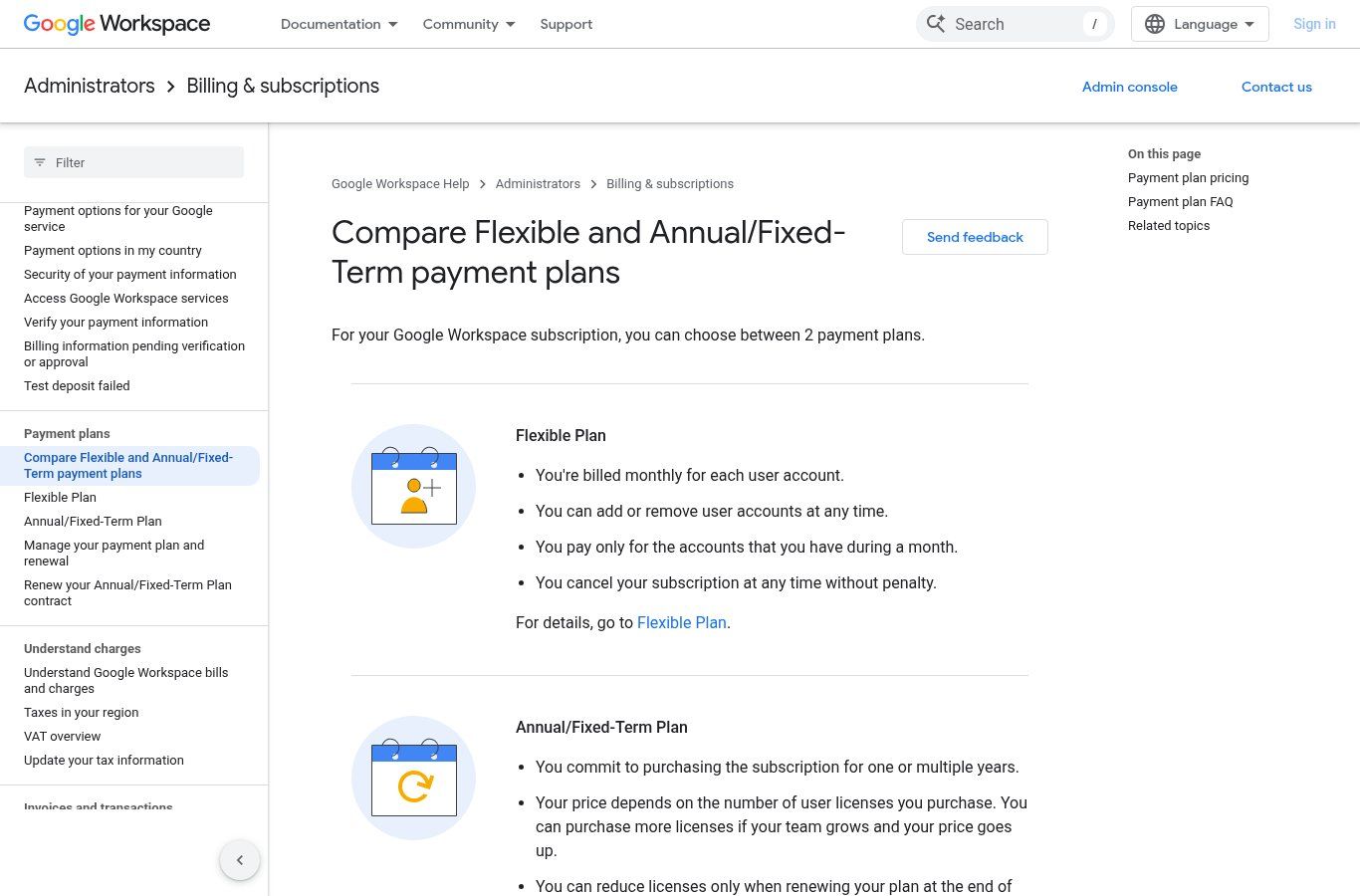
Source: Compare Flexible and Annual/Fixed-Term payment plans, captured on 3 Nov 2026.
Flexible or annual?
Flexible lets you cancel easily and add/remove users month to month — it costs more. Annual/fixed is cheaper (about 16% according to Google) but commits you: you generally reduce licences only at renewal. For a stable team of 5–20 people, annual is usually rational. For a temporary project or headcount that swings every month, flexible avoids paying for empty seats.
Ballpark for 5 users on Standard annual: 5 × $14 = $70 USD ex-tax / month (roughly 84,000 XOF at a given rate — rates move, never freeze an XOF budget from a blog post). Add the domain, any taxes, and admin time.
Is Google Workspace free?
Not for a real organisation on a custom domain. Common confusions:
- Personal Gmail / Drive: free, but you do not "own" @gmail.com as a company asset, and you have no Admin console.
- Workspace trial: 14 days on the official site, then you pay.
- Education / Nonprofits editions: specific programmes exist — eligibility is Google's, not automatic for every Beninese NGO.
- Old "free forever" promos: do not plan 2026 budgets on them.
If all you need is "an address that looks serious", start with how to create a professional email on your domain. Workspace becomes the cleaner path as soon as several people must collaborate.
Which plan for an SME, NGO or institution?
This is the blunt grid we use in diagnosis.
- 1–5 people, mostly email and files → Business Starter. Move to Standard when 30 GB / user feels tight or you record meetings.
- 5–40 people, frequent meetings, shared docs, forms → Business Standard. The reasonable default.
- Legal hold, internal investigations, Vault → Business Plus (or Enterprise if size/compliance require it).
- More than 300 users → outside Business: Enterprise / architecture territory.
For an NGO reporting to donors: Standard is often enough, but document who administers, where archives live, and how access is revoked. For a clinic or practice booking appointments online, look at Standard's booking pages and our guide to online appointment tools.
On AI: if your team already pastes sensitive data into consumer ChatGPT or Gemini, also read AI in business: use cases and policy. Organisation-side Workspace + Gemini reduces the "we pasted the donor list into a public chat" risk.
Rolling out Google Workspace: the steps that matter
- Domain name. No domain, no professional email. In Benin, .bj has its own rules; see buying a .bj domain.
- Create the Workspace organisation on Google's official flow (trial or paid).
- Verify the domain (DNS TXT or equivalent).
- Configure MX records so mail lands at Google. A DNS mistake means silent mailboxes. Also set SPF, DKIM and DMARC for deliverability.
- Create users with a clear convention (firstname.lastname@, role@). Do not route everything through the founder's personal Gmail.
- Enforce 2-step verification for everyone from day one.
- Migrate old mailboxes (IMAP, Google tools, or export) and critical files.
- Train for 45 minutes: shared Drive vs My Drive, calendars, Meet, what never to paste into an external chat.
Clients mentally link your site's HTTPS and your mailboxes: HTTP + improvised @gmail.com addresses looks amateur. See HTTPS / SSL certificates and, if things go wrong, website hacked: what to do.
West Africa: what European guides skip
- Payment. An international card is not always straightforward. Decide who pays (company card, local reseller, foreign HQ for an NGO). Plan renewals so email does not die on tender day.
- Currency. Billing is often USD or EUR: budget XOF conversion and fees.
- Connectivity. Workspace is cloud: enable offline access in Docs/Drive before the outage, not after.
- WhatsApp still rules. Do not force end clients onto Meet or Chat if they write on WhatsApp. Use Workspace inside, WhatsApp (and optionally a chatbot) outside.
- Personal data. In Benin, Act 2017-20 (as amended) and the APDP frame processing. Properly administered mailboxes help; they do not replace a privacy policy on your site.
Connecting Workspace to your site and automations
This is where Workspace pays for itself beyond "we have a nice email".
- Site contact form → Sheets → notification. A Form (or your website contact form) lands in a spreadsheet; n8n/Make alerts the team on WhatsApp or Chat.
- Quotes / registrations. Forms + Sheet + Gmail templates.
- Light CRM. A well-structured Sheet, then a real CRM when volume explodes.
- SEO and measurement. Workspace does not rank your site: use Search Console and GA4.
When comparing automation tools, see n8n or Make and Zapier. The goal is not to stack subscriptions — it is to kill daily copy-paste.
Google Workspace or Microsoft 365?
Both are solid. In Benin and French-speaking Africa:
- Workspace often wins when the team already lives in Gmail/Drive, wants something light in the browser, and collaborates heavily in Docs/Sheets.
- Microsoft 365 wins when the work lives in desktop Word/Excel, Outlook, heavy Excel macros, or when an institutional partner mandates the Microsoft stack.
We are not fans of either brand for its own sake. We look at existing files, team skills, and total cost (licences + training + migration). Switching suites "because it is modern" without a migration plan is a good way to lose a week of email.
Eight common mistakes (and how to avoid them)
- Letting the founder pay with a personal card and no backup. When the card expires, the whole company goes dark.
- Creating one shared info@ used by five people. No accountability, weak 2FA, guaranteed leaks. A shared mailbox can exist, but every human needs their own account.
- Never disabling leavers' accounts. The first hole we find in audits.
- Storing everything in personal My Drive. Use shared team Drives.
- Ignoring SPF / DKIM / DMARC. Your mail lands in spam.
- Buying Plus "for headroom" with no Vault need. You pay for features nobody administers.
- Migrating on a Friday night with no DNS rollback. Keep a reverse plan.
- Believing Workspace equals finished cybersecurity. Reused passwords + shady attachments remain the same risk. Train the team.
Kick-off checklist (30–90 minutes of framing)
- List of people and roles (who truly needs a licence).
- Domain available / already bought, DNS access.
- Inventory of current mailboxes (@gmail, web host, etc.).
- Critical files to migrate first (contracts, finance, HR).
- Starter vs Standard choice (storage + Meet).
- Who will be super admin (ideally two trusted people).
- Payment method and renewal calendar.
- Simple rule: no sensitive client data in consumer AI chats.
FAQ
What is Google Workspace in one sentence?
Google's professional suite (domain Gmail, Drive, Meet, Docs, Sheets, and more) administered by your organisation and billed per user.
How much does Google Workspace cost per month?
Per official Help: on the annual plan, from $7 (≈ €6.80) ex-tax / user / month for Business Starter; $14 (≈ €13.60) for Standard; $22 (≈ €21.10) for Plus. Flexible costs more. Sign-up promos may appear on the pricing page.
Can I pay in West African CFA francs (XOF)?
Google bills in supported currencies (often USD/EUR). XOF conversion happens via your bank or a reseller. Budget the fees.
Do I need a website to use Google Workspace?
You need a domain name. A website is not mandatory to open Workspace, but an organisation with pro email and no site still looks incomplete to clients who search for you. See our offers.
Does Workspace replace WhatsApp Business?
No. Internal = Workspace. Clients = often WhatsApp. Connecting them with automation is exactly one of the projects we support.
How is it different from free Gmail?
Custom domain, central admin, team Drives, security controls, organisational support — and a per-user cost.
Does Guelichweb resell Google Workspace?
We help with setup (domain, DNS, migration, training, automations around Forms/Sheets/WhatsApp). Licences are bought from Google or a reseller. For an implementation quote: contact.
Conclusion: start simple, administer seriously
Google Workspace is not a fad: it is the baseline so a structure owns its email and collaborates without depending on one person's Gmail. Pick Starter or Standard based on storage and Meet, pay annually if the team is stable, configure DNS and 2FA properly, then wire forms and automations.
If you want us to frame the domain, migration and useful automations with you (without stacking useless licences), write via the contact page. We reply with a diagnosis and a quote — not with a magic price grid invented for the web.