Online appointment booking: free tools, software and how to add it to your website (a guide for SMEs, clinics and NGOs)
G. CHRIST
Published on October 30, 2026
In many businesses across French-speaking Africa, appointment booking looks like this: a WhatsApp number on the website, an assistant who answers when she can, a notebook or an Excel file, and customers texting "good evening, are you free tomorrow?" at 10 pm. The next day, two people show up for the same slot, a third one never comes, and nobody reminded her the evening before.
This is not a goodwill problem. It is a tooling problem. Online appointment booking fixes a large part of this mess, and for many organisations it can start for free. But the comparisons you find on Google are almost all written by software vendors who praise their own product, bill text messages in euros or dollars and assume your customers read their emails.
At Guelichweb, we build websites and automations for SMEs, NGOs and institutions, in Benin and beyond. In this guide we explain what an online booking system really is, which free tools hold up, how to add one to your website, and what needs adapting when your customers live on WhatsApp and pay with mobile money.
Online appointment booking: what exactly are we talking about?
An online booking system is a page (or a module inside your website) where customers see your truly available slots, pick one, leave their details and get an instant confirmation. The slot immediately disappears for everyone else. Behind the scenes, the tool is connected to your calendar: if you block an afternoon for a meeting, nobody can book it any more.
A good system does at least four things:
- shows availability while respecting your opening hours, breaks and the buffer between two appointments;
- collects the right information (name, phone number, reason) without turning booking into an interrogation;
- confirms and reminds the customer, ideally the day before;
- lets people cancel or reschedule without calling, so the freed slot can go to someone else.
What it is not: the "appointment request" form
Many websites show a "Book an appointment" button that actually opens a contact form: name, phone, preferred date, send. The customer thinks they have booked. In reality, they have sent a message that someone must read, compare with the calendar and then call back to suggest something else. Our view is blunt: this form is often worse than no button at all, because it creates an expectation nobody meets. If you cannot show real slots, say so honestly, "Request an appointment, we will call you back within 24 hours", and keep that promise.
Who really needs a booking system?
Not every organisation does. The test is simple: is time your product? If each appointment ties up a person or a room for a set duration, the tool will save you time from the very first week.
- Clinics, medical and dental practices, labs, physiotherapists: the textbook case. The French query "online appointment booking system for a clinic" even shows up in Google suggestions in all five countries we tested (France, Benin, Côte d'Ivoire, Senegal, Cameroon).
- Law firms, accountants, consultants, agencies: first discovery calls, often by video.
- Hair salons, beauty institutes, driving schools, garages: many short slots, many no-shows.
- NGOs and projects: legal aid sessions, consultations, beneficiary selection interviews, distributions organised in waves to avoid crowds.
- Institutions, schools, universities: file submissions, document pick-ups, admission interviews. Physical queues are expensive for everyone.
On the other hand, a shop selling over the counter or a walk-in restaurant does not need this kind of tool. For them, a good WhatsApp number and an up-to-date Google Business Profile bring in more.
Free tools that actually hold up
There are dozens of appointment scheduling apps. We keep four, because they are solid, well documented and we see them last. Plan conditions change regularly: always check the official page before you decide; we link to each one.
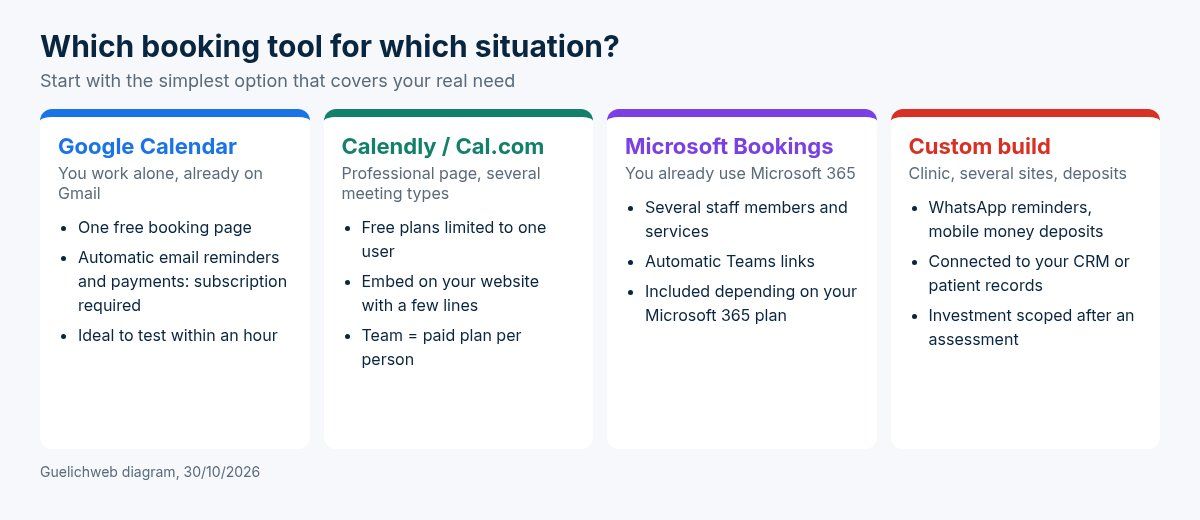
Guelichweb diagram, 30/10/2026.
1. Google Calendar: the simplest starting point
If you already have a Gmail account, you already have a booking tool. Google Calendar offers appointment schedules: you set your time ranges, the appointment length and a minimum notice period, and Google generates a booking page you can share or embed on your site (official Google Calendar help).
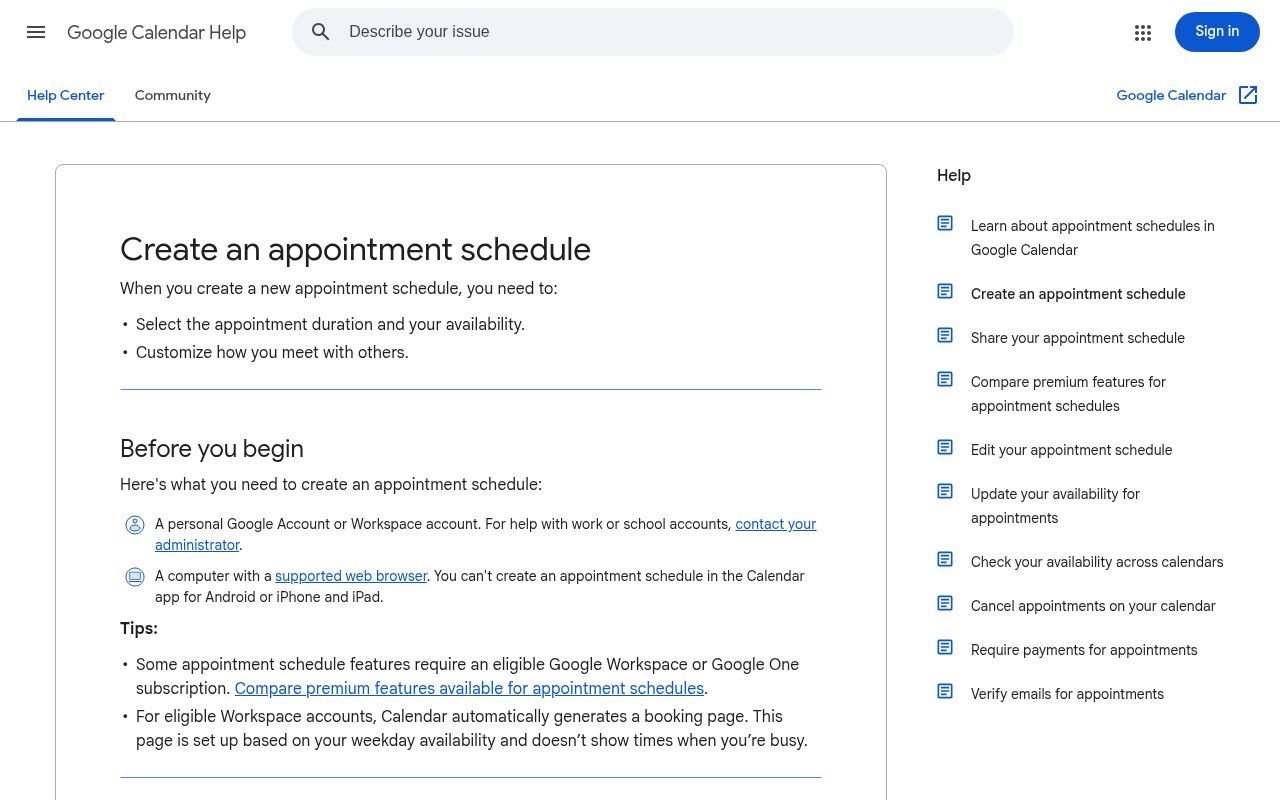
Source: support.google.com/calendar (public page, screenshot taken on 30/10/2026).
One limit matters: with a personal account, Google states you can create a single booking page. Automatic email reminders, multiple schedules, checking availability across several calendars and collecting payments require an eligible Google Workspace or Google One subscription (official premium features table). Another practical detail: setup is done on a computer, not in the mobile app.
Our take: it is the best tool to test within an hour if you work alone. For a team, it quickly becomes too narrow.
2. Calendly: the benchmark, but the free plan is for individual use
Calendly is the best-known tool, and "free Calendly" or "Calendly alternative" are very common searches. The interface is clean, embedding it on a website means pasting a snippet of code, and it connects to Google Calendar or Outlook. But Calendly itself presents its free plan as meant for personal use, and the features a business needs (advanced meeting types, custom reminders, payments, team scheduling) sit in the paid plans, billed per user (official pricing page).
Calendly is a great fit for a consultant or a salesperson. For a clinic with five practitioners, the monthly bill in dollars deserves a comparison with the other options.
3. Cal.com: the open alternative
Cal.com offers a free plan for one user, with unlimited event types and connected calendars, plus email and SMS notifications according to its pricing page (official Cal.com pricing). Team plans are paid per user.
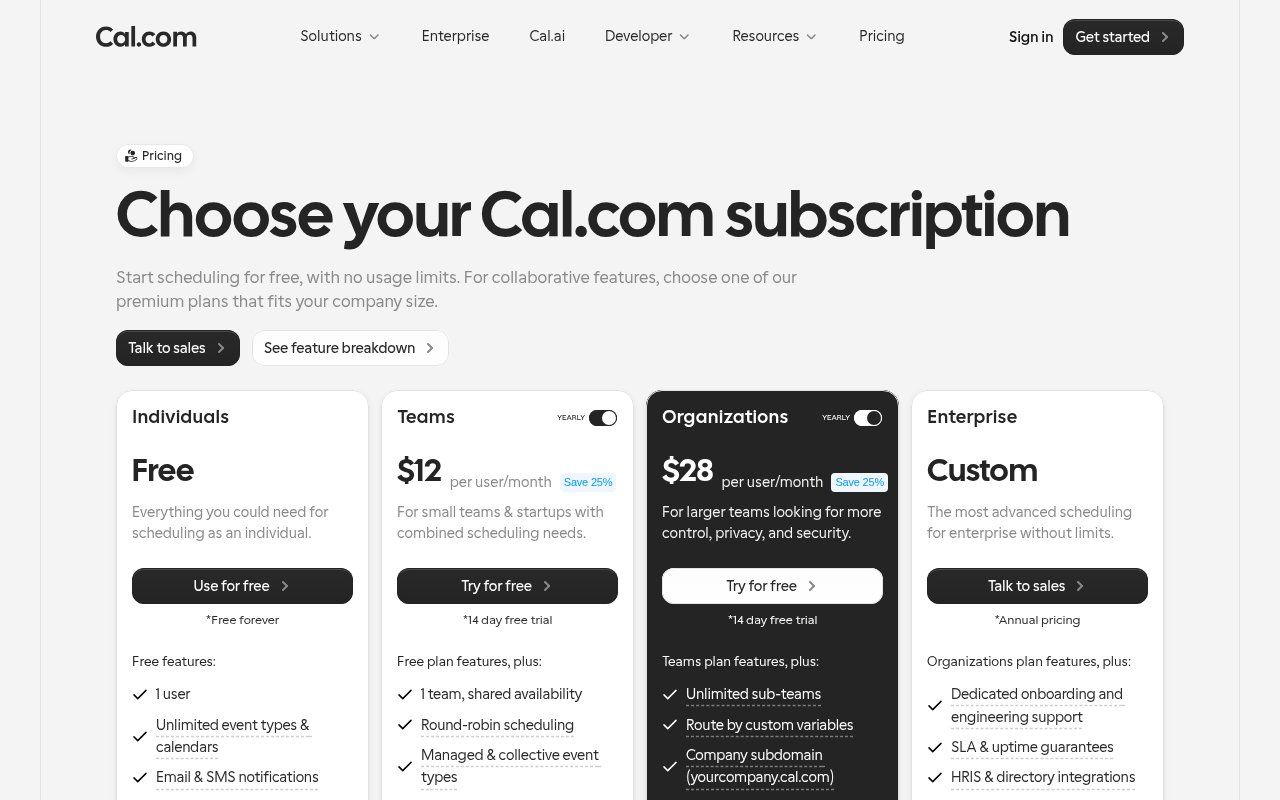
Source: cal.com/pricing (public page, screenshot taken on 30/10/2026).
Its special asset: an open source community edition, Cal.diy, under the MIT licence, which you can host on your own server (official GitHub repository). Be careful: its own authors state that enterprise features (teams, workflows) have been removed and that it is used "at your own risk". It is a serious option for an institution that wants to keep its data in-house, provided someone maintains the server. Without that person, do not go there.
4. Microsoft Bookings: if you already use Microsoft 365
Many NGOs and institutions run on Microsoft 365 (Outlook, Teams). Microsoft Bookings provides a web booking page integrated with Outlook, email and SMS notifications to reduce no-shows, automatic Teams meetings, and personal or shared bookings between colleagues (official overview).
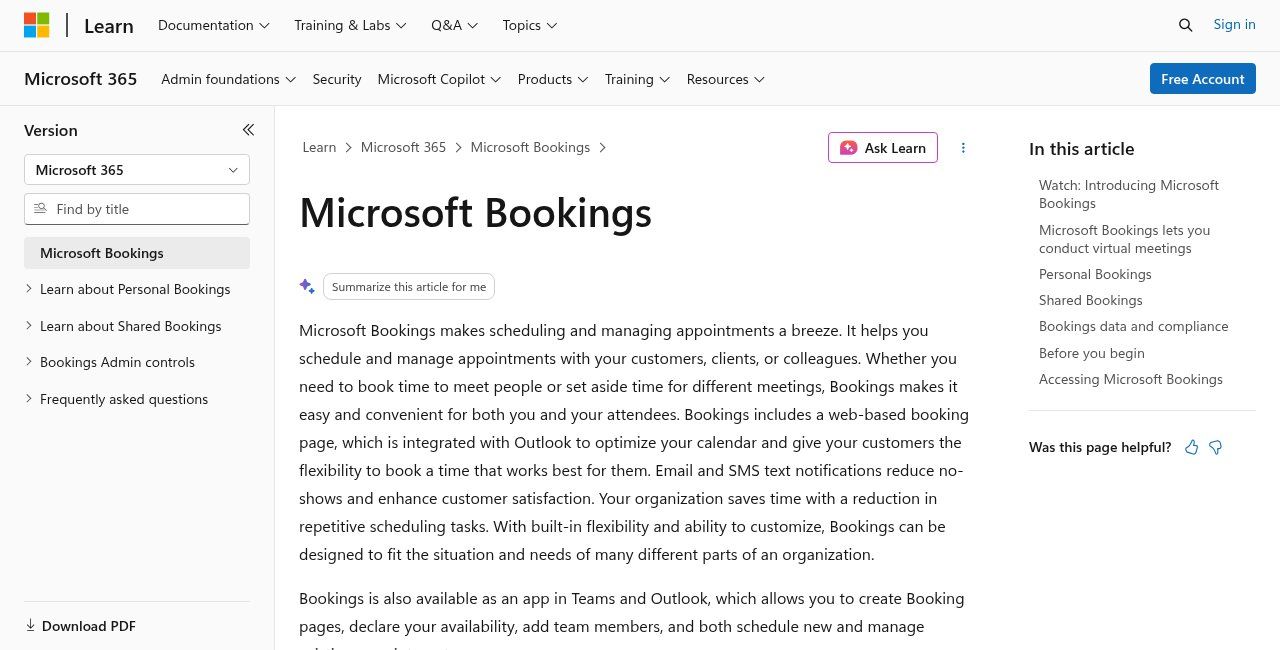
Source: learn.microsoft.com (public page, screenshot taken on 30/10/2026).
Bookings is included in some Microsoft 365 business subscriptions: check yours before paying for another tool. Many organisations already have it without knowing.
What about WordPress plugins or "100% free" tools?
If your site runs on WordPress, there are booking plugins, free or paid. They avoid depending on an outside service, but add one more component to update and secure. As for small, completely free tools, they can help in a pinch. Ask yourself one question before trusting them with your calendar: if the service shuts down next year, can you get your data back?
What comparisons forget: the reality of French-speaking Africa
The tools above were designed for markets where everyone reads email and pays by card. In Benin, Togo, Côte d'Ivoire or Senegal, four things change the picture.
Reminders must land on WhatsApp
An email reminder nobody opens does not reduce no-shows. Most of your customers will, however, read a WhatsApp message. None of the free tools above sends WhatsApp reminders natively. There are two ways around it: ask customers for their number in international format (+229, +225, +221…) and send reminders manually from WhatsApp Business the evening before, or automate them through the WhatsApp Business API and a tool such as n8n or Make. The second option needs some setup, but then it runs on its own.
Text messages are not free
When a tool advertises "SMS reminders", check who pays and at what rate to your country. International SMS are billed, sometimes expensively, and some carriers filter them. Test with your own Beninese or Ivorian number before relying on the feature.
Online deposits: Stripe and PayPal do not cover everyone
Requiring a deposit is the most effective way to reduce no-shows. But the tools above collect payments through Stripe or PayPal. As of 30/10/2026, Stripe's official page lists neither Benin nor Senegal among the countries where a business can open an account (Stripe availability by country). Your customers prefer mobile money anyway. The solution is to connect booking to a local gateway; we compare the options in our article on mobile money payment gateways (FedaPay vs KkiaPay). This is typically where a custom build becomes useful.
The phone is not going away
Some customers will keep calling. That is not a failure. The golden rule: one calendar for everyone. The assistant who books an appointment over the phone enters it in the same tool as the website. Two parallel calendars guarantee double bookings.
How to add appointment booking to your website
There are three levels of integration, from the simplest to the most advanced.
- The link. A "Book an appointment" button that opens the tool's booking page. Five minutes of work, no technical risk. Enough to get started.
- The embedded widget. The tool gives you a snippet to paste into a page: the calendar appears directly on your site. Customers never leave your website, which builds more trust. Check how it looks on a phone, because most of your visitors will be there; our guide to responsive websites explains how to test.
- The custom build. A booking form built into your site, connected to your calendar, your CRM, a mobile money gateway and WhatsApp reminders. Longer to set up, but shaped around how you actually work.
Whatever the level, a few settings make all the difference:
- Put the button wherever intent is strong: at the top of the home page, on every service page, on your business's Google listing, in your email signature and in your WhatsApp greeting message.
- Keep the form short. Every extra field loses bookings.
- Set a minimum notice period and buffers between appointments. Otherwise someone will book 8:00 am at 7:55 am.
- Track bookings as a conversion in Google Analytics 4. Without measurement, you cannot tell whether your site brings appointments.
- Watch page speed: some booking widgets are heavy. Our article on website speed explains how to check.
Reducing no-shows
A booking tool does not eliminate no-shows on its own. You need a flow designed to prevent them.
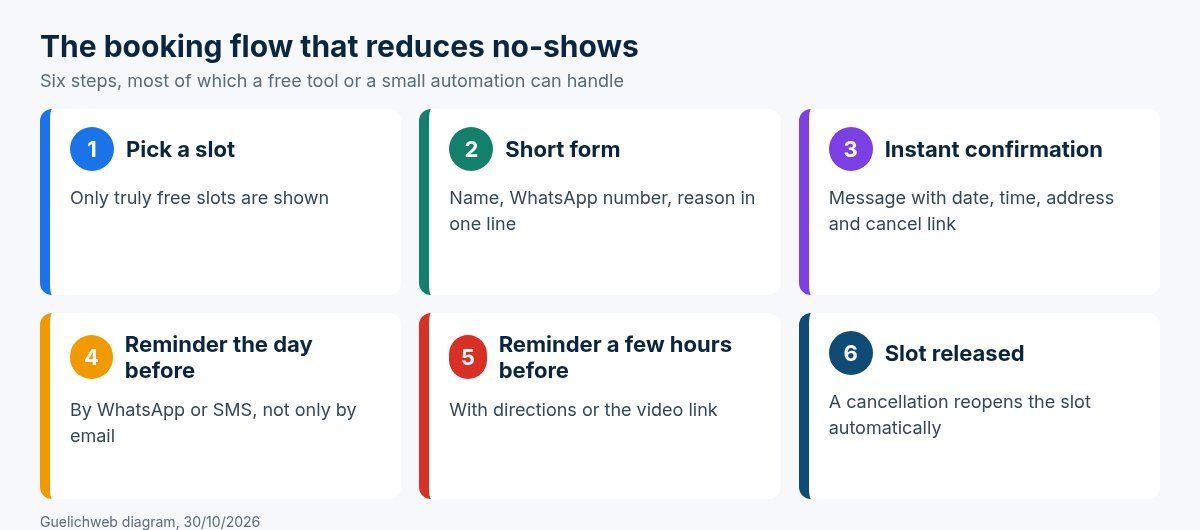
Guelichweb diagram, 30/10/2026.
- Instant, complete confirmation: date, time, precise address with a well-known landmark, what to bring.
- Two reminders: the day before, then a few hours before. Preferably on WhatsApp.
- A visible cancellation link: a customer who can cancel in one click will do so. A customer who has to call will simply not show up.
- A clear rule for repeated no-shows, stated at booking time, or even a deposit for long services.
- A waiting list for popular slots, so a freed slot can be offered immediately.
Personal data: be careful, especially in healthcare
A booking contains personal data: name, phone number, sometimes the reason for the visit. In healthcare, that reason is health data, which is particularly sensitive. In Benin, the personal data protection authority (APDP) oversees compliance (official APDP website). Without getting into legal detail, three common-sense rules:
- do not ask for a detailed reason on the public form; a choice between "consultation", "check-up" or "urgent" is often enough;
- limit who can access the calendar, with named accounts rather than one password shared by the whole front desk;
- know where the data is stored and how to export or delete it, especially with a tool hosted abroad.
If your website uses an external widget, it may also set cookies; our article on cookies and trackers helps make sense of it.
A concrete (fictional) example: a dental practice in Cotonou
Imagine a practice with two dentists and one assistant. Today, everything goes through WhatsApp and the phone. Here is how we would approach it, step by step.
- Week 1: a professional calendar account in the practice's name (not one dentist's personal Gmail), two calendars, one per practitioner. The website button and the WhatsApp greeting message point to the booking page.
- Week 2: the assistant also enters phone bookings in the same tool. She sends next-day reminders on WhatsApp from a list exported every evening.
- Month 2: if volume justifies it, we automate WhatsApp reminders and add a mobile money deposit for long treatments. That is when budget comes up, not before.
This scenario is deliberately gradual. Most booking projects that fail tried to do everything on day one.
The mistakes we see most often
- Setting up the tool on an employee's personal account. The day they leave, the calendar leaves with them. Always use an account in the organisation's name.
- Opening slots nobody can honour. Fewer slots, all kept, is better.
- Forgetting time zones when you see diaspora clients by video. Make sure the tool shows the customer's local time.
- Hiding the button at the bottom of a "Contact" page. The booking button is a sales button; it deserves the top spot. If your site generates no enquiries at all, read why your website is not bringing customers.
- Never looking at the statistics: number of bookings, no-show rate, most requested slots. They are your best sales data.
When should you move to a custom solution?
Free tools are enough as long as you are a small team, your customers read email and you collect nothing online. A custom build makes sense when several of these situations add up: several practitioners or locations, WhatsApp reminders that are a must, mobile money deposits, a link to a CRM or customer file, statistics per service. That is exactly the kind of chain we build: website, booking, WhatsApp and customer follow-up working together, as in our article on the website, WhatsApp and CRM trio for SMEs.
On budget, we do not throw out random prices: it depends on the number of calendars, the integrations and the message volume. We prepare a quote after a short assessment, as explained on our offers page. To understand the cost drivers, our article how much does AI automation cost in Benin details what makes the bill vary.
Frequently asked questions about online appointment booking
Is there truly free appointment booking software?
Yes, for simple use. Google Calendar (one booking page with a personal account), Calendly and Cal.com have free plans, with limits: a single user, little customisation, reminders or payments reserved for paid plans. For a team, plan a budget or a tailored solution.
Can customers book through WhatsApp?
Yes, in two ways. The simplest: your WhatsApp Business greeting message links to your booking page. The more advanced: a WhatsApp chatbot connected to your calendar offers slots inside the conversation. The second option requires the WhatsApp Business API and some development.
Do I need a website to offer online booking?
No, a booking page works on its own and can be shared as a link. But a website builds trust, lets you explain your services before booking and makes you visible on Google. The ideal is a booking page embedded in your site.
How do I avoid fake bookings?
Ask for a valid phone number, turn on email verification if your tool offers it, limit the number of bookings per person and, for expensive services, ask for a deposit.
Are reminders really useful?
Yes. Microsoft says so itself about Bookings: notifications reduce no-shows. Where emails are rarely read, a WhatsApp reminder the day before is, in our view, the most cost-effective step of the whole effort.
How long does it take to set up a booking system?
An hour for a Google Calendar or Calendly page. A few days to embed it properly on your site and train the team. Several weeks for a custom solution with payments and automatic reminders.
Take the first step
Start small: an account in your organisation's name, a free tool, a well-placed button, reminders sent the evening before. Watch for a month. If no-shows drop and your team saves time, you will know exactly what to automate next.
If you want a booking system connected to your website, WhatsApp and mobile money payments, contact us. We look at how you work today, tell you honestly whether a free tool is enough, and if not we send a quote after an assessment. You can also browse our services.