What is Claude AI? Free vs paid, pricing, and how to use it in your business (2026 guide)
G. CHRIST
Published on November 22, 2026

For about a year, the same question has kept coming up in our conversations with small businesses and NGOs: “We already use ChatGPT. Is Claude worth it?” Usually someone has watched a colleague swear by Claude for their reports, or heard a developer talk about Claude Code all day long. And they can’t tell whether it’s hype, a tool for geeks, or a real work assistant.
This guide gives a straight answer: what Claude AI is, what the free version really does, what the paid plans cost in 2026, whether you can use it from Benin or Côte d’Ivoire, what happens to your data, and when we recommend it over another assistant. Prices and terms were checked on Anthropic’s official pages on 22 November 2026.
What is Claude AI, in one sentence?
Claude is the artificial intelligence assistant built by Anthropic, an American AI company. Like ChatGPT, it runs on large language models: you type (or talk) to it, you hand it documents, and it writes, summarises, analyses, translates, calculates or codes. You use it on the web at claude.ai, in a desktop app and on mobile (iOS and Android).

Official Claude logo (source: header of Anthropic’s claude.com website, captured 22/11/2026).
Our take, straight away: Claude is not a gimmick. For anything that looks like serious office work (reports, memos, analysis of long documents, spreadsheets, code), it is one of the two or three best assistants on the market. But it isn’t magic either, and the free version hits its limits quickly once you work with it all day.
What Claude can actually do in 2026
The feature list has grown a lot in two years. Here is what matters to an organisation that wants to save time, not to a technology enthusiast:
- Write and rewrite: emails, letters, briefing notes, articles, job descriptions, tender responses. It holds a given tone well if you describe it.
- Read very long documents: the context window exceeds 200,000 tokens (about 500 pages, according to Anthropic) and can reach 1 million on paid plans with some models. A full annual report, or a specification with its appendices, fits in a single conversation.
- Create real files: documents, spreadsheets and presentations you can download and edit. Claude runs code behind the scenes to build a clean table or a chart.
- Search the web and cite its sources, including on the free plan.
- Remember across conversations (memory) and work inside Projects that group your reference documents and standing instructions.
- Connect to your tools (connectors): email, calendar, file storage, depending on what you authorise.
- Work on your behalf on paid plans: hand off a long task, schedule it (“every Monday, prepare the weekly summary”), act in the browser with Claude in Chrome, or in Word, Excel and Outlook with Claude for Microsoft 365.
- Code: Claude Code, included from the Pro plan upwards, has become a reference tool among developers.
Anthropic also notes in its help centre that Claude is particularly strong in French, alongside English. That matches our experience: its writing quality in French is one of its real strengths, which matters a great deal for organisations in francophone Africa.
Haiku, Sonnet, Opus, Fable: the models in two lines
Claude isn’t a single “brain” but a family of models. Haiku is the fastest and cheapest, Sonnet is the everyday model, Opus is reserved for paid plans and complex tasks, and Fable is presented by Anthropic as its most powerful model, available with usage credits on Pro and included in part of the quota on Max and Ultra. For 90% of a small business’s needs, Sonnet is more than enough. Switching models won’t make a poor instruction any better.
Is Claude free? What the Free plan really includes
Yes, there is a free version, and it is not just a demo. According to the official pricing page, the Free plan includes chat on web, desktop and mobile, web search, file creation and code execution, memory, connectors, Artifacts (small apps or documents generated inside the chat), Claude Design, Slides and Docs, and up to five Projects. The available models are Sonnet and Haiku.
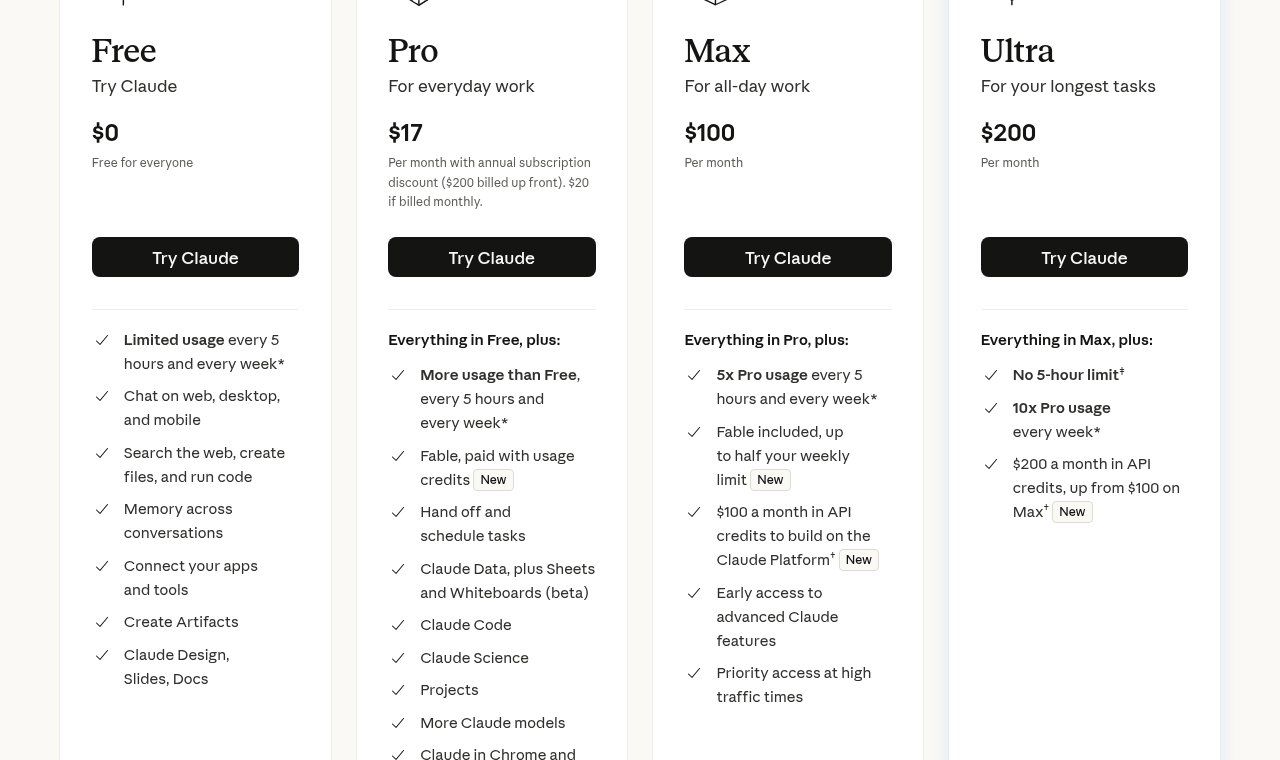
Source: claude.com/pricing, Individual tab (captured 22/11/2026). Prices in US dollars, excluding tax.
What’s missing on Free: the Opus model, Claude Code, Research mode (in-depth reports), Claude in Chrome and in Microsoft 365, and task hand-off and scheduling. Above all, usage is capped every five hours and every week.
How the limits work
This is what surprises people most. Claude doesn’t announce a number of messages per day. According to the help article on limits, it all depends on conversation length, file size, the model and the features you use. A five-hour window starts with your first message; paid plans add a weekly limit. The web, the apps and Claude Code all draw from the same pool.
In practice, one long conversation about an 80-page PDF uses far more than a dozen short questions. Our simple rule: if you get blocked mid-task twice in the same week, the free version is no longer enough. And start a new conversation whenever you change topic, instead of piling everything into the same thread.
Claude pricing in 2026: Pro, Max, Ultra, Team and Enterprise
These are the amounts Anthropic displayed on 22 November 2026. All are in US dollars, excluding tax, and they can change, so check the official page again before you pay.
- Free: $0.
- Pro: $20 a month billed monthly, or $17 a month billed annually ($200 up front). More usage than Free (at least five times more per five-hour session, according to the FAQ), Opus, Claude Code, Projects without the five-project cap, Research, Claude in Chrome and Microsoft 365.
- Max: $100 a month. Five times Pro usage, Fable included for up to half of the weekly limit, $100 of API credits a month.
- Ultra: $200 a month. Ten times Pro’s weekly usage, no five-hour limit for verified accounts, $200 of API credits a month.
- Team (2 to 150 people): Standard seat at $20 a month billed annually or $25 monthly; Premium seat at $100 annually or $125 monthly. Central billing, administration, single sign-on (SSO), no model training on your content by default, seat types can be mixed.
- Enterprise: $20 per seat per month, billed annually, 20-seat minimum, with actual usage billed on top at API rates. Audit logs, per-user spend controls, custom data retention.
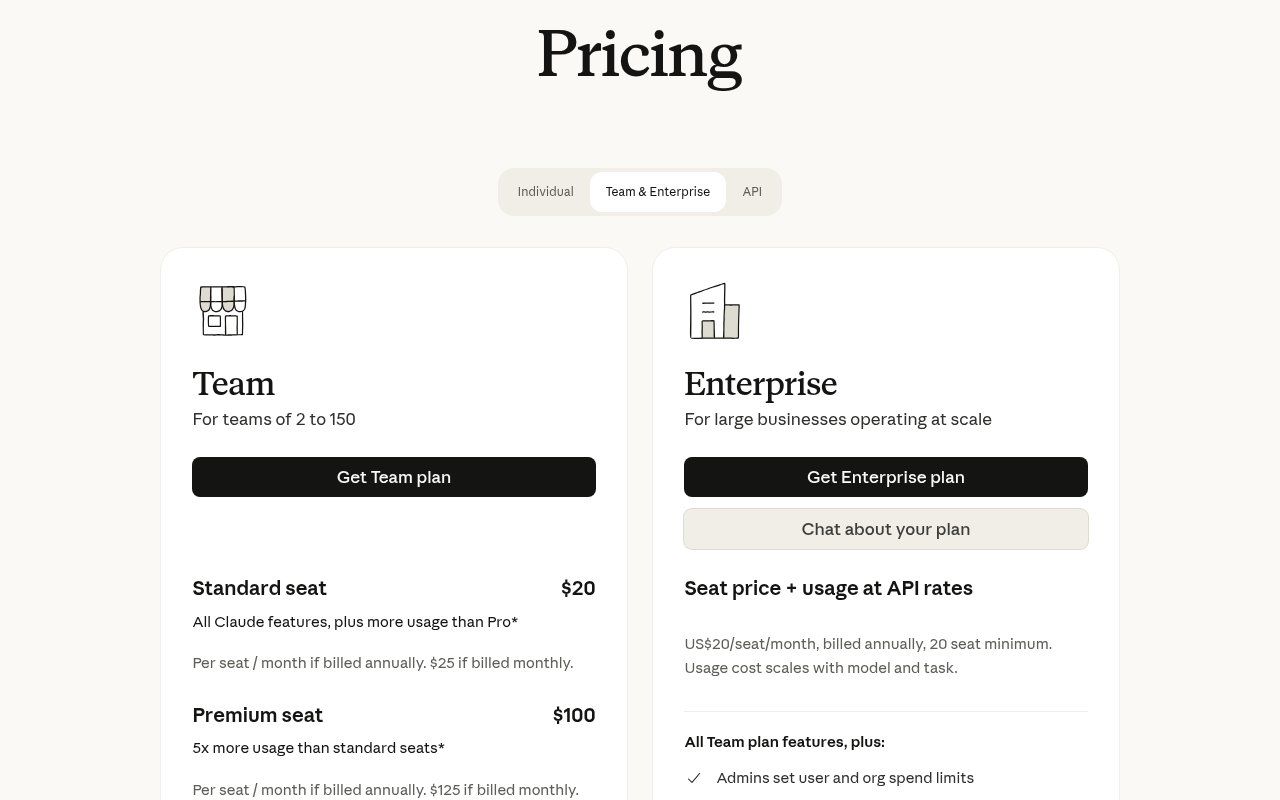
Source: claude.com/pricing, Team & Enterprise tab (captured 22/11/2026).
Our reading for an organisation in francophone Africa: Max and Ultra are for people who spend their whole day in Claude, typically developers or analysts. A ten-person business almost never needs them. The real choice is between a few Pro accounts and a Team plan. Enterprise, with its 20-seat minimum and usage-based billing, is for large organisations, banks and some donor-funded programmes.
Pro or Team: where to draw the line?
The difference isn’t only price. Free, Pro, Max and Ultra fall under Anthropic’s consumer terms; Team and Enterprise fall under its commercial terms. In practice, with Team the contract is in the organisation’s name, an administrator adds and removes access, and when an employee leaves, their work conversations don’t leave with a personal account. As soon as three or more people use Claude with internal documents, we recommend Team. Below that, one or two properly configured Pro accounts will do.
Paying from Benin, Côte d’Ivoire or Senegal
Payment is by bank card (and, on mobile, through the App Store or Google Play). You are charged in dollars, so your bank applies its exchange rate and often an international payment fee. Before subscribing, check that your card (including a prepaid card) is enabled for online payments abroad. And keep in mind that the real price in CFA francs will move with the dollar, unlike a local subscription.
Can you use Claude in Benin and francophone Africa?
Yes. Anthropic’s Supported Regions Policy, effective since 12 November 2026, lists Benin, Côte d’Ivoire, Senegal, Cameroon, Togo, Burkina Faso, Mali, Niger, Guinea, Gabon, both Congos and Madagascar, among others. The apps, Claude Code and the API are available there.
One point few guides mention: the policy states that access depends on where the user is physically located and where the organisation is headquartered. Using a VPN to get around a restriction isn’t a technical detail; it breaches the terms and can get the account closed, along with all your conversations. Fortunately, in our countries it isn’t needed.
Your data: what happens to your conversations
This is the first topic we raise with every client, before we even talk about productivity. The rules differ by plan.
Individual plans (Free, Pro, Max, Ultra): according to Anthropic’s Privacy Center, your conversations may be used to improve the models if you allow it in your privacy settings, or if a conversation is flagged for safety review. The setting is under Settings, then Privacy. Incognito chats are never used for training.
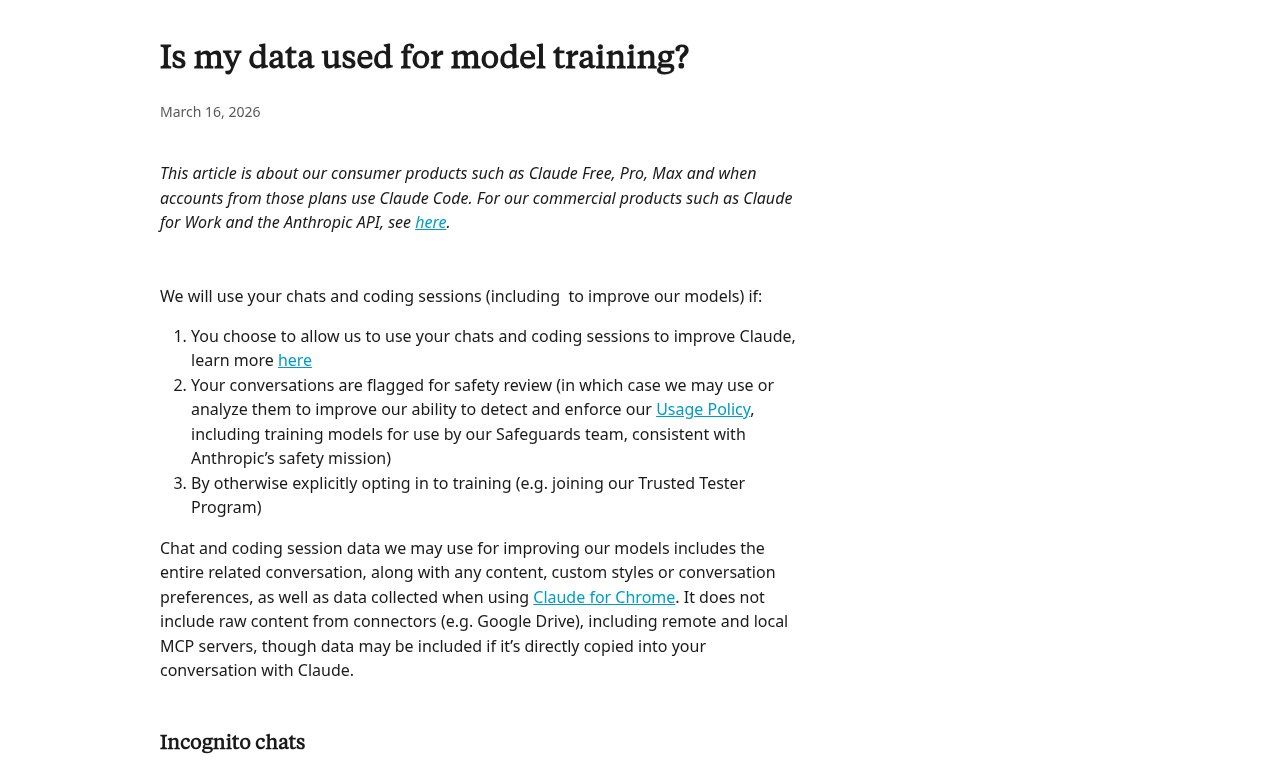
Source: privacy.claude.com, article “Is my data used for model training?” (captured 22/11/2026).
Business plans (Team, Enterprise, API): by default, Anthropic does not use inputs or outputs to train its models, unless you send feedback (thumbs up or down) or explicitly opt into a programme. The pricing page says the same: “no model training on your content by default”.
Our position is clear: no salaries, no patient records, no NGO beneficiary lists and no ID documents in a personal account, whatever the setting. In Benin, personal data is governed by the Digital Code and supervised by the APDP; elsewhere in francophone Africa, equivalent authorities exist. Anonymise (replace names with “Client A”, remove phone numbers), or move to a Team plan with a written AI usage policy.
Claude or ChatGPT (or Copilot, or Gemini): which should you choose?
We get this question every week, and our answer sometimes annoys people: the best assistant is the one your team will actually use, in the environment it already works in. Quality differences come second.
- Choose Claude if your work revolves around writing and long documents: donor reports, legal notes to review, specifications, spreadsheet analysis, or web development. That’s where it stands out most clearly, and its French prose needs less editing.
- Choose ChatGPT if you want the most versatile tool, with a very broad ecosystem (images, voice, third-party apps). We cover its plans in our ChatGPT for business guide.
- Choose Copilot if your whole organisation lives in Microsoft 365 (Outlook, Teams, Word). See our Microsoft Copilot guide.
- Choose Gemini if you run on Google Workspace (Gmail, Drive, Docs) and want AI directly inside those tools.
Two paid subscriptions for the same person are rarely justified. Test the free versions for a week on your real files (not on general-knowledge questions), then decide. Whatever the tool, answer quality depends mostly on the instruction: our method for writing an effective prompt works with Claude as well as with the others.
10 practical uses for a small business, an NGO or a public institution
- Draft a narrative report for a donor from your field notes, indicators and the required template.
- Analyse a tender file: give it the full tender documents and ask for the list of required documents, eliminatory criteria and deadlines.
- Write standard replies for customer service, to adapt for WhatsApp or email.
- Turn an oral procedure into a document: you dictate, it structures the steps.
- Clean and analyse an Excel file of sales or stock, with a chart and commentary.
- Translate and adapt a document between French and English for a partner, keeping the formal register.
- Produce meeting minutes with decisions and action items from a transcript (see our AI meeting minutes method).
- Review a contract to flag clauses a lawyer should check (not to replace the lawyer).
- Prepare internal training: outline, exercises and quizzes from your own materials.
- Fix or improve code for a website or a script, if someone on your side can review it.
In every case, the value comes from two things: giving it your real reference documents, and checking what it produces. Claude can be wrong with great confidence, especially about figures, recent legislation or local realities it knows poorly.
Getting started with Claude in 7 steps
- Create the account with a work email address, never with an intern’s personal Gmail.
- Set privacy on day one: Settings, then Privacy, and decide whether your conversations may be used for training.
- Fill in your preferences: who you are (role, sector, country), the tone you want, what it should avoid.
- Create one Project per major file (a programme, a donor, a client) with its reference documents and standing instructions.
- Write complete instructions: context, task, expected format, examples, constraints. A vague line gets a vague answer.
- Always verify figures, names and legal references before sending anything.
- Share what works: keep a small library of proven prompts within your team.
Claude in your automations: API, n8n and Make
This is where Claude becomes truly interesting for a business, and it’s our line of work. Beyond chat, Anthropic offers an API: programmatic access to the same models, billed by consumption (per million tokens read and written). It plugs into the automation tools we use every day: n8n has an Anthropic node and Make offers an Anthropic Claude app.
A few realistic scenarios:
- A WhatsApp message comes in: n8n passes it to Claude, which classifies it (quote request, complaint, information), extracts the name and the need, then records it in your CRM and alerts the right person.
- A PDF invoice arrives by email: Claude extracts the supplier, amount and due date, and a row is created in your tracking sheet.
- Every Friday, a workflow gathers the week’s figures and asks Claude for a five-line summary sent to management.
Three rules we apply every time: a human approves anything that goes to a customer; sensitive data is filtered before it reaches the model; and cost is estimated in advance, because a badly designed automation can burn tokens endlessly. For the logic and orders of magnitude, see how much AI automation costs in Benin and what a WhatsApp chatbot actually does. If you want to go further, towards an assistant that acts on its own, read our guide to AI agents.
Claude’s limits (and the mistakes we see most often)
- It sometimes makes things up. Less than before, but a reference, a legal article or a precise figure must always be checked at the source.
- Its local knowledge is uneven. Beninese administrative procedures, mobile operator prices, the realities of a market stall in Dantokpa: it can be approximate. Give it your sources.
- National languages remain a weak spot. French and English are excellent; for Fon, Yoruba, Wolof or Dioula, test before relying on it, and have a native speaker review.
- The usage limit hits at the worst time. Don’t discover the free plan’s ceiling the night before a submission deadline.
- Personal accounts used for work: the day that person leaves, the accumulated knowledge leaves too.
- All-AI output: unreviewed generated text is easy to spot, and it damages an institution’s credibility faster than a typo.
- Dollar dependency: a subscription that costs a reasonable amount today can weigh more if the exchange rate moves or your card is declined.
What Guelichweb can do for you
We have nothing to sell on Anthropic’s behalf: we don’t resell Claude subscriptions. Our work starts when the assistant alone is no longer enough. We help small businesses, NGOs and institutions choose the right tool (Claude, ChatGPT, Copilot or Gemini) for their environment, write a usage policy, train teams on their real files, and above all connect AI to their processes with n8n or Make: WhatsApp message triage, document extraction, automatic summaries, WhatsApp chatbots.
Every project is different, so we don’t publish random prices: you get a quote after a diagnosis of your needs. See our offers.
FAQ: Claude AI
Is Claude AI free?
Yes, the Free plan costs nothing, on web, desktop and mobile. It includes the Sonnet and Haiku models, web search, file creation and five Projects, with usage capped every five hours and every week.
How much does Claude Pro cost?
$20 a month billed monthly, or $17 a month on the annual plan ($200 up front), excluding tax, according to the pricing page checked on 22 November 2026.
Does Claude work in French?
Yes, very well. You can write to it in French, the website and help centre are available in French, and Anthropic lists French among the languages where Claude performs best after English.
Is Claude available in Benin?
Yes. Benin is on Anthropic’s list of supported regions, along with Côte d’Ivoire, Senegal, Cameroon and most francophone African countries.
Who created Claude?
Claude is developed by Anthropic, an American artificial intelligence company. The name refers both to the assistant (web, desktop and mobile apps) and to the family of models available through the API.
Claude or ChatGPT: which is better?
Neither is better at everything. Claude stands out for writing, long documents and code; ChatGPT is more versatile. The right choice depends on your tasks and the tools your team already uses.
Are my conversations used to train Claude?
On individual plans, only if you allow it in your privacy settings (or if a conversation is flagged for safety review). On Team, Enterprise and the API, there is no training by default.
In short
Claude is now one of the strongest assistants for office work in French and English: writing, document analysis, spreadsheets, code. The free version is enough to explore and for occasional use; Pro suits one person who uses it daily; Team becomes the obvious choice as soon as a team puts internal documents into it. Set privacy first, check what it produces, and remember that the real gain comes when AI is wired into your processes, not just open in a browser tab.
Want to know which assistant suits your organisation, or connect Claude to your WhatsApp messages and documents? Contact Guelichweb: we always start with a diagnosis.