How to write an effective AI prompt: the 6-block method and 12 examples for SMEs, NGOs and institutions (ChatGPT, Gemini, Claude, Mistral)
G. CHRIST
Published on November 18, 2026

When we train teams on AI in Benin, the first session almost always starts the same way. Someone types “Write a Facebook post for our shop”, gets back a text full of emojis, exclamation marks and “Discover our exceptional offer!”, and concludes: “AI isn’t for us.” The tool is not the problem. The request is.
A prompt is the instruction you give to ChatGPT, Gemini, Claude, Mistral or Copilot. And the gap between an unusable answer and a text that is almost ready to send rarely comes down to which tool you picked. It comes down to how you write that instruction. This guide gives you the method we use at Guelichweb, ready-to-adapt examples for an SME, an NGO or a public institution, and above all what most tutorials leave out: the African context the AI knows nothing about, confidentiality, and the moment a prompt stops being a personal trick and becomes a team tool.
The advice below combines the official guides from Google, OpenAI, Anthropic and Mistral, checked on 18 November 2026, with what we see working (or failing) with our clients.
In short
- A good prompt says who the AI should be, what it should produce, with which information, in what form, and what it must not do.
- Precision matters more than length. But very short requests fail: according to Google, the most successful prompts average around 21 words, while people’s first attempts are usually under 9.
- The method is the same for ChatGPT, Gemini, Claude or Mistral. What changes is where you save your instructions so you don’t retype them.
- The AI doesn’t know your prices, your customers or the reality of Benin. If you don’t tell it, it makes things up or talks about Europe.
- A prompt used by a whole team, or by a WhatsApp chatbot, should be tested and stored like a working document. Not like a throwaway message.
What exactly is a prompt?
A prompt is the text you send to an artificial intelligence assistant to get an answer: a question, an instruction, a goal, sometimes with a document attached. In French-speaking offices you will also hear “requête” (the word Google uses in French) or simply “consigne”.
To understand why wording matters so much, accept one simple idea: the AI cannot read your mind. Anthropic, the company behind Claude, puts it very well: think of the model as a brilliant but new employee who knows neither your habits nor your customers. Their test is excellent: show your prompt to a colleague who doesn’t know the file. If they can’t tell what you expect, the AI won’t either.
Imagine telling an intern who arrived this morning: “Make me a Facebook post.” They don’t know what to sell, to whom, in what tone, or how many lines. They will fill the gaps with generic filler. That is exactly what the AI does. People call this “prompt engineering”; we prefer to say it is simply knowing how to delegate in writing.
The 6-block method we teach
Google talks about four elements (Persona, Task, Context, Format). OpenAI, in its ChatGPT guide, talks about goal, context, output and boundaries. Mistral recommends starting with “You are a role, your task is to…”. They all say the same thing in different words. We merged these approaches into six blocks, because two elements are often missing from consumer checklists when you work in an organisation: sources (what the AI is allowed to rely on) and guardrails (what must absolutely not happen).
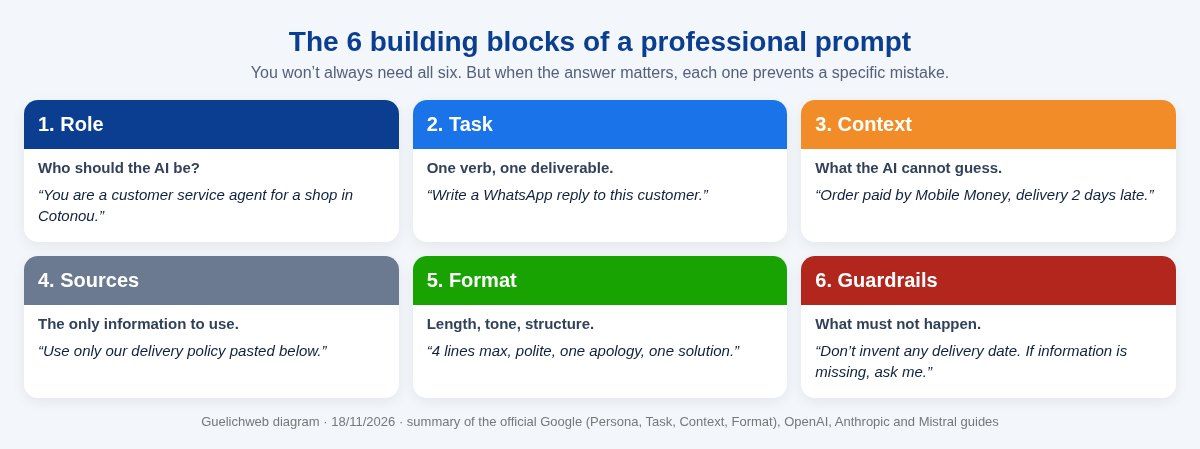
Guelichweb diagram · summary of the official Google, OpenAI, Anthropic and Mistral guides (18/11/2026).
1. Role: who should the AI be?
“You are an accountant in an SME in Cotonou”, “You are the communications officer of a health NGO”, “You are a lawyer specialising in OHADA business law”. The role steers vocabulary, level of detail and reflexes. It doesn’t make the AI competent by magic; it helps it pick the right register. For a simple task such as fixing spelling, you can skip it.
2. Task: one verb, one deliverable
Start with an action verb: write, summarise, compare, sort, translate, correct, suggest. Then name the deliverable: “a WhatsApp message”, “a three-column table”, “a one-page memo”. One main task per prompt. Ask for a report, a post and an email at the same time and you’ll get three mediocre results.
3. Context: what the AI cannot guess
This is the block people forget most, and the one that changes the result the most. Who will read it? In which country? What is at stake? What happened before? “The customer has already chased us twice and is threatening a bad review” does not produce the same reply as “the customer has a question”. Google’s guide recommends giving as much relevant context as possible; we would add: relevant, not exhaustive.
4. Sources: what the AI is allowed to rely on
Paste the reference text (your delivery policy, your price list, the donor’s call for proposals) or attach the file, and say it clearly: “Use only the information below.” OpenAI recommends putting instructions at the start and separating the reference text with markers such as ### or triple quotes. This is the best protection against invented answers.
5. Format: length, tone, structure
“Five lines maximum”, “formal tone”, “a table with the columns Task, Owner, Deadline”, “plain English, no jargon”, “three different options”. Without a format instruction, the AI chooses for you, and it usually chooses too long. One detail helps a lot: show an example of the expected result. Models imitate better than they interpret.
6. Guardrails: what must not happen
“Don’t invent any figures.” “If information is missing, ask me instead of guessing.” “Don’t promise a delivery date.” “Keep the amounts exactly as they are.” OpenAI’s ChatGPT guide talks about boundaries that prevent real problems and advises keeping one or two, not twenty. We agree: too many guardrails drown the main instruction.
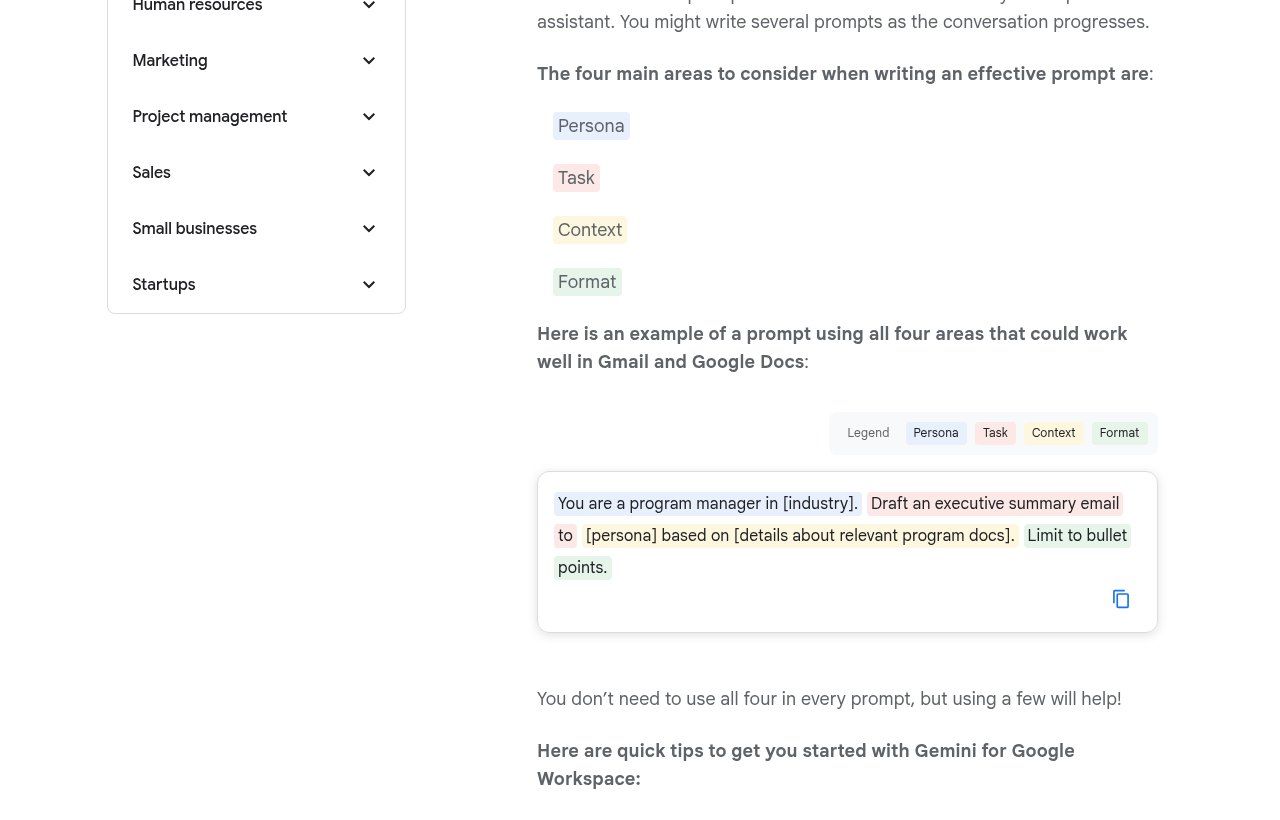
Source: Google Workspace, “Writing effective prompts” (workspace.google.com), screenshot taken 18/11/2026.
Before and after: three prompts rewritten
Nothing beats examples. Here are three real-life requests, like the ones we see in training, rewritten with the method.
Example 1: a shop’s Facebook post
Before: “Write a Facebook post for my fabric shop.”
After: “You are the community manager of a shop in Cotonou selling wax fabrics and tailor-made outfits. Write a Facebook post announcing new wax designs for the end-of-year holidays. Audience: working women aged 25 to 45 who mostly order on WhatsApp. Warm, simple tone, no more than two emojis. 80 words maximum. End with an invitation to message us on WhatsApp. Don’t invent any price or discount: we are not running one this week.”
What changed: a role, an audience, a conversion channel (WhatsApp), a length limit, and above all a guardrail that stops the AI from adding a “20% off” you never decided on.
Example 2: an NGO report
Before: “Summarise this report.”
After: “You are a monitoring and evaluation officer in an NGO. Summarise the activity report below for the steering committee, who have ten minutes to read it. Format: one paragraph of context, then three results with figures, two difficulties and two decisions to make. Copy the figures exactly as they appear in the text. If a figure looks inconsistent, flag it in square brackets instead of correcting it. Text: ### [paste the report] ###”
What changed: the reader and their reading time, an imposed structure, and a caution rule on figures, which is where automatic summaries do the most damage.
Example 3: replying to an unhappy customer
Before: “Reply to this customer.”
After: “You are replying on behalf of the customer service team of an IT equipment supplier in Benin. The customer below paid by Mobile Money five days ago and hasn’t received their laptop. Our rule: delivery within 72 hours in Cotonou, otherwise a goodwill gesture decided by the manager. Write a WhatsApp reply of four to six lines, polite, that acknowledges the delay without making excuses, explains the next step and says a manager will call them today. Don’t promise any specific delivery date. Customer message: ### [paste the message] ###”
The techniques that really change the result
Beyond the six blocks, a few techniques make a real difference. They are all recommended in the official documentation, and we use them every day.
Show an example instead of describing
If you have a message you like, paste it: “Here is an example of a reply we think is right. Write in the same style.” Specialists call this “few-shot” prompting. For a brand voice, a product sheet template or a report structure, one example is worth ten adjectives.
Have it ask questions before answering
End with: “Before answering, ask me the questions you need.” It is the most profitable instruction we know for important tasks (a sales proposal, a strategy memo, a funding application). The AI points out what you forgot to say.
Say what to do, not only what to avoid
“Don’t be too formal” leaves the AI guessing. “Write like a shopkeeper who knows their customer well” gives it a direction. OpenAI and Anthropic make the same point: a positive, explained instruction works better than a ban in capital letters. Explaining why also helps: “Use short sentences, because the message will be read on a phone.”
Break complex tasks down
For a heavy file, go step by step: first the outline, then each section, then the review. OpenAI’s guide explicitly recommends splitting a complex task into shorter requests and treating the exchange as a conversation. One giant request produces an average text everywhere.
Ask for a self-check
Add at the end: “Before finishing, list the assumptions you made and the points to check.” Or: “Put anything uncertain in square brackets.” You immediately spot the passages where the AI guessed instead of knowing.
Let the AI improve your prompt
Not sure how to phrase it? Paste your rough notes and ask: “Turn these notes into a clear, complete prompt and tell me what is missing.” Google even suggests a formula in its Gemini guide: “Make this a power prompt.” Always reread the result; the AI tends to add requirements you never had.
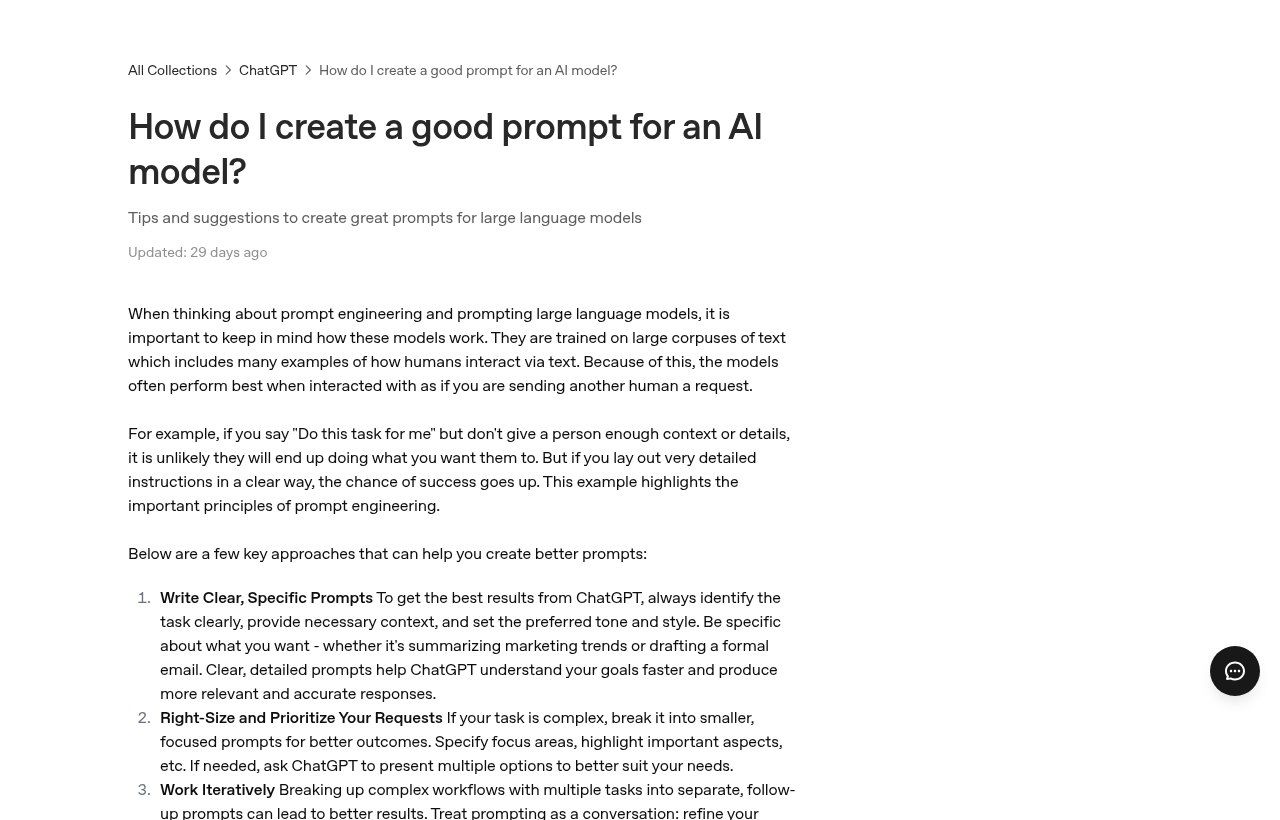
Source: OpenAI Help Center, “How do I create a good prompt for an AI model?” (help.openai.com), screenshot taken 18/11/2026.
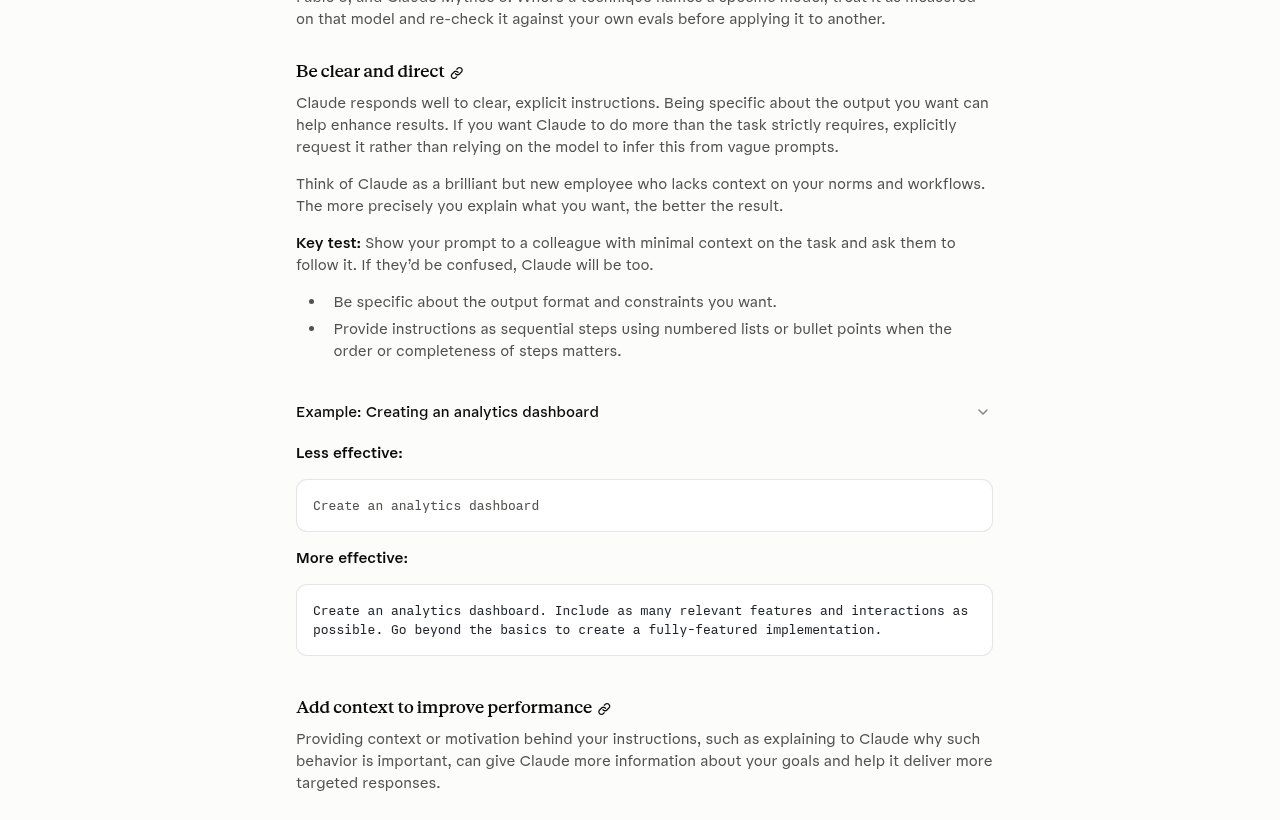
Source: Anthropic documentation, “Prompting best practices” (platform.claude.com), screenshot taken 18/11/2026.
ChatGPT, Gemini, Claude, Mistral: should you write differently?
Our view is firm: for everyday professional use, no. The “secret ChatGPT prompts” going around social media are mostly marketing. All four companies publish almost identical advice: be clear, give context, specify the format, iterate. Mistral also recommends structuring long prompts with Markdown headings (# Context, # Instructions, # Format), which works well everywhere.
What really changes from one tool to another is where you save your instructions so you don’t retype them in every conversation:
- ChatGPT: according to the official ChatGPT guide, custom instructions (Settings, then Personalization) apply to all your chats; Projects group chats that share the same files and instructions.
- Gemini: careful, things are changing. Since 17 November 2026, Gems on personal Google accounts are read-only and are becoming “skills”; they will be removed on 17 December 2026 (Google help page). For Google Workspace business accounts, the transition is announced for March 2027. If your team relied on Gems, check that their instructions and files were carried over.
- Claude: Projects let you attach reference documents and shared instructions.
- Mistral (Le Chat): an alternative from a French company, worth considering for organisations that care where their tools come from; the method stays the same.
Our practical advice: pick one main tool for the team, the one that fits your existing tools (Gemini if you use Google Workspace, Copilot if you use Microsoft 365, ChatGPT otherwise), and invest in method rather than endless comparisons. We cover plans and privacy in our article ChatGPT for business.
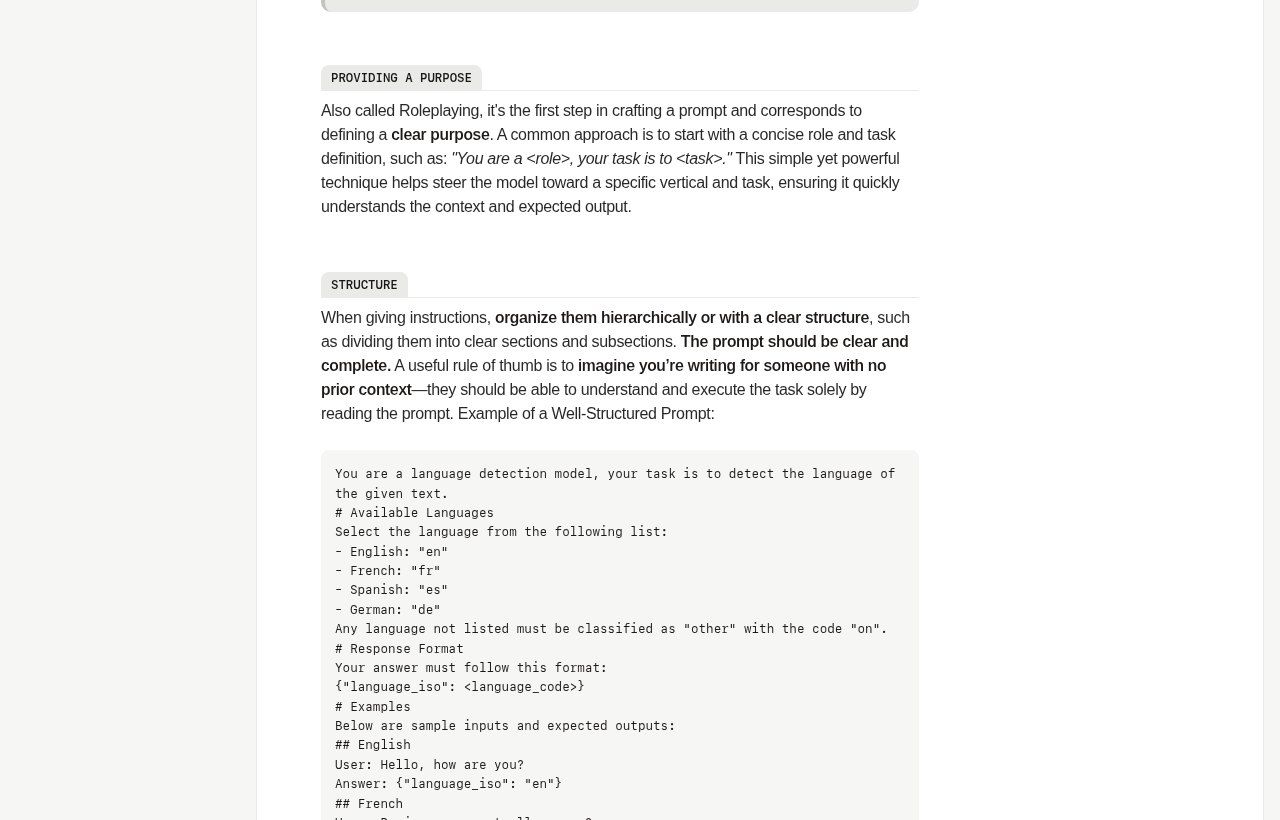
Source: Mistral AI documentation, “Prompting” (docs.mistral.ai), screenshot taken 18/11/2026.
What the AI doesn’t know about Benin (and you need to tell it)
International guides skip this point, yet it is where we see the most mistakes. Large models learned mostly from American and European texts. Without guidance, they reason in euros or dollars, quote French or US law, and suggest payment solutions that don’t exist where you are.
- Country and currency: say “in Benin, prices in CFA francs (FCFA)”. Otherwise a budget estimate arrives in euros or dollars.
- Legal framework: for a contract, terms of sale or personal data, say “Beninese law, OHADA Uniform Acts, Benin Digital Code”. And have a professional review it: the AI easily confuses the European GDPR with the rules of the APDP, Benin’s data protection authority.
- Local habits: Mobile Money payments, orders on WhatsApp, customers who send voice notes, formal or informal address depending on the sector. If it matters for the answer, write it down.
- Languages: AI handles French and English well, and Fon, Yoruba or Dendi much less well. For a message in a national language, always have a native speaker check it.
- The reader: an international donor, a market customer and a civil servant don’t expect the same text. Name the reader.
One sentence of context is often enough: “We are a distribution SME based in Cotonou; our customers are traders who mostly pay by Mobile Money and message us on WhatsApp.” Paste it at the top of your prompts or, better, save it in your tool’s instructions.
12 ready-to-adapt prompts for an SME, an NGO or an institution
Replace the items in square brackets. These templates are not magic: they give you a structure you will adjust after two or three tries.
Customer service and sales
1. Standard WhatsApp replies: “You are a customer adviser for [company], which sells [products] in Benin. Here is our policy: ### [delivery, returns, payment] ###. Write three short replies (five lines maximum) to the following frequent questions: [questions]. Friendly, polite tone, no promises outside the policy.”
2. Product description: “Write a 120-word product description for [product] for our website and our WhatsApp catalogue. Reader: [audience]. Real features: [list]. Highlight the concrete benefit, not superlatives. Don’t add any feature that isn’t on the list.”
3. Replying to a Google review: “Here is a [positive or negative] customer review on our Google profile: ### [review] ###. Write a public reply of 60 words maximum, polite, that thanks them, addresses the point raised and invites them to contact us privately if needed. Don’t mention any personal data about the customer.”
4. Invoice reminder: “Write a reminder message for an invoice of [amount] FCFA that has been overdue for [number] days. This is the [first or second] reminder. Firm but respectful tone, include the invoice number and payment methods: [list]. Four sentences.”
To go further on the last two cases: how to get and manage Google reviews and our unpaid invoice reminder templates.
Management and organisation
5. Meeting minutes: “From the transcript below, write minutes with: decisions made, tasks (owner, deadline), open issues. Don’t invent any decision. Put uncertain names or figures in square brackets. ### [transcript] ###”
6. Spreadsheet formula: “In Google Sheets, column A holds invoice dates and column B amounts. Give me a formula that totals this month’s invoices, explain it in two sentences, and tell me how to test it.”
7. Job advert: “Write a job advert for a [position] in [city]. Duties: [list]. Profile: [list]. Don’t mention age, gender or family status. Format: title, two-sentence presentation of the organisation, duties, profile, how to apply.”
8. Feedback analysis: “Here are [number] customer comments. Group them into themes, give the number of comments per theme, quote one representative example for each, and suggest three priority actions. Don’t rephrase the quotes.”
Meeting minutes deserve an article of their own: we explain the full method and a strict prompt to go from meeting to action items.
NGOs and institutions
9. Briefing note: “You are a policy analyst in a public institution. Write a one-page briefing note on [topic] based on the documents below, for a director who must decide [decision]. Structure: background, options (pros and cons), recommendation. Cite the source document for each piece of information.”
10. Donor report: “Here is the project’s logical framework and this quarter’s monitoring data. Write the Results section of the report for [donor], linking each result to its indicator. Use the figures without rounding. Flag indicators with no data instead of estimating them.”
11. Awareness message: “Write a WhatsApp awareness message on [topic] for [audience], in very simple French, sentences of ten words maximum, with a single requested action. Then suggest a version for a thirty-second voice note.”
12. Controlled translation: “Translate this text from French into English for an international partner. Keep the institutional tone, keep acronyms and amounts unchanged, and list at the end any terms whose translation is debatable.”
A prompt library for the whole team
In most organisations, everyone tinkers with their own prompts, and the day they leave, everything leaves with them. The real gain comes when good prompts become a shared asset.
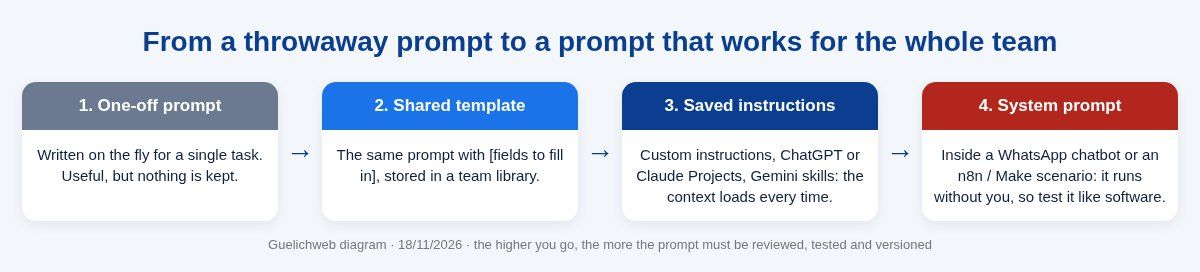
Guelichweb diagram · the higher you go, the more the prompt must be reviewed, tested and versioned.
In practice, here is what we set up:
- One place: a shared Google Docs document or Google Sheets file, with one row per prompt. No special software needed at first.
- Useful columns: prompt name, use case, prompt text with [fields], example of a good result, tool tested, owner, date of last update.
- One owner per prompt: someone who improves it when results get worse or when an internal rule changes.
- A shared context: a short presentation of the organisation, audience, tone and banned words, pasted at the top or saved in the tool’s instructions.
- A quarterly review: AI models evolve, and a prompt that worked well can degrade after an update. Mistral says so in its documentation: revisit your prompts regularly.
If you already work on Google Workspace, our Google Docs guide explains how to organise sharing and version history for this kind of document.
When the prompt runs a chatbot or an automation
There is a difference in kind between the prompt you type into a consumer AI chatbot and the one that powers a WhatsApp chatbot or an n8n or Make scenario. The second, called a system prompt, runs without you, hundreds of times, in front of customers you never see. An ambiguous sentence no longer produces one bad answer: it produces a hundred.
Here are the rules we apply on our automation projects:
- A written scope: what the assistant handles, and what it must hand over to a human (complaints, payments, medical or legal questions).
- An up-to-date knowledge base: prices, opening hours, terms. The assistant answers from this information, not from its general memory.
- Structured output when a machine reads the answer: for example a precise JSON format to classify a message or extract invoice data, as shown in the Mistral documentation example.
- A test set: twenty to fifty real customer questions, including the traps (insults, off-topic requests, attempts to make it say anything). Rerun these tests after every change.
- Version history: OpenAI advises developers to pin the model version used in production and to measure prompt behaviour. Without that, an update can change answers overnight.
This is the core of our work on WhatsApp chatbots with n8n in Benin. If you are torn between tools, read our comparison n8n or Make, and to understand what an assistant can do on its own, our article on AI agents.
Confidentiality: what never goes into a prompt
Everything you type into a prompt leaves your organisation. Depending on the tool and plan, this data may be stored and, on some consumer plans, used to improve models unless you turned that off. Our rule is simple: don’t send to a personal account what you wouldn’t email to a stranger.
- Never passwords, Mobile Money PINs, card numbers or banking access.
- No health data, beneficiary files or named customer lists on a personal account.
- Anonymise before pasting: “Customer A, trader in Porto-Novo” is enough to get a good answer.
- Use business accounts managed by the organisation, with checked privacy settings, rather than personal accounts.
- Personal data remains subject to the Digital Code and the rules of the APDP in Benin, even when an AI processes it.
These rules belong in an internal policy. We offer a template in our article on AI in business. And beware of fake “AI assistants” asking for your login details: it is a classic form of phishing.
Checking an answer before using it
A good prompt reduces errors. It doesn’t eliminate them. Models sometimes state false information with great confidence: a law that doesn’t exist, a rounded figure, an invented link. Before sending or publishing, run this thirty-second checklist:
- Do the figures match the source?
- Are the names (people, organisations, places) correct?
- Do the legal or regulatory references really exist? Check the official source.
- Do the links work and lead to the right place?
- Does the tone suit the reader and your relationship with them?
- Is there a promise (deadline, discount, guarantee) you never decided on?
If the answer must be factual, ask the tool to use web search and cite its sources, then open at least one of them. A source that is cited but never opened protects you from nothing.
The 7 mistakes we see most often
- The telegraphic prompt: three words, no context, then disappointment.
- Asking for everything at once: a report, a post, an email and a table in the same request.
- Forgetting the reader: a text that is perfect for a donor fails with a customer on WhatsApp.
- Accepting the first answer: the real work starts with the second message (“shorter”, “more concrete”, “remove the superlatives”).
- Letting the AI invent: not providing your real data, then being surprised by imaginary prices or statistics.
- Collecting “mega-prompts” found online: two pages of generic instructions rarely beat five precise lines about your situation.
- Pasting sensitive data into a personal account: the costliest mistake, and the easiest to avoid.
What Guelichweb can do for you
We work at three levels, depending on how mature your organisation is: hands-on training for your teams on their real cases (not generic examples), building a prompt library and a usage policy, and setting up assistants (WhatsApp chatbot, automatic message sorting, document generation) when a prompt deserves to run on its own. Details of our services are on our services page.
On budget, we don’t publish random prices: it depends on the number of people, the use cases and the tools already in place. We start with a diagnosis, then issue a quote, as explained on our offers page.
Frequently asked questions
What is a prompt in artificial intelligence?
It is the written (or spoken) instruction you give to an assistant such as ChatGPT, Gemini, Claude or Mistral: a question, an instruction or a goal, possibly with documents attached. The quality of the answer depends largely on how clear that instruction is.
How do you write an effective prompt in one sentence?
Say who the AI should be, what it should produce, for whom, in what form, and what it must not do. For example: “You are a customer adviser; write a five-line WhatsApp reply to this unhappy customer, politely, without promising a date.”
Does a prompt need to be long?
No, it needs to be precise. A simple request can fit on one line. But very short requests often lack context: Google observes that the most effective prompts average around 21 words, versus under 9 for first attempts.
Should I write prompts in English?
Not if the result should be in French. The major assistants understand French very well. Write in the language of the expected output; you will get fewer awkward translated phrases.
Do the same prompts work on ChatGPT, Gemini and Claude?
Yes, in the vast majority of cases. The companies recommend the same principles. Results vary slightly between models; test your important prompts on the tool your team actually uses.
Can I use ChatGPT with customer data?
Only with care: on a business account with checked settings, with the minimum data needed, preferably anonymised, and in line with personal data protection rules (the APDP in Benin). Never passwords or banking details.
What is prompt engineering?
It is the practice of designing and improving the instructions given to an AI model to get reliable answers. For a user, it is mostly a writing method; for a chatbot or an automation, it also includes testing, versioning and monitoring results.
Final word
Writing a good prompt is not a talent reserved for IT people. It is a delegation skill: being able to say clearly what you want, for whom, with which information and within which limits. The organisations that save time with AI are not the ones that found a miracle tool; they are the ones that turned this skill into a team habit.
Want to train your team on its real files, build your prompt library or turn a prompt that works into an assistant that runs on its own? Contact Guelichweb: we start by looking at how you work today, and we tell you honestly what is worth doing.