What is Microsoft Copilot? Free vs paid, and which version your business needs (2026 guide)
G. CHRIST
Published on November 21, 2026

At Microsoft, "Copilot" now means at least five different things. A free app on your phone, a button in Windows, a feature inside Word, a business licence billed per user, a workshop for building agents… and a developer tool that has almost nothing to do with the rest. The result: we see managers paying for a licence their team didn't need, and others turning Copilot down when they already had it, included in their Microsoft 365 subscription.
This guide sorts it out. We explain what Microsoft Copilot is, what is genuinely free, what the paid version costs in 2026, what happens to your data depending on the account you use, and how to decide without getting caught out, whether you run an SME in Cotonou, an NGO in Abidjan, a public institution in Dakar or a small team in Lagos or London. Prices and terms were checked on Microsoft's official pages on 21 November 2026.
What is Microsoft Copilot, in one sentence?
Microsoft Copilot is Microsoft's artificial intelligence assistant: you write (or speak) to it in plain language, and it drafts, summarises, translates, analyses a file, creates an image or looks something up on the web. At its core, it plays in the same league as ChatGPT or Gemini. Its real difference lies elsewhere: it is wired into the Microsoft world, meaning Windows, Edge, Outlook, Teams, Word, Excel, PowerPoint and, with the right licence, your work emails and files.

Official Microsoft Copilot logo (source: copilot.microsoft.com, Microsoft).
Our view, up front: if your organisation already works with Microsoft 365 (Outlook, Teams, OneDrive), Copilot is the first AI assistant to try, before you open a subscription anywhere else. If you're on Google Workspace, or have no online office suite at all, there's no reason to move to Microsoft just for Copilot.
The 5 "Copilots" everybody mixes up
Before talking about price, you need to know which Copilot we mean. Microsoft has renamed its products several times since 2023, so you'll find the same things under slightly different names from one page to another. Here's the map as it stands at the end of 2026:
- Microsoft Copilot (consumer): the free app on the web (copilot.microsoft.com), in Windows, in Edge and on Android or iPhone, used with a personal Microsoft account (Outlook.com, Hotmail…). For everyone, with usage limits.
- Copilot Chat (at work): the same kind of AI chat, but used with a Microsoft 365 work account (your @your-company address managed by Microsoft). It's included at no extra cost in eligible Microsoft 365 subscriptions and comes with enterprise data protection.
- Microsoft 365 Copilot / Copilot Business (paid licence): Copilot built into Word, Excel, PowerPoint, Outlook and Teams, able to search your emails, meetings, chats and files. Copilot Business is the version for organisations with up to 300 users.
- Copilot Studio: the tool for building agents (specialised assistants that answer from your documents or trigger actions), billed by consumption in "Copilot Credits".
- GitHub Copilot: a coding assistant for developers. Same name, different product, different subscription. If you don't write code, ignore it.
Source: Copilot home page, copilot.microsoft.com (Microsoft), screenshot taken 21/11/2026.
Above all, remember the dividing line between 1 and 2: it's the account you sign in with that decides which rules apply to your data, not the app. The same Copilot opened with a Hotmail address or with the NGO's work address does not follow the same terms at all.
Is Microsoft Copilot free?
Yes, partly. There are three levels of "free", and they don't give you the same thing.
With a personal account: free, but limited
The Copilot app is free on the web, in Windows and on mobile. Microsoft states that it's a limited version, subject to available capacity: when you hit a limit (images, voice, advanced features), you have to wait or move to a subscription. For a solo entrepreneur who wants to rephrase a message, prepare a training outline or understand a legal text, that's often enough.
In August 2026, Microsoft launched a new version of the Copilot app. If you used the old one, Microsoft asks you to sign in to the new one before 31 December 2026 to keep your eligible conversations; content that hasn't been migrated will then be deleted. If your team got used to keeping important drafts there, now is the time to check.
With a Microsoft 365 work account: Copilot Chat included
If your organisation has an eligible Microsoft 365 subscription (Business Basic, Business Standard, Business Premium, E3, E5 and so on), every user with a work account gets Copilot Chat at no extra cost. According to Microsoft's help pages, it lets you chat with an AI grounded on the web and powered by the latest models, ask questions, summarise documents and web pages, create images and use pay-as-you-go agents. In Outlook and Teams, it can see the message or conversation you have open.
What it doesn't do without a licence: go and search your mailbox, calendar or SharePoint folders on its own. It only knows what you show it (an uploaded file, an open email).
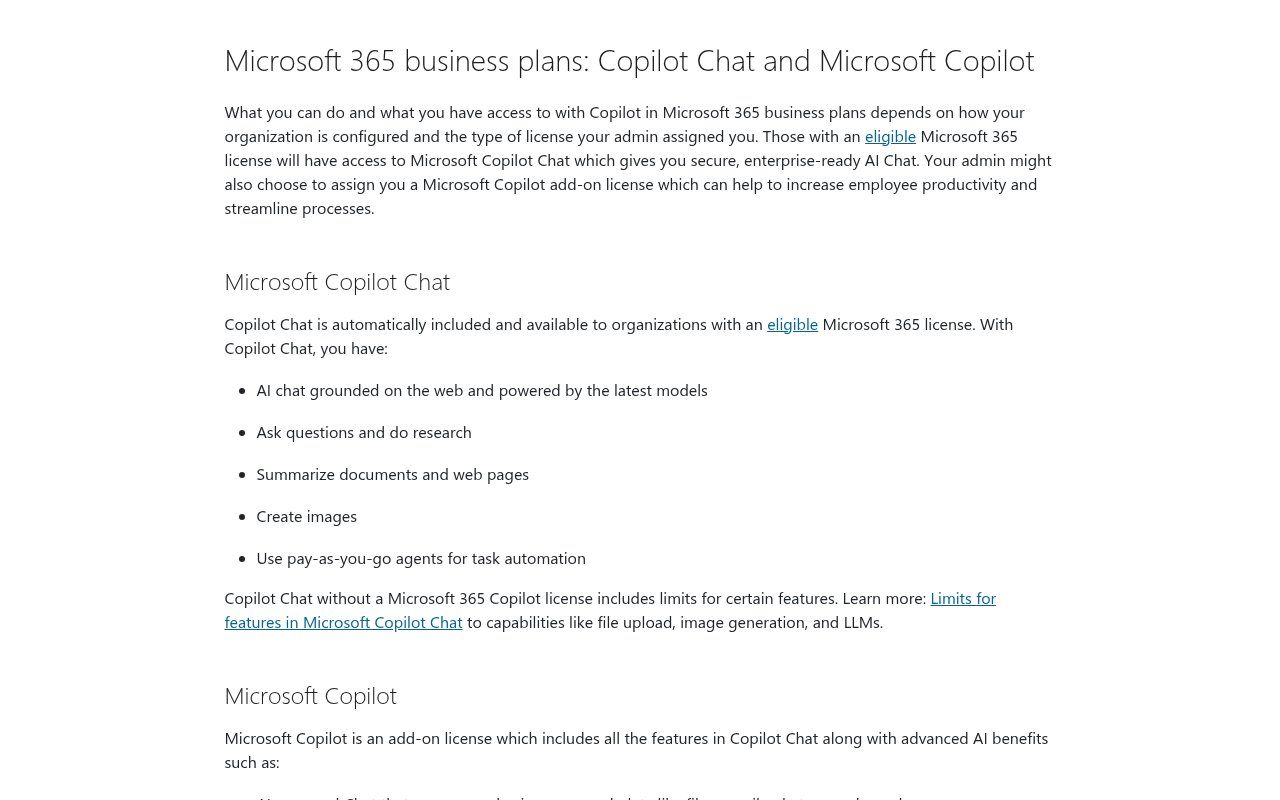
Source: Microsoft Support, "What's the difference between Microsoft Copilot (free) and Copilot in Microsoft 365", screenshot taken 21/11/2026.
One important change since 9 November 2026: Microsoft has extended usage limits in Copilot Chat for users without a Copilot licence. Microsoft doesn't publish numbers; when a limit is reached, a notice says when the feature will be available again. It's not an outage. Warn your team, or you'll get "Copilot is broken" messages all week.
Copilot on WhatsApp: it's over
Many people in West Africa first met Copilot through WhatsApp, and "copilot whatsapp" still shows up a lot in Google suggestions. Since 15 January 2026, Copilot is no longer available on WhatsApp: Meta changed the WhatsApp Business terms to exclude general-purpose AI assistants, and Microsoft withdrew the service (TechCrunch). Chat histories were not transferred. So be wary of "free Copilot on WhatsApp" numbers that still circulate: they are not Microsoft services.
That doesn't mean a business can no longer use AI on WhatsApp. A chatbot that answers customers about your own business is still allowed; we cover this on our WhatsApp chatbot with n8n page.
How much does Copilot cost in 2026?
These are the prices Microsoft displayed on 21 November 2026. They change often, vary by billing country and don't always include tax: treat them as a ballpark and check the official page before buying.
For individuals
- Free Copilot: nothing, with limits.
- Microsoft 365 Personal: $9.99 a month in the US (€10 incl. VAT in France), with Copilot in Word, Excel, PowerPoint and Outlook and higher limits than the free version.
- Microsoft 365 Family: $12.99 a month (€13 in France), for up to 6 people; Microsoft's pricing pages have so far reserved AI features for the subscription owner, and Microsoft has announced that Family and Premium members will be able to share AI benefits.
- Microsoft 365 Premium: $19.99 a month (€22 in France), which replaces the old Copilot Pro and adds advanced features such as Researcher and Analyst.
These plans are designed for individuals. For a team, they raise a basic problem: the files and the AI are tied to a personal account, not to the organisation. The day that person leaves, everything leaves with them.
For a business, an NGO or an institution
- Copilot Chat: included with eligible Microsoft 365 subscriptions, at no extra cost.
- Microsoft 365 Copilot Business (add-on, up to 300 users): $21 per user per month on an annual commitment on the US page, with a promotional $18 until 31 December 2026 (first year, for customers who already have an eligible Business plan), and $25.20 on monthly billing. In France: €18.20 excl. VAT, €15.60 during the promotion.
- Microsoft 365 subscription required: Copilot Business sits on top of an eligible plan (Business Basic, Standard, Premium, Apps for Business or Teams Essentials, according to Microsoft Learn), which you pay for separately. Microsoft also sells "Business Standard with Copilot" and "Business Premium with Copilot" bundles at special prices.
- Copilot Studio and agents: $200 a month for a pack of 25,000 Copilot Credits, or $0.01 per credit on pay-as-you-go.
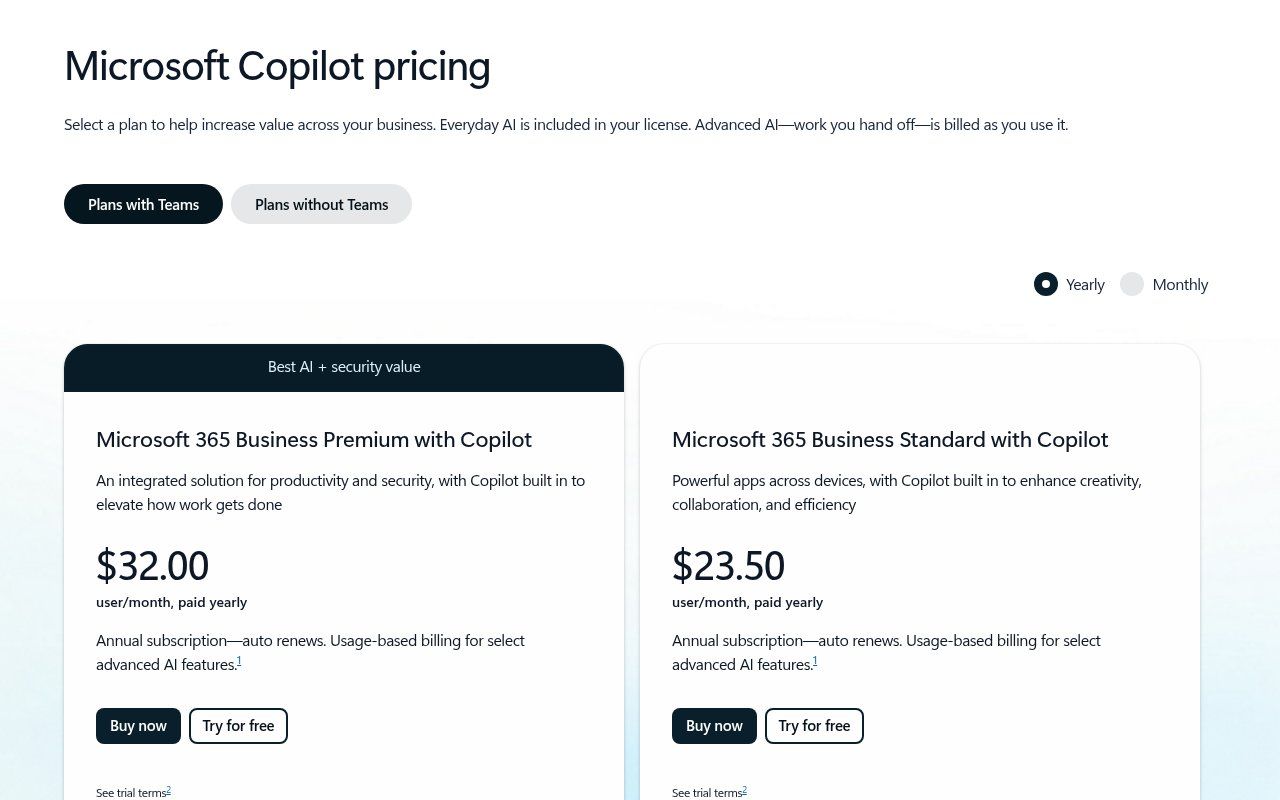
Source: Microsoft, "Microsoft Copilot Plans and Pricing for business" page, screenshot taken 21/11/2026. Amounts depend on country, currency and billing option.
Do the honest maths before you sign. At $21 per person, equipping 10 people comes to $210 a month, or $2,520 a year, on top of the Microsoft 365 subscription. For many SMEs in Benin, that is the budget of a real digital project. So the question isn't "is Copilot good?" but "who, exactly, will save enough time to justify that amount?".
From Benin, Côte d'Ivoire or Senegal, the billing currency, taxes and payment methods depend on your account's country and on the Microsoft reseller. Ask for a written quote and check whether the commitment is annual: an annual licence is paid for even if the user never opens Copilot.
NGOs and nonprofits
Nonprofits that qualify for Microsoft's nonprofit programme can get Microsoft 365 Business Basic free for up to 300 users, Copilot Chat included, and Business Premium at a discount ($5.50 per user per month on annual billing, according to the Microsoft Nonprofits page). The Copilot add-on is listed there at $25.50 per user per month. Oddly, that's more than the public Copilot Business price for organisations under 300 people, so compare the two before ordering. Eligibility depends on country and legal status; check it on the nonprofit offers page.
What the paid licence really changes
The Copilot licence doesn't make the AI "smarter" in the abstract. It mainly changes three things:
- Access to your work data. Copilot can search the emails, meetings, Teams chats, calendars and files the person already has access to. Example: "Which delivery date did we agree with the cement supplier?" Copilot answers from the emails and minutes, without you digging them out.
- Copilot inside the apps. Summarise a 40-email thread in Outlook, catch up on a missed Teams meeting, suggest a pivot table in Excel, turn a Word report into a PowerPoint deck. For meetings, our guide to AI meeting minutes also explains how to manage without a licence.
- Agents and advanced features. Researcher (in-depth research that produces a sourced report), Analyst (spreadsheet analysis), custom agents at no extra cost for licensed users, and priority access to computing capacity.
What it doesn't change: a messy file structure, unreadable scanned documents, procedures that exist only in the director's head. Copilot searches what exists. If there's nothing tidy to find, it will find it badly. In several organisations, we recommend tidying OneDrive and SharePoint before buying a single licence.
Your data: work account or personal account makes all the difference
This is the question finance and admin managers ask us most, and it has a fairly clear answer.
With a work account (Microsoft Entra), Copilot Chat and Copilot are covered by enterprise data protection. According to Microsoft Learn, prompts and responses fall under the same contractual commitments as your Exchange emails and SharePoint files, your access rights and sensitivity labels apply, and prompts, responses and data accessed through Microsoft Graph aren't used to train foundation models. In the app, a "Work" label and a green shield show it.
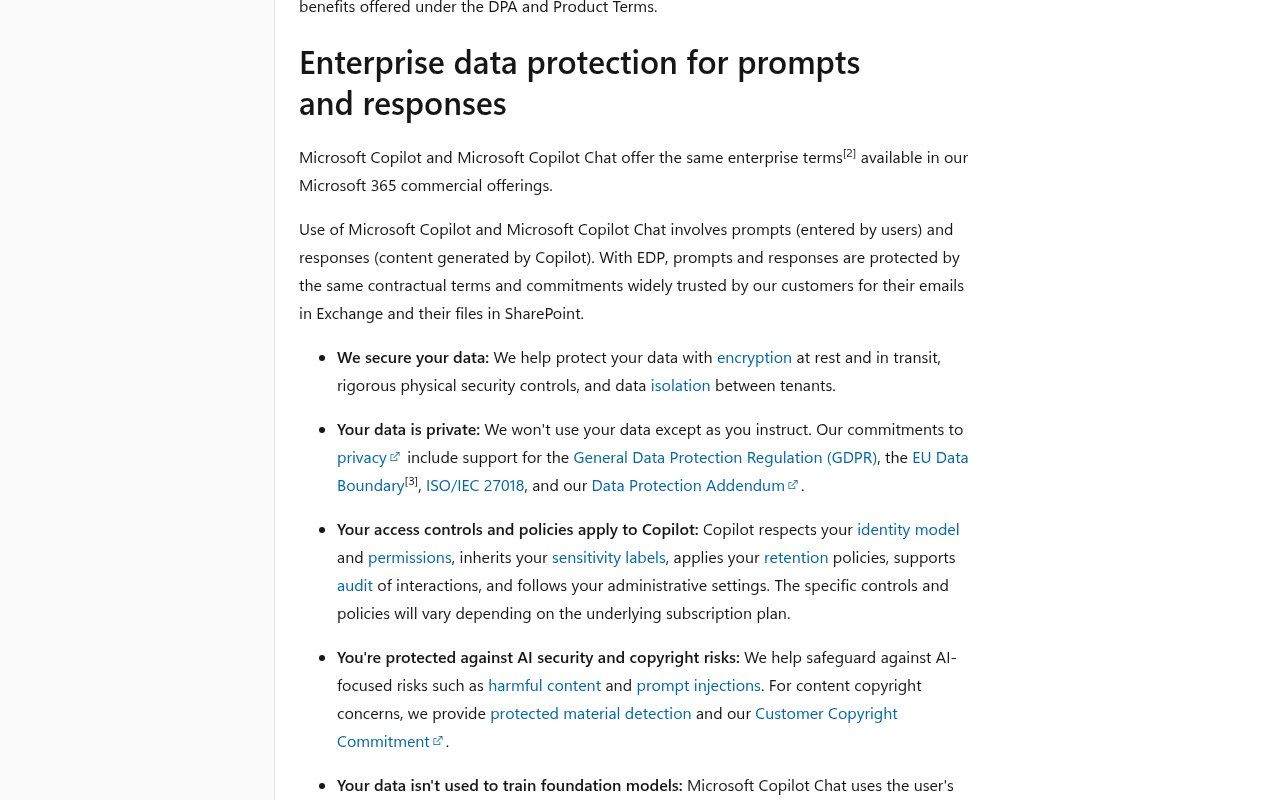
Source: Microsoft Learn, "Enterprise data protection in Microsoft Copilot and Microsoft Copilot Chat", screenshot taken 21/11/2026.
With a personal account, you're under Microsoft's consumer terms (Services Agreement, Privacy Statement, Copilot Terms of Use). That isn't necessarily dangerous, but it isn't a business framework: no administrator, no retention policy, and privacy settings (history, personalisation) you have to manage yourself.
Three watch-points we always add:
- Web searches. When Copilot goes to the web, it sends Bing a short query built from your question, with user and tenant identifiers removed, but outside the Microsoft 365 contractual framework. An administrator can turn web search off if your topics are sensitive.
- Oversharing. With the licence, Copilot finds everything the person is allowed to open, including a "salaries" folder shared with "Everyone" by mistake. Check sharing before rollout, not after.
- Mixed accounts. An intern who pastes a client contract into Copilot using their Hotmail takes that contract outside the company's framework. A simple written rule covers most cases; our AI usage policy template can serve as a starting point.
Copilot, ChatGPT or Gemini: which one for your organisation?
We have a firm view: pick the assistant that belongs to the suite you already use, and don't pay for two AI subscriptions for the same team without a measured reason.
- You're on Microsoft 365 (Outlook, Teams, OneDrive): start with Copilot Chat, already included. Add Copilot Business licences for the people who spend their days in email, meetings and Excel.
- You're on Google Workspace: Gemini is built into Gmail, Docs and Drive; see our Google Workspace guide and our article on NotebookLM for working on your own documents.
- You have no online office suite: a team subscription to an assistant such as ChatGPT may be enough at first; we compare its plans in ChatGPT for business.
Answer quality varies from month to month depending on the models used; Microsoft even lets you choose between several models in its paid plans. What really matters day to day is integration with your tools and the quality of your requests. A good instruction beats a more expensive licence: our method for writing an effective prompt works with Copilot too.
10 practical uses of Copilot for an SME, an NGO or an institution
- Summarise a long email thread with a donor and pull out the list of commitments made by each side.
- Prepare a first draft of an activity report from notes, Excel figures and meeting minutes.
- Turn a Word report into a PowerPoint deck for a board meeting (to be reworked, never projected as is).
- Catch up on a missed Teams meeting: decisions, open points, who does what (with a licence and transcription turned on).
- Write template replies for customer service in French, then adapt them into English for partners.
- Analyse a sales file: which products are declining, which branches are growing, which anomalies to check.
- Compare three supplier quotes uploaded as PDFs and produce a criteria table.
- Prepare a job description, an interview grid and a courteous rejection message.
- Build an agent that answers staff questions from the procedures manual stored in SharePoint.
- Proofread an official letter for tone and clarity before sending it to a government office.
In every case, someone reviews the output. Copilot makes mistakes, sometimes invents a reference or a figure, and doesn't know local specifics (tax procedures, regulator rules, how a ministry likes things done) as well as it seems to. As for national languages: Fon, Yoruba and Wolof are not on Copilot's official list of supported languages (September 2026 update), and Copilot may decline a request in an unsupported language. French and English are supported.
Our method: test for 30 days before you buy
Here's how we advise organisations to decide, without spending a franc more than needed:
- Check what you already have. Sign in to copilot.cloud.microsoft or the Microsoft 365 Copilot app with a work account. If the "Work" label appears, Copilot Chat is active.
- Set an account rule. Organisation data only in work accounts. Never a client file, a payslip or beneficiary data in a personal account.
- Pick 3 to 5 repetitive tasks and measure the current time spent (e.g. 2 hours a week on weekly reports).
- Have the team work with Copilot Chat for 2 to 4 weeks. The usage report in the Microsoft 365 admin centre shows who really uses it.
- Buy licences only for the people who keep hitting the limits or who need Copilot to search their emails and files. Two or three licences are often enough where you expected to buy twenty.
- For a recurring question on the same set of documents (manual, price list, internal rules), compare with an agent billed per answer rather than per-person licences.
Copilot Studio, Power Automate, n8n or Make: who does what?
Copilot helps a person work faster. It doesn't replace an automated process that runs on its own, overnight, across several tools. The confusion is common, so let's be precise:
- Copilot / Copilot Chat: an assistant you ask. Someone has to be at the screen.
- Copilot Studio: for building AI agents in the Microsoft ecosystem (Teams, SharePoint, website), billed in credits.
- Power Automate: Microsoft's automation tool, a logical choice if all your work already lives in Microsoft 365.
- n8n or Make: automation across mixed tools, very common among our West African clients: website form, Google Sheets, WhatsApp, Mobile Money, CRM, email. See n8n or Make and what is n8n.
A realistic example: a quote request comes in through your website form, n8n saves the contact in the CRM, sends a WhatsApp acknowledgement and creates a task; the salesperson then opens Copilot in Outlook to draft a proposal from the previous exchanges. Each tool in its place. To estimate this kind of project, read how much AI automation costs in Benin and our guide to task automation.
The mistakes we see most often
- Buying licences for the whole team in month one, then finding half of them never use it.
- Ignoring Copilot Chat when it's already paid for in the Microsoft 365 subscription.
- Letting everyone use their personal account "because it's easier".
- Rolling out the licence without checking which folders are shared with the whole organisation.
- Confusing GitHub Copilot with Microsoft 365 Copilot on a purchase order.
- Searching for "free Copilot on WhatsApp" and landing on a fake service that harvests data. On that topic, our guide to phishing at work is still useful.
- Expecting Copilot to replace a real system: CRM, automation, an up-to-date website. It makes them easier to use; it doesn't build them.
How Guelichweb can help
We don't resell Microsoft licences and we earn nothing from their sale, which leaves us free to tell you when Copilot isn't worth the money. Our work sits around it: diagnosing your current tools, choosing between Microsoft 365 and Google Workspace, a professional email address on your own domain, an AI usage policy, n8n or Make automations that connect your website, WhatsApp and CRM, and training your team in good habits.
Every situation is different, so pricing is by quote, after a diagnosis. Our approach is detailed on the offers page and in our services. To talk it through, get in touch.
FAQ: Microsoft Copilot
What exactly is Microsoft Copilot?
Microsoft's AI assistant. It drafts, summarises, translates, analyses files and answers questions, in a dedicated app and in Windows, Edge, Outlook, Teams, Word, Excel and PowerPoint depending on your subscription.
Is Copilot free?
Yes, in a limited version with a personal account, and as Copilot Chat included with eligible Microsoft 365 business subscriptions. The version that works inside your company emails and files is paid.
What's the difference between Copilot Chat and Microsoft 365 Copilot?
Copilot Chat (included) answers from the web and from what you show it. Microsoft 365 Copilot (paid) also searches your emails, meetings, chats and files, works across all the Office apps and gives access to Researcher, Analyst and agents.
How much does Copilot cost for a business?
The Microsoft 365 Copilot Business add-on is listed at $21 per user per month on annual billing in the US (€18.20 excl. VAT in France), with a promotion until 31 December 2026, plus the eligible Microsoft 365 subscription. Check the price that applies in your country.
Does Copilot use my data for training?
With a work account covered by enterprise data protection, Microsoft says prompts, responses and data accessed through Microsoft Graph aren't used to train foundation models. With a personal account, the consumer terms apply.
Can I still use Copilot on WhatsApp?
No. The service ended on 15 January 2026. Copilot remains available on the web, in Windows and in the official mobile apps.
Does Copilot work in Benin and in French?
Microsoft says Copilot is available in more than 170 markets (the exceptions cited are mainland China and embargoed countries), and French is among the supported languages. Some new features reach certain regions later; test the ones you need before paying.
Main sources: Microsoft, Copilot plans for business and for individuals; Microsoft Support, difference between free Copilot and Copilot in Microsoft 365 and Copilot Chat limits; Microsoft Learn, enterprise data protection, licence options and supported languages; Copilot Studio pricing; Microsoft nonprofit offers; TechCrunch (25/11/2025) on Copilot leaving WhatsApp. Accessed 21 November 2026.