WhatsApp Business catalog: how to create it, share it and turn carts into orders (2026 guide)
G. CHRIST
Published on November 2, 2026
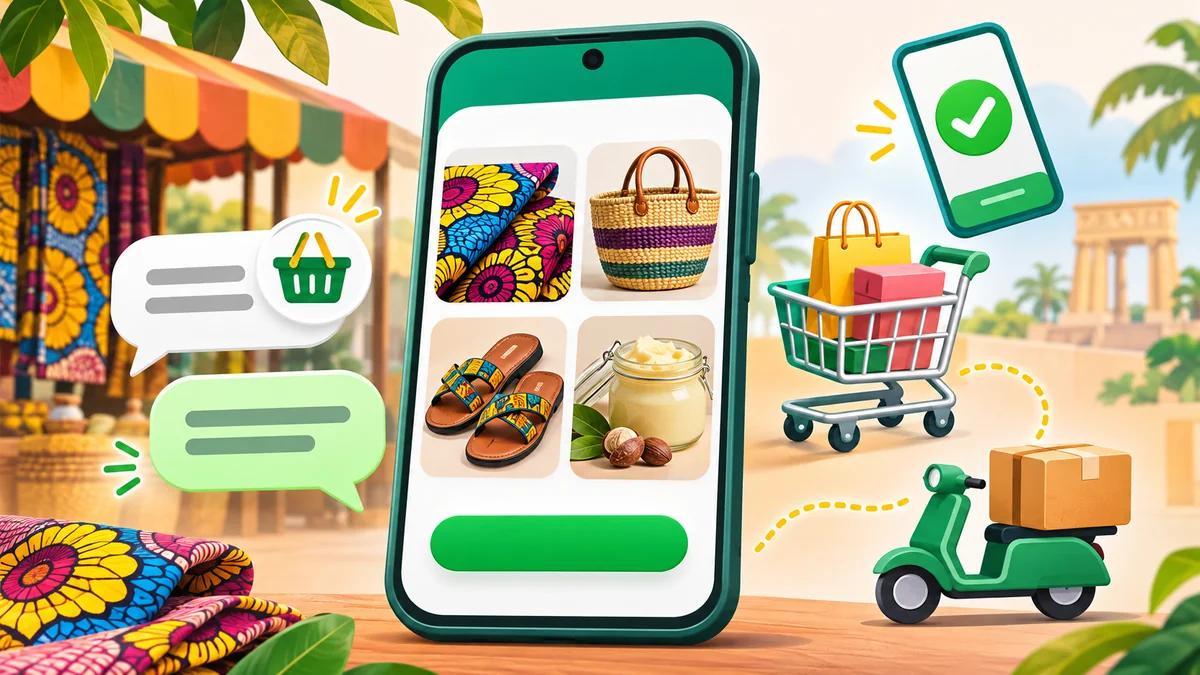
"Do you have the dress in medium? How much is it? What about the blue one? Can you send more photos?" If you sell on WhatsApp, you know this routine. Every customer asks the same questions, you forward the same pictures from your gallery, you type the same prices again, and by 10 pm you no longer remember who ordered what.
The WhatsApp Business catalog solves a large part of that problem, and it costs nothing. Yet many sellers switched it on once, added three products and forgot about it. Others keep wondering why their items stay "in review" or why the link won't open for some customers.
At Guelichweb, we build websites, online stores and WhatsApp automations for SMEs, NGOs and institutions in Benin and across French-speaking Africa. In this guide, we explain how to create a catalog on WhatsApp Business, how to fill it so it actually sells, how to share it, how to turn a cart into an order paid with Mobile Money, what to do when the catalog isn't working and, above all, when it is no longer enough.
In short: the catalog is a free storefront built into WhatsApp Business (up to 500 items). It does not handle payment, stock or visibility on Google. Filled in properly and connected to order tracking, it saves a huge amount of time. Left untouched, it does nothing for you.
What exactly is the WhatsApp Business catalog?
The catalog is a feature of the WhatsApp Business app that lets you display your products or services directly on your business profile. Customers browse it without leaving WhatsApp, open an item, see the photos, the price and the description, then message you or add the item to their cart.
According to WhatsApp's official catalog page, you can upload up to 500 items. Each item can include up to 10 images or videos (a video can't exceed 50 MB), a name, a country of origin and, optionally, a price, a sale price, a description, a link to your website and an item code.

Official WhatsApp logo (Meta), reproduced for illustration.
It is just as important to be clear about what the catalog is not:
- It is not a checkout. In Benin, as in most countries, there is no in-app payment: the customer sends you a cart, and you collect the money afterwards.
- It is not a stock management tool. When an item sells out, you have to hide it yourself.
- It is not a website. Nobody finds your catalog by typing "wax dress Cotonou" into Google. It only works for people who are already chatting with you.

Source: “Using your WhatsApp Business catalog to make sales”, WhatsApp for Business, captured on 2 November 2026.
Before you start: five things to prepare
You can create a catalog in ten minutes. You can also create a good one in an afternoon, as long as the groundwork is done. This is what we ask our clients to prepare before they even open the app.
- The WhatsApp Business app, not regular WhatsApp. The catalog only exists in WhatsApp Business (Android, iPhone) and can also be managed from WhatsApp Web and the Windows app. If you sell from your personal number, now is the time to separate the two.
- A complete business profile. Business name, category, description, address or delivery area, opening hours, website. A catalog sitting on an empty profile doesn't inspire much trust.
- A clean product list. Build it in a spreadsheet first: name, item code, price in CFA francs, short description, sizes or variants, stock status. Our Google Sheets guide will get you started. You will reuse this list later to track orders.
- Decent photos. Not necessarily professional, but sharp, well lit, on a plain background and square.
- Your sales rules. Delivery areas and fees, lead times, payment methods, return conditions. If you haven't written them down, you will improvise them in every conversation.
How to create a catalog on WhatsApp Business, step by step
Here is the procedure described in WhatsApp's official help center, Android version. On iPhone, the menus are very similar.
- Open WhatsApp Business, go to the Tools tab, then tap Catalog.
- Tap Add new item.
- Tap Add photos and videos, then choose Gallery or Camera. You can add up to 10 images or videos.
- Enter the product or service name.
- Set the country of origin (required).
- Fill in the optional fields: price, sale price, description, website link, item code.
- Tap Save. The item is sent for review.
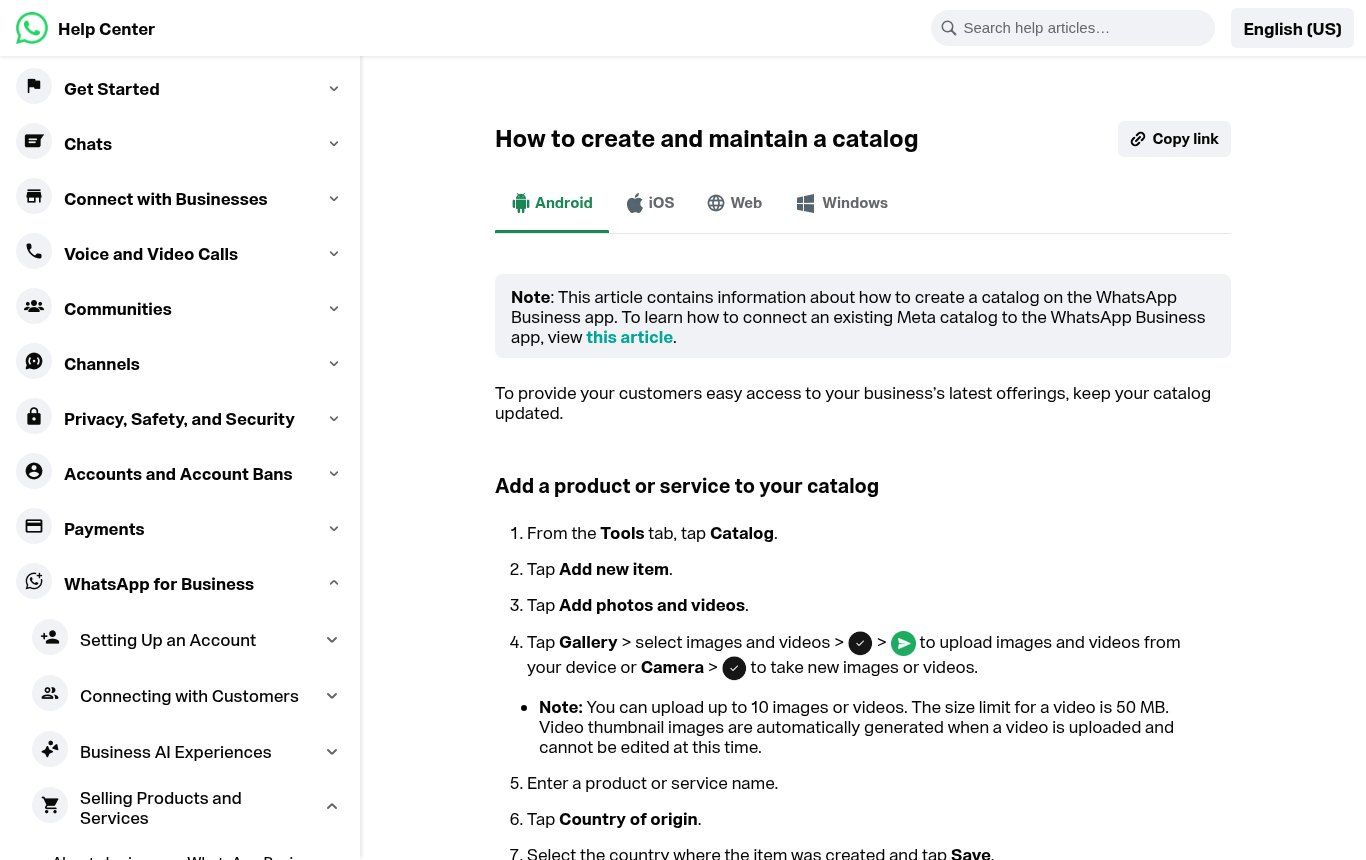
Source: WhatsApp Help Center, “How to create and maintain a catalog”, captured on 2 November 2026.
One important point: every item is reviewed by WhatsApp against its commerce rules and only becomes visible to customers once it has been approved. So don't share your catalog right after creating it; check first that the items are actually live.
What about from a computer?
The help center also covers WhatsApp Web and Windows. When you need to enter thirty products with careful descriptions, a keyboard saves a lot of time. Prepare the texts in your spreadsheet, copy and paste, and add the photos from the folder where you saved them. If your business already runs a Meta catalog (for Facebook or Instagram), WhatsApp also lets you connect it to the app instead of retyping everything.
Format, image size and copy: a product listing that sells
"What image size should I use for the WhatsApp Business catalog?" comes up all the time. WhatsApp doesn't publish a mandatory size for the app. Meta does, however, publish image specifications for catalogs, and they are good benchmarks: JPEG or PNG, 8 MB maximum, square, at least 500 × 500 pixels, 1024 × 1024 recommended, and nothing misleading.
Our advice: shoot everything square, at 1080 × 1080 or 1024 × 1024, with the product centered and some space around it. The catalog thumbnail is small, and a product photographed from far away against a busy background becomes unreadable.
For the copy, think of the customer who is hesitating at 11 pm and doesn't feel like messaging you to ask something basic.
- Name: what it is, plus what makes it different. "Long wax dress, short sleeves" beats "Model 12".
- Price: show it if you can (the price field depends on the country and currency the app offers). A catalog without prices generates one question per item.
- Description: material, available sizes, dimensions, color, what's included, production or delivery time, areas you serve.
- Item code: use exactly the code from your spreadsheet. When an order comes in, you'll know immediately which product it is.
- Link: if the product is on your website, add the link. Customers who want more details, or want to share the product, need it.
Here is a sample listing (fictional) for a clothing shop in Cotonou: "Men's pagne outfit, shirt and trousers. 100% cotton wax fabric. Sizes M to XXL. Made-to-measure possible within 5 days. Delivery in Cotonou and Abomey-Calavi, other cities on request. Code ENS-H-014." In five lines the customer has everything they need and can order without any back-and-forth.
The catalog works for services too: a consultancy can list its support packages, a school its courses, a caterer its menus, an NGO its workshops or kits. Use a "from" price when that's honest, or explain in the description how the price is set.
Organizing the catalog: collections, hidden items, updates
Beyond a dozen items, an unsorted catalog wears people out. WhatsApp lets you group items into collections (for example "Women", "Men", "Kids", or "Breakfast", "Mains", "Drinks"). A collection should answer the question the customer is asking, not mirror how your storeroom is organized.
Two habits to adopt:
- Hide instead of deleting. An out-of-stock item can be hidden and shown again later without retyping everything.
- Book a weekly update. Once a week, compare the catalog with your stock spreadsheet. A customer who orders something unavailable often leaves annoyed, and doesn't come back.
Sharing the catalog: link, status, greeting message
A catalog nobody opens sells nothing. According to WhatsApp's help article on sharing, you can share the whole catalog or a single item: send it in a chat, add it to your status, copy the link or share it to another app.
Where the WhatsApp Business catalog link really pulls its weight:
- Greeting message and quick replies. As soon as a new contact messages you, they receive the catalog link. Also create a "/catalog" quick reply so you can send it in two seconds.
- Your WhatsApp status. Post an item with its link: anyone who taps it lands directly on the listing.
- Your social media. Instagram bio, Facebook page, TikTok description, email signature.
- Offline. A QR code pointing to the catalog on your flyers, bags, counter or trade-fair stand.
- Your website. A "See our WhatsApp catalog" button next to the contact button.
Two official limits to keep in mind: the catalog link can't be customized, and it may stop working if you edit it. On old Android phones (before Android 6.0), it may not open at all. If a customer tells you "the link doesn't work", send them the item directly in the chat.
A quick reminder for Benin: since phone numbers moved to 10 digits at the end of 2024, check that all your contact links (wa.me on your website, printed QR codes, Instagram bio) use the new format with the 01 prefix. An old QR code pointing to your former number is a lost sale you'll never hear about.
The cart: from "I want this" to a real order
The cart is the most underused part of the catalog. According to WhatsApp's help center, a shopping button appears next to your business name. Customers browse your catalog, add items to their cart, change quantities, then send you the cart as a message.
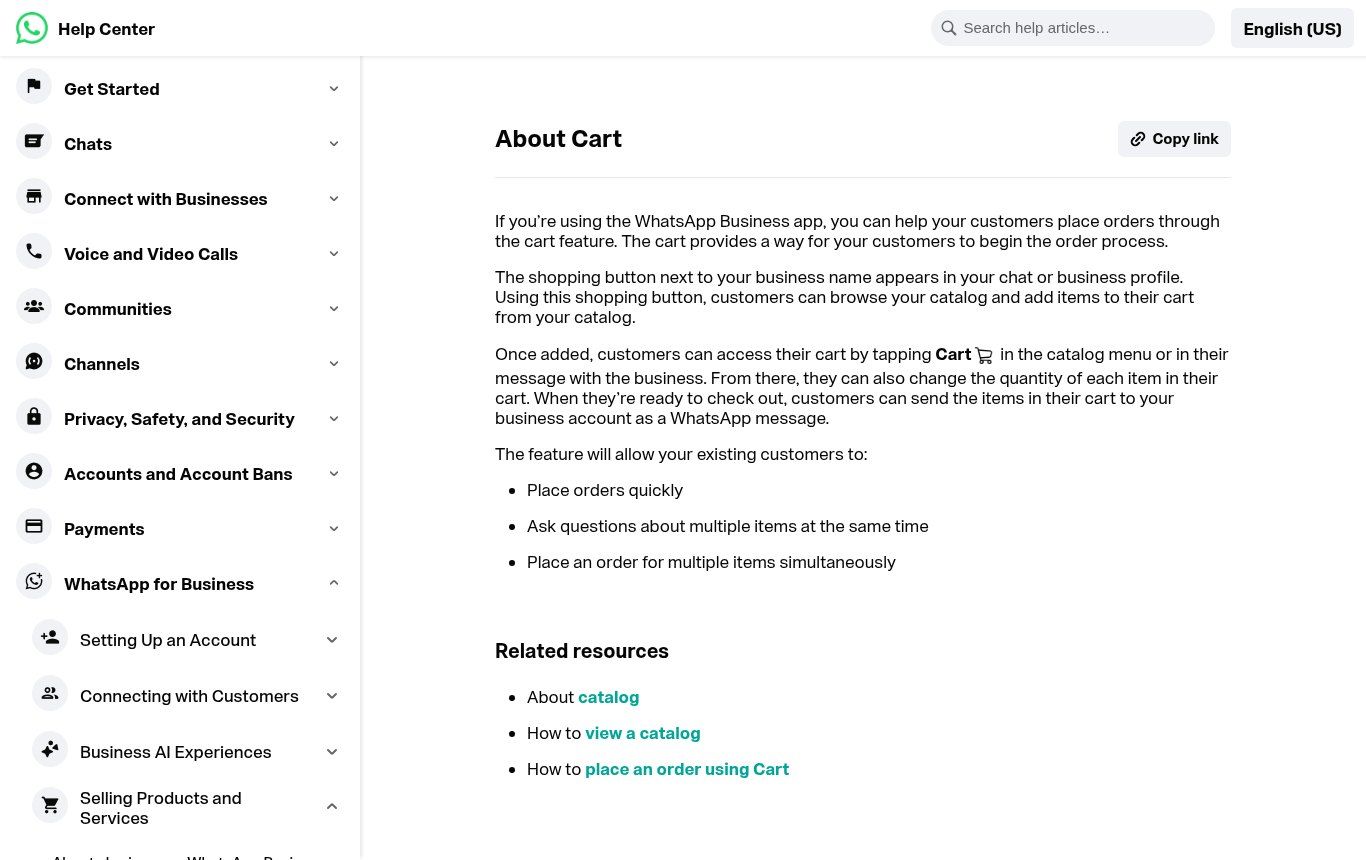
Source: WhatsApp Help Center, “About Cart”, captured on 2 November 2026.
For you, the difference is huge. Instead of "I'll take the red one and two of the ones from yesterday", you get a structured list with the items, quantities and catalog prices. Fewer mistakes, fewer questions, and a message that's easy to copy into your tracking sheet.
Be careful, though: a cart is neither a confirmed order nor a payment. It's a request. The order becomes real when you confirm it: availability, total, delivery fee, lead time, payment method. We recommend a confirmation quick reply that always covers the same points, for example:
Thank you for your order! Summary: 2 × Pagne outfit (ENS-H-014), size L. Subtotal: [amount] CFA. Delivery in Cotonou: [amount] CFA. Total: [amount] CFA. Payment by Mobile Money to [number] or cash on delivery. Expected delivery: [date]. Reply OK to confirm.
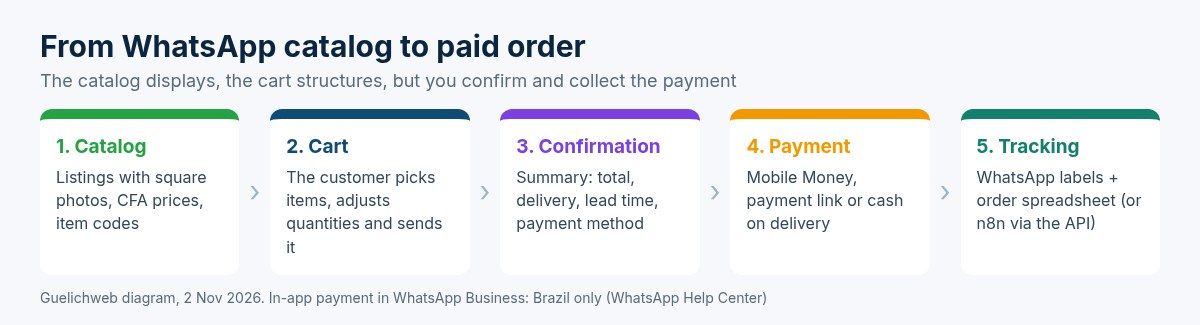
Getting paid in Benin: Mobile Money, payment link or cash on delivery
WhatsApp does offer built-in payments in some regions, but its official help center states that the Business app's order-and-payment feature is only available in Brazil. In Benin, Côte d'Ivoire or Senegal, payment therefore happens outside WhatsApp. Three options, from simplest to most robust:
- Direct Mobile Money transfer. Simple, but everything relies on manual checks: the customer sends a screenshot, you check your phone, you write it down. Beyond a few orders a day, mistakes creep in.
- Payment link. A gateway such as FedaPay or KkiaPay lets you generate a link you paste into the chat. The customer pays by Mobile Money or card, and you get a reliable confirmation. We compare the two in our article on Mobile Money payment gateways.
- Cash on delivery. Reassuring for the customer, risky for you (refusals at the door, couriers holding the cash). Keep it for areas and amounts you can control, or ask for a deposit.
One last point that's often overlooked: the WhatsApp Business commerce policy states that the business is solely responsible for its transactions, its terms of sale and its tax obligations. Write down your terms (delivery, returns, refunds) and make them easy to find, for example through a link on your profile. Our guide to online store terms of sale gives you a template.
"My WhatsApp Business catalog isn't working": causes and fixes
This is one of the most common searches around the catalog. Here are the causes we run into most often, and what to do about them.
- Items are still in review. Until an item is approved, customers can't see it. Wait before sharing the link.
- An item was rejected. A red exclamation mark appears on it. Fix what's wrong (photo, name, description), then use "Request another review" if you think the rejection is a mistake.
- The product is in a prohibited category. WhatsApp's policy excludes, among others, medical and healthcare products, alcohol, tobacco, drugs, weapons, live animals (except livestock) and other categories. A pharmacy or a supplements shop will get rejections however good the photos are. Read the full list before you start.
- The customer can't open the link. Phone too old, link edited, or WhatsApp not up to date. Send the item directly in the chat.
- The cart button doesn't show. Check in the catalog settings that the cart is turned on. After a change, it may take a while to appear.
- You can't find the Catalog option. You are probably on regular WhatsApp rather than WhatsApp Business, or your app is out of date.
If several items are rejected for no obvious reason, reread the descriptions: words like "cures" or "treatment", or promises of results, can be enough to trigger a rejection.
The catalog's limits, and when to move beyond it
We like the WhatsApp catalog. But we see too many businesses asking it to do things it can't do. Its real limits:
- 500 items maximum, entered and updated by hand in the app.
- No stock sync with your till, your spreadsheet or your online store.
- No visibility on Google. To be found by strangers, you need a website or a Google Business Profile.
- No sales analytics: you don't know which items are viewed most or how many carts go nowhere.
- Total dependence on one account. If your number is suspended or your phone is lost, your sales channel stops.
Our position is simple. The catalog on its own is fine for getting started, testing an offer or selling a small range to customers who already know you. Once you go beyond a few dozen orders a week, want to be found on Google, or have several people answering customers, you need to add a website or online store, with WhatsApp as the conversation and confirmation channel. We explain that combination in website, WhatsApp and CRM for an SME and in our guide to creating an online store in Benin.
Automating follow-up for orders received on WhatsApp
The WhatsApp Business app has no API, so you can't plug an automation tool directly into it. That doesn't mean you have to keep everything in your head.
With the app alone
Use labels ("New order", "Paid", "To deliver", "Delivered") to see where each customer stands, and copy every confirmed order into a shared spreadsheet. It's manual, but far more reliable than memory. If you have many repeat customers, a CRM, even a free one, quickly becomes useful.
With the WhatsApp Business API
As volume grows, the WhatsApp Business API changes the game. The catalog is then managed in Meta Commerce Manager and connected to your WhatsApp Business account, with one catalog per account. Meta documents sending product messages (a single item or a selection) and receiving orders in its developer guide.
In practice, an order sent from the cart can then trigger a scenario in n8n or Make: logging it in Google Sheets or your CRM, automatically sending a payment link, a confirmation message, an alert to the delivery team. Our n8n or Make comparison helps you choose the tool, and our article on what a WhatsApp chatbot actually does explains what you can automate without making the relationship feel robotic.
Moving to the API has a cost (messages billed by Meta, setup, maintenance) and isn't useful for everyone. To see what it would look like for you, check our WhatsApp chatbot with n8n in Benin offer.
Six mistakes we see all the time
- A catalog without prices. Every item turns into one more conversation. If the price varies, give a range or a "from" price.
- Photos taken from far away, in landscape, on a busy background. Unreadable as thumbnails.
- Sold-out items still visible. The best way to disappoint a customer who was ready to pay.
- No delivery information. Customers don't know whether you deliver to them or at what price, so they don't order.
- A catalog that's never shared. It exists, but nobody sees it: not in the greeting message, not in statuses, not on social media.
- A cart with no confirmation. The customer sends a cart, waits, gets no clear summary, and buys elsewhere.
Checklist: a working catalog in one afternoon
- Complete WhatsApp Business profile (description, hours, address or area, website).
- Up-to-date product list in a spreadsheet, with item codes and prices in CFA francs.
- Square, sharp photos, ideally at least 1024 × 1024.
- Items created, all approved, grouped into collections.
- Cart turned on and tested from another phone.
- Greeting message and quick reply with the catalog link.
- Order confirmation quick reply ready.
- Payment method decided (Mobile Money, payment link, on delivery).
- Terms of sale written down and easy to find.
- Tracking labels created and a shared order spreadsheet.
WhatsApp Business catalog FAQ
Is the WhatsApp Business catalog free?
Yes. The catalog is part of the WhatsApp Business app, which is free. It's the API and its messages that cost money, not the app's catalog.
How many items can a WhatsApp catalog hold?
Up to 500 items according to WhatsApp, with up to 10 photos or videos per item.
Can I receive payments directly in WhatsApp in Benin?
No. The Business app's order-and-payment feature is only available in Brazil for now. In Benin, you collect payment via Mobile Money, a payment link or on delivery.
Can I have a catalog on regular WhatsApp?
No, you need the WhatsApp Business app. You can move your number from WhatsApp to WhatsApp Business, but consider keeping your personal number and your sales number separate.
Why was my item rejected?
Either it belongs to a category banned by WhatsApp's commerce policy (health, alcohol, tobacco, etc.), or something in it (photo, text) is a problem. Fix it and request another review from the item.
Can a WhatsApp catalog replace a website?
To get started, yes. To be found on Google, manage a large stock, take payments online or publish full terms of sale, no. The two work very well together.
Want help selling better on WhatsApp?
At Guelichweb, we help businesses structure how they sell on WhatsApp: catalog, ordering flow, payment, automated follow-up, and a website or online store when the catalog is no longer enough. Pricing depends on your situation: we set it after a diagnosis, as explained on our offers page. You can also explore our services.
Already selling on WhatsApp and feeling swamped? Contact us: we'll look at how you sell today and tell you what is worth improving.
Sources: WhatsApp for Business, catalog page; WhatsApp Help Center, create and maintain a catalog; WhatsApp Help Center, share your catalog; WhatsApp Help Center, About Cart; WhatsApp Help Center, managing orders; WhatsApp Business commerce policy; Meta, catalog image specifications; Meta for Developers, sell products and services.