Invoice OCR: how to extract invoice data automatically (free tools, AI, n8n) — a guide for SMEs, NGOs and public bodies
G. CHRIST
Published on November 13, 2026
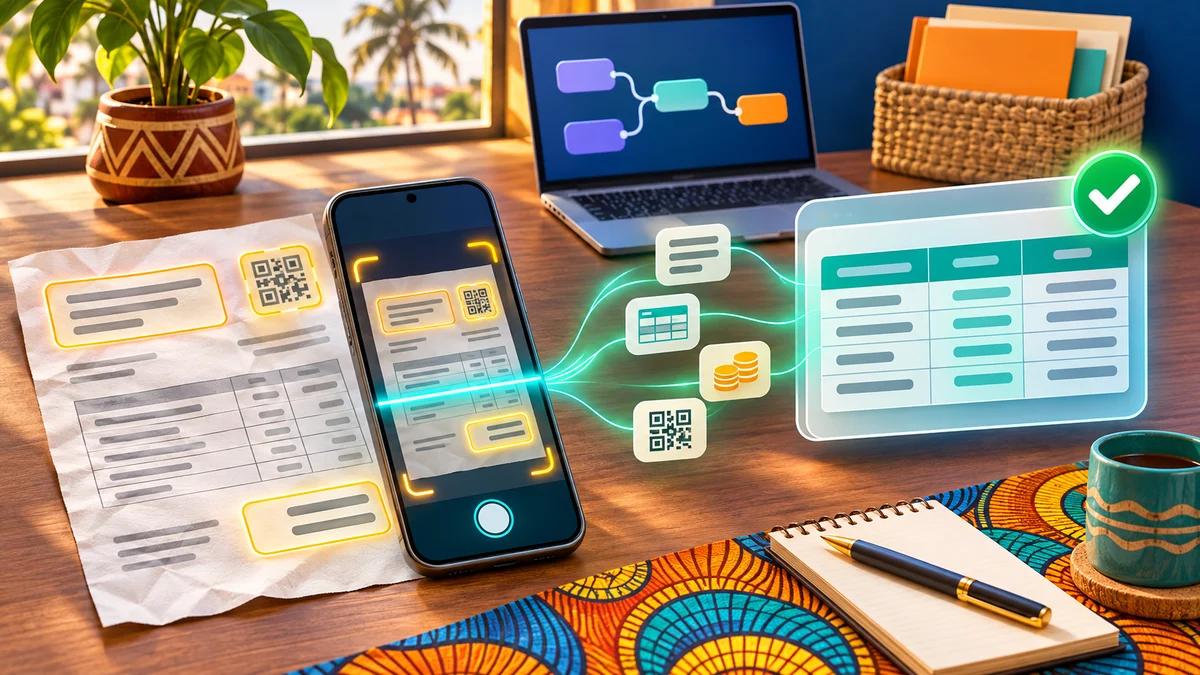
In many small businesses, accounts payable looks like this: a box of paper invoices, a WhatsApp folder full of crooked photos, PDFs scattered across three inboxes, and one person who types everything into Excel at the end of the month. Line by line. With the typos that come with it, and the duplicates nobody notices until the same supplier gets paid twice.
Invoice OCR promises to end that retyping. The promise is partly true. But Google’s first page is mostly filled with “free, no sign-up” online tools asking you to upload your invoices, and with vendors selling their own software. Few pages simply explain what OCR does, what it does not do, what it really costs, and how to set it up properly in an SME, an NGO or a public body in French-speaking Africa.
That is what this guide is for. We automate this kind of workflow for our clients with n8n and AI; here is what we recommend, and what we advise against.
In short
- OCR (optical character recognition) turns the image of an invoice into text. Extraction goes further: it puts that text into fields (supplier, number, date, net amount, VAT, total).
- For a handful of invoices a month, free tools are enough: Google Drive, Google Lens, Tesseract. For a steady flow, an extraction API costs from a few CFA francs to about 60 CFA francs per invoice.
- The real gain does not come from OCR alone but from the whole circuit: intake, reading, automatic checks, human approval, export to accounting, archiving.
- A Beninese standardised invoice carries a MECeF/DGI code and a NIM: extract them, because they let you check the invoice on the tax authority’s website.
- Do not upload your suppliers’ invoices to just any free website: they contain personal and commercial data.
Invoice OCR: what exactly is it?
OCR (Optical Character Recognition) is the technique that “reads” letters and digits in an image: a scan, a photo, a scanned PDF. The raw result is a block of text. Useful, but not enough: a block of text does not tell you which of the five amounts on the page is the grand total.
When people talk about invoice OCR, they actually mean three quite different levels:
- Reading the text. The image becomes copyable text. That is what Google Drive does when you open a photo with Google Docs.
- Extracting fields. The software understands that “FA-2026-0142” is the invoice number, that “18%” is the VAT rate and that “1,180,000” is the total. Modern tools rely on AI models trained on millions of invoices, or on language models that “look” at the document.
- Integrating. The extracted fields land in the right place (Google Sheets, accounting software, ERP), after checks, with the PDF attached. This is the level that saves hours.
Our position is simple: if your project stops at level 1, you have bought a slightly smarter photocopier. The value starts at level 2 and becomes real at level 3.
What OCR does not do (and what you are sometimes sold)
- It does not prove that the invoice is genuine. A well-printed fake invoice will be read perfectly. The very common “changed bank details” scam, or its Mobile Money variant, goes straight through any OCR. Only checks (known supplier, unchanged payment details) and a human will stop it. We cover this in our article on phishing at work.
- It does not read everything 100% right. A stamp over the amount, a blurry photo, a faded thermal receipt or a handwritten invoice all lower reliability. You need a review queue.
- It does not safely post entries for you. Suggesting an accounting entry, yes. Approving it with no human looking, no, at least at the start.
- It does not replace e-invoicing. OCR reads invoices you receive as images or PDFs. Issuing compliant invoices is another topic, covered in our guide to electronic invoicing in Africa.
First question: can a machine already read your invoice?
Almost nobody asks this, and it saves a lot of money. There are three cases.
1. The native PDF
The invoice was produced by software (Word, Excel, invoicing software) and saved as a PDF. The text is already inside: if you can select it with your mouse, you do not need OCR. A tool like n8n’s Extract From File node pulls that text for free. You still have to identify the fields, but the reading itself costs nothing and makes no mistakes.
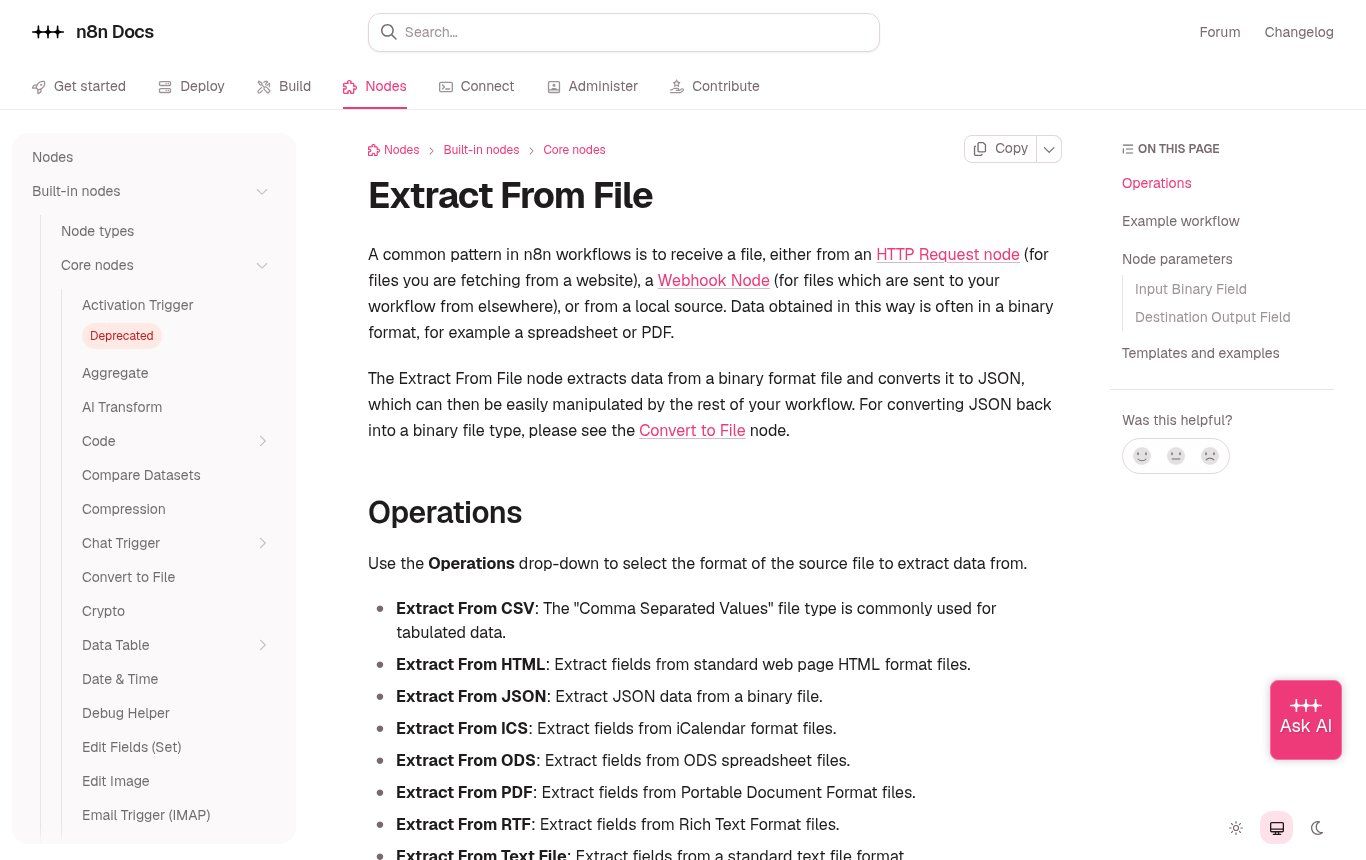
Source: n8n documentation, “Extract From File” page (docs.n8n.io), captured 13 Nov 2026. The node reads the embedded text of a PDF; it does not run OCR on a scanned image.
2. The scan or photo
A paper invoice run through a scanner, a phone photo, or a PDF from a supplier who scanned their own invoice: here there are only pixels. OCR is essential.
3. The standardised invoice (Benin)
In Benin, businesses covered by the reform issue standardised invoices through MECeF machines or the e-MECeF platform. According to the Directorate General of Taxes (DGI), a standardised invoice carries, on top of the usual details, security elements: the machine identification number (NIM), a signature and an electronic code (source: gouv.bj, in French). The DGI provides a public page, SyGMEF, where you enter the MECeF/DGI code and the NIM to check an invoice.
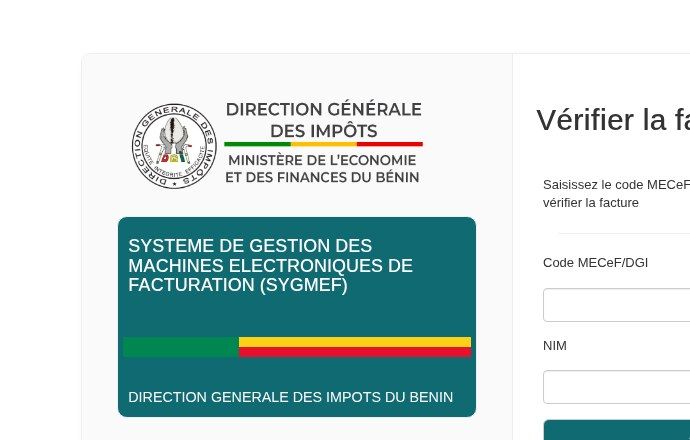
Source: SyGMEF, Directorate General of Taxes of Benin (sygmef.impots.bj/Verification), captured 13 Nov 2026.
In practice: in an OCR workflow in Benin, the MECeF/DGI code and the NIM are fields to extract, just like the total. They allow a check that OCR alone will never perform: comparing the invoice you received with what the authority shows. Today this check is done by hand on the SyGMEF page; we know of no documented public API to automate it, so we plan it as a human step for significant invoices.
Invoice OCR tools, from free to API
Prices and limits checked on 13 November 2026 on official pages. Conversions rounded at about 590 CFA francs to the US dollar. These figures change: check again before you commit.
Free tools for occasional use
- Google Drive + Google Docs. Right-click a PDF or image in Drive, then “Open with Google Docs”: the text appears below the image. Official limits: 2 MB maximum file size, text at least 10 pixels high, document the right way up; tables are rarely detected (Google Drive help). Perfect to grab the text of an invoice, not to fill a spreadsheet.
- Google Lens. On a phone, Lens lets you select and copy text from a photo (lens.google). Handy for an invoice number or a tax ID, not for fifty invoices.
- OneDrive. Microsoft retired its Lens scanning app in 2026 and now points users to the scan feature of the OneDrive app (Microsoft notice). If your team relied on Lens, now is the time to change habits.
- Tesseract. The reference open-source OCR engine, under the Apache 2.0 licence, recognising more than 100 languages; version 5.5.4 came out at the end of October 2026 (GitHub). Free and local: nothing leaves your server. On the other hand, it reads text but does not “understand” an invoice; you need rules or an AI model on top.
“Free, no sign-up” online extractors
These are the ones filling Google’s first page. They often work well for a demo. Our concern lies elsewhere: you are sending to an unknown server a document containing your supplier’s name, their bank details, your purchase prices, and sometimes a person’s name and phone number. Read their terms (retention period, hosting country, reuse to train models) before uploading anything real. To test, use a dummy or anonymised invoice.
Extraction APIs (for a steady flow)
- Azure Document Intelligence (Microsoft). The prebuilt “Invoice” model costs around $10 per 1,000 pages, about 6 CFA francs per page. A free tier (F0) lets you test: 500 pages a month, but only the first 2 pages of a document are analysed and files are capped at 4 MB (official limits).
- Google Document AI. The “Invoice parser” processor costs $0.10 per document of up to 10 pages, about 59 CFA francs for a one-page invoice (Google Cloud pricing). More expensive for short invoices, competitive for long documents.
- Mistral OCR. Mistral OCR 4.1 is listed at $4 per 1,000 pages and $5 per 1,000 “annotated” pages (with structured extraction), about 2 to 3 CFA francs per page (model card).
- General-purpose AI models with vision. You can also send the image to a language model and ask for JSON back. It is flexible and often very good on mixed invoice layouts, but the cost depends on tokens consumed and you must frame confidentiality (see our guide to ChatGPT for business).
What all these APIs have in common: you need a cloud account, often an international bank card, and none of them accept Mobile Money. That is a real obstacle for many organisations; it is usually solved by going through a provider who carries the subscription, or by using a prepaid card.
Business software that has it built in
Some ERPs and accounting packages include supplier invoice digitisation. Odoo, for example, offers document digitization in its Accounting app: invoices uploaded or sent to a dedicated email alias become draft vendor bills, and the service is counted in in-app purchase (IAP) credits. If you already use Odoo, this is often the simplest route; we explain what Odoo costs in this article. Several African vendors also offer OCR tuned for SYSCOHADA accounting: compare them on your own invoices, not on their demo.
Which tool should you choose for your volume?
Here is the grid we use in our assessments. It is deliberately blunt.
- Fewer than 30 invoices a month. Pay nothing. Google Drive for the text, a well-structured Google Sheets table and a file-naming rule. One careful person will beat a badly configured tool.
- 30 to 300 invoices a month. This is where automation pays off. An n8n workflow (intake, reading, checks, approval, Sheets or accounting software) with an extraction API costs a few thousand CFA francs a month in usage. The main cost is the setup, not the tool.
- More than 300 invoices a month, several sites or entities. Look first at what your ERP or accounting software offers, then at an approval circuit (purchase order, goods receipt, invoice). OCR becomes just one building block.
- NGOs and public bodies with supporting documents for donors. Volume matters less than traceability: the link between the document, the budget line and the project. Prioritise filing and archiving over speed.
The full workflow we set up
A good invoice OCR workflow fits in six steps. We usually build it with n8n, because it can be self-hosted and, in that case, does not charge per execution (comparison in n8n or Make).
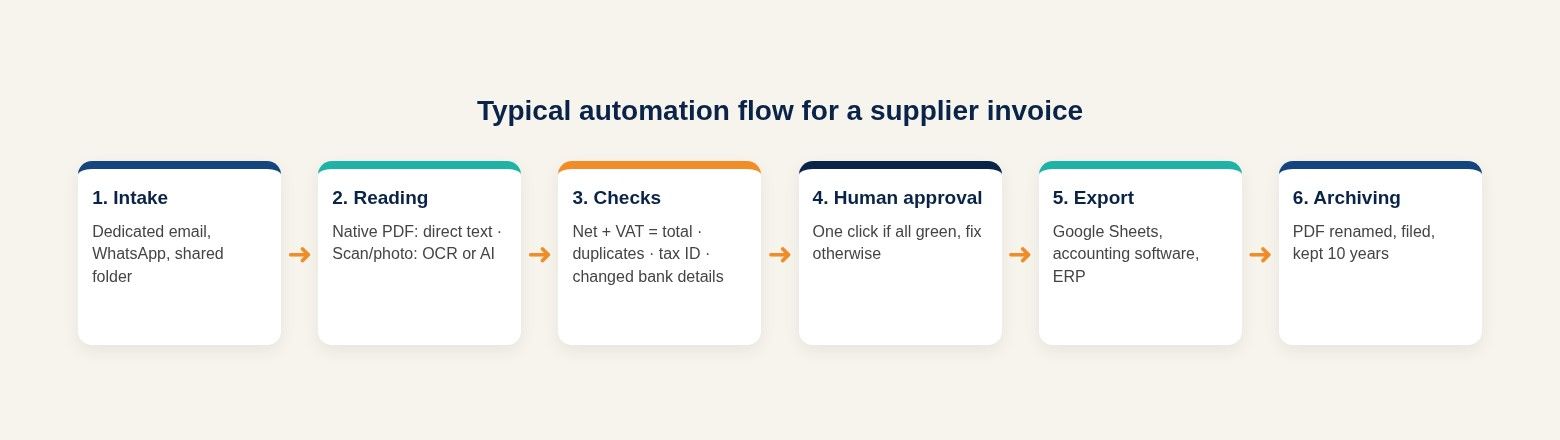
Diagram: Guelichweb.
- Single intake. A dedicated email address (invoices@your-domain), a WhatsApp Business number connected to the API, or a shared folder. What matters is having one front door. For WhatsApp, see what the WhatsApp Business API allows.
- Reading. The workflow first checks whether the PDF contains text. If so, direct and free reading. If not, OCR or an AI model. n8n’s Information Extractor node then lets you ask a model to fill a precise schema (supplier, number, date, net, VAT, total…).
- Automatic checks. Net + VAT = total; plausible date; invoice number never seen before for this supplier (duplicate check); tax ID in the right format; payment details identical to those on file. Every failed check moves the invoice to “to review”.
- Human approval. The person in charge receives a summary (by email or WhatsApp) with the invoice attached and two options: approve or correct. At first, everything goes through this step. Later, only invoices with anomalies.
- Export. A row added in Google Sheets, an invoice created in the accounting software, or both. Invoices to pay can feed a payment schedule, and on the customer side the same logic powers unpaid invoice reminders.
- Archiving. The PDF is renamed with a fixed rule (date_supplier_number_amount), filed in the right folder, and its link stored with the accounting row.
Our rule: AI suggests, a human decides. An invoice is never paid on the basis of an automatic reading alone.
Fields to extract from an invoice in French-speaking Africa
English-language tools are tuned for American or European invoices. Here, you often need to add or adapt fields:
- Supplier’s legal name and tax ID (IFU in Benin, NCC in Côte d’Ivoire, NINEA in Senegal, and so on).
- Invoice number, issue date, due date.
- Net amount, VAT rate and amount (18% standard rate in Benin), total including tax, any other taxes.
- Currency: CFA francs by default, but not always (purchases in euros, dollars, naira).
- MECeF/DGI code and NIM for Beninese standardised invoices.
- Payment method: bank transfer, cheque, cash, Mobile Money with the merchant number.
- For NGOs and projects: project code, budget line, donor. These fields are not on the invoice; they are added at the approval step.
- Line items (description, quantity, unit price) only if you really need them: they are the most expensive and least reliable part to extract.
A detail that wastes hours: how amounts are written. “1 250 000”, “1.250.000”, “1 250 000 F CFA” or “1250000F” must all become the same number. Plan a normalisation step and test it on your real invoices.
On the ground: what makes OCR fail here
- Compressed WhatsApp photos. WhatsApp lowers image quality. Ask teams to send the invoice “as a document” rather than as a photo, or to scan it with the Google Drive or OneDrive app.
- Thermal receipts. They fade within months. Digitise them the same day; in a year, neither a human nor a machine will be able to read them.
- Handwritten invoice books. Recent models read handwriting, but reliability drops sharply. For small regular suppliers, a simple invoice template beats the best OCR.
- Stamps and signatures over amounts. Where possible, ask for the stamp to be placed next to the total.
- Multi-page invoices. Check how your tool counts and bills them (per page or per document).
- Connectivity. A workflow that depends on an API must be able to retry later. An invoice must never get lost because the network dropped.
How to photograph an invoice properly
- Lay the invoice flat on a dark, plain surface.
- Use daylight or even lighting, no flash that creates glare.
- Hold the phone parallel to the sheet, with all four corners visible.
- One invoice per photo, one photo per page.
- Use an app’s “scan” feature rather than the plain camera: it straightens and crops.
- Send it as a document, not as a compressed photo.
- Check that the total and the number are sharp before sending.
Privacy and retention: the two legal points not to miss
Personal data. An invoice often contains personal data: the name of a sole trader, a phone number, an address, sometimes an account number. In Benin, this processing falls under the Digital Code and the data protection authority (APDP). Before sending your invoices to a foreign API, ask three questions: where is the data processed, how long is it kept, and is it used to train models. The business plans of major cloud providers document these points; anonymous free websites rarely do. An AI usage policy clarifies who may send what.
Retention. In the OHADA area, article 24 of the Uniform Act on accounting law and financial reporting (AUDCIF) requires accounting books and supporting documents to be kept for ten years (text of article 24, in French). If you want to keep only the digital version, you must be able to prove throughout that period that the file is complete, unaltered and readable; the exact conditions should be validated with your chartered accountant and, if needed, the tax authority. In practice: do not throw away originals before your archiving procedure has been validated with your chartered accountant, and keep files in backed-up storage, not on an employee’s phone. Donors often have their own requirements about original documents: read your agreement.
Setting up invoice OCR in 5 steps
- Measure the current situation. How many invoices a month, from which suppliers, in what form (paper, PDF, WhatsApp), and how many hours of data entry. Without that figure, you cannot tell whether the project pays off.
- Build a test sample. 30 real, representative invoices: your main suppliers, a few poor photos, a handwritten invoice, a standardised invoice.
- Test two or three tools on that sample. Measure reliability field by field: a tool that reads text well but gets the total wrong one time in ten is not usable.
- Build the workflow with human approval. Start with systematic approval for one month, then lighten it for reliable suppliers.
- Track three indicators. Average processing time per invoice, share of invoices corrected by hand, number of duplicates or anomalies caught. A small dashboard is enough.
The mistakes we see most often
- Choosing the tool before looking at your own invoices.
- Removing human approval in the first week because “the AI works well”.
- Multiplying entry points (three email addresses, two WhatsApp numbers, a folder): duplicates explode.
- Paying for an OCR API on PDFs that already contain their text.
- Extracting every line item when accounting only needs the totals.
- Leaving originals on personal phones, with no archiving.
- Forgetting to check payment details, which is exactly where fraud happens.
How much does an invoice OCR project cost?
There are two cost items. Usage first: from zero (free tools, native PDFs, Tesseract) to a few thousand CFA francs a month for a few hundred invoices through an API, based on the prices above. Setup second: analysing your invoices, building the workflow, checks, training, follow-up. This is the item that varies most, depending on the number of sources, the software to connect and the level of control you want.
At Guelichweb we do not quote prices at random: we provide a quote after assessing your invoices and tools, as explained on our offers page. For orders of magnitude on an automation project, read how much AI automation costs in Benin, and for the general logic, task automation.
FAQ
Is there truly free invoice OCR?
Yes, for reading text: Google Drive, Google Lens and Tesseract are free. For automatically extracting fields, free offers are either online demos (be careful with confidentiality) or trial quotas, such as the 500 monthly pages of Azure Document Intelligence’s F0 tier.
Can I extract invoice data into Excel?
Yes. Extractors usually export to CSV or Excel, and an n8n workflow can add each invoice as a row in Excel online or Google Sheets. Define the columns first: they drive the extraction.
Can OCR read handwritten invoices?
Recent models read handwriting, but with much lower reliability than printed documents. For a regular supplier who writes by hand, it is better to help them move to a simple invoice template.
Can ChatGPT read my invoices?
Yes, a model with vision can read an invoice and return the fields. For regular business use, choose a business plan or an API whose terms exclude training on your data, and keep human approval.
Does a scanned invoice have the same value as the original?
Not automatically. Supporting documents must be kept for ten years (AUDCIF, art. 24), and tax rules as well as donor requirements may require you to keep originals. A well-archived scan is an excellent working copy; do not destroy anything before your procedure has been validated with your chartered accountant.
Can invoices be received by WhatsApp and processed automatically?
Yes, with the WhatsApp Business API connected to n8n: an invoice sent to the dedicated number triggers the reading, the checks and the approval request. This is the kind of workflow we build in our WhatsApp chatbot and automation projects.
Our conclusion
Invoice OCR is not magic software, it is a building block. On its own, it saves some typing. Placed in a well-designed workflow (one front door, free reading of native PDFs, AI extraction for scans, checks, human approval, archiving), it frees up whole days every month and reduces payment errors.
Do you receive dozens of supplier invoices a month and does your team still retype them by hand? Contact Guelichweb: we analyse your invoices and tools, then propose the right workflow, with a quote after assessment.