What are managed IT services (infogérance)? What the contract should cover and what it costs (SMEs, NGOs, Africa)
G. CHRIST
Published on November 24, 2026

In many small businesses and NGOs, IT survives thanks to one person. Sometimes it is an employee who "knows computers", sometimes a technician you call when the printer stops responding, sometimes the director's nephew. As long as nothing breaks, it works. Then the file server dies the night before a donor report, or an email account gets hacked, and you discover there is no tested backup, no list of passwords and nobody to call.
That gap is exactly what managed IT services, called *infogérance* in French, are meant to fill. The term sounds like something for big corporations with six-figure contracts. Yet, cut into the right pieces, it can make sense for a five-desk office in Cotonou as much as for a 200-person institution in Dakar. In this guide we explain what it really is, what a contract should cover, what it costs (with sourced figures, not promises) and how to choose a provider without getting locked in.
What are managed IT services? The simple definition
Managed IT services means handing over the management of all or part of your IT to an outside provider, over time, with written commitments. French dictionaries define *infogérance* as the contractual takeover, by an outside provider, of part or all of a company's IT resources. The AFNOR definition quoted on French Wikipedia adds three things that matter: a multi-year contract, a fixed-fee basis and a defined service level.
The provider is called a managed service provider (MSP). In French-speaking Africa you will see both the English term and *infogérant* in quotes and tenders, so it helps to know they mean the same thing. Wikipedia's entry on managed services gives a broader international overview.
Keep this in mind: managed IT is not a one-off job. Calling a technician to reinstall Windows is a repair. Paying someone every month to monitor, update, back up and answer your users within promised times is managed IT.
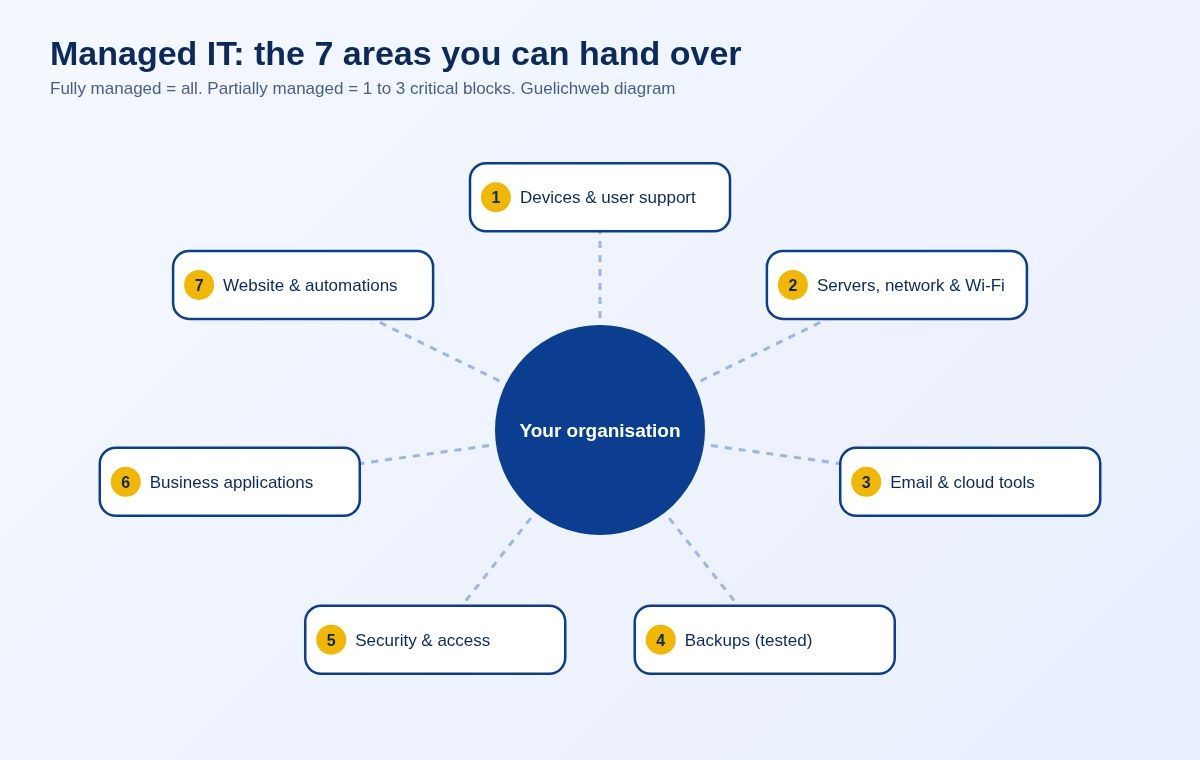
Guelichweb diagram: the seven areas you can hand to a provider, together or separately.
Managed IT, maintenance, outsourcing, application support: stop mixing them up
These words get used in quotes as if they were interchangeable. They are not, and the confusion gets expensive when you compare two offers.
- IT maintenance: repairing and servicing hardware and software. It can be one-off, "per call". It is one building block of managed IT, not the whole thing.
- Outsourcing: handing any activity to a third party (accounting, security guards, cleaning…). Managed IT is outsourcing applied to your information system.
- Infrastructure management: devices, servers, network, email, backups, security.
- Application management (*TMA* in French, application maintenance and support): keeping a business application, an ERP or an in-house tool alive with fixes, updates and small changes.
- Outsourced IT department (fractional CIO): the provider also plays the role of IT director, with advice, budgeting, tool choices and dealing with other vendors.
The French law firm Baumann Avocats sums it up well: the scope can range from the whole information system to a single application. In other words, "managed IT" means nothing until the scope is written down.
What managed IT actually covers
These are the blocks found in most contracts. No provider has to do everything, and no organisation needs to buy everything.
1. User support (helpdesk)
A phone number, an email address or a WhatsApp channel where your staff report problems. Each request becomes a ticket, with an opening time and a resolution time. It is the most visible part and often the most appreciated: nobody has to hunt for "someone who can help" anymore.
2. Monitoring and updates
A small agent installed on each computer and server reports their status: disk almost full, antivirus switched off, updates overdue, failed backup. A good provider fixes things before you notice. A bad one waits for your call.
3. Servers, network and Wi-Fi
File server, router, firewall, Wi-Fi access points, sometimes the phone system. This is usually the most technical and most expensive part, because a failure here stops the whole office.
4. Email and cloud tools
Creating and removing accounts when staff join and leave, managing Microsoft 365 or Google Workspace licences, shared folders, two-factor authentication. This block is underrated: a former employee who keeps access to the "director@" mailbox for six months is a classic, and entirely avoidable, scenario.
5. Backups
Copying data, storing it off-site and, above all, testing the restore. A backup that has never been restored is a hypothesis, not a guarantee. The 3-2-1 rule we explain for websites in our website backup guide applies just as well to office files.
6. Security
Managed antivirus, filtering, patches, access rights, staff awareness. The weakest link is still human: one click on a fake link is enough. Our article on phishing in small businesses has simple exercises to run with your team.
7. Applications, website and automations
Management software, databases, the website, forms, automation workflows. This is the "application" side. For the website alone people usually say website maintenance, but the logic is the same: someone is responsible, within known timeframes.
Fully managed, partially managed or on demand: which one?
Our view is clear: for an SME or NGO with fewer than 50 people, fully managed IT is rarely the right starting point. It is expensive, it creates strong dependence, and it forces you to document everything at once, which few organisations are ready to do.
- Partially managed: you hand over one or two critical blocks (backups and email, or server and network) and keep the rest. This is what we recommend most often as a first step.
- Fully managed: the whole information system goes to the provider. It makes sense for an institution or a branch network without an IT team, provided the contract is solid (see below).
- Block of hours or on-demand support: a monthly number of hours, used as needed. More flexible, but without proactive monitoring. That is not really managed IT, and you should know it.
A useful test: list the three failures that would hurt you most (losing the accounting files, email down, website offline during a campaign…). Hand those three over first. The rest can wait.
Why managed IT in Benin, Côte d'Ivoire or Senegal is not the same as in Paris
Almost every page ranking at the top of Google on this topic in French is written by French providers for French SMEs. Their advice is still useful, but several realities change the picture in West and Central Africa.
- Power: outages, voltage drops, generators. A server without a properly sized UPS is a disk that will eventually fail. Ask whether the provider also monitors UPS units and clean shutdowns.
- Connectivity: remote monitoring needs a stable connection. Plan a backup link (a 4G router is often enough) and check what happens when the fibre is down for two days.
- On-site visits: a provider based in Paris or Abidjan can manage your email remotely, but cannot replace a disk in Parakou. Ask who travels, where and how fast.
- Payment: cloud licences are billed in dollars or euros, by card. A local provider who invoices in CFA francs and pays the licences for you can make life easier, as long as the licences stay in your name.
- Personal data: in Benin, the Digital Code governs the processing of personal data and the Personal Data Protection Authority (APDP) enforces it. Côte d'Ivoire (ARTCI) and Senegal (CDP) have their own authorities. If your provider can access beneficiary, patient or student files, the contract must state what they may do with them.
- The "IT cousin": many organisations rely on a trusted person with no contract. That is not necessarily bad, but the day they leave, everything leaves with them. Even light managed IT is first about making that knowledge transferable.
How much do managed IT services cost?
Let's be honest first: there is no official price list, and we found no reliable public price grid for the Beninese or West African market. The only figures published online come from French providers. Here they are, for what they are worth:
- According to an overview published in November 2026 by SOS PC 82, the French market sits between €30 and €180 excl. VAT per device per month: €30–50 for entry level (remote support, monitoring, updates), €50–100 for mid-range (with backups and security), €100–180 for a complete offer.
- The same source says server monitoring is often billed separately, between €100 and €350 per month, and off-site backup between €50 and €150 per month.
- One public price list: French provider M-KIS shows €39, €49 and €59 excl. VAT per device per month depending on the plan, with a €390 monthly minimum and servers from €90 per month (checked on 24 November 2026).
At the fixed rate (€1 = 655.957 CFA francs), the French entry level works out at roughly 19,700 to 32,800 CFA francs per device per month. Ten devices at a €50 mid-range rate come to about 328,000 CFA francs a month, before any server. Do not read these as local prices: labour costs, travel and taxes are different. They are mainly useful to understand how a quote is built.
What really moves the bill is less the number of devices than:
- the scope (support only, or support + backups + security + servers);
- the guaranteed response times (4 hours or "as soon as possible");
- whether on-site visits are included or charged extra;
- non-desktop equipment: servers, network, business software;
- the commitment period and notice period.
At Guelichweb we do not publish per-device prices for this kind of engagement: we send a detailed quote after a diagnostic, as for all our tailored work (see our offers). The reason is simple: two ten-desk organisations can have needs that differ by a factor of four.
A managed IT quote that fits on one line ("full management: X CFA/month") is not a quote. It is a bet, and you are the one who loses it at the first incident.
Managed servers and hosting: the web case
"Infogérance serveur" (managed server) shows up in Google suggestions in all five countries we tested. It covers two very different situations. Either you have a physical server in your office (files, accounting software) and want someone to watch it. Or you rent a virtual server (VPS) for your website, application or automations, and you do not want to administer it yourself.
In the second case there are three levels: shared hosting, where the host handles almost everything; an unmanaged VPS, where everything is on you; and a managed server, where the host or a provider takes care of the system, updates, security and backups. For a brochure website, good shared hosting is nearly always enough. A managed server makes sense for a business application, a data-collection platform or n8n automations running around the clock.
For a mostly West African audience, a local host you can pay in CFA francs is often the simplest choice: clear invoices, support in the same time zone, no international card. If you need an international host, Shinjiru (an offshore host) offers VPS plans from $9.90 a month on a 24-month term ($12.90 month to month, prices checked on shinjiru.com on 24 November 2026) and a "VIP Managed Services" option where its team handles server management. There is no Mobile Money or CFA payment, so compare over the full term, renewals included. See Shinjiru plans (affiliate link: we may earn a commission if you sign up, at no extra cost to you).
For more on choosing a host, read our comparison of free vs paid web hosting in West Africa.
What a managed IT contract should include
This is the part people skim when signing and reread in a panic on the day of the problem. The French cybersecurity agency ANSSI's guide on managing outsourcing risks (in French), written for French organisations but useful anywhere, stresses two documents: a security assurance plan attached to the contract, and a reversibility clause. Here is our minimum list.
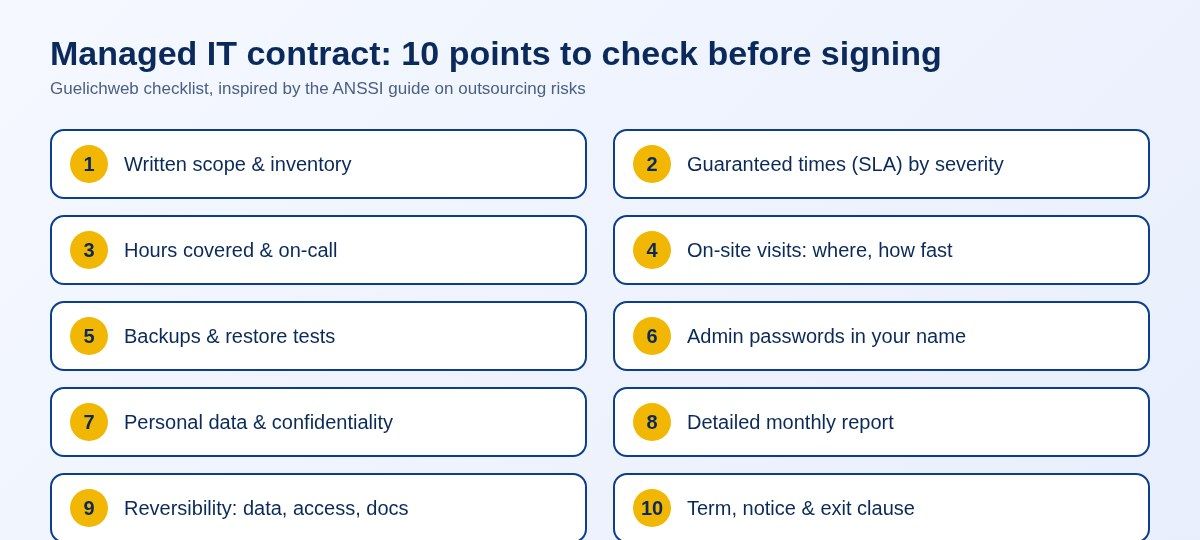
Guelichweb diagram: the ten points to check before you sign.
- Scope and inventory: the list of devices, servers, accounts, software and websites covered. What is not listed is not covered.
- Guaranteed times (SLA): response time and resolution time by severity level. "Within 4 business hours for a total outage" is a commitment. "As soon as possible" is not.
- Hours and on-call: days and hours covered, and what happens on a Saturday or a public holiday.
- On-site visits: included or not, in which cities, how fast, and what travel costs.
- Backups: what, how often, where, for how long, and how often restores are tested.
- Security and access: who holds the admin passwords (expected answer: you, with a shared vault), two-factor authentication, handling of departures.
- Personal data and confidentiality: what the provider may view, where data is stored, and the duty to warn you of any incident.
- Monthly report: tickets handled, incidents, updates, backup status. Without a report, you are paying blind.
- Reversibility: at the end of the contract, the provider returns documentation, access and data, and helps you hand over, within a timeframe and at a price set in advance.
- Term and notice: many contracts ask for 12 to 36 months. Negotiate a short first period, or an exit if the guaranteed times are not met.
One non-negotiable principle: accounts, domain names and licences must be in your name. The provider can administer them, not own them. We explain the same principle for email in our guide to professional email addresses.
How to choose a provider: 8 questions to ask
- How many organisations of our size and sector do you look after today, and can I call two of them?
- Who will be our contact, and who covers when they are away?
- Which tools do you use for monitoring and tickets, and will we see the dashboard?
- What exactly happens if our server goes down on a Friday at 5 pm?
- How do you test our backups, and can you show us the last test?
- Where is our data stored, and who on your side can access it?
- What is billed outside the fixed fee?
- If we leave after a year, what do we get back and how quickly?
Vague answers to questions 5 and 8 are, for us, deal-breakers.
Red flags
- The provider alone keeps the admin passwords "for your security".
- No inventory is done before the quote.
- The contract promises "unlimited maintenance" with no figures on response times.
- No monthly report, or a report that only lists billed hours.
- You are pushed to buy hardware from them at every visit.
- A 36-month commitment on the very first contract, with no exit clause.
When it is better to keep IT in-house
Managed IT is not a universal answer. Keep at least some in-house skills if your work depends on very specific software that only your team understands, if you already have a capable IT person who simply lacks tools, or if your data is so sensitive that you want no outside access at all.
The setup that looks healthiest to us: an internal point person (even part-time) who knows the organisation, backed by a provider for monitoring, backups and emergencies. The point person keeps control, the provider brings tools and availability.
Managed IT and automation: what has changed
Ten years ago, looking after a set of computers meant a technician walking from desk to desk. Today much of that work is automated: alerts when a disk fills up, backup reports sent every morning, accounts created automatically when someone joins. This is our home ground. With tools like n8n you can, for example, send a WhatsApp alert to the point person when a backup fails, or produce a readable monthly report for management.
Task automation does not replace the provider; it makes their work measurable. And for an NGO accountable to donors, an automatic report proving that data is backed up and protected is worth a lot.
Our take: where to start
If you remember one thing: do not sign a managed IT contract before you have inventoried what you own. List devices, accounts, licences, passwords, backups, websites and suppliers. That inventory is valuable even if you never sign anything. It will show you where the real risk is.
Then hand over first the blocks whose failure would cost you most (usually backups, email and the website), insist on figures for response times and on written reversibility, and review after six months with the reports in hand. It is less spectacular than a "complete transformation", but it is what lasts. For the bigger picture, our guide to digital transformation for SMEs and NGOs puts managed IT into a wider plan.
At Guelichweb we work on the web, data and automation side: websites, hosting, backups, security, n8n and Make workflows, dashboards, plus training and technical support for your teams (see our services). We always start with a diagnostic of what you have, then a detailed quote.
FAQ on managed IT services
What is the difference between managed IT and IT maintenance?
Maintenance means repairing and servicing, often on demand. Managed IT is an ongoing commitment with monitoring, guaranteed response times and reporting. Maintenance is one part of managed IT.
What does "infogérance" mean in English?
It translates as managed IT services or IT outsourcing. The provider is a managed service provider (MSP).
Is managed IT only for large companies?
No. Partial managed IT (backups and email, for instance) makes sense from just a few devices, especially if your work stops when IT stops.
How long does a managed IT contract last?
The French AFNOR definition speaks of a multi-year contract, and many offers ask for 12 to 36 months. For a first contract we advise a short term or an exit clause tied to meeting the guaranteed response times.
What is reversibility?
It is the provider's obligation, at the end of the contract, to return your data, access and documentation and to help you hand over to another provider or to your own team, on terms agreed in advance.
Can I have only my website managed?
Yes. That is usually called website maintenance or managed website care: updates, backups, security, uptime monitoring and small fixes. Our article on website maintenance explains what such a contract should cover.
What if my website or server has already been hacked?
Deal with the emergency first and the contract later. Our steps to take when a website is hacked walk you through it.
Want a clear view before you sign?
Torn between keeping your technician, signing with an IT services firm or handing over only part of your IT? We can start with a diagnostic: inventory, priority risks and what it would be sensible to hand to a provider. Contact us to talk it through.