What is Mistral AI (Vibe, formerly Le Chat)? Free vs paid, pricing, and how to use it in your business (2026 guide)
G. CHRIST
Published on November 24, 2026

When people talk about AI at work in French-speaking Africa, the conversation almost always ends up on ChatGPT. Yet there is an AI built in France that writes excellent French, publishes part of its models as open weights and hosts data in Europe by default: Mistral AI. Many people still know its assistant as "Le Chat". Since May 2026 it has been called Vibe, and the rename has caused a fair amount of confusion.
In this guide we keep it plain: what Mistral AI is, what happened to Le Chat, what the free plan gives you, what the paid plans cost in dollars, euros and CFA francs, what happens to your data, and when we recommend it to an SME, an NGO or a public institution in Benin, Côte d’Ivoire or Senegal. Everything was checked against Mistral’s official pages on 24 November 2026.
What is Mistral AI?
Official Mistral logo (source: header of mistral.ai, captured 24/11/2026).
Mistral AI is a French artificial intelligence company founded in Paris in April 2023 by Arthur Mensch, Guillaume Lample and Timothée Lacroix. It builds its own large language models (the "brains" behind a chat assistant) and releases some of them with open weights, meaning you can download them and run them on your own servers.
In practice, Mistral offers three things today:
- Vibe (formerly Le Chat): the assistant you use in a browser or on your phone to ask questions, write, summarise, search the web, analyse a file or write code.
- Mistral Studio: the developer console, with the API that lets you plug Mistral models into your own apps and automations.
- The models themselves: Mistral Large 4 (the flagship), Mistral Small 4 and Ministral 3 (lighter, under the Apache 2.0 licence), plus specialised models for OCR (reading documents), voice (Voxtral) and code (Codestral). The current list is on the models page.
If you remember one thing: Mistral AI is the company; Vibe is the app. When someone tells you "I use Mistral", they almost always mean Vibe.
Le Chat became Vibe: what actually changed
Source: mistral.ai/news/vibe-agent, "Vibe gets to work" announcement of 28 May 2026 (captured 24/11/2026).
On 28 May 2026, Mistral announced that Le Chat was becoming Vibe: one assistant and one subscription for office work and code. Accounts, conversations, settings and plans all carried over. The address stays the same: chat.mistral.ai now opens Vibe, and the mobile app is listed as "Vibe by Mistral (ex-Le Chat)".
Vibe runs in two modes, described in the official documentation:
- Work, on web and mobile: you ask a question or describe the result you want. A toggle switches between a quick answer and deeper thinking. For a long task, Vibe drafts a plan, waits for your go-ahead, then works through the steps using your connected tools (email, calendar, documents).
- Code, for developers: an agent that reads a project, edits code, runs commands and opens pull requests, from the terminal, VS Code or the web.
Since 22 September 2026, the old "Chat" tab and "Work" mode have been merged, so you no longer pick a surface before you start. For someone in a small business, the difference is simple: it is still the same chat assistant, with the added ability to carry out multi-step tasks.
Our take: "Vibe" says less than "Le Chat" to a French-speaking audience, and it gets mixed up with "vibe coding". If colleagues search for "Le Chat Mistral" on their phones, just tell them to install Mistral’s Vibe app. Same thing.
Is Mistral AI free?
Yes. The Free plan is not a trial that expires: it stays usable, just capped. According to the pricing page, it includes:
- access to Vibe on the web and on mobile (Android and iOS);
- access to Mistral’s latest models;
- a limited number of messages and web searches;
- limited coding sessions;
- basic image generation and editing;
- more than 100 connectors to other tools.
What Mistral does not publish is a hard quota. There is no "50 messages a day" in writing. The page only gives comparisons: for example, Pro allows up to 40 times more image generations than Free. In practice, a few questions a day, drafting an email or summarising a document fit comfortably in the free plan. You hit the ceiling when you feed it long documents, chain deep research reports, or code all day.
One important point for organisations: a free account is a personal account. If three staff members of an NGO each use their own free account with the organisation’s documents, nobody controls where that data goes or who can see it. More on that below.
Mistral Vibe pricing: Pro, Team and Enterprise (in dollars, euros and CFA francs)
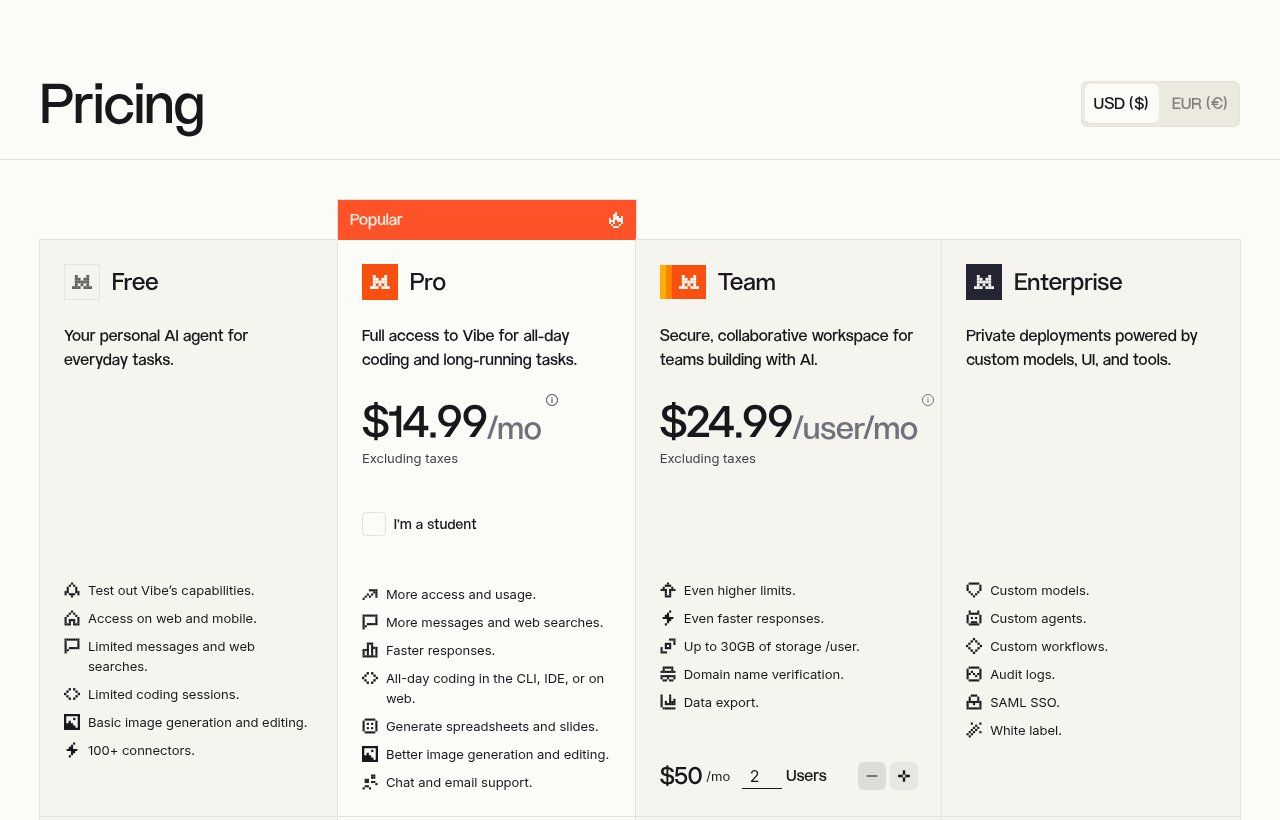
Source: mistral.ai/pricing, shown in US dollars excluding taxes (captured 24/11/2026).
The official grid shows dollars excluding taxes by default. Here is what it showed on 24/11/2026, with an indicative CFA franc conversion at the BCEAO reference rate of 23/11/2026 (about 600 CFA francs to the dollar):
- Free: 0 CFA francs.
- Pro: $14.99 a month excluding taxes, roughly 9,000 CFA francs a month. In France the same plan is shown at €17.99 including French VAT.
- Pro for students: $5.99 a month for verified students (about 3,600 CFA francs) instead of $14.99.
- Team: $24.99 per user per month excluding taxes, roughly 15,000 CFA francs per person per month, from 2 users ($50 a month for two).
- Enterprise: custom quote, with private or on-premises deployment, custom models and agents, audit logs, SAML single sign-on and white labelling.
These conversions are ballpark figures, not local prices: the dollar rate moves, your bank often charges fees on international payments, and a tax may be added depending on your country. You pay by international bank card (or through your phone’s app store). Before subscribing, check that your card (many organisations use a prepaid Visa) accepts online payments abroad.
What Pro really adds: more messages and web searches, more complex tasks, daily coding, spreadsheet and slide generation, more images, and chat and email support. Team adds a shared workspace, even higher limits, up to 30 GB of storage per user, domain verification and data export.
Our position is clear: for an organisation that handles data about clients, beneficiaries or partners, Team is the reasonable minimum, not Pro. The price difference pays for central administration: an admin can switch off training on data for the whole team, and when someone leaves, their access goes with them.
Your data: what Mistral does with it (and the setting to change on day one)
This is the point many guides skim over, so let’s be precise. According to Mistral’s help centre, on Vibe Free, Pro, Team and Student, your inputs and outputs are used by default to train the models unless you opt out. Only Enterprise customers are opted out by default.
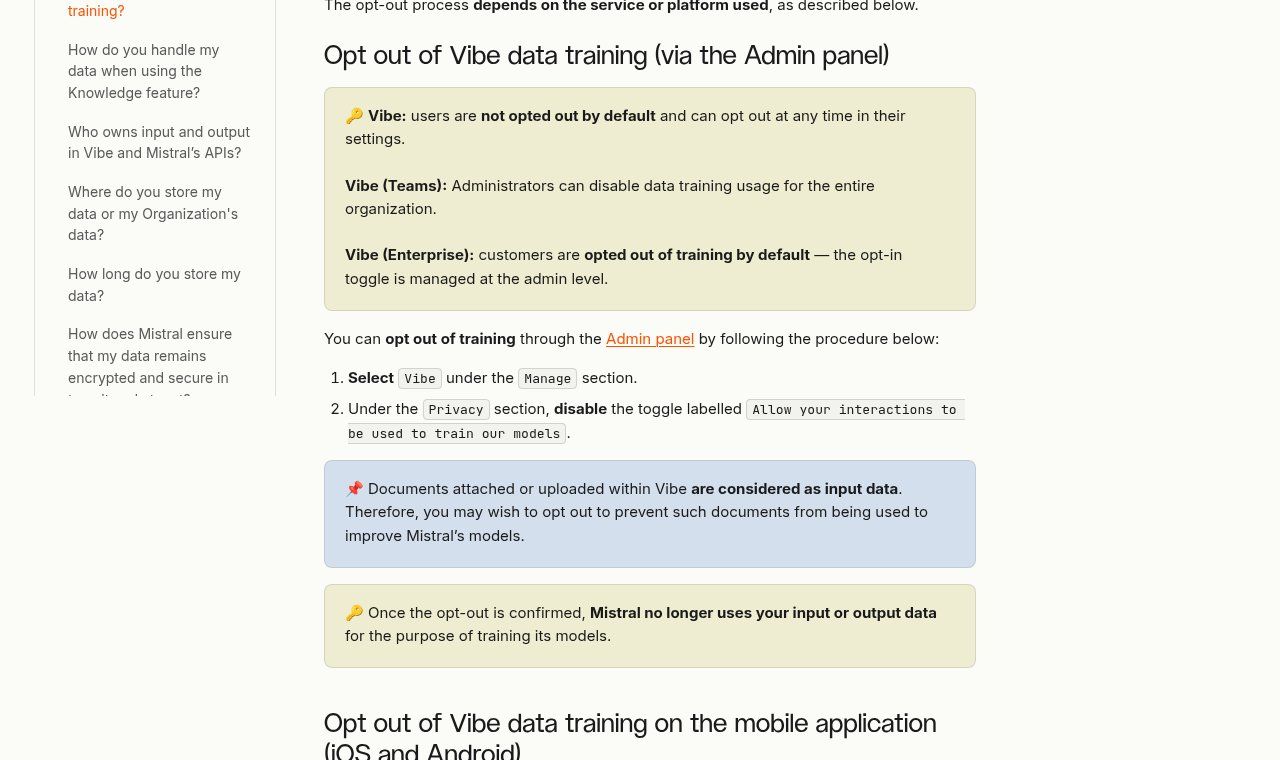
Source: help.mistral.ai, article "Can I opt out of my input or output data being used for training?" (captured 24/11/2026).
Opting out is simple and takes a minute:
- Open your Mistral account’s Admin panel and select Vibe under Manage.
- Under Privacy, switch off "Allow your interactions to be used to train our models".
- On the mobile app: Settings, then "Data & Account Controls", then untick "Enable data sharing".
- If you also use the API or Studio, change the setting separately in the Privacy menu: the two toggles are independent.
Three details worth knowing. First, documents you upload count as input data, so the same setting covers them. Second, if you click thumbs up or down and add a comment, Mistral may use that exchange to improve its models whatever your plan: on a work account, we advise against rating answers. Third, the opt-out does not apply to "Labs" or public preview models.
On hosting, Mistral says data is hosted in the European Economic Area by default, with possible temporary transfers to subprocessors outside the EU depending on the feature, covered by standard contractual clauses (source).
For an organisation in Benin, Côte d’Ivoire or Senegal, "hosted in Europe" does not mean "nothing to do". Using an online assistant with personal data means transferring that data out of the country. In Benin these questions fall under the APDP; in Côte d’Ivoire, the ARTCI; in Senegal, the CDP. Our working rule: no names, phone numbers, health data or beneficiary files in a consumer AI assistant, even a paid one. Anonymise first, or use a plan and contract built for it. Our article on AI in business and AI usage policies includes a template you can adapt.
Mistral, ChatGPT, Claude or Copilot: which one should you pick?
We have already published detailed guides on ChatGPT for business, Claude, Microsoft Copilot and NotebookLM. Rather than another price table that will be wrong in three months, here is how we decide in practice:
- Pick Mistral if sovereignty and European hosting matter to you or your donors, if you want an assistant with natural French, or if you may later want to run a model on your own servers thanks to open weights.
- Pick Copilot if your whole organisation already lives in Microsoft 365 (Outlook, Teams, SharePoint): the integration is worth more than raw model quality.
- Pick ChatGPT or Claude if you want the broadest ecosystem or specific strengths (Claude is well liked for long documents and code).
A strong opinion we stand by: the best assistant is the one your team uses with clear rules, not the one that tops a leaderboard. We see more damage from badly configured personal accounts than from picking the "wrong" model. Test two tools for two weeks on real work, then decide.
8 practical uses of Mistral Vibe for an SME, NGO or institution
- Drafting a narrative report for a donor from your field notes, following the required template. You review and complete; Vibe writes the first draft.
- Summarising a 60-page tender or specification and pulling out eligibility criteria, required documents and deadlines.
- Translating and adapting documents between French and English, handy for NGOs reporting to English-speaking partners.
- Preparing standard replies to frequent customer questions on WhatsApp or email, in your house tone.
- Analysing a spreadsheet (sales, attendance, distributions) to surface gaps or trends, then double-checking the figures.
- Turning a meeting recording into minutes with decisions and tasks: our method for AI meeting minutes works as is.
- Running sourced web research for a briefing note (regulation, competitors, prices), insisting on source links.
- Scheduling a recurring task, for example a Monday-morning summary of the week’s important emails, a Vibe Work feature.
For all of these, output quality depends mostly on the instruction. Our 6-block prompt method works just as well with Mistral as with other assistants.
For developers: the Mistral API, open models and automation
This is where Mistral really stands out. Through Mistral Studio and the API you can build its models into a website, a WhatsApp chatbot, an internal tool or an automation flow. Pricing is per million tokens, with input (your prompt) and output (the answer) counted separately. The official FAQ says batch processing cuts the price by 50% and cached input tokens cost up to 90% less. OCR is billed per 1,000 pages and speech models per minute.
A few pointers for picking a model, based on the documentation:
- Mistral Large 4: the most capable general model, multimodal, open-weight under Mistral’s own licence (not a free-software licence).
- Mistral Small 4 and Ministral 3 (3B, 8B, 14B): lighter and cheaper, under Apache 2.0. These are the ones to consider for self-hosting.
- OCR 4.1: text and structure extraction from scanned documents, very useful for invoices. See our guide to invoice OCR.
- Voxtral: speech transcription and text-to-speech.
Watch out: older models get retired on a regular schedule. Mistral Medium 3.5 and Mistral Large 3, for example, are due to be retired from the API on 30 April 2027. If you commission an integration, insist that the model name is easy to change in the configuration.
On automation, Mistral models plug into n8n, the tool we use most for our clients. A typical example: a contact form comes in, Mistral classifies the request (quote, complaint, partnership) and extracts the useful details, then n8n creates the record in your spreadsheet or CRM and alerts the right person on WhatsApp. To go further, our article on AI agents explains when an agent makes sense and when a plain automation is enough.
What about open weights? Yes, you can run a small Mistral model on your own server without sending data outside. But let’s be honest: for an SME it is rarely the right starting point. You need suitable hardware (often with a GPU), maintenance, updates and someone to look after it. We keep it for cases where confidentiality truly demands it, such as medical records or legal files.
Mistral and French-speaking Africa: signals worth watching
Two recent facts show Mistral is paying attention to the continent. In August 2026, Côte d’Ivoire’s Ministry of Digital Transition and Mistral signed a strategic partnership to support AI tailored to the country’s priorities, with pilot projects planned in public administration, health, education and agriculture. In September 2026, Mistral and its partners launched a pan-African Accelerator BootCamp for AI projects in health, education and agriculture, explicitly encouraging applicants from Benin, Côte d’Ivoire and Senegal.
That is no guarantee of quality for your use cases, but it is a signal: a vendor working with African governments has every reason to take sovereignty and data seriously. For public institutions wary of handing documents to a US company, Mistral belongs on the shortlist.
Limits and traps to know about
- Confident mistakes. Like every assistant, Vibe can invent a figure, a date or a legal reference. Anything going into a report, contract or publication must be checked.
- National languages. Don’t expect French-level quality in Fon, Yoruba, Wolof or Dioula. Test before promising anything to beneficiaries.
- Connectors. Plugging Vibe into your mailbox or Drive is powerful, but it gives it access to everything there. Start with a test account and limited folders.
- Unpublished quotas. You won’t know in advance when the free plan will stop you. For anything critical (a help desk, customer service), don’t rely on a free account.
- A name that keeps moving. Le Chat, Vibe, Work, Code… Mistral evolves its product fast. Expect to update your internal procedures.
- Payment. A dollar subscription, an international card (or your phone’s app store), and no Mobile Money as far as we know: plan for it in your budget and spending approval process.
Getting started with Mistral Vibe in 30 minutes
- Create an account at chat.mistral.ai, ideally with a work email rather than a personal one.
- Before anything else, switch off the use of your data for training (see the steps above).
- Try three real, non-sensitive tasks: an email to draft, a public document to summarise, a sourced web search.
- Compare the results with the tool you already use, on the same prompts.
- If the team adopts it, move to Team, name an admin, and write a one-page rulebook: which data is off-limits, who approves text sent outside, how to report an error.
- Train your colleagues for one hour. It is the most profitable step and the one most often skipped.
Our verdict on Mistral AI
Mistral is now a serious alternative, not a patriotic gadget. For writing in French, summaries and everyday office work, Vibe does the job. Its real advantages for French-speaking Africa lie elsewhere: European hosting by default, open models that leave you an exit door, and a reasonable API for automation.
Its main weakness, in our view, is the default data setting on Free, Pro and Team: you have to remember to switch off training, and many people never will. The second is the naming confusion, which does not help adoption. Neither is a deal-breaker, as long as you put two or three simple rules in place from day one.
If you do just one thing after reading this: open your account, switch off training, and test Vibe on a real task from this week. Within an hour you will know whether it has a place in your organisation.
FAQ about Mistral AI and Vibe
Is Mistral AI really free?
Yes, Vibe’s Free plan is permanent. It gives access to Mistral’s models on web and mobile, with a limited number of messages, web searches and coding sessions. Mistral does not publish a fixed quota.
What happened to Mistral’s Le Chat?
Le Chat was renamed Vibe on 28 May 2026. Accounts, conversations and plans carried over, and chat.mistral.ai now opens Vibe.
How much does Mistral Vibe Pro cost in CFA francs?
Pro is listed at $14.99 a month excluding taxes, roughly 9,000 CFA francs at the BCEAO rate of late November 2026, before bank fees and any taxes. Team costs $24.99 per user per month excluding taxes, roughly 15,000 CFA francs.
Does Mistral use my conversations to train its models?
By default yes, on Free, Pro, Team and Student, unless you switch the setting off in the Admin panel (Vibe, then Privacy). Enterprise customers are opted out by default. Thumbs-up or thumbs-down feedback may be used whatever your plan.
Where is the data stored?
By default in the European Economic Area, according to Mistral, with possible temporary transfers to subprocessors outside the EU for some features.
Is Mistral better than ChatGPT?
Neither better nor worse in absolute terms: both are very capable for office work. Mistral stands out for European hosting and open models; ChatGPT for its ecosystem. Test both on your own tasks.
Can Mistral power a WhatsApp chatbot or an automation?
Yes, through the Mistral Studio API, for example in n8n. The cost depends on the volume of text processed and the model chosen. Our article on how much AI automation costs in Benin helps you build that budget.
Want to bring Mistral into your organisation?
Choosing the plan, setting up data controls, training the team, or connecting Mistral to your forms, WhatsApp or CRM: we can help, from simple setup to full automation. As with all our offers, pricing is a quote after a short diagnosis of your needs. Get in touch to talk it through.