WhatsApp account banned, blocked or restricted? What to do, and how to protect your business number (2026 guide)
G. CHRIST
Published on November 20, 2026
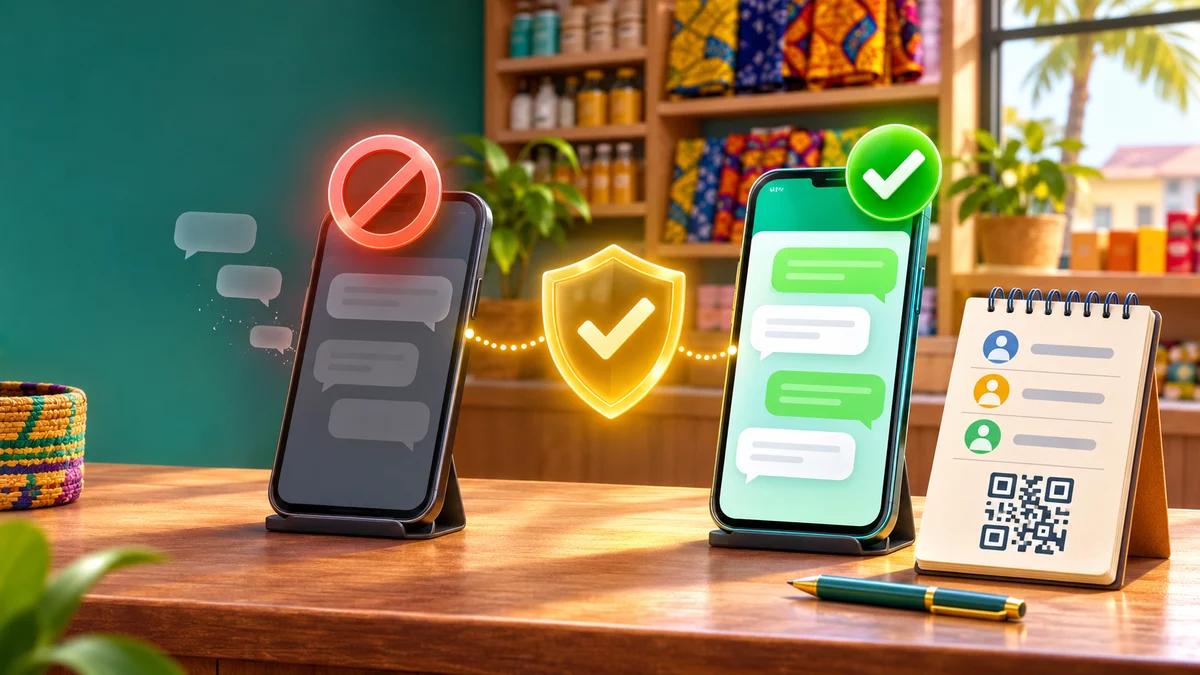
One morning WhatsApp Business opens on a blunt sentence: "This phone number can't use WhatsApp." The number printed on your flyers, stuck on your shop window and saved by hundreds of customers no longer answers. Yesterday's orders are locked inside a chat history you can't open. And before the day is over, someone offers to "unblock" the account for a few thousand CFA francs.
We see this scenario again and again with shop owners, SMEs, NGOs and even some institutions that use WhatsApp as their main front desk. The good news is that not all blocks are the same: some lift on their own within hours, some can be appealed, and some are final. The bad news is that most of the advice going round makes things worse.
This guide sorts it out. First, how to read the exact message on your screen and what to do in each case. Then why business numbers get banned, with the causes we actually run into in French-speaking Africa. Finally, how to organise your business so that a ban never cuts you off from your customers again. Every rule quoted here comes from WhatsApp's official help pages and Meta's documentation, checked on 20 November 2026.
Official WhatsApp logo (Meta). Source: whatsappbusiness.com.
Banned, blocked, suspended, restricted: what your message actually means
On forums everyone says "blocked". WhatsApp itself separates several very different situations, and each one has its own fix. Before you touch anything, write down the exact wording on screen, take a screenshot and compare it with this list.
- "This phone number can't use WhatsApp" (or "This account can't use WhatsApp"): this is a ban. The account is cut off. You can request a review if the button is offered.
- "Temporarily banned": according to WhatsApp, this usually points to an unofficial app (such as GB WhatsApp) or a tool that harvests data ("scraping"). The way out is to go back to the official app; otherwise the ban can become permanent.
- "Your account is restricted right now" or "may be restricted soon": this is a restriction, not a ban. For a while you can't message new contacts, create groups, add members or use linked devices. It lifts on its own.
- Business broadcasts (formerly marketing messages) unavailable in WhatsApp Business: the feature was suspended after too many reports or blocks. WhatsApp says the suspension lasts three days and ends automatically.
- "Account locked due to inactivity": not a penalty at all. Re-register the number as soon as possible, or the account and its data may be deleted.
- WhatsApp Business API account restricted or disabled (alert in Meta Business Suite): a different track, handled in Business Support Home. More on that below.
This distinction changes everything. A restriction is handled by doing… nothing. A ban is handled with a single review request. An unofficial app is handled by uninstalling it. Mixing up the three costs you days.
WhatsApp account banned: what to do, step by step
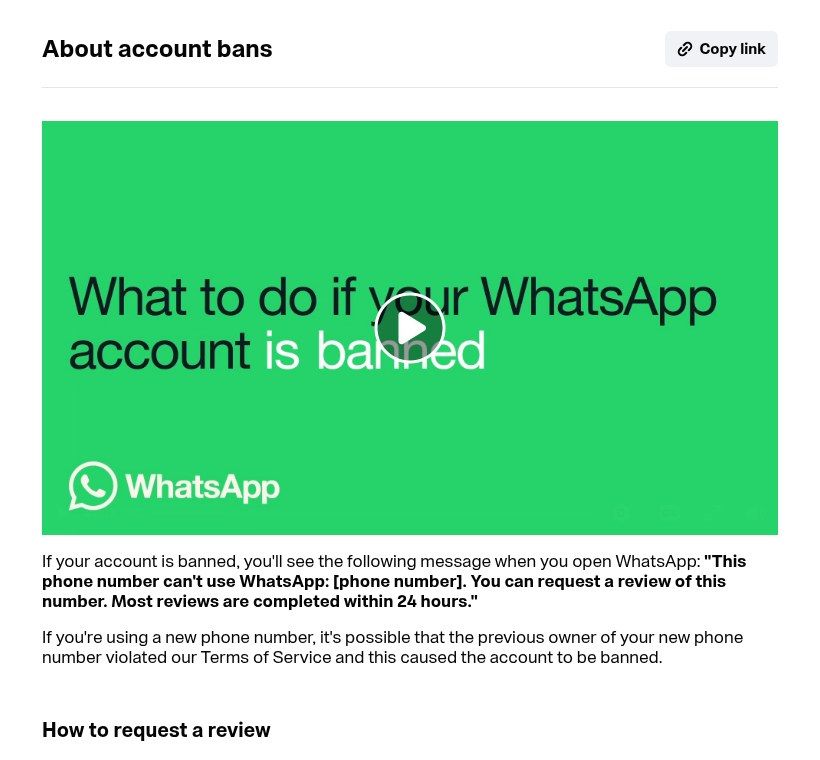
Source: WhatsApp Help Center page "About account bans" (faq.whatsapp.com), screenshot taken 20/11/2026.
- Don't uninstall the app and don't switch phones. The appeal option lives on the ban screen, on the device that carries the number.
- Tap "Request review". If a text field appears, keep it short and factual: what the number is used for (for example "customer service number of a shop in Cotonou"), the fact that you use no modified app and no bulk-sending tool, and what you have fixed if you found a problem. No anger, no essay.
- One request only. WhatsApp says it plainly: contacting it outside the review process, or from someone else's account, won't speed anything up or change the decision. Only one phone number is reviewed per appeal.
- Wait for the notification. "Most reviews are completed within 24 hours," WhatsApp says. You can check the status by reopening the app.
- If the ban is lifted, you verify your number again and get back in. Only then does your chat backup become available again: while the account is banned, neither the history nor the backups can be accessed.
And if the "Request review" button doesn't show up? Then, again according to WhatsApp, the ban is final and can't be appealed. That is hard to read, but it is better to know on day one than to wait three weeks for a miracle. For a WhatsApp Business account subscribed to Meta Verified, the subscription is also cancelled automatically when the account is banned.
What doesn't help (and what costs you)
- Paying an "unbanning service". WhatsApp is clear: third-party services can't ban or unban an account. Only WhatsApp can. Anyone offering a 24-hour unblock for a Mobile Money deposit is scamming you, and sometimes collects your verification code on the way.
- Sending email after email, form after form, or writing from a relative's account. None of it speeds things up.
- Installing GB WhatsApp or another modified version "in the meantime". That is precisely one of the causes of bans.
- Opening ten new numbers and doing the same thing again. If the cause is unsolicited mass messaging, the new number will follow the same path, often faster.
WhatsApp account restricted: why you don't need to do anything
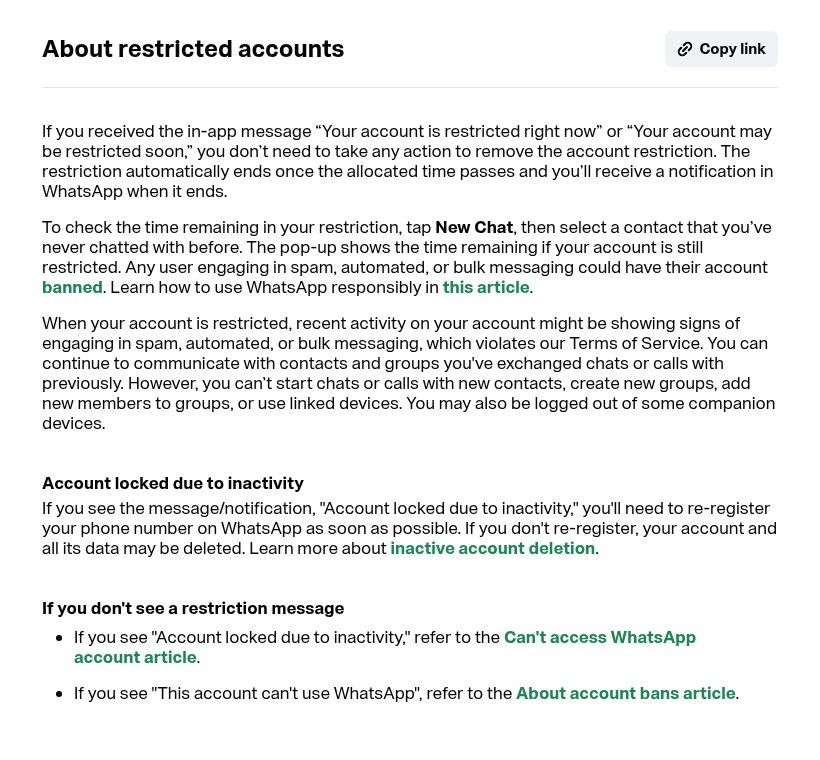
Source: WhatsApp Help Center page "About restricted accounts" (faq.whatsapp.com), screenshot taken 20/11/2026.
A restriction is a warning. According to WhatsApp, it means recent activity on the account looks like spam, automated or bulk messaging. You can keep chatting with contacts and groups you have already messaged or called. But you can't start a chat with a new contact, create a group, add members or use linked devices (WhatsApp Web, desktop). Some companion devices may be logged out.
To see how long is left, open New Chat and pick a contact you've never chatted with: a pop-up shows the remaining time. After that, the restriction ends by itself and you get a notification.
Our advice is simple: use the pause to understand what triggered it. WhatsApp notes that an account can be restricted "even if these people shared their contact information with you", once many of them block or report your messages. A restriction you ignore, followed by the same campaign, is the shortest road to a ban.
Business broadcasts suspended for three days
In countries where WhatsApp Business offers "business broadcasts" (formerly marketing messages), there is an intermediate penalty. If many recipients report or block your account, WhatsApp first sends a warning. If unwanted sending continues, the feature is suspended for three days, then restored automatically at the date and time shown in the app. Broadcasts scheduled before the suspension aren't sent and aren't charged.
WhatsApp itself gives the method to avoid this: get consent for each category of message (order updates, offers, recommendations), separate consent for calls, a clear way to opt out, and an obvious reason to receive your messages. In other words, the same logic as personal data law, which Benin's data protection authority, the APDP, keeps reminding businesses about.
Why business numbers get banned: what we see on the ground
WhatsApp's help pages list the forbidden practices. What they don't show is what those practices look like inside an SME in Cotonou, Abidjan or Dakar. Here are the causes we meet most often when someone calls us after a ban.
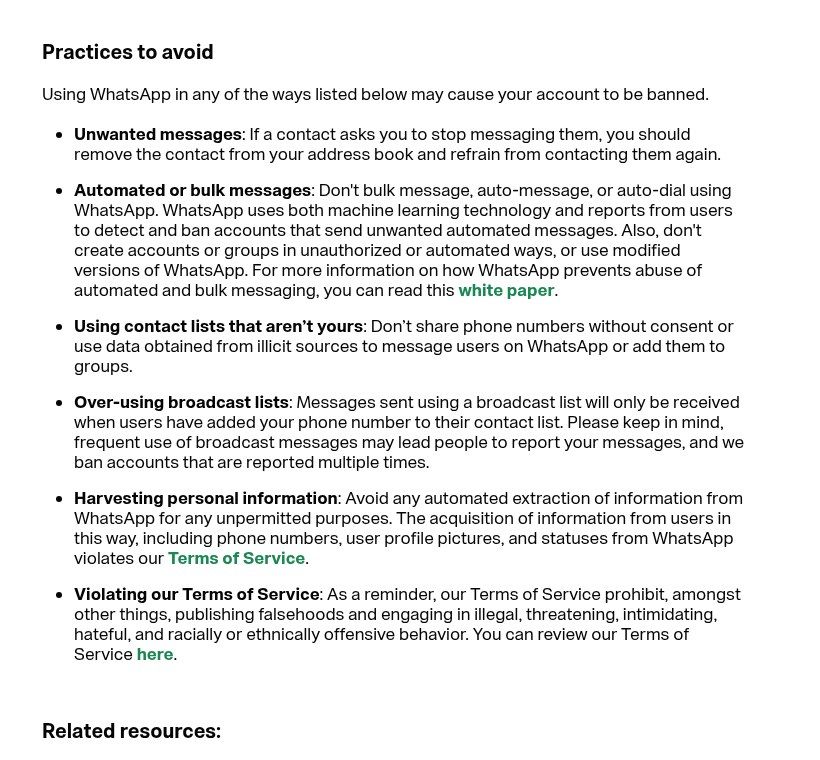
Source: WhatsApp Help Center page "How to use WhatsApp responsibly", Practices to avoid section (faq.whatsapp.com), screenshot taken 20/11/2026.
1. Modified apps: GB WhatsApp, FM WhatsApp and friends
They are popular because they promise scheduled sends, advanced auto-replies or messaging hundreds of contacts at once. WhatsApp names them among unofficial apps (GB WhatsApp, FM WhatsApp, TM WhatsApp…) and warns that using them can lead to a temporary or permanent ban, or to restrictions such as losing the ability to link devices. Add the malware risk and the decision is easy: on a business number, no.
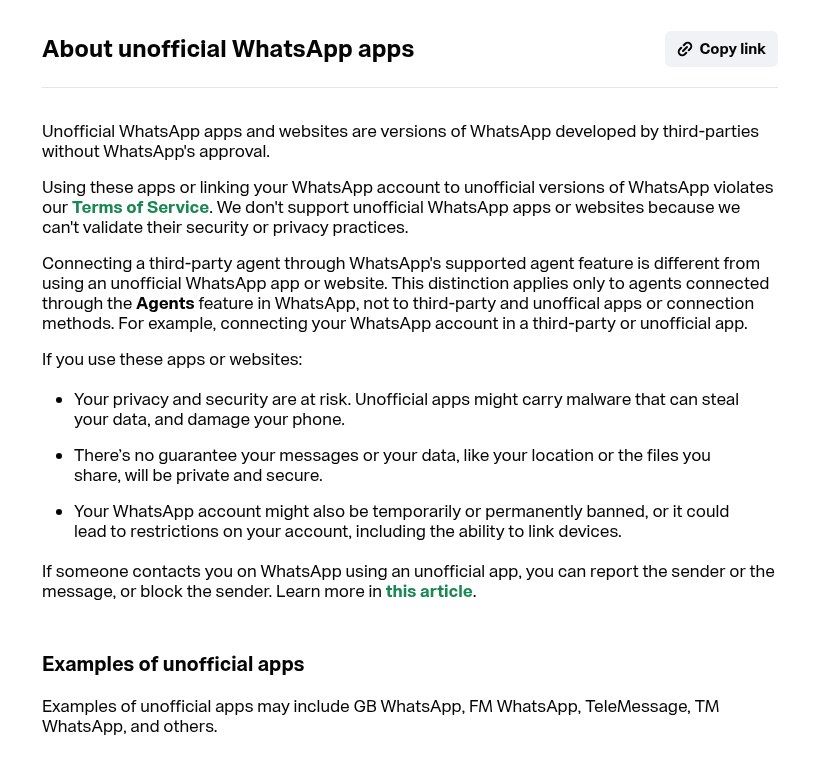
Source: WhatsApp Help Center page "About unofficial WhatsApp apps" (faq.whatsapp.com), screenshot taken 20/11/2026.
2. "Bulk sender" extensions and software
Chrome extensions that drive WhatsApp Web, software sold on social media with the promise of "5,000 messages without getting blocked": they automate an account that was never built for it. WhatsApp says it uses both machine learning and user reports to detect unwanted automated messaging. No "random delay trick" changes what the sending actually is.
3. Fake chatbots plugged into WhatsApp Web
This is the quietest trap, because it is often sold as a professional solution. Some providers connect a "chatbot" to your number by scanning a WhatsApp Web QR code through unofficial libraries, instead of using the official API. It works… until the day it doesn't. We covered this in our article on what a WhatsApp chatbot actually does: a serious bot on a business number runs on Meta's official platform. Always ask your provider, in writing, which method they use.
4. Bought or scraped number lists
"List of 10,000 civil servants' numbers", "contacts pulled from neighbourhood groups"… WhatsApp explicitly forbids using contact lists that aren't yours or data obtained from illicit sources. Beyond the ban risk, those people never asked to hear from you: they block, they report, and every report counts.
5. Adding people to groups without asking, and overusing broadcast lists
Adding 200 customers to a promotional group without asking is the classic recipe. WhatsApp asks you to get permission before adding someone to a group and to respect their decision if they leave. Same for broadcast lists: a message is only received if the person has saved your number, and sending too often ends up being reported. WhatsApp writes that it bans accounts reported multiple times.
6. The recycled number
A lesser-known case: you bought a SIM whose number had been used before. WhatsApp acknowledges that the previous owner may have broken its terms and caused the number to be banned. If that is your situation, say so in the review request. For a business number, prefer a fresh line registered in the organisation's name, and keep the paperwork.
What changes in 2026: less "cold" messaging
WhatsApp is gradually tightening the screws on unsolicited messages, and two changes directly affect businesses using the WhatsApp Business app.
- A monthly cap on new chats that get no reply. Announced as a test in October 2025 (TechCrunch), it counts messages sent to people who haven't answered you. Media outlets reported figures in 2026 that vary by country and account (150 a month in Colombia, for example), but WhatsApp hasn't published an official number. Hitting the cap doesn't lock the account: you can still reply and continue open chats. The number that matters is the one your app shows.
- Broadcasts limited, and paid beyond an allowance. WhatsApp is rolling out, country by country, a credit system for business broadcasts: one credit per recipient who receives the message. It isn't available everywhere yet.
Our reading: WhatsApp is clearly pushing businesses towards two habits. Let the customer write first (wa.me link or QR code, click-to-WhatsApp ads, a button on your website), and for volume sending, use the official API. Those who organise now will be fine; those hunting for the next workaround will spend their time changing SIM cards.
On the official API: graduated penalties and a real appeal
If your number runs on the WhatsApp Business Platform (the official API), the rules are easier to read. New business portfolios start with a limit of 250 unique recipients per 24 hours outside the customer service window, which can rise to 2,000 (for instance by verifying the business), then 10,000, 100,000 and unlimited depending on message quality (Meta documentation).
For repeated violations, Meta describes escalating restrictions (enforcement policy): a one- or three-day block on marketing, utility and authentication templates, then a five-, seven- or thirty-day block on all messages, an account lock that can only be removed by appeal, and finally permanent removal. Severe violations (scams, exploitation, illegal goods) lead to immediate offboarding.
The appeal happens in Business Support Home in Meta Business Suite: pick the account, the violation, "Request review", explain. The decision usually arrives within 24 to 48 hours. Note that Meta says not every spam violation can be appealed: sometimes you simply wait for the period to end. Practical tip: keep the admin email addresses in Business Manager up to date, because that is where warnings land.
The continuity plan: stop depending on a single number
This is the part nobody does before the problem and everyone regrets afterwards. A permanent ban is rare when you work cleanly, but that is not the only risk: hacking, a lost phone, a blocked SIM, an employee leaving with the phone… The outcome is the same. Here is what we set up for our clients.
- Your customers exist outside WhatsApp. Name, number, town, last purchase, consent: in a customer database or a CRM, not just in the chat history. If the number goes down, you know whom to tell.
- A second channel your customers already know. Email or a newsletter, SMS, a Facebook page and, above all, your website. On the day of the problem, you post the new contact where customers will look for it.
- One central wa.me link. If your website, QR codes and posts all point to a single link you control (for example a page on your site that redirects to WhatsApp), changing numbers takes five minutes instead of reprinting everything.
- A backup number in the organisation's name, active on WhatsApp Business with a complete profile, ready to take over. Not for mass sending: for receiving.
- Regular backups of chats with the official app, and an export of important orders.
- Written rules for the team. Who may create groups, send broadcasts, install what on the shop phone. One page is enough.
We described this setup (website, WhatsApp and CRM working together) in our article on the website, WhatsApp and CRM trio for SMEs.
How to sell on WhatsApp without getting banned
Good news: the businesses that never get blocked aren't shyer than the others. They simply reverse the direction of the conversation.
- Bring customers to you: a WhatsApp button on your site, a QR code in the shop, a link in your bio, click-to-WhatsApp ads. A customer who writes first doesn't report you as spam, and a chat where they reply doesn't weigh on the new-chat cap.
- Answer fast and well with greeting and away messages, quick replies and an up-to-date catalog, rather than chasing people in bulk.
- Ask before any broadcast, say who you are and why you're writing, and always offer "reply STOP to stop receiving our offers". Then honour it.
- Space out and target. A useful offer to 80 interested customers beats a generic promo to 2,000 numbers.
- For public announcements, a WhatsApp Channel or an admins-only group fits better than a broadcast list.
- Beyond a few hundred outgoing messages a day, or as soon as you want a chatbot, move to the official API through a recognised provider. It is paid per message, but it is the only route designed for that.
- Several people on the same number? Use the official linked devices, not third-party apps.
Banned or hacked? Pick the right battle
A message saying "Your phone number is no longer registered with WhatsApp on this phone" is not a ban: it often means someone registered your account elsewhere. In that case the priority is to recover the account and warn your customers, and above all not to report your own account. We wrote a dedicated guide: hacked WhatsApp Business account, what to do.
Do it yourself or get help?
For a one-off restriction or a first review request, you don't need anyone: follow the steps above. Help saves time when WhatsApp has become your main sales channel, when you want to automate (chatbot, reminders, order tracking) or when you are coming out of a ban and don't want to go through it again.
At Guelichweb we audit how you use WhatsApp today (installed tools, how you send, where your contacts come from), set up the continuity plan and, when it makes sense, connect a WhatsApp chatbot on the official API with n8n. Pricing depends on volume and integrations: we quote after a diagnosis, as explained on our offers page. We never promise to unban an account: nobody but WhatsApp can do that.
Is your WhatsApp number blocked, or do you want to make sure it never happens? Write to us: we'll look at your situation and tell you honestly what can be recovered and what needs to change.
FAQ: banned, blocked or restricted WhatsApp account
How long does a WhatsApp ban last?
A ban has no set length: it is lifted if your review succeeds, otherwise it stays. WhatsApp says most reviews are completed within 24 hours. A restriction, on the other hand, has a duration you can see through New Chat. WhatsApp doesn't publish a duration for the "temporary ban" linked to unofficial apps.
How do I unblock a permanently banned WhatsApp account?
If the "Request review" option doesn't appear, WhatsApp says the decision is final and can't be appealed. You then need to start again on another number, fix the cause, and inform your customers through your other channels.
My WhatsApp account was blocked for no reason. Is that possible?
Mistakes happen, which is why reviews exist. But "no reason" often hides an indirect cause: a modified app installed by a relative, an extension on the computer, a recycled number, a provider's tool connected to the account, or many reports after a group add. Check these points before writing your request.
Will I lose my chats?
During a ban, history and backups are out of reach. If the ban is lifted, the backup tied to the number becomes accessible again. If it is final, treat that data as lost: hence the value of a customer list kept elsewhere.
Can I reuse the same number on WhatsApp Business?
The ban targets the phone number, and the message shown is the same in WhatsApp and WhatsApp Business. As long as it isn't lifted, switching from one app to the other solves nothing.
Can a number on the official API be banned?
Yes, if Meta's rules aren't followed: the API is not a licence to spam. But penalties there are graduated, explained in Business Support Home and mostly appealable, which changes risk management a lot.
How many messages can I send per day without being blocked?
WhatsApp publishes no "safe threshold" for the app, and anyone selling one is making it up. What triggers penalties is mainly how recipients react (blocks, reports) and whether sending is automated or bulk. On the API, limits are public and start at 250 unique recipients per 24 hours for a new portfolio.
Main sources: WhatsApp Help Center pages on account bans, bans on the WhatsApp Business app, restricted accounts, temporarily banned accounts, unofficial apps, responsible use and marketing messages; Meta documentation on messaging limits and policy enforcement. Checked on 20 November 2026.