How to create a WhatsApp link (wa.me) with your number, a pre-filled message and a QR code: a guide for websites, Google profiles and posters
G. CHRIST
Published on November 15, 2026
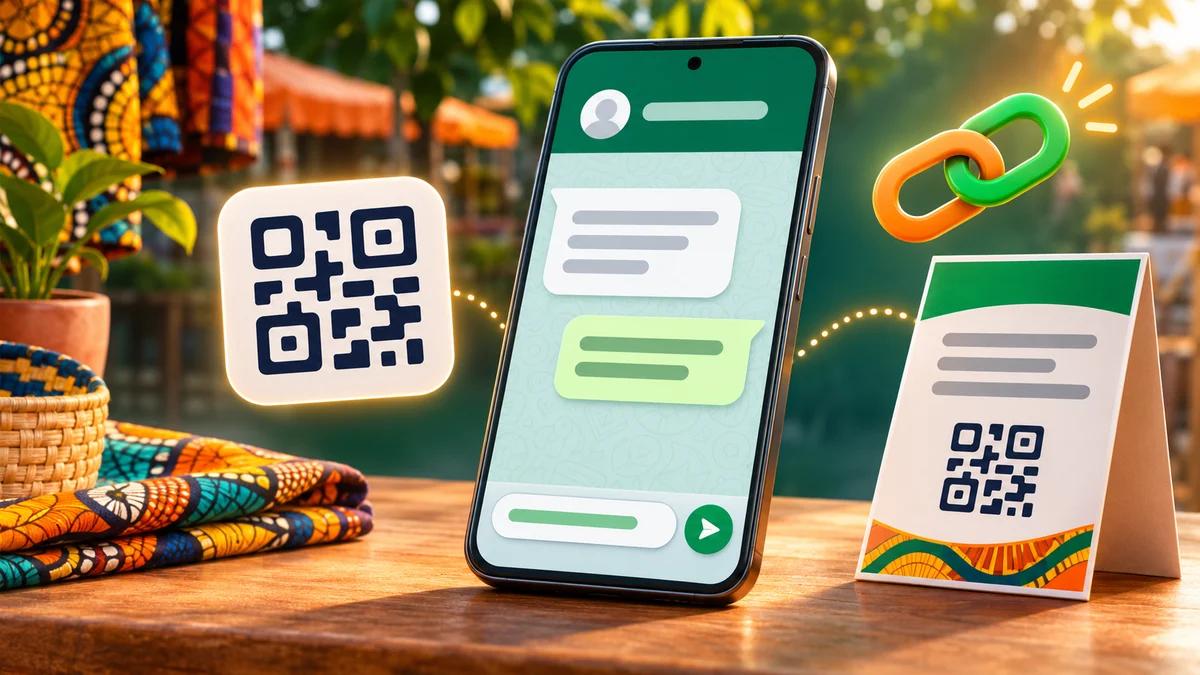
A poster in a shop in Cotonou, a flyer handed out at a trade fair, a well-kept Facebook Page. At the bottom, a number: “WhatsApp: 97 XX XX XX”. An interested customer has to save it in their contacts, open WhatsApp, find the contact, then type. Four steps. And if the flyer was printed before November 2024, the number is not even in the right format any more. Many people give up along the way, and you never find out.
A WhatsApp link removes those four steps: one tap (or one scan) and the chat opens, sometimes with the first sentence already written. It is free, official and takes two minutes. Yet on the websites and printed material we look at, we regularly find broken links: a “+” left in the address, the 0 of the Benin prefix removed, a QR code made on a website that stopped working after a few months, a pre-filled message cut in half by an “&”.
This guide explains how to create a WhatsApp link with your number (the well-known wa.me link), add a pre-filled message, use the WhatsApp Business short link and QR code, where to place them so they actually work, and how to avoid the traps. It is written for SMEs, NGOs and public institutions in French-speaking Africa, with local phone numbers rather than +1 or +44 examples.
In short
- Basic link: https://wa.me/ followed by your number in international format, with no “+”, no spaces and no dashes.
- In Benin, since 30 November 2024, a mobile number is written 229 01 followed by the 8 digits of the old number: https://wa.me/22901XXXXXXXX. You keep the 0 of the 01.
- Pre-filled message: add ?text= and the URL-encoded message (space = %20). Customers can edit it before sending.
- WhatsApp Business already gives you a short link and a QR code (Tools, Short link), with a default message.
- QR code: choose a static code or a redirect from your own website rather than a “dynamic” code that depends on a subscription.
- Place it wherever customers hesitate: website, Google profile, social media, posters, invoices, packaging.
Official WhatsApp logo (Meta). Source: whatsapp.com.
WhatsApp link: what exactly are we talking about?
“WhatsApp link” actually covers four different things, and mixing them up explains a good share of the mistakes.
- The “click to chat” link (wa.me followed by a number). This is the format documented by WhatsApp. It works with a standard WhatsApp account as well as WhatsApp Business, and you can create as many as you like, each with its own message.
- The WhatsApp Business short link. The app generates it automatically for your business. It does not show your number in the address and offers a default message.
- The QR code, which is simply a link in image form. Either the one provided by the WhatsApp Business app, or a QR code made from a wa.me link.
- The group invite link (chat.whatsapp.com). A different thing altogether: it lets someone join a group, it does not open a chat with you. It is also what many people typing “WhatsApp link” are looking for, which is why search results are cluttered with lists of groups.
The diagram below summarises the five options an organisation can use, including a redirect from your own website, which we cover further down.
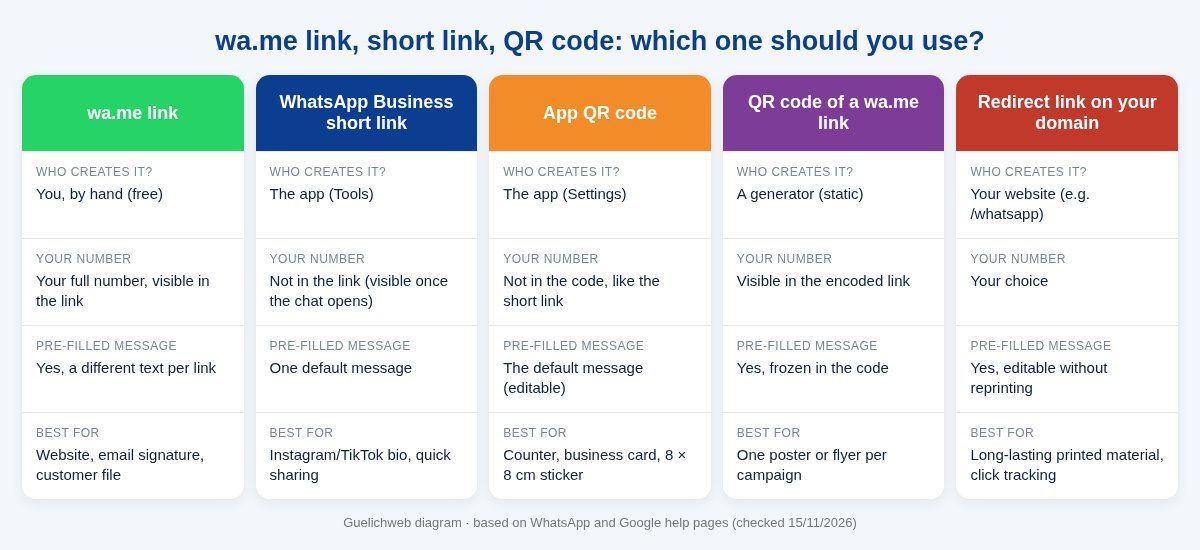
Guelichweb diagram, based on WhatsApp and Google help pages checked on 15/11/2026.
How to create a WhatsApp link with your number (wa.me) in two minutes
The official rule
WhatsApp’s help page is very short: use https://wa.me/ followed by the full phone number in international format, and “omit any zeroes, brackets, or dashes”. The link works on phones and on WhatsApp Web (WhatsApp Help: click to chat). The person who taps it does not need to have saved your number, and you have nothing to install.
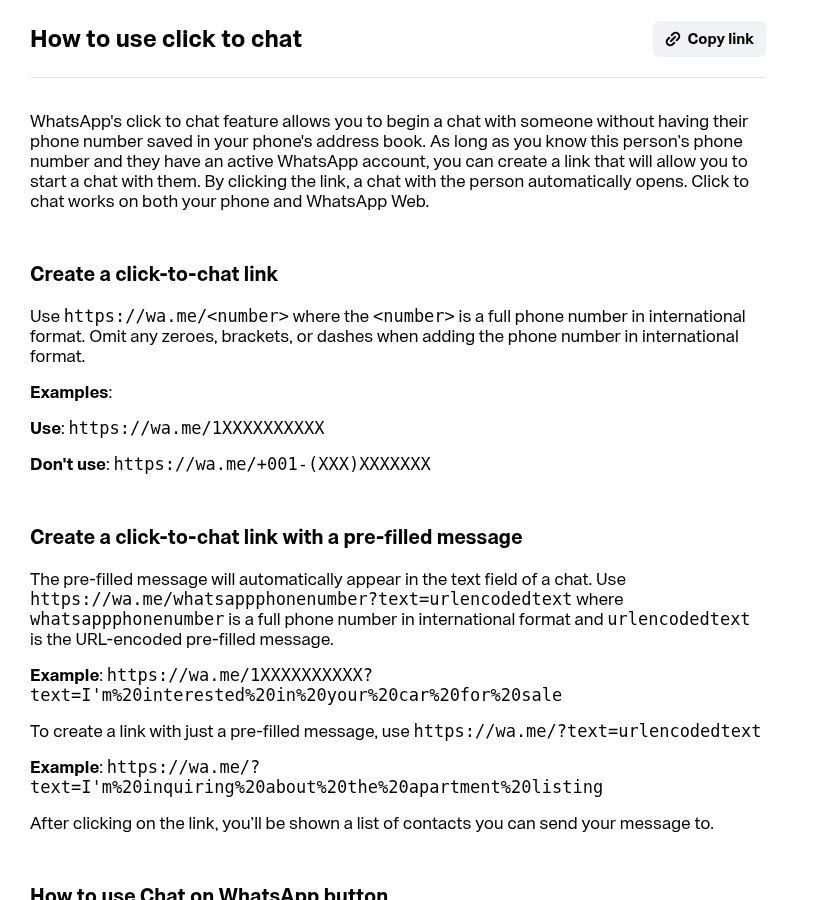
Source: screenshot of the WhatsApp Help Center page “How to use click to chat”, faq.whatsapp.com, viewed on 15/11/2026.
The Benin trap: keep the 0 of the 01
The “omit any zeroes” instruction is about the national trunk 0 that many countries drop in international format (a UK mobile 07… becomes 44 7…). Benin is different. Since 30 November 2024, every number has moved to 10 digits by adding the prefix 01 in front of the old number, whatever the network, and ARCEP states that from abroad you dial +229 followed by 01 and the number (ARCEP Benin). The numbering plan notified to the ITU confirms that this zero is part of the number (ITU).
In practice, an old number 97 XX XX XX becomes 01 97 XX XX XX, and the correct link is https://wa.me/2290197XXXXXX. If you remove the 0 (https://wa.me/229197XXXXXX), you create a number that does not exist. It is a very common mistake on Beninese websites, together with its cousin: the link that still contains the old 8-digit number.
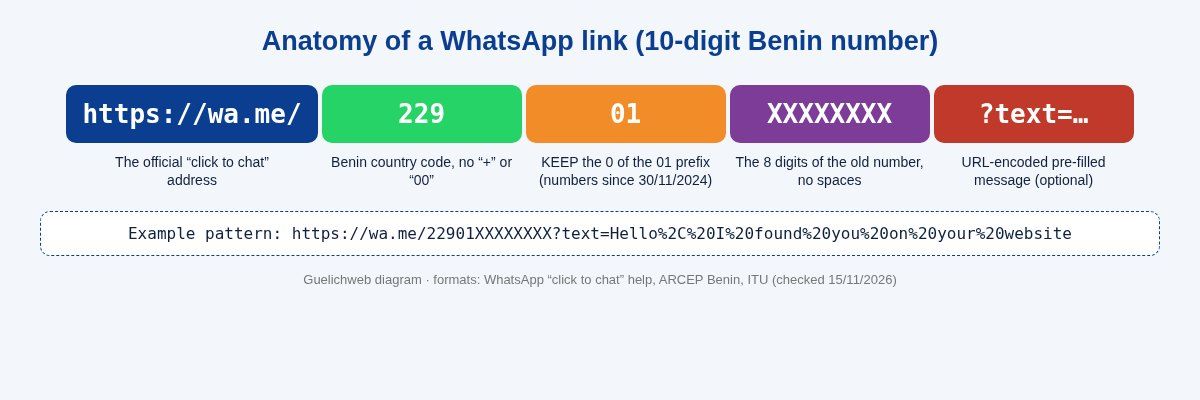
Guelichweb diagram. Formats: WhatsApp Help Center, ARCEP Benin and ITU, checked on 15/11/2026.
What about neighbouring countries?
The logic is the same everywhere: country code, then the number as you would dial it from abroad, with no symbols or spaces. A few pointers for the region, to be checked for each number before printing:
- Côte d’Ivoire (225): numbers have had 10 digits since 2021 and you keep the leading digit, for example https://wa.me/22507XXXXXXXX.
- Senegal (221): 9-digit mobile numbers, for example https://wa.me/22177XXXXXXX.
- Togo (228), Burkina Faso (226), Niger (227), Mali (223): country code followed by the 8-digit number.
- Cameroon (237): 9-digit mobile numbers starting with 6.
The most reliable test is also the simplest: open the link on a phone that does not have your number in its contacts. If WhatsApp says the phone number is not on WhatsApp, or opens a chat with someone else, start again.
Step by step
- Write down your WhatsApp number (the one where someone actually replies) in international format: 229 01 97 XX XX XX.
- Remove everything that is not a digit: spaces, dots, “+”, “00”, brackets. You get 2290197XXXXXX.
- Paste it after https://wa.me/: https://wa.me/2290197XXXXXX.
- Test it on an Android phone, on an iPhone if possible, and on a computer (where the link opens WhatsApp Web or the desktop app).
- Store the link somewhere tidy (your customer file, a shared team document) so everyone uses the same one.
Adding a pre-filled message (and encoding it correctly)
The pre-filled message is the most underrated part. It appears in the text field when the chat opens; nothing is sent until the customer taps Send, and they can change it. The official format is https://wa.me/number?text= followed by the “URL-encoded” text. There is also https://wa.me/?text=… with no number: the person then chooses who to send the text to, which is useful for a “share with a friend” button, not for contacting you.
The encoding rules you need to know
- A space becomes %20, a comma %2C, a line break %0A.
- Accented letters take two codes: é becomes %C3%A9, è becomes %C3%A8.
- The curly apostrophe ’ (the one Word and phones insert) becomes %E2%80%99. The straight apostrophe ' usually goes through without encoding.
- The characters & and # are dangerous: if they are not encoded, they cut the message. “Order #12” becomes “Order”. Encode them as %26 and %23.
You do not need to do this by hand. In Google Sheets, =ENCODEURL("Hello, I found you on your website") returns the encoded text; join it to your link: ="https://wa.me/2290197XXXXXX?text="&ENCODEURL(B2). A developer will use encodeURIComponent in JavaScript. Online generators do the same thing, but always check the result by clicking it.
Six pre-filled messages that work
Our rule: one sentence, two at most, saying where the customer comes from and what they want. People hesitate less to send a short text they do not need to fix. A few examples to adapt:
- Website, contact page: “Hello, I found you on your website and I would like some information about…”
- Product page: “Hello, I am interested in: black folding chair. Is it available?” (one link per product, generated automatically by the website).
- Poster in a shop: “Hello, I saw your poster in Fidjrossè.”
- Google profile: “Hello, I found you on Google Maps.”
- NGO, signing up for an activity: “Hello, I would like to register for the 12 December training. Name: … Town: …”
- Institution, public service: “Hello, I have a question about the procedure for…” (and nothing that invites people to send ID documents over WhatsApp unless that is planned).
One detail makes all the difference later on: by changing the sentence for each channel, you know where each conversation comes from as soon as the first message arrives. We come back to this in the section on measurement.
The WhatsApp Business short link: nothing to type
If you use the WhatsApp Business app, you already have a link. According to the official help page, a short link is generated automatically when you create the account; you find it under Tools, then Short link. From there you can copy it to paste on your website or Facebook pages, share it directly, and turn on a default message that customers can edit (WhatsApp Help: short links). If the customer does not have WhatsApp on the device, they land on a web page with your business information and a “Continue to chat” button.
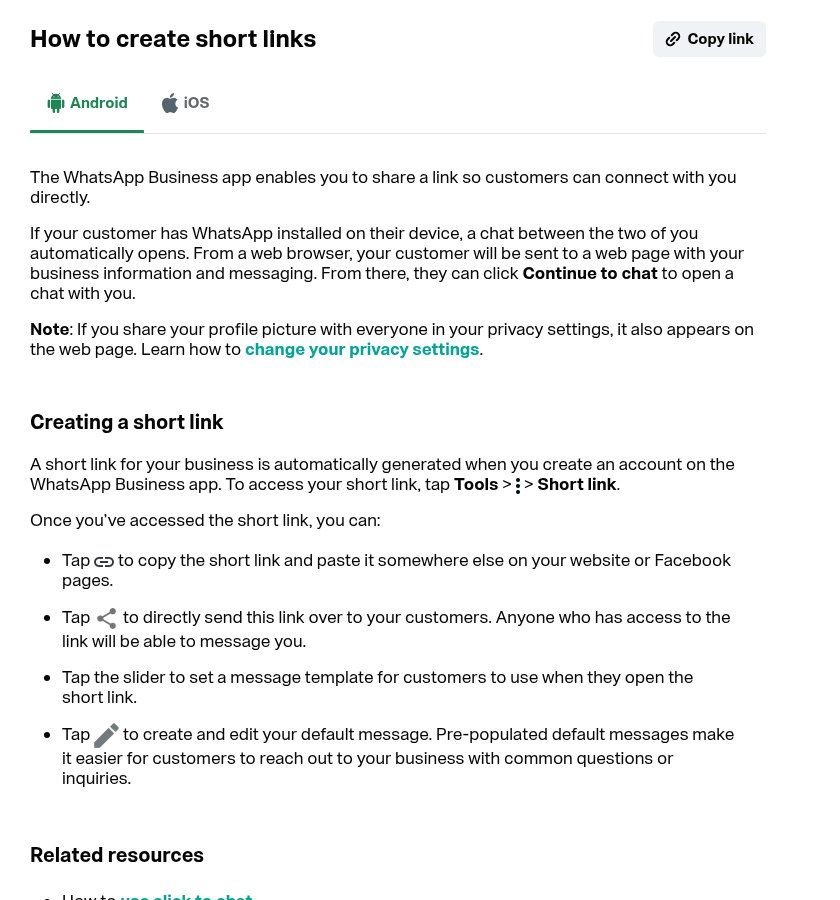
Source: screenshot of the WhatsApp Help Center page “How to create short links”, faq.whatsapp.com, viewed on 15/11/2026.
Its strengths: nothing to build, no risk of a wrong number, and a link that does not show your number in the address (it is visible once the chat is open, of course). Its limits: one default message for everyone, so you cannot tell where a customer came from; and a “Reset” option that makes the old link and the old QR code unusable. If you have printed 2,000 flyers with that code, never touch that button.
Our view: the short link is perfect for an Instagram or TikTok bio and for quick sharing from the phone. For the website and printed material, we prefer wa.me links you control, one per placement.
How to create a free WhatsApp QR code (that will not let you down)
The WhatsApp Business app QR code
The app also provides a QR code. The help page on printing your QR code gives the path (More options, Settings, then the green QR code icon next to your business name), explains how to save it (screenshot, or Share code then Photos) and states that, for the sticker template WhatsApp offers, the printed code should measure 8 × 8 cm (WhatsApp Help: print your QR code).
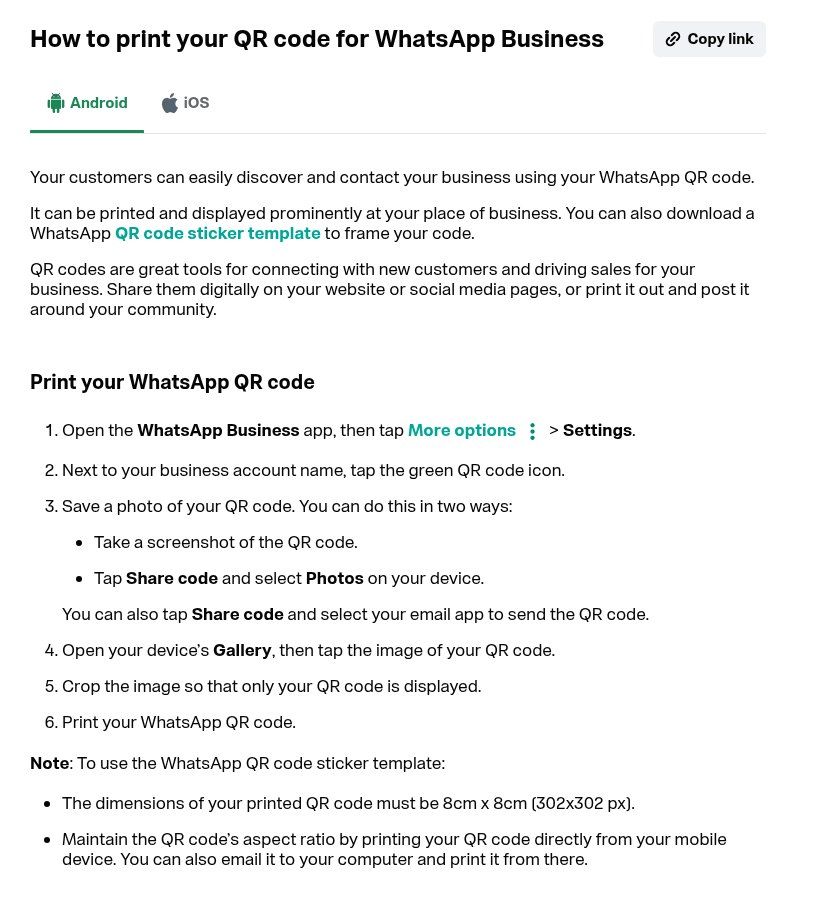
Source: screenshot of the WhatsApp Help Center page “How to print your QR code for WhatsApp Business”, faq.whatsapp.com, viewed on 15/11/2026.
It is the simplest solution for a counter, a till or a business card. Same warning as for the short link: resetting the code disables every copy you have already printed.
Static or “dynamic” QR code: the free generator trap
Most pages at the top of the results for “free WhatsApp QR code” are generators. They are handy, but you need to understand what you are downloading. A static QR code contains the wa.me link itself: it depends on nobody and works as long as your number is on WhatsApp. A dynamic QR code contains the generator’s address, which then redirects to WhatsApp: that is what allows scan counts and changing the destination, but if the service shuts down, changes its terms or keeps the feature for paying subscribers, your printed code stops working.
The scenario is a classic: a code created “for free” for a menu or a sign leads, a few months later, to a page asking you to subscribe. Read the generator’s terms before you print anything. Our rule is simple: for anything printed, use either a static code or a redirect from your own domain name. Before downloading, scan the code with your phone camera: the address shown should start with https://wa.me/ (static code) or with your own domain. If it starts with the generator’s name, it is a dynamic code that does not belong to you.
A redirect from your website: the answer for long-lasting material
If you have a website, create an address such as yoursite.bj/whatsapp that redirects to your wa.me link. The QR code points to your address, not to WhatsApp. The day you change number, message or the person in charge of replies, you edit the redirect in a minute without reprinting anything, and you can count visits to that address in your statistics. On WordPress, a redirect plugin is enough; on a custom site, it is one line of configuration. It is the kind of setting we put in place when we build or maintain a website.
Printing rules
- Size: 8 × 8 cm is WhatsApp’s reference for its sticker; below 2 to 3 cm, many entry-level phones struggle. For a poster read from several metres away, go much bigger.
- Contrast: dark code on a light background. Green on green, or inverted codes, often fail.
- Short message: the longer the pre-filled text, the denser the code and the harder it is to scan. One sentence is enough.
- A call to action next to the code: “Scan to message us on WhatsApp”. Without it, many people do not know what the code does.
- The number in plain text under the code, in the form +229 01 97 XX XX XX. For people who do not scan, and so everyone can check they are writing to the right number.
- Real-world test: three different phones, including an old one, in daylight and under the lighting where the code will be displayed.
Where to place your WhatsApp link so it actually works
On your website
The link should be where visitors have a question: at the top of the homepage, on the contact page, on every product or service page, and in the footer. We cover where the WhatsApp button goes in what to include on a website homepage and in our article on landing pages. Two tips from experience: a real, readable button (“Message us on WhatsApp”) beats a tiny lost icon, and a permanent floating button must never hide content or the buy button on mobile.
On WordPress, there is no need for a heavy plugin for a simple button: a wa.me link in one of your theme’s buttons does the job, with no extra script slowing the page down. A plugin is only worth it if you want several agents, opening hours or built-in tracking. And keep a contact form alongside it: not everyone wants to use WhatsApp, especially for an official or confidential request.
On your Google Business Profile
Google lets verified business profiles add a WhatsApp chat option: Edit profile, Contact, then the “Chat” section, where you paste your click-to-chat link. Google says this option is only available in some regions (Google Help: chat from your profile); WhatsApp describes the same process on its side (WhatsApp Help). So check your own profile: if the section does not appear, at least add your number in international format and mention WhatsApp in the description. For the rest of the profile, see our guide to creating a Google Business Profile and our article on local SEO.
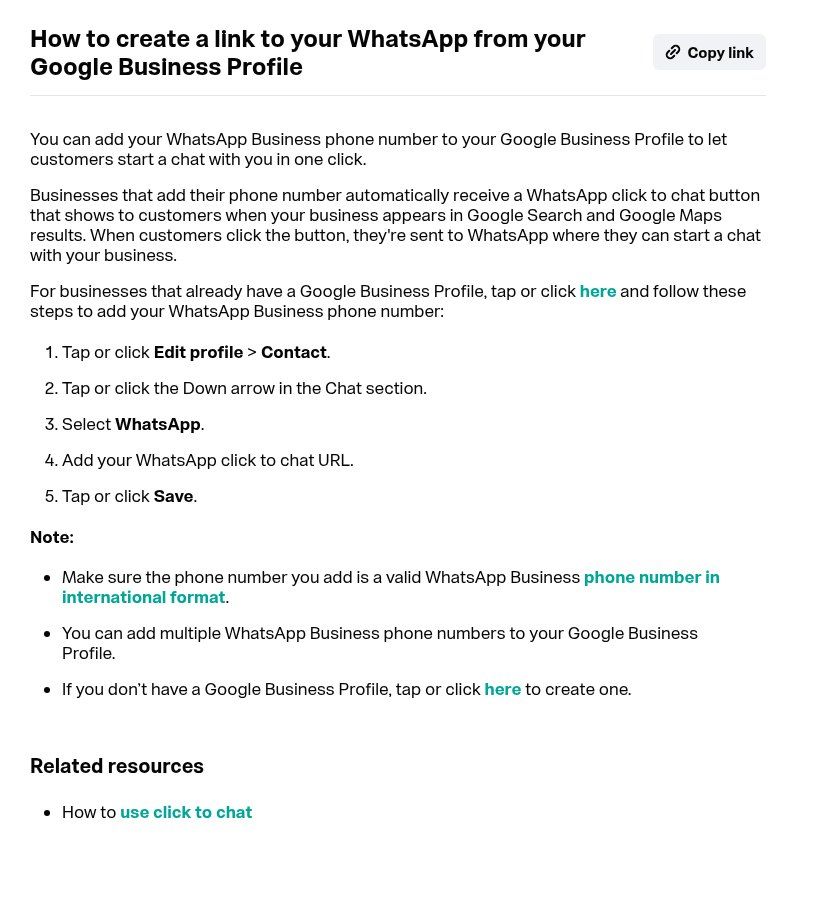
Source: screenshot of the WhatsApp Help Center page “How to create a link to your WhatsApp from your Google Business Profile”, faq.whatsapp.com, viewed on 15/11/2026.
On Facebook, Instagram and TikTok
On a Facebook Page, Meta lets you add a WhatsApp action button once your WhatsApp Business number is connected to the Page (with a verification code). On Instagram, the link goes in the profile links, or through the contact options of a professional account. On TikTok, the bio link depends on the account type and audience; if it is not available, at least show the number. These menus change regularly: trust what you see in your own app rather than screenshots from two years ago. In posts and Status updates, a wa.me link with a campaign-specific message remains the most effective option.
Everywhere else
- Email signature: “Message us on WhatsApp” with the link, rather than a raw number.
- Invoices, quotes and receipts: a link or QR code “Questions about this invoice?”, with a message that includes the invoice number. See also our customer database method, which shows how to generate a WhatsApp link for each customer with a formula.
- Packaging, bags, product labels: for the next order.
- Delivery vehicles, shop windows, site boards: with a code large enough to be scanned from a distance.
- WhatsApp catalog: each catalog item also has its own shareable link; see our WhatsApp Business catalog guide.
- Asking for Google reviews: the opposite direction, but the same mechanism; we explain it in how to get Google reviews.
Knowing where your messages come from
It is the question every organisation investing in posters or ads asks us: “Is it working?” A WhatsApp link on its own gives no statistics: the message arrives, full stop. Three methods, from simplest to most complete:
- One pre-filled message per channel: “I saw your poster”, “I found you on your website”, “seen on Facebook”. Count them every week. Basic but effective, and free.
- A click event in Google Analytics 4 on the website’s WhatsApp buttons: you measure how many visitors click, from which pages and which sources. We explain GA4 in what is Google Analytics 4.
- One redirect per channel from your domain (yoursite.bj/wa-poster, yoursite.bj/wa-fair): each QR code has its own address, and your website statistics count the scans.
On the WhatsApp Business side, record the source with a label or in your customer file as soon as you reply for the first time. Otherwise the information gets lost in the chat history. When volume grows, that is exactly the moment a CRM starts to make sense.
Security: fake QR codes, fake numbers and group links
A QR code is a link nobody can read with the naked eye. France’s Cybermalveillance.gouv.fr describes “quishing”, phishing through QR codes, including replacement codes stuck over genuine ones, and recommends checking that the address looks right before following it (Cybermalveillance.gouv.fr). For a business that takes Mobile Money payments, the risk is real: a sticker placed over your poster can send your customers to another number, which will then ask them to pay.
- Always show the number in plain text next to the code, so customers can see they are writing to the right person.
- Check your posters and counters regularly: a sticker placed on top is spotted in ten seconds.
- Laminate the code or print it directly on the material rather than on a sticker that is easy to cover.
- In your greeting message or profile, state the only valid Mobile Money number and the account holder’s name.
- Do not publish an employee’s personal number: use a company number that stays the same if they leave.
- For WhatsApp groups, remember that anyone with the invite link can ask to join; reset it if it is circulating too widely.
These habits are part of basic team awareness, which we cover in phishing at work.
WhatsApp link not working: the usual causes
- The “+” or “00” is still in the link: wa.me/+229… does not behave as expected.
- The 0 of Benin’s 01 has been removed: 229 1 97… instead of 229 01 97…
- Old 8-digit number on an old flyer, a signature or a website that was never updated.
- Spaces or dashes in the number, often added by copying and pasting from a document.
- Badly encoded message: an “&” or “#” cuts the text; an unencoded curly apostrophe can break the link on some websites.
- The number has no WhatsApp account, or is no longer the right one after a change of phone or SIM.
- The short link or QR code has been reset in WhatsApp Business: every old copy is dead.
- The dynamic QR code generator has stopped redirecting, or now requires a subscription.
- The link opens in an app’s in-app browser (Facebook, Instagram) and can get stuck on an intermediate page: tap “Continue to chat” or open it in the browser.
The right habit: a quarterly check of all your links on two phones. It takes ten minutes and prevents weeks of lost messages.
WhatsApp usernames: should you wait?
WhatsApp is preparing usernames (such as @yourbusiness): the official page says you can already reserve a username before launch, that businesses will be able to have one, and that a phone number will still be needed to use WhatsApp (WhatsApp: questions about usernames). For businesses, the page also says the phone number is still displayed when the business contacts someone.
Our advice: reserve a name consistent with your other social accounts as soon as the option appears in your app, but do not replace anything. Your wa.me links and QR codes remain the foundation, and almost all your customers already know how they work.
When a simple link is no longer enough
A WhatsApp link opens the door. After that, someone, or something, has to be behind it. If your links work well, you will receive more messages, and that is where the real problems start: late replies, forgotten customers, information scattered across several phones.
- A few dozen messages a day: a well-configured WhatsApp Business account (full profile, quick replies, labels) and an up-to-date customer file are enough.
- Lots of repetitive questions: a chatbot can answer the simplest ones and pass on the rest. We explain what it does and does not do in WhatsApp chatbot: what it actually does.
- Several people replying, bulk messages, a connection to the website or CRM: you need the API; see what is the WhatsApp Business API and what does it cost.
- A complete set-up of website + WhatsApp + customer follow-up: that is the subject of website, WhatsApp and CRM.
At Guelichweb, we build WhatsApp links and QR codes into the websites we create, with redirects and measurement, and we build WhatsApp chatbots with n8n when volume justifies it. The cost depends on your situation: we provide a quote after a diagnosis, as explained on our offers page.
Checklist: your WhatsApp link in 10 points
- The number is one where someone really replies, ideally a company number.
- International format with no “+” or spaces; in Benin, 22901 followed by 8 digits.
- Link tested on Android, iPhone and computer, from a phone that does not have your number saved.
- Short pre-filled message, different for each channel, correctly encoded.
- Complete WhatsApp Business profile: name, description, opening hours, address, website.
- Static QR code or redirect from your own domain for anything printed.
- Printed code large enough, high contrast, with a call to action and the number in plain text.
- Visible button on the website (homepage, contact, product pages) and link on the Google profile.
- Source of each conversation recorded (label, customer file or CRM).
- Quarterly check of all links and posters.
Frequently asked questions
How do I create a WhatsApp link with my number?
Write https://wa.me/ followed by your number in international format, digits only. For a Benin number 01 97 XX XX XX: https://wa.me/2290197XXXXXX. Test the link before sharing it.
How do I create a WhatsApp link with a message?
Add ?text= at the end of the link, followed by the encoded message: https://wa.me/2290197XXXXXX?text=Hello%2C%20I%20found%20you%20on%20your%20website. The customer sees the message in the text field and can edit it before sending.
Can I create a WhatsApp link without a number?
Yes, in two ways. https://wa.me/?text=… opens WhatsApp with a text and lets the person choose the recipient (useful for getting people to share information). And the WhatsApp Business short link does not show your number in the address, even though the chat does happen with that number.
Do I need WhatsApp Business to get a link or QR code?
Not for the wa.me link, which works with any WhatsApp number. Yes for the short link and QR code provided by the WhatsApp Business app. For professional use, we recommend WhatsApp Business anyway, for the profile, opening hours and reply tools.
Does a WhatsApp QR code expire?
A static QR code containing a wa.me link does not expire: it works as long as the number is active on WhatsApp. The WhatsApp Business app QR code stops working if you reset it. A dynamic QR code depends on the service that created it.
Why is my WhatsApp link not working?
In most cases: a “+” or spaces in the number, the 0 of the 01 removed, an old 8-digit number, or an unencoded “&” in the message. Go through the list of causes above and test from another phone.
How do I add a WhatsApp button to a WordPress site?
The lightest option: a button from your theme or page builder pointing to your wa.me link. A plugin is only useful for advanced needs (several agents, opening hours). Then check that the button does not get in the way on mobile. More context in what is WordPress and when to choose it.
Can I use several WhatsApp numbers?
Yes: one link per department (sales, after-sales, registrations). WhatsApp also says you can add several WhatsApp Business numbers to a Google Business Profile. Still, keep the number of entry points reasonable: three poorly monitored numbers are worth less than one well-run number.
To wrap up
A WhatsApp link is one of the few marketing tools that cost nothing and pay off immediately, as long as it is correct. A number in the right format, a message that says where the customer came from, a QR code that depends on nobody, and a check every now and then: that is all. The rest is about the quality of the reply behind it.
Would you like us to check the WhatsApp links on your website and printed material, or set up the redirect, measurement and, if needed, a chatbot? Contact Guelichweb: we start with a diagnosis, then send you a quote.