Business continuity plan (BCP): what it is, BCP vs disaster recovery plan, and a simple template for SMEs, NGOs and institutions
G. CHRIST
Published on November 27, 2026
Ask yourself one question before reading on: if tomorrow morning your organisation loses its main computer, its internet access or the phone that runs the company WhatsApp, how long can you hold out before customers, beneficiaries or head office notice? One hour? Three days? Nobody knows?
If the honest answer is “nobody knows”, you don’t have a business continuity plan. Don’t worry, most small organisations don’t. The trouble is that you only find out on the day it would have helped. In this guide we explain what a business continuity plan (BCP) is, how it differs from a disaster recovery plan (DRP), what RTO and RPO mean, and above all how to write a short, usable one for an SME, an NGO or a public institution. You will also find a one-page template you can copy into Word or Google Docs. The references quoted were checked on 27 November 2026.
What is a business continuity plan? The plain definition
A business continuity plan is a document, ideally a short one, that explains how your organisation keeps working during a crisis: what must keep running no matter what, with which backup means, who makes decisions, who informs whom, and how you get back to normal.
In the United States, the federal Ready.gov business continuity planning page describes it as organising a continuity team and compiling a plan to manage a business disruption. France’s national security secretariat (SGDSN) publishes a free continuity guide for government bodies, local authorities and companies, built on the same idea: keep or resume your activities after an event that seriously disrupts normal operations. The international reference standard is ISO 22301.
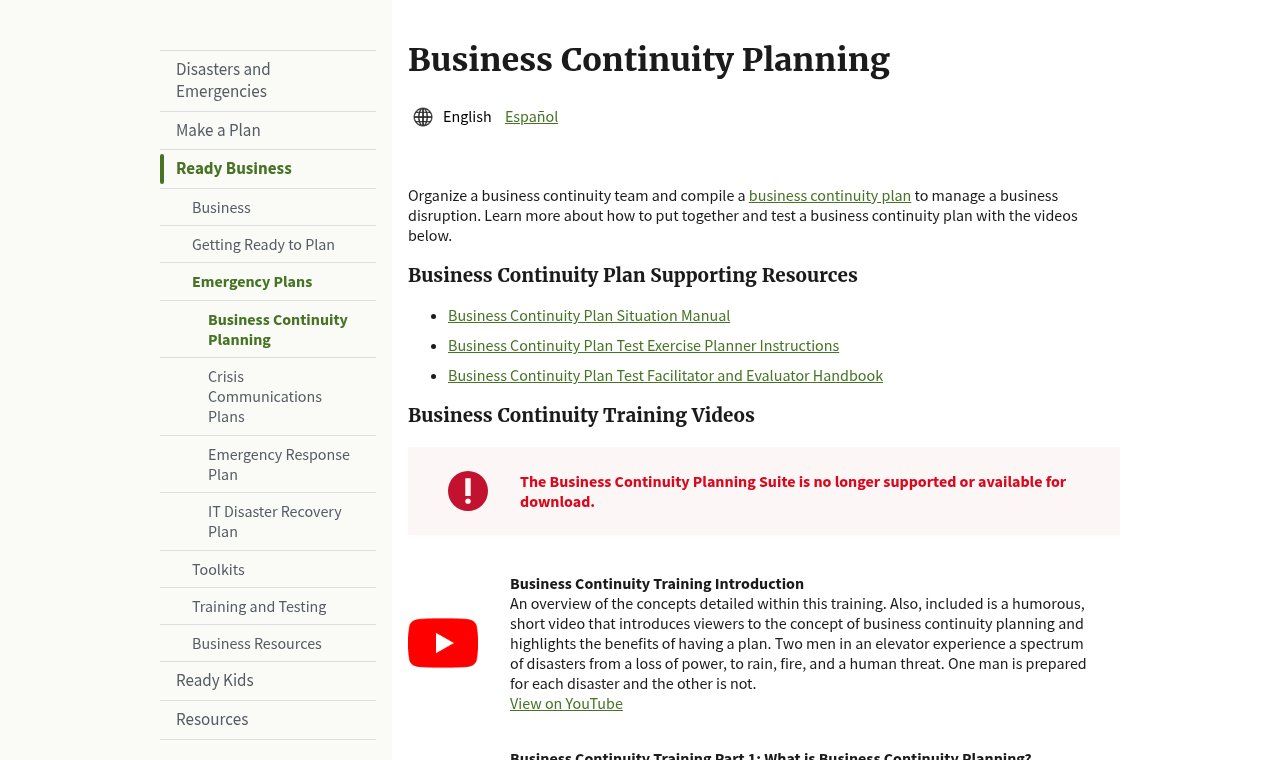
Source: ready.gov, Business Continuity Planning page, screenshot taken on 27/11/2026.
What a BCP is not, because these mix-ups are expensive:
- It is not an 80-page binder. A plan nobody reads is useless during an outage. For an organisation of 5 to 50 people, a few pages are enough.
- It is not just an IT topic. A flood that closes your office, the long absence of your only accountant or a supplier going bust are continuity issues too.
- It is not insurance. Insurance may pay for part of the losses. It won’t answer your customers’ calls while you wait for the loss adjuster.
BCP vs DRP vs IT contingency plan: what’s the difference?
Three terms that often get blended together in quotes and tenders. Here is how we separate them.
- BCP (business continuity plan): the whole organisation. It applies during the disruption, including in degraded mode (handwritten invoices, orders taken by phone, meetings in another building).
- DRP (disaster recovery plan): the technical side. It describes how to bring systems and data back after the incident: from which backups, in what order, and who checks that everything works.
- IT contingency plan: the part of the set-up that keeps essential IT functions running, even in reduced form. The US NIST SP 800-34 publication covers this as contingency planning for information systems.
The CISO guide published by ASIN, Benin’s Agency for Information Systems and Digital Affairs, sums up the relationship well: the continuity plan takes an overall view of business processes, while the recovery plan focuses on restoring the information systems that support them. One does not replace the other. A DRP without a BCP restarts servers without knowing which ones really matter. A BCP without a DRP promises recovery times nobody has checked.
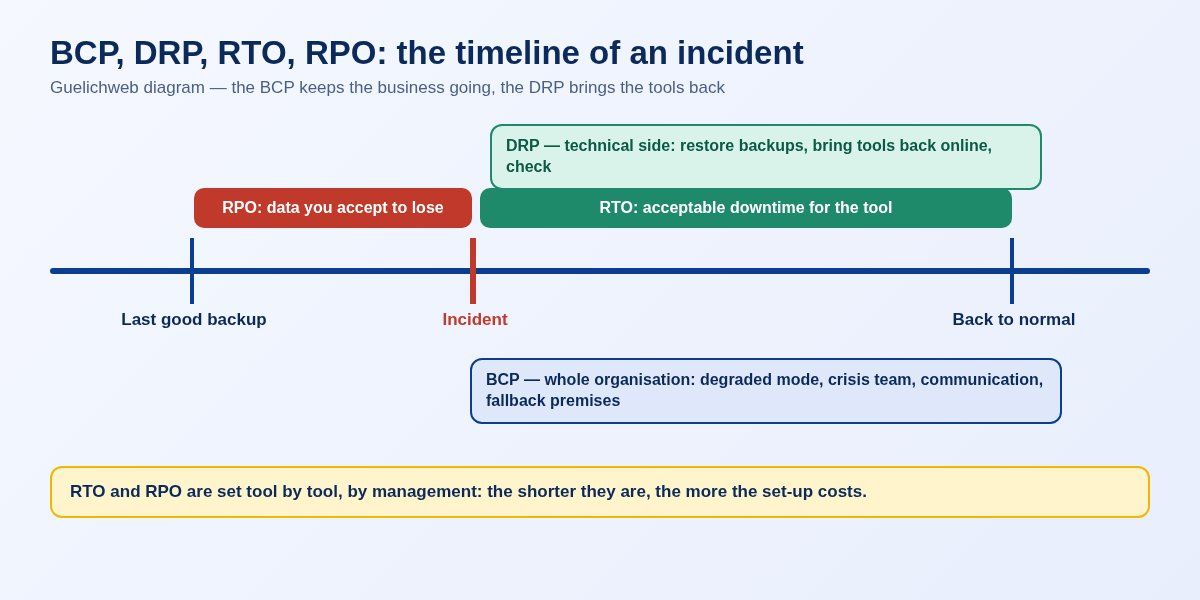
Guelichweb diagram: where the BCP, the DRP, the RTO and the RPO sit on an incident timeline.
RTO and RPO: the two numbers that drive everything
If you remember only two terms from this article, make it these.
- RTO (Recovery Time Objective): how long a tool can stay unavailable before the impact becomes unacceptable. You will also see “maximum tolerable downtime”, a close cousin.
- RPO (Recovery Point Objective): how much data you are prepared to lose, expressed as time since the last good backup.
A concrete example: if your customer file is backed up every night at 11 pm and your computer dies at 4 pm, you lose up to 17 hours of work. If that’s too much, you need more frequent backups, or a cloud tool that syncs continuously. ASIN’s guide puts it plainly: a four-hour RPO requires a backup at least every four hours, while a 24-hour RPO can live with a daily backup.
The point we would like to see pinned up in every manager’s office: RTO and RPO are management decisions, not technical settings. A very short recovery time is expensive (duplicate hardware, backup subscriptions, an on-call provider). So it is up to management to decide, tool by tool, knowing the price of each option. Your IT provider proposes; it shouldn’t decide alone.
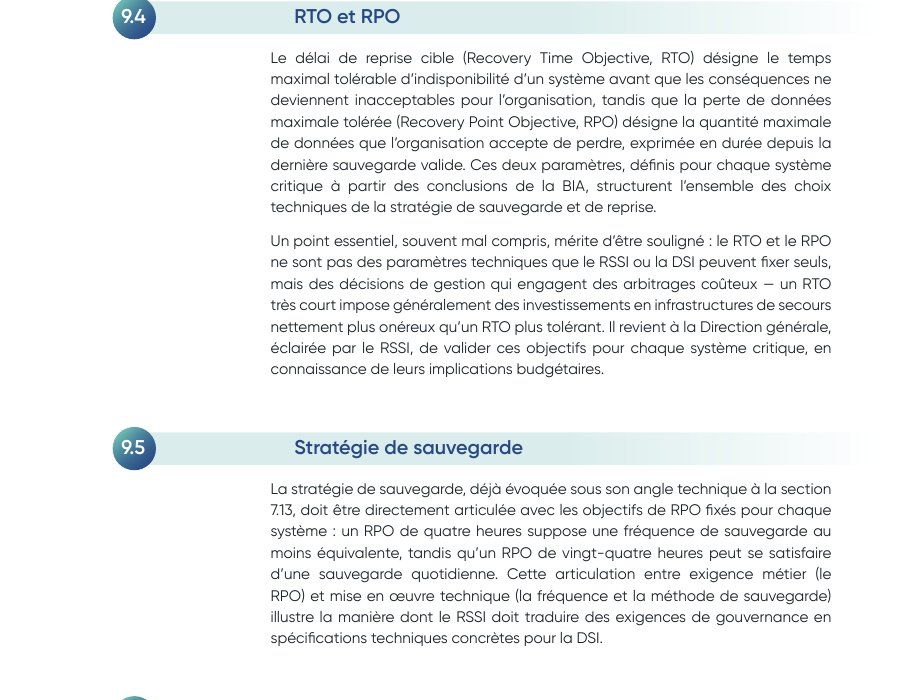
Source: ASIN (Benin), Guide du Responsable de la sécurité des systèmes d’information, part IX, p. 79, in French (PDF consulted on 27/11/2026).
Why this matters in Benin and across French-speaking Africa
You sometimes hear that continuity planning is a luxury for banks and multinationals. We think the opposite: the thinner your resources, the longer a single failure can stop you. A few realities that tip the balance:
- Power and connectivity. ASIN’s guide notes that unreliable electricity and connectivity in some areas call for an architecture that tolerates outages, rather than copying standards designed for more stable environments. In practice: UPS units, batteries, a second mobile operator, tools that work offline.
- Cyber incidents. ASIN’s vulnerability and incident report on Benin’s cyberspace states that malware infections, website hacks and botnets were the most frequently recorded incidents among the entities studied, and that several could have been prevented with multi-factor authentication and awareness training.
- Dependence on one person or one phone. In many small organisations everything runs through one WhatsApp number and passwords live in one person’s head. ASIN’s guide explicitly flags plans that rely on undocumented individual know-how as a major weakness.
- Personal data. A data leak or loss can trigger obligations towards the APDP in Benin (or your own country’s authority). Better to know in advance who handles it.
Is it mandatory? In Benin, State bodies fall under the government information security policy (PSSIE), and operators of critical information infrastructure have their own rules, approved by decree in 2023. For an ordinary SME, we are not aware of any general obligation to have a written BCP. However, the question may come up in a security questionnaire from a partner, a large customer or a donor. Having a clean document to show on that day makes a difference.
The scenarios to plan for first
No need to imagine disaster-movie scenes. Start with the failures that actually happen and rank them by likelihood and impact. Here is our starting list for a modest-sized organisation:
- A power cut lasting several hours: who can work, on what, and how long do the batteries last?
- Internet down at your provider: is there a second operator or a planned mobile hotspot with enough data?
- Computer or phone stolen, broken or lost: is the data stored elsewhere, and is the device locked and encrypted?
- Account locked or hacked (email, WhatsApp Business, Facebook page, Google): do you have recovery codes and a second admin? See our guides on a banned WhatsApp account and a hacked WhatsApp Business account.
- Ransomware: are your backups out of the attacker’s reach, and do you know whom to call?
- Website down or hacked, or a failing host: see what to do if your website is hacked.
- A key person is away (illness, resignation, travel): can someone else run payroll, tax returns and bank transfers?
- A provider or supplier disappears: is your domain name registered to you, or to your former web agency?
- Premises inaccessible (flood, fire, unrest): where do you relocate, and with what equipment?
For most organisations, five or six scenarios handled properly beat twenty skimmed over.
How to write a business continuity plan in 7 steps
The SGDSN method offers a full approach and a simplified one. For an SME, an NGO or a department within an institution, the simplified version is enough to start with. Here is how we run it.
1. Appoint an owner and set the scope
One person leads, backed by management. The scope must be explicit: the whole organisation, one site, a funded project, one department. Without a named owner, the document will never be updated.
2. List your essential activities
This is the business impact analysis, or BIA. For each activity, ask three questions: what happens if it stops for an hour, a day, a week? Who is affected (customers, beneficiaries, staff, partners)? Is there a regulatory or contractual deadline? You will usually end up with a handful of truly vital activities: getting paid, delivering, paying salaries, answering customers, reporting to donors.
3. Inventory the resources they depend on
People, tools, accounts, data, suppliers, premises. Also write down where access sits: who has the accounting software password, which phone receives the bank’s verification code, which email address the company Google account is tied to. This step almost always reveals a surprise.
4. Set an RTO and an RPO for each tool
Here is what this step can look like in a small organisation: email and WhatsApp, RTO 4 hours; invoicing software, RTO 1 day and RPO 1 day; brochure website, RTO 2 days; accounting archives, RTO 1 week but RPO close to zero (nothing may be lost). These values are examples, not recommendations: yours depend on your activity.
5. Choose backup solutions and a degraded mode
For each vital activity, describe how it continues without the usual tool: a paper invoice book, a printed receipt template, a backup phone number, a replacement laptop, a fallback location. Then the technical measures: backups, a second operator, a UPS, backup accounts. Favour what a non-technical person can switch on.
6. Write the plan and the quick-reaction sheets
A one-page summary (template below), then one quick-reaction sheet per scenario: the first 5 to 10 actions, in order, with the numbers to call. Print a copy. A continuity plan stored only on the server that just went down happens more often than you’d think.
7. Test, then update
A backup restore test, a simulated outage (“today we work two hours without the server”), a one-hour tabletop exercise with management. ASIN’s guide generally recommends an annual test for the most critical systems, with a report on the gaps found. For a small organisation we advise a quick review every six months and after every significant change (new software, a key employee leaving, a new provider).
Business continuity plan template: the one-page sheet
Here is the outline we suggest as a starting point. Copy it into Word, Google Docs or a spreadsheet; what matters is that every box contains actual names, numbers and locations, not generalities.
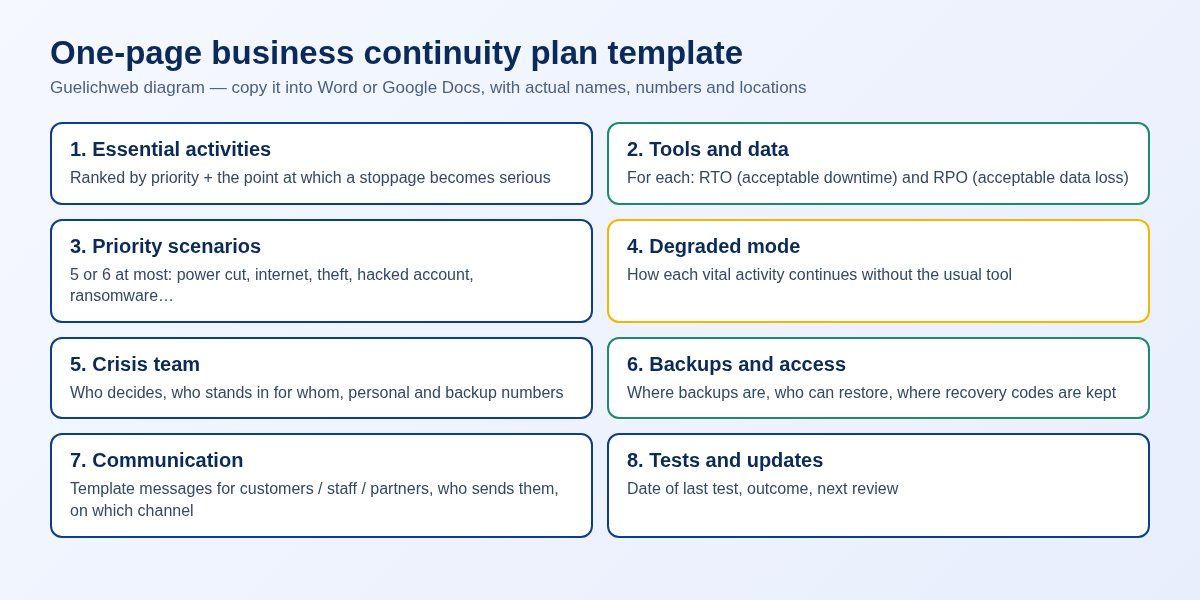
Guelichweb diagram: one-page business continuity plan template.
- Essential activities, ranked by priority, with the point at which a stoppage becomes serious.
- Tools and data linked to them, with their RTO and RPO.
- Priority scenarios you have chosen (5 or 6 at most).
- Degraded mode: how each vital activity continues without the usual tool.
- Crisis team: who decides, who stands in for whom, personal and backup phone numbers.
- Backups and emergency access: where backups are, who can restore them, where recovery codes are kept (password manager, sealed envelope).
- Communication: template messages for customers, staff and partners, who sends them and on which channel.
- Tests and updates: date of the last test, outcome, next review.
Looking for a fuller template in Word or PDF? NIST’s SP 800-34 page offers free business impact analysis and contingency plan templates, and the SGDSN guide (in French) includes practical worksheets. Both were written for larger organisations, but their structure adapts well.
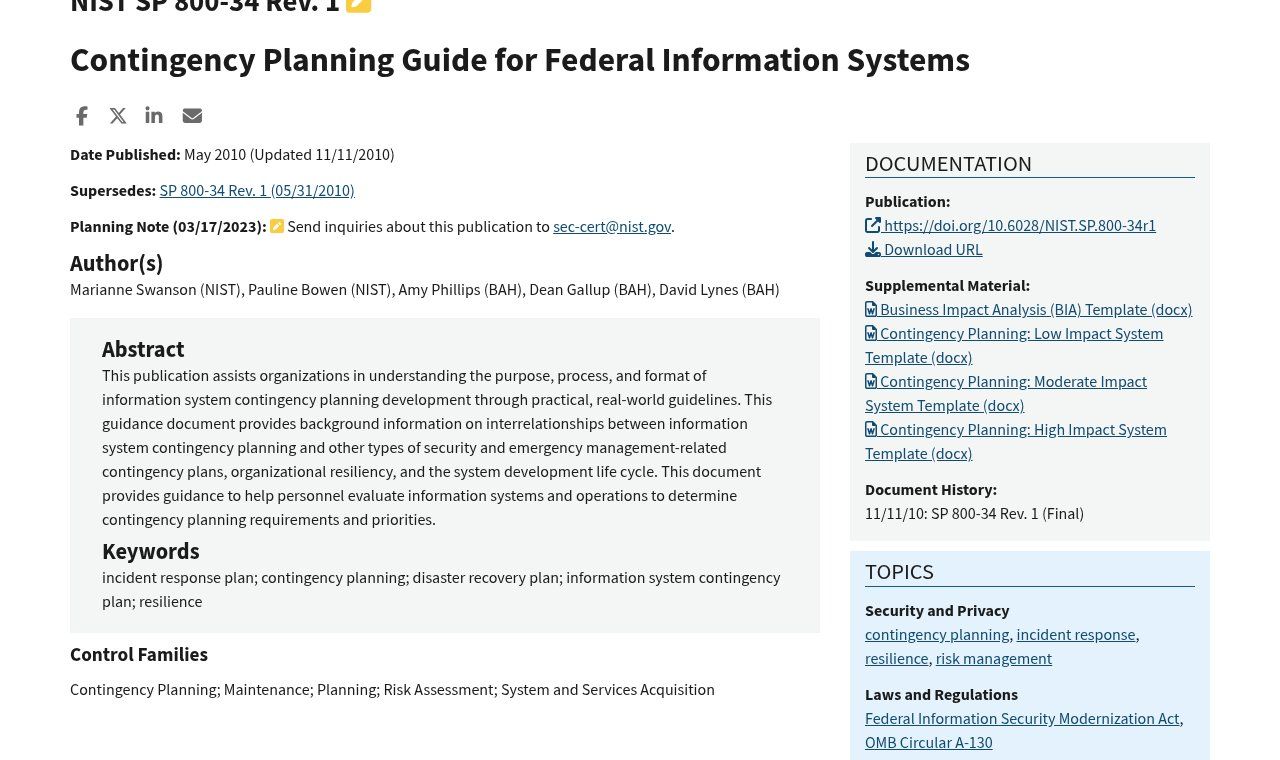
Source: csrc.nist.gov, NIST SP 800-34 Rev. 1 page, screenshot taken on 27/11/2026.
Example: a simplified BCP for a small organisation
Let’s take a fictional case to illustrate: a food distributor in Cotonou with eight employees, orders coming in mostly on WhatsApp, invoicing in software installed on a single computer, and a brochure website.
- Vital activities: taking orders, delivering, getting paid, paying suppliers.
- Weak spot discovered: the invoicing software and all its data sit on one PC, backed up “when someone remembers” to a USB stick kept in the same office.
- Decisions: automatic daily backup to cloud storage plus a weekly copy on a drive kept off-site; RPO set to 1 day, RTO to 1 day.
- Degraded mode: a numbered paper invoice book and printed delivery note templates, with data entered afterwards.
- WhatsApp: two linked devices on the account, two-step verification turned on, a backup number shared with key customers.
- Power and network: a UPS for the PC and the router, a data plan with a second operator for hotspot use.
- Testing: restoring the backup onto another computer once a quarter, recorded on the sheet.
For an NGO the logic is the same with different priorities: donor reporting, beneficiary data (often sensitive), keeping field activities going when connectivity drops, and careful handling of access shared between head office and field offices.
The IT side (DRP): what we check first
When an organisation asks us for help with continuity, the technical review nearly always starts with the same points.
Backups that actually restore
The 3-2-1 rule is still the foundation: three copies of your data, on two different media, one of them offline or isolated so ransomware can’t reach it. But the real question is different: have you ever restored a backup? A backup that has never been tested guarantees nothing. We walk through the method in our guide to website backups.
Accounts that don’t depend on one person
Two-factor authentication everywhere, at least two administrators on every important account (email, Google or Microsoft, online banking, social media, hosting), recovery codes printed and stored safely. If you use Google Workspace, check who holds super admin rights. And train your team: phishing remains one of the most common ways in.
Domain name, email and website
Your domain name must be registered to your organisation, with a contact email you control. It powers both your professional email addresses and your website: lose it and you lose both. For the website, keep a full, restorable copy somewhere other than your main host, and write down how to bring it back online with another provider. Our guide to migrating a WordPress site covers the steps.
For a mainly West African audience, a local or regional host you can pay in CFA francs is often the best everyday choice (see our comparison of web hosting options). If you want a second, international provider for a backup copy or a VPS, Shinjiru, an offshore host operating since 2000, listed on 27/11/2026 shared hosting from US$3.95 a month (on a 36-month term), VPS plans and a Strongbolt range with anti-DDoS protection; it accepts Bitcoin among other methods, but not Mobile Money or CFA francs. See Shinjiru’s plans (affiliate link: we may earn a commission if you sign up, at no extra cost to you).
Power and connectivity
A UPS for critical workstations and the router, a way to charge phones, a second operator. And a list of tasks that can be done offline: drafting, preparing invoices, entering data into a tool that will sync later. Nothing spectacular, but it is what gets you through a day without power.
Where automation helps (and where it replaces nothing)
Automation with n8n and Make is part of our day-to-day work, and the question keeps coming up: can automation “do the continuity plan”? No. It doesn’t set priorities and it doesn’t replace an exercise. What it does is remove the small oversights that make plans fail:
- Monitoring: check every five minutes that the website and forms respond, and send an email or WhatsApp alert when they don’t.
- Backup checks: warn you when a backup didn’t run or is suspiciously small, instead of finding out on the day of the outage.
- Regular copies: export the CRM, the customer file or Google Sheets to a second storage location every week.
- Reminders: automatically nudge the plan owner about the quarterly test and the six-monthly review.
- Incident log: a simple form that timestamps every incident and feeds a tracking sheet.
If you want to see how such workflows work, our article on n8n explains the tool and how to install it. And if you would rather hand over technical follow-up, managed IT services can include part of these checks, provided they are written into the contract.
The most common mistakes
- Writing a plan that is too long. Nobody will read it mid-crisis.
- Leaving it all to IT. Priorities are management decisions.
- Keeping backups in the same place as the original, or permanently connected to the network.
- Never testing. The first test should not be the real outage.
- Forgetting access: a perfect plan is useless if nobody can find the hosting password.
- Planning no communication: customers and partners forgive a well-explained outage far more easily than silence.
- Not updating after someone leaves, a provider changes or a new tool arrives.
How much does a business continuity plan cost?
It depends on the size of the organisation, the number of tools, the state of your backups and the recovery times you are aiming for. Many measures cost next to nothing: appointing an owner, listing access, turning on two-factor authentication, printing quick-reaction sheets. Others need investment: backup hardware, cloud storage, monitoring tools, outside support. We don’t quote prices off the cuff. We prefer a short assessment followed by a tailored quote, as with our other offers.
Our take
A useful continuity plan fits in a few pages, has been tested at least once and is known by the people who will have to apply it. Everything else is secondary. If you do only one thing this month, do this: list your five vital tools, write down who has access, and actually restore a backup. You will quickly see where you stand. For the bigger picture on digital tools in your organisation, our article on digital transformation sets out the framework.
FAQ: business continuity plans
Is a business continuity plan mandatory?
For an ordinary SME, not as a general rule as far as we know. It is, or is becoming, mandatory for some sectors and organisations (public administrations, critical infrastructure operators, financial institutions depending on regulations). A customer, partner or donor may also ask for one.
What is the difference between a BCP and a DRP?
The BCP covers the whole organisation and applies during the crisis, including in degraded mode. The DRP is the technical part that describes how to bring systems and data back after the incident. The DRP is part of the BCP.
What do RTO and RPO mean?
RTO is the maximum acceptable downtime for a tool. RPO is the maximum amount of data you accept to lose, expressed as time since the last backup. Both are set tool by tool, by management.
What is a business continuity plan called in French?
Plan de continuité d’activité (PCA). A disaster recovery plan is a plan de reprise d’activité (PRA). You will see both acronyms in French-language tenders across West and Central Africa.
Is there a free business continuity plan template in Word or PDF?
Yes: NIST provides free templates for business impact analysis and contingency plans, and the SGDSN guide offers worksheets in French. The one-page sheet above is a good starting point for a small organisation; you can copy it into Word or Google Docs.
How often should a BCP be tested?
At least once a year for the most critical systems, according to ASIN’s guide. For a small organisation, we recommend a backup restore test every quarter and a plan review every six months.
Does a five-person organisation need a BCP?
Yes, in a very short version. That is often where a single failure does the most damage, because everything rests on one or two people and one or two devices.
Want an outside view of your continuity?
Tell us which tools are vital to you and how you back them up today. We will help you spot the weak points, write a usable one-page continuity sheet and, where it makes sense, automate the checks. Get in touch through our contact page.