What is no-code? Low-code vs no-code, the right tools and the real limits for SMEs and NGOs
G. CHRIST
Published on November 27, 2026

“Our tracking system? An Excel file, three WhatsApp groups and the accountant’s memory.” If that line makes you smile, it probably describes your organisation. It certainly describes a lot of small businesses, NGOs and public offices, in Benin and everywhere else. And that is exactly where no-code becomes interesting.
The word has been everywhere for a few years now, usually wrapped in big promises: “build your app in ten minutes”, “no more developers needed”. Reality is more nuanced, and more useful. In this guide we explain what no-code is, how it differs from low-code and from the new AI app builders, which tools fit which needs, what it really costs, and above all where the limits are. Tool information was checked on the vendors’ websites on 27 November 2026.
No-code: a simple definition
No-code (also written no code or nocode) refers to tools that let you build software without writing programming code. You assemble visual blocks: a form, a data table, a button, a rule such as “when this happens, do that”. The platform takes care of the rest.
The code has not disappeared. It was written once and for all by the platform’s developers, who turned it into reusable building blocks. You do not program, you configure. Think of the difference between building furniture from raw planks and assembling a flat-pack kit: the kit is much faster, but you will not choose the shape of the parts.
In practice, a small organisation can use no-code tools today to:
- build a brochure website or a sign-up page (Wix, Webflow, Framer, Carrd);
- turn a spreadsheet into a mobile app for field staff (Glide, AppSheet);
- open a client area or a partner portal (Softr);
- organise data in a visual database connected to forms (Airtable, Notion, Google Sheets);
- connect tools to each other and automate repetitive tasks (Make, Zapier, n8n).
That last point is often the one that pays off fastest. We covered it in our article on task automation: what changes a team’s daily life is rarely the spectacular app; it is the reminder that goes out on its own and the report that fills itself without copy-pasting.
What is low-code, and how is it different from no-code?
Low-code relies on the same visual principle but leaves the door open to programming. When the blocks are not enough, you add a formula, a short script, or a call to an API the platform does not know. Low-code is therefore aimed at teams with at least one person who is comfortable with technical work.
IBM sums up the nuance well on its page “Low-code vs. no-code: what’s the difference?”: low-code is a compromise between traditional development and no-code, because users can still add their own code to what is generated automatically; no-code relies entirely on visual tools.
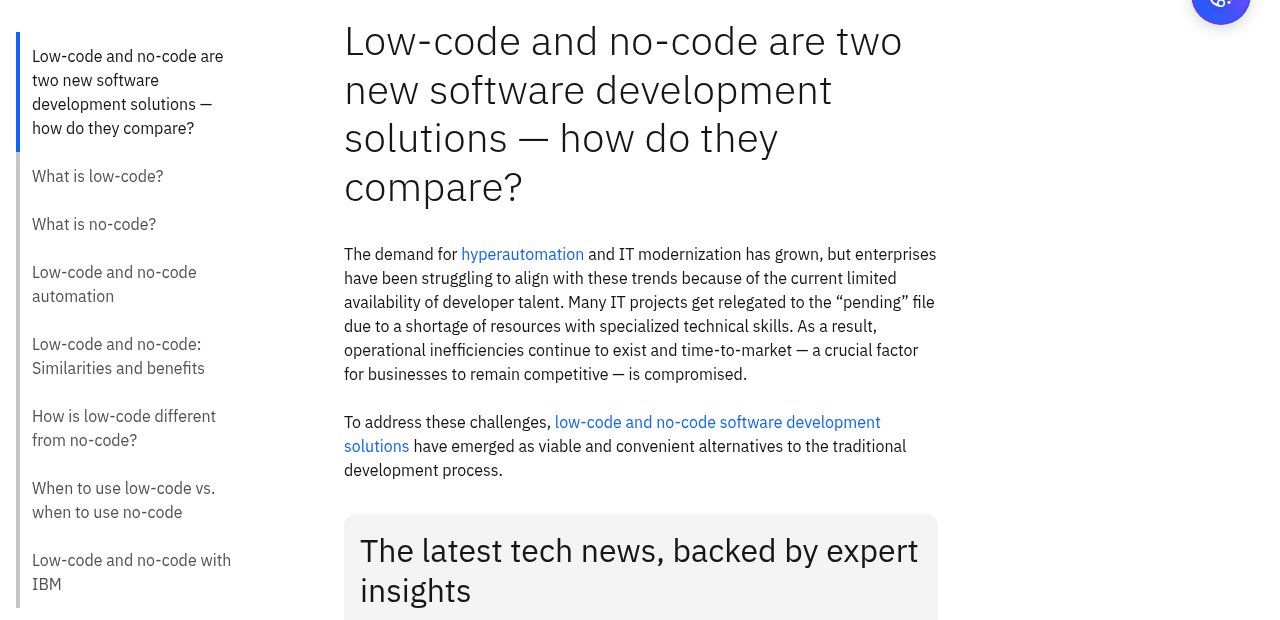
Source: IBM, “Low-code vs. no-code”, ibm.com/think (screenshot taken 27/11/2026).
In practice the line is blurry, and that is normal. Most serious tools have become “no-code to start, low-code when needed”. Make can call any API and transform data with functions. n8n has a “Code” node in JavaScript or Python. Microsoft describes Power Apps as a low-code platform. Just remember this:
- no-code: a business user with no technical training can build and change the tool alone;
- low-code: most of it is visual, but some parts need someone who can read and write a little code;
- custom development: everything is programmed, which gives total freedom but requires more time, budget and a team to maintain it.
What about AI app builders?
Since 2024 a third family has muddied the waters further: tools where you describe your app in plain language and an AI writes the code for you. Lovable, Bolt and Replit are the best-known examples. People sometimes call it “vibe coding”.
Long-standing no-code tools are following the trend. Glide’s home page, for instance, no longer asks you first to drag and drop blocks: it invites you to explain what you want to the AI, or to upload a spreadsheet.
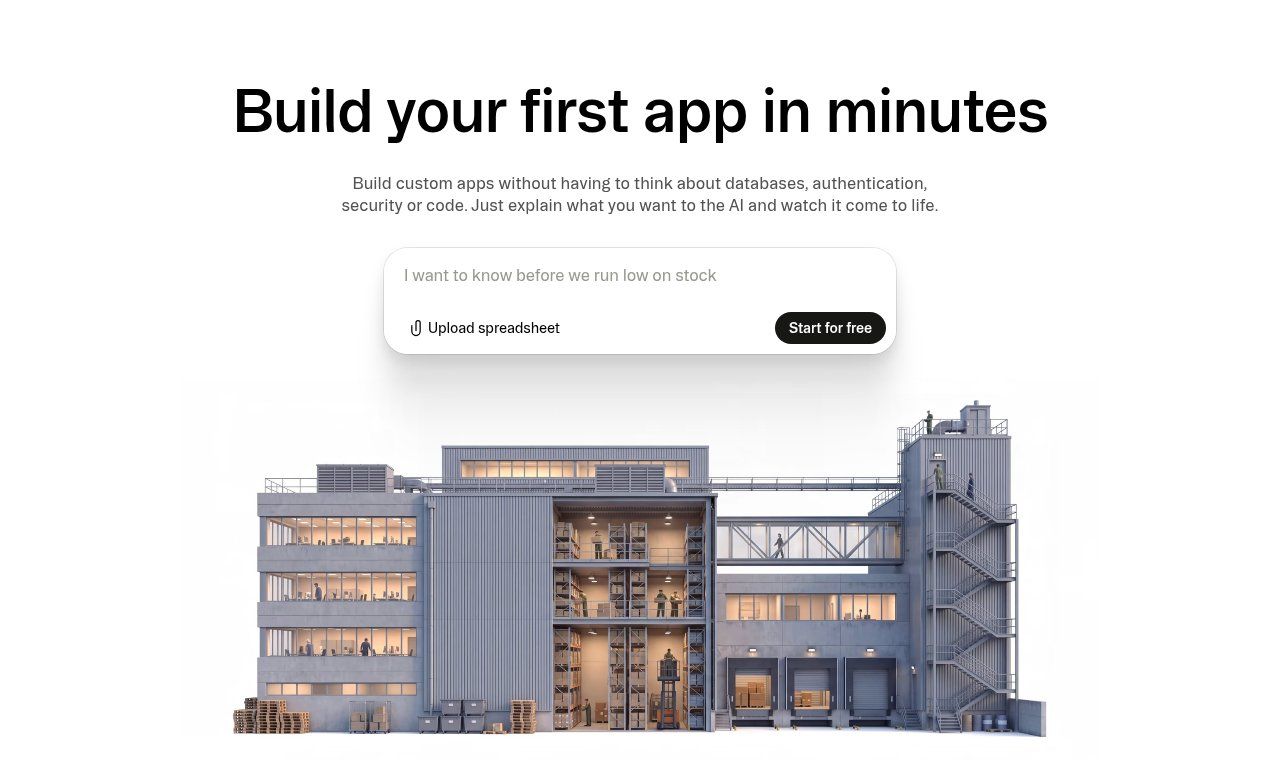
Source: Glide home page, glideapps.com (screenshot taken 27/11/2026).
Our view is clear-cut: these builders are excellent for getting a prototype in an afternoon and showing an idea to your management or a donor. They are dangerous when you put into production code that nobody in the organisation understands, with real client or beneficiary data. Generated code must be reviewed, secured and hosted properly. We made the same argument for websites in AI website builder vs professional website.
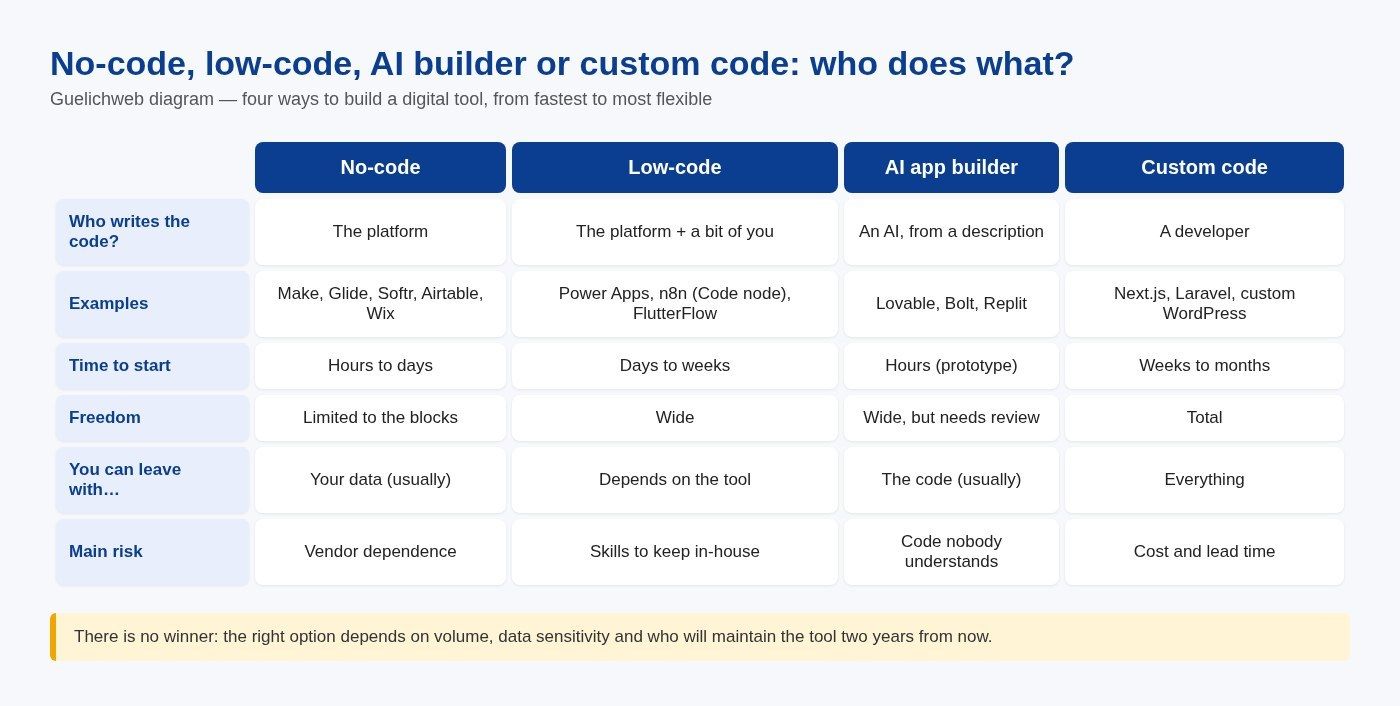
Guelichweb diagram: four ways to build a digital tool.
Why no-code appeals so much to SMEs, NGOs and institutions
As early as 2021, Gartner predicted that by 2025, 70% of new applications developed by organisations would use low-code or no-code technologies, up from less than 25% in 2020. It was a forecast, made with large companies in mind, and should be read as such. But the underlying trend is real, and it has very concrete reasons for a modest-sized organisation.
1. Developers are hard to come by
Hiring a full-time developer for an internal tool makes no sense for a fifteen-person company or an NGO running three projects. Calling in a contractor for every small change does not either. No-code lets you keep part of that autonomy in-house.
2. Needs change all the time
A newly funded project, a new monitoring form, an indicator added by the donor: in an NGO, needs shift every six months. A no-code tool can be changed in a few hours. With custom software, every change goes through a specification.
3. Low upfront cost
Most platforms have a free or cheap entry plan. You can test an idea on a small scope before committing a real budget. That is healthy: many digital projects fail because they were built big before being tested small.
4. It plugs into the tools you already use
Gmail, Google Sheets, WhatsApp Business, a website form, a CRM: no-code automation tools connect to most of them. You do not replace everything; you link what already exists.
No-code and low-code tools, sorted by need
There are hundreds of platforms. The right approach is not to look for “the best no-code tool” but to start from what you want to achieve. Here is our shortlist, deliberately limited to tools you actually come across in small organisations’ projects.
Automating and connecting your tools
Make, n8n and Zapier lead the field. Zapier is the easiest to pick up but gets expensive with volume; Make strikes a good balance between power and price; n8n can be installed on your own server and gives the most control. We compared them in detail in n8n or Make: which tool to choose and in our article on Zapier. The technical mechanism behind them, the webhook, is also worth understanding.
On pricing, Make has billed in “credits” since 2025: each action usually uses one credit. The free plan gives 1,000 credits a month, and on 27/11/2026 the pricing page showed the Core plan at $9 a month (billed annually, 10,000 credits). Make says it accepts credit cards, ACH direct debit and Google Pay; no mobile money. For NGOs, Make asks you to contact it about non-profit terms.
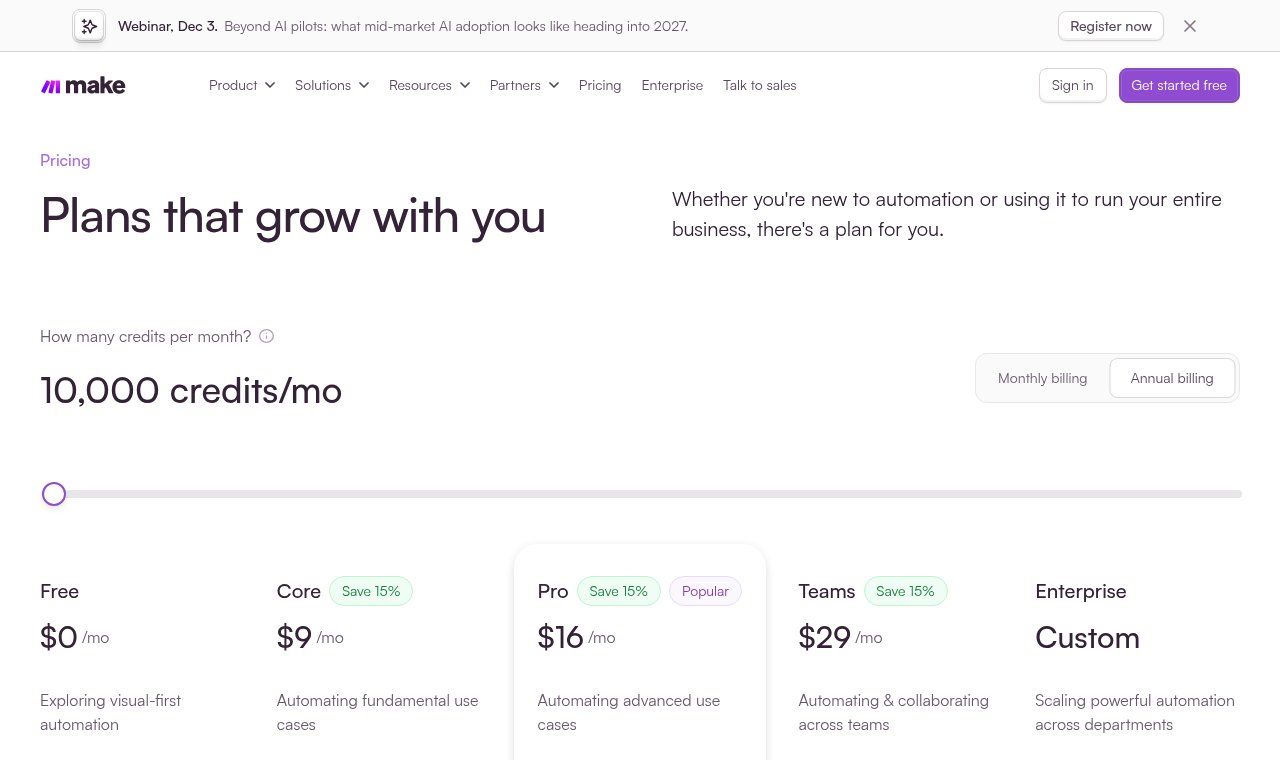
Source: Make pricing page, make.com/en/pricing, annual billing (screenshot taken 27/11/2026).
n8n, for its part, offers a free Community edition you install yourself, which includes almost all features. Some team features (sharing workflows, environments, single sign-on) are reserved for paid plans, as the official n8n documentation explains.
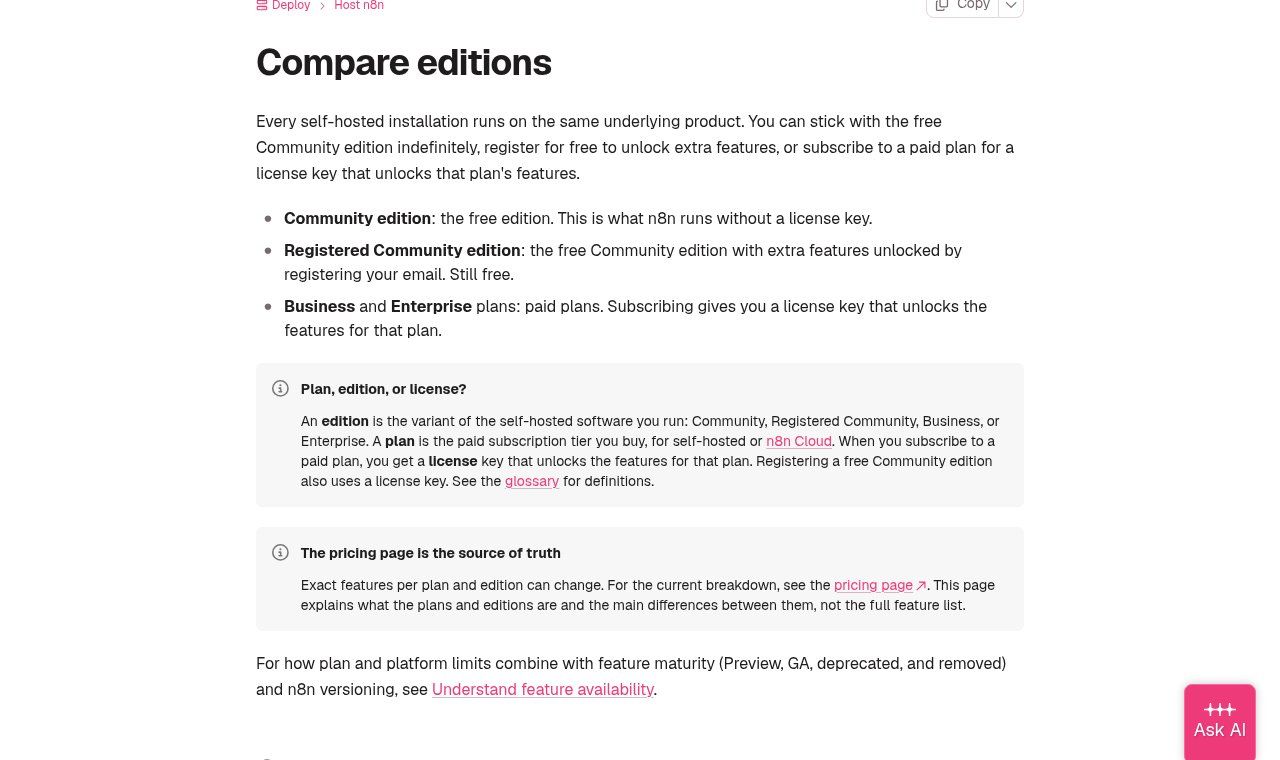
Source: n8n documentation, “Compare editions”, docs.n8n.io (screenshot taken 27/11/2026).
Building an internal or field app
Glide and AppSheet (from Google) turn a spreadsheet into an app you can use on a phone. Softr builds portals and member areas on top of Airtable or other sources. Bubble goes much further, with user accounts, payments and real business logic, but takes serious learning. Power Apps makes sense if your organisation already lives in Microsoft 365.
For field data collection, especially in NGOs, do not overlook specialised tools such as KoboToolbox, which work offline. It is not always marketed as no-code, but that is what it is.
Organising data
Airtable, Notion, Google Sheets: these are often the foundations. A well-structured database beats a pretty app sitting on messy data. If your current customer file has four “phone” columns filled in four different ways, start there.
Building a website
Wix, Squarespace, Webflow, Framer: these are no-code website builders. They suit some projects well and others less so; we compared the real costs in Wix, Squarespace or a custom website.
What no-code does very well
Here are the cases where no-code usually delivers the best results for a reasonable effort:
- Forms that feed a tracker: a request on the website lands in a table, the right person is notified, and the sender gets an acknowledgement.
- Reminders: invoices, appointments, reports due from a partner. What used to depend on someone’s memory becomes automatic.
- Regular reports: every Monday, a summary of the week’s sales or activities is sent by email or to a group.
- Small internal apps: inventory, mission tracking, beneficiary directory, room or vehicle booking.
- Prototypes: testing a service idea with real users before investing in development.
- Bridges between tools: a WhatsApp message qualified by a chatbot that creates a record in the CRM, for example.
What they have in common: clear, repetitive processes with a limited number of users. That is the ideal ground.
The limits of no-code, stated plainly
Platform vendors rarely talk about them. Yet knowing the limits is how you avoid nasty surprises eighteen months down the line.
Vendor dependence
Your tool only exists on the platform that hosts it. If the vendor raises prices, changes its terms or drops a feature, you have to live with it. With most no-code app builders you can export your data, not the app itself. Before choosing, always ask: “If we want to leave in two years, what do we take with us?”
Costs that climb with volume
Free plans are designed to get you started, not to last. As soon as the number of users, operations or records goes up, so does the bill. A poorly designed automation that runs every five minutes for nothing can burn a month’s quota in a week. Estimate volume before choosing the tool, not after.
Paying in foreign currency
This is a very concrete limit in West Africa: almost all these platforms bill in dollars or euros, by international bank card. One declined card, one spending cap reached, one expired card nobody replaced, and your automations stop. Plan for a dedicated card, a person responsible for renewals, and an alert before the due date.
Sensitive data
When you use an online platform, your data is hosted by that platform, often in Europe or the United States. For health data, financial data or lists of vulnerable beneficiaries, that is not a trivial matter. In Benin, the Digital Code governs personal data protection, and the personal data protection authority (APDP) is the regulator. In these cases a self-hosted option such as n8n, or custom development, may be a better fit. And in every case: only collect what you need.
Internet connectivity
An online no-code app does not work without a connection, apart from tools designed for that. If your teams work in rural areas, test offline mode before rolling out, or pick a tool built for disconnected data collection.
The tool that depends on one person
This is the most common trap, and there is nothing technical about it. A motivated intern builds a great app on their personal account, then leaves. Nobody has the logins anymore, nobody understands the logic. No-code makes building easy; it does not make maintenance automatic.
The functional ceiling
One day someone will ask for a feature the platform does not allow. You can then work around it, often in a fragile way, wait for the vendor to add it, or move on. When you spend more time working around a tool than using it, that is the signal to change approach.
No-code, low-code or custom: how to choose
Here is the very simple grid we recommend. Answer the questions in order; the first “yes” points you to the option.
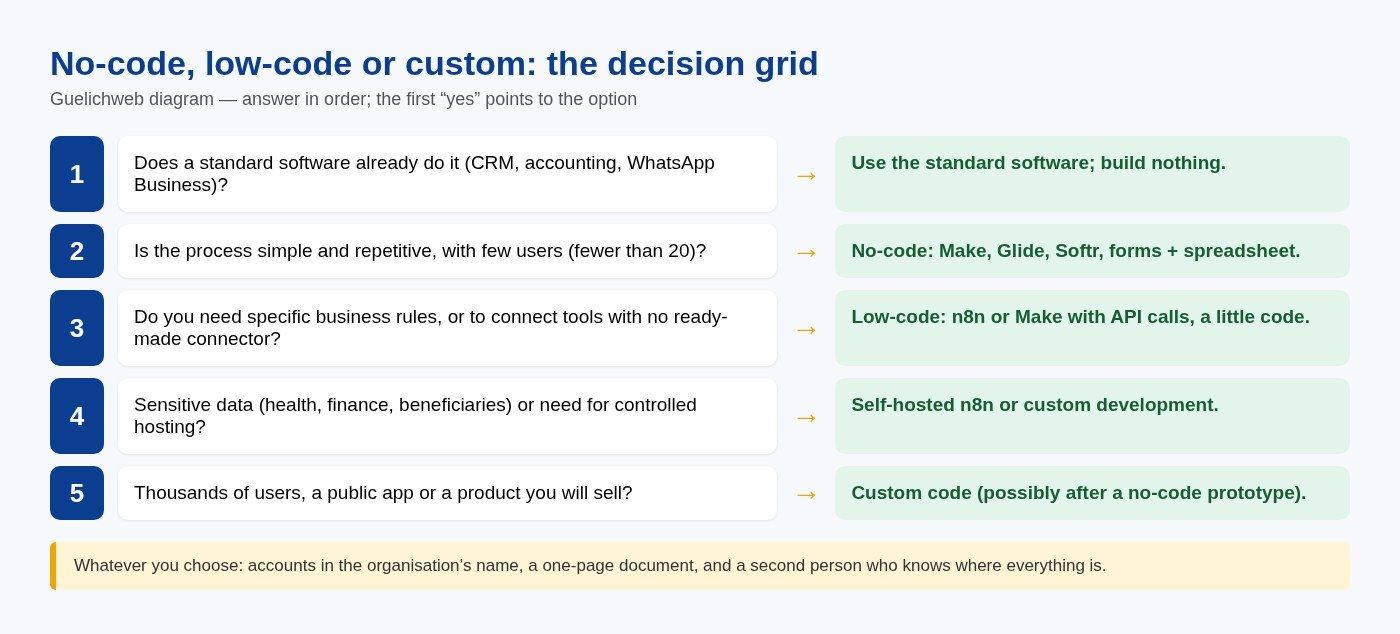
Guelichweb diagram: the no-code, low-code or custom decision grid.
A few notes on this grid. The first question is the one most often skipped: before building anything, check that a standard piece of software does not already do the job. Building your own CRM in no-code when a free CRM exists is a waste of time. Next, the twenty-user threshold is not an absolute rule but a marker: beyond it, per-user costs and permission management become topics in their own right.
Finally, the options can be combined. Many solid projects use a custom website, an Airtable or Google Sheets base, and Make or n8n automations in between. In our article how to create an app we also explain when it is better to move to development after a first no-code version.
Three examples to picture it
These are typical scenarios built to illustrate the method. They do not describe real clients.
A distribution SME in Cotonou
Orders come in through WhatsApp and by phone, are written in a notebook and then copied into Excel in the evening. The no-code version: a simple form to record each order, a Google Sheets or Airtable base, a Make automation that alerts the storekeeper and sends the customer a summary, and a weekly report to the manager. A modest starting budget, set up in a few days, and above all a reliable history.
An NGO tracking beneficiaries across several municipalities
Field data is collected offline with KoboToolbox. A self-hosted n8n automation picks up new submissions, files them in the monitoring database, alerts the project lead when an indicator looks abnormal and prepares the table for the quarterly report. Sensitive data only passes through tools whose hosting the NGO controls.
A public office handling document requests
Requests arrive by post, email and at the front desk, with no tracking number. A first no-code step is to centralise all requests in a single base with a number, a status and an owner, then send an automatic acknowledgement. If volume grows and the office wants a public portal with logins, it then moves to more robust development. No-code was used to clarify the process, which is already a big win.
The most common mistakes
- Choosing the tool before describing the process. Write down the current steps in plain language first. If you cannot describe them, no tool will automate them.
- Creating accounts in one person’s name. Accounts must belong to the organisation, with a generic address and at least two administrators.
- Documenting nothing. One page is enough: what the tool does, where the logins are, who to call if it breaks.
- Ignoring errors. An automation that fails silently is worse than no automation. Set up failure alerts.
- Piling up tools. Five platforms for five small needs means five subscriptions, five passwords and five risks. Two well-mastered tools are better.
- Automating everything at once. Start with one process, measure the gain, then move to the next.
- Forgetting training. The tool will be used by people who did not build it. Plan a hands-on session.
Should you learn no-code yourself or get support?
Both are defensible. If someone on your team is curious, organised and available a few hours a week, they can learn the basics of Make or Glide in a few weeks thanks to the many free courses. That is a real asset for the organisation.
Outside support makes sense when the stakes are higher: several tools to connect, sensitive data, high volume, or simply the need to move fast without design mistakes. The right model, in our view, is hybrid: a provider designs the architecture, builds the critical automations, documents them and trains someone in-house who takes over routine changes. That is the approach we favour in our automation services.
On budget, we do not quote prices “off the cuff”: the cost depends on the number of processes, the tools to connect and the volume. You also need to factor in the platform subscriptions, which stay in your name. The honest way is to start with a diagnosis, then a precise quote; you will find our packages on the offers page.
Our take
No-code is neither a passing fad nor a magic wand. It is a very effective way to build internal tools and automations for organisations without a technical team, provided you treat it as seriously as any software: accounts owned by the organisation, documentation, error monitoring, and a plan for the day the tool is no longer enough.
Our advice for an SME, NGO or institution getting started: pick one painful, repetitive process, automate it with a simple tool, and measure. If the gain is there, you will have the proof, and the appetite, to go further. The promises of AI agents that handle everything on their own can come later, on clean foundations.
Frequently asked questions about no-code
What is no-code in one sentence?
It is a way to build websites, apps or automations by assembling visual blocks, without writing code.
What is the difference between no-code and low-code?
No-code is done entirely with the mouse, by non-technical people. Low-code stays visual but lets you add code for cases the blocks do not cover, so it requires some technical skills.
What are the best free no-code tools?
To get started: Google Forms and Google Sheets, Make’s free plan (1,000 credits a month as of 27/11/2026), n8n’s Community edition if you can host it, Glide or AppSheet for small apps, and KoboToolbox for field data collection. Free plans are enough for testing, rarely for heavy use.
Can you build a real mobile app without coding?
Yes, for an internal app or a simple use case. Publishing a full app on Google Play or the App Store is a more demanding step, often underestimated, which sometimes requires moving to low-code or development.
Will no-code replace developers?
No. It shifts the work: simple tasks can be handled by business teams, and developers focus on what genuinely needs code, security and complex integrations.
Is no-code safe for my customers’ data?
The big platforms are generally well secured, but security also depends on you: access rights, passwords, two-factor authentication, link sharing. For sensitive data, check where it is hosted and consider a self-hosted option.
How much does a no-code project cost?
Distinguish between platform subscriptions, often from zero to a few dozen dollars a month for a small organisation, and design time, done in-house or by a provider. For a Guelichweb estimate, we always start with a diagnosis.
Got a process to automate?
Tell us in a few lines which task wastes your team the most time and which tools you use today. We will tell you frankly whether no-code is the right answer, and where to start. Write to us through the contact page.