What is Google Gemini? Free vs paid, pricing and how to use it in your business (2026 guide)
G. CHRIST
Published on November 25, 2026

“We already have Gemini on our phones. Can we use it for work?” That is the question we hear most often since Google started putting its assistant everywhere: in Android, in Gmail, in Chrome, in Search. Plenty of SME owners, NGO managers and public-sector staff already use it without ever having really chosen it. And that is exactly where the serious questions begin. Is it free, and how far does free go? Which plan should you pay for? What happens to the documents you paste into it?
In this guide we explain, in plain terms, what Gemini is, what the free version really gives you, what the paid plans cost in November 2026 (in France and in Benin, because prices differ), and above all how a small organisation in French-speaking Africa or elsewhere can use it without exposing its data. We also give our honest opinion on when Gemini is the right choice… and when it is not.
What exactly is Gemini?
Gemini is Google’s artificial intelligence assistant. You type (or speak) to it, and it answers, drafts, summarises, translates, and analyses a photo, a PDF or a spreadsheet. It replaced Bard in early 2024, and today the same name covers two things you should keep apart:
- the Gemini app: the chat itself, available at gemini.google.com, on Android, on iPhone and on desktop;
- the Gemini models: Google’s AI “engines” (in November 2026, the Gemini 4 family: Hydrogen, Neon, Carbon), which power the app but also Gmail, Docs, Google Search and developers’ applications through an API.
For users, the distinction matters mainly when it comes to money: you pay a subscription for the app and Google’s tools, and you pay per use (by the volume of text processed) when you plug the models into your own systems.
Official Gemini logo (source: header of Google’s gemini.google website, captured 25 Nov 2026).
What Gemini does well (and what it does badly)
The feature list grows every month. These are the ones that genuinely help an organisation, based on what we see in the teams we work with:
- Drafting and rewording: emails, letters, product descriptions, social posts, replies to unhappy customers. This is where it pays for itself fastest.
- Summarising documents: a 40-page report, a tender file, a contract. Upload the file, then ask precise questions.
- Deep Research: an in-depth web search that produces a sourced report. Handy for market watch, a quick market study or preparing a briefing note.
- Gemini Live: spoken conversation, useful to rehearse a presentation or prepare for an interview.
- Canvas: a workspace for long documents, or for generating a small web page, a quiz or an infographic.
- Images and video: image creation and editing; video generation is reserved for paid plans.
- Gems: custom assistants that keep your standing instructions (brand voice, answer format, internal rules).
- Gemini Notebook (formerly NotebookLM): working only from your own sources. We wrote a full guide about it.
Now for the weak spots. Like every assistant of this kind, Gemini can invent a date, a legal reference or a figure with total confidence. It knows little about local administrative realities (a procedure at a Beninese agency, an Ivorian tax rule, a Senegalese form) and it readily gets prices in CFA francs wrong. Our rule is simple: anything that comes out of Gemini and commits your organisation gets reviewed by a human. Figures, names and legal references, always.
Is Gemini free?
Yes. The “Free of charge” plan costs nothing with a Google Account (your Gmail account is enough). According to the official subscriptions page, it already includes the Gemini app with automatic model selection, image generation and editing, Deep Research, Gemini Live, Canvas, Skills, Gemini Notebook, limited access to Google Flow and the standard 15 GB of Google storage.
That does not make it unlimited. Google applies limits “based on compute resources”: a short question costs little, while analysing a long PDF, running Deep Research or creating images costs a lot. According to Gemini Help, these limits refresh every five hours until you reach a weekly cap. Google does not publish a message count.
Our view: for someone discovering AI, or for occasional use, the free version is more than enough. We even recommend testing it for two or three weeks before paying for anything. For regular professional use, however, it raises a real problem, and it is not about limits: it is about confidentiality. We come back to this below, because it is the most important part of this article.
Tip: start a new chat whenever you change topic. Gemini re-reads the whole conversation history with every message, which burns through your limits faster and muddies the answers.
Gemini pricing in November 2026: Plus, Pro, Ultra
For a personal Google Account, Gemini is sold as a Google AI plan, bundled with Google One storage. Here are the prices shown on the official page on 25 November 2026, for Benin and for France (Google adjusts prices by country; the Benin page also shows euros):
- Free of charge: €0. Standard limits, 15 GB of storage.
- Google AI Plus: €4.69/month on the Benin page, €4.99/month in France. Twice the usage limits of the free plan, access to Gemini 4 Hydrogen, video generation, 200 Google Flow credits, Gemini in Gmail and Vids, 400 GB of storage.
- Google AI Pro: €18.87/month on the Benin page, €21.99/month in France. Four times the free limits, access to Gemini 4 Neon, Gemini in Docs, Sheets, Drive and Slides, 1,000 Flow credits, 5 TB of storage.
- Google AI Ultra: from €94.33/month on the Benin page (€99.99 in France) for five times the Pro limits, and €189.99/month (€219.99 in France) for twenty times. Highest access to Gemini 4 Carbon, early-access features, at least 20 TB of storage.
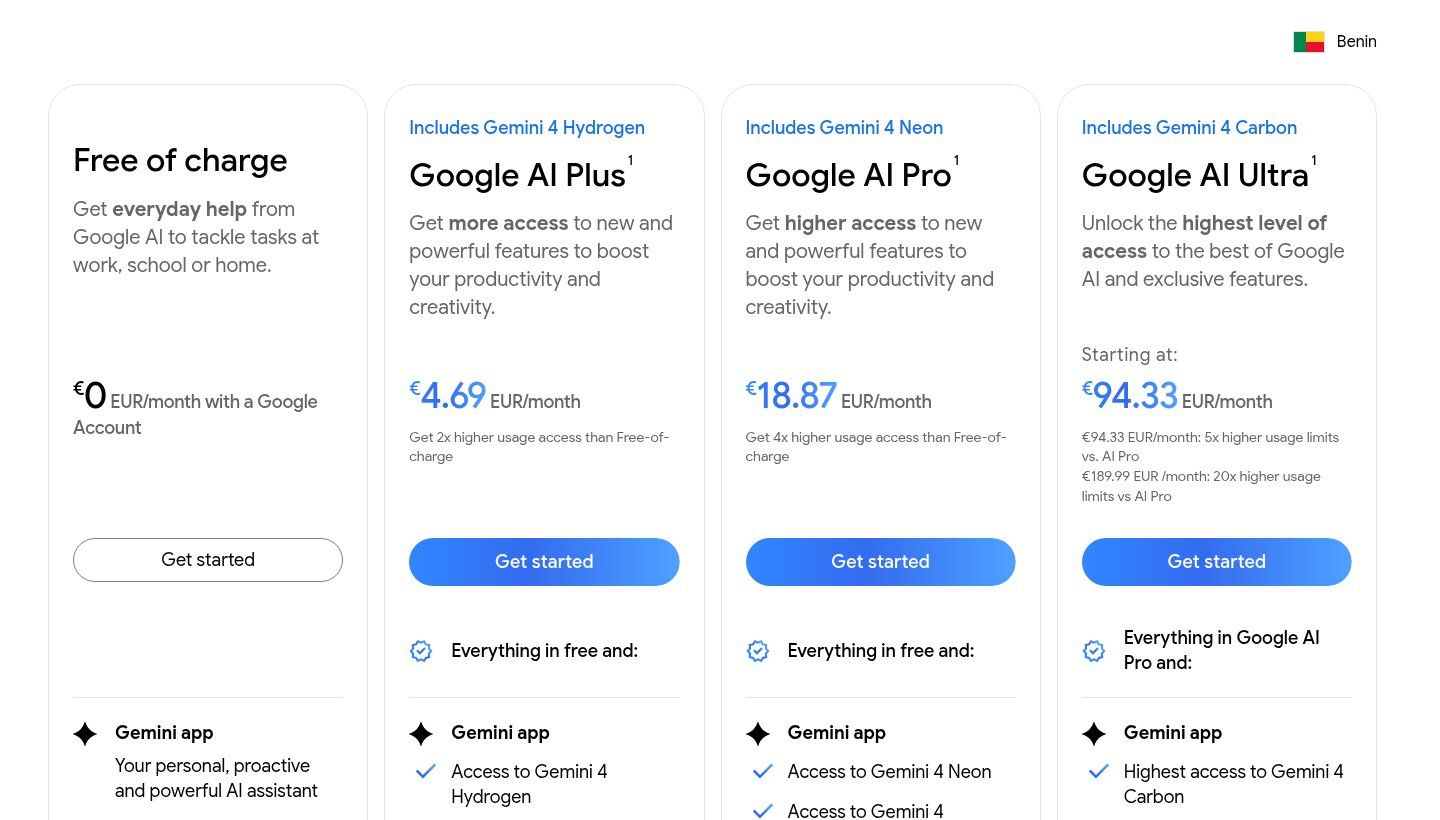
Source: gemini.google/bj/subscriptions, Personal tab, country Benin (captured 25 Nov 2026). On the day of capture, Google was also showing a Black Friday promotion of “up to 50%” on selected plans, terms apply.
Good news for readers in West and Central Africa: according to Google One’s official lists checked on 25 November 2026, Google AI Plus and Google AI Pro are available in Benin, Côte d’Ivoire, Senegal, Cameroon, Togo, Burkina Faso and Mali. The Gemini web app itself is open in more than 230 countries and territories and works in French and English (official list).
For students, Google’s dedicated page advertises a free year of Google AI Plus, subject to eligibility. Check that the offer actually appears for your country before counting on it.
Plus or Pro: which one?
For a freelancer who writes a lot and analyses a few documents a week, Plus is often enough, and it is one of the cheapest AI subscriptions on the market. Pro makes sense if you work on long files every day, want Gemini directly inside Docs and Sheets, or use video heavily. Ultra, frankly, concerns almost no SME: it is aimed at heavy creators and developers.
One detail that few articles mention: Google states that Google AI Pro is a personal subscription governed by the Google One terms, and it does not provide business invoices. For a company that must justify its expenses, or an NGO accountable to a donor, that is often a deal-breaker.
Gemini for business: Workspace or Gemini Enterprise
As soon as several people are involved, or you handle data about customers, beneficiaries or citizens, a personal plan is no longer the right entry point. Google offers two routes.
1. Gemini included in Google Workspace
Google Workspace is Google’s business suite: email on your own domain, Drive, Meet, Calendar, Docs, Sheets… and now Gemini. On the French pricing page, checked on 25 November 2026, prices per user per month, excluding tax, on an annual commitment are:
- Business Starter: €6.80 (shown at €6.12 with a temporary 10% discount for 12 months). Gemini in Gmail and chat with Gemini, with an explicit note that company data is not used to train models. 30 GB per person.
- Business Standard: €13.60. Gemini in Gmail, Docs, Meet and the other apps, extended access to Gemini Notebook, 2 TB per person.
- Business Plus: €21.10. The same AI features, with stronger security and archiving, 5 TB per person.
On the “Gemini for business” page viewed from Benin, Google shows “Gemini with Google Workspace” from US$14 per seat per month, which matches, in Google’s dollar price list, Business Standard on an annual plan: the tier where Gemini is present in Docs, Sheets, Meet and Drive. We cover plan selection in our Google Workspace guide.
2. Gemini Enterprise
This is the offer for organisations running Microsoft 365 (or other tools) that want Gemini without switching suites, with agents, connectors to HubSpot, Jira or Microsoft 365, and advanced IT controls. Listed from US$30 per seat per month. For a ten-person SME in Cotonou or Dakar, it is rarely the first thing to buy.
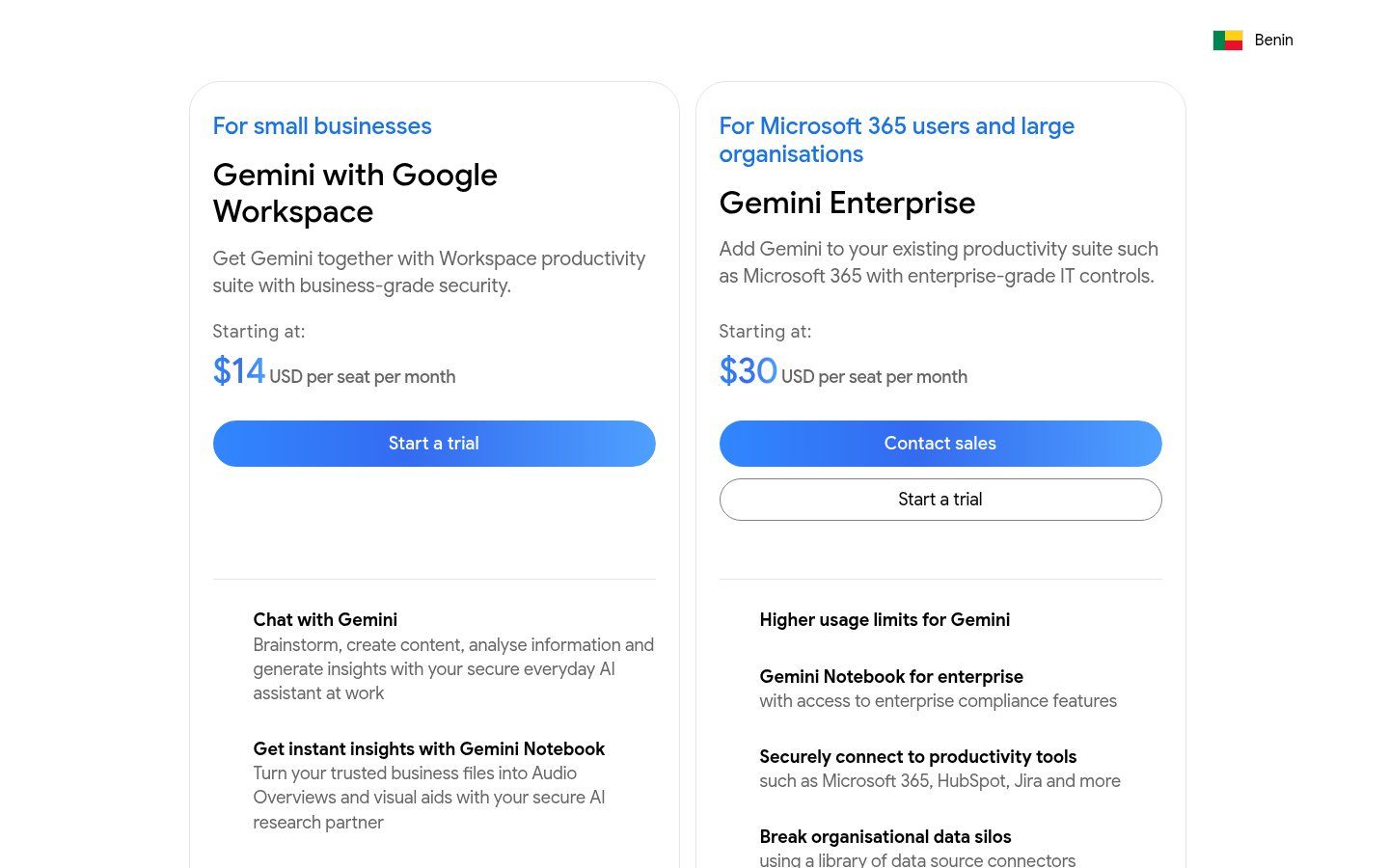
Source: gemini.google/bj/business, “Team and organisation” tab, country Benin (captured 25 Nov 2026).
How to pay from West Africa
No mobile money for now. For African countries not listed individually (which includes Benin, Côte d’Ivoire, Senegal and Cameroon), Google Workspace Help lists payment by credit or debit card, in US dollars or euros, and states that prepaid and virtual cards are refused in every country. In practice you need a regular bank card, ideally in the organisation’s name, and should allow for your bank’s currency fees. We have seen more than one subscription suspended because it was paid with the personal card of an employee who had since left.
Privacy: what Google does with your conversations
This is the heart of the matter. The Gemini Apps Privacy Hub, updated in late November 2026, is very clear for personal accounts (free or paid):
- a subset of conversations is read by human reviewers, including service providers trained by Google, to improve the models. Google says it in plain words: do not enter confidential information you would not want a reviewer to see;
- conversations reviewed by humans are disconnected from your account, but kept for up to three years, even if you delete your history;
- history is deleted automatically after 18 months by default (you can choose 3 months, 36 months or never);
- you can stop future conversations from being used to train models, or use temporary chats, which are not used for training. Even then, conversations are kept for about two months to respond to you and for safety.
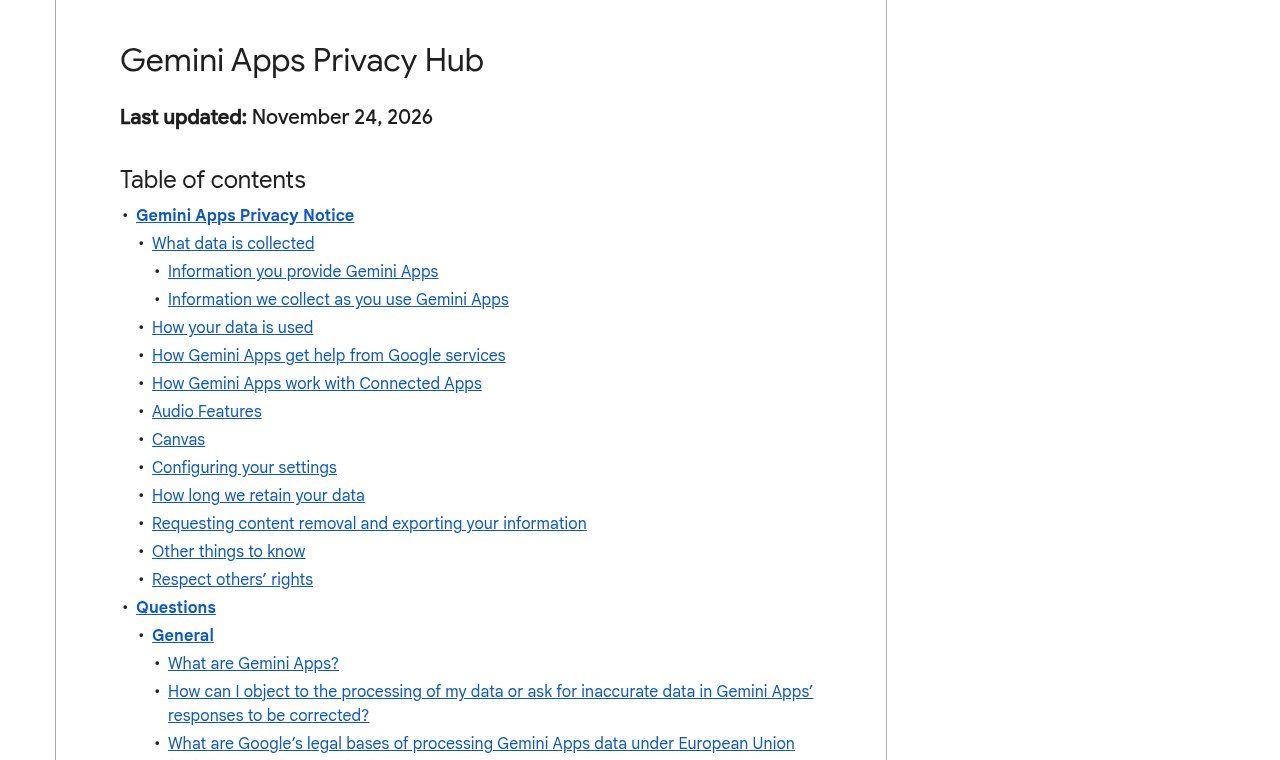
Source: support.google.com/gemini, “Gemini Apps Privacy Hub” (captured 25 Nov 2026).
By contrast, Google states that in Google Workspace and Gemini Enterprise, your data is not used to train models outside your organisation and is not subject to human review. That line, far more than any feature, is what justifies paying for a business plan.
Our position is firm: a personal Gemini account, even a paid one, is not a suitable tool for customer lists, beneficiary files, health data, ID documents or sensitive internal documents. For those uses, go with Workspace (or an equivalent tool under a business contract), plus an internal policy. In Benin, the APDP sets out personal-data obligations; in the UK, the ICO publishes detailed guidance on AI and data protection. Our AI usage policy template gives you a ready-to-adapt starting point.
Gemini, ChatGPT, Claude or Copilot: which one?
We have tested and documented the main assistants: ChatGPT, Claude, Microsoft Copilot and Mistral. Our conclusion has not changed: answer quality is close for 90% of office tasks. What makes the difference is your environment.
- Already on Gmail, Drive and Google Docs? Take Gemini, through Workspace. AI shows up where your teams already work, with no copy-pasting between tools.
- On Outlook, Word and Teams? Copilot will feel more natural. Gemini Enterprise exists, but it is a heavier investment.
- Writing long, nuanced texts or analysing large files? Claude often has a slight edge in style; ChatGPT remains the most versatile.
- Looking for the lowest budget for individual use? Google AI Plus is one of the cheapest subscriptions available.
What we advise against: paying for three AI subscriptions for the same team “to compare”. Pick one main tool, train people on it, and measure the time saved after a month.
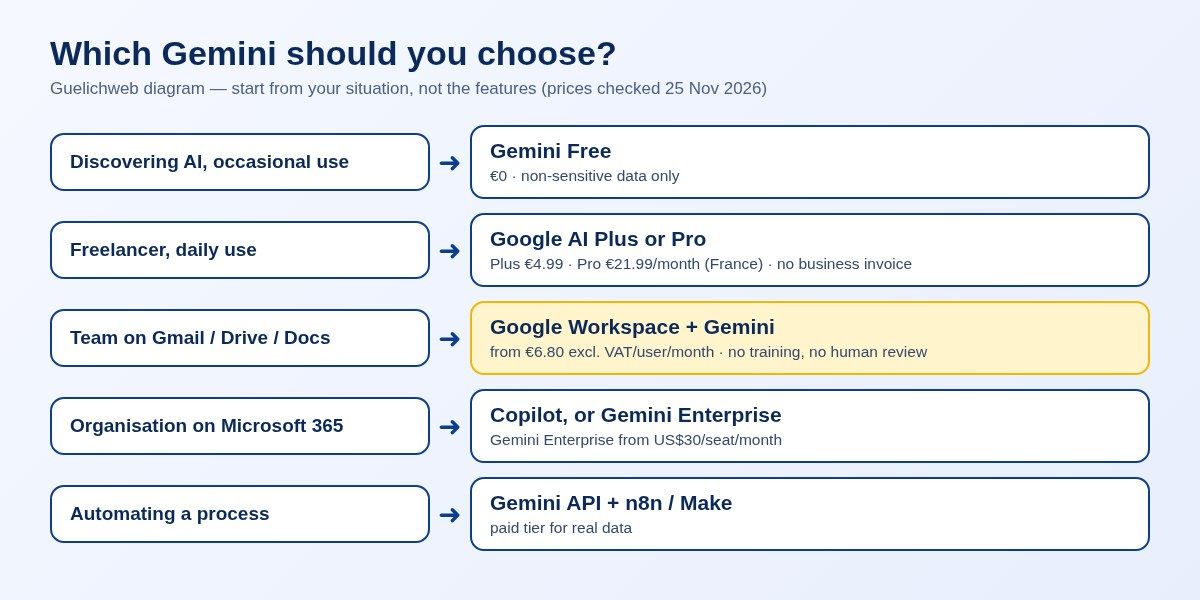
Guelichweb diagram — the right Gemini depends first on your tools and how sensitive your data is, not on features.
10 practical uses for an SME, an NGO or a public body
Here are realistic uses you can set up in a few days, without any development:
- Reply to customers faster: paste an (anonymised) message and ask for three draft replies in your house style.
- Prepare a tender: have the consultation file summarised, with the required documents and scoring criteria listed.
- Draft an activity report for a donor from your notes and figures, then review it carefully.
- Produce meeting minutes from Meet (Workspace) or from a transcript; see our AI meeting minutes method.
- Analyse a sales sheet in Sheets: trends, products in decline, a chart ready to present. Our Google Sheets guide explains how to prepare the file.
- Create marketing visuals for a promotion or a campaign, to be finished in your usual tool.
- Translate a product sheet, a press release or a letter into French or English, then have a native speaker check it.
- Run market watch with Deep Research: competitors, regulations, calls for proposals, checking every cited source.
- Onboard new staff with a Gem that knows your procedures and answers their questions.
- Prepare website and social media content: article outlines, FAQs, descriptions. Rewrite them with your real experience, or everything ends up sounding the same.
For each use, quality depends on the instruction. Our article on how to write an effective prompt gives a six-block method that works on Gemini as well as on other assistants.
Getting started with Gemini in 7 steps
- List three repetitive tasks that eat your time every week. No more.
- Test with the free version, on non-sensitive data, for two weeks.
- Decide the setup: a personal account for a freelancer, Workspace as soon as there is a team or third-party data.
- Write a one-page usage policy: what may be pasted, what never is, who reviews.
- Create Gems for recurring tasks, with your instructions and templates.
- Train the team on real files, not generic examples.
- Measure: time saved, errors avoided, customer feedback. After a month, keep, adjust or stop.
Going further: the Gemini API with n8n or Make
The app is a person asking questions. Automation is Gemini working in the background inside your processes. Google gives access to the models through an API, with a generous free tier to get started and usage-based billing afterwards. A key point from the API pricing page: on the free tier, your content may be used to improve Google’s products; on the paid tier, it is not. For real customer data, move to the paid tier.
n8n offers an official Google Gemini node, and Make also has a Gemini module. A few scenarios we set up regularly:
- WhatsApp → automatic triage: every incoming message is classified (quote, complaint, information), summarised and saved to your CRM, with an alert to the right person. This is the backbone of our WhatsApp chatbots.
- Invoices and receipts: amounts, dates and suppliers extracted from photos or PDFs into a spreadsheet; see our article on invoice OCR.
- Weekly summary: every Friday, a digest of sales, requests and blockers is emailed to management.
- Website form replies: a first personalised draft reply is prepared, and a human approves it before sending.
When these scenarios chain several decisions together, we call it an AI agent. To choose between the two automation platforms, read our n8n or Make comparison.
The 7 mistakes we see most often
- Pasting personal data into a free account: customer lists, phone numbers, medical files, CVs. Mistake number one.
- Paying for Google AI Pro for the whole team on personal accounts: no business invoice, no central management, and access that walks out of the door with departing staff.
- Publishing without reviewing: wrong figures, invented sources, a tone that does not sound like you.
- Assuming Gemini knows your organisation: without your documents, it makes things up. Give it context, or use Gemini Notebook.
- Using an employee’s personal card for the organisation’s subscription.
- Stacking AI tools without mastering any of them.
- Automating before the process is stable by hand: you end up automating the mess.
How much does Guelichweb support cost?
We do not resell Google subscriptions. We help SMEs, NGOs and public bodies choose the right plan, set up Workspace properly (domain, accounts, security), write the usage policy, train teams and, when it is worth it, connect Gemini to their processes with n8n or Make. The price depends on the number of users, existing tools and what needs automating: we provide a quote after an initial assessment, as explained on our offers page. For a sense of what drives the cost of automation, see our article on how much AI automation costs.
Our take on Gemini in 2026
Gemini has become a very good assistant, and its free version is one of the most complete on the market. For an organisation already on Google, it is the most logical choice: AI slips into Gmail, Docs, Sheets and Meet without changing habits. Its weak point is not technical but contractual: on a personal account, your conversations may be read by reviewers and kept for a long time. Use it freely to learn and for tasks without sensitive data; move to Workspace as soon as real work begins. And always keep a human in the loop to review.
Frequently asked questions about Gemini
Is Gemini really free?
Yes. The “Free of charge” plan only requires a Google Account and already includes Deep Research, Gemini Live, Canvas and image generation. It is capped by quotas that refresh every five hours, with a weekly limit.
How much does Gemini Pro cost per month?
Google AI Pro costs €18.87/month on the Benin page and €21.99/month in France (prices checked on 25 November 2026). Google AI Plus costs €4.69 in Benin and €4.99 in France. Prices can change and promotions sometimes apply: check the official page when you subscribe.
Is Gemini available in Benin, Côte d’Ivoire and Senegal?
Yes. The Gemini web app is available in these countries, in French and English. Google AI Plus and Pro also appear on the official lists for Benin, Côte d’Ivoire, Senegal, Cameroon, Togo, Burkina Faso and Mali (checked 25 November 2026).
Can I pay for Gemini with mobile money?
Not as far as we know on 25 November 2026: the Google payment pages we checked list credit or debit cards, in US dollars or euros, for African countries not listed individually. Prepaid cards are refused for Google Workspace.
Is my data safe with Gemini?
On a personal account, some conversations may be reviewed by humans and kept for up to three years; Google advises against entering confidential information. With Google Workspace or Gemini Enterprise, Google states that your data is not used to train its models and is not reviewed by humans.
What is the difference between Gemini and Gemini Notebook?
Gemini is the general-purpose assistant. Gemini Notebook (formerly NotebookLM) answers only from the sources you give it, which limits made-up answers. The two complement each other; our Gemini Notebook guide explains when to use which.
Gemini or ChatGPT: which is better?
For most office tasks, the difference is small. Gemini is the most convenient if you already work in Gmail and Google Docs; ChatGPT remains more versatile outside Google’s ecosystem. See our article on ChatGPT for business.
Want to use Gemini safely in your organisation?
We can start with a short assessment: your current tools, your sensitive data, the three tasks where AI would save you the most time, and the plan that best fits your budget. Get in touch to talk it through, or explore our services.