What is a lead magnet? Definition, 12 examples and how to create one (email or WhatsApp)
G. CHRIST
Published on November 25, 2026
A visitor lands on your website, reads your services page, hesitates… and leaves. They weren’t ready to ask for a quote, and you will never know who they were. Out of a hundred people who visit a company website, the vast majority do exactly that. It isn’t a design problem. It’s that nothing is offered to them between “reading” and “buying”.
A lead magnet fills that gap. The term comes from English-language marketing and often carries the image of an online “guru” giving away an ebook to sell a $497 course. Forget that image. Done properly, a lead magnet is a very simple tool that works as well for a hardware store in Cotonou as for an accounting firm in Abidjan, an NGO in Dakar or a training centre in Lyon. In this guide we explain what it is, what actually works (with examples), how to deliver it by email or WhatsApp without breaking the rules, and how to automate what comes next.
What is a lead magnet? The simple definition
A lead magnet is a free, useful resource you offer in exchange for someone’s contact details: their email address, their WhatsApp number, sometimes their name and organisation. A “lead” is a contact who has shown interest in what you do. The “magnet” is what draws them in.
Mailchimp, in its guide to the topic, sums it up as a journey: visitor → dedicated page → resource → email → conversion. That’s right, but incomplete for West Africa, where the “email” step is often replaced, or doubled, by a WhatsApp conversation. More on that below.
In practice, a lead magnet can be:
- a one-page checklist (“15 things to check before signing a commercial lease”);
- a ready-to-use template (quote, job description, stock tracker, project budget);
- a short guide of 5 to 15 pages on one precise question;
- a calculator or simulator (“what does a delivery to Calavi really cost you?”);
- a self-assessment (10 questions, a score, recommendations);
- a webinar or online information session;
- a trial, a sample, a first meeting or a free assessment.
What a lead magnet is not
A PDF freely available on your site is not a lead magnet. It’s a free resource. It only becomes a lead magnet when you ask for something in return. Your sales brochure isn’t one either. Nobody leaves their number to receive a document explaining how wonderful you are. The rule is simple: a lead magnet must be useful even if the person never buys from you. That is exactly what makes them willing to share their details.
What is it actually for, for an SME, an NGO or a public body?
A lead magnet does three jobs. It identifies people who would otherwise have stayed anonymous. It qualifies them: someone who downloads your “website brief template” very probably has a website project. And it opens a conversation at a point when the person isn’t ready to buy yet, which is where most visitors are.
The goal depends on the type of organisation:
- SMEs and shops: build a list of potential customers you can contact again (offers, new products, quote follow-ups), instead of relying only on WhatsApp statuses and paid ads.
- B2B firms and service providers (consulting, accounting, construction, IT): get decision-makers’ contacts, with their organisation and need, before the first call.
- NGOs and associations: grow the list of supporters, volunteers and donors, or collect applications for a programme.
- Public bodies, schools, training centres: capture registrations (open day, call for applications, user guide) and be able to inform those people later.
Let’s be clear about one thing: a lead magnet doesn’t create traffic. If nobody visits your site or sees your posts, the best guide in the world won’t be downloaded by anyone. It turns an existing audience into contacts. If your site gets almost no visits, start with why a website brings no customers: the problem is upstream.
Where the lead magnet fits in your sales funnel
In a sales funnel, the lead magnet sits right after discovery. The person has just found you (Google, Facebook, a status, a trade fair). They aren’t ready to pay, but they have a problem. You offer a partial, free solution. In return, you earn the right to talk to them again.
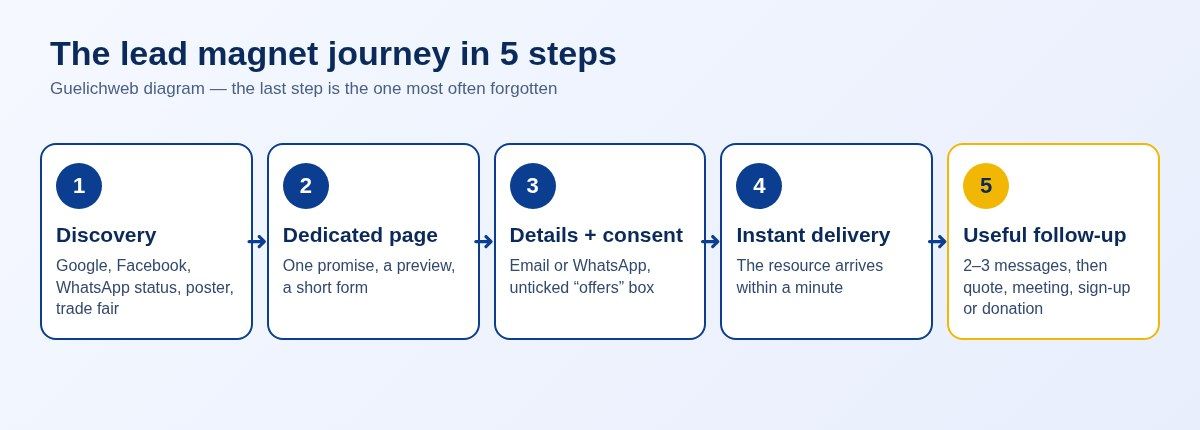
Guelichweb diagram: the lead magnet journey, from discovery to quote request.
The weak spot, in almost every organisation we talk to, is the last step. A nice guide gets made and delivered… and then nothing. The contact sleeps in a spreadsheet. A lead magnet without follow-up is just a list of phone numbers getting older.
12 lead magnet examples that work in French-speaking Africa (and elsewhere)
Here are ideas we find relevant, grouped by type of organisation. Adapt them rather than copy them: your lead magnet has to answer a question your customers really ask.
Shops, online stores, restaurants
- The short buying guide: “Choosing a generator for a shop: 7 questions to ask” (hardware store, equipment seller).
- The discount code: 10% off the first order in exchange for a WhatsApp number, with explicit consent to receive offers. Simple and effective, but it also attracts bargain hunters.
- The “subscribers only” menu or catalogue with wholesale prices: useful for a wholesaler who wants to identify resellers.
Service providers and B2B
- The pre-contract checklist: “12 things to check in a construction quote” (construction), “10 documents to prepare to register a company at Benin’s one-stop shop (APIEx)” (consulting firm).
- The ready-to-use template: service contract, simplified payslip, cash-flow tracker in CFA francs. A template saves time immediately, which is why it works.
- The calculator: cost of a solar installation based on consumption, budget for an online store based on the number of products, loan repayments. It takes longer to build, but the people who use it nearly always have a real project.
- The self-assessment: “Is your Google listing complete? 10 questions” for an agency, “Is your business ready for e-invoicing?” for an accounting firm.
NGOs, associations, public bodies
- The short report or policy brief (4 pages), with the full report sent afterwards: a great fit for NGOs that publish studies and want to know who reads them.
- The applicant’s guide for a call for proposals or a scholarship: criteria, documents, timeline, common mistakes. You get a list of potential applicants to notify about future rounds.
- The volunteer or partner kit: presentation, rules, commitment form.
- The information webinar (live, then replay): ideal for a school or training centre before a new intake.
- The toolkit for beneficiaries: practical sheets, templates, useful numbers, as long as you don’t lock information that belongs to the public service behind a form.
That last point deserves a comment. A public body shouldn’t turn every piece of public information into a lead magnet. Opening hours, official procedures and administrative forms must stay freely accessible. A lead magnet makes sense for what goes beyond that: support, an in-depth guide, a personalised alert.
Our view: the formats that work best, and the ones to avoid
We won’t give you an “average conversion rate” per format. The figures floating around online (25%, 40%, 50%…) are rarely sourced, measured on very different markets, and tell you nothing about your own audience. What we can tell you is what keeps coming up on the ground.
What works: short formats you can use straight away. A one-page checklist, an Excel or Google Sheets template, a calculator with amounts in CFA francs. They open on a phone, get shared on WhatsApp and help the same day. They also take a few hours to produce, which limits the risk if the topic doesn’t catch on.
What we advise against at first: the 60-page ebook. It takes weeks to write, is heavy to download on a mobile connection, and is rarely read past page 5. The same goes for vague promises like “the ultimate guide to digital marketing”. The more precise the title, the better the people it attracts: “7 mistakes that lose you customers on WhatsApp Business” beats “Succeeding on social media”.
Our strongest opinion: the best lead magnet for a service provider is often a free, clearly scoped assessment. Thirty minutes, a defined scope, a written summary. It’s what we do ourselves through our offers. But be careful: a free assessment with no time limit or scope quickly turns into unlimited free consulting.
Email or WhatsApp: where should you deliver your lead magnet?
This is a question European and American guides almost never ask. In France or the US, you deliver by email, full stop. In Benin, Côte d’Ivoire, Senegal or Cameroon, many prospects check WhatsApp ten times a day and their inbox once a week. Some don’t even have an active work email address.
Our recommendation: let people choose, but only ask for what you need. For consumers or traders, a WhatsApp number is enough. For B2B, NGO or public-sector audiences, email is still better: it’s the channel for documents, reports and “official” exchanges. A hybrid is often ideal: the resource arrives by email, and a WhatsApp message confirms it was sent if the person agreed to that.
What the WhatsApp rules say
The WhatsApp Business Messaging Policy is unambiguous: you may only contact someone on WhatsApp if they gave you their number and explicitly agreed to receive your messages. You must also respect any request to stop. Collecting numbers from a group and adding them to a broadcast list doesn’t fit that framework, and it’s the quickest way to get your account restricted.
On costs, if you use the WhatsApp API (essential for automating at scale), Meta charges messages by category. Since 1 October 2026, service messages are charged again beyond a free tier of 1,000 per month per business phone number, according to the official pricing page. Marketing templates are paid. To understand the difference between the app and the API, read our article on the WhatsApp Business API.
And email?
A free email marketing tool is enough to start. Brevo, for example, lists on its pricing page a free plan limited to 300 emails a day (checked on 25/11/2026), with sign-up forms. Our email and newsletter guide covers choosing a tool and setting up your domain so you don’t end up in spam.
How to create a lead magnet in 7 steps
- Start from a real question. List the ten questions customers ask you before they buy. Each one is an idea. Pick the one that comes up most and leads most directly to what you sell.
- Write the promise before the content. One sentence: “This template lets you… in … minutes.” If you can’t write it, the topic is too vague.
- Choose the shortest format that keeps the promise. Checklist, template, calculator, short guide. Don’t write 20 pages when 2 will do.
- Produce it properly. A well-structured Google Doc or a layout in Canva is enough. Add your name, a discreet logo, a way to contact you and an update date. Compress the PDF: aim for a few hundred KB, not 15 MB.
- Build a dedicated page. A landing page with a headline that repeats the promise, three bullets about the content, a visual preview and the form. No distracting menu.
- Deliver instantly. The resource should arrive within a minute, by email or WhatsApp, with no human in the loop. Someone who waits two days has already forgotten why they signed up.
- Plan the follow-up. Two or three useful messages over the next few days, then a clear offer: meeting, quote, registration, donation.
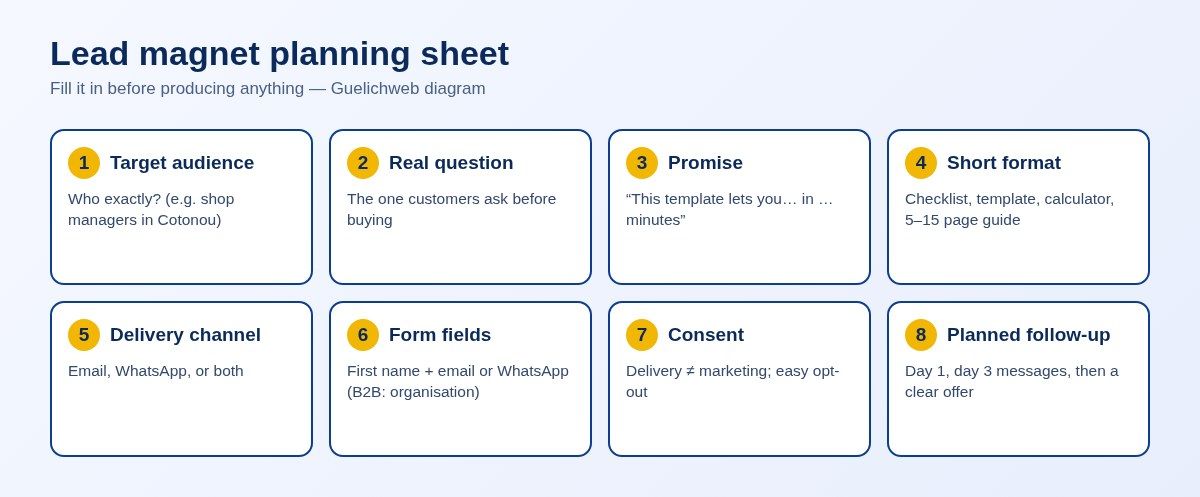
Guelichweb diagram: the sheet to fill in before producing anything.
Which fields should the form ask for?
As few as possible. Every extra field makes some visitors give up. In most cases: first name, and either email or WhatsApp number. In B2B, add the organisation and perhaps one multiple-choice qualifying question (“Your project is about: website / automation / both”). Our contact form guide has more examples, and a Google Form can do the job perfectly well at the start.
The rules to follow: consent and personal data
A lead magnet collects personal data. That isn’t a legal detail to sort out later. In Benin, the Digital Code (Law No. 2017-20) governs how it is processed and the APDP enforces it; Côte d’Ivoire (ARTCI) and Senegal (CDP) have equivalent authorities, and in Europe it’s the GDPR.
In practice, a few habits cover most cases:
- Say what you will do with the details, in one sentence under the form, with a link to your privacy policy.
- Separate delivery from marketing. Getting the guide is one thing; agreeing to your offers is another. Add an unticked box for marketing messages. France’s data protection authority, the CNIL, sets out the prior-consent rule for email marketing to individuals (page in French).
- Make leaving easy: an unsubscribe link in every email, “STOP” respected on WhatsApp.
- Don’t sell or share the list with a partner without explicit consent.
- Store it in the right place: a CRM or an email tool, not an Excel file passed around on WhatsApp between three colleagues.
This isn’t legal advice: for sensitive data (health, minors, NGO beneficiaries), have your set-up checked by a lawyer or the relevant authority.
Automating delivery and follow-up with n8n or Make
Manual delivery works for the first ten contacts. Beyond that, you will miss sends, especially at weekends. That’s when automation pays off. Here are four workflows we regularly set up with n8n or Make (see our comparison):
- Form → email + CRM. The person fills in the form; a webhook triggers automatic delivery of the resource, creates the record in your CRM (or a Google Sheet at first) with source and date, and adds the contact to the right list in your email tool.
- WhatsApp keyword → resource. On your poster, status or ad, you write “Send GUIDE to …” using a wa.me link. A WhatsApp chatbot replies, asks for consent to follow up and sends the PDF. The person messages first, so they open the conversation window themselves: the ideal case.
- Gentle reminder on day 3. If the person hasn’t opened the email or clicked, a short second message offers the resource in another form, or asks a simple question.
- Sales alert. When a contact ticks “I have a project in the next 3 months” or downloads two resources, your salesperson gets a notification with a summary and calls back while interest is high.
A tip from experience: only automate once the manual journey has proven itself. If nobody downloads your guide, automating it changes nothing. To see what this kind of set-up looks like, browse our services.
Measuring whether your lead magnet works
Three numbers are enough to start:
- The page sign-up rate: sign-ups divided by landing page visitors. Measure it with Google Analytics 4 and a form submission event set up through Google Tag Manager.
- The open or read rate of the resource and follow-up messages.
- The number of useful conversations that follow: quote requests, meetings, registrations, donations. That’s the only number that really matters.
Also record the source of each contact (Google, Facebook, poster, trade fair). After two or three months you’ll know which channel brings serious prospects and which only brings the curious.
8 mistakes that ruin a lead magnet
- A topic unrelated to what you sell: you collect contacts who will never buy.
- A promise that’s too broad or too good, which the content doesn’t keep.
- An eight-field form for a one-page checklist.
- A PDF that’s too heavy and unreadable on a phone.
- Manual delivery “later today” that arrives three days later.
- No follow-up: the contact sleeps in a spreadsheet.
- Numbers added to a broadcast list without consent, leading to reports and a restricted WhatsApp account.
- A resource that’s never updated: outdated prices, laws or procedures that damage your credibility.
How much does a lead magnet cost?
On the tools side, you can start for next to nothing: Google Docs or Canva for the document, a Google Form or your website’s form, the free plan of an email tool, a wa.me link. The real cost is time: thinking about the topic, writing, laying it out, then following up with contacts.
Costs appear when you want a polished landing page on your own site, a custom calculator, an n8n or Make automation connected to your CRM, or delivery through the WhatsApp API (with the Meta charges described above). At Guelichweb we don’t give prices off the top of our heads: the budget depends on the number of steps, the tools already in place and the volume of contacts. We start with an assessment, then a quote, as explained on our offers page.
Our verdict
The lead magnet is one of the most underused marketing tools among SMEs and NGOs in French-speaking Africa, even though it’s one of the simplest to set up. Most organisations already have the content: a template they send every client, a checklist they explain on the phone, a note they wrote for a donor. All it takes is to format it, offer it in the right place and plan what comes next.
Start small: one resource, one page, automatic delivery, two follow-up messages. Measure for a month. Only then add a second lead magnet or a more advanced automation.
Lead magnet FAQ
Is there another name for a lead magnet?
You’ll also see “opt-in bribe”, “gated content”, “content upgrade” or “freebie”. In French it’s sometimes called an “aimant à prospects”, though the English term is the most common, including in software.
What’s the difference between a lead magnet and a landing page?
The lead magnet is the resource you offer. The landing page is the page that presents it and holds the form. You need both, but they aren’t the same thing.
Can you run a lead magnet without a website?
Yes: a Google Form, a wa.me link with a keyword, or your email tool’s form are enough to test. A website is still better in the medium term, for credibility and for proper measurement.
Should you ask for an email or a WhatsApp number?
Whichever your audience actually checks. Consumers and traders: often WhatsApp. B2B, NGOs, public bodies: usually email. If in doubt, offer both, but make only one field mandatory.
Is it legal to require a newsletter sign-up to get the download?
It’s risky. Good practice, recommended in Europe in particular, is to deliver the resource and ask separately, with an unticked box, for consent to receive your offers. Check the rules in your country with the data protection authority.
How long does it take to create a lead magnet?
A checklist or template: a few hours. A 10-page guide: a few days. A custom calculator or a full automation: more like a few weeks, depending on complexity.
Does a lead magnet work for an NGO?
Yes, if you think “relationship” rather than “sale”: an applicant’s guide, a volunteer kit, a short policy brief. Our article on what an NGO website should include has more ideas.
Need a lead magnet that actually brings in contacts?
Have an idea for a resource but no time to build the page, the automatic delivery and the follow-up? We can start with an assessment: your audience, the right format, the delivery channel and what is sensible to automate. Contact us to talk it through.